GoHyperLevel
Health Gecti
- License — License: AGPL-3.0
- Description — Repository has a description
- Active repo — Last push 0 days ago
- Community trust — 10 GitHub stars
Code Gecti
- Code scan — Scanned 12 files during light audit, no dangerous patterns found
Permissions Gecti
- Permissions — No dangerous permissions requested
Bu listing icin henuz AI raporu yok.
The open-source business OS your AI agents run on: CRM, pipelines, inbox, automations, invoices and courses in one self-hosted app – driven via MCP or the REST API. Free, unlimited users, 0 € per seat.
Your entire business stack in one open-source app.
Free for everyone. Self-hosted. Yours forever.
CRM, funnels & websites, unified inbox, automations, an AI business developer, courses & communities, helpdesk, invoices –
the tools solopreneurs, agencies and small businesses rent for hundreds a month, in one app on your own server, with unlimited users and 0 € per seat.





Quick start · Docs · Live demo · Features · Who it's for · Comparison · AI & MCP · Contribute · Roadmap · Deutsch


[!IMPORTANT]
Not another AI OS – the business layer under yours. Keep the agent or AIOS harness you already use and plug it in:
HyperLevel is the universal adapter with one single source of truth. Nobody types data into this CRM any more –
Claude, ChatGPT, Codex, Cursor, Hermes or your own harness create and maintain contacts, deals, notes, tasks and invoices
over MCP and the REST API. Every agent and every person works on the same database – with the same permissions,
the same audit log and the same undo. (AI & MCP)
[!TIP]
Open for contributions – come build with us. Every module, every screen and every workflow step is open source and
meant to be extended. Pick a good first issue,
request a connector, translate the UI or ship a whole module – here's how.
Made for agentic solopreneurs, agencies, small businesses & startups
|
|
|
 Solopreneurs
 Agencies
 Small businesses & startups
100 % open, 100 % customizable
Nothing is locked, nothing is "enterprise only". Every feature ships in this repository under the AGPL-3.0 – self-hosted
is the full product, not a demo.
 Make it yours |
Themes, colours, icon packs, logos, login pages and custom domains per agency and per client (theming). |
 Add your own modules |
Every feature is a self-contained module with its own tables, routes and screens – plug yours into the registries without touching the core (CONTRIBUTING.md). |
 Connect anything |
REST API with OpenAPI, webhooks, 340+ MCP tools, 250+ app connectors, Zapier / Make / n8n, external MCP servers (API). |
 Bring your own AI |
Claude, OpenAI, Gemini, kie.ai or any OpenAI-compatible model – your keys, or your own Claude / ChatGPT subscription for your personal chats (AI providers). |
 Own your data |
One SQLite file on your server, export everything, no telemetry, no vendor lock-in. |
 Translate it |
The UI is German and English – adding a language is a set of plain files (translating). |
Status: HyperLevel is in daily production use, ships often (
0.0.N, one step per deploy) and is now open source.
The UI is German and English: the English UI covers the app shell, sign-in, dashboard, contacts,
opportunities, inbox, calendar, settings (company, team, your account) and invoices (phase 1), and workflows, email
marketing and the email designer, funnels/websites, forms, tasks and projects with time tracking, reports, the
helpdesk, the social planner, wiki and team chat, and courses (phase 2) – everything else still shows German
(what is translated, how to add a language). Each person picks the language in
Einstellungen → Mein Konto or the sidebar; the login page follows the browser. The docs for self-hosters are in
English.
Why HyperLevel?
Stop renting your CRM. GoHighLevel costs $97–$497 per month, HubSpot's Professional tiers start
around €800+ per month and grow with every seat and contact. HyperLevel gives an agency or small business the
same toolbox for the price of a small server (≈ €5–15/month) – with unlimited users, contacts and
sub-accounts.
- Own your data. Everything lives in one SQLite file on your server: no vendor lock-in, no per-contact
pricing, GDPR-friendly by design, back it up withcp. Import from GoHighLevel and HubSpot in a few clicks. - AI-native. A built-in MCP server lets Claude, ChatGPT, Codex and other AI clients work your CRM through
340+ tools – with the same permissions and audit log as a human. Plus an AI assistant for replies, a chatbot
and an AI phone agent (bring your own Anthropic key). - Agency-ready. Unlimited sub-accounts, client logins with per-area permissions, white-label branding and
login domains, snapshots, and a SaaS mode to resell sub-accounts through your own Stripe. - Fair, flat pricing. Self-hosted is 0 € with every feature. A hosted cloud is planned – Solo 49,99 €, Team & Company
99,99 € or Agentur 199 € (white-label and unlimited client sub-accounts included) per month, net plus VAT, never per
seat, no contact tiers – but it is not open yet: gohyperlevel.com takes sign-ups for the
waitlist only. The cloud mode software is in the box for anyone who wants to run it (docs/cloud.md). - Small and hackable. No Postgres, Redis or queue – one process. Every feature is a module with its own
tables and routes; adding yours doesn't mean forking the core (CONTRIBUTING.md).
Quick start
On any Linux server with Docker and a domain pointing at it – one command, with automatic HTTPS:
curl -fsSL https://raw.githubusercontent.com/BAISESYSTEMS/GoHyperLevel/main/scripts/install.sh | bash
Or by hand, in three commands:
git clone https://github.com/BAISESYSTEMS/GoHyperLevel.git hyperlevel && cd hyperlevel
cp .env.example .env                    # set PGHL_BASE_URL and PGHL_DOMAIN
docker compose --profile caddy up -d    # HyperLevel + Caddy (Let's Encrypt)
Optional profiles: --profile openshorts (Video-Studio engine) and --profile nango (self-hosted
Nango for the Nango connector – Elastic License, see the licence notes there).
Open your domain and create the admin account on the setup page. Just looking around? Run it locally with
fictional demo data:
npm ci && npm run build
npm run demo:seed -- --data-dir ./demo-data
PGHL_DATA_DIR=./demo-data npm start     # http://localhost:4700 · [email protected] / demo1234

More ways to deploy – Coolify, Railway, Render, Hostinger, plain Node: docs/deploy.
A public try-it-out instance: demo mode (PGHL_DEMO_MODE=1 – seeded data, nightly
reset, nothing ever leaves the server).
Features
| CRM & pipelines Contacts, companies, custom objects, smart lists, lead scoring, drag-and-drop deals. 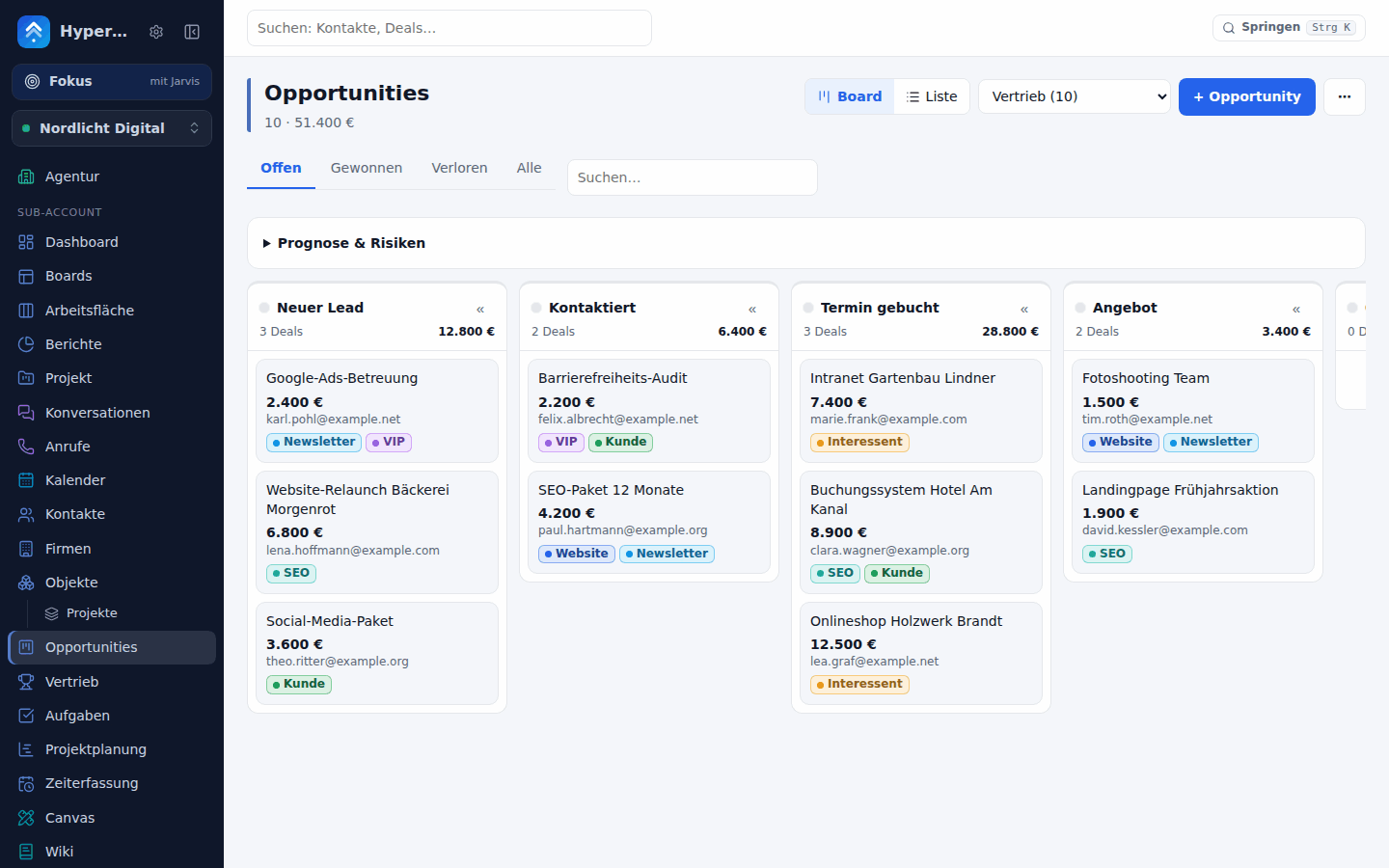 |
Unified inbox E-mail, SMS, live chat, WhatsApp, Messenger, Instagram and calls in one place. 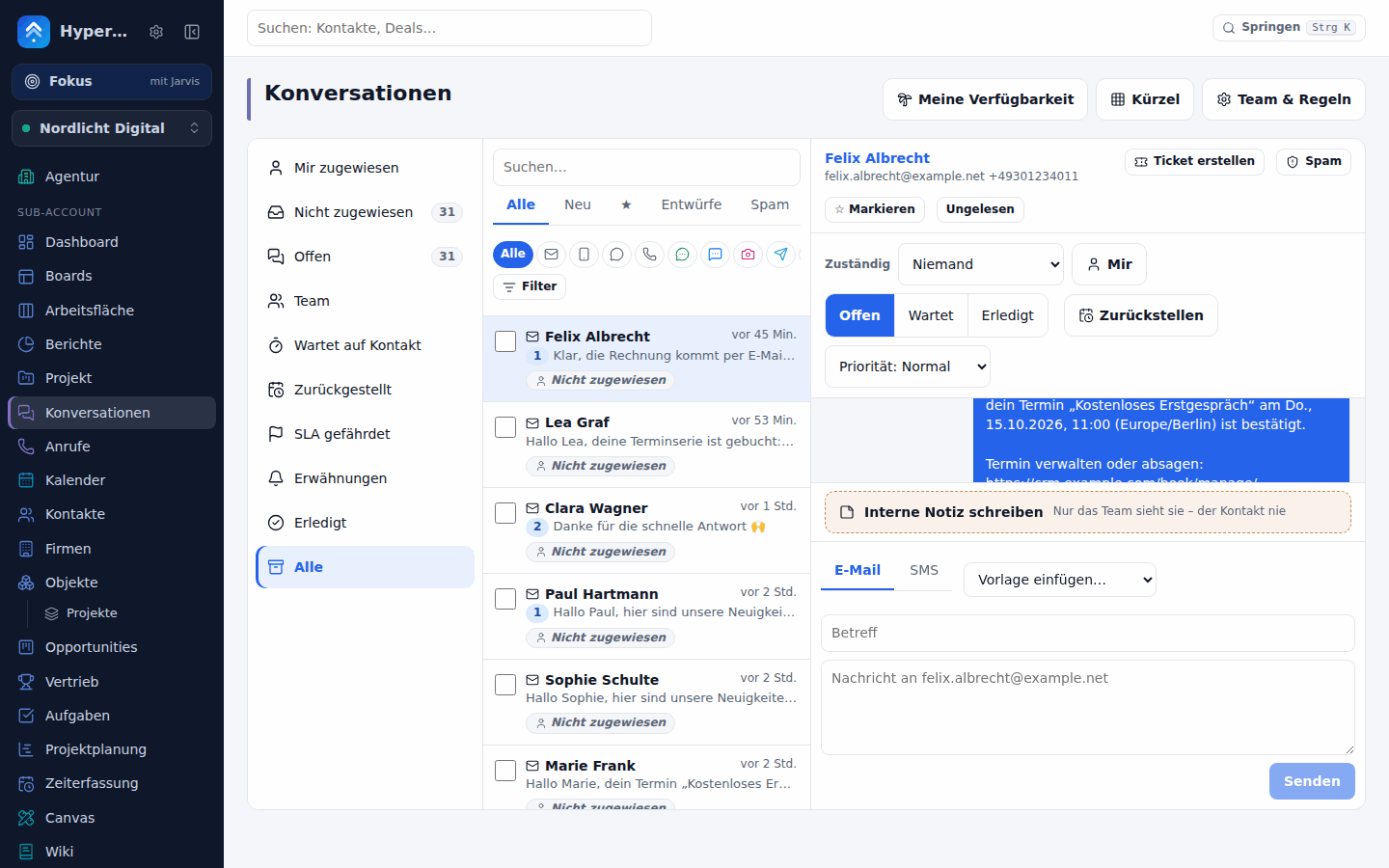 |
| Calendars & booking Booking pages, reminders, two-way Google/Outlook sync. 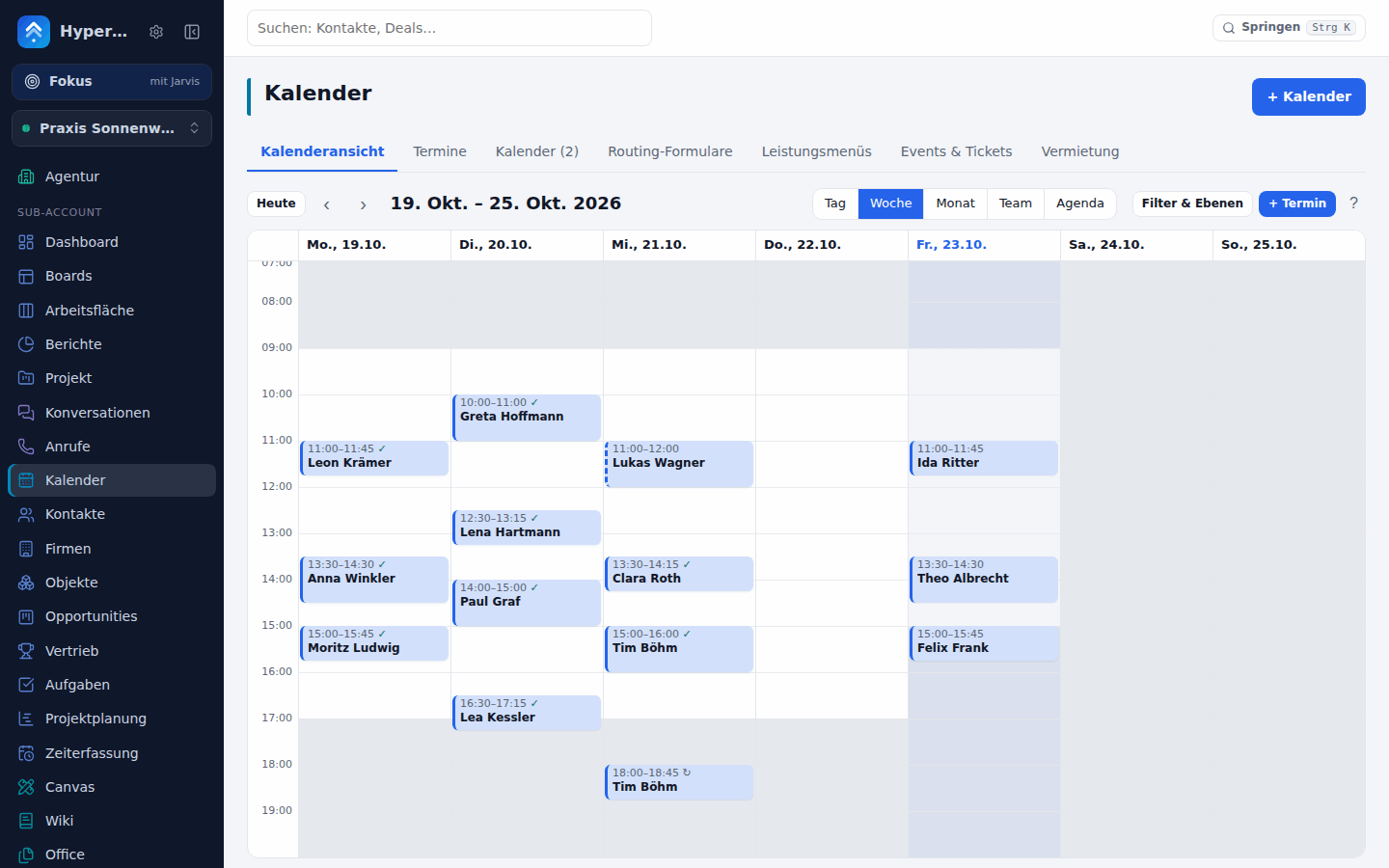 |
Workflows 140+ triggers, 130+ actions (formatter, math, code, loop, split test, waits, AI steps, 23 app steps), list or visual canvas editor, test runs and versions – plus campaigns and an e-mail builder. 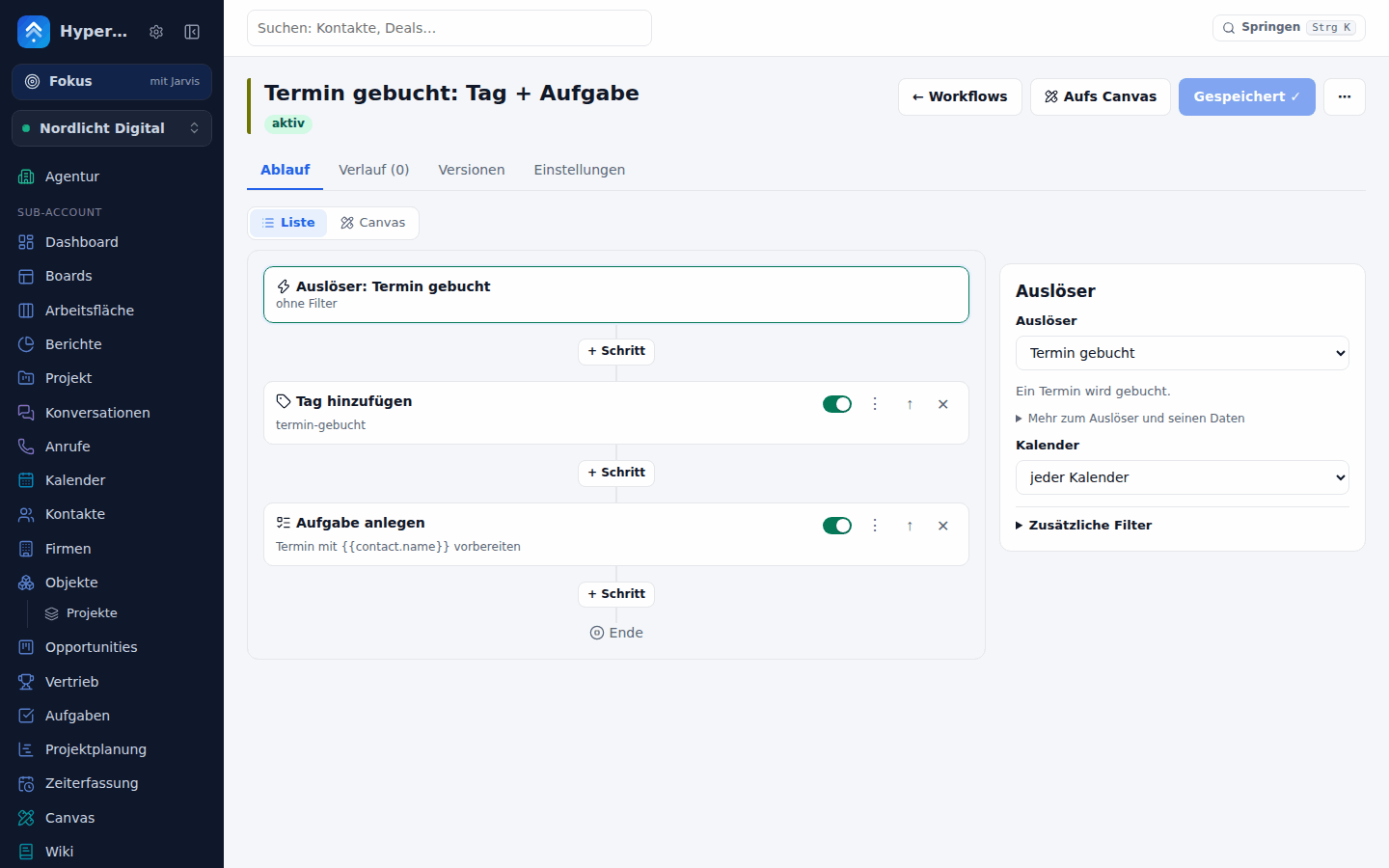 |
| Canvas Infinite boards for whiteboarding and design – live CRM cards, device and social frames, templates, AI drawing. 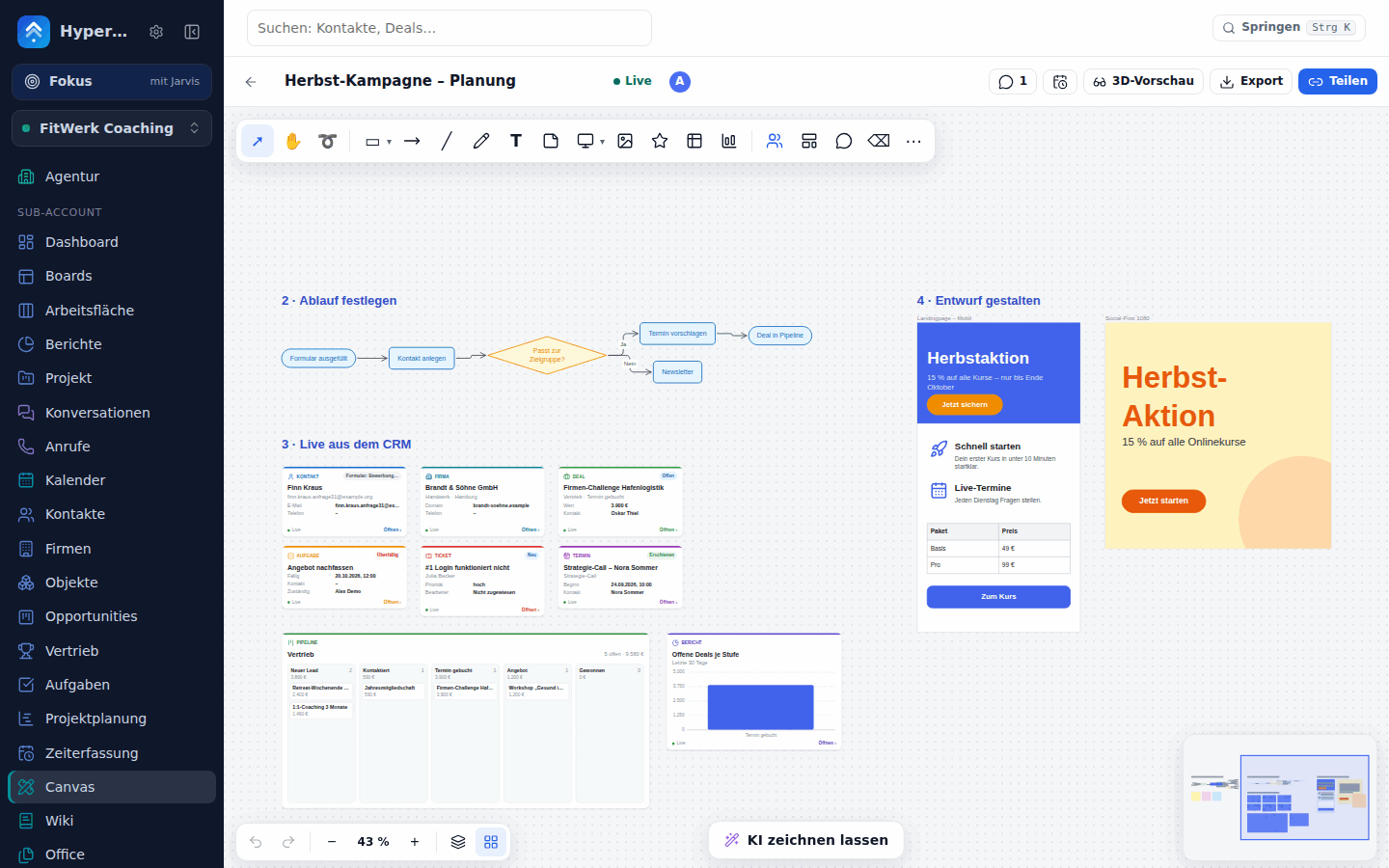 |
Agents that draw Claude, ChatGPT or the HyperLevel Agent draw on a board while you watch – with their own cursor. 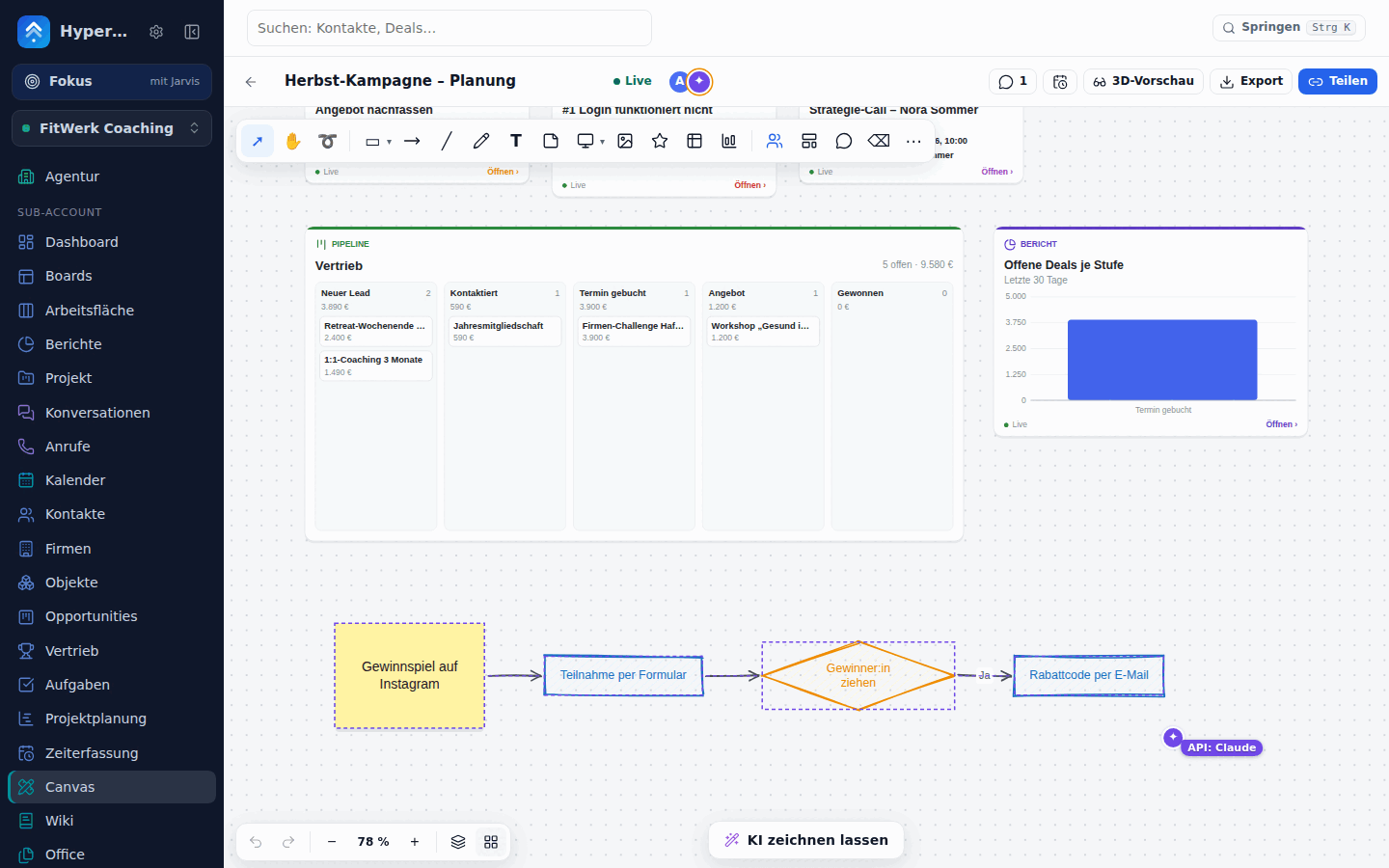 |
| Wiki Team knowledge with a page tree, live CRM cards, comments, history, share links and one-click help-center publishing. 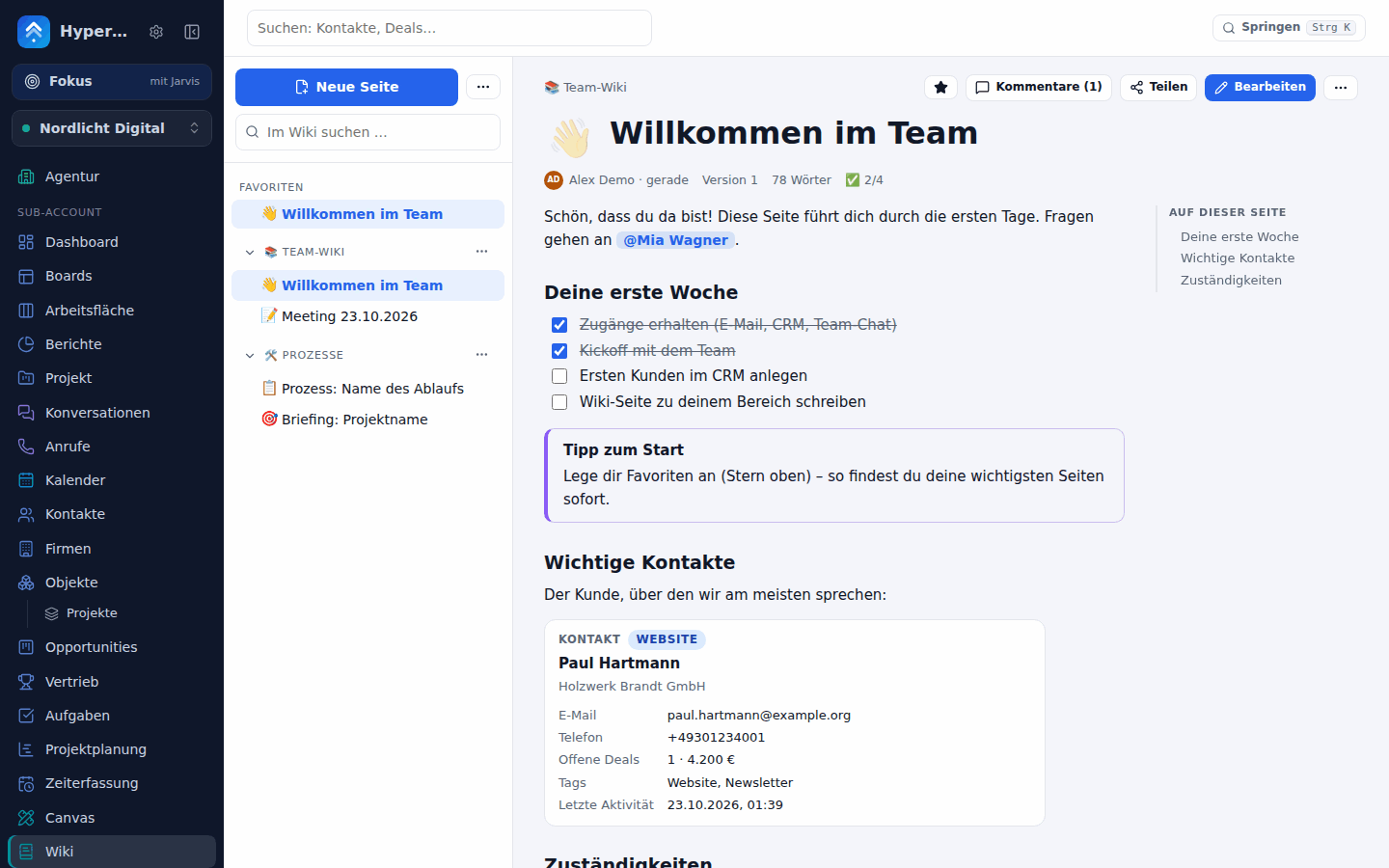 |
Team chat Channels, DMs and threads inside the CRM – record cards, /aufgabe, /kontakt and an AI agent that answers in the channel.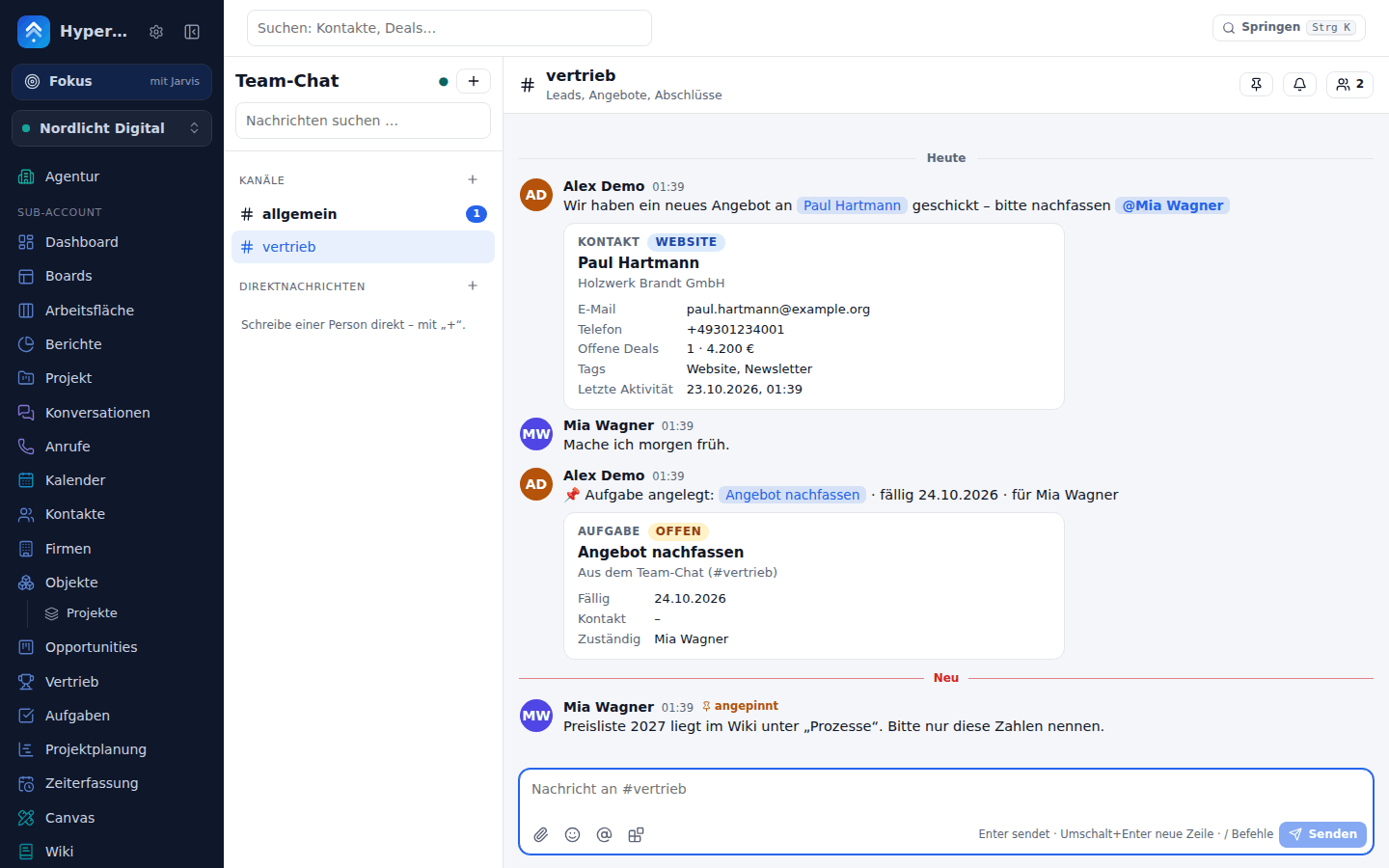 |
| Werkstatt Wishes build themselves: the AI proposes a plan with permissions and cost, you confirm, an admin approves – the result is a private plugin first. 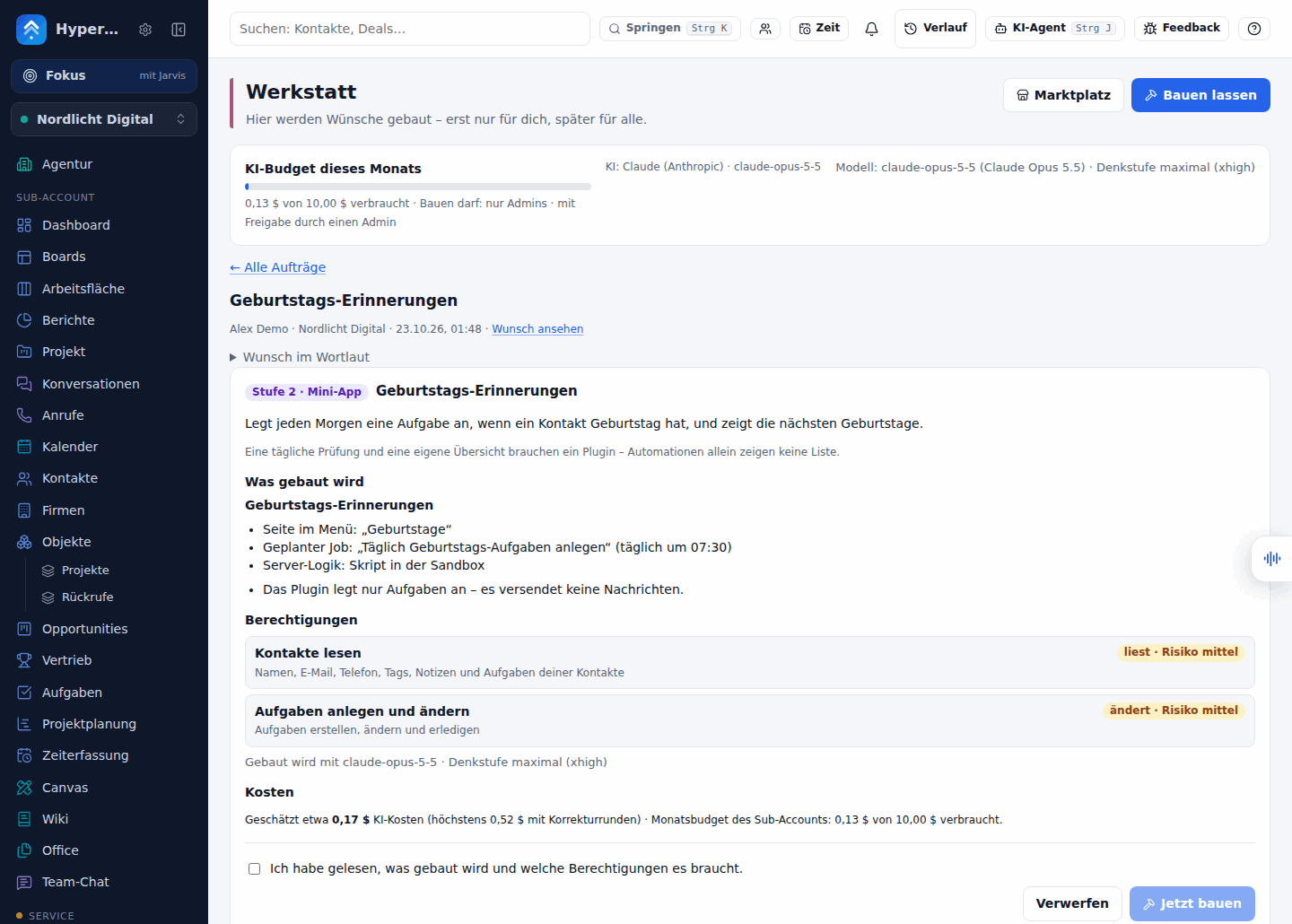 |
Marktplatz Plugins to discover and install per sub-account – live preview, ratings, consent screen, AI security review before publishing. 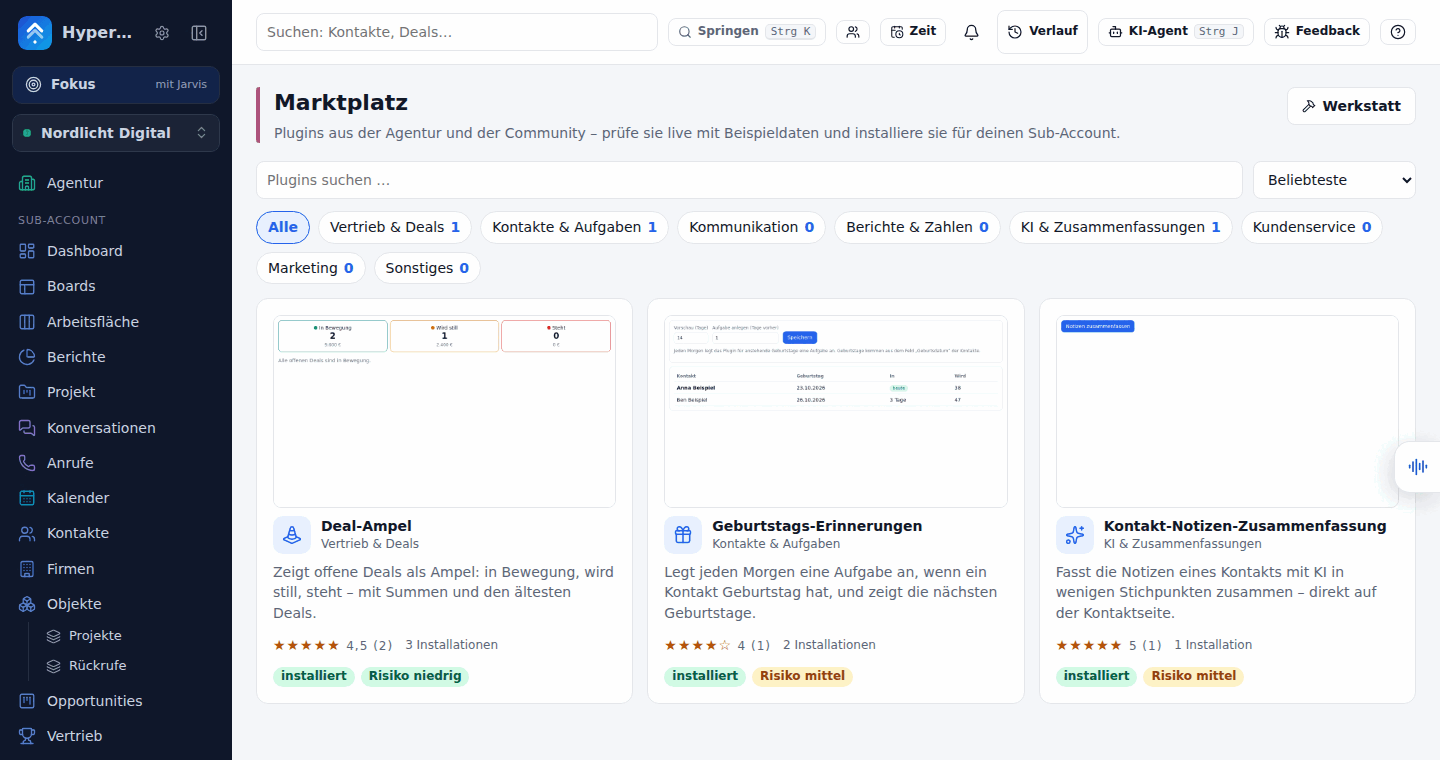 |
| Werkstatt in the agent chat A wish becomes a plan card you confirm yourself, a live build and a sandboxed preview – with Ändern lassen, Version zurück and Verwerfen. 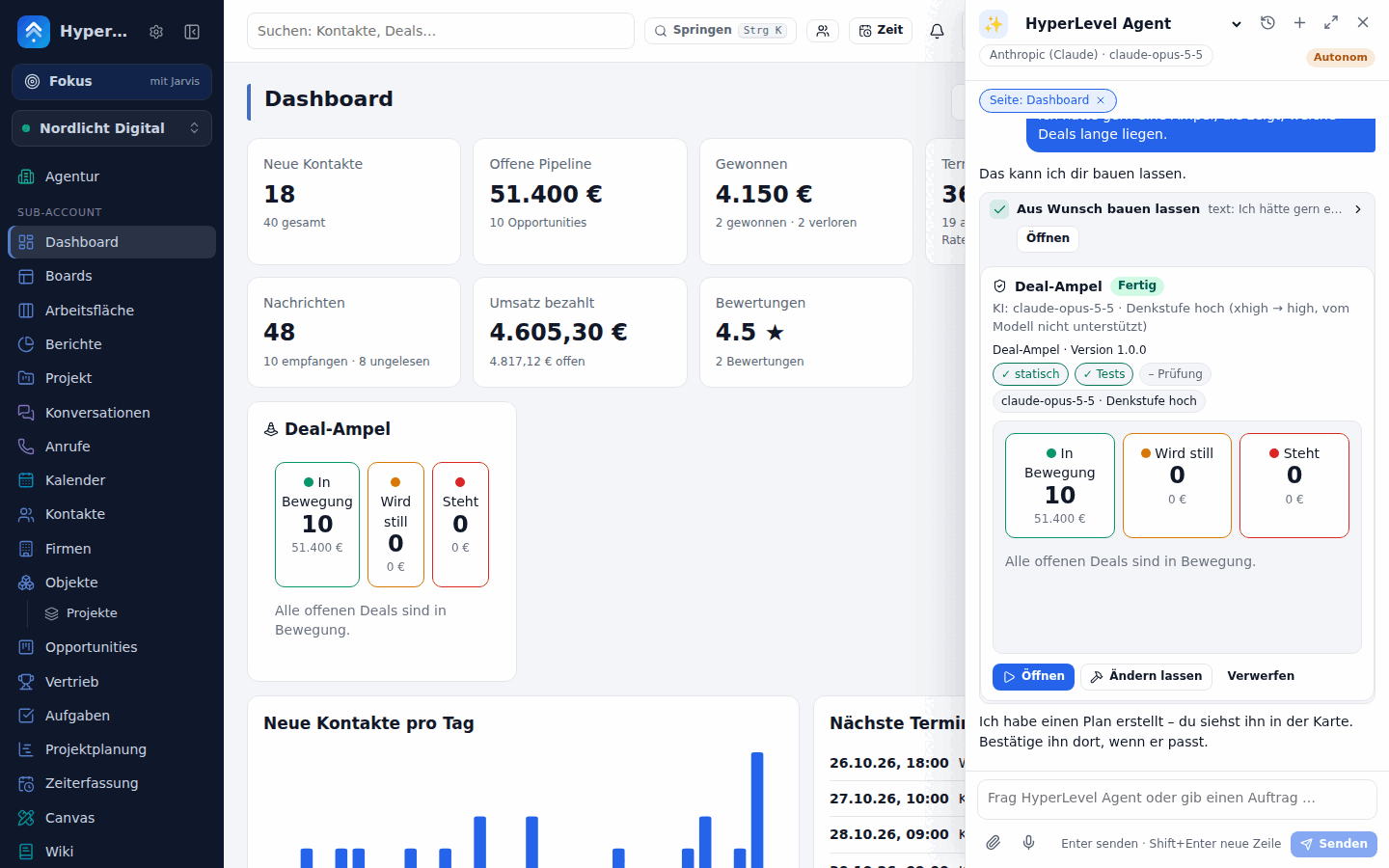 |
Sicherheitsnetz Seals per version, second opinion by another top model, health monitoring and one-click rollback. 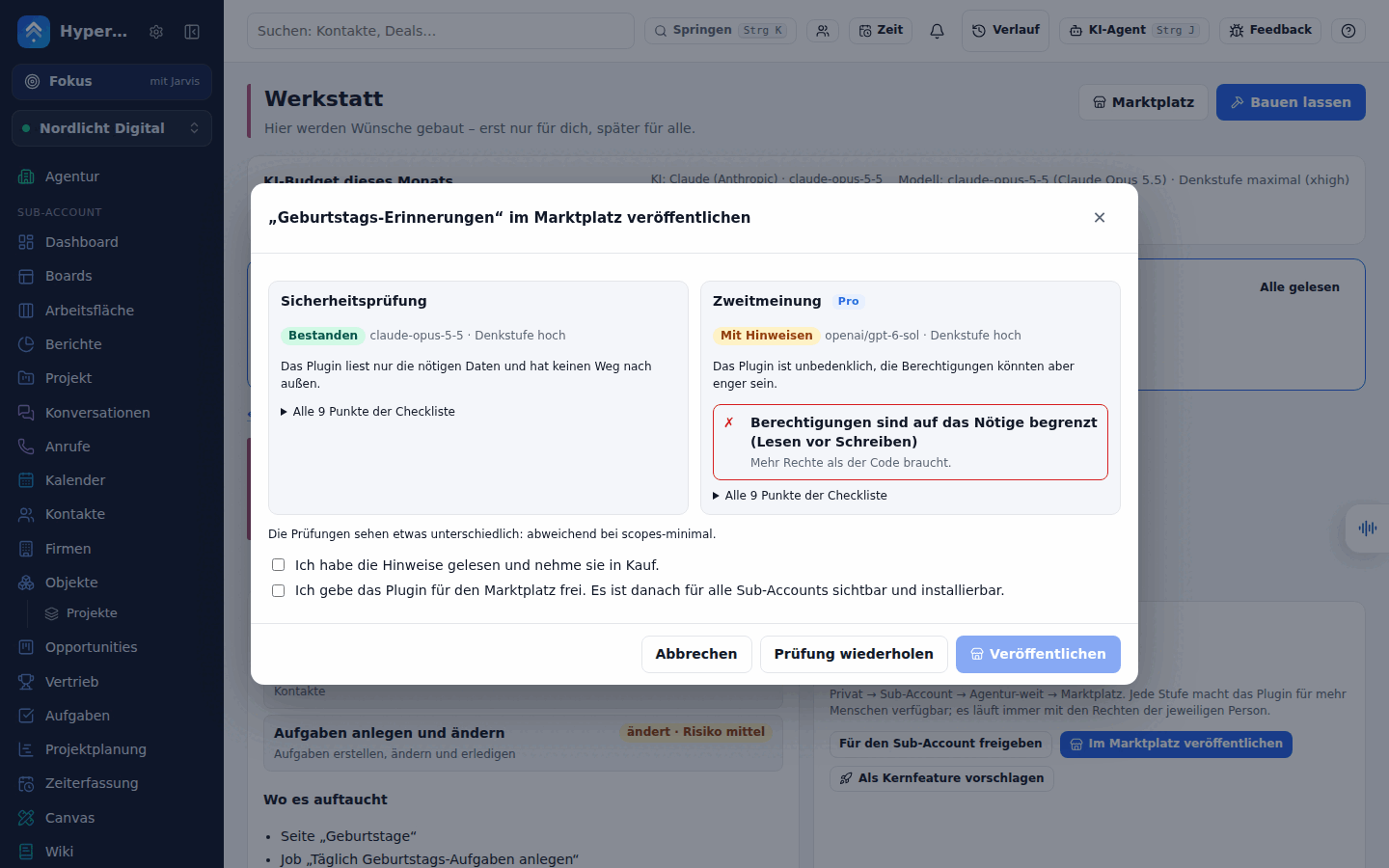 |
| Funnels, websites & blog Page builder, custom domains, SEO, A/B tests, forms and surveys. 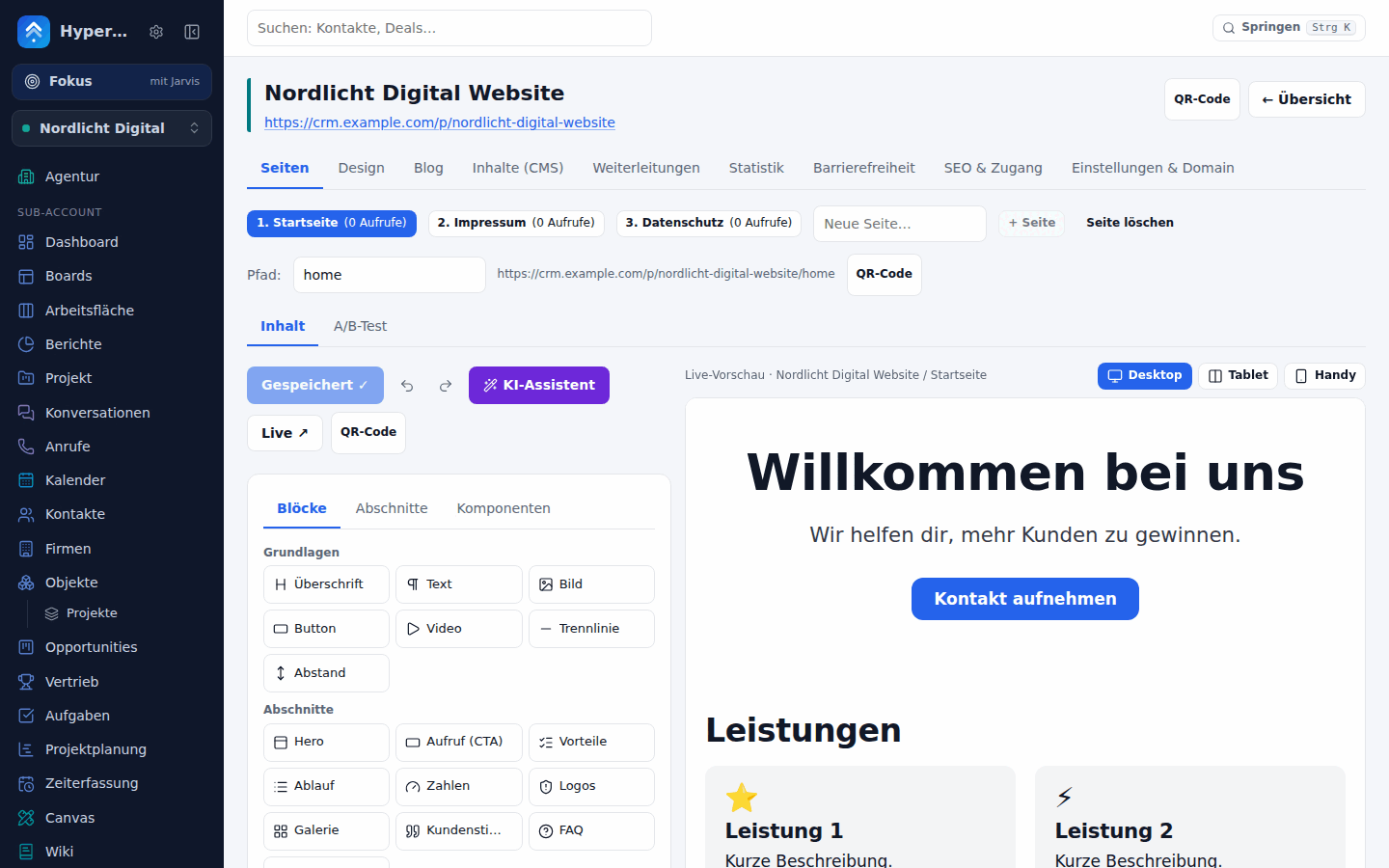 |
Reports & dashboards Free reports over 30+ sources, dashboards, scheduled e-mails. 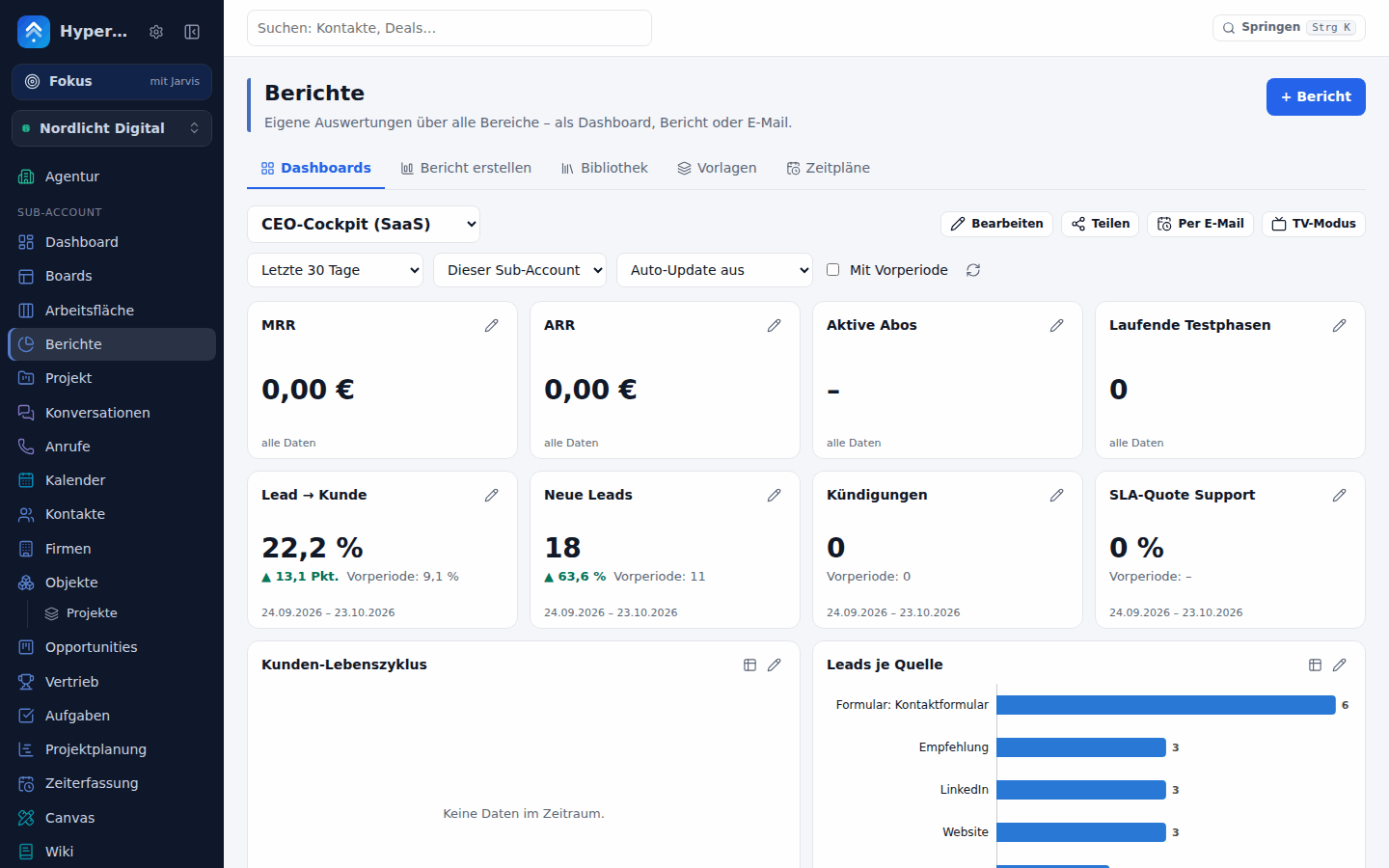 |
| Helpdesk Tickets with SLAs, knowledge base & help center, CSAT/NPS, health scores. 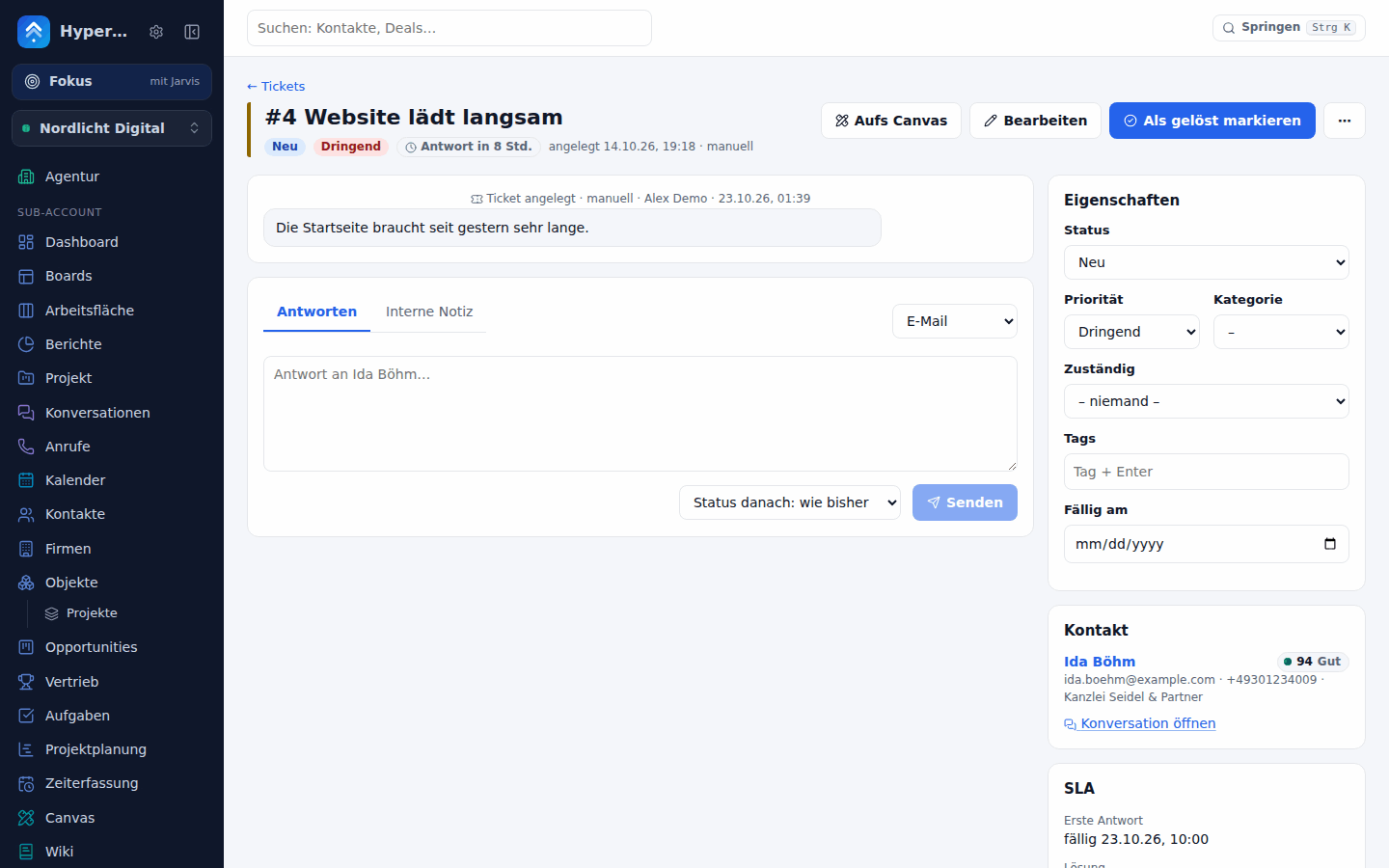 |
Revenue Invoices & offers, subscriptions, Stripe checkout with order bumps and upsells, contracts with e-signature. 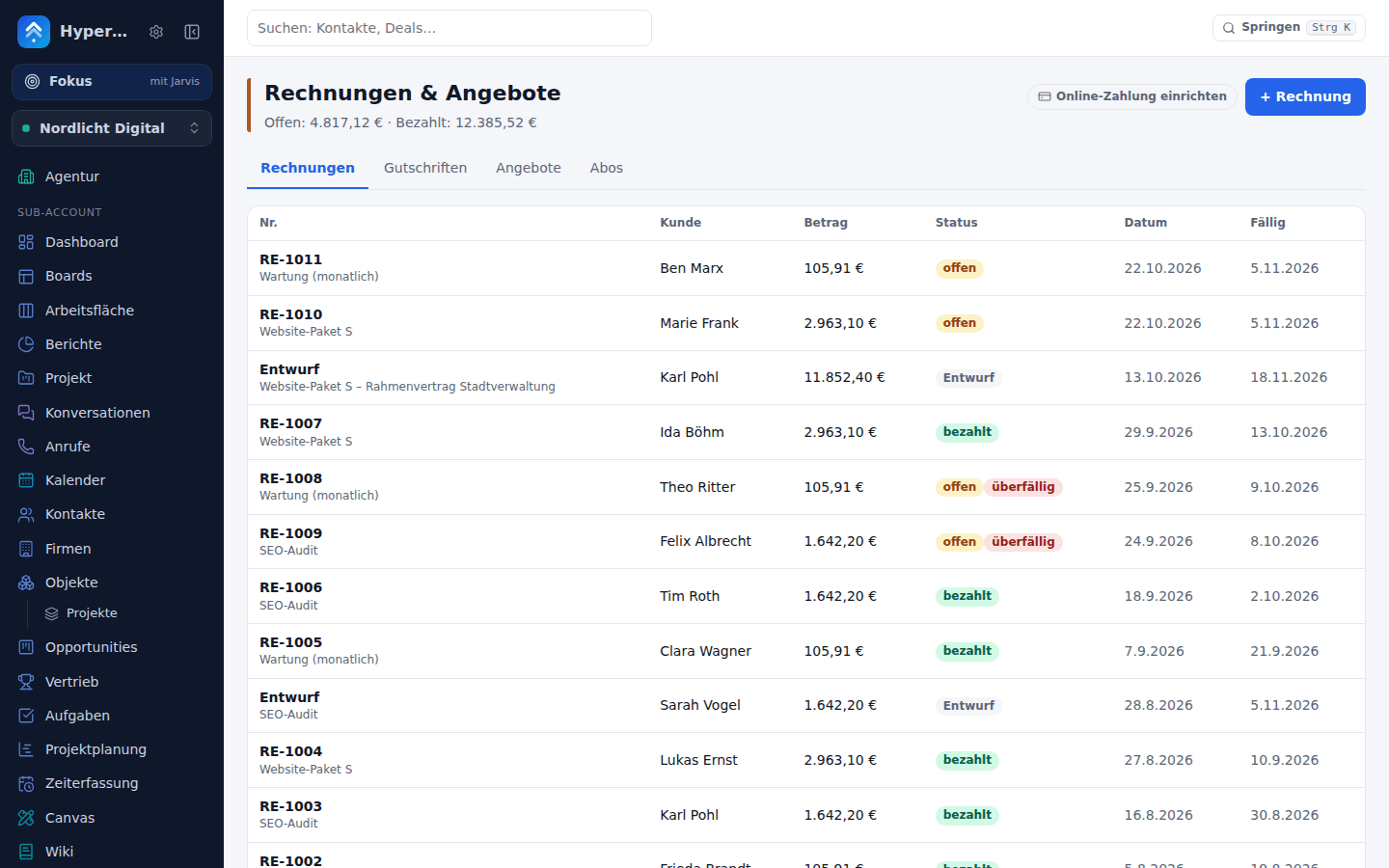 |
| Focus mode with Jarvis Ask instead of click: Was brennt? gives a briefing with hot spots and next steps, requests go straight to the agent – typed or spoken. 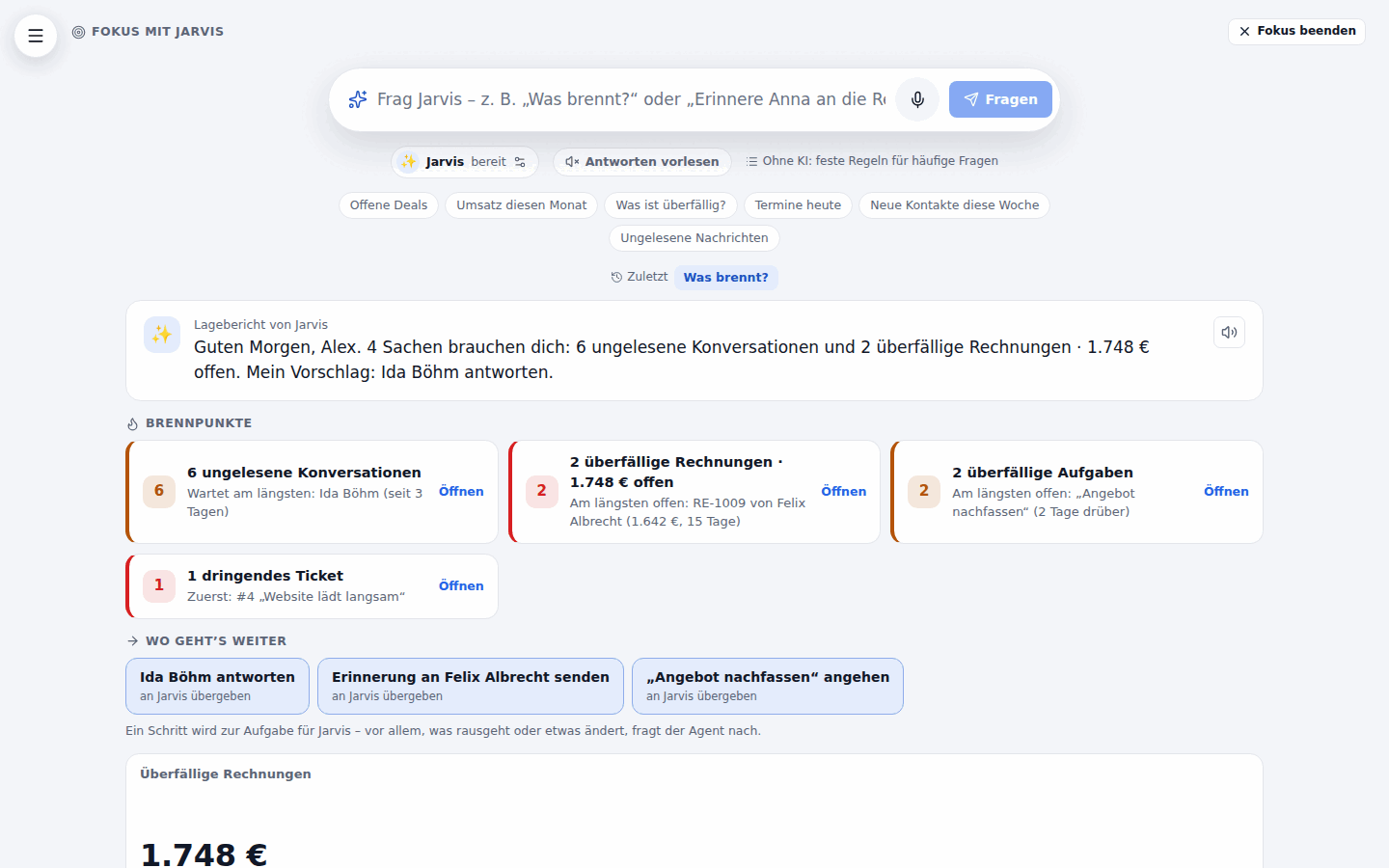 |
Academy Guided tours in the real interface – a 14-chapter handover guide, 110+ module tours, badges and a practice company. 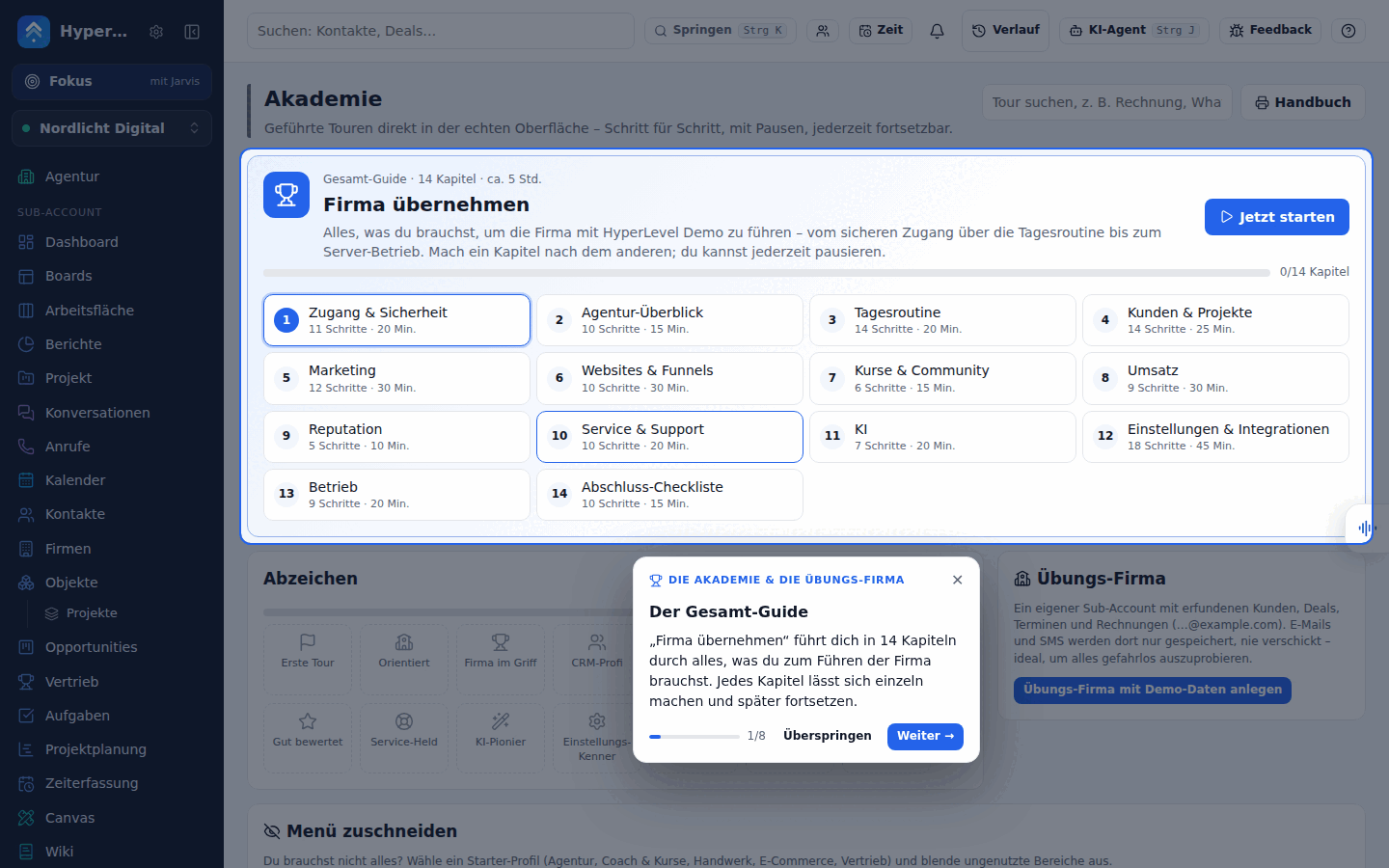 |
| Themes & white label 19 themes in light and dark, accent and area colours, six icon packs and your own logo – per person, with agency defaults. 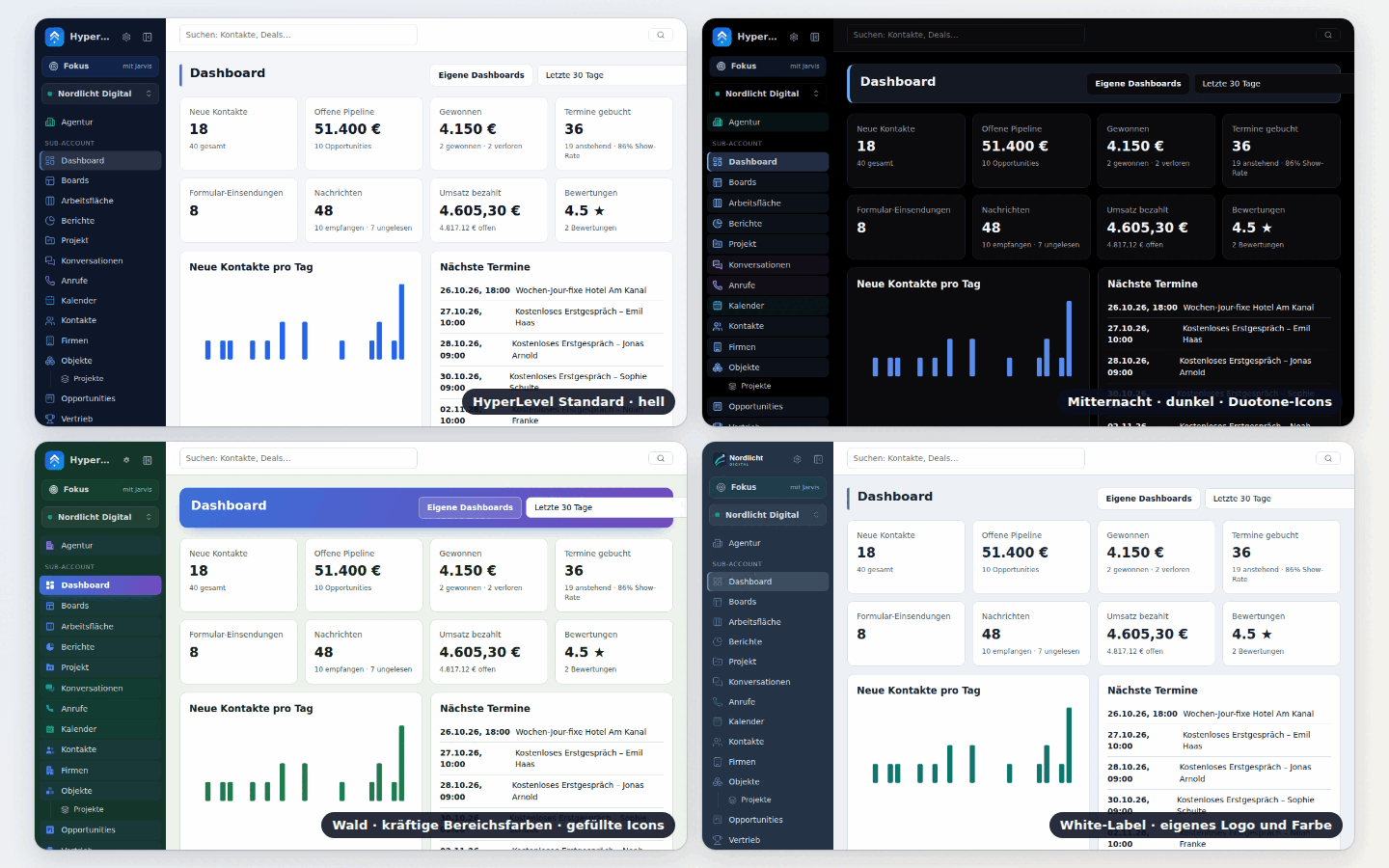 |
XR Raum-Modus for headsets and display glasses, boards as floating panels in WebXR – or as a 3D preview in the browser. 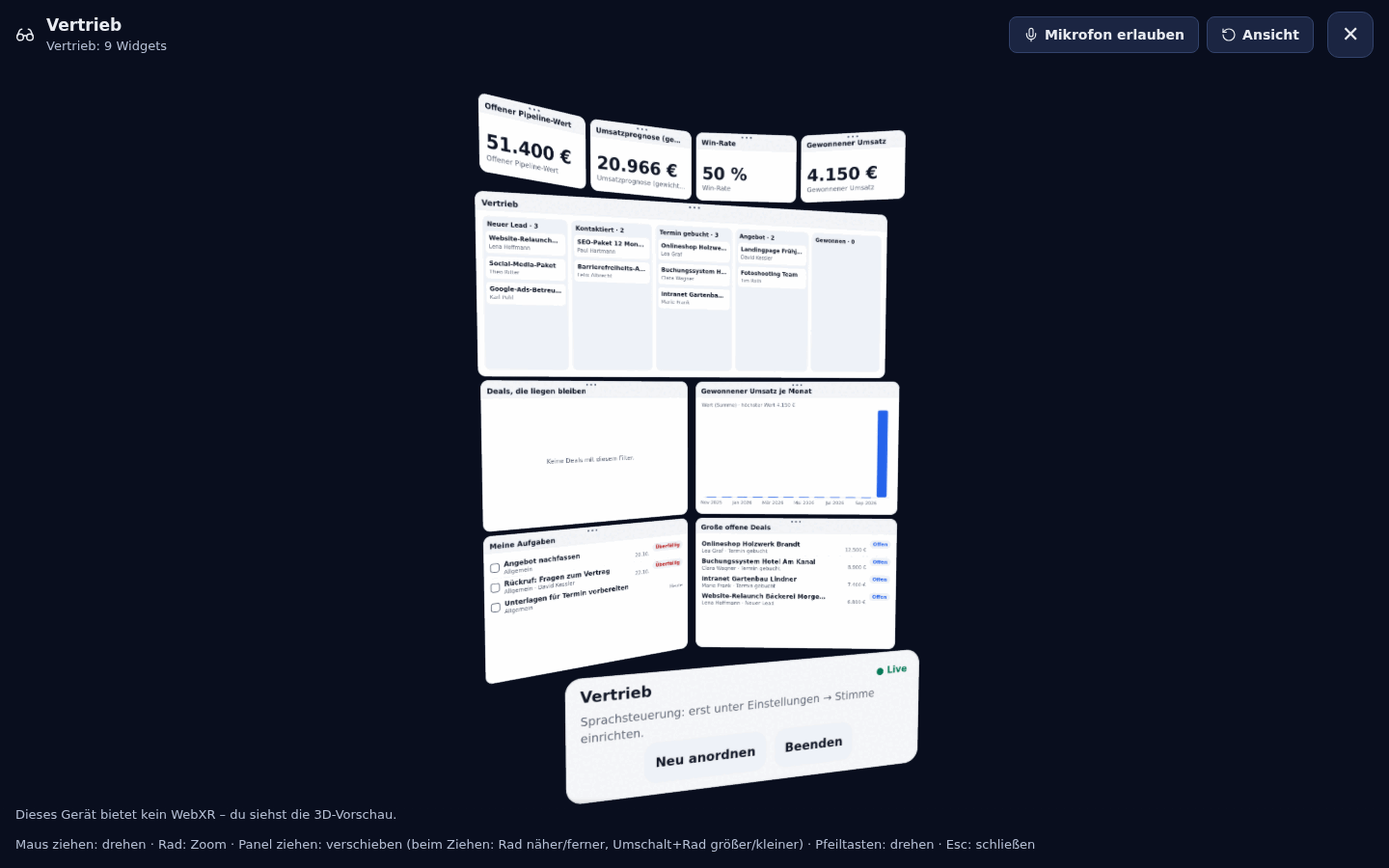 |
| Agency cockpit All sub-accounts at a glance, snapshots, white-label, SaaS mode. 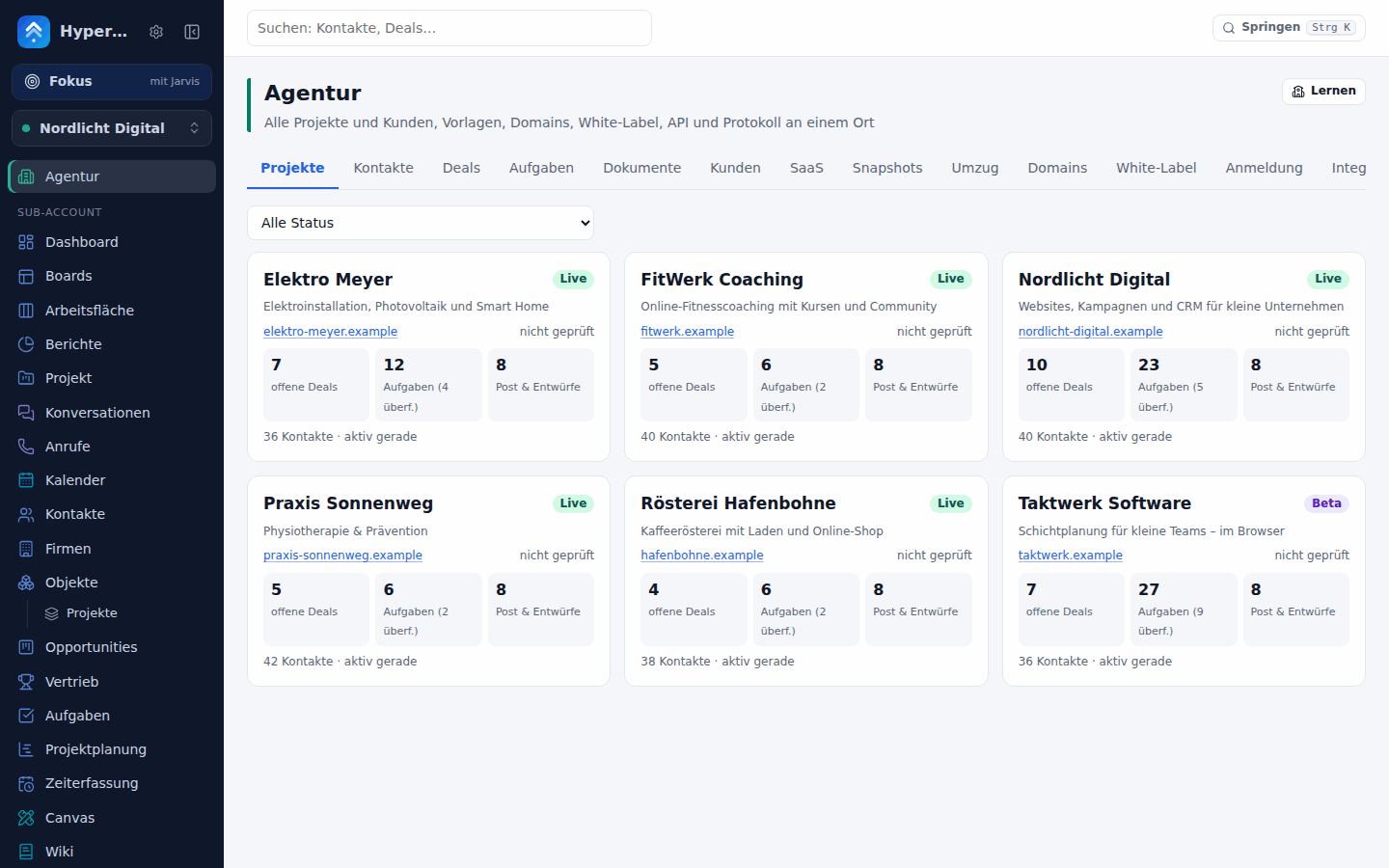 |
Dark mode, phone & Android Installable PWA with push, native Android app with 13 widgets. 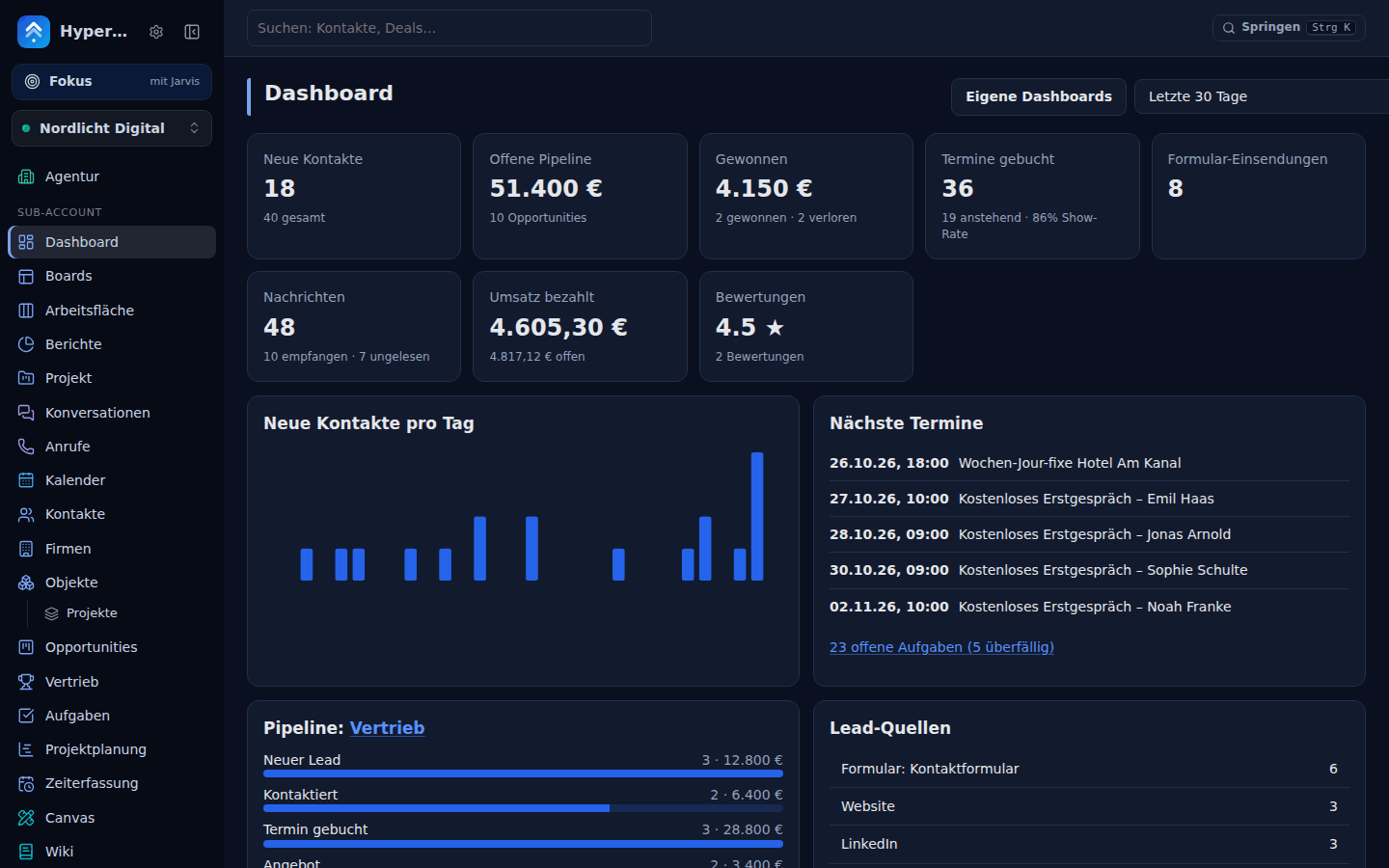 |
| Area | What you get |
|---|---|
| Agency & white-label | Unlimited sub-accounts, client logins with per-area rights, own name/logos (light, dark, square mark)/colours/login domain per agency and per client, default look with locks, snapshots (websites, funnels, forms, calendars, workflows, courses …), SaaS mode with plans, limits, trials and Stripe billing |
| Hosted cloud version | Sign up, pay, work – on your instance (PGHL_CLOUD_MODE=1, off by default). A public pricing page (/cloud: Solo 49,99 €, Team & Company 99,99 €, Agentur 199 € incl. white-label – net plus VAT via Stripe Tax, monthly or yearly with a discount, every feature in every plan except white-label and client accounts (Agentur only), no fee per user, self-hosted stays 0 €) and a cookie-free signup (/start) with e-mail verification (no account and no password before the address is proven – protection against account pre-hijacking), password or Google, and versioned acceptance of AGB, AVV and Datenschutz. Stripe Checkout with a trial (card optional), webhooks, customer portal, plan changes with proration, Stripe Tax and reverse charge, invoices in the app; dunning from a failed payment through read-only to a scheduled deletion with export (GDPR). Every customer is an isolated sub-account provisioned in seconds (welcome mail, onboarding checklist, own sub-domain); the Agentur plan adds white-label, client accounts and custom domains. Transparent fair-use meters instead of feature locks. Operator console with MRR/ARR, churn, trial conversion, customers, comped plans, extended trials, consent-based support access and editable legal templates (not legal advice). Customers export everything as ZIP and delete their account themselves. B2B-only signup (VAT ID or business confirmation, on by default), abuse handling under the Digital Services Act (/abuse notice form, pause sending, sites offline, suspend – with reasons – and an automatic pause on complaints above 0.1 % or bounces above 5 %), and customer sites on an origin of their own with custom domains only after a TXT verification. Without Stripe (or with PGHL_CLOUD_WAITLIST=1) it runs as a waitlist instead: nobody can sign up or pay, the pages lead with self-hosting and collect interest – docs/cloud.md |
| Custom values | Global placeholders per sub-account. {{custom_values.key}} (phone hotline, opening hours, booking link, promo code) works in every e-mail, SMS, workflow step, document and published page – change the value once, everything follows. Folders, search, undo, a form target "set custom value", strictly separate per sub-account; snapshots carry them as placeholders (with a hint), so agencies fill them per client after loading a snapshot. MCP ghl_custom_values, ghl_custom_value_set – see docs/custom-values.md |
| CRM | Contacts with tags (colours and categories – the chips show them everywhere, kept in snapshots), custom fields, smart lists, notes (title, colour, pinning, Markdown, search), tasks, timeline, CSV import/export, duplicate merging, DND; companies, custom objects, associations with labels; lead scoring with decay |
| Pipelines & deals | Multiple pipelines (sorted by drag & drop), Kanban with coloured stages, count and value per stage, stages that fold away and columns you can resize (remembered per person), a list view with smart lists (per person or team, pinned default), chosen and ordered columns, sorting, advanced filters on deal fields and properties, bulk actions (stage, owner, contact tags, delete with undo) and CSV export, won/lost with a required loss reason (list per pipeline), expected close date and deal currency (forecast by close month in reports), deal properties; projects hub with uptime monitoring |
| Projects & time | Project planning in every sub-account (ClickUp/Asana style): projects linked to a contact, company or deal, custom statuses per project, sections, tasks with nested subtasks, checklists, several assignees, watchers, tags, estimates, dependencies, recurring tasks, custom fields, attachments and comments with @mentions; list (grouping, filters, bulk edit), board, calendar, Gantt (drag to move and resize, dependency arrows, critical path, baseline, day/week/month), workload and "My tasks", saved views, project templates (client onboarding, website project), automations (when status changes / done / overdue → create task, move, assign) and read-only project boards in the customer portal; time tracking with a global timer, manual entries, weekly timesheets with optional approval, billable hours and rates, reports and "bill it" → invoice draft; job costing: hour and money budgets per project with alert thresholds (80 %/100 % → bell, push, audit, workflow trigger project.budget_threshold) and burn-down, internal cost rates per person, external costs (optionally a bookkeeping receipt), a profitability report (revenue invoiced + unbilled, cost, margin € and %) per project or client with CSV, and retainers (monthly hour contingent at a fixed price, carry-over none/capped/unlimited, overage rate, month close → invoice draft); 17 MCP tools, workflow triggers/actions and the mobile API – see docs/projects.md |
| Calendars | Public booking pages (with a QR code to download as PNG/SVG or print), availability rules, buffers, minimum notice, booking limits per day and week, holidays and extra hours for single dates, several reminders by e-mail and SMS (24 h + 1 h …), follow-up and no-show messages (docs/booking.md), .ics, two-way Google Calendar & Outlook sync (OAuth) or iCal; a calendar view – day, week, month, team (a column per person) and an agenda on phones – with drag to move and resize (through the reschedule logic, with conflict and availability checks), click an empty slot to book, a drawer per appointment (contact, notes, status, payment, invoice draft), overlays for buffers, blocked times, Google/Outlook busy times, absences and tasks with a due date, filters, keyboard navigation and a "today" line in the sub-account's time zone (calendar view); recurring appointments (daily, weekly on given days, every N weeks, monthly; written 90 days ahead, own reminders per appointment, edit or cancel only this / this and following / all – recurring); rentals – items with a quantity (e-bikes, holiday flats) booked by date range per day or night, with minimum/maximum length, price, deposit, online payment and no overbooking (rentals) |
| Team calendars | Booking calendars for teams: round robin (even or weighted, maximum availability or equal distribution – respects each member's own appointments, out-of-office, working hours and their Google / Outlook busy times), collective (everybody free, one appointment with all hosts) and classes (seats per start, waiting list whose offers go through payment on paid classes). Booking page with custom questions (text, choice, checkbox, required), pay at booking with Stripe (full price or deposit; the slot is held and confirmed only after payment, paid invoice, automatic or manual refund by your cancellation rules and policy text), automatic video links (Google Meet, Microsoft Teams through the host's connected calendar, Zoom through the connector, or a fixed place), reschedule / cancel links with cutoffs, routing forms ("What can we help with?" → the right calendar). The round-robin host is in every appointment payload for workflows; 2 MCP tools and app fields – see docs/team-calendars.md |
| Conversations | E-mail (SMTP + IMAP mailbox sync, or Resend / Postmark / Amazon SES / Brevo / Mailgun with bounce handling), SMS (Twilio, seven.io, Bird, Vonage, Plivo or your own Android phone as gateway), live chat widget, WhatsApp Business, Messenger, Instagram, Telegram bots, Discord, reply-from-Slack team threads, web push to contacts |
| Team inbox | Mark as spam and block a sender (messages archived silently, calls rejected, filter Spam, workflow steps, unblock – docs/team-inbox.md). Shared inbox for small teams: every conversation can have an owner (a person or a helpdesk team) and a status (open / waiting for the contact / done), can be snoozed until later (it comes back on time or when the contact writes) and carries a priority. Views with live counts (assigned to me, unassigned, team, waiting, snoozed, SLA at risk, mentions, done), bulk assign / close / snooze and keyboard shortcuts. Automatic assignment: manual, round robin or least busy over everybody, a team or chosen people; rules by channel and contact tag; the contact's owner first; people who are paused, out of office or outside their hours (and approved HR absences) are skipped. Internal notes with @mentions (app, push, e-mail; yellow and never sent to the contact) and "Anna is typing…" collision warnings over a live connection. Answer deadlines for the first and every next response in business hours with warning and breach highlighting, auto-close after N days, three workflow triggers (assigned, status changed, SLA breached) and three steps, report sources for response times, volume per person and SLA rate, 4 MCP tools and app endpoints – see docs/team-inbox.md |
| Mailbox sync | Gmail and Outlook / Microsoft 365 over their official APIs (no IMAP/SMTP passwords): connect per user or per sub-account (several mailboxes, Microsoft shared mailboxes) with the agency's Google/Microsoft OAuth app; first import with a configurable window, then Gmail history / Graph delta, push via Pub/Sub and Graph change notifications (poll as fallback); inbox, sent and drafts as conversations (contacts matched by e-mail, routing rules for personal mailboxes, attachments, labels/folders); read, star, archive and labels both ways; answer from HyperLevel through your own mailbox in the same thread, with signature, attachments, scheduled send and drafts that sync both ways; workflow e-mails optionally through a mailbox; optional open/click tracking per mailbox (off by default); 4 MCP tools – see docs/mailbox-sync.md (incl. Google's restricted-scope policy) |
| Voice (own speech providers) | Bring your own text-to-speech and speech-to-text – OpenAI, ElevenLabs, Deepgram, Cartesia, AssemblyAI, Azure, Google, Gemini or a local Kokoro/Whisper server – with live voice lists and a voice test. The AI phone agent speaks with your voice: live over Twilio Media Streams (streaming STT → LLM → streaming TTS, barge-in, latency per turn) or in recorded turns, falling back to Twilio's voices whenever a provider fails. Push-to-talk and spoken replies in the HyperLevel Agent (web and Android app; voice never confirms a change), voicemail transcription with summary, 6 MCP tools and mobile endpoints – see docs/voice.md |
| Telephony | Outbound AI calls – the workflow action KI-Anruf starten has the AI phone agent call a contact to qualify, book or remind (Twilio with answering-machine detection, your own voice over <Connect><Stream>, the dialer's consent/hours/holiday rules plus a daily limit, triggers answered/booked/no answer/voicemail, transcript and summary on the timeline – docs/voice.md); your own number as caller ID (Twilio verified caller IDs with a verification call) for the browser phone, dialer and click-to-call (docs/telephony.md). Call scripts with placeholders and branches per dialer list or pipeline, shown in the browser phone and power dialer (docs/telephony.md). Twilio click-to-call, voicemail, call log, browser phone (WebRTC), AI voice agent that books appointments. Call centre on top: a visual telephone menu (greeting, keys, business hours and German holidays, voicemail per branch, hand-over to a person, ring group, queue or the AI agent, with a dry-run test), ring groups and queues (all at once / in order / round robin, hold music, queue position, longest wait, overflow, per-queue numbers), call notes and transfer (cold or announced) in the browser phone, number purchase and release over the Twilio API (search by country, type and area code; the German address and regulatory bundle are explained and chosen in the dialog; nothing is bought without a confirmation), tracking numbers per campaign and dynamic number insertion (a number per visitor source on your site, calls attributed through the existing attribution, report calls by source), a power dialer (call lists from smart lists or tags, auto-advance, outcome codes, notes, callbacks as tasks, voicemail drop – Nicht stören, consent, calling hours and holidays enforced on the server), call intelligence for recorded calls and uploaded meeting recordings (transcript per speaker, summary, action items that become tasks, topics, sentiment, talk-time ratio, filler words; summaries land in the contact timeline) with scorecards (AI pre-score, manager review, coaching report), a recording notice before every recorded call and retention for recordings and voicemails – see docs/telephony.md |
| Marketing | Forms & surveys, funnels & websites with blog and A/B tests, campaigns with a sending speed per campaign (messages per hour, time estimate, warm-up hint for new senders – docs/deliverability.md) and open/click tracking that counts people, not Apple Mail / proxy / scanner hits (docs/email-tracking.md), drag-and-drop e-mail builder, trigger links, attribution (UTM, click IDs), affiliate manager, Meta/Google Ads reporting |
| Automation | Workflows with 140+ triggers and 130+ actions (formatter for text/numbers/dates with time zones and business days, math, a sandboxed code step, find/find-or-create, go-to and goal jumps, loops with a safe cap, A/B/n split tests with stats, drip, waits for a field/time window/date, webhook with retries and response mapping, AI classify/extract/summarise/translate, 23 native app steps; triggers such as field changed, cron schedule, form abandoned, payment failed, no-show, task overdue, unanswered conversation, custom events), a visual canvas editor next to the list (drag to pan, zoom, minimap, sticky notes, run numbers on every step, the step's form in a side drawer), copy and paste of steps between workflows, pausing single steps, validation on save (missing settings shown on the step), test runs with sample data and a per-step run log, error handling (ignore a failing step and go on, start another workflow on error, bell and e-mail notices with the failing step, repeat a stopped run from the failed step), draft/published versions, JSON import/export (docs/workflow-actions.md), inbound webhooks, REST hooks for Zapier/Make/n8n (apps included in integrations/) |
| Content | Social planner (via self-hosted Postiz), Video-Studio: AI shorts from long videos (via OpenShorts), content recycling and a feed autopilot |
| Canvas | Infinite boards per sub-account for whiteboarding and design: shapes, arrows that stick to shapes, pen, sticky notes, frames with device and social presets, images, icons, tables, charts, a hand-drawn look, templates, Mermaid, comments with @mentions, live cursors; live CRM cards (contacts, deals, tickets, reports, whole pipelines), sticky note → task/deal, workflow ⇄ diagram, frames → funnel pages; AI drawing (flowcharts, mind maps, wireframes) and agents that draw on the board – the HyperLevel Agent or Claude/ChatGPT over 10 MCP tools; export PNG/SVG/PDF into social posts, e-mails and funnels, read-only public links, version history – see docs/canvas.md |
| Bookkeeping (light) | Preparation for the tax advisor – not certified accounting software, no GoBD certification, no ELSTER. SKR03/SKR04 chart, double-entry journal that cannot be edited (storno instead, hash chain, audit trail, period lock, receipt archive with SHA-256), automatic postings from invoices, payments and Stripe payouts, receipts inbox (upload, phone photo, forwarded mail; XRechnung/ZUGFeRD read exactly, AI vision optional), bank CSV/CAMT.053 import with matching, EÜR, SuSa/BWA, VAT return figures (81/86/66 …), open items, DATEV export (EXTF Buchungsstapel with Beleglink + documents ZIP with DATEV document.xml for Belegtransfer / Unternehmen online), MCP tools – see docs/backoffice.md |
| Invoicing (GoBD, e-invoice) | Invoices that stand up to an audit – technical means, not a certification. Festschreiben gives a gap-free number per range (invoice, credit note, Storno, quote; prefix/year configurable) and freezes lines, amounts, customer and tax treatment (API 409 + database triggers) with a snapshot, SHA-256 and an append-only audit trail; drafts have no number. Mistakes are fixed with a Stornorechnung or a partial Gutschrift (booked reversed in the ledger), payments can be partial (also with Skonto). Fields: Leistungsdatum, Reverse Charge / innergemeinschaftlich / Ausfuhr / § 19 / steuerfrei with the mandatory text, buyer VAT ID (format + optional VIES), Leitweg-ID, Abschlags- and Schlussrechnung, quote → invoice. XRechnung 3.0 (EN 16931) as CII and UBL, checked by an own rule validator, immutably archived (retention 8 years noted); server-side PDF (DIN 5008) with GiroCode, attached to the mail; ZUGFeRD 2.3 / Factur-X 1.07 (EN 16931 or XRECHNUNG profile: the PDF with the CII embedded, XMP, sRGB output intent; optionally attached instead of the plain PDF). Existing invoices are finalised by the update. Strict PDF/A-3 (embedded fonts) and the official KoSIT validator are not included yet – see docs/invoicing.md |
| Bookkeeping live sync | Lexware Office or sevDesk get your invoices by themselves. Connect per sub-account with the tool's API key (sealed, test button) under Apps → Buchhaltung: every finalised invoice and credit note is pushed with customer upsert (stored link → customer number → e-mail → create), lines and tax rates – Lexware as a sales voucher with HyperLevel's number and PDF, sevDesk as an invoice marked sent / a credit note – and the tool's id lands in the invoice link. Payments are pulled every two hours and recorded as payments here. One job per document plus a lookup by number before anything is created (never twice), rate limit (Lexware 2 req/s), retries with backoff, error log with Erneut versuchen, backfill of older invoices (docs/integrations.md) |
| Stock & purchasing | Articles with variants, SKU and EAN, storage places, goods receipt/issue/transfer, automatic goods issue when invoices are paid, minimum-stock alerts (push + workflow trigger), stock-taking with differences, purchase orders to supplier contacts with goods receipt, stock valuation at moving-average cost – see docs/backoffice.md |
| HR basics | Employees (HyperLevel logins or not), absences with request → approval, vacation account (pro rata, carry-over, public holidays per Bundesland), team calendar, onboarding/offboarding checklists, salary and other sensitive fields behind a second gate with audit log, a hook for time tracking – see docs/backoffice.md |
| Wiki | Team knowledge per sub-account: spaces with nested pages (drag & drop), Markdown editor with live preview, checklists you can tick, tables and callouts, live CRM cards (contacts, deals, tasks, tickets, Canvas boards, project documents) with the viewer's own rights, @mentions and comments, version history with restore, favourites, full-text search (SQLite FTS5), templates (meeting notes, SOP, project brief, onboarding handbook), Markdown import, Markdown/PDF export, read-only share links and one-click publishing to the help center, AI summarise/rewrite/draft (suggestion only), agents read and write pages over MCP – see docs/wiki.md |
| Office | Documents, spreadsheets, presentations and PDFs per sub-account (Word .docx, Excel .xlsx, PowerPoint .pptx, PDF), optionally linked to a contact, deal or project: create or upload, every save an immutable version with its author (a person, the HyperLevel Agent on behalf of a person, or an API key) and restore, comments with @mentions, an edit lock with auto-expiry ("Anna is editing – open read-only") and live presence; open-source browser editors (WebAssembly, optional, served with a strict CSP in a sandboxed iframe; a small load/save bridge hands them the file and takes the saved bytes back as a new version) and headless engines for the agent – 5 MCP tools to list, read, create, edit (engine commands or spreadsheet range writes on a temp copy) and export to PDF, respecting the lock; the editors and engines are installed from pinned upstream releases with deploy/office/ – see docs/office.md |
| Team chat | Internal messenger per sub-account (and agency-wide): public/private channels, direct messages and groups, threads, reactions, files, pins, search, typing and presence over SSE, unread counters, push and Android notifications; private channels and DMs are readable by their members only; record cards for CRM links, /aufgabe (creates a task), /kontakt, /agent (the HyperLevel Agent answers in the channel, changes wait for the asker's click); retention setting, optional one-way Slack copy, MCP tools for public channels – see docs/team-chat.md |
| Live collaboration | See where the team is – on every page. Avatars of the colleagues on the same page in the top bar ("Anna – editing"), avatars next to the menu entry each colleague is in, Team ist hier with Go there, "Anna just saved here – reload" and "Anna is editing this too" banners, live cursors (on by default on Canvas and Living Boards, opt-in elsewhere; follow a person on Canvas). Live state only – no history, no logs; invisible mode per person, a switch per sub-account, a colleague's page only for people who may open that area (docs/collaboration.md, DE) |
| Werkstatt & Marktplatz | Wishes build themselves. Bauen lassen on a wish: the AI proposes a plan – Stufe 1 "Einrichtung" (workflows, fields, objects, reports, agents, templates, forms from existing building blocks, undoable) or Stufe 2 "Mini-App" (a sandboxed plugin: menu page, contact/deal panel, dashboard widget, workflow action, scheduled job) – with permissions and cost estimate; the requester confirms, an admin approves by policy (app, push and e-mail notification), the build runs live with log, cost tracking and a monthly budget per sub-account (works with Anthropic, OpenAI or any OpenAI-compatible provider such as OpenRouter) – only with a top model (GPT-6 Sol, Astra, Claude Opus 5.5, Fable 5.5; configurable) and a Denkstufe of at least high. In the HyperLevel Agent chat a wish becomes a plan card, a live build and a sandboxed preview, and "make the cards darker" makes version 2 with a diff summary. The plugin is private first, then sub-account, agency-wide or the Marktplatz (categories, search, live preview, ratings, install per sub-account with a consent screen, updates, kill switch, JSON export/import) after an AI security review, a second opinion by another top model (Pro) and an admin's approval; every version carries seals (static, tests, review, signature, model · Denkstufe), health monitoring switches slow or failing plugins off and rolls back with one click; Ed25519-signed plugin bundles, „ungeprüft“ warning otherwise (Marktplatz install/publish, signed installs, second opinion and the percent rollout are marked Pro behind a license stub – the plugin runtime and local builds stay AGPL). Real isolation: sandboxed iframe + postMessage bridge that checks scopes and the user's own permissions; server logic in a permission-restricted child process (or declarative steps). Core proposals open a GitHub issue for @codex/@claude; feature flags roll core features out in stages; MCP tools ghl_list_plugins, ghl_install_plugin, ghl_build_from_wish, ghl_plugin_status, ghl_change_plugin, ghl_discard_plugin, ghl_plugin_overview, ghl_plugin_admin – see docs/werkstatt.md |
| Ads manager | Create and run Meta (Facebook/Instagram) and Google Ads campaigns inside HyperLevel: connect with a normal sign-in (agency Meta app, Google OAuth app + developer token, ad account per sub-account), a five-step wizard (goal, budget and schedule, audience, ad, review) for Meta traffic/conversions/reach and Lead Ads (instant forms, leads become contacts and start workflows – webhook plus a 10-minute poll) and Google Search (RSA) and Performance Max; audiences from smart lists (SHA-256 hashed per platform rules, Meta lookalikes, Google Customer Match, consent and do-not-disturb respected), interests and locations from the platforms' targeting search, creatives from the media library or KI-Studio with AI copy suggestions, funnel links with UTM added automatically. Safety first: everything is created paused, publishing is bound to the reviewed version, switching on and budget changes need a person's confirmation (keys, MCP and the Agent can only file an approval), daily limit per sub-account, audit log; rules such as "pause when cost per lead > X"; 5 MCP tools and mobile endpoints – see docs/ads-manager.md |
| Google Ads offline conversions | Won deals, forms, bookings and paid invoices go back to Google Ads (UploadClickConversions) with the contact's gclid/gbraid/wbraid, value and currency, and – for enhanced conversions for leads – e-mail and phone normalised and SHA-256-hashed as Google specifies. Only contacts with confirmed marketing consent (checked at the event and again before the upload). Queue with per-row partial-failure handling and backoff, order ids against duplicates, a Prüflauf with validate_only, upload log. Uses the ads manager's Google connection (docs/ads-manager.md) |
| Profit calculator | Gewinnrechner: what is left at which price and how many customers – after VAT, payment fees, running costs, acquisition costs and taxes. One pure engine (runs in the browser, the API and MCP alike) for flat prices per company, per seat, per location with included units, step price and cap, size bands by team size (Solo / Team / Firma) and agency tiers, with a customer mix across plans, annual discount, setup fees and add-ons; customers as a count or a growth curve with churn; German VAT (19/7/0 %, reverse charge, Kleinunternehmer), Stripe-style fees on the gross charge, hosting/AI/e-mail/support/commission/app-store costs, fixed costs and CAC; taxes by legal form (income tax § 32a EStG with editable, year-labelled parameters, Soli, optional church tax, trade tax with Hebesatz, Freibetrag and § 35 credit; GmbH with corporate tax) – always labelled Schätzung, keine Steuerberatung. Heatmap matrix customers × price points with a metric selector (revenue, after variable costs, EBIT, net profit, margin), break-even, LTV/CAC, payback, MRR/ARR, 12/24/36-month projection, waterfall per cell and tornado sensitivity as hand-made SVG; six presets (HyperLevel Staffel, Standort-Modell, SaaS pro Nutzer, Agentur-Retainer, Kurs/Community, Handwerk), scenarios per sub-account to save, compare and export as CSV; REST API with JSON Schema, 5 MCP tools for the HyperLevel Agent and Claude/Codex, mobile endpoints – see docs/gewinnrechner.md |
| Living Boards | "Software that adapts to you – not the other way round." Workspaces you compose from widgets – by dragging or by telling the board what you want (typed, or spoken with push-to-talk): key figures with comparison, charts over your report data, lists with saved filters (contacts, deals, tasks, tickets), a pipeline mini-kanban, appointments, inbox, tasks you can tick off, a wiki page, Markdown notes, an embedded page (https allow-list), quick-action buttons (start a workflow, open a form, create a task or contact), a Gewinnrechner result and widgets from Werkstatt plugins. Pointer-based drag and resize (no library; cards glide, a ghost shows where they land, keyboard and screen-reader support, phone = one column with up/down buttons), add-widget picker with search, settings panel drawn from each widget's declaration. A wish becomes a validated patch with a preview card (before/after, list of changes, risk) – applied on confirm, or at once for low-risk layout changes if you want that; spoken wishes never confirm anything; anything with an address or buttons always needs a person; "no widget for that" offers the Werkstatt. Every change is a version (undo, redo, history, restore – also for agent and MCP changes), changes appear live for everyone looking (SSE). Personal or shared boards, a start page, five starter boards (Solo-Cockpit, Vertrieb, Agentur-Übersicht, Service, Projekte), templates (config only, no data) saved or published to the Marktplatz with a review and a consent screen. Every widget reads with the viewer's own rights (a locked card instead of values), audit log for every write, 5 MCP tools and read-only mobile endpoints; modules add widgets with one boardWidgets(app).register() call and no browser code – see docs/living-boards.md |
| Focus mode with companion | Don't click – ask. And get it done. The Fokus button at the top left (mit Jarvis) hides the menus and turns the app into one prompt with a voice companion – "Hey Jarvis" (opt-in wake word with the browser's own recognition, only while the tab is visible, an always-visible ear with one-click off), the edge button on every page or Alt+J (hold to talk, tap for hands-free). Questions ("Offene Deals", "Umsatz diesen Monat") become a view of Living Boards tiles, each saying where its numbers come from, read with the asker's rights – without any AI provider German/English keyword rules answer. Requests to do something go to the HyperLevel Agent (or the custom agent you pick as companion) right there: streamed answer, tool steps and the confirmation card inline, same rights, audit log and undo – voice never confirms. One voice reads every answer – Jarvis speaks with a clear native Google voice without accent (de-DE-Chirp3-HD-Iapetus, English UI en-US-Chirp3-HD-Iapetus) through your own Google Cloud Speech key – or ElevenLabs Brian through your kie.ai key (else the browser's voice) – barge-in stops it. Proactive check-ins (every 5 min to 4 h or at fixed times, quiet hours, weekdays only, only when something changed) and "Was brennt?" show the Brennpunkte – overdue tasks and invoices, unanswered customers, stale deals, the next meeting, tickets at the SLA, failed automations, the website down, low stock, approvals – and 1–3 next steps that one click hands to the agent; as web push and in the app. Jarvis live: a real conversation – the microphone stays open for a follow-up (default 8 s), you can talk over Jarvis, answers are spoken while the agent still writes, longer tasks run in the background and are announced when done; Jarvis speaks up on events (new lead, unanswered message, overdue invoice, meeting in 10 minutes, bad review, deal won/lost, failed payment or automation – each on/off, right away or collected) and takes initiative with prepared drafts ("Ich habe eine Antwort an Anna vorbereitet – soll ich sie schicken?"), learning from what you decline; optional realtime voice via Gemini Live through the server. Jarvis is your Business Developer (default role): it answers with numbers, ranks by € impact and ends with 1–3 steps it prepares; an opt-in daily Wachstums-Briefing (top 3 opportunities and risks with €, one growth idea with a ready draft – only when something is new, never in the quiet hours) and on Mondays the Wochenbilanz (KPIs vs. last week) – without AI too; a failing model hands over to Ersatzmodelle instead of ending with an error. Read-only MCP tools ghl_focus_view, ghl_briefing and ghl_growth_review for other agents – see docs/living-boards.md |
| XR (Vision Pro, Quest, Android XR, display glasses) | Built for eyes + pinch, controllers and giant virtual screens. The Raum-Modus (automatic on a detected headset, or switched on by hand under Einstellungen → Darstellung) is a spatial UI mode made of theme tokens and one lazy stylesheet: hit targets of at least 60 px, roomy spacing, a larger type scale, a soft gaze glow on hover and focus, no hover-only actions, Verschieben nach … instead of precise dragging, translucent glass whose text contrast is checked (AA, also over black and white) in every theme, prefers-reduced-motion and prefers-contrast respected. The Arbeitsfläche shows 2–4 pages side by side for 21:9 and 32:9 (Inbox | Contact | Board | Agent), with keyboard splitters, links that open in the panel that already shows that kind of page, a pick in the inbox updating the contact panel, saved per person, one page at a time below 1000 px. In XR öffnen puts a Living Board on a curved wall of floating panels and a Canvas on a large plane in a WebXR session (immersive-vr / immersive-ar) or – without WebXR – in a 3D browser preview with mouse orbit; grab and move panels with controllers, hands or the mouse (saved to your own spatial layout), live over the board's realtime stream, push-to-talk to the board prompt (“zeig mir …”; spoken wishes never confirm anything). Plain WebGL2 and a simplified 2D renderer for widget views – no new npm package, everything lazy; installable with large icons and its own window. See docs/xr.md for devices, what works where, limits (widgets are drawn simplified, not as DOM) and testing with the WebXR emulator |
| Webinars | Automated webinars: a video plays at the appointment, for everybody who registered – and says so. Fixed weekdays and times (daylight saving safe), single dates, just in time (the next start every N minutes), start right away and blackout days, times shown in each viewer's time zone, optional seats per session. Registration page (/w/<slug>, also as an embed in funnel pages, or via forms) that creates or updates the contact with tags; confirmation with .ics and a signed personal link; reminders (default 24 h, 1 h, 15 min and at the start) by e-mail and optionally SMS through your own senders. The room: waiting room with a countdown, the video from the second the schedule is at (late joiners come in mid-way, no skipping), questions that land in the inbox, polls and an offer button at a chosen second (a real deadline, never a fake timer), then the recording with an expiry. Video from an upload (chunked), an MP4/HLS link, YouTube/Vimeo or the Video-Studio. Honest by design (UWG): the room is labelled Automatisiertes Webinar / Aufzeichnung and the wording can never claim "live"; automatic chat messages and the attendee counter are off by default, scripted messages carry a fixed Automatische Nachricht note, the counter shows only real numbers. Per person: registered, attended, watch share, left at, offer clicked, bought, recording watched – on the contact's timeline, as six workflow triggers (with a minimum % watched filter) and the action Kontakt für Webinar anmelden; analytics per webinar and session (show-up rate, watch time, drop-off curve, clicks, sales, revenue); 4 MCP tools, mobile endpoints – see docs/webinars.md |
| Website builder | Sections, columns and blocks – and a page that is fast, accessible and measurable. A nested layout (section → row → 1–4 columns → blocks) edited with drag & drop (and buttons for touch and keyboard), undo/redo and a live preview for desktop, tablet and phone; per section/column/block spacing, background, border, corners, shadow, hide per device, column stacking, column width and font size per device; design tokens per site (colours with a contrast check, nine system-font stacks, type scale, radius, shadows), global header and footer with a navigation menu editor, reusable components; 23 German templates (coach, craftsman, agency, SaaS, restaurant, practice, real estate, law & tax, fitness, photographer, salon, club, careers, lead magnet, webinar, course sale, event, link in bio, newsletter, podcast, product launch, video sales letter, application funnel) that create the form, calendar/product wiring, collections and the legal pages from your company data; CMS collections (custom fields, list and detail templates, filters, search, dynamic pages with slugs, sitemap and site-search integration) for team, projects, products, testimonials, FAQ and jobs; redirect manager (301/302/307/308, wildcards, test, import, list of unknown paths), custom 404, site search, hreflang / multi-language pages; image optimisation (sizes from the file header, srcset, WebP/AVIF with an optional sharp, lazy loading, no layout shift); a product / checkout block that links to the buy page with the checkout-law button; BFSG / WCAG check (alt texts, contrast, heading order, form labels, link names, language) with fix hints and a generated accessibility statement; funnel analytics per step without cookies (views → conversions, drop-off, time on page, A/B per step, revenue incl. attribution), a board widget and CSV; Lighthouse-style budgets (inline critical CSS, small HTML) enforced by tests – see docs/sites.md |
| Funnel & Website AI | Describe it, review it, publish it yourself. Mit KI erstellen in Funnels & Websites: a chat-style brief (business, offer, audience, tone, du/Sie, German or English; landing page, funnel with steps or multi-page website; goal) becomes a page plan, then block JSON checked against the website builder's block registry and your forms, calendars and products (types, lengths, links, real ids, one H1 per page; up to three attempts with the errors fed back), with a preview of every page – created as an unpublished draft with a gallery design, a wired form and Impressum/Datenschutz from your company data. In the builder an AI side panel works on the selected section or the page ("make it shorter", "add FAQ", "rewrite in du-Form", free text): section diff, preview, restore point before applying, result unsaved in the editor. Cost estimate before every request, the monthly AI limit applies, BYOK use "Funnel & Website AI". Also an AI writer for blog posts and e-mail text blocks, and "KI-Agent mit KI erstellen" (a described agent → checked config → draft agent). MCP ghl_site_generate, ghl_agent_generate – see docs/site-ai.md |
| AI Studio | Describe an app, watch it being built – with your own key. A chat-first builder (like Lovable/Bolt) on the sub-account's BYOK text connection (Claude, OpenAI, OpenRouter …): per-project workspace on disk with a quota, an agent with file, search, build and log tools ("Thought for X s", tool cards, file activity), React (Vite) or HTML template, esbuild in a sandboxed child process, a sandboxed live preview, a snapshot per turn with restore, tokens and cost per turn under the monthly AI limit, ZIP export, publish to /apps/<slug>/ (static, strict sandboxing CSP, cookie-less; optional own host or custom domain; audit-logged) – esbuild-wasm and React ship in the production image; menu entry with a Beta pill, key empty state and example prompts – see docs/ai-studio.md |
| Consent & legal | Provable consent and the German/EU must-haves – drafts, not legal advice. A consent ledger per contact, channel (e-mail, SMS, WhatsApp, phone, tracking) and purpose: source, time, IP network (/24 or /48 only), browser hash, the versioned consent text and the proof link; status unknown / pending / confirmed / revoked, Nicht stören counts as revoked. Double opt-in for forms, funnels, webinar and community sign-ups, imports and the API (signed link on a confirm page that scanners cannot trigger, reminder, expiry, own mail and page texts, per sub-account and per form), triggers consent.confirmed / consent.revoked. A send gate for campaigns, workflow e-mail/SMS and WhatsApp marketing templates (only confirmed or confirmed + legacy; service messages exempt and marked). Proof export as PDF/CSV per contact and in the DSGVO export, a preference centre linked from the unsubscribe footer. Our own cookie banner (CMP) for funnels, booking pages and portals: categories, type="text/plain" script blocking, embeds behind a placeholder, Google Consent Mode v2, consent log, re-open link, texts and colours with live preview – no third-party CMP, one banner only. Legal text generators: Impressum, Datenschutzerklärung (only names the modules you use), Widerrufsbelehrung, AVV and VVT drafts, as PDF/HTML/Markdown, prefilled website legal pages, optional eRecht24 placeholder. Checkout law (DE): "zahlungspflichtig bestellen" button, required AGB box and withdrawal waiver for digital content stored with the order, VAT notes – see docs/consent.md |
| Sales workbench (Vertrieb) | A sales workbench in the spirit of HubSpot, in German and on your own mailbox. Sequences: up to 20 steps of e-mail, task, call and manual LinkedIn with waits, business-hours window and daily limit per person, tokens, A/B variants, sent from the person's own connected mailbox; they end by themselves on a reply (also found by a mailbox sweep), a booked meeting, a deal that moves or closes, an unsubscribe, Nicht stören or a withdrawn consent; enrol from a contact, a list or tag, or a workflow; numbers count human opens only. Marketing series pass the consent gate and always carry the unsubscribe line; Einzelkorrespondenz needs a stored confirmation and a documented legal note. Deal positions and quotes: positions (product, quantity, discount, tax) drive the deal value; a quote has variants, optional positions the customer ticks, validity, a deposit or full payment on signature, and a clean public page where the customer signs – stored as a signed contract, numbered estimate, deposit or full invoice with the Stripe link, later the final invoice that deducts the deposit. Record access: all / team / own per contacts, companies, deals, tasks and conversations, sales teams, hidden fields – enforced centrally in lists, search, reports, exports, the app and MCP, with leak tests; keys and automations see everything. Duplicate assistant (e-mail, phone in any notation, name at a company) with a field-by-field merge and one-step undo. Quotas and leaderboard per person and team with pace and weighted pipeline, visibility setting, two board widgets. Call and meeting summaries hang on the deal (attachCallSummary). Internal approval: optionally quotes above a net amount or discount need the approval of a role (admins, Leitung, finance or a sales team's leads) – request, approve/reject with comment, notifications and audit log, enforced inside the send for web, API, MCP and workflows alike. Workflow triggers, MCP tools, Akademie tours. See docs/sales.md. |
| Payment plans | Instalments (Ratenzahlung) on one-time products: plans per product (2–60 instalments, weekly or monthly, optional different first payment, what happens to the access on a default); the buy page offers lump sum or plan; Stripe collects the instalments as a subscription that ends by itself after the last one (counted by the app, cancel_at as a safety net); every instalment is booked as a paid invoice; access comes with the first payment and is paused, revoked or kept when payments fail. Purchases with progress, pause the access, end the plan; two workflow triggers (completed, defaulted), 3 MCP tools, mobile list – see docs/payment-plans.md |
| Dunning (Mahnwesen) | Catches money that did not arrive. Failed subscription/instalment payments open a case: reminders with a signed link to a hosted billing page (/abo/<link>, no login: update the card via Stripe portal or Checkout, see invoices, and – where you allow it – pause, cancel or switch plan), Stripe Smart Retries or HyperLevel's own retry days, access pause when it ends, recovery when it is paid. Overdue invoices get Zahlungserinnerung, 1. and 2. Mahnung with fees and default interest (§ 288 BGB, base rate + 5/9 points, 40 € flat fee between businesses) as e-mail with PDF – off by default, then with approval or automatic, with a hold per invoice and a stop the moment it is paid. Trockenlauf, audit log, 3 triggers + 2 actions, 4 MCP tools, mobile list – see docs/dunning.md |
| SEPA direct debit (without Stripe) | Collect invoices with your own mandate, no payment provider. Mandates per contact on paper or online through a personal link (legally required German mandate text, CORE or B2B, recurring or one-off; proof: time, IP network, browser fingerprint, SHA-256 of the text), creditor identifier and IBAN checks with check digits, sequence types FRST → RCUR, OOFF and FNAL, expiry after 36 months without use. Collection runs of open finalised invoices with preview and totals, pre-notification e-mails (lead time 14 days by default, 1 day minimum as written into the mandate), a pain.008.001.08 file (grouped by sequence type and date, invoice number as EndToEndId) and Lastschrift eingereicht in the invoice's audit trail; paid and returned collections (reason code, optional return fee as draft invoice) update the invoice through the payment records. pain.001.001.09 transfer files for open supplier invoices or a payout list. No bank connection – you upload the files. 2 triggers, 2 MCP tools – see docs/sepa.md |
| Online store & gift cards | A store with a cart on your own website – HighLevel-style, with German invoicing behind it. Products with variants and stock from the inventory (size, colour … with SKU), collections, the site blocks Produktliste and Produktdetail, a cart (browser + server session) and an on-page checkout (address, shipping method, VAT, gift card, payment, the legally worded order button); flat-rate and weight-based shipping per country with free-from amounts; tax from the invoice tax modes (DE rates, § 19, export, intra-community supply). Every paid order becomes a finalised invoice with a gap-free number (GoBD), takes the goods out of stock, mails the confirmation with the invoice and fires order placed / paid / shipped; order list with fulfilment status, tracking numbers mailed to the buyer, refunds; abandoned carts fire the existing checkout.abandoned. Gift cards with a code and an append-only balance ledger – sold in the store or issued by hand, redeemed in the checkout, on invoices and in booking payments, taxed on redemption (multi-purpose vouchers, § 3 Abs. 15 UStG), optional expiry. Snapshots, DSGVO export/erase, 3 MCP tools – see docs/store.md |
| Payment providers | Stripe, PayPal and Mollie side by side behind one small provider registry (create checkout, webhook → payment, refund): PayPal Orders API v2 with verified webhooks and Pay Later, Mollie Payments API (iDEAL, SEPA bank transfer, cards, Klarna – popular in DACH and the Netherlands). Credentials per sub-account, checked on save and stored sealed. Invoices, buy links, bookings, forms and the store offer every connected provider (a pay page with provider choice and gift-card field); payments are booked through the invoice payment logic (never more than is open, differences flagged) – see docs/payment-providers.md |
| Quizzes, assignments, certificates | Proof of learning inside your courses. Quizzes as a lesson type (single/multiple choice, true/false, short text auto-graded or reviewed by hand; pass mark, attempts, a gate that keeps the next lesson closed); assignments with a text and/or private file hand-in and a review queue (passed / revise / failed, with feedback); certificates as PDF (drawn on the server, no library) from a template per course, issued at course completion, after a quiz or by hand, with a public verification page and revoke. Member-area pages for all three, 5 workflow triggers + the action Zertifikat ausstellen, 6 MCP tools, mobile review list – see docs/quizzes-certificates.md |
| Social comments inbox | Facebook, Instagram, YouTube and LinkedIn comments as an inbox channel – reply publicly, hide, AI reply suggestion; Facebook/Instagram through the Meta webhook (several pages and Instagram accounts per sub-account, routed by page ID, replies with the right page token), YouTube/LinkedIn through Nango – see docs/social-comments.md and docs/meta-channels.md |
| Comment to DM | "Comment guide, get the link" for Instagram and Facebook. Rules with keywords (whole word, case/accents/emoji-insensitive), one post or all, rotating public replies, a private reply (once per comment, as Meta requires) with a link button and up to three buttons, contact creation, tags and a workflow; story-reply rules; per-rule and per-account hourly limits, retries, signature-checked webhook, subscribe button, test box, event list. Plus the workflow action Nachricht mit Buttons senden (quick replies and button templates on Instagram/Messenger, reply or link buttons on WhatsApp). Meta app permissions and App Review are explained – see docs/comment-to-dm.md |
| AI workflow builder | Describe it, review it, save it as a draft. Mit KI erstellen / Mit KI ändern in Automationen: the AI (your own key, routed under the use "Workflows" in the AI provider registry – any text provider) gets the live workflow catalogue and the ids of your sub-account, answers in JSON that is checked against the catalogue (types, required fields, options, real ids; up to three attempts with the errors fed back), and you see a preview with a diff (new / changed / moved / removed). It is saved as a draft only – a new workflow inactive, a change as the workflow's draft – and never published. MCP tool ghl_workflow_generate – see docs/workflow-ai.md |
| Undo, history & trash | Nothing is final. Every change to the main records is journaled before it happens – tasks (core list and project planner), contacts, companies, deals, pipelines, notes, appointments, conversations and drafts, tickets, products, invoice drafts, forms, funnels, tags – and workflows, wiki pages and canvas boards through their own version histories. After each change a toast offers Rückgängig (8 s, pauses on hover/focus; also after ticking a task); Ctrl/⌘ + Z takes back your last change (not while typing; Ctrl+Shift+Z repeats it); the Verlauf panel in the top bar and the command palette lists your changes by day with search, a filter by kind, before → after for the key fields and Wiederherstellen; the Papierkorb (per sub-account) restores deleted records for 30 days (setting, daily cleanup) with everything that went with them – a deleted contact comes back with the same ids, its notes, tasks, deals and conversations – and admins can endgültig löschen. Bulk actions are one group and one click. If the record changed since, you get a 409 with a diff and decide (Trotzdem wiederherstellen / Abbrechen); an undo is an entry too, so it can be redone. Own changes for everyone, anyone's for admins, member areas and sub-account isolation apply; erasing a contact for GDPR empties the journal of it. Never pretends: sent e-mails/SMS, payments and ads cannot be unsent – the entry says "E-Mail wurde bereits gesendet – nur der Status wird zurückgesetzt" and restores only the data. A task's completion undone reopens it and the Todoist sync follows (no loop). Erledigt heute filter in Aufgaben; big hit targets for XR; MCP tools ghl_undo_list (filter by person, API key, MCP, HyperLevel Agent) and ghl_undo, mobile endpoints /api/mobile/undo/*, Rückgängig on the agent's tool cards, about +0.3 ms per write – see docs/undo.md |
| Switching over (Umzug) | Move from Mailchimp, ActiveCampaign, Kit (ConvertKit), Kajabi, Teachable, Keap, Pipedrive, systeme.io, Klaviyo, Brevo, KlickTipp, ManyChat, Zendesk, Intercom, Salesforce, Zoho CRM, monday.com, ClickUp, Notion, Airtable, Typeform, Calendly, Lexware Office or sevDesk – with a preview, a dry run and an undo button. Connect with an API key (sealed on your server) or upload the export files (CSV, JSON, HTML, ZIP). The wizard shows what is there (contacts with their consent, lists, segments, companies, deals with pipelines, notes, tasks, templates, products, courses, tickets and help articles, conversations, projects with tasks, wiki pages, tables as custom objects, forms with their answers, calendars with appointments, accounting documents as history), maps the fields automatically and lets you change every mapping – including creating new custom fields on the fly – then runs the import as a background job with progress, pause and resume. Idempotent (external ids are stored, contacts are matched by e-mail or phone, nothing is imported twice), unsubscribed and bounced people arrive as Nicht stören plus a tag, automations and sequences become workflow drafts marked bitte prüfen, the report lists warnings, and one click takes a whole import back (created records deleted, merged contacts restored). Every import is in the audit log; keys are never logged or returned. Menu Umzug, Einstellungen → Umzug, Agentur → Umzug (any sub-account), MCP tools ghl_umzug_sources, ghl_umzug_preview, ghl_umzug_start, ghl_umzug_status, Akademie tour, docs/umzug.md (what moves, what does not, where to find each key) |
| E-mail deliverability check | SPF, DKIM, DMARC and MX of your sending domain – checked, explained in German, with the DNS records to copy. Einstellungen → E-Mail-Zustellung: status badges, per-provider records (Amazon SES, Postmark, Resend, Brevo, Mailgun, SMTP; with a connected provider account the exact records come from its API), re-check, and a warning in the campaign send dialog. Campaign, workflow and NPS mails carry the RFC 8058 List-Unsubscribe + List-Unsubscribe-Post: List-Unsubscribe=One-Click headers with a working one-click endpoint (signed token); the unsubscribe link in the body stays. MCP tool ghl_mail_domain_check, Akademie tour, docs/deliverability.md |
| E-mail marketing depth | A/B tests, follow-ups to non-openers, send-time optimisation, behaviour segments, 60 German templates, WhatsApp template campaigns, deliverability tools and abandoned-cart recovery – Klaviyo/Brevo-style, no extra service. Kampagnen: A/B test of subject, sender name or whole content on a 5–50 % test share, winner by human opens, clicks or revenue after a waiting time (machine opens never count) and automatic send of the winner to the rest, results view with significance, manual "send B now"; resend to non-openers after N hours with a new subject; best time per contact within 24 hours from each person's own open history (fallback: the sub-account's best hour); segment builder with live count – opened/clicked/did not open a campaign, visited a page, bought a product, submitted a form, tag, field, consent state, last activity, AND/OR groups, saved segments as campaign audience and as workflow triggers (enters/leaves a segment); WhatsApp template campaigns (approved Meta templates, category read from Meta, marketing templates only to contacts with WhatsApp consent); trigger checkout.abandoned from Stripe checkout.session.expired plus the workflow template Warenkorbabbruch-Serie; template gallery with 60 responsive German designs in 13 categories (search, preview, use as campaign or template); deliverability: warm-up plan with rising daily caps, reputation dashboard (bounce, complaint and unsubscribe rates per campaign, domain and week with warnings), list hygiene (repeated soft bounces → Nicht stören, sunset segment) and address checks (syntax, MX, disposable, role addresses); preference-centre link next to Abmelden in every campaign. MCP tools ghl_campaign_ab_results, ghl_list_segments, ghl_segment_count, ghl_save_segment, ghl_email_gallery, ghl_deliverability_report, Akademie tour, docs/email-marketing.md |
| AI studio | Images, video, music, text-to-speech and transcription with your own keys for any model – fal.ai, kie.ai, Replicate, OpenAI, Gemini (Imagen/Veo), Stability, ElevenLabs, Runway, Luma or any provider via an HTTP template; results land in the media library and are usable in e-mails, funnels, social posts and workflows |
| Courses | Courses with modules, lessons, drip and member portal (appointments, files shared with the customer and uploads back) |
| Courses in depth | Your own course video, discussion, learning paths and cohorts (docs/courses.md). Hosted video: resumable chunked upload, storage under the data directory, signed expiring links bound to the member's session (no hotlinking), range requests, poster frame, optional ffmpeg (feature-detected: faststart, HLS 360/720/1080p – plain MP4 without it), captions (WebVTT/SRT upload or AI transcription through your speech provider), and a player with resume position per student, speed, chapters and complete at X % watched. Lesson discussion (threaded, instructor badge, notifications), ratings & reviews with moderation, learning paths (a sequence of courses with unlock rules, by tag, purchase or by hand), cohorts (start date, cohort-based drip, link to a community channel), course analytics (per-lesson drop-off, completion, watch time, retention curve, quiz scores, CSV) and an installable member app with courses and community. |
| Forms in depth | Typeform-style forms (docs/forms.md): one question at a time (keyboard, progress bar, smooth transitions), logic jumps by answer, scoring and calculator fields (own safe formula parser, variables, results by score with tag or redirect), a payment field through the existing Stripe buy flow, rating, NPS, scale/slider, signature, date range, ranking and picture-choice fields, themes (ten presets, fonts, colours, background image, contrast warnings), per-field analytics (views, drop-off, time, funnel – cookie-less), optional Cloudflare Turnstile with your own keys (off by default, honeypot always on), a disk quota for visitors' uploads per sub-account (PGHL_PUBLIC_UPLOADS_MB, 413 when full, notice at 90 % and 100 %), public input that never changes a stored e-mail address or phone number, and a gallery of 26 German templates (Lead-Qualifizierung, Kundenumfrage mit NPS, Bewerbung, Event-Anmeldung, Quiz, Angebotsanfrage Handwerk, Coaching-Erstgespräch …). |
| Community | A Skool-style community on your own server, with the CRM behind it. Public page /c/<name> with join questions, approval, free or paid tiers (monthly, yearly, lifetime, free trial, discount codes, invite links; payments through your Stripe products), then the member area: feed with polls, video and GIFs, direct messages, directory and a member map without any map service, online dots, profiles, roles. Engagement: points, levels and a monthly leaderboard with an archive, rule-based badges, perks that unlock at a level (codes, files, links), level- or tier-locked channels, challenges with daily check-ins and streaks, live calls on Jitsi with attendance and recordings. Growth: numbers (members, MRR, churn, trial conversion, daily actives), welcome message, onboarding checklist, segments and scheduled broadcasts, a partner programme. Installable app per client (name, colour and icon from the branding, offline page, push notifications), 12 workflow triggers and 6 steps, MCP tools, endpoints for the Android team app, CSV and Markdown import (a Skool moving guide) and export. Needs no extra accounts (Stripe only for paid tiers) – see docs/community.md |
| Service | Helpdesk with pipelines, SLAs, round robin, canned replies, knowledge base, customer portal, CSAT/NPS, health score |
| Reputation | Review requests, review widget, Google reviews & Business Profile replies/posts, "KI-Antwort vorschlagen" (AI reply drafts in your tone and brand voice, editable, optional auto-draft for new reviews – never posted by itself); reviews from many platforms in one list – Facebook, Trustpilot, ProvenExpert, Yelp, Tripadvisor through their official APIs and Jameda, Kununu & co. by CSV/RSS/web-hook import (adapter registry, trigger Bewertung erhalten with the source, AI drafts, reply through the API where allowed, else a reply on the platform link, every platform in the widget – docs/reputation.md); QR codes (PNG, SVG, print sheet) for the review link, booking pages, buy links, funnel pages and trigger links |
| Revenue | Products, invoices & offers (VAT; finalising with gap-free numbers, Storno, credit notes, XRechnung – docs/invoicing.md), recurring invoices, Stripe, PayPal and Mollie checkout & buy links (docs/payment-providers.md), online store with cart and gift cards (docs/store.md), order bumps, one-click upsells, coupons, contracts with e-signature |
| Reporting | Report builder over 30+ sources, dashboards, templates, TV mode, scheduled summaries |
| AI | AI assistant (Claude or OpenAI) for replies, summaries, chatbot hand-off, workflow texts; the chat bot and the agents' inbox auto-replies book appointments with the phone agent's booking logic – safety level "Termin buchen", confirmation with reschedule and cancel links (AI booking); MCP server with 340+ tools and OAuth 2.1, so Codex, Claude Code, Cursor, ChatGPT and Claude.ai connect in one click (page KI-Werkzeuge); monthly limits and call log |
| AI agent | HyperLevel Agent on every page (Ctrl/⌘ + J, side panel, full screen, phones): works through all MCP tools with the user's own rights, streams answers, shows every step as a card and asks before changes (modes Nur lesen, Vor Änderungen fragen, Termin buchen, Autonom); custom agents with templates, schedules, a workflow action and inbox auto-replies; Custom GPT actions, MCP ghl_run_agent, a mobile API and an optional local bridge for your own Codex / Claude Code subscription – see docs/agent.md |
| AI providers (BYOK) | Any model with your own key: OpenAI, Anthropic, Gemini, OpenRouter, Groq, Together, Fireworks, DeepSeek, Mistral, xAI, Perplexity, Cerebras, Hugging Face, Azure OpenAI, Ollama, LM Studio, vLLM/LiteLLM (Bedrock/Vertex via LiteLLM), any OpenAI-compatible URL – plus Requesty, Vercel AI Gateway, Cloudflare, Nebius, Novita, Hyperbolic, SambaNova, Featherless, Venice, Moonshot (Kimi), Zhipu GLM, Alibaba Qwen, MiniMax, Cohere, AI21 and kie.ai (Claude models) – and fal.ai, kie.ai, Replicate, Stability, ElevenLabs, Runway and Luma for media. EU hosting (GDPR) badge and filter for IONOS, STACKIT, OVHcloud, Scaleway and the Mistral EU endpoint (only where the provider's own documentation names the place of processing). Gallery with search and filters (EU hosting, cheap, fast, local, subscription), partner sign-up links, live model lists with prices per million tokens, connection test, routing per use, usage and costs per connection – see docs/ai-providers.md |
| Use your own subscription | Sign in with ChatGPT (OpenAI's official flow for open-source apps: your Plus/Pro/Team plan for your own agent chats, assistant actions and Werkstatt builds – tokens sealed per user, refreshed automatically, personal by construction, agency off switch, audit log; off by default on hosted services until OpenAI approves) and Claude through Claude Code on your own computer (local bridge: one command, pairing code with QR code, live status, your model – Anthropic does not allow Claude sign-in in third-party apps, so there is deliberately none; an API key works too). The Codex CLI works the same way for ChatGPT. Legal notes with sources in docs/ai-providers.md |
| Nango connector | Hundreds of APIs with your own OAuth apps via Nango (Cloud or self-hosted with docker compose --profile nango, Elastic License): the agency registers one OAuth app per provider in Nango once, sub-accounts only click „Verbinden“ (redirect, no popup, works in the Android app); integrations appear „via Nango“ in the catalogue; workflow action „API-Aufruf über Nango“ (any endpoint, merge fields, result mapping), MCP tool ghl_nango_request and an agent tool within a per-sub-account allow-list – see docs/nango.md |
| Knowledge memory (Cognee) | Connects a self-hosted Cognee server (Apache-2.0, REST API, no MCP) as a knowledge-graph memory – with strict data governance: opt-in per sub-account (default off) and per data type (wiki & documents, notes, tickets & helpdesk, course content, conversations, contacts – personal types are flagged; default only the wiki), one dataset per sub-account and type (gh_<locationId>_<type>, other sub-accounts' datasets are never touched – enforced in code and tests), optional own Cognee login per sub-account, redaction of e-mail addresses, phone numbers and IBANs before sending (on by default for personal data), erasure that follows the GDPR erase and record deletions into Cognee (queued, retried), „Daten in Cognee löschen“ when sharing stops, every push/search/delete in the audit log (counts, never content), a status panel with a prominent warning when the server runs without ENABLE_BACKEND_ACCESS_CONTROL; incremental background sync with retries and backoff; „Gedächtnis fragen“ with sources, the agent tool and MCP tool ghl_memory_recall (compact, ≤ 4 KB, scoped to the sub-account) and ghl_memory_remember – see docs/cognee.md |
| External MCP servers | Any remote MCP server as a tool source – presets for GitHub, Notion, Linear, Atlassian, Zapier, Make, Stripe, Supabase, Sentry, Cloudflare and self-hosted AnythingMCP; no auth, sealed tokens or OAuth 2.1 (discovery, dynamic client registration, PKCE, refresh; per server, sub-account or user); tool checklist with rug-pull protection, SSRF guard, size limits; workflow action „MCP-Werkzeug ausführen“, HyperLevel Agent tools (writes need a confirmation) and optional re-exposure on HyperLevel's /mcp as ext_<server>_<tool> – see docs/mcp-client.md |
| Integrations | 250+ apps via Composio (connect per sub-account with managed OAuth, workflow action + trigger, AI allow-list, MCP tool ghl_app_action), native connectors without Composio (Slack bot, Teams, Trello, Asana, ClickUp, Airtable, Notion, Google Sheets and Calendar, HubSpot, Mailchimp, Brevo, Shopify, WooCommerce, Stripe, Calendly, Typeform, Zoom; API key or OAuth via Nango), REST API + OpenAPI 3.1, webhooks, integrations catalogue with live status, GoHighLevel & HubSpot importers, Supabase mirror, Todoist two-way sync |
| Provider sign-up | "Konto anlegen ↗" next to every provider key field; partner links are labelled, counted per provider via /go/<provider> and replaceable or switchable off under Agentur → Partner-Links (docs/referrals.md) |
| Appearance | Tiles and cards in your own order, everywhere: drag any key figure, dashboard card, project or list card where you want it – no handles, a long-press on touch, Alt+Shift+arrow keys, saved per login on every device and the same in every sub-account (docs/theming.md); Einfach-Modus: a goal-based first-run setup ("Was willst du tun?") and an adaptive sidebar with at most ten core entries, everything else under a searchable "Mehr" with pinning, areas you use promoted at the next session start; 19 themes with matched light and dark variants (contrast-checked to WCAG AA), any accent colour with automatically readable text, department colours (off / subtle / clear / vibrant, three palettes) so every area is recognised at a glance, an icons-only sidebar (Ctrl/⌘ + B, tooltips, flyouts), six icon packs, density and font size, hide the areas you do not use (starter profiles for agencies, coaches, trades, e-commerce and sales teams), white-label logos for light and dark sidebars plus a square mark and favicon with a strict SVG check, agency defaults with a lock per group and per-client overrides, no flash of the wrong theme – see docs/theming.md |
| Apps | Installable PWA with web push; native Android app (widgets, quick actions, notifications without Firebase, in-app updates, a web view that says why it is empty – error screen, WebView check, diagnostics) |
| Gray-label apps | One neutral store app for every instance: discovery by e-mail, address or QR code (/.well-known/gohyperlevel-app.json, cloud directory), native push through the operator's relay without message content or with your own FCM/APNs keys, share into the CRM, desktop updates from your instance – see docs/apps.md |
| iPhone & iPad | An installable web app with push and badges – no App Store. Home-screen install with a guided sheet (Share → Zum Home-Bildschirm, per person, never inside the app), touch icons and launch images for every current iPhone/iPad/foldable screen in light and dark, drawn in your white-label name, colour and logo; push from the installed app (iOS/iPadOS 16.4+) behind an explicit Mitteilungen aktivieren button, notification taps open the right page, the unread count on the app icon. Made for the glass: bottom bar on phones, sidebar rail and list + record side by side on iPad (inbox, contacts, tasks, deals as a drawer), Split View/Slide Over/Stage Manager at any width, the iPhone Duo folded and unfolded without losing your place, keyboard-aware composers, safe areas, dvh, no zoom-on-focus (pinch zoom stays), pull-to-refresh, share sheet for invoices and exports, ⌘K/⌘N/⌘/ shortcuts, Apple Pencil Scribble and pen pressure on the canvas. Honest about the limits (no widgets or Share extension, links from mails open in Safari) – see docs/ios-web-app.md |
| Sign-in | Google, Microsoft, GitHub and Apple login, OpenID Connect SSO (Keycloak, Authentik, Okta, Entra ID …) with group mapping and per-domain enforcement, passkeys, magic links, sign-up and 2FA policies |
| Feedback | Bug reports with screenshots and automatic error capture as helpdesk tickets, "My reports", a public wish list with voting, roadmap and changelog – in the web app and on Android |
| Operations | Off-site encrypted backups (hourly to S3-compatible storage – Hetzner, Backblaze, Hostinger, MinIO –, AES-256-GCM, retention 48 hourly / 14 daily / 6 monthly, a monthly automatic restore test with alert, npm run backup:restore), /healthz checking database, disk, scheduler and backup age (?strict=1 for UptimeRobot / Better Stack), alerts by e-mail, web push and webhook (ntfy, Slack, Telegram), a public status page /status with 90 days of uptime from its own samples and incidents from Agentur → System, and an incident runbook (GDPR 72 hours, restore, key rotation) – see docs/backups.md |
| Security | 2FA, audit log incl. exports, device sessions, account lockout (also for 2FA), encrypted credentials with key rotation (npm run rotate-secret), SSRF protection on every outbound fetch, rate limits, upload checks, security headers, GDPR export & erase per contact, tenant-isolation test suite, daily backups – see docs/security.md |
| Performance | First page load of about 140 KB of gzip JavaScript (was 1.9 MB; budget 160 KB, checked by a test) thanks to code splitting and brotli/gzip, immutable caching of build files, tuned SQLite with indexes for every dashboard and agency screen, a read cache that is dropped on every write, background jobs in short slices, event-loop and slow-query monitoring under Agentur → System, and a seed + load-test kit (npm run perf:seed, perf:bench) – see docs/performance.md |
| Onboarding | In-app academy with guided tours, a practice sub-account and a printable handbook |
| Run your own company (HQ) | We are our own first customer. The built-in template Software- & SaaS-Firma (HQ) loads in one click (Agentur → Snapshots): customer pipeline Warteliste → Testphase → Kunde → Gekündigt, partner and press pipelines, Double-Opt-in waitlist, demo, support and feature-wish forms, onboarding/trial-end/winback/SLA workflows (as drafts), German du-tone mails, help-center skeleton, community, CEO cockpit (MRR/ARR, trials, conversion, churn, sources, SLA) and recurring founder routines; the Academy course Deine Firma mit HyperLevel führen (10 lessons with a 10-minute task each); a landing-page waitlist hook (PGHL_LANDING_LOCATION) and a cloud → HQ CRM bridge (PGHL_HQ_LOCATION) – see docs/company-playbook.md and the course |
German feature reference with every detail: README.de.md.
How it compares
An honest look – HyperLevel wins on cost, ownership and openness; the SaaS giants win on ecosystem, hosted
telephony and certifications. Zoho is the broadest suite, but most areas are separate apps with their own plans.
| HyperLevel | GoHighLevel | HubSpot (Pro tiers) | Zoho (CRM / One) | |
|---|---|---|---|---|
| Price | 0 € self-hosted (your server) · hosted cloud planned from €49 / month, never per seat (waitlist) | $97 – $497 / month | from ~€800 / month, per seat & contacts | €14 – €52 / user / month (CRM, annual) · Zoho One €37 / employee, for all employees |
| Open source & self-hosted | ✅ AGPL-3.0, your server | ❌ SaaS only | ❌ SaaS only | ❌ SaaS only |
| Data ownership | ✅ one SQLite file you control | Vendor | Vendor | Vendor (EU data centres in Amsterdam/Dublin) |
| Unlimited users / contacts / sub-accounts | ✅ | ✅ on higher plans | ❌ priced per seat & contact tier | ❌ priced per seat, no sub-accounts |
| White-label & SaaS reselling | ✅ included | ✅ (SaaS mode on $497 plan) | ❌ | ❌ |
| CRM, pipelines, custom objects | ✅ | ✅ | ✅ (most mature) | ✅ (up to 500 custom modules) |
| Unified inbox (e-mail, SMS, WhatsApp, Messenger, Instagram) | ✅ bring your own providers | ✅ incl. hosted phone/e-mail | ✅ (SMS/WhatsApp on higher tiers) | ⚠️ WhatsApp in the CRM; SMS and phone through Zoho Voice (extra) |
| Funnels, websites, blog, A/B tests | ✅ | ✅ | ✅ (CMS Hub) | ⚠️ separate apps (Sites, LandingPage), no funnel builder |
| Courses & communities | ✅ | ✅ | ⚠️ memberships only | ⚠️ Zoho Learn / Connect, team-focused |
| Project management (subtasks, boards, Gantt, time tracking) | ✅ list, board, calendar, Gantt with critical path, timesheets → invoices | ⚠️ tasks only | ⚠️ projects & tasks (Pro), no Gantt or timesheets | ✅ Zoho Projects (separate app, in Zoho One) |
| Helpdesk with SLAs & knowledge base | ✅ | ⚠️ basic | ✅ (Service Hub) | ✅ Zoho Desk (separate app) |
| Workflows & campaigns | ✅ | ✅ | ✅ | ✅ (campaigns in Zoho Campaigns) |
| AI assistant & voice agent | ✅ bring your own key | ✅ paid add-ons | ✅ Breeze AI | ✅ Zia agents, bring your own key · no native voice agent |
| MCP server for AI clients | ✅ 340+ tools, self-hosted | ✅ vendor-hosted | ✅ vendor-hosted | ✅ vendor-hosted |
| Mobile apps | ✅ installable web app (iPhone, iPad, Android) + native Android app, ❌ native iOS app | ✅ iOS & Android | ✅ iOS & Android | ✅ iOS & Android |
| Integration marketplace | ⚠️ Zapier/Make/n8n + ~20 built-in | ✅ large | ✅ huge | ✅ large |
| Ready-made hosted cloud (sign up, pay, work) | ◐ cloud mode in the box (PGHL_CLOUD_MODE=1): pricing page, signup, trial, Stripe billing, isolation, operator console – you or a hosting partner run it (list prices Solo 49,99 €, Team & Company 99,99 €, Agentur 199 € incl. white-label per month, net); our own hosted cloud is not open yet – waitlist on gohyperlevel.com |
✅ | ✅ | ✅ |
| Hosted e-mail/SMS/phone numbers | ❌ use your SMTP/Twilio/gateway | ✅ | ⚠️ partly | ⚠️ Zoho Mail; phone numbers via Zoho Voice (own subscription) |
| Compliance certifications (SOC 2 …) | ❌ you operate it | ✅ | ✅ | ✅ |
| Support | Community, docs, academy | Vendor support | Vendor support | Vendor support |
| Scale | One instance (SQLite) – thousands of contacts per sub-account, not millions | Cloud | Cloud | Cloud |
Prices are public list prices at the time of writing and change often – check the vendors' sites.
GoHighLevel and HubSpot are trademarks of their owners; HyperLevel is not affiliated with them.
AI & MCP
HyperLevel speaks the Model Context Protocol at POST /mcp (Streamable
HTTP). Create an agency key (all sub-accounts, read-only or read/write) or a sub-account key under
Agentur → API & MCP, then connect your AI client:
# Claude Code / Claude Desktop
claude mcp add --transport http gohigh https://crm.example.com/mcp --header "Authorization: Bearer pghla_…"
Codex, ChatGPT and other MCP-capable clients use the same URL and bearer key. 340+ tools cover projects,
contacts, companies, custom objects, deals, tasks, the inbox (incl. WhatsApp templates), campaigns and e-mail
templates, social posts and AI shorts, calendars and calls, Google reviews, blog posts, courses, community
posts, attribution, affiliates, reports and dashboards, tickets and help articles, project planning and time
tracking, wiki, team chat, invoices and quotes, sequences, webinars, Canvas boards, Living Boards, undo, SaaS
plans and the audit log. Every tool calls the regular REST API internally – permissions, validation and the
audit log apply unchanged. The live list comes from tools/list; the tools of each feature are named on its
page, the core ones in docs/api.md.
Moving from Claude? Connect the connector with agency scope and ask Claude to call ghl_import_claude_project in a
claude.ai project (instructions, knowledge files and chat links become a sub-account) or ghl_upload_files in a Claude Code
repository; ghl_api reaches every other route with the connection's own rights – see
docs/ai-tools.md.
The built-in AI assistant (per sub-account, your own Anthropic key, monthly limit) suggests replies,
summarises threads, answers website chats with hand-off to your team, drafts e-mails and powers the AI
phone agent that books appointments over Twilio. Details: docs/ai-assistant.md.
Android app
A native Android app (Kotlin, Jetpack Compose + Glance) wraps the web app and adds 13 home-screen
widgets (cockpit, inbox with direct reply, tasks, appointments, pipeline, revenue, calls, reviews, voice
note …), quick actions and notifications without Firebase. It updates itself from your server
(/android, signed APK with checksum). Build it with your server address and package name:
cd android && ./gradlew assembleRelease -PgohighBaseUrl=https://crm.example.com -PgohighApplicationId=com.example.crm
See android/README.md and docs/android-app.md. The web app is
also an installable PWA with push notifications on every platform – on iPhone and iPad as a Home-Screen app with push and
badges, see docs/ios-web-app.md.
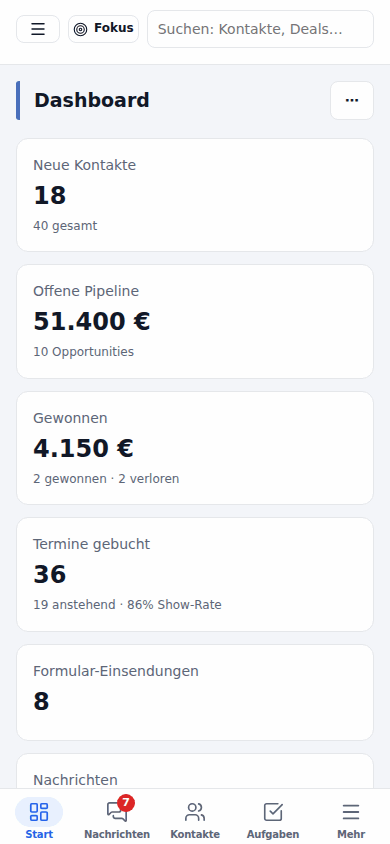
Architecture
flowchart LR
  subgraph Clients
    B[Browser · React SPA / PWA]
    A[Android app]
    M[AI clients via MCP]
    Z[Zapier · Make · n8n]
  end
  subgraph HyperLevel["HyperLevel – one Node.js 22 process"]
    R[HTTP router · auth · guards]
    MOD[Modules registry<br/>CRM · inbox · workflows · funnels · helpdesk · reports · …]
    T[Scheduler tick<br/>waits · reminders · syncs · backups]
  end
  DB[(SQLite<br/>node:sqlite)]
  B & A & M & Z --> R --> MOD --> DB
  T --> MOD
  MOD -. your credentials .-> X[SMTP/IMAP · Twilio · Meta · Stripe · Google/Microsoft · Anthropic · Postiz · OpenShorts]
- Server: TypeScript on Node.js 22 with the built-in
node:sqlite– no ORM, no external database.
Each feature is a module (server/modules/*.ts) with its own migrations and routes, registered inserver/modules/index.ts; modules cooperate through hooks onapp.services(workflow actions, MCP tools,
report sources, catalogue entries …), so a missing module never breaks the core. - Web: React 19 + Vite single-page app under
/app, public pages (funnels, booking, portal, help center)
rendered on the server. - Tests: 4,500+ vitest unit and end-to-end API tests run against a real in-memory app.
- Deploy: one Docker image (multi-arch, ~70 MB), data on one volume.
Read more in docs/architecture.md (German) and CONTRIBUTING.md.
Documentation
Documentation home (Deutsch) – all guides grouped by topic. Pages marked (DE) are only in German so far; most others also have a German version (Deutsch at the top of the page).
Open for contributions
HyperLevel is built in the open and we'd love your help – whether you fix a typo, add a connector or ship a whole module.
| You want to … | Start here |
|---|---|
 Report a bug or suggest a feature |
Open an issue |
 Make your first contribution |
Good first issues · help wanted |
| Add an integration |
Connector request · how connectors work |
| Build a module |
CONTRIBUTING.md – dev setup, tests, the module/registry rules |
| Translate the UI |
docs/translating.md |
 Ask, discuss, show what you built |
GitHub Discussions |
git clone https://github.com/BAISESYSTEMS/GoHyperLevel.git hyperlevel && cd hyperlevel
npm ci && npm run build && npm run demo:seed -- --data-dir ./demo-data
PGHL_DATA_DIR=./demo-data npm run dev     # hack away – [email protected] / demo1234
Please read the Code of Conduct. Pull requests need a one-time signature of the CLA (the CLA
Assistant asks on your first PR). Found a vulnerability? Please report it privately: SECURITY.md.
Recommending, hosting or setting up HyperLevel for others: partner program.
Partner links: Some "Konto anlegen" links are referral links of the maintainer; replace or disable them under Agentur → Partner-Links or with
PGHL_REFERRALS_DISABLED=1. They are always labelled "Partner-Link" and only clicks per provider are counted – details in docs/referrals.md.
License
HyperLevel is free software under the GNU Affero General Public License v3.0: use it, change it
and run it for your business or your clients. If you offer a modified version as a network service, you must
publish your changes under the same license. Third-party notices: NOTICE.
If HyperLevel saves you a subscription, give it a ⭐ – it helps more solopreneurs, agencies and small businesses find it.
Built with ❤️ in Germany · coded together with Claude · free for everyone
Yorumlar (0)
Yorum birakmak icin giris yap.
Yorum birakSonuc bulunamadi