mogui-ADE-orchestrator
Health Warn
- License — License: MIT
- Description — Repository has a description
- Active repo — Last push 0 days ago
- Low visibility — Only 5 GitHub stars
Code Pass
- Code scan — Scanned 12 files during light audit, no dangerous patterns found
Permissions Pass
- Permissions — No dangerous permissions requested
No AI report is available for this listing yet.
Run one AI agent as the orchestrator of your whole workspace, on the CLI subscription you already pay for. No API key, no model endpoint. Point it at a folder of repos and it dispatches workers under contract, verifies their output before accepting it, and hands the role to a fresh session when context runs out.
mogui-ADE-orchestrator
I have agents running in tmux sessions. Can I still drive each one manually when I want, and at the same time orchestrate all of those sessions from above? Is tmux-based agent orchestration a thing?
Yes. That is what this is. Any mix of agents, as many as you want. (Claude as the master is the combination that has been run hard.)
Anyone running more than two agents at once hits this. Dorito hit it, got tired of it, and wrote this.
Nothing to configure and nothing to read first. Clone it, start an agent inside the clone, tell it to wake up. The agent takes it from there and explains as it goes.
It runs the fleet on Orca. A session has to outlive its window and be addressable by handle before anything can orchestrate it. Built and run on macOS; Orca also ships Linux and Windows. Python 3.10+, stdlib-only core, MIT. No API key.
The orchestrating session is called the master, for lack of a better word. It has no name yet. Suggestions welcome.
Quickstart
$ brew install --cask stablyai/orca/orca
$ git clone https://github.com/baksohyeon/mogui-ADE-orchestrator
$ cd mogui-ADE-orchestrator
Not on macOS? Orca has Linux and Windows builds on its download page. --cask is macOS-only, so Homebrew is not the route there.
Then open Orca once and turn on Settings → Orca CLI → Shell command. The runtime calls orca to spawn and retire master sessions. orca status should answer.
Open that directory in Orca, start any coding agent inside it, and say:
Wake the master.
Any words work. It walks you through setup and ends by spawning your Generation 1 master. Getting Started has the detail.
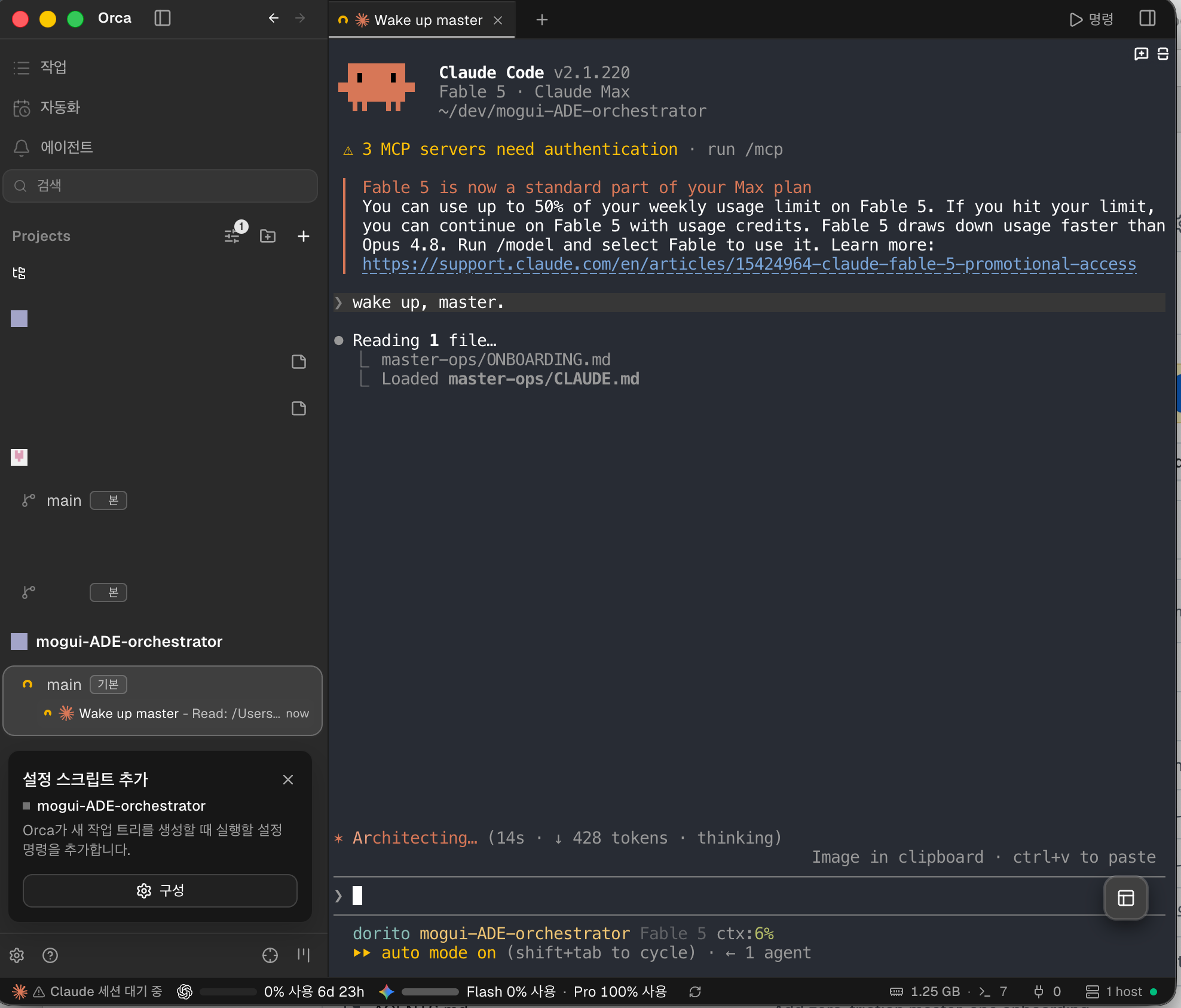
The core is stdlib-only, so you can call it without Orca and without setup. You will not get a master session this way, just the pure functions.
$ cd mogui-ADE-orchestrator
$ scripts/master-succeed detect "routine status update" --context-ratio 0.7 --json
$ scripts/dispatch-gate --ledger /tmp/gate.jsonl check \
  --runtime codex --contract README.md --agents 1 --est-chars 1000
$ scripts/adapter doctor
Why this exists
Run one long-lived session as the orchestrator of a multi-repository workspace and three failure modes appear that repo-level tooling does not cover.
- Sessions end, work does not. Context fills, sessions crash, sessions get compacted. Pasting a summary into a fresh session loses role state, open tracks, and standing decisions. You find out when the successor repeats a question you answered, or reopens a decision you made.
- A master that can spawn workers can waste them. Delegation is cheap to trigger and expensive to run. Without a gate, duplicate dispatches, oversized inputs, and dispatches into the wrong tree all go through, and nothing says so.
- Context loss after compaction is invisible. The session reads as continuous while state is gone. Re-feed everything at boot and you lose the one chance to find out what it still holds.
This runtime treats all three as testable. Succession is a guarded procedure. Lineage is an append-only ledger with a fixed schema. Worker dispatch needs a readable contract and passes budget and routing checks. The boot path withholds state after compaction to probe recall.
How it fits together
flowchart TB
    You(["you"])

    subgraph Orca["Orca"]
        M["master session<br/>plan, dispatch, verify, retire"]
        W1["worker pane<br/>Codex"]
        W2["worker pane<br/>Claude"]
        W3["worker pane<br/>Cursor, Grok, Gemini"]
        M2["successor master"]
    end

    You -->|"one instruction"| M
    You -.->|"open any pane and type"| W1
    You -.-> W2

    M -->|"contract"| W1
    M -->|"contract"| W2
    M -->|"contract"| W3
    W1 -->|"artifact and evidence"| M
    W2 -->|"artifact and evidence"| M
    W3 -->|"artifact and evidence"| M

    M --> T[("tracker<br/>execution state")]
    M --> G[("git<br/>charter, decisions, lineage")]
    M ==>|"verified handoff"| M2
    G -.->|"boot"| M2
Solid arrows are orchestration. Dotted arrows are you. The panes are real terminals, take any of them over.
Sibling project
Two layers, split by unit of operation. This repository owns the workspace. mogui-agent-harness owns one repository.
flowchart LR
    subgraph WS["workspace layer"]
        A["mogui-ADE-orchestrator<br/>roles, succession, dispatch, lineage"]
    end
    subgraph RP["repository layer"]
        B["mogui-agent-harness<br/>repo rules, hooks, wiki, runbooks"]
    end
    A -->|"contract, never source coupling"| B
| mogui-agent-harness | mogui-ADE-orchestrator (this repo) | |
|---|---|---|
| Layer | Repository Harness (repo-local runtime) | Workspace Master Runtime |
| Unit of operation | one repository | a workspace of many repositories |
| Owns | repo-local rules, hooks, wiki, runbooks | orchestration state, roles, succession, lineage |
Either runs alone. Use both when a track crosses repositories and each repository still needs its own rules.
Scope
Local only.
- No network calls. Every import in
src/andscripts/is standard library, none of them networking.git grep -nE "^[[:space:]]*(import|from)[[:space:]]+(urllib|http|socket|ssl|requests)" -- src scriptsreturns nothing. - No API key, no model endpoint, no telemetry.
- Reads the folder you point it at and paths you name in config. Nothing walks your home directory. Redaction scanners read one repository's tracked files through
git ls-files. - The CLIs it drives reach their own providers as before. No traffic added.
- Master starts with approval prompts off, to run unattended. Shift-Tab cycles the mode.
Limitations
- Master starts under Claude Code out of the box. The spawn path in
core/succession.pycallsclaude. Nothing in the design depends on that, and pointing the line at another CLI is a small change. Claude Code is what has been run, so it is what is recommended. - Workers can be any CLI. A worker is a terminal session in an Orca pane, so it is whatever binary starts there. Claude, Codex, Cursor, Grok, Gemini have all run this way under contract. No plugin for any of them. The typed
adapter dispatchpath is narrower and takescodexonly. - Codex as master should work, and nobody has tried it. Untested rather than unsupported. If you run it, a report or a patch is welcome.
- macOS is what this has been run on. Orca itself ships Linux and Windows builds, and one user has reported the install working on Linux. Neither is exercised here, so reports are useful.
- Orca required for live sessions. Pure functions run without it.
Alternatives
If you are going to use an API key, use LangChain deepagents. It is well documented and it solves this problem inside your process. This project is for the other case: you already pay for coding-agent CLIs and you want one orchestrator driving all of them, with no key and no per-token bill.
| LangChain deepagents | this | |
|---|---|---|
| Cost model | API key, billed per token | your existing CLI subscription |
| Subagent | an actor inside the process | a real CLI session under a contract |
| Filesystem | virtual, pluggable backend | a git worktree |
| Approval | a runtime callback | a gate a human holds |
| Orchestrator dies | the graph dies with it | the successor takes the role and proves it |
The comparison came after. This was built before Dorito knew deepagents existed; the announcement landed two weeks in.
What this runs on
Why Orca
A master that outlives one session needs somewhere to live. A terminal tab does not qualify. Orca does, and it is the one dependency this project does not abstract away.
- Sessions outlive the window. Close the tab, restart the app, come back tomorrow. The session is there, with a handle you can read, write to, and retire. Succession is auditable because the predecessor stays addressable while you verify the successor.
- Warm context is money. A long-lived session keeps its prompt cache warm. Respawning for every task pays the context tax again.
- Many agents, many accounts. Run several CLI agents side by side on different runtimes and accounts. Switch when one runs out of credit. A worker's quota does not kill the orchestrator.
- Placement is addressable. Every pane carries a worktree identity. "Which folder did that worker run in" has an answer you can check.
- Reachable from anywhere. Put it behind Tailscale and the same sessions answer from another machine. Long jobs do not need you at the laptop that started them.
Without this substrate you can read the ideas here. You cannot run a master that survives its own session.
The tools this actually runs on
Vendor-neutral here means the master is not tied to one AI agent host. It does not mean the tooling is a mystery. These are the real dependencies, by name.
| Tool | What it does here | Replaceable? |
|---|---|---|
| Orca | Execution substrate. Terminal sessions that outlive the window, worktree-scoped placement, dispatch and retirement of worker panes. | No. Everything about session lifetime assumes it. |
beads (bd) |
Work ledger. Tracks, issues, dependencies, and the memory block the boot path audits. master-bootstrap-live shells out to bd for active-track lines. |
Yes, through the adapter. Any tracker with a CLI that lists issues by status works. |
| ctx | Session archive index. Lets a master search what an earlier session actually said instead of trusting a summary of it. | Yes, through the adapter. |
| Git | Long-term source of truth. Charters, decisions, runbooks, lineage. Worktrees are also the isolation primitive for workers. | No. |
The split matters: core/ never learns these names, adapter/ wires them, and swapping one means writing an adapter rather than editing the units. adapter/profile.py currently ships synchronous CLI profiles for codex and cursor-agent; that is the layer where an agent host gets named, and it is the only one.
The skill layer it runs under
Nothing to do before you start. Onboarding raises this during setup, explains each one, and asks. Declining all of it is a normal answer. Every script here runs with none of it installed.
Listed here so the recommendation is readable before you are asked. Vendor neutrality covers agent hosts, not tooling.
Optimized for Claude Code. These are Claude Code plugins and skills. Workers can be Codex or another CLI and the adapter ships a codex profile. The orchestrator side assumes Claude Code.
| Layer | Tool | What it does in the harness |
|---|---|---|
| Method | superpowers | Puts process ahead of code. A SessionStart hook injects a rule that a relevant skill must be invoked before any response, including clarifying questions. Ships brainstorming, plan writing and execution, TDD, systematic debugging, code review on both sides, and verification before completion. |
| Lifecycle | GSD | The largest harness footprint of the four. A spec to plan to execute to verify command set, plus around a dozen hooks: a statusline, a context monitor that warns the agent rather than only the user as the window fills, prompt-injection scanners over both written and read content, a guard that blocks writes outside the worktree root, and commit validation. |
| Commands | gstack | Task commands rather than methodology: ship, review, QA, headless-browser dogfooding, plan review from CEO, engineering, and design angles, context save and restore. |
| State | beads | Listed in the table above. The boot path already shells out to it. |
Say yes and onboarding prints the command for you to run. GSD's installer edits ~/.claude/settings.json and wires hooks across most lifecycle events. An agent should not do that to your configuration.
One integration note if you adopt GSD. Its context monitor warns the agent at 35% context remaining and escalates at 25%, well before the succession threshold this project recommends. Left alone, a master is told to stop and save state while its charter says to keep working. Record in your charter that the warning is advisory and not a succession trigger. Editing the thresholds in gsd-context-monitor.js also works, but the file is GSD-managed and an update restores it; /gsd-update --reapply offers the patch back, and the offer is easy to skip. The charter line survives updates.
Which document do you want?
| You are | Start here |
|---|---|
| Reading about the system for the first time | docs/public/overview.md |
| Installing it on your own workspace | master-ops/ONBOARDING.md |
| Looking for a specific document | docs/README.md (the document index) |
| Reading the code | Architecture below, then src/master_runtime/core/ |
Documentation in this repository is English. master-ops/ is a template that gets copied and substituted during onboarding, not documentation about this repository. See the index for why the two are separate.
Status
Working and exercised, as of 2026-08-01: 295 unit tests pass, 1 skipped. Every
unit listed below exists in src/master_runtime/core/. The succession,
dispatch-gate, acceptance, and compaction paths have run against real
workspaces, and onboarding has been run start to finish by someone other than
its author.
Released as 0.1.0, the first tagged version. CHANGELOG.md records what changes
after it. No CI: tests and the redaction scanners run locally before a push, so
a passing count in a pull request is the author's word. While the major version
is 0, interfaces, CLI flags, and file formats can change in a minor release.
Pin a version if you build on it.
The template that onboarding copies is versioned separately atmaster-ops/TEMPLATE-VERSION, currently 1. A generated operations repository
does not update when the template does, so that number is how an installation
says where it came from.
Core concepts
Succession
src/master_runtime/core/succession.py implements master-to-master handoff as an explicit, guarded procedure rather than a copy-paste. detect_trigger() classifies signals into IMMEDIATE (explicit user instruction), ADVISORY (context usage ratio at or above the 0.60 default, or a natural milestone; advisory triggers never auto-start succession, they only propose it), or NONE. The flow then builds a handoff, spawns the successor, verifies the successor booted with the inherited state (PASS / PARTIAL / FAILED), checks for duplicate master instances, and retires the predecessor. Hard safety violations raise SuccessionError instead of proceeding.
The advisory ratio is a code default, not a claim about what any given workspace should use; an operating charter can set its own threshold.
Lineage
src/master_runtime/core/lineage.py keeps an append-only markdown ledger of every succession: generation number, parent/successor session IDs, inherited role and open tracks, verification result, and honesty metrics such as repeated_question_count, reopened_decision_count, and a context_loss_summary. The schema is fixed (13 required fields), duplicate generations are rejected, and every write is re-verified as append-only. By design, lineage is observability metadata only; it never feeds runtime decisions.
Contract-gated dispatch
src/master_runtime/core/dispatch_gate.py sits between the master and any worker dispatch. A DispatchRequest (runtime, contract file path, estimated input characters, agent count) is resolved to a GateDecision with a stable reason code: OK, BUDGET_EXCEEDED (defaults: 500k chars single / 1M batch), DUPLICATE_CONTRACT (same contract SHA within a 30-minute window), ROUTING_VIOLATION, CONTRACT_UNREADABLE, HIGH_COST_RUNTIME, PATH_OUTSIDE_KNOWN_ROOTS, WORKTREE_AS_REPO_ROOT, and others. The gate writes each decision to a JSONL ledger, so you can answer what the master dispatched and why it was allowed.
Acceptance loop
src/master_runtime/core/acceptance/ runs candidate changes against a casebook and produces a scorecard instead of trusting a worker's completion report. Raw case results and aggregated scores are separate types, the casebook owns which split a case belongs to (an evaluator cannot relabel its own case), and holdout visibility is a single predicate so the private-holdout invariant cannot drift. Candidates that change nothing still produce a decision record.
Compaction-resilience probe (E12)
scripts/master-bootstrap-live is a session-start hook that emits a small (~1KB budgeted) dynamic bootstrap block and is written to never fail the boot (any internal error degrades to a [BOOTSTRAP-FALLBACK] line with exit code 0). When the incoming session event reports source == "compact", the hook suppresses the Role State and active-tracks sections. The post-compaction session has to recall that state from its own context first, and you compare what it recalled against the ledger. That turns silent context loss into a number you can read.
Architecture
src/master_runtime/core/
├── bootstrap.py        # session boot: charter + handoff + role state, char-budgeted
├── bootstrap_live.py   # live boot block for session-start hooks (audits, dual-instance check)
├── succession.py       # trigger detection, handoff, spawn/verify/retire
├── lineage.py          # append-only succession ledger
├── dispatch_gate.py    # contract-gated worker dispatch decisions
├── recovery.py         # recovery flow after abnormal termination
├── watchdog.py         # stall detection for dispatched work
├── digest_loop.py      # read-only L1 digest loop for orchestrator observations
├── work_ledger.py      # workspace track ledger and session cache
├── context/            # pure filesystem context resolver (path -> ContextDescriptor)
├── approval/           # approval gates and registry
├── acceptance/         # casebook-driven acceptance loop and scorecards
└── adapter/            # adapter layer: dispatch, doctor, isolation, profile
Two principles shape the layout:
- Core / adapter split.
core/modules avoid depending on any specific agent product; contact with the outside world (process spawning, ledgers, tool CLIs) goes through injected callables and theadapter/layer, so core logic is testable with in-memory fakes. Tool names live inadapter/, not in the units above it. - Vendor neutrality as a direction. The master should run under different AI agent hosts. The spawn path still names
claude, so Claude Code is the host that has been exercised. The worker side is further along, withadapter/profile.pyshipping synchronous CLI profiles forcodexandcursor-agent.adapter doctorprobes a fixed set of local tools, and some Korean-language operator strings are embedded. Broadening this is ongoing work.
Working on the harness
To use the system, the Quickstart above is the whole path. This section is for changing the harness itself.
Prerequisites: macOS and Python 3.10+. The runtime is stdlib-only; there is nothing to install.
All CLI entry points live in scripts/ and are self-contained (they insert src/ on sys.path themselves):
# Classify a succession trigger signal (pure function, safe to try)
$ scripts/master-succeed detect "routine status update" --context-ratio 0.7 --json
# → {"status": "ADVISORY", "reason": "context ratio threshold reached", ...}

# Ask the dispatch gate whether a worker dispatch may proceed
$ scripts/dispatch-gate --ledger ./gate-ledger.jsonl check \
  --runtime codex --contract ./job-contract.md --agents 1 --est-chars 1000
# → {"allow": true, "reason": "OK", "contract_sha": "...", "cost_proxy": 1000}

# Check which adapter-layer tools are present on this machine
$ scripts/adapter doctor

# Boot a master session from a charter document (add --handoff for a handoff file)
$ scripts/master-bootstrap --charter path/to/charter.md --json
Other entry points, briefly: scripts/master-succeed also provides handoff, verify-successor, check-duplicates, retire, and spawn subcommands; scripts/master-recover runs the recovery flow from a charter + handoff after abnormal termination; scripts/master-bootstrap-live is meant to be wired as a session-start hook rather than run by hand; scripts/l1-digest tick advances the read-only digest loop; scripts/adapter dispatch performs an adapter-level worker dispatch; scripts/acceptance-loop runs the acceptance casebook. Run any of them with --help for current flags.
Tests are the agent's job. Ask the agent working on the harness to run them and report, the same way you ask it for anything else. There is no test step here for a person to type.
What this is not
This repo owns workspace-level orchestration state only. Repo-local rules, hooks, wikis, and runbooks belong to a repository-harness layer (see the sibling project above); the connection between the two layers is contract-based, never source-tree coupling. Submodules only ever appear as pinned example fixtures, never as core dependencies.
License
MIT
Reviews (0)
Sign in to leave a review.
Leave a reviewNo results found