BrewPing
Health Gecti
- License — License: MIT
- Description — Repository has a description
- Active repo — Last push 0 days ago
- Community trust — 34 GitHub stars
Code Basarisiz
- rm -rf — Recursive force deletion command in Scripts/build-mac-app.sh
Permissions Gecti
- Permissions — No dangerous permissions requested
Bu listing icin henuz AI raporu yok.
A local-network remote control for coding agents running on your own computer.
BrewPing
English | 简体中文
A remote control for the coding agents running on your own computer.
BrewPing runs a small desktop service on your Mac or Windows machine and drives the CLI agents
already installed there. Pair your phone over the local network, then send instructions, follow
progress, and approve risky commands from iPhone, Apple Watch, or Android.
Your agents, your models, your machine — driven from your phone, on your own network.
Availability: macOS and Windows are released (
v1.0.0) · iOS / watchOS are in App
Review (TestFlight only, no App Store listing yet) · Android is built but not submitted to
Google Play · Wear OS is in the repository, unreleased. Details: Availability.





⚡ Quick start (macOS, from source):
git clone https://github.com/banmu123/BrewPing.git && cd BrewPing && ./build-app.sh && open "build/BrewPing Desktop.app"
→ open Show Pairing Code in the menu bar, scan the QR code with the iPhone app
· or grab the prebuilt, signed & notarized DMG from commitbrew.com
· full guide: 🚀 Quick Start
📸 Screenshots
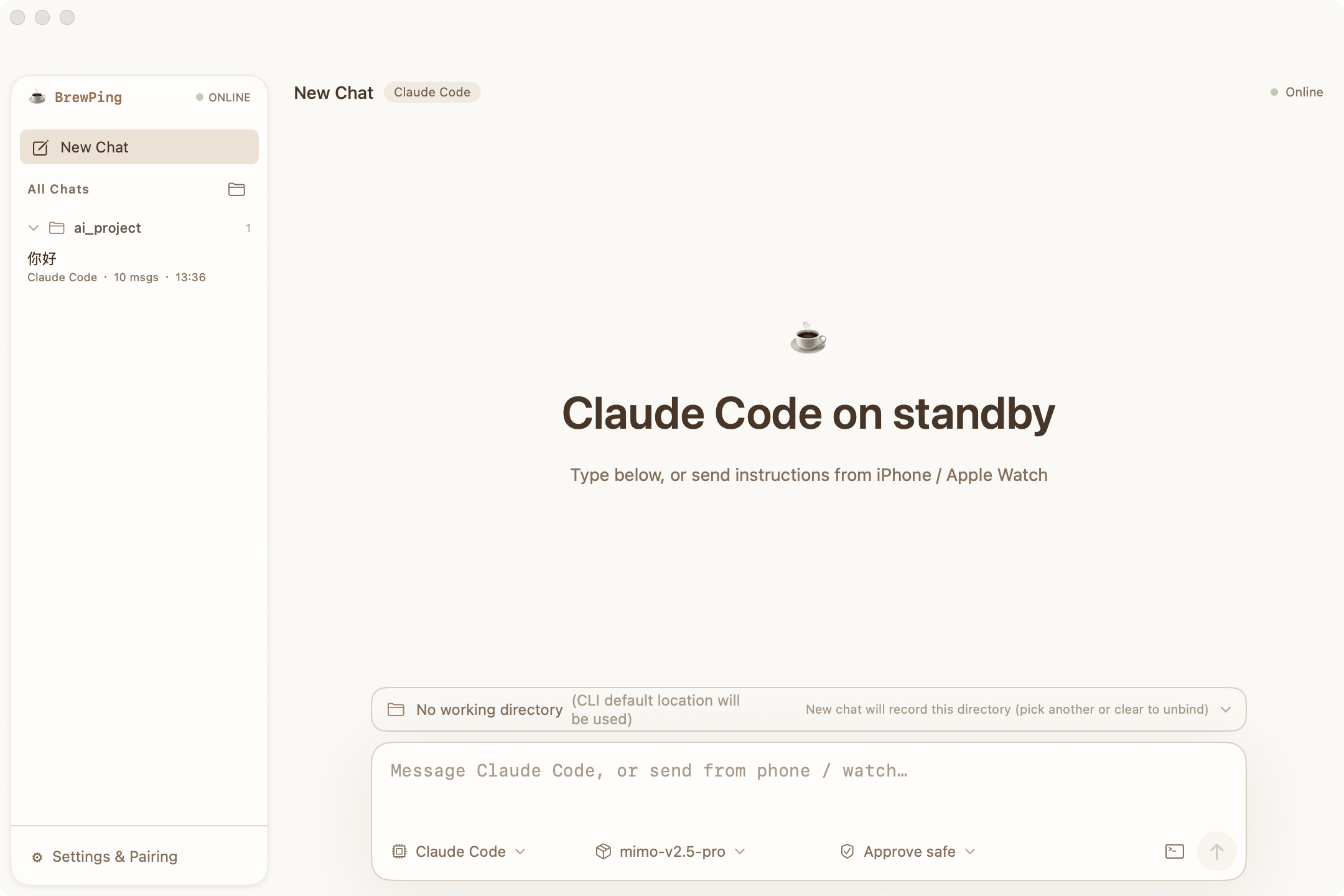
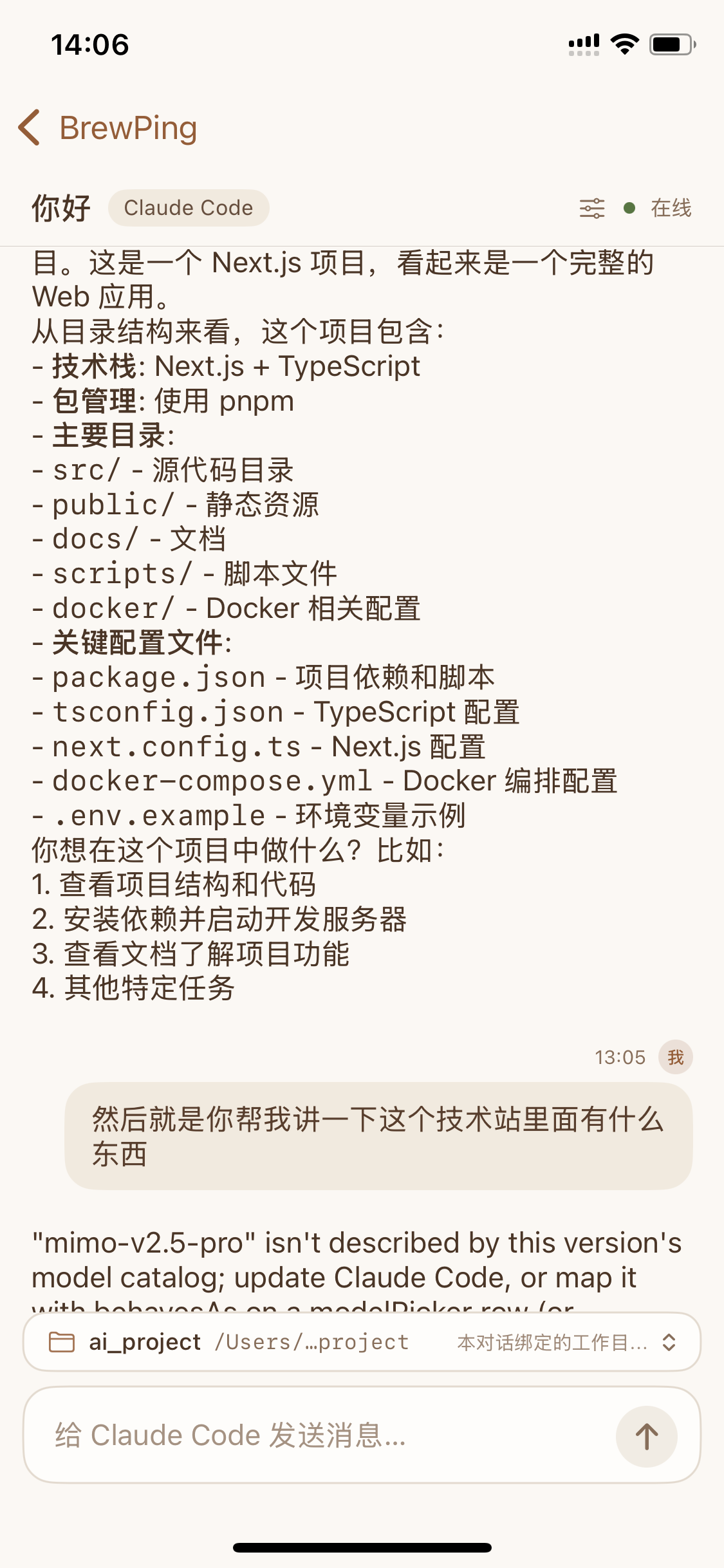
macOS desktop · iPhone
🎯 Who is it for?
- You run a coding agent — OpenCode, Claude Code, Codex CLI, or pi — on a Mac or Windows machine,
and you want to kick off work, check progress, or approve a risky command without sitting at
that machine. - You want that from your phone or watch: one hand, one glance, no remote desktop.
- You care that your code, prompts, and agent output stay on your own machines — BrewPing ships
no account system, no analytics, and no server of ours in the path.
It is not for you if: you don't have any of those CLI agents installed (BrewPing drives them, it
does not replace them), or you are looking for a hosted coding agent that runs in the cloud.
🤔 Why BrewPing instead of SSH, remote desktop, or a hosted agent?
| SSH / terminal apps | Remote desktop | Hosted coding agents | BrewPing | |
|---|---|---|---|---|
| Agent-aware UI (status, transcripts, models) | ✗ | ✗ | ✓ | ✓ |
| Usable on a phone / watch | awkward | screen-shaped | ✓ | ✓ (native apps) |
| Keeps your existing agent config & logins | ✓ | ✓ | ✗ | ✓ (reads them, never replaces them) |
| Approval gate before risky commands run | ✗ | ✗ | varies | ✓ (safe / ask-all / auto) |
| Your code and prompts stay on your machines | ✓ | ✓ | usually not | ✓ (local network only) |
| Works with several agents + model switching | ✗ | ✗ | ✗ | ✓ |
✨ Highlights
📲 Send a command from anywhere in your home
Start the desktop service, pair once, and send instructions from your phone. BrewPing shows the
agent's status while the command runs and returns the output when it finishes — you do not have to
stay at the keyboard.
🧩 Keep using the agents and models you already configured
BrewPing does not replace your agents or their logins. It discovers the CLI agents installed on your
computer, reads the models each one is configured with, and lets you switch the active agent or model
remotely. Your subscriptions, credentials, and permission settings stay exactly where they are.
🛡️ Approve risky commands before they run
Commands are checked before they reach the agent. BrewPing classifies dangerous operations
(rm -rf, git reset --hard, curl | sh, and more) and holds them for your approval. Pick a mode:
block only dangerous commands, confirm every command, or run without confirmations. Pending requests
time out as denied — silence is never an approval.
⌚ iPhone, Apple Watch and Android
Both phone apps share the same flow: discover computers on the current Wi-Fi, or add one by host and
port; pair by scanning the QR code or typing the 6-digit code; then browse conversations, send
instructions, switch agents and models, and approve commands. The Watch app sends voice-dictated
instructions, switches agents and models with swipes, and lets you read the reply without pulling out
your phone.
📁 Conversations and working folders stay together
Conversations are grouped by the folder each one is bound to. Pin, archive, and reopen them; bind a
working folder to a conversation so file operations happen where the conversation lives; and set
agent, model, and approval level per conversation.
🔍 Find your computer automatically
Bonjour/mDNS discovery finds computers on the current Wi-Fi without typing an IP address. If the
network blocks multicast (AP isolation, guest networks), add the host and port by hand — BrewPing
tells you exactly what to check.
🖥️ More built in
- Multi-device — pair more than one computer and switch between them from the device bar.
- In-app language switch — English and Simplified Chinese, switched inside the app without
restarting it. - Markdown transcripts — read agent output rendered as Markdown, including long responses.
- Local network only — no account, no analytics, no third-party SDKs; commands and output travel
only between your phone and your own computer. - Demo device (iOS) — try the whole flow with no Mac and no hardware.
🏗️ Architecture
┌──────────────┐    HTTP API     ┌─────────────────────────┐
│    Phone     │ ◄────────────►  │   BrewPing Desktop      │
│ iOS / Android│   same Wi-Fi    │  macOS menu bar + window│
└──────┬───────┘   Bonjour       │  or Windows (Tauri)     │
       │            discovery    └───────────┬─────────────┘
       │ WatchConnectivity                   │ PTY / CLI
┌──────┴───────┐                  ┌──────────┴─────────────┐
│ Apple Watch  │                  │  opencode · claude     │
│  (watchOS)   │                  │  codex · pi            │
└──────────────┘                  └────────────────────────┘
- Desktop service — a Swift core (
Sources/App,Sources/Agents,Sources/PTY,Sources/Session,Sources/Protocol) exposing an HTTP API on your LAN, supervising agent
processes, and gating commands through the approval check. The Windows desktop reimplements the
same API surface in Rust (Tauri 2 + axum) and is covered by the same clients. - Clients — iOS and watchOS apps (SwiftUI), Android app (Jetpack Compose), and a CLI
(swift run BrewPing …). Clients never talk to each other, and never to a machine you did not pair. - Auth — a one-time 6-digit code becomes a long-lived token; every
/api/*call carriesAuthorization: Bearer <token>, and writes additionally carryX-BrewPing-Timestamp+X-BrewPing-Nonce(120-second window, replay-protected).
📦 Availability
What you can install today, and what is still in the pipeline:
| Surface | Status | How to get it |
|---|---|---|
| macOS desktop | Released (v1.0.0) |
Signed & notarized DMG from the GitHub Release, or build from source |
| Windows desktop | Released (v1.0.0) |
setup.exe / .msi attached to the same release, or npm run tauri dev |
| iPhone / Apple Watch | In App Review — not publicly available yet | Build from source with Xcode until Apple approves |
| Android phone | Built, not submitted to Google Play | cd Android && ./gradlew assembleDebug |
| Wear OS watch | In the repository, not released | Build from source; on no store |
BrewPing ships local-network only — there is no hosted service and no official public relay, so
none of the clients talk to anything but the computer you paired.
🚀 Quick Start
🍎 macOS desktop (build from source)
git clone https://github.com/banmu123/BrewPing.git
cd BrewPing
./build-app.sh                          # produces build/BrewPing Desktop.app
open "build/BrewPing Desktop.app"
Prefer a prebuilt binary? The DMG on commitbrew.com is
Developer ID signed, notarized, and stapled, so it opens without Gatekeeper warnings.
🪟 Windows desktop (Tauri 2 + axum)
cd Sources/BrewPingwinDesktop
npm install
npm run tauri dev
📱 iPhone / Apple Watch
open ios/BrewPing.xcodeproj # set your team, then Run
The iOS app uses bundle IDs com.brewping.ios and com.brewping.ios.watchkitapp.
🤖 Android
cd Android && ./gradlew assembleDebug # Windows: gradlew.bat assembleDebug
🔗 Pair your phone
- In BrewPing Desktop, open Show Pairing Code — a 6-digit code (and a QR code) appears.
- On your phone, scan the QR code, or tap Add Device and enter the code.
- Both devices must be on the same local network. BrewPing has no public relay and never
connects to a machine you did not configure.
The pairing code is single-use and expires after 10 minutes. On iOS the token is stored in the
Keychain; on the desktop it lives in ~/.brewping/pairing.json with 0600 permissions.
⌨️ Use BrewPing from the CLI
swift run BrewPing start                        # start an OpenCode session in a PTY
swift run BrewPing status                       # show the current session status
swift run BrewPing send "Fix the failing test"  # send a message to the session
swift run BrewPing attach                       # attach to the running session (Ctrl+D to detach)
swift run BrewPing stop                         # stop the session
🧠 Supported agents
BrewPing drives the CLI agents already installed on your computer. Product names and trademarks
belong to their respective owners (see Trademarks).
| Agent | Mode | Command | Configuration read from |
|---|---|---|---|
| OpenCode | Session (interactive PTY) | opencode |
~/.config/opencode/opencode.json |
| Claude Code | Headless (one-shot) | claude |
~/.claude/settings.json |
| Codex CLI | Headless (one-shot) | codex |
~/.codex/config.toml |
| pi | Headless (one-shot) | pi |
~/.pi/agent/settings.json + ~/.pi/agent/models.json |
Install the ones you want to use:
# OpenCode
curl -fsSL https://get.opencode.ai | sh

# Claude Code
npm install -g @anthropic-ai/claude-code

# Codex CLI
npm install -g @openai/codex

# pi
npm install -g @earendil-works/pi-coding-agent
🔌 HTTP API
Except for POST /api/pair and GET /api/status, every endpoint requiresAuthorization: Bearer <token>. Write endpoints additionally require X-BrewPing-Timestamp andX-BrewPing-Nonce.
| Method | Path | Description |
|---|---|---|
| POST | /api/pair |
Exchange a 6-digit pairing code for a long-lived token (public) |
| GET | /api/status |
Device status, read-only health check (public) |
| GET | /api/protocol/state |
Protocol state snapshot |
| GET | /api/agents |
Installed agents |
| POST | /api/agents/default |
Set the default agent |
| POST | /api/agents/:id/switch |
Switch the active agent |
| GET | /api/agents/:id/models |
Models configured for that agent (providers → models) |
| POST | /api/agents/models/default |
Set the default model |
| POST | /api/message |
Send a message (optional commandId = client idempotency key) |
| GET | /api/message/:id |
One command's status, including the authoritative execution phase (run.phase) |
| POST | /api/session/start |
Start a session |
| POST | /api/session/stop |
Stop a session |
| GET / POST | /api/approvals/mode |
Read or change the approval mode |
| GET | /api/approvals |
Pending approval requests |
| POST | /api/approvals/:id |
approve, deny, or always_approve |
| GET / POST | /api/conversations |
List or create conversations |
| GET / PATCH / DELETE | /api/conversations/:id |
Read, update, or delete one conversation |
| POST | /api/conversations/:id/activate |
Activate a conversation |
| GET | /api/folders/roots |
Directory roots for the working-folder picker |
| GET | /api/folders?path= |
Browse sub-directories (directories only) |
| POST | /api/agents/workdir |
Set or clear an agent's default working folder |
| POST | /api/discovery/refresh |
Refresh local network discovery |
run.phase is computed by the desktop from the command's real state and its last output timestamp:queued / thinking / streaming / stalled / completed / failed. stalled is decided by
the desktop (30 seconds without new output) — clients display it, they never guess it.
POST /api/message accepts an optional client-generated commandId. Send the same value when
retrying after a timeout and the desktop returns the existing command instead of executing it twice.
This is separate from X-BrewPing-Nonce, which is a transport-level replay guard.
⚙️ Configuration
BrewPing keeps its state in ~/.brewping/:
device.json— device identity (device ID, name)pairing.json— pairing token and temporary code (permissions0600)approval.json— global approval mode and always-allow rules (permissions0600)config.json— agent configuration (default agent, model preferences)session.json— current session state
🔒 Privacy & security
- No account, no analytics, no third-party SDKs, no server operated by us. Commands you send,
the output your agent returns, and any speech that is transcribed travel only between your phone
(or watch) and the computer you paired. Full text: privacy policy. - Token handling — the pairing code is single-use and expires in 10 minutes; the token it
exchanges for is stored with0600permissions on the desktop and in the iOS Keychain. Write
requests are timestamped and nonce-protected (120-second replay window). - Approval gating is scoped on purpose — it intercepts commands at the point where they enter the
agent, so a shell command that an agent pushes on its own is not covered by this release. Treat it
as a safety net for your instructions, not as a sandbox for the agent. - No third-party agent is bundled or redistributed. BrewPing only detects and runs the CLI tools
you installed yourself; installers above point at each vendor's own distribution channel.
🧪 Testing & CI
- Swift unit tests —
swift testruns 66 tests over the vendor-native configuration
modules (Claude Code / Codex / OpenCode / pi merge and write invariants), the conversation
execution state machine, and the HTTP run-status derivation. Silent config corruption and
"is it stuck?" regressions would otherwise hide there. - Android unit tests —
:coreand:apphold 83 JVM unit tests that need no device
(cd Android && ./gradlew test); CI additionally builds the phone app and the Wear OS module. - GitHub Actions —
.github/workflows/ci.ymlbuilds and tests the
Swift core on macOS, compiles the iOS + watchOS targets with signing disabled, and runs the
Windows and Android suites — on every push and pull request, plus a nightly schedule. - Windows — the Rust side has its own 318-case
cargo test --lockedsuite
(Sources/BrewPingwinDesktop/src-tauri). - Release — pushing a
v*tag triggers.github/workflows/release-mac.yml, which builds a universal
binary, signs with Developer ID, notarizes, staples, and attaches the DMG to the GitHub release.
The workflow needs Apple signing secrets that are not configured in this repository, so thev1.0.0macOS packages were built locally by the maintainer and attached by hand (see
Project status).
📋 Requirements
| Platform | Requirement |
|---|---|
| macOS desktop | macOS 13.0 or later (built as a universal binary: Apple Silicon + Intel) |
| Windows desktop | Windows 10/11 with WebView2 (Tauri 2) |
| iPhone | iOS 17.0 or later |
| Apple Watch | watchOS 11.6 or later (paired with the iPhone app) |
| Android | Android 8.0 or later (minSdk 26) |
| Wear OS | Wear OS 3.0 or later (minSdk 30) — the module is in the repository but not released yet |
| Network | Phone/watch and computer on the same local network |
| Agents | At least one of OpenCode / Claude Code / Codex CLI / pi installed on the computer |
📚 Documentation
- Privacy policy — what BrewPing does and does not touch
- iOS structure & modules — iPhone app layout and state flow
- Windows multi-conversation design — desktop conversation model
- Provider management migration — provider config internals
- Folder browsing design — working-folder binding
- App Store pre-submission review — the checklist we ran, at the point the iOS build went into App Review
- Project status — platforms, test counts, maintenance process, known limitations
- Trademarks — third-party names used to describe compatibility
- Relay prototype — experimental, not wired into any client, outside the product's security boundary
🏗️ Tech Stack
| Layer | Technology |
|---|---|
| Core service | Swift 5.9 (SwiftPM), no third-party Swift dependencies |
| macOS desktop | SwiftUI + AppKit (window + menu bar), Hardened Runtime, notarized |
| Windows desktop | Tauri 2 + axum + React 19 + Vite + Tailwind CSS 4 |
| iOS / watchOS | SwiftUI, WatchConnectivity |
| Android | Kotlin + Jetpack Compose (minSdk 26, JDK 17) |
| Transport | HTTP on the local network, Bonjour/mDNS discovery, Bearer token + nonce |
| Relay prototype (experimental, not shipped) | TypeScript + ws + express — parked under experimental/, no client connects to it |
📁 Project Structure
Sources/
├── App/                  # HTTP API, routing, pairing store, approval gate, conversations
├── Agents/               # agent discovery + OpenCode / Claude Code / Codex / pi drivers
├── PTY/                  # pseudo-terminal handling for interactive agents
├── Session/              # session lifecycle
├── Protocol/             # wire protocol shared by every client
├── BrewPing/             # CLI entry point (start / status / send / attach / stop)
├── BrewPingDesktop/      # macOS SwiftUI app (window + menu bar)
└── BrewPingwinDesktop/   # Windows desktop (Tauri 2 + axum + React)
ios/
├── BrewPing/             # iPhone app
└── Watch/                # Apple Watch app
Android/                  # Android phone app + Wear OS module (Jetpack Compose)
experimental/
└── relay-server/         # parked TypeScript prototype — not part of the shipped product
Scripts/                  # packaging (build-mac-app.sh) + entitlement/Info.plist for the DMG
docs/                     # design notes + privacy policy
logo/                     # app icons and logo
🚧 Beyond the local network
BrewPing ships local-network only. There is no official public relay, no hosted service, and
nothing in this repository proxies your traffic to the internet.
experimental/relay-server/ is a parked prototype: it is not part of the shipped product, no
client connects to it, it has no authentication, and it logs relayed payloads. Do not deploy it to a
public or untrusted network (see its README). It is kept for reference only — the product path does
not include it, and it is not on the roadmap as a shipped component.
If you want to reach your own computer from a different network, that is a network problem you
solve on your side — for example with a VPN overlay such as Tailscale or WireGuard. BrewPing does
not operate, configure, or endorse that setup.
🤝 Contributing
Issues and pull requests are welcome — see CONTRIBUTING.md for build commands,
what CI runs, and the conventions this repo follows. Security reports: SECURITY.md.
⚠️ Trademarks
OpenCode, Claude, Claude Code, Codex, and pi are trademarks of their respective owners. BrewPing is
not affiliated with, endorsed by, or sponsored by them; these names appear only to describe
compatibility — see TRADEMARKS.md for the per-name list.
BrewPing connects only to devices you configured, on your own local network. It does not connect
to third-party devices and does not provide a public relay.
📄 License
MIT.
BrewPing does not bundle or redistribute any third-party agent. It only detects and runs the
command-line tools you have already installed on your own computer (see Trademarks).
🙏 Credits
- Swift + SwiftUI / AppKit — the core service and the macOS app
- Tauri — the Windows desktop shell
- Jetpack Compose — the Android app
- shields.io — README badges
- OpenCode, Claude Code, Codex CLI and pi — the agents BrewPing drives (unofficial, see Trademarks)
Yorumlar (0)
Yorum birakmak icin giris yap.
Yorum birakSonuc bulunamadi