bobix
Health Gecti
- License — License: MIT
- Description — Repository has a description
- Active repo — Last push 0 days ago
- Community trust — 16 GitHub stars
Code Basarisiz
- fs module — File system access in scripts/make-icon.js
- fs.rmSync — Destructive file system operation in scripts/record-demo.mjs
- os.homedir — User home directory access in scripts/record-demo.mjs
- network request — Outbound network request in scripts/record-demo.mjs
- network request — Outbound network request in scripts/smoke-drag.mjs
- fs.rmSync — Destructive file system operation in src/core/autostart.js
- os.homedir — User home directory access in src/core/autostart.js
- fs module — File system access in src/core/autostart.js
- child_process — Shell command execution capability in src/core/focus.js
- exec() — Shell command execution in src/core/focus.js
Permissions Gecti
- Permissions — No dangerous permissions requested
Bu listing icin henuz AI raporu yok.
Your Claude Code sessions as little pixel pets on your screen: see who is working, who needs you and who is done. macOS, Windows, Linux.

Bobix
Your Claude Code sessions as little pixel pets on your screen.
See who is working, who needs you and who is done, without opening a single window.




English · Tiếng Việt
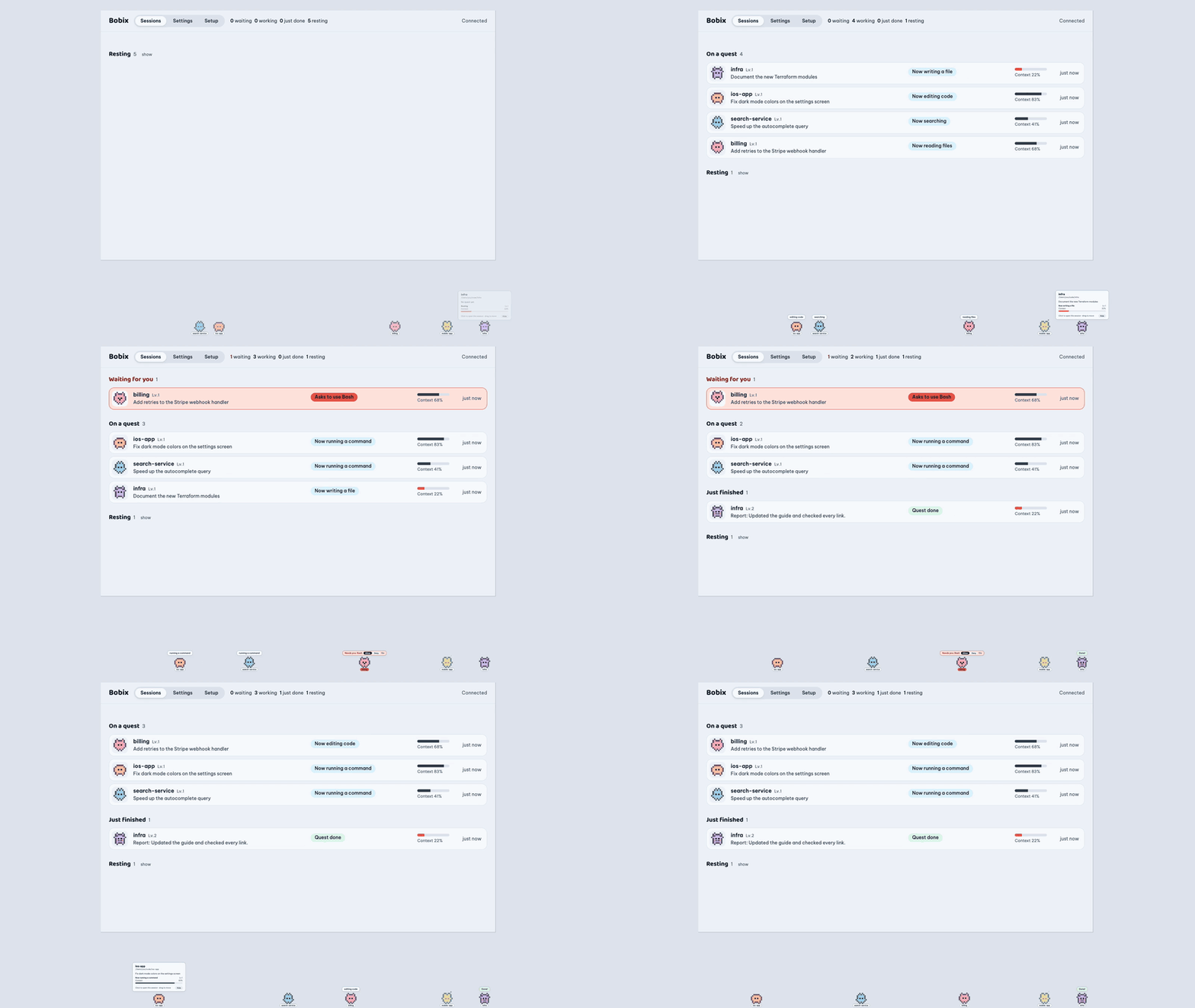
Watch the demo in full quality (16 s)
Why
Run a few Claude Code sessions at once and you spend your day clicking through them: still working? stuck on a permission prompt? finished? Bobix gives each session a pet that walks along the edge of your screen and answers that at a glance.
| The pet… | means |
|---|---|
| walks around, bubble like running a command | Claude is working |
| hops, red bubble Needs you: Bash | Claude is waiting for your approval |
| smiles, green bubble Done! | the session finished its turn |
| sleeps | nothing happening; after a while it leaves the screen |
Click a pet to jump into that session. Hover to see its task, status and how much context is left.
Features
- A pet per session, shaped by its project: every session of a project (git worktrees included) has the same creature in its own colour, named after the session's title. Give a project your own picture as the pet's face from the panel (Change pet); Bobix turns it into pixel art and lets you tune it, as the pet's face or as the whole pet. Side sessions stand next to the session they came from.
- Click to open the session: straight to it in the Claude desktop app, or brings its Terminal, iTerm or VS Code window forward.
- Side sessions (Claude desktop app): a session started from another one stands next to it, and the panel shows which session it came from and how many side sessions are still busy or need you.
- Approve from Bobix: when Claude asks for permission, answer Allow, Always allow or Deny on the pet, in the panel or on the notification (macOS). By default Bobix holds the request until you answer it there; Claude still asks in the terminal at the same time, so you can answer in either place. A time limit in Settings makes Bobix let go of the request when it runs out. Nothing is held while pets are hidden or notifications are paused.
- Control panel with every session grouped by what needs you, its last answer and a log of the tools it used.
- Notifications when a session needs approval or finishes, with optional sound.
- Stays out of your way: pick the screen, the top or bottom edge, the part of the edge pets may use, their size and opacity. Pets fade when the cursor comes near, everything that isn't a pet lets clicks through, and sleeping pets leave the screen after a time you choose.
- Light on your machine: about 1–2 % CPU while pets sit still, nothing redrawn while none are out, no disk writes besides your settings.
- macOS, Windows and Linux, in English and Vietnamese.
- Private by design: runs locally, no account, nothing about you or your sessions sent anywhere. The only request it makes is a daily check on GitHub for a new version, which you can turn off. See Privacy.
- Tells you about updates: when a new version is out, a notification and the tray menu link to it.
Install
Download the installer for your computer. The links always give the newest version (all releases):
| Your computer | Download |
|---|---|
| Mac with Apple chip (M1 and later) | Bobix-mac-arm64.dmg |
| Mac with Intel chip | Bobix-mac-x64.dmg |
| Windows 10 / 11 (64-bit) | Bobix-windows-x64.exe |
| Ubuntu / Debian (amd64) | bobix-linux-amd64.deb |
| Ubuntu / Debian (ARM64) | bobix-linux-arm64.deb |
Then:
- Open the app. The builds are not code-signed yet, so the first launch shows a warning; the install guide shows how to get past it on each system.
- In the control panel, go to Setup → Install hooks.
- Send a prompt in any Claude Code session. Its pet appears.
The install guide also covers troubleshooting and uninstalling.
From a terminal, or with an AI assistant
Use the release installers below. Don't clone this repository or build it to install Bobix: the source is for contributors.
macOS (Apple chip; on an Intel Mac use Bobix-mac-x64.dmg). Quit Bobix first if it is running.
curl -fL -o /tmp/Bobix.dmg https://github.com/baonguyen-agilityio/bobix/releases/latest/download/Bobix-mac-arm64.dmg
hdiutil attach -nobrowse -quiet -mountpoint /tmp/bobix-dmg /tmp/Bobix.dmg
rm -rf /Applications/Bobix.app && cp -R /tmp/bobix-dmg/Bobix.app /Applications/
hdiutil detach -quiet /tmp/bobix-dmg && xattr -cr /Applications/Bobix.app && open /Applications/Bobix.app
Windows (PowerShell):
$f = "$env:TEMP\Bobix-windows-x64.exe"; Invoke-WebRequest https://github.com/baonguyen-agilityio/bobix/releases/latest/download/Bobix-windows-x64.exe -OutFile $f; Start-Process $f
Ubuntu / Debian (amd64; on ARM use bobix-linux-arm64.deb), then open Bobix from your apps menu:
curl -fL -o /tmp/bobix.deb https://github.com/baonguyen-agilityio/bobix/releases/latest/download/bobix-linux-amd64.deb && sudo apt install -y /tmp/bobix.deb
Screenshots
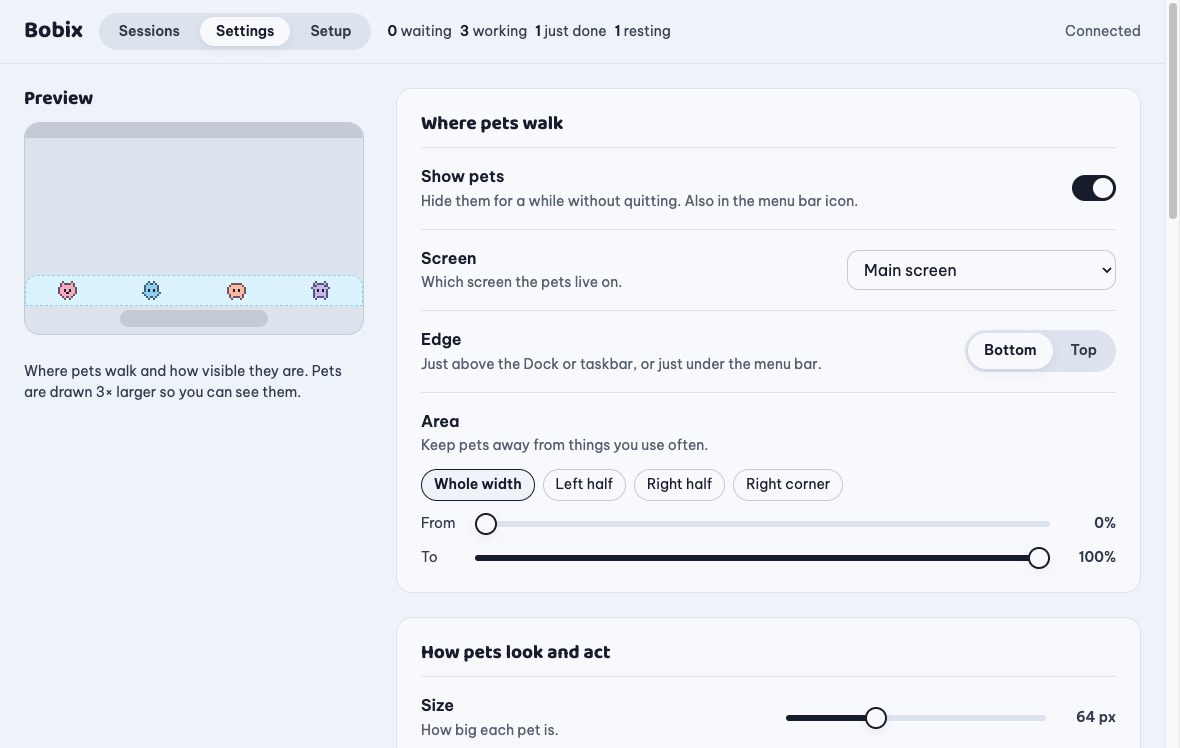 |
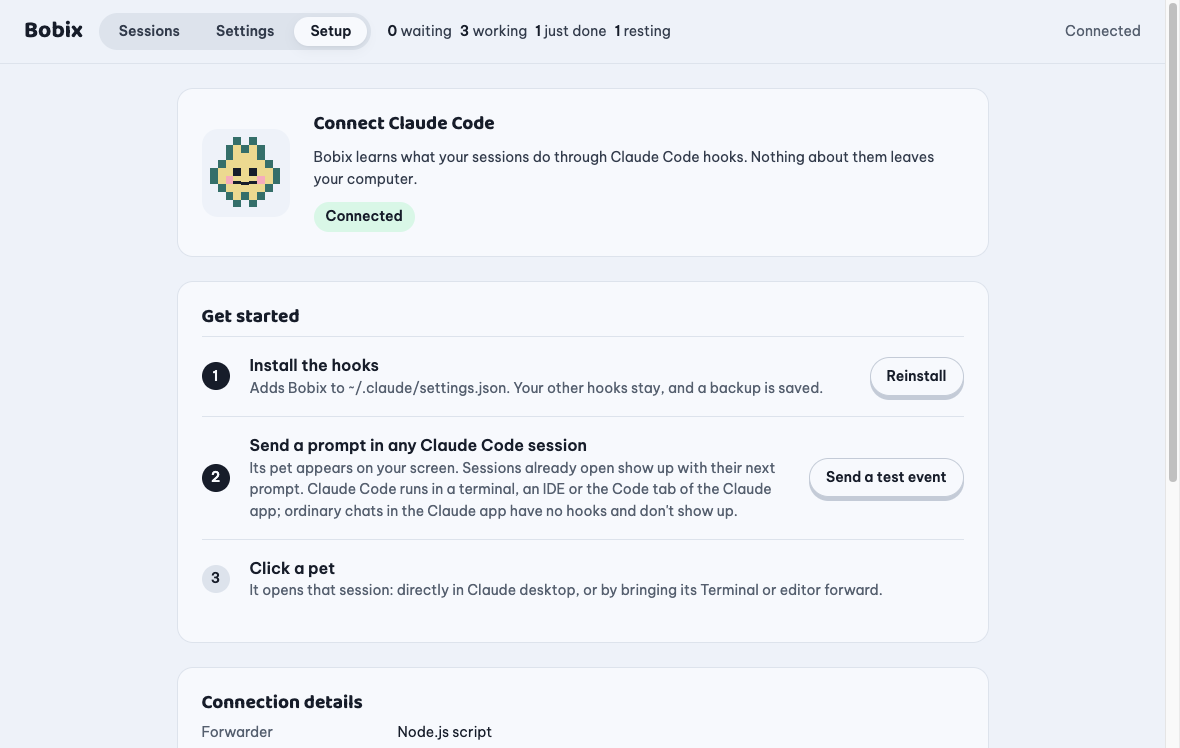 |
| Settings with a live preview of where pets walk. | Setup connects Claude Code in one click. |
How it works
Claude Code ──hooks──▶ node ~/.claude/bobix/hook.js ──127.0.0.1──▶ Bobix ──▶ pets · panel · notifications
                                                                              └─ reads the session transcript for the title, last answer and context left
- Uses Claude Code's documented hooks: SessionStart, UserPromptSubmit, PreToolUse, PostToolUse, PermissionRequest, Notification, Stop, SessionEnd. They run asynchronously, so Claude never waits for them.
- Installing adds entries to
~/.claude/settings.json, keeps every other hook and setting, and saves a backup first. Removing takes out only Bobix's entries. - The forwarder sends what the pets show (tool name, file path or command, your prompt), never file contents or tool output.
- An Esc or a denied permission ends a turn without a hook; Bobix notices it in the transcript and puts the pet to rest.
FAQ
Does it slow Claude down? No. Hooks run asynchronously and the forwarder exits within a few tens of milliseconds.
What about chats in the Claude app or on claude.ai? Not supported. Bobix follows Claude Code sessions through Claude Code's hooks, and ordinary chats have no hooks or any other way for an app on your computer to follow them. In the Claude desktop app, use the Code tab: those are Claude Code sessions and show up as pets.
Which Claude Code setups work? The CLI in any terminal, the IDE extensions and the Claude desktop app. Click-to-open goes straight to the session in the desktop app; elsewhere it brings the app forward, not a specific tab.
What if I don't have Node.js? Hooks fall back to curl or PowerShell. Everything works except click-to-open, which then shows the session's details.
It shows nothing on my work laptop. Your organization may allow only managed hooks (allowManagedHooksOnly). Bobix respects that and cannot receive events there.
Is my code sent anywhere? No. See Privacy.
Status and limitations
- Version 0.1. Tested on macOS (Apple chip) with the Claude desktop app and the CLI, and on Ubuntu (Wayland) with the CLI. Windows is smoke-tested on CI only, and the Claude desktop app on Linux (beta) isn't tested yet.
- On Linux Wayland, Bobix runs through XWayland so pets can stay on top; bringing a terminal forward needs X11 and
xdotool. - Opening a session in the Claude desktop app uses a link that app registers (
claude://code/continue), not a documented API, so it may change. - "Context left" is estimated from token usage.
- Linux installers are for Ubuntu and Debian; other distributions aren't packaged yet.
License and credits
MIT, see LICENSE. Fonts: Baloo 2 and Be Vietnam Pro, SIL Open Font License, bundled via Fontsource (licenses in src/ui/fonts/). GIF code: gifenc by Matt DesLauriers and the LZW decoder and deinterlacer of gifuct-js by Matt Way, MIT, copied into src/core/gif/ with their licenses.
Bobix is an independent project, not affiliated with or endorsed by Anthropic. "Claude" and "Claude Code" are trademarks of Anthropic.
Developing Bobix
For contributors only: building, testing and releasing are in docs/development.md; open work is in docs/roadmap.md. To use Bobix, install it from the release as shown above.
Yorumlar (0)
Yorum birakmak icin giris yap.
Yorum birakSonuc bulunamadi