vibetime
Health Uyari
- License — License: MIT
- Description — Repository has a description
- Active repo — Last push 0 days ago
- Low visibility — Only 5 GitHub stars
Code Gecti
- Code scan — Scanned 12 files during light audit, no dangerous patterns found
Permissions Gecti
- Permissions — No dangerous permissions requested
Bu listing icin henuz AI raporu yok.
Local-first time tracking for your coding agent.
Local-first time tracking for AI coding agents.
VibeTime runs quietly in the menu bar and records coding sessions from Claude Code,
Codex, Cursor, and Gemini CLI. It is built for answering a simple question well:
where did my agent-assisted work time go today?
What It Does
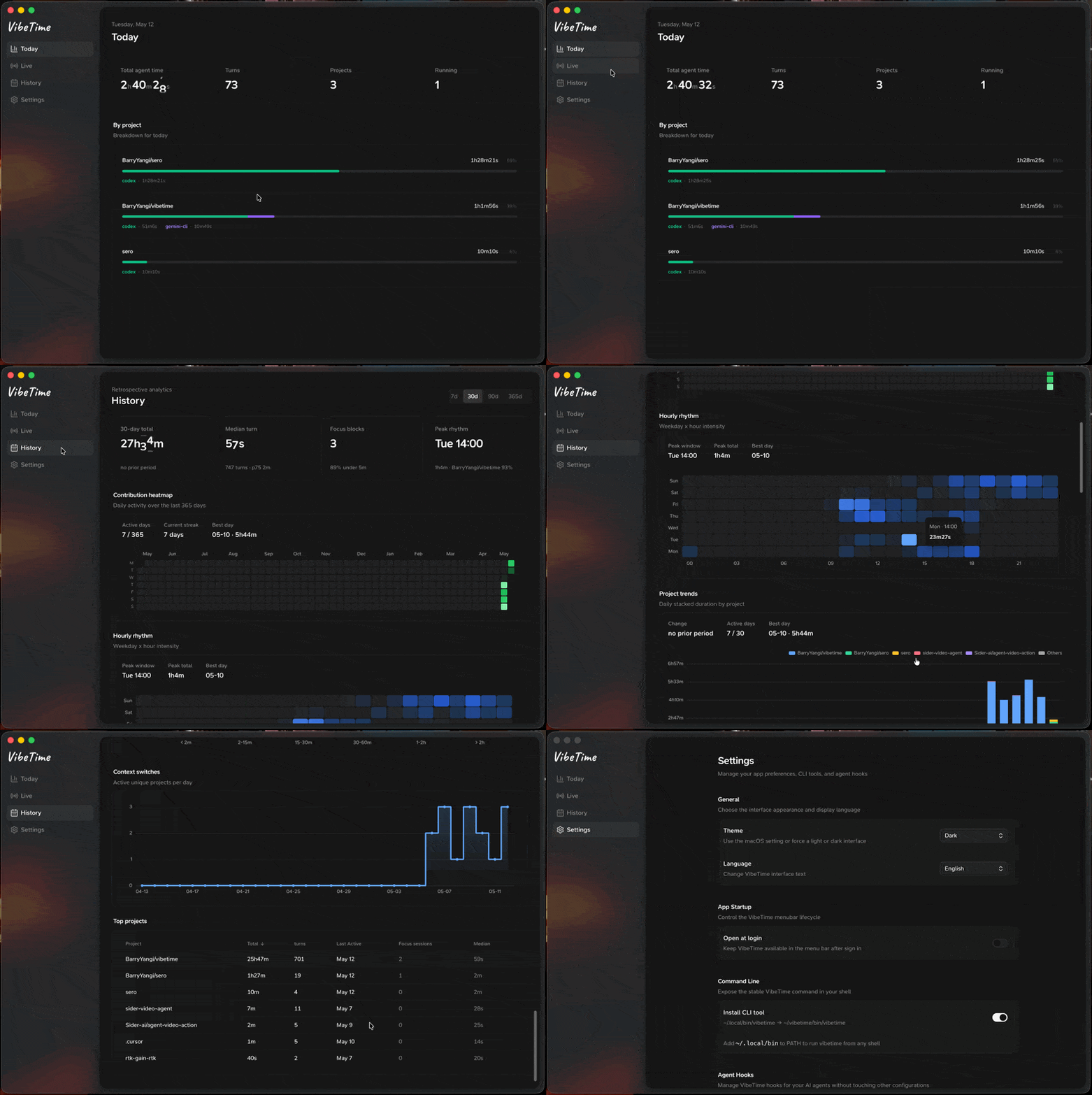
- Tracks agent sessions and turns locally with SQLite.
- Shows today's live activity, completed work, and active turns.
- Provides history views with contribution-style heatmaps and useful project breakdowns.
- Installs and removes hooks for Claude Code, Codex, Cursor, and Gemini CLI from the app settings.
- Keeps data on your machine. No account, cloud sync, or hosted backend is required.
- Ships a small CLI through
~/.vibetime/bin/vibetimefor local checks, exports, and hook health diagnostics.
Download
Download the latest build from GitHub Releases.
- macOS Apple Silicon: download the latest
.dmg - Windows x64: download the latest setup
.exe
Install
macOS
- Download the latest macOS
.dmgfrom Releases. - Open the DMG and drag
VibeTime.appto/Applications. - Launch VibeTime.
- Open Settings and enable the agents you want to track.
The app is not notarized yet, so macOS may require right-clicking VibeTime.app
and choosing Open on first launch.
Windows
- Download the latest Windows x64 setup
.exefrom Releases. - Run the installer.
- Open Settings and enable the agents you want to track.
Windows support currently targets x64.
Agent Notes
Codex
VibeTime installs three Codex hooks:
SessionStartUserPromptSubmitStop
Codex may require one manual review step after installation. If Codex shows a
message like hooks need review, open /hooks in Codex and approve the VibeTime
hooks. This is Codex's safety boundary; VibeTime does not bypass it.
VibeTime uses Codex's current inline config.toml hook format and removes its
older entries from ~/.codex/hooks.json to avoid mixed-source warnings.
Claude Code, Cursor, and Gemini CLI
Claude Code, Cursor, and Gemini CLI hooks can be installed or removed from VibeTime
Settings. VibeTime preserves unrelated user hooks.
Local Data
VibeTime stores data under:
~/.vibetime/data.db~/.vibetime/config.toml~/.vibetime/hook.log~/.vibetime/main.log~/.vibetime/hook-health.json~/.vibetime/bin/vibetime
The database is local SQLite. You can remove VibeTime's hooks from Settings before
uninstalling the app.
Hook health diagnostics:
- Run
vibetime healthto inspect recent hook persist failures. - Use this when data appears missing to quickly confirm whether writes are failing (for example, DB lock or disk issues).
CLI essentials:
- Run
vibetime statusfor a compact local health summary. - Run
vibetime agentsto inspect agent hook installation. - Run
vibetime historyfor the same 30-day summary semantics as the app History tab. - Add
--jsonto status/query commands when scripting or calling from another agent.
Development
VibeTime is a pnpm workspace:
packages/core- pure TypeScript domain logic and SQLite schemapackages/hook- Bun-compiled hook and CLI binarypackages/desktop- Electron, React, and the tray/menu bar app
Useful commands from the repo root:
pnpm typecheck
pnpm lint
pnpm test
pnpm depcheck
pnpm verify:core-zero-deps
pnpm run ci
Desktop builds:
pnpm --filter @vibetime/desktop pack:mac
pnpm --filter @vibetime/desktop dist:mac
pnpm --filter @vibetime/desktop pack:win
pnpm --filter @vibetime/desktop dist:win
Artifacts are written to packages/desktop/release/.
License
MIT
Yorumlar (0)
Yorum birakmak icin giris yap.
Yorum birakSonuc bulunamadi