overseer
Health Uyari
- License — License: AGPL-3.0
- Description — Repository has a description
- Active repo — Last push 0 days ago
- Low visibility — Only 7 GitHub stars
Code Basarisiz
- rm -rf — Recursive force deletion command in .github/actions/setup/action.yml
- rm -rf — Recursive force deletion command in .github/workflows/mobile-init.yml
Permissions Gecti
- Permissions — No dangerous permissions requested
Bu listing icin henuz AI raporu yok.
Run and supervise your AI coding agents side by side, locally or on a server over SSH

Overseer
Run and supervise your AI coding agents side by side
on this machine or on a server over SSH, with their terminals, tasks and reviews in one place.









Install · Features · User guide · Changelog
Overseer is a desktop app (Linux, macOS, Windows), a phone and tablet app (Android, iOS) and a small
daemon. It works with Claude Code, Codex, Gemini CLI, Antigravity, opencode, Amp, Copilot CLI and
Cursor Agent. Each agent session is a line: one agent, in one worktree, on one machine, for
one owner. The daemon owns the terminals, so closing the app, losing Wi-Fi or putting the laptop
to sleep stops nothing; open the app again and every session is where you left it.
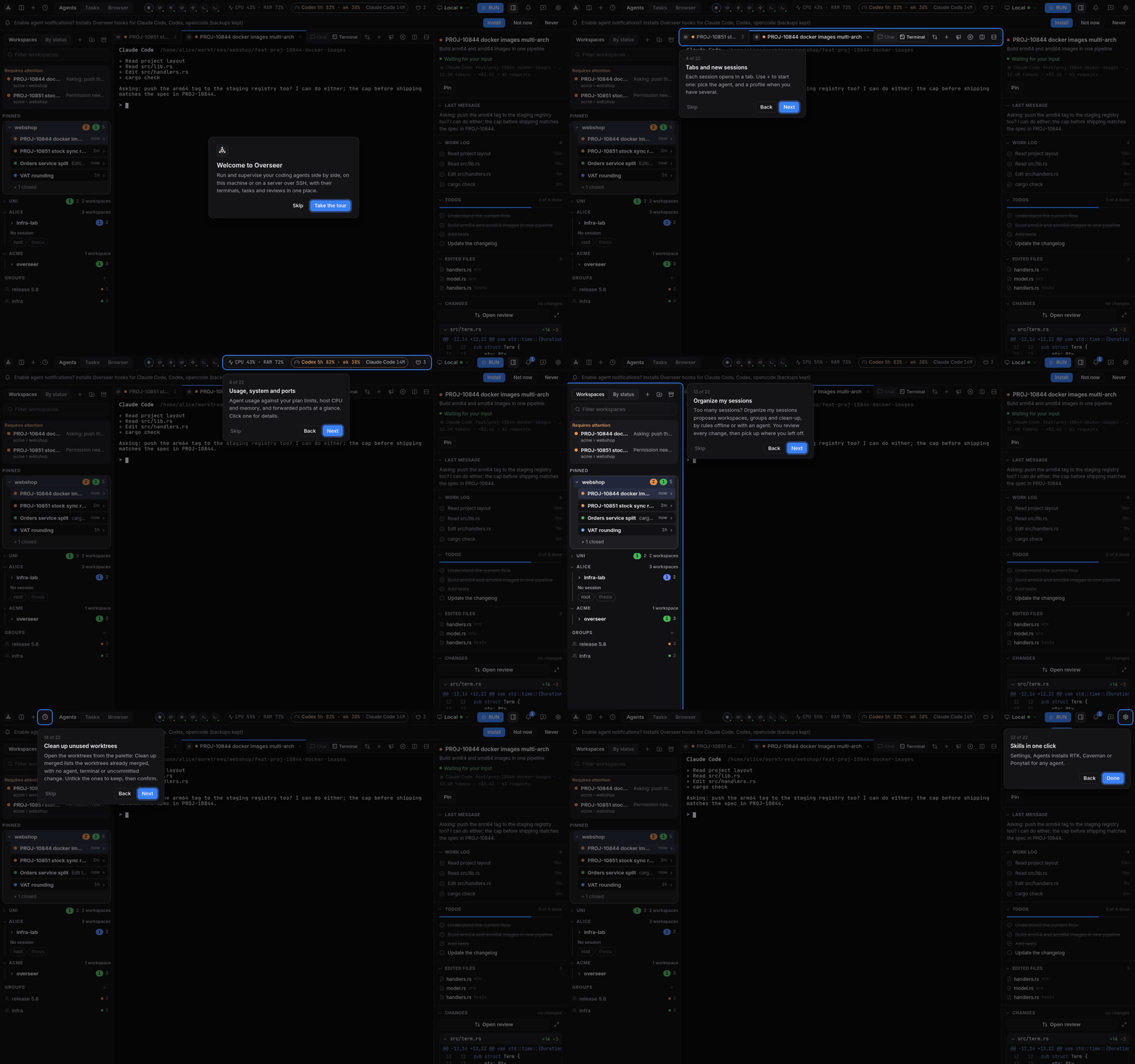
New here? Install the app, open it, and take the tour: it shows each part of the window in about
a minute. You can replay it any time from Settings → Help.
Features
Every agent in one window
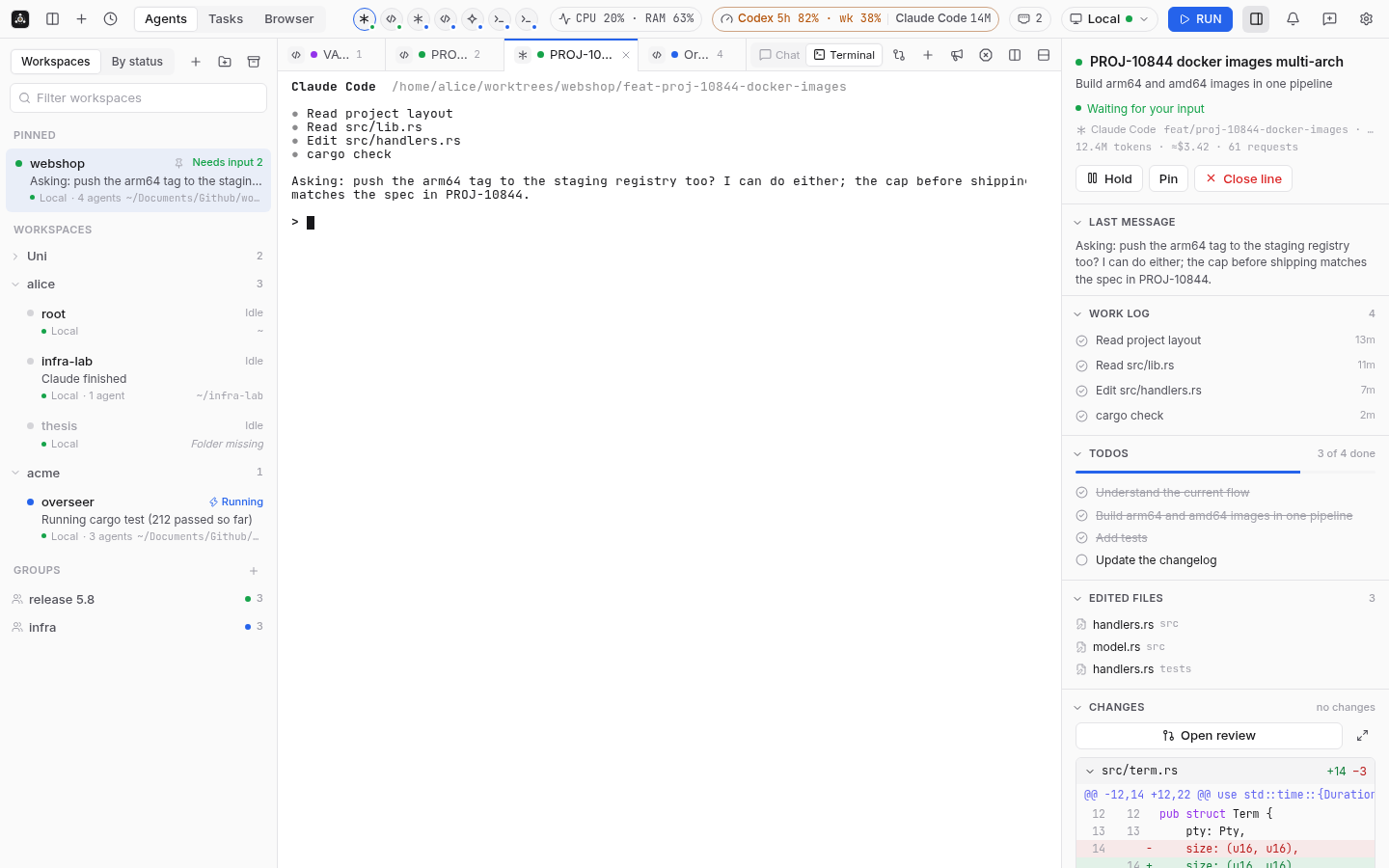
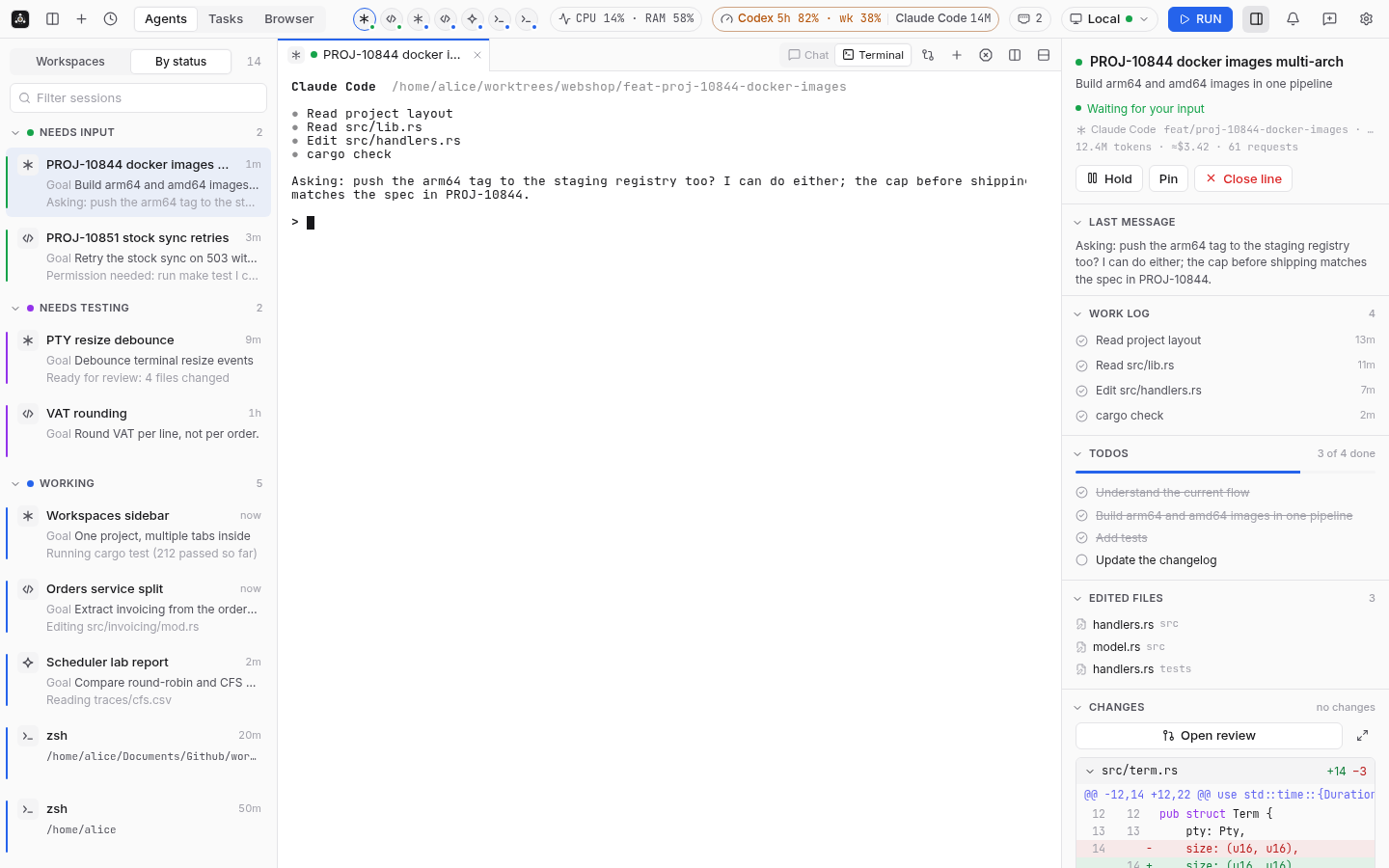
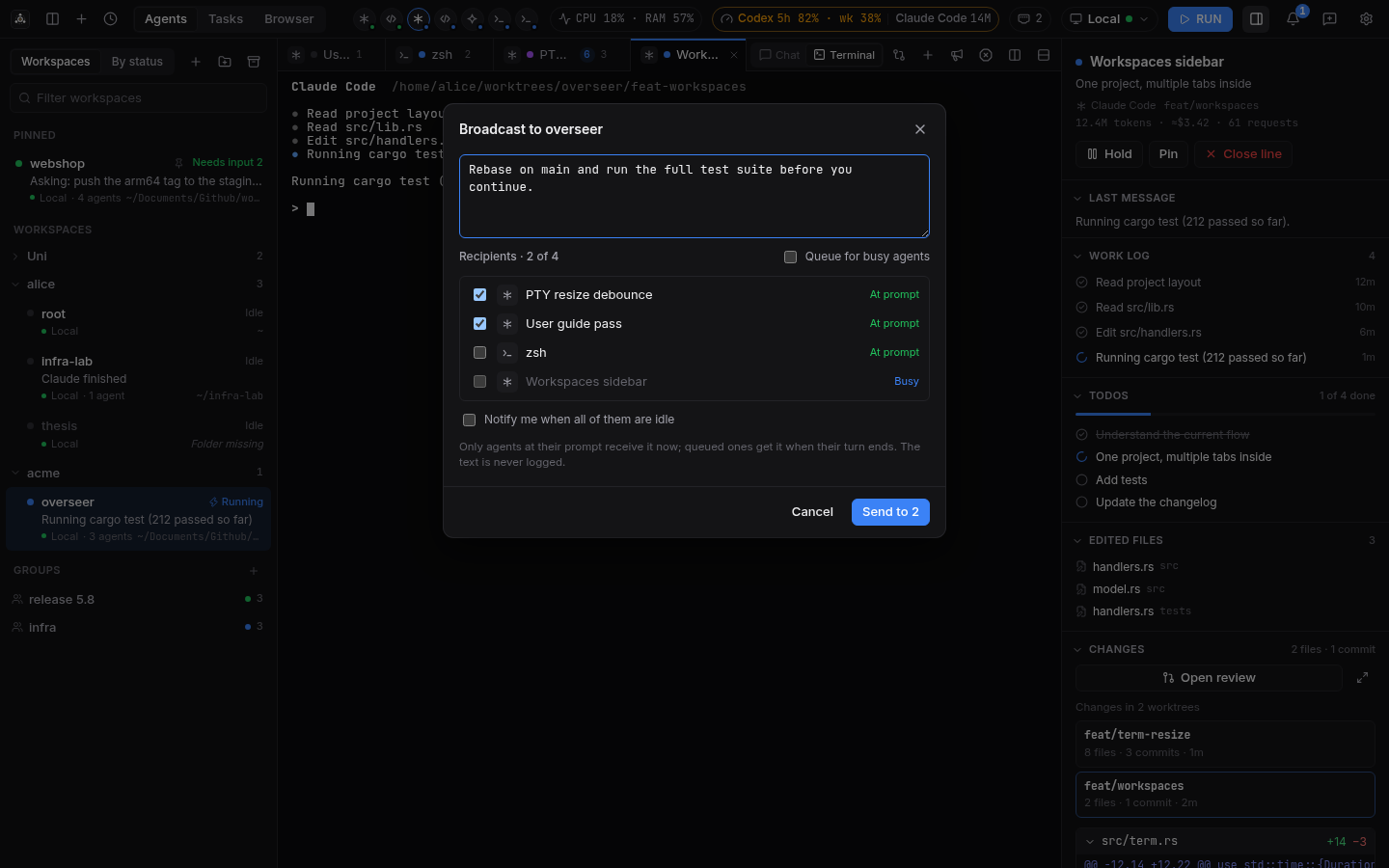
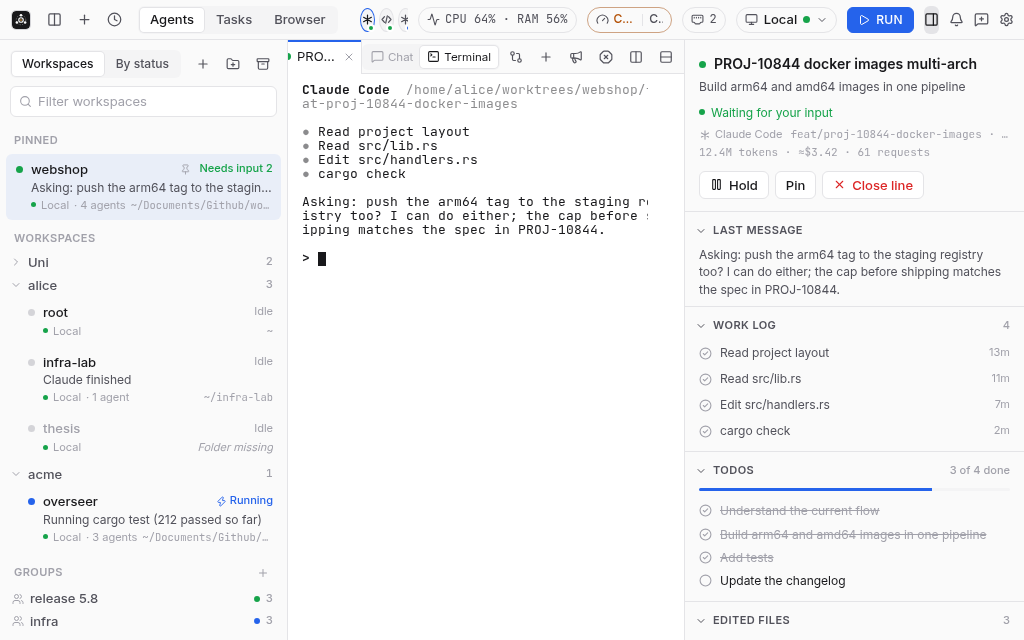
Workspaces group sessions by project. Each session opens in a tab with its live terminal, and
the side panel shows what the agent is doing: last message, work log, todos, edited files and
changes. Switch to By status to see at a glance who needs your input, who is running and who
is done. Agent tabs also have a Chat view rebuilt live from the agent's session file.
Terminals can optionally be drawn on the GPU with WebGL (Settings, Terminal, GPU rendering,
off by default and experimental), which keeps long output smooth. Clicking in the line you are
typing, in a shell or an agent like Claude Code or Codex, moves the cursor there like in a text editor.
Coming from Switchboard, the old name of Overseer? When its data is found, Overseer offers to import
your sessions, tasks, workspaces and settings in one click (also in Settings, Help).
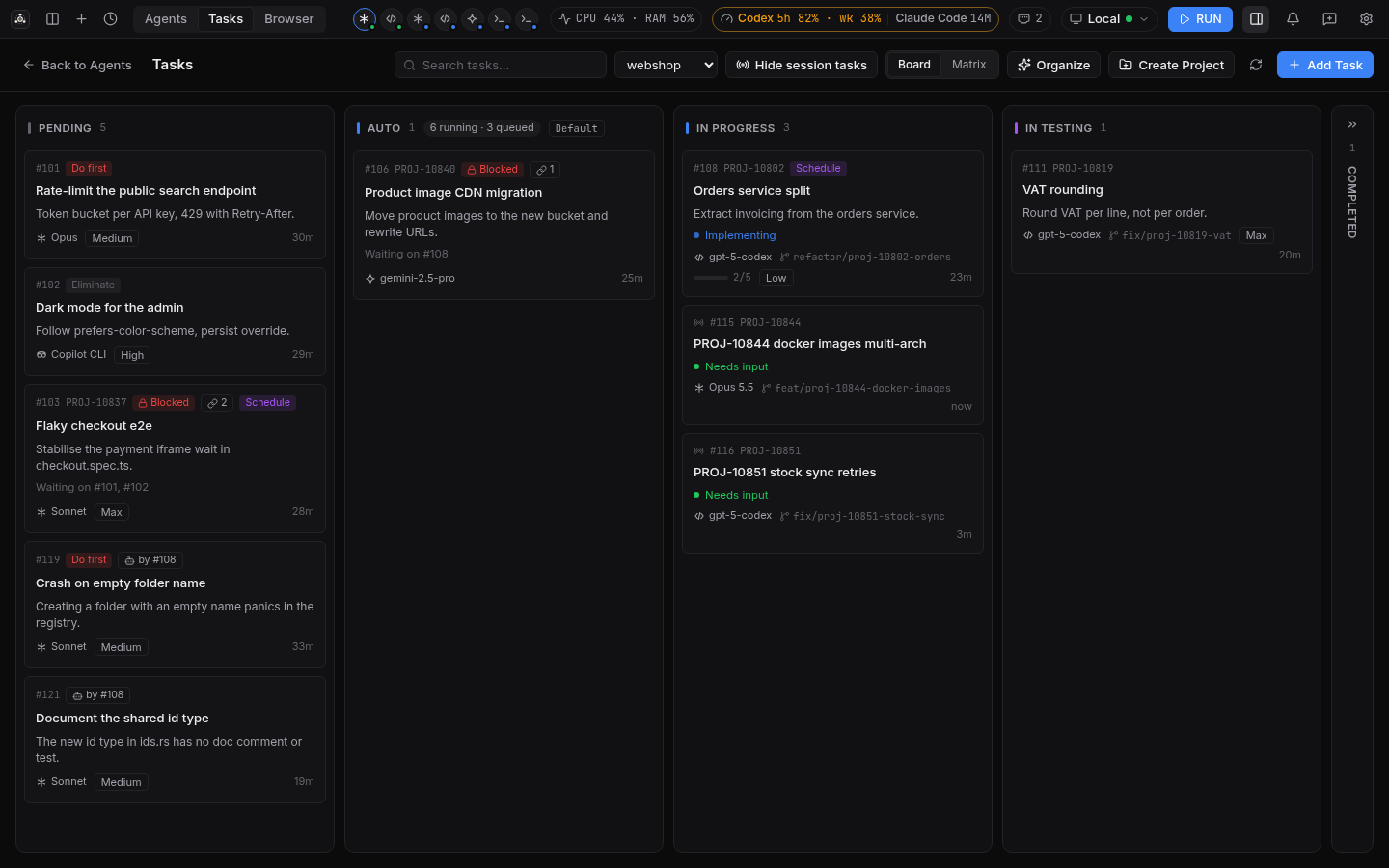
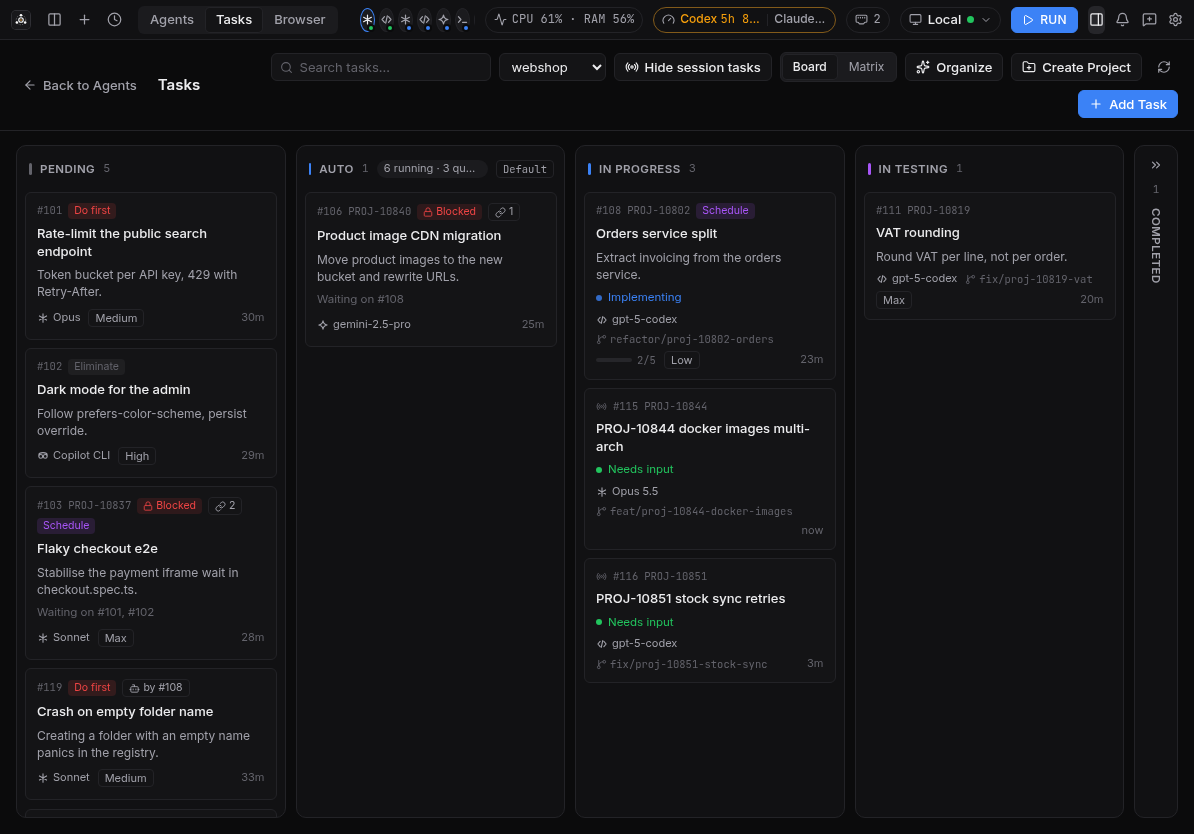
A task board that starts agents for you
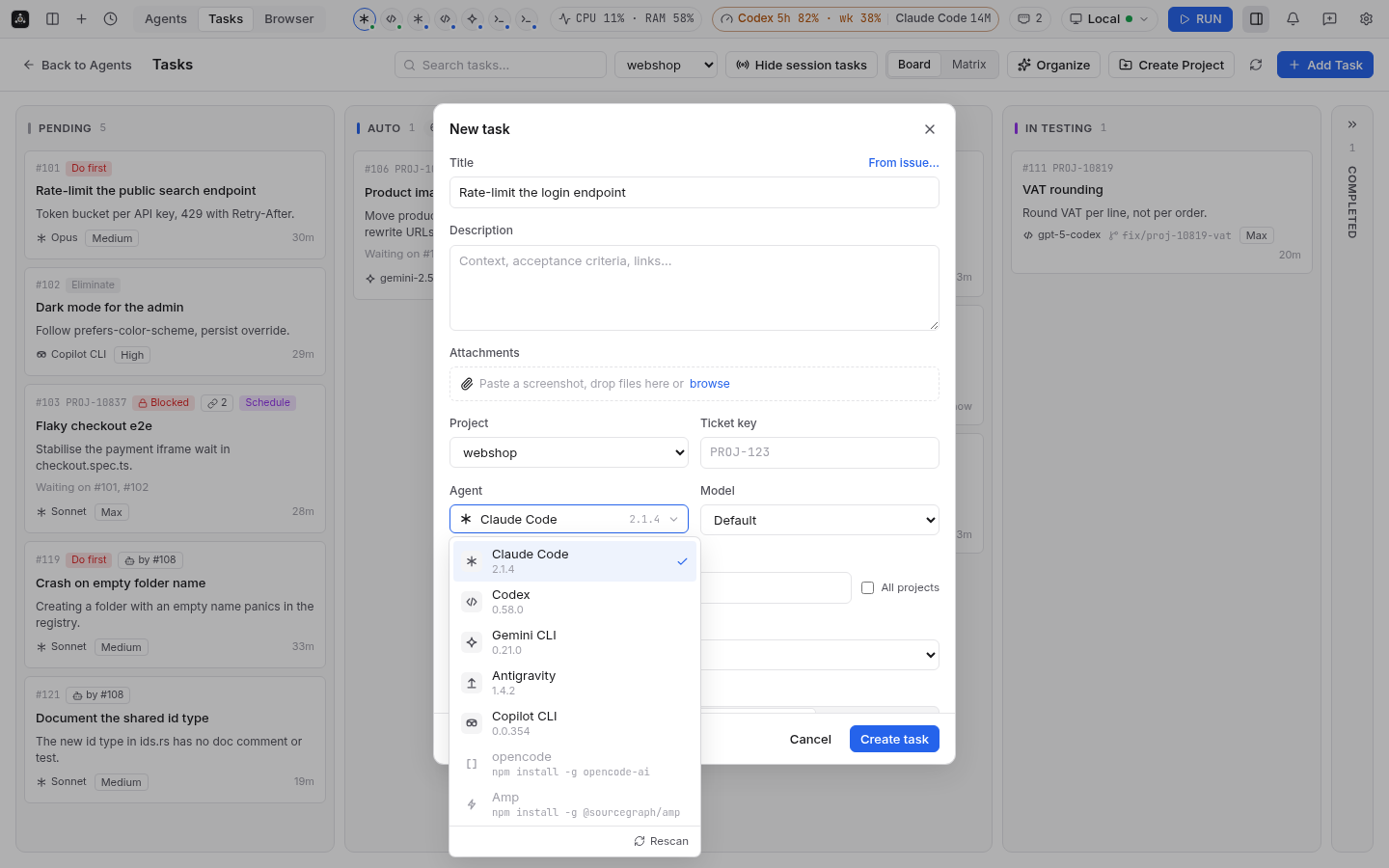
Write a task, pick the agent, its model and reasoning effort, and start it: Overseer creates a
worktree on a new branch and types the task into the agent. Tasks in the Auto column start on
their own, in order, within your concurrency limit. A new task can be filled from the project's
GitHub or GitLab issues or Jira tickets, and agents can read and update tasks through the
built-in MCP server.
Live review of what agents change
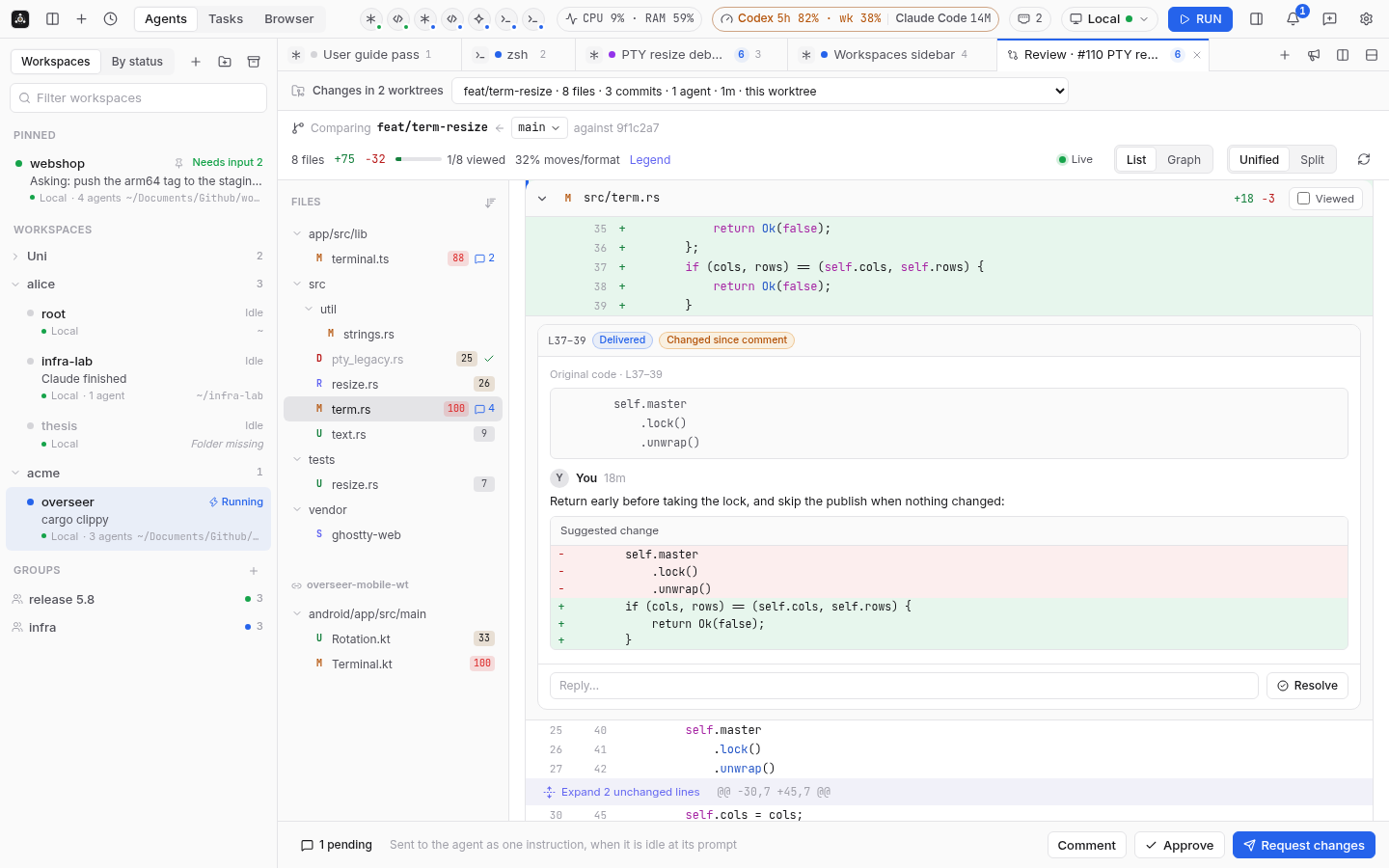
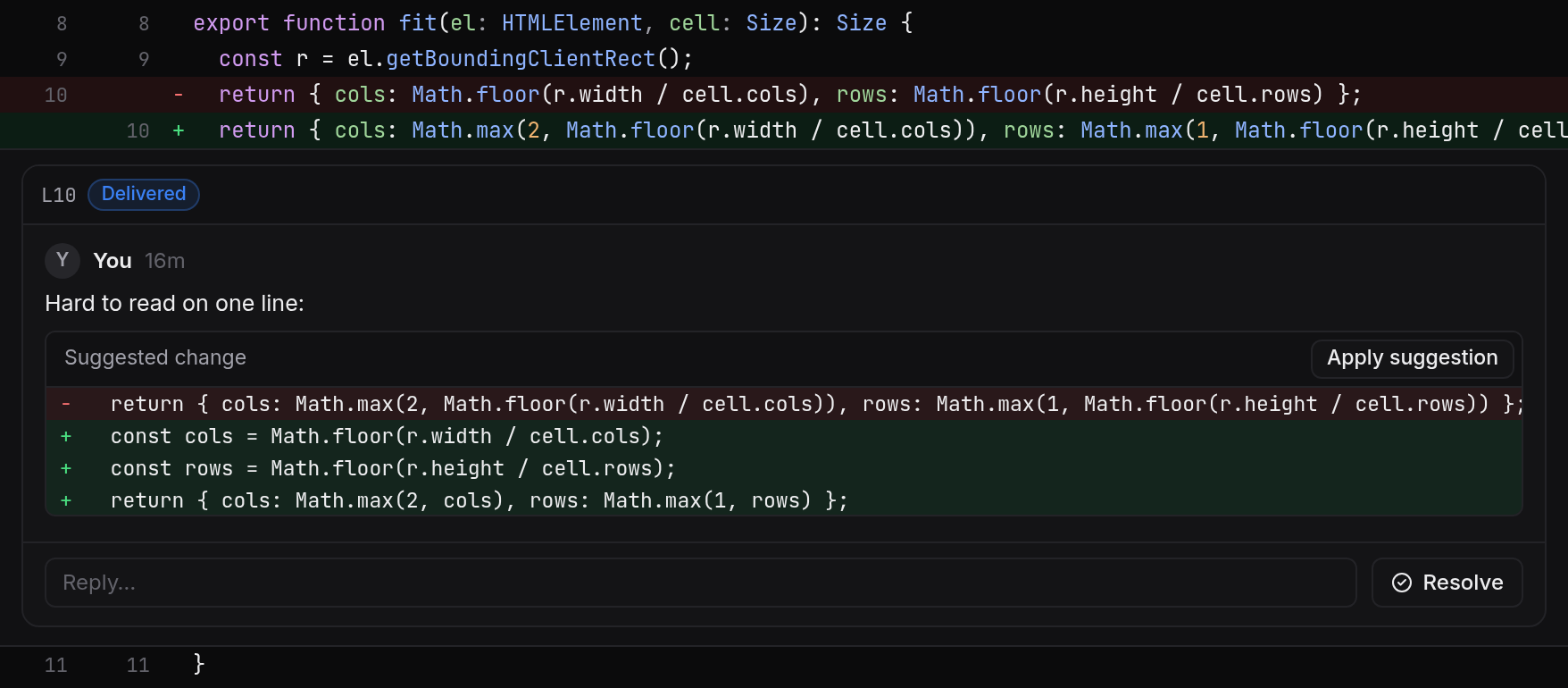
A GitHub-style review of an agent's changes while it works. Comment on lines, suggest edits, and
send the comments back to the agent; threads follow the code as it changes. Approve, reject or
commit from the Kanban card when the task is in testing.
Git graph and worktrees
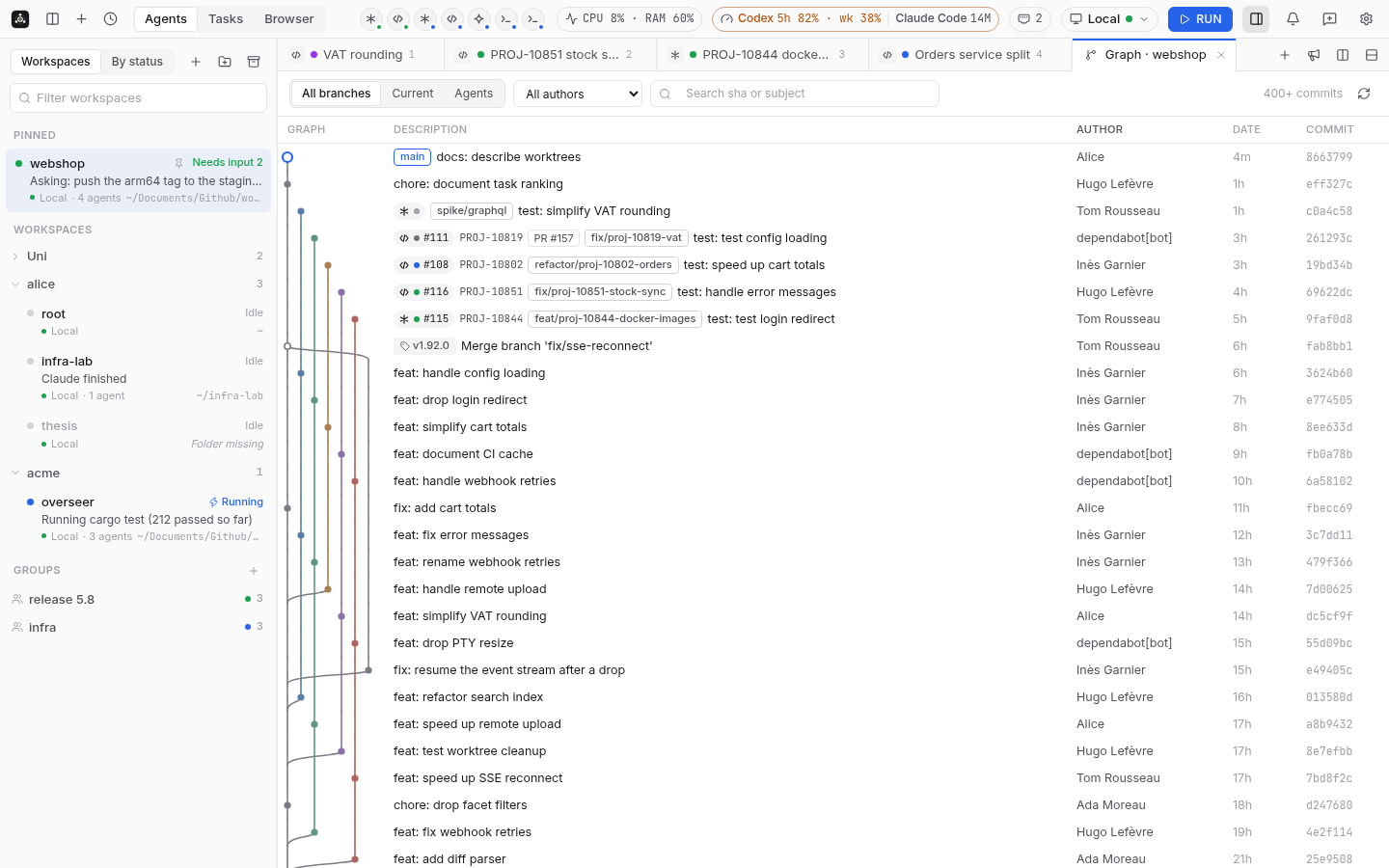
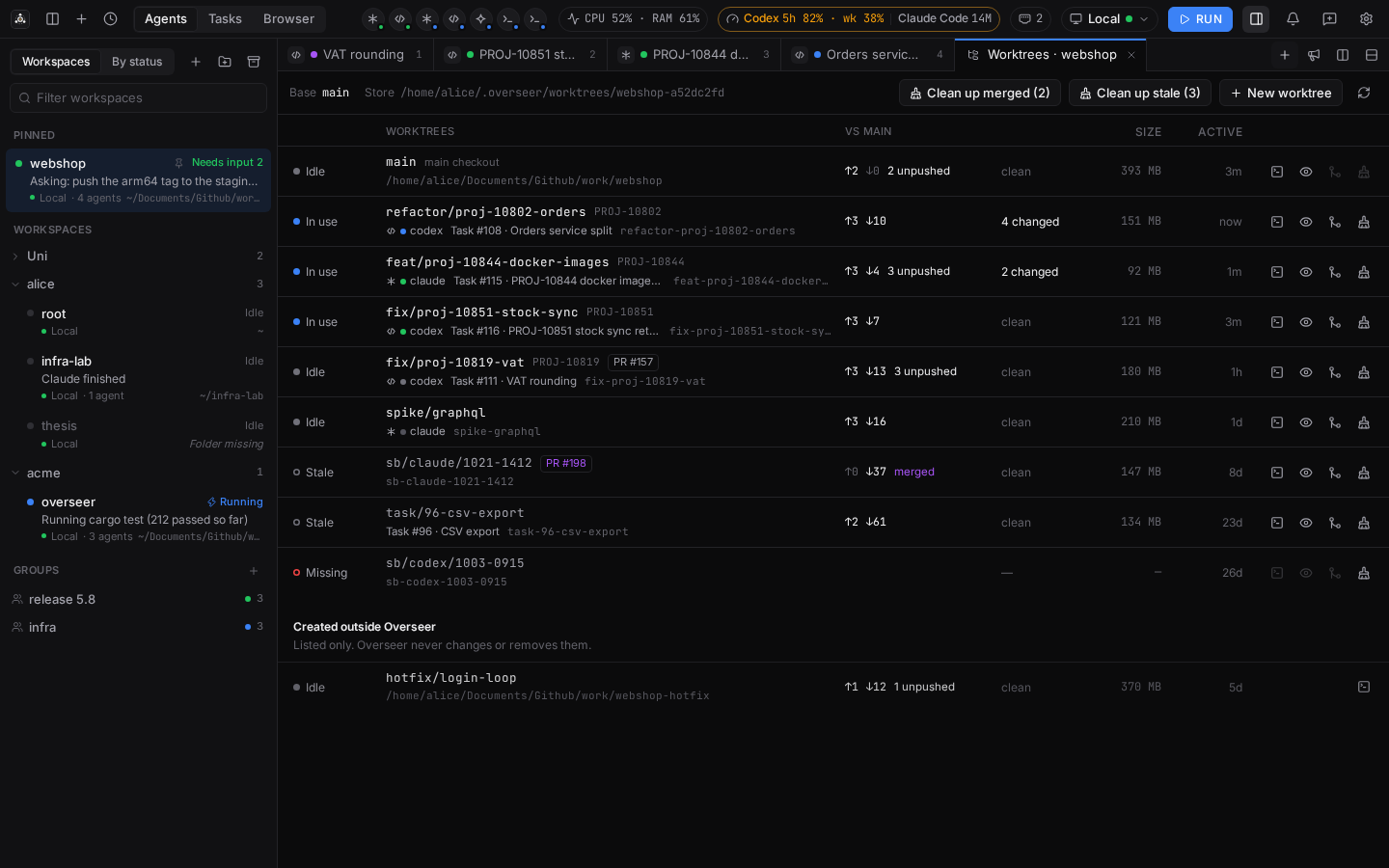
A per-project git graph that stays fast on large histories, with agent branches, tasks and PRs
on it. Worktrees live in one store outside your repositories, show whether they are in use, idle
or stale, and are cleaned up safely: Clean up merged picks the merged ones with no agent left,
and you untick the ones to keep.
Remote machines over SSH
Point the app at any host that works with ssh <host>: your ~/.ssh/config, ProxyJump,ProxyCommand, agents and keys are used as is. The app installs the daemon on first connection
and carries terminals, events and forwarded ports over a single SSH connection. Nothing listens
on a TCP port on the server.
And also
Phone and tablet apps for Android and iOS (iPhone and iPad), synced with the desktop: follow
and answer your agents from anywhere (docs/mobile.md). Tablets get the phone
layout in portrait and the full desktop layout, with touch, in landscape.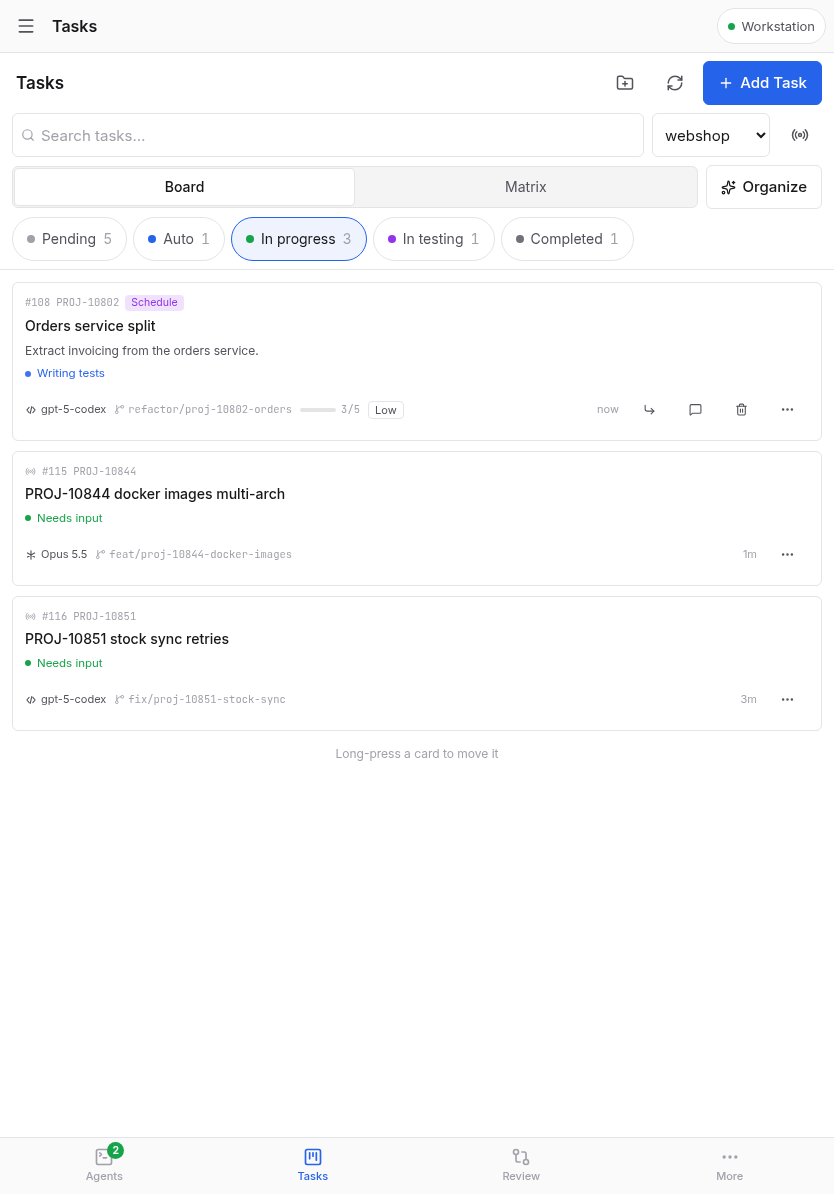
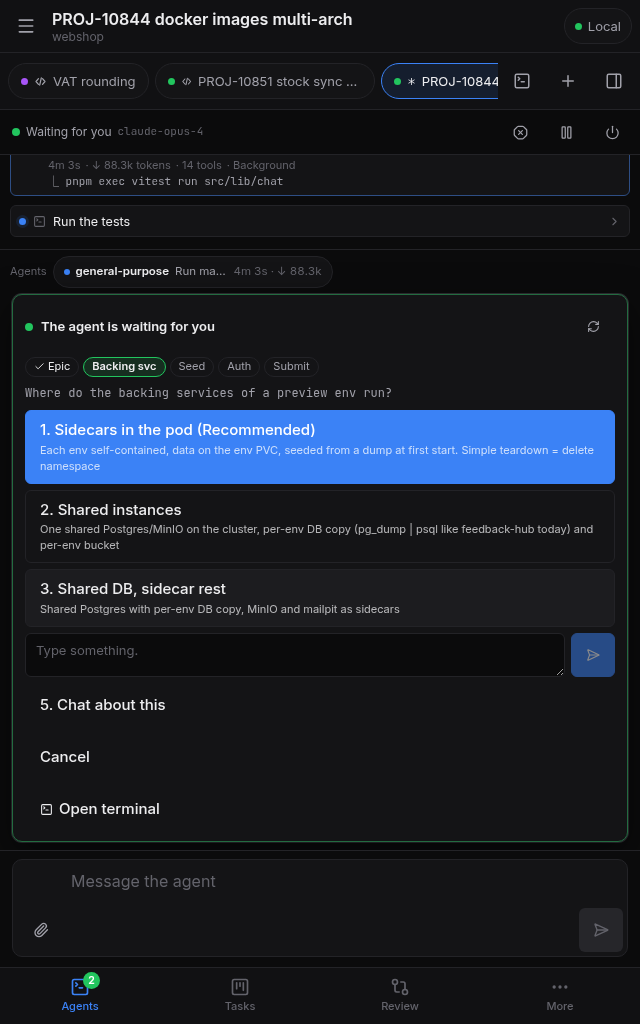
Demo mode: no server yet? Try the demo on the connect screen runs the whole app on sample
sessions, tasks, reviews and chats, on the desktop or a phone, with nothing installed. A Demo
mode pill stays in the title bar; Exit demo returns to your own hosts and settings, untouched.Notifications when an agent needs input or finishes, from agent hooks Overseer can
install for you.Skills and plugins in one click: install RTK (trims shell output before the agent reads it),
Caveman (terse replies) or Ponytail (simplest code that works) for Claude Code, Codex, Gemini CLI,
opencode, Copilot CLI, Cursor Agent, Amp or Antigravity, from Settings → Agents or the command
palette. The install runs in a terminal you can watch.Usage and system monitor: agent quotas, token usage, CPU and RAM in the title bar.
Light and Dark palettes: choose System, Light or Dark as the theme (System follows your OS live), then pick a palette for each mode: Default, Graphite or Solarized Soft for Dark, or make your own with color pickers, a live preview and a contrast warning. Find them in Settings → General → Appearance (Graphite, Solarized Soft).
Settings with search: categories in a sidebar, and a search box that finds any setting by name or description, in your language or in English.
Command palette (history, actions, sessions) and keyboard shortcuts.
Organize my sessions: a proposed workspace layout you approve before anything moves.
Built-in browser and port forwarding for the dev servers your agents start; the Ports panel
lists them and stops any one an agent left running in the background.Team mode: a shared API merges every station's lines, relays commands between stations,
and publishes events and signed webhooks for other tools.Updates in the app, and a feedback button with optional diagnostics.
Install
macOS (Homebrew)
Install the desktop app, and the overseer CLI/daemon if you want it on this machine:
brew install --cask basilelt/tap/overseer
brew install --formula basilelt/tap/overseer
The full basilelt/tap/... name taps the repository and tells Homebrew to trust these packages,
so no brew trust or --trust step is needed. Upgrade withbrew update && brew upgrade --cask basilelt/tap/overseer && brew upgrade --formula basilelt/tap/overseer.
The app is signed with a Developer ID and notarized by Apple, so macOS opens it without a
warning. Each release asset carries a build provenance attestation:gh attestation verify <file> --repo basilelt/overseer checks a download came from this
repository's release workflow.
Linux and Windows
Download from the latest release (.AppImage, .deb or .rpm on Linux x64 and arm64,-setup.exe or .msix on Windows x64 and arm64). The Linux builds need glibc 2.35 or newer
(Ubuntu 22.04, Debian 12, Fedora 36 and later). The .msix is self-signed: importoverseer-msix.cer from the release into Local Machine > Trusted People once, then open the.msix; it does not update itself, use the -setup.exe for in-app updates. For example:
gh release download --repo basilelt/overseer --pattern '*.AppImage'
chmod +x Overseer_*.AppImage
The overseer CLI/daemon alone is a single static binary per platform
(overseer-<version>-<target>), e.g. --pattern '*-x86_64-unknown-linux-musl'. Remote hosts
need nothing: the app installs the daemon over SSH on first connection.
Android and iOS
Android: install and update the APK from the releases with Obtainium
(add it in one tap, settings prefilled), or download it withgh release download --repo basilelt/overseer --pattern '*android.apk'. Google Play gets a
release now and then, shipped by hand; Play builds are updated by Play instead of the in-app
updater. iOS: Overseer Agents on the App Store, or join the TestFlight beta. Store versions lag behind the GitHub releases. See
docs/mobile.md.
Google Play (closed testing)
Overseer is in closed testing on Google Play before its public release. To install it from Play
and get updates there:
- With the Google account of your Android phone, join the
Overseer testers group ("Join group"). - Open the testing invitation
with the same account and tap Become a tester. If it says the app is not available, the
group join has not reached Play yet: wait a few minutes and reload. - Install Overseer from the
Play Store page
(the link from the invitation page). Updates arrive through Play like any app. - Stay in the group and keep the app installed: Play only opens the app to everyone after
testers have used it for 14 days. Send feedback from the app (More > Send feedback) or on the
Play listing.
No server yet? Tap Try the demo on the first screen to explore the app with sample data.
Already using the APK from the releases? The Play build is signed with a different key, so
Android will not install it over the APK: uninstall the APK first (your servers have to be added
again). From then on Play updates the app instead of the in-app updater.
TestFlight (iOS beta)
Overseer for iPhone and iPad is in public beta on TestFlight before its App Store release:
- Install TestFlight from the App Store.
- Open the Overseer TestFlight invitation on your
iPhone or iPad and tap Accept, then Install. If it says the beta is full or not
accepting testers, try again later. - New builds arrive through TestFlight; each build expires after 90 days, so keep TestFlight
updates on. Send feedback from the app (More > Send feedback) or with Send Beta Feedback
in TestFlight.
Updates
From 0.4.0 the app updates itself (AppImage and Windows installer) from the public GitHub
releases; no token or sign-in is needed. Homebrew installs get an Update button that runsbrew upgrade for you (the command stays copyable); .deb/.rpm installs link to the release.
Components
overseer: CLI and daemon of a station. Reads the agents' sessions, tmux and git; installs
agent hooks on request; serves a local API on a Unix socket; syncs with the API.overseer-api: shared registry (Rust, SQLite). Station and user tokens, merged reads,
command relay and audit, SSE events, webhooks,POST /v1/linesfor feedback-hub.- Board: web page served by the daemon on loopback; lines grouped by ticket, PR and CI, actions.
- Desktop app support (in the daemon): terminals owned by the daemon, a local task Kanban that
starts agents in worktrees, an activity panel from transcripts, an MCP server for agents, a
per-project git graph, worktrees managed in one store outside the repositories with safe
cleanup (ADR 0031), and a server mode reached over
SSH (contract, user guide section 14). - Desktop app: Tauri client for the daemon, local or remote over SSH; terminals,
activity, diffs and a task board.
CLI quickstart
make build                                   # target/release/overseer, target/release/overseer-api
cp target/release/overseer ~/.local/bin/
export OVERSEER_STATE_DIR=~/.local/state/overseer

overseer ls                               # this station's lines
overseer doctor                           # what is installed and what is missing
overseer hooks install                    # dry run; add --apply to write

overseer daemon --http 127.0.0.1:0 &      # daemon with the Board
overseer board                            # prints the Board URL

printf '%s\n' "$STATION_TOKEN" | overseer enroll --api http://api.example.com:8080
overseer sync --once                      # push this station's lines to the API
printf '%s\n' "$USER_TOKEN" | overseer login --api http://api.example.com:8080
State lives in ~/.local/state/overseer (Linux) or ~/Library/Application Support/overseer (macOS); OVERSEER_STATE_DIR overrides it, and bin/overseer defaults it to <checkout>/.state.
Service files for the daemon and sync (systemd user units, launchd agents) and a runner image are
in deploy/; Overseer never installs them.
Contributing
Contributions are welcome. CONTRIBUTING.md explains how to propose a change,
and AGENTS.md holds the rules every change follows (stability, energy, tests, one
draft PR per feature). app/README.md covers the app's development loop and the
mock daemon. make test and make lint run offline; tmux tests use an isolated server. Report
security problems privately, as described in SECURITY.md.
Develop while using the installed app
scripts/dev.sh runs Overseer built from your checkout next to the Overseer you use every day,
without touching it: the dev daemon gets its own HOME, state directory and tmux server under~/.overseer-dev (OVERSEER_DEV_DIR changes it), and the dev desktop app runs under its own
bundle id, io.github.basilelt.overseer.dev, so its settings, windows and macOS permissions are
separate too.
scripts/dev.sh up       # build the daemon from this checkout and start it
scripts/dev.sh app      # desktop app in dev mode (pnpm tauri dev) on the dev daemon
scripts/dev.sh status   # is the dev daemon running?
scripts/dev.sh down     # stop the dev daemon; its tmux sessions keep running
scripts/dev.sh reset    # stop everything dev and delete ~/.overseer-dev
No code signing is needed: tauri dev runs an unbundled binary you built, which Gatekeeper does
not block. Signing only concerns the released .app (see docs/ci.md).
The dev app is a different app to macOS, so it may ask for Local Network access on its own. The dev HOME starts
with a copy of your ~/.gitconfig and nothing else: agents started from the dev daemon are not
logged in until you log in from one of its terminals (for example claude, then /login). For UI work
alone, pnpm dev in app/ runs the frontend in a browser on the mock daemon.
Never start a daemon from a checkout with your real HOME (for exampleOVERSEER_STATE_DIR=$PWD/.state target/debug/overseer daemon): a daemon on a state directory other
than the default one does not repair your global agent hooks or ~/.overseer/bin/overseer (it
logs why), but it shares your agents, tmux and files. Give it its own HOME, as scripts/dev.sh
and scripts/qa/sandbox.sh do.
Documentation
- User guide: setup per station, every command, Board, API, desktop app, troubleshooting.
- Brief: context, architecture and plan.
- Architecture decisions.
- CI and releases.
- Changelog.
- Contracts:
api.openapi.yaml,daemon.openapi.yaml, JSON schemas.
License
Overseer is free software under the GNU Affero General Public License v3.0 or later.
You can use, change and share it; if you distribute a modified version, or let people use one
over a network, you must publish its source under the same license.
Yorumlar (0)
Yorum birakmak icin giris yap.
Yorum birakSonuc bulunamadi