dispatch
Health Uyari
- No license — Repository has no license file
- Description — Repository has a description
- Active repo — Last push 0 days ago
- Community trust — 360 GitHub stars
Code Gecti
- Code scan — Scanned 2 files during light audit, no dangerous patterns found
Permissions Gecti
- Permissions — No dangerous permissions requested
This tool is a Claude Code skill that acts as an orchestrator, spawning background AI workers to handle tasks in parallel. It prevents your primary AI session's context window from filling up by delegating implementation work—like refactoring or writing tests—to separate, fresh contexts.
Security Assessment
The overall risk is rated as Medium. The automated code scan of two primary files found no dangerous patterns, hardcoded secrets, or requests for explicitly dangerous permissions. However, the fundamental nature of this tool inherently requires executing shell commands, managing multiple terminal processes, and making network requests to interact with external AI model APIs. While the light audit found no malicious intent in the scanned files, the tool functions as an orchestration layer that dispatches automated instructions to external services. A comprehensive security review of the entire codebase is recommended to fully verify how payloads and API keys are handled.
Quality Assessment
The project appears to be very healthy and actively maintained, with its most recent code push occurring today. It enjoys solid community trust, evidenced by a strong 360 GitHub stars, which indicates that multiple developers have reviewed and found the tool useful. The primary drawback is the complete lack of a designated open-source license. Without a license, the code remains under exclusive copyright by default, meaning that technically, you do not have legal permission to use, modify, or distribute it.
Verdict
Use with caution. The tool is actively maintained and safe from obvious malware, but the missing license poses a strict legal risk for integration into commercial or open-source projects.
A Claude Code skill that 10x's your effective context window by dispatching tasks to background AI workers.
/dispatch 
Dispatch 10x's Claude Code's effective context window size. Instead of filling your session with implementation, /dispatch turns it into a lightweight orchestrator — work fans out to background agents, each with their own full context window.
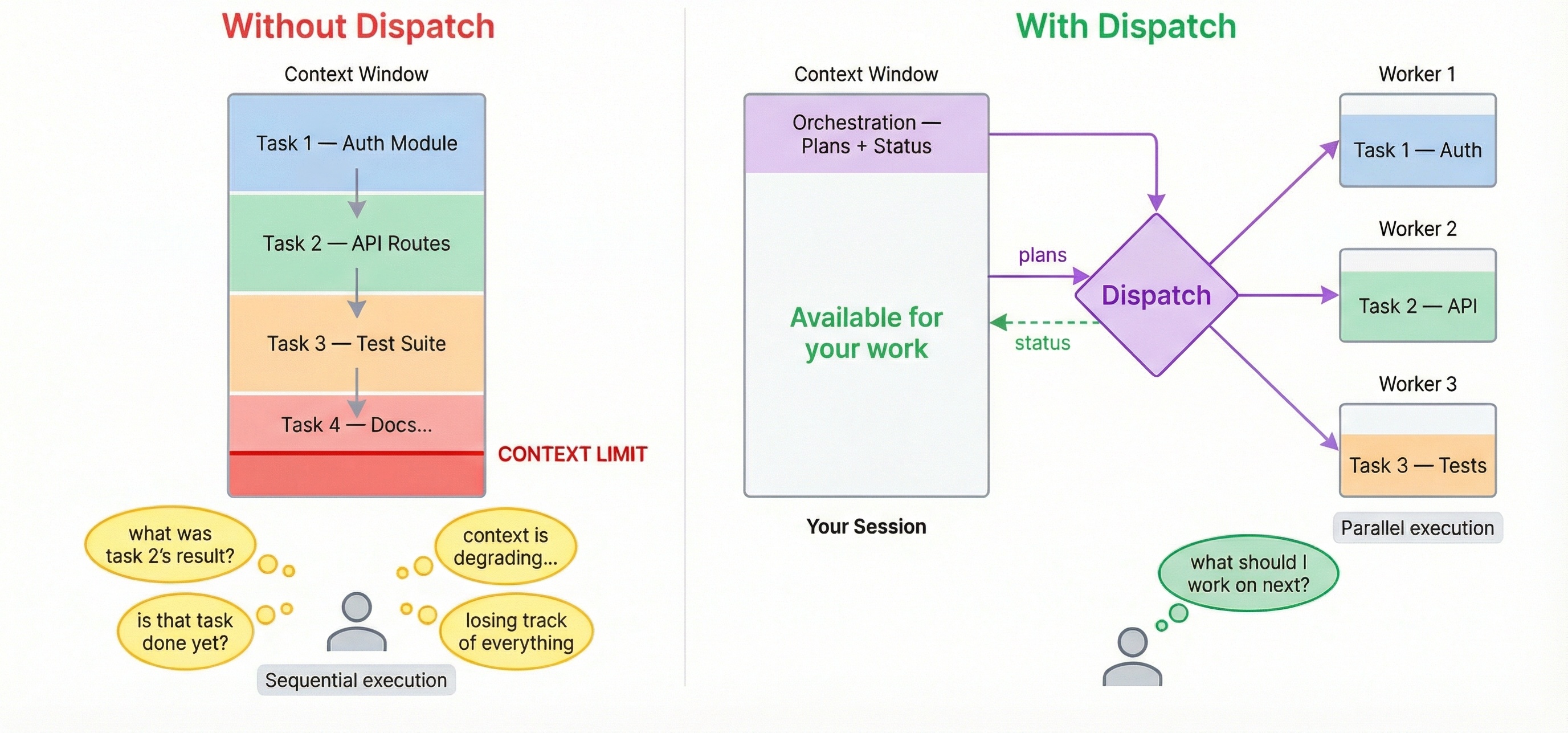
Without dispatch: You ask Claude to review code, refactor a module, write tests, and update docs. Each task fills the context window. By task 3, Claude is losing track. By task 5, you're starting a new session.
With dispatch: You describe all 5 tasks. Workers execute in parallel with fresh contexts. Your main session stays lean. Questions surface to you when needed — no polling, no context lost.
/dispatch use sonnet to find better design patterns for the auth module
Why dispatch
Your session stays lean
Dispatch inverts the usual model: the main session becomes a mediator, not the thinker. It writes a checklist and hands it off. The actual implementation — reading code, reasoning about edge cases, writing tests — happens in fresh worker contexts that each get their own full window. Your main session's context is preserved for orchestration.
The dispatcher carries the cognitive load
With claude --background, multiple terminals, or fire-and-forget agent runners — you are the orchestrator. You track what's running, check on progress, notice failures, and context-switch between outputs.
With dispatch, the AI dispatcher tracks all workers, surfaces questions, reports completions, handles errors, and offers recovery. Your job reduces to: (a) describe what you want, (b) answer questions when asked.
Workers ask questions back
When a /dispatch worker gets stuck, it doesn't silently fail or hallucinate. It asks a clarifying question — the dispatcher surfaces it to you, you answer, and the worker continues without losing context. No restart, no re-explaining, no lost work.
Worker is asking: "requirements.txt doesn't exist. What feature should I implement?"
> Add a /health endpoint that returns JSON with uptime and version.

Answer sent. Worker is continuing.
Non-blocking — you never wait
The moment a worker is dispatched, your session is immediately free. Dispatch another task. Ask a question. Write code. Workers run in parallel and results arrive as they complete.
Any model, one interface
Mix models per task. Claude for deep reasoning, GPT for broad generation, Gemini for speed. Reference any model by name — if it's not in your config, /dispatch auto-discovers and adds it. If multiple models are named in one prompt, dispatch uses the last one mentioned. If no model is specified, dispatch confirms your default before proceeding.
/dispatch use opus to review this PR for edge cases
/dispatch use gemini to refactor the config parser — it's getting unwieldy
Requires Claude Code as your host session. Dispatch is a skill that runs inside Claude Code — the host plans tasks and spawns workers. Other CLIs like Cursor and Codex work as workers only (background agents that execute subtasks).
Install
npx skills add bassimeledath/dispatch -g     # user-level (all projects)
npx skills add bassimeledath/dispatch        # project-level (team-shared)
How it works
- You run
/dispatch task description - A checklist plan is created — the only context your main session needs
- A background worker picks it up in a fresh, full context window and checks off items as it goes
- If the worker has a question, it asks — you answer — it continues (no context lost in either direction)
- You get results when it's done, or ask for status anytime — your main session is still lean
Complex example
Example — pre-launch sweep for a fullstack SaaS app:
/dispatch we launch Thursday, need a full pre-launch sweep:

1) security audit the auth flow (JWT, sessions, password reset) and the
   stripe payment integration. use opus, do it in a worktree

2) performance - load test the top 5 API endpoints, find N+1 queries,
   check db indexes on users/orders/products tables. sonnet in a worktree

3) frontend audit - accessibility (WCAG 2.1 AA), bundle size, flag any
   components missing error boundaries. dispatch sonnet

4) generate OpenAPI specs for every endpoint that's missing one. use gemini

5) error handling audit - find uncaught exceptions, missing try/catch,
   inconsistent error response formats across all API routes. sonnet, worktree

ask me if anything is unclear. security is highest priority - flag
anything critical immediately
Dispatch reads the prompt, creates 5 plans, and fans out:
All 5 workers dispatched with their monitors. Here's the summary:

Security (worktree):
  ● security-audit — Opus 4-6 (worktree): Full auth + payment security review

Performance (worktree):
  ● perf-audit — Sonnet 4-6 (worktree): API load testing + DB index review

Frontend (single worker):
  ● frontend-audit — Sonnet 4-6: Accessibility, bundle size, error boundaries

Docs (single worker):
  ● api-docs — Gemini 2.5 Flash: Generate missing OpenAPI specs

Error handling (worktree):
  ● error-handling — Sonnet 4-6 (worktree): Uncaught exceptions + error format audit

All running in background. Five workers, three models, three worktrees —
your session wrote five checklists and is idle. Dispatch more work or say
"status" anytime.
Best practice: warm up at session start
Run /dispatch with no arguments at the beginning of a session to pre-load your config:
/dispatch
This reads ~/.dispatch/config.yaml into the dispatcher's context so subsequent dispatches are faster and don't need confirmation prompts. It's a good habit to add as a Claude Code memory so you remember to do it each session:
"Run /dispatch at the start of each session to warm up the config."
Setup
On first run, /dispatch auto-detects your CLIs (claude, agent, codex), discovers available models, and generates ~/.dispatch/config.yaml. No manual config needed.
Configuration
Three sections in ~/.dispatch/config.yaml:
Backends — CLI commands for each provider:
backends:
  claude:
    command: >
      env -u CLAUDE_CODE_ENTRYPOINT -u CLAUDECODE
      claude -p --dangerously-skip-permissions
  cursor:
    command: >
      agent -p --force --workspace "$(pwd)"
  codex:
    command: >
      codex exec --full-auto -C "$(pwd)"
Models — one line each, mapped to a backend:
models:
  opus:            { backend: claude }
  sonnet:          { backend: claude }
  gpt-5.3-codex:  { backend: codex }
  gemini-3.1-pro:  { backend: cursor }
Aliases — named shortcuts with optional role prompts:
aliases:
  security-reviewer:
    model: opus
    prompt: >
      You are a security-focused reviewer. Prioritize OWASP Top 10.
Prerequisites
Host (required):
- Claude Code (
claude)
Workers (optional — for multi-model dispatch):
- Cursor CLI (
agent) - Codex CLI (
codex) - Any CLI that accepts a prompt argument
Updating
Skills CLI (recommended):
npx skills update
This updates all installed skills to their latest versions. Run npx skills check first to see what's changed.
Symlinked to a local clone? If your .claude/skills/dispatch is a symlink to a local git checkout, just pull:
cd /path/to/your/dispatch && git pull
Changes are picked up immediately — Claude Code hot-reloads skills from disk.
Architecture
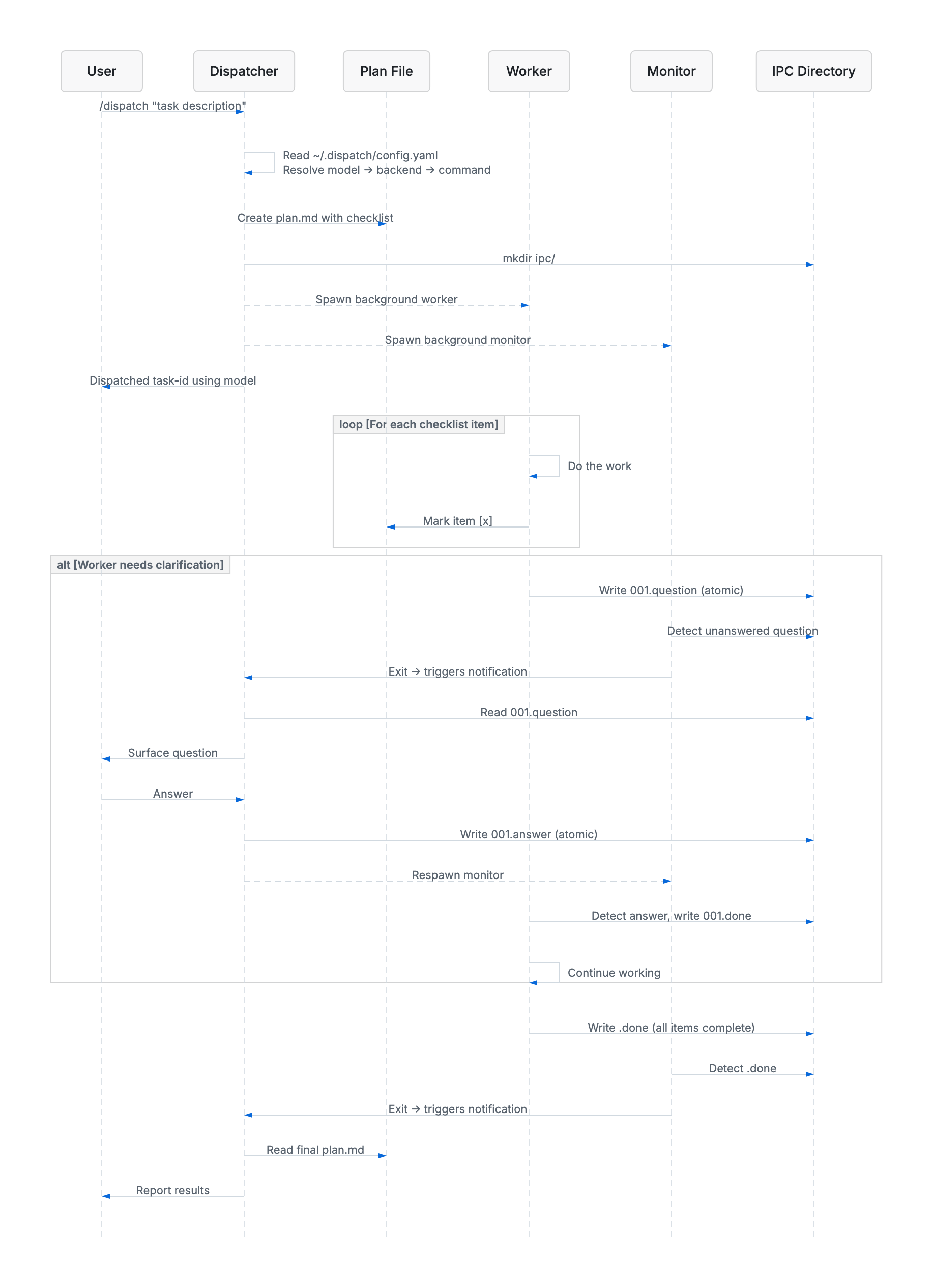
The dispatcher reads your config, creates a checklist plan, then spawns a background worker and monitor. The worker executes each item and checks it off. If it needs clarification, it writes a question to the IPC directory — the monitor detects it and notifies the dispatcher, which surfaces it to you and relays your answer back, all without the worker losing context.
License
MIT
Yorumlar (0)
Yorum birakmak icin giris yap.
Yorum birakSonuc bulunamadi