godspeed
Health Uyari
- License — License: AGPL-3.0
- Description — Repository has a description
- Active repo — Last push 0 days ago
- Low visibility — Only 7 GitHub stars
Code Uyari
- process.env — Environment variable access in .github/workflows/release.yml
- fs module — File system access in .github/workflows/release.yml
Permissions Gecti
- Permissions — No dangerous permissions requested
Bu listing icin henuz AI raporu yok.
Free, open-source AI tutor for your classes. Claude Code, Codex or any MCP app teaches you step by step, tracks what you know in a knowledge graph, and preps you for exams. No API keys. Mac, Windows, Linux.

A free, open-source AI tutor for your classes, taught by the AI you already pay for.
Download · Website · What's different · Outside agents · Docs · Issues
godspeed is a study app for students and self-learners. Claude Code, Codex or any MCP app becomes your tutor: it checks what you already know, plans a path to your goal or exam, teaches one step at a time, then quizzes you. Every class gets its own lessons, files (PDFs, notes, lecture recordings), knowledge graph and exam prep. It runs on Mac, Windows and Linux, and needs no API keys.
godspeed is a fork of LearnHarness by Amos Blomqvist, and keeps its teaching method. The fork changes who teaches (an agent you already use) and adds classes, files, graphs and exams.
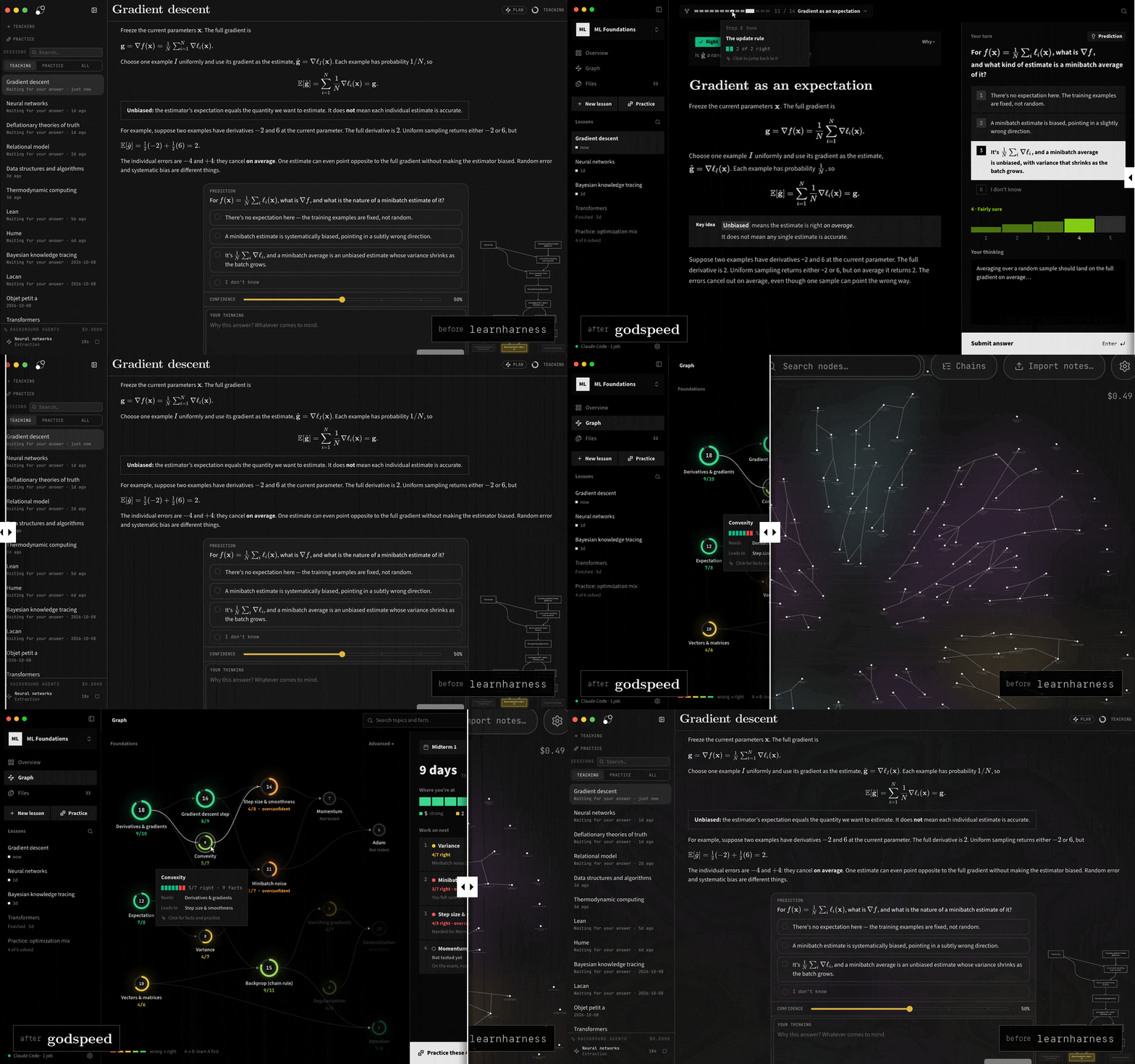
What's different from LearnHarness
| LearnHarness | godspeed | |
|---|---|---|
| Who teaches | Models from 30+ providers, through your API keys or a ChatGPT sign-in | An agent you already use: Claude Code, Codex, or any MCP app |
| API keys and sign-ins | An API key, or sign in with ChatGPT. Agents that can't be signed into, like Claude Code, are left out | Neither. godspeed is an MCP server, so there is no key to paste and no account to sign in to |
| Organization | One graph for everything | Classes, each with its own lessons, knowledge graph, files and exams |
| Course files | Import notes | Add PDFs, notes, transcripts and recordings (transcribed locally with whisper.cpp), or link a folder that's rescanned every minute |
| Graph | A canvas of individual facts | A topic map. The AI groups facts into topics, colors each by how often you get it right, and draws arrows for "learn this first" |
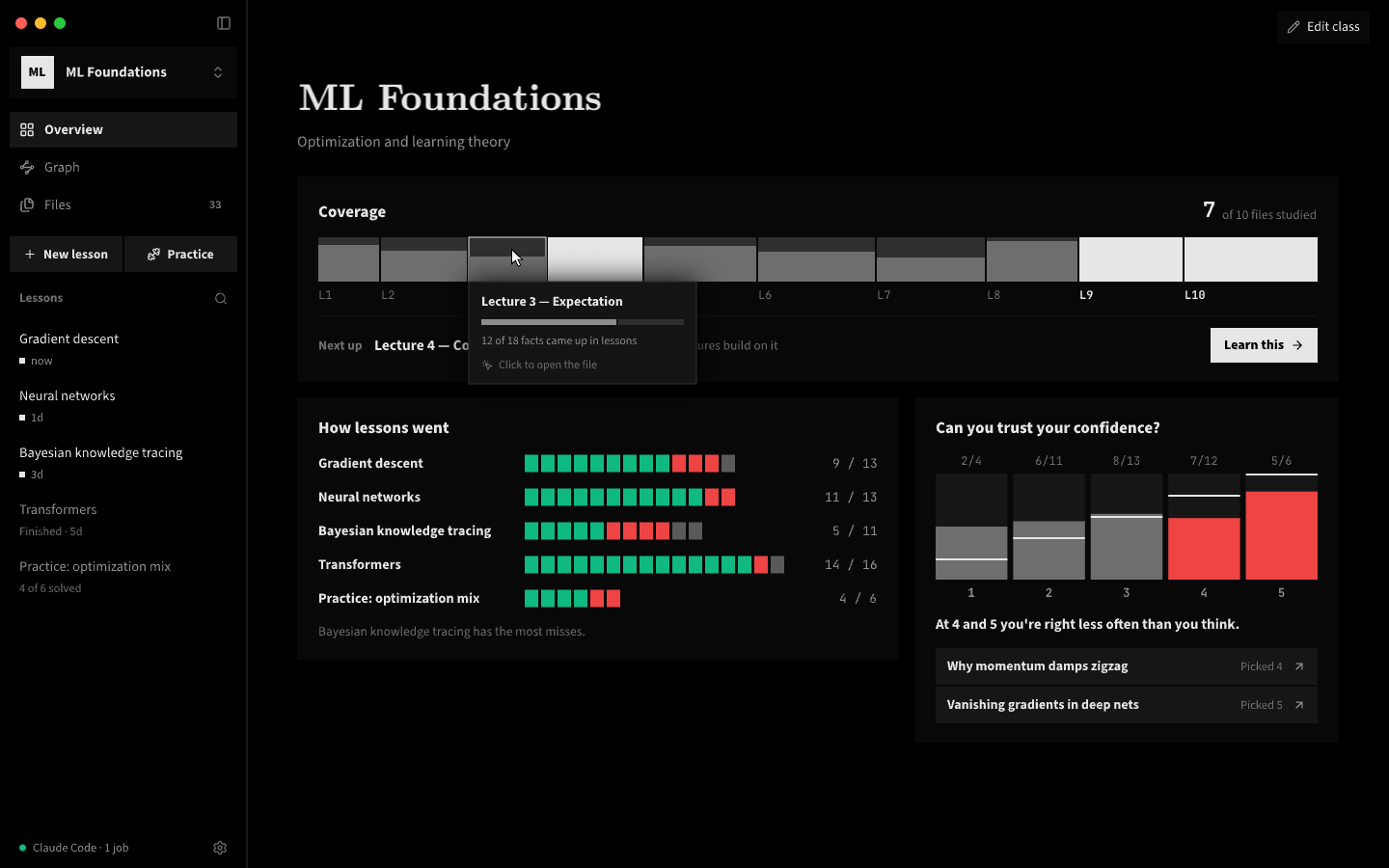
| Progress | None | A class Overview: coverage per file, how each lesson went, and whether your confidence matches your results |
| Exams | None | Add exams with dates and the files they cover. The Graph shows days left and what to work on next |
| Lessons | Chat with a floating answer dock | A reading column, a plan step bar, and an always-open "Your turn" panel with number keys for answers |
| Confidence | Percent slider | Five levels |
| Look | Rounded corners | OLED black, square corners, CMU Serif titles, Source Sans 3 text |
| Dictation and web search keys | Deepgram, Tavily, Brave | Removed |
The lesson screen was also rebuilt for speed. While the teacher writes, the screen redraws at most once per frame and only the message being written updates. Diagrams, code highlighting and the topic map load the first time you need them.
How it works
- Measure. The teacher finds where your understanding ends on each part the lesson depends on, from your answers, your confidence and what you type in the thinking box.
- Plan. It maps the steps from there to your goal. The step bar shows where you are, and the plan changes when your answers say it should.
- Teach. Each step builds on something you already understand. You predict, read the explanation, then check yourself. Confusions get fixed before anything is built on them.
- Practice. Practice lessons pose varied problems that make you recall the right idea without being told which one it is.
Everything you learn is saved as facts and the reasoning chains between them, linked back to the lesson they came from. Later lessons read that graph instead of starting from zero.
Get started
Download godspeed for your computer:
- Mac with an Apple chip (M1 or newer): open the file, then drag godspeed into Applications.
- Windows: open the file. If Windows says "Windows protected your PC", click More info, then Run anyway. (The app isn't signed on Windows.)
- Linux: AppImage (most computers) or .deb (Ubuntu, Debian). Make the AppImage executable, then open it.
Each link downloads the newest version directly.
The app checks for updates once a day and installs them when you quit. Settings → General → Check for updates checks right away.
The first launch walks you through connecting your agent (below). You can find the same steps later under Settings → Outside agents.
To build it yourself instead: npm install, then npm run desktop:local (an unsigned Mac app in dist/) or npm run dev (http://localhost:3000).
Outside agents (MCP)
While godspeed is open it runs an MCP server, and an agent you already use is its teacher. The agent also does the background jobs: research, diagrams, PDF reading and building your knowledge graph. If no agent is connected, that work waits and starts when one connects.
- Connect your agent:
- Claude Code:
/plugin marketplace add bayshores/godspeed, then/plugin install godspeed@godspeed, then/godspeed:teach(add a topic to start a new lesson)./godspeed:setup-classesbuilds your classes from your course files. - Codex: paste the config snippet from Settings → Outside agents into
~/.codex/config.toml. - Other MCP apps: use the address and token shown under Settings → Outside agents (Streamable HTTP,
Authorization: Bearer <token>).
- Claude Code:
- Start a lesson. You answer in the godspeed window and the agent teaches.
While you think, the Claude Code plugin waits in a background script, so the agent spends no tokens until you answer. Agents can also list and read lessons, search your graph, import notes, and manage classes and exams. Only programs on your computer that hold the token can connect.
Your plans, your data
- The AI is your own agent, on the plan you already pay for. godspeed has no subscription or markup of its own.
- Lessons, graphs, class files and settings stay on your machine as plain files you can read.
- Each task sends the context it needs to your agent, and web research fetches pages. Local storage doesn't mean offline.
- System prompts are visible and editable.
Development
npm test             # deterministic: no LLM, no network
npm run typecheck
npm run lint
See the development guide and architecture. Bugs and requests go to GitHub Issues.
License
AGPL-3.0. godspeed is based on LearnHarness, copyright its authors, and is distributed under the same license.
Yorumlar (0)
Yorum birakmak icin giris yap.
Yorum birakSonuc bulunamadi