terminal
Health Uyari
- No license — Repository has no license file
- Description — Repository has a description
- Active repo — Last push 0 days ago
- Low visibility — Only 5 GitHub stars
Code Uyari
- Code scan incomplete — No supported source files were scanned during light audit
Permissions Gecti
- Permissions — No dangerous permissions requested
Bu listing icin henuz AI raporu yok.
BBARIT Terminal — manage every codebase on one screen. All-in-one AI vibe-coding IDE: run Claude, Codex, Gemini, Kimi, Qwen & Ollama side by side, and pair two into an autonomous self-reviewing dev/review team. Unlike VS Code (a window per folder), all projects + their terminals on one screen. macOS & Windows. Free.

BBARIT Terminal
The Ultimate AI Vibe-Coding IDE — manage every codebase on one screen, with every AI agent and dev tool built in.
formerly Octo Terminal
Open all your projects at once and switch between them instantly — each with its own terminals, AI agents, and tools. Run Claude · Codex · Gemini · Kimi · Qwen · OpenCode · Ollama side by side, pair two of them into a self-reviewing dev team that ships while you sleep, and never leave the terminal — all from a fast native desktop app.
Free with GitHub sign-in · auto-updating · built with Tauri + Rust + React.
⬇️ Download
| Platform | Get it |
|---|---|
| 🍎 macOS (Apple Silicon · M1+) | Latest release · bbarit.com |
| 🪟 Windows 10 / 11 (64-bit) | Latest release · bbarit.com |
macOS repo: bbarit/terminal · Windows repo: bbarit/terminal-win
📖 Table of contents
- Why BBARIT?
- Who it's for
- See it in action
- The core — every codebase on one screen
- 🦌 Broker Agent — your autonomous AI dev/review team
- Multi-AI terminals
- Terminal & editor
- Knowledge that compounds
- Developer tools
- Remote & web access
- Built-in browser + automation
- Full feature list
- How it's built
- Quick start
- Requirements & install
- FAQ
- Support & community
🤔 Why BBARIT?
Most "AI IDEs" lock you into one model and one workflow, hide the AI behind a chat box, and still make you babysit every step. Meanwhile your real work is spread across a dozen terminals, a browser, an editor, a notes app, a Kanban board, and three SSH sessions.
BBARIT collapses all of that into one native terminal — and then goes further: it puts every AI coding agent in the same window, gives them real tools (PTY, git, editors, databases, MCP, a browser), and lets two of them work as an autonomous team that designs, builds, tests, reviews, and merges — with a knowledge base that gets smarter every session.
It's not a chat wrapper. It's a cockpit for shipping with AI.
| The old way | With BBARIT |
|---|---|
| A dozen windows for a dozen repos | Every codebase on one screen, switch in a keypress |
| One AI model, take it or leave it | 10 AI CLIs side by side, swap any time |
| Copy-paste between AI and editor | Agents run in real terminals with full tool access |
| You review every diff by hand | A reviewer AI reviews continuously; you approve merges |
| Knowledge lost between sessions | Karpathy Wiki + self-improving rules compound over time |
| 12 windows for 12 tools | One window: terminal · editor · git · notes · kanban · browser |
| Tied to your desk | Web terminal + Telegram/Discord/Slack — drive it from your phone |
👤 Who it's for
- Solo builders & indie hackers who want an AI team without hiring one — ship features while you focus on product.
- Vibe coders who think out loud to an AI and want it to actually do the work, not just suggest.
- Terminal-native developers who never want to leave the keyboard, but want modern tools (editors, git UI, search) one keypress away.
- Knowledge-driven developers who want a wiki, notes, and design rules that compound across every project.
- Remote / on-the-go developers who need to check on long-running agents from a browser or phone.
🎥 See it in action
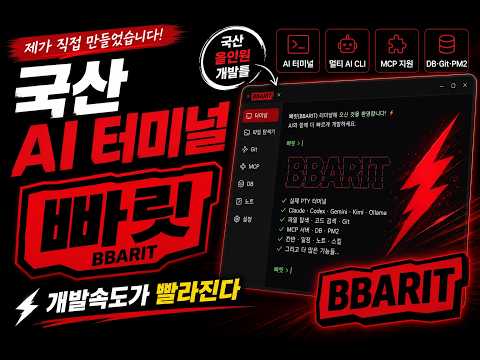
📣 As featured by creators
"99% of AI coding tools are too hard. Octo Terminal is the 1%."
— @aiexplained412 on Instagram · ▶️ Watch the reel
In the reel, the creator walks through why most AI coding tools are overwhelming — and shows how Octo Terminal (now BBARIT Terminal) strips that away: every AI agent and every dev tool in one native terminal, where you just say what you want and the AI does the work. It's the rare AI IDE built to be easy, not just powerful.
🗂️ The core — every codebase on one screen
BBARIT's killer feature is effortless multi-project, multi-codebase management. Stop juggling a dozen windows — put every repo in one place and move between them at the speed of thought.
The difference from VS Code: VS Code opens a separate window per folder. BBARIT keeps every codebase — and all of their terminals — on a single screen, so you manage all your projects and AI agents without ever switching windows.
- All your repos, side by side. Open dozens of projects at once; they sit in a list on the left. Jump between them instantly with a shortcut — no re-opening windows, no lost context.
- Every codebase's terminals, in one place. Each project's terminals (dev servers, AI agents, logs) stay live and visible together — no window-hopping to check another repo's terminal.
- Each codebase is fully its own. Every project keeps its own terminals, AI agents, theme, font, and working directory (local or SSH). Switch projects and everything follows.
- Search across all codebases.
Ctrl/Cmd+Pquick-open searches every project at once — not just the current one — and it's instant. - Split, stack & monitor. Run a dev server in one pane, Claude in another, tests in a third; rearrange freely. Monitor mode gives you a CCTV-style overview of every service across every codebase, live.
- Drag, pin, restyle. Reorder projects by drag-and-drop, pin favorites to the top, give each its own look.
One window. Every codebase. Zero context-switching tax.
✨ Headline — 🦌 Broker Agent — your autonomous AI dev/review team
Press one button (🦌) and BBARIT opens two real terminals — a Developer (e.g. Claude) and a Reviewer (e.g. Codex) — and runs a transparent mechanical broker between them that mediates the entire dev↔review loop. You give the goal; the pair designs, builds, tests, reviews, and merges. You approve.
The loop, step by step
- You give the developer a task in plain language — just like talking to Claude normally.
- The developer implements and tests its own work, keeps a project wiki, and appends a one-line
DONE:to a feed file when a unit is genuinely finished. - The broker sees that signal, reads the
git diff, and judges it mechanically — source-growth vs a baseline SHA, code-graph blast radius, sensitivity patterns (secrets/auth/destructive/SQL/payment), and requirements progress. No extra LLM calls, zero token cost. - The broker hands the change to the reviewer — and delivers the diff content inline, so the reviewer doesn't burn tokens re-opening files.
- The reviewer reviews (Linus-style: direct, specific) and replies
APPROVEDorREWORK: …. It owns the rework loop, re-issuing instructions until the developer actually fixes it. - On
APPROVED, the broker auto-commits and merges the harness's isolated branch — only if git checks pass. A failed merge is escalated to you, never forced.
What makes it genuinely different
- 🔍 Transparent, not a black box. Two visible terminals. Every message, diff, and decision is tracked in git + the Karpathy Wiki — reproducible and auditable, never screen-scraped.
- 🧠 Mechanical broker brain (LLM = 0). The mediation logic is pure code — growth, impact, sensitivity, RTM — so coordination is free, fast, and deterministic.
- 🌳 Worktree isolation. Each harness runs on its own git branch + worktree (
.octo-tmp/broker-wt-…). It never touches your working tree, so you can run several features in parallel and merge them later. - 🧩 Multi-harness manager. A full-screen workspace with a project → harness tree: spin up many dev/review pairs across projects, switch between them, each with its own live status window (Working / Done), broker log, and two terminals.
- 🔄 Hot-swap models mid-session. Change the developer or reviewer agent any time; the new agent reads the wiki + git and continues the in-progress work — no restart from scratch.
- 💾 Session persistence. Harnesses are saved and auto-restore on reopen/restart, continuing exactly where they left off — including queued auto-merges.
- 📋 Requirements traceability (RTM). Every requirement is a tracked row, verified against real code + real tests before anything is called done.
- 📈 Self-improving. Recurring review findings are promoted into permanent design rules, so the same mistakes get caught earlier next time.
- 🪜 Tiered knowledge. Project wiki → global wiki → other projects' code when stuck — learning your patterns and conventions.
- 🛑 You stay in control. Agents propose; merge & deploy require your approval. Always.
One click → a Claude+Codex pair that designs, builds, tests, reviews, and records — while you just give the goal.
🤖 Multi-AI terminals
BBARIT speaks every major AI coding CLI fluently — each in its own real PTY session, with independent model, flags, and autonomy mode.
| Agent | Good at |
|---|---|
| Claude Code | Deep reasoning, large refactors, planning |
| Codex | Code generation & review, fast iteration |
| Gemini | Multimodal, long context |
| Kimi | CJK-optimized, long documents |
| Qwen | Open-source, strong coding |
| Cursor / OpenCode | Editor-style code workflows |
| Ollama | Local, private models — no data leaves your machine |
| Pi / Reasonix | Extended reasoning |
- Per-project agent settings — different model/flags per project.
- Autonomy modes — normal · auto-accept · full-auto · yolo, switchable per terminal.
- AI Roundtable — have multiple models debate a question and compare answers.
- Orchestra — orchestrate a multi-AI workflow across models from one panel.
🖥️ Terminal & editor
A real terminal — not a web emulation. Built on portable-pty + Rust, rendered with WebGL.
- Multi-project, multi-terminal — open dozens of projects, each with its own terminals, themes, and fonts. Switch instantly with
Ctrl/Cmd+Shift.Ctrl/Cmd+Pquick-open searches across all projects and is blazing fast. - Split panes — resizable tree layout, tabs, horizontal/vertical/grid/tile — run an agent in one pane, your dev server in another, a reviewer in a third.
- Monitor mode — a CCTV-style overview of every service across every project, with live activity dots.
- WebGL rendering — GPU-accelerated, Unicode 11, ligatures, true color, 75+ themes, custom coding fonts.
- First-class CJK / IME — Korean / Chinese / Japanese composition done right, with UTF-8 shells out of the box.
- Copy that just works — copy-on-select, right-click copy/paste, search, click-to-open links.
Every file viewer & editor built in — you never leave the app to open a file:
| Type | What you get |
|---|---|
| Code | Monaco editor — Vim mode, Emmet, Prettier, bracket colorization, 30+ languages |
| Markdown | WYSIWYG (Tiptap) + raw source, tables, Mermaid, color emoji |
| Full viewer with editing + text selection/export | |
| Office | Word, PowerPoint, Excel (with functions) |
| EPUB | Whole-book reader and creator (export Markdown → EPUB) |
| Data | SQLite browser, JSON tree view |
| Media | Images (BMP/GIF/ICO/JPG/PNG + crop/edit), video (MP4), audio (MP3) |
| Diagrams | Mermaid live preview |
📚 Knowledge that compounds
- Karpathy Wiki — a structured, two-tier (project + global) knowledge base your agents read first and write back to. Kept small with per-topic files and auto-archiving, so it never bloats into one giant document.
- Notes / knowledge graph — a markdown vault with wikilinks, backlinks, tags, and an Obsidian-style graph view (4 layouts, minimap, glow). AI can auto-generate and auto-organize notes.
- Skills library — thousands of curated skills, GitHub skill-pack import, parameterized templates with
{{variables}}, and one-click run. Includes the built-in Karpathy guidelines pack (think-before-coding, simplicity, surgical changes, goal-driven). - Prompt library — save, favorite, and reuse your best prompts across projects.
- Self-improving harness — background review distills recurring lessons into durable rules.
🛠️ Developer tools
- Git panel — status, diff, history, branches, stashes, tags, worktrees, merge; one-click worktree for features or harnesses.
- Code search — hybrid BM25 + semantic over your source, plus a code-graph (
defs/callers/impactwith risk scoring) — the same engine the broker uses to judge change blast-radius. - Tasks — global Kanban (6 columns, 5 priorities), Todo, and a Gantt planner that links tasks to projects/terminals. Imports GitHub & Linear issues → send a card to a terminal so the agent fixes it (one-click support automation).
- MCP — connect Model Context Protocol servers (form or JSON), browse/invoke tools, with a built-in browser MCP bridge and 100+ curated presets (Gmail, Slack, Linear, Notion, GitHub, Postgres…).
- Database — MySQL & PostgreSQL: connection test, schema browser, query runner; credentials stored locally.
- PM2 / process monitoring — real-time CPU/memory gauges, log streaming, and AI anomaly detection (via Ollama) for SSH servers.
- AutoResearch — a Karpathy-style autonomous ML-experiment panel.
🔌 Remote & web access
- 🌐 Web Terminal — open a full terminal, file explorer, and editor from any browser (phone or desktop) over a Cloudflare tunnel. Real PTY, not an HTTP shim.
- 📱 Telegram · Discord · Slack — mirror terminal I/O and drive sessions remotely from your phone (passwords auto-masked, per-project channels).
- 🔑 SSH projects — file tree, editor, and terminal work transparently over SSH — a remote project behaves exactly like a local one.
- 🔗 GitHub · Linear Hub — a unified, color-coded feed of all your issues, per-project.
🌐 Built-in browser + automation
A real Chromium browser inside the app, wired to your agents:
- Pick — click any element → CSS selector, XPath, computed styles → straight into an AI prompt.
- Live — real-time console errors & page changes, auto-notified.
- Page → Markdown — Readability + Turndown to convert any page to clean Markdown (and copy it).
- AI Fix — auto-diagnose console errors + suggest fixes.
- Test — auto-generate test cases from the live page.
- MCP bridge — your Claude/Codex CLI can
navigate,screenshot,get_page_text,javascript_eval, manage tabs, read console/network — all through the built-in browser.
📋 Full feature list
Everything in the box (click to expand)AI agents & orchestration
- Multi-agent terminals: Claude Code, Codex, Gemini, Kimi, Qwen, Cursor, OpenCode, Ollama, Pi, Reasonix
- 🦌 Broker Agent — autonomous AI dev↔review pair: mechanical broker (no extra LLM cost), git + wiki channel, DONE-signal flow, worktree isolation + headless auto-merge, RTM requirements traceability, live status window, multi-harness manager, hot-swap models, session persistence/auto-resume, self-improving rules, human approval gate
- AI Roundtable (multi-model debate), Orchestra multi-AI workflow orchestration
- Per-project agent flags, models, autonomy modes (normal / auto-accept / full-auto / yolo)
Terminal & editor
- Native PTY (portable-pty + Rust), WebGL renderer, Unicode 11, ligatures, UTF-8 shells
- Resizable split panes (tree layout), tabs, multi-project tabs with per-project themes & fonts (75+ themes)
- Monitor mode (all-services overview), copy-on-select, right-click copy/paste, search, click-to-open links
- Monaco editor (Vim, Emmet, Prettier) + viewers: Markdown, PDF (edit), Word, PowerPoint, Excel, EPUB (read & create), SQLite, Mermaid, JSON tree, images (+crop), video, audio
- First-class CJK/IME (Korean/Chinese/Japanese), command palette, configurable keybindings (Octo / VSCode / IntelliJ presets)
Dev tools
- Git panel (status, diff, history, branches, stashes, tags, worktrees, merge)
- Hybrid code search (BM25 + semantic) + code-graph (defs / callers / impact + risk)
- Kanban board, Todo, Gantt planner (global across projects), GitHub/Linear issue import → terminal
- MCP server connections + built-in browser MCP bridge + 100+ presets
- Database: MySQL & PostgreSQL with schema browsing
- PM2 / process monitoring with AI anomaly detection, server Hub, SSH remote projects
Knowledge & skills
- Karpathy Wiki — two-tier (project + global) structured knowledge base, per-topic files, auto-archiving
- Notes / knowledge base with wikilinks, backlinks, tags, Obsidian-style graph view, templates
- Skills library (thousands curated) + GitHub skill-pack import + Karpathy guidelines pack
- Self-improving harness (background review → durable rules), prompt library
- AutoResearch (Karpathy-style autonomous ML experiment panel)
Remote, web & team
- Web Terminal (browser access to terminal/files/editor via Cloudflare tunnel)
- Telegram, Discord, Slack (mirror terminal I/O + remote control)
- GitHub, Linear unified Hub; SSH remote-project terminals; built-in Chromium browser + AI toolbar
- Generic HTTP proxy (CORS-free) for integrations
Media & productivity
- Screen capture (region select), clipboard image paste into terminal, native video editor
- Voice input (Whisper), OS notifications, completion sounds, 8 UI languages
- Auto-updater (Tauri), code-signed builds
🏗️ How it's built
| Layer | Technology |
|---|---|
| Desktop framework | Tauri v2 (Rust backend + native webview) |
| Backend | Rust · tokio · axum · portable-pty |
| Frontend | React 19 · TypeScript · Vite 7 |
| Terminal | xterm.js + WebGL addon, Unicode 11, FitAddon |
| Editors | Monaco (code) · Tiptap/CodeMirror (markdown) |
| Orchestration | Real AI CLIs in PTY sessions + Orchestra workflows |
| Remote | Cloudflare tunnels (web terminal) + KV store |
Native and fast — small binary, low memory, real OS integration. Auto-updates via the Tauri updater; builds are code-signed (macOS Developer ID, Windows code-signed).
🚀 Quick start
- Download & install for your platform (links above), launch, and sign in with GitHub (free).
- Open a project — from local disk, over SSH, or open a server directly. All projects sit on the left; jump between them with a shortcut.
- Start a terminal and run any AI CLI you have installed — or just use it as a great native terminal.
- Press 🦌 Broker Agent to spin up a Developer + Reviewer pair. Give the developer a goal, and watch the pair build, test, review, and queue a merge for your approval.
- Open the side panels as you go — git, code search, notes/wiki, Kanban, and the built-in browser.
💻 Requirements
| macOS | Apple Silicon (M1 or later) |
| Windows | 10 / 11 (64-bit) |
| AI CLIs | Install the agents you want (Claude Code, Codex, Gemini, etc.) — BBARIT drives them |
| License | Free — sign in with GitHub |
📥 Install
- Download the latest build:
- 🍎 macOS (Apple Silicon) → github.com/bbarit/terminal/releases/latest
- 🪟 Windows 10/11 → github.com/bbarit/terminal-win/releases/latest
- or grab either from bbarit.com
- Launch and sign in with GitHub (free license).
- Open a project folder and start a terminal — or press 🦌 Broker Agent to spin up an AI pair.
Auto-updates are built in (Tauri updater) — you'll always get the latest.
❓ FAQ
- Do I need an API key? You use the AI CLIs you already have installed; BBARIT runs them in real terminals — no separate API key required.
- Which agents can the Broker Agent pair use? Any installed CLI — Claude, Codex, Gemini, Kimi, Qwen, Ollama, and more — and you can hot-swap either role mid-session.
- Will it touch my repo without asking? No — the Broker Agent works in an isolated git worktree and never merges or deploys without your approval. It only initializes git (with a notice) when needed for review.
- My project has no git — does review still work? Yes — the broker offers to initialize git so diff-based review works, and tells you before it does.
- Can I run more than one AI pair at once? Yes — the multi-harness manager runs several dev/review pairs in parallel, each worktree-isolated and individually monitored.
- Does it work over SSH / from my phone? Yes — SSH projects work like local ones, and the Web Terminal + Telegram/Discord/Slack mirroring let you drive sessions from a browser or phone.
- Is my code private with local models? Run Ollama for fully local, on-device inference — nothing leaves your machine.
- Is this the same as Octo Terminal? Yes — BBARIT Terminal is the evolution of Octo Terminal, rebuilt and renamed.
🆘 Support & community
- Issues: this repository's GitHub Issues
- Contact: [email protected]
- Web: bbarit.com
BBARIT Terminal — the ultimate AI vibe-coding IDE.
Maintained by Tenmiles Inc. · Built for developers who ship with AI.
🍎 bbarit/terminal · 🪟 bbarit/terminal-win · 🌐 bbarit.com · ▶️ Demo
Yorumlar (0)
Yorum birakmak icin giris yap.
Yorum birakSonuc bulunamadi