strata
Health Warn
- License — License: Apache-2.0
- Description — Repository has a description
- Active repo — Last push 0 days ago
- Low visibility — Only 5 GitHub stars
Code Fail
- Hardcoded secret — Potential hardcoded credential in .docker/service-mode/pyproject.toml
Permissions Pass
- Permissions — No dangerous permissions requested
No AI report is available for this listing yet.
Strata is a notebook your coding agent can drive, and everything it computes stays.
Strata




Strata is a notebook your coding agent can drive, and everything it computes stays.
Coding agents explore by writing throwaway scripts: python -c, files in/tmp, gone by the next session. Point one at Strata and the work lands in a
notebook instead. Every result is cached by what produced it, every cell
records who wrote it, and you can watch the whole thing in your browser while
the agent works.
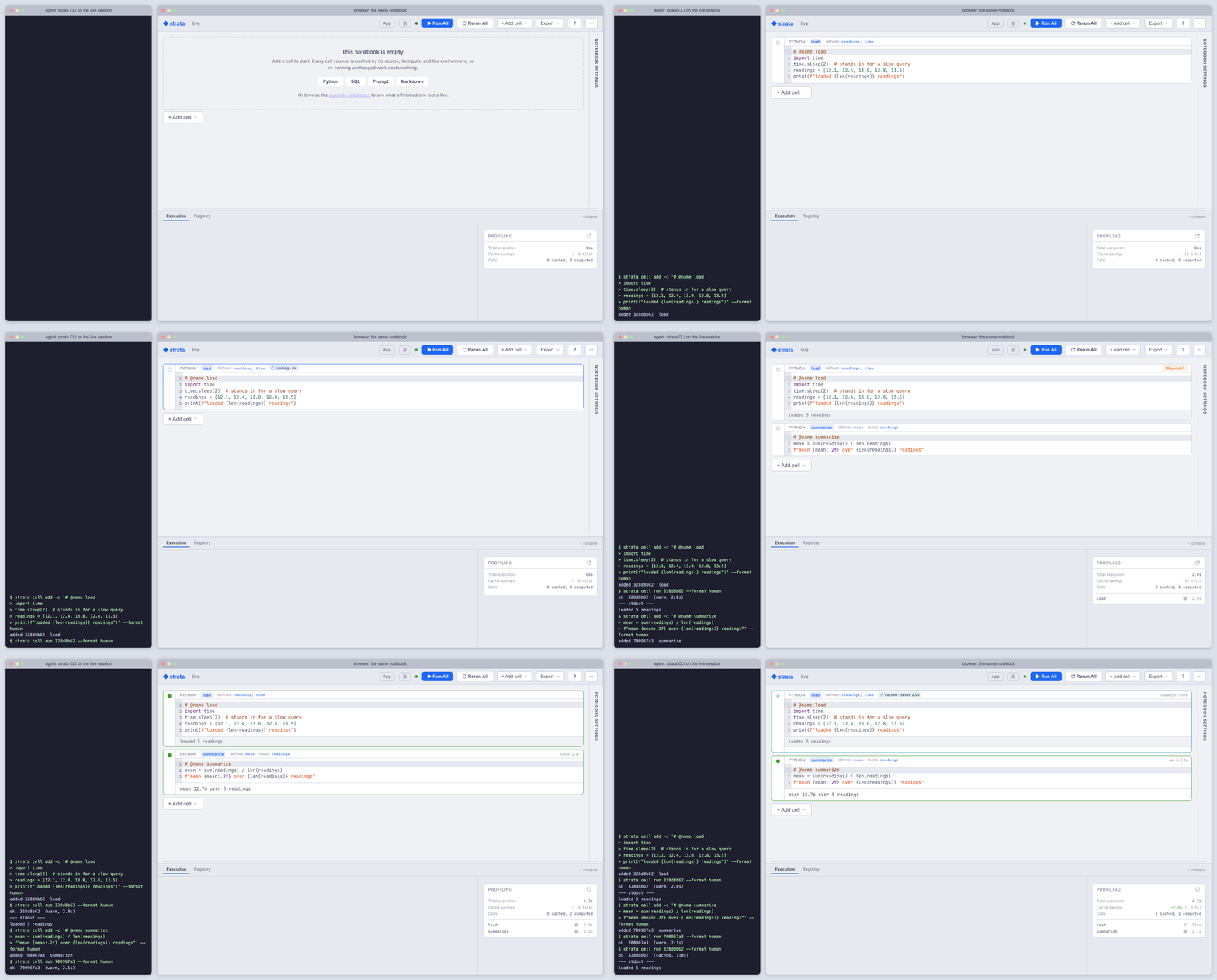
An agent adds and runs cells through the strata CLI while the browser on the
same session updates. Captured from a real run, not a mock-up.
Try it
You need uv 0.8 or newer and
Claude Code (or another MCP client).
uv tool install "strata-notebook[mcp,tui]"

strata agent ./my-notebook      # terminal 1: server, session and a live viewer
cd ./my-notebook && claude      # terminal 2: the agent drives the notebook
Ask the agent for an analysis and watch the cells arrive. Open
http://localhost:8765 to follow along in the browser, or to take over and edit.
Two ways an agent uses it
The notebook is the deliverable. strata agent scaffolds the notebook,
starts the server, and writes the .mcp.json and CLAUDE.md the agent needs.
You keep the result.
Use a coding agent →
The notebook is a scratchpad. An agent working on something else runs its
throwaway Python in a cached cell instead of python -c, so the snippet from
ten turns ago is still there. Install the plugin once, in any Claude Code
session:
/plugin marketplace add bearing-research/strata
/plugin install strata-scratchpad@strata
Other agents connect to the MCP endpoint at /mcp, or script the strata CLI,
which returns JSON and stable exit codes.
Why the work holds up
Nothing runs twice. A cell's identity is its source, its inputs and its
environment. The step an agent ran ten turns ago is a cache hit now, and an
edit re-runs only the cells below it.
First run:       load (2.5s) → summarize (0.4s) → plot (0.9s)  = 3.7s
Edit summarize:  load (✓)    → summarize (0.4s) → plot (0.6s)  = 1.0s
Run again:       load (✓)    → summarize (✓)    → plot (✓)     = <0.1s
That is a real run of the tutorial below, whose load step waits two seconds on purpose.
You can review what it did. Every cell records whether a person or an
agent wrote it. Watch live in the browser or with strata watch in a terminal,
or read the directory afterwards.
It reads like code in git. A notebook is plain .py files plus a TOML
manifest. Outputs and caches stay in a gitignored .strata/ folder.
my-notebook/
├── notebook.toml      # cells, order, workers, mounts
├── pyproject.toml     # this notebook's own uv environment
├── uv.lock
└── cells/
    ├── 3f9a1c2e.py    # one file per cell
    └── 8b07d4aa.py
Heavy cells go where the compute is. # @worker gpu-box sends one cell to
another machine in the notebook's locked environment. Hand an agent an SSH
target and it provisions the worker itself.
Whether agents use it is measured. evals/agent_notebook/ scores 9 recorded
agent sessions in CI, plus a group that checks whether an un-primed session
reaches for the notebook at all.
For people, too
Run strata-notebook and open http://localhost:8765 for the full editor:
Python, SQL, R, prompt and widget cells in one dependency graph, with an
interactive data viewer and a read-only app view.
Notebook quickstart →
New here? strata tutorial caching opens a two-minute tour of what the cache saves.strata tutorial lists the samples that ship with Strata, and Open a sample on the
home page does the same.
Coming from Jupyter? strata import notebook.ipynb converts a notebook.
Like marimo and Pluto, Strata builds the graph from variable references; unlike
them, every cell is cached by default and a single cell can run on another
machine. How Strata compares →
Examples
| Example | What it shows |
|---|---|
| agent_demo | A coding agent builds the notebook live; only the eval re-runs when the model caches |
| pandas_basics | A DataFrame pipeline: caching, staleness and per-cell tests |
| review_triage | A prompt cell with schema-validated LLM output |
| arxiv_classifier | One cell sent to a GPU worker |
| r_lm_vs_sklearn | R and Python sharing one graph over Arrow |
| sql_orders_report | SQL, Python and markdown cells together |
What is still moving
Materialization, the artifact store, the DAG, caching and headless runs are
settled and covered by tests. Three surfaces are not:
- Prompt-cell API: streaming and structured-output validation will change.
- SQL cloud drivers: DuckDB, SQLite and PostgreSQL run in CI. BigQuery and
Snowflake ship without integration coverage. - On-disk formats:
notebook.toml,.strata/runtime.jsonand the cache
layout may change between minor versions.
Learn more
- Documentation, including the full feature list
- Installation: Docker, source builds, and why Strata needs uv
- Use Strata as a library with
strata-client - Deployment: service mode, multi-tenancy, workers
- Issues for bugs and questions
Development
uv sync --all-extras                   # install dependencies (matches CI)
uv run pytest                          # run the tests
uv run pre-commit run --all-files      # lint and format
cd frontend && npm run dev             # frontend dev server
License
Apache 2.0
Reviews (0)
Sign in to leave a review.
Leave a reviewNo results found