Assistant
Health Pass
- License — License: MIT
- Description — Repository has a description
- Active repo — Last push 0 days ago
- Community trust — 31 GitHub stars
Code Pass
- Code scan — Scanned 12 files during light audit, no dangerous patterns found
Permissions Pass
- Permissions — No dangerous permissions requested
This tool is an AI-powered task assistant with a built-in agent hypervisor. It uses an LLM to autonomously decide which tools to execute, spawn parallel sub-agents for complex tasks, and synthesize results, all of which can be run locally via terminal, in a browser, or deployed as an API.
Security Assessment
Overall Risk: Medium
As an agentic framework, this tool's primary function is to dynamically route and execute actions based on AI decision-making. While an automated code scan of 12 files found no hardcoded secrets or inherently dangerous patterns, the fundamental architecture poses a higher inherent risk. The system executes actions and spawns parallel sub-agents based on tool scoping and permission policies. The security of this tool heavily depends on what specific tools, system access, or external APIs you choose to connect to the central tool-use loop. No dangerous permissions were explicitly requested at the repository level.
Quality Assessment
The project demonstrates strong health and maintenance indicators. It is actively maintained (last updated today), uses the permissive MIT license, and integrates continuous integration pipelines for building, linting, and documentation. It includes a test coverage badge, which signals good development practices. Community trust is currently low but growing, sitting at 31 GitHub stars.
Verdict
Use with caution: the codebase is clean, well-maintained, and safely structured, but because it is an autonomous agent, you must carefully restrict the permissions and tools you grant it before deploying.
AI assistant with a built-in agent hypervisor. Spawns, scopes, and manages parallel sub-agents across tasks. Runs from your terminal, browser, API, or Home Assistant.
Meeseeks: The Personal Assistant 👋




https://github.com/user-attachments/assets/78754e8f-828a-4c54-9e97-29cbeacbc3bc
Meeseeks runs right in your terminal, browser, or hosted as an API.
Overview
Meeseeks is an AI task agent assistant built on a single async tool-use loop driven by native bind_tools. The LLM decides which tools to call, can spawn sub-agents for parallel work, and synthesizes a final reply. It keeps a session transcript, compacts long histories, and stores summaries for continuity across longer conversations.
Meeseeks Console
The web console provides a task orchestration frontend backed by the REST API. It supports session management, real-time event polling, tool selection, and execution trace viewing.
| Task detail page | Console landing page |
|---|---|
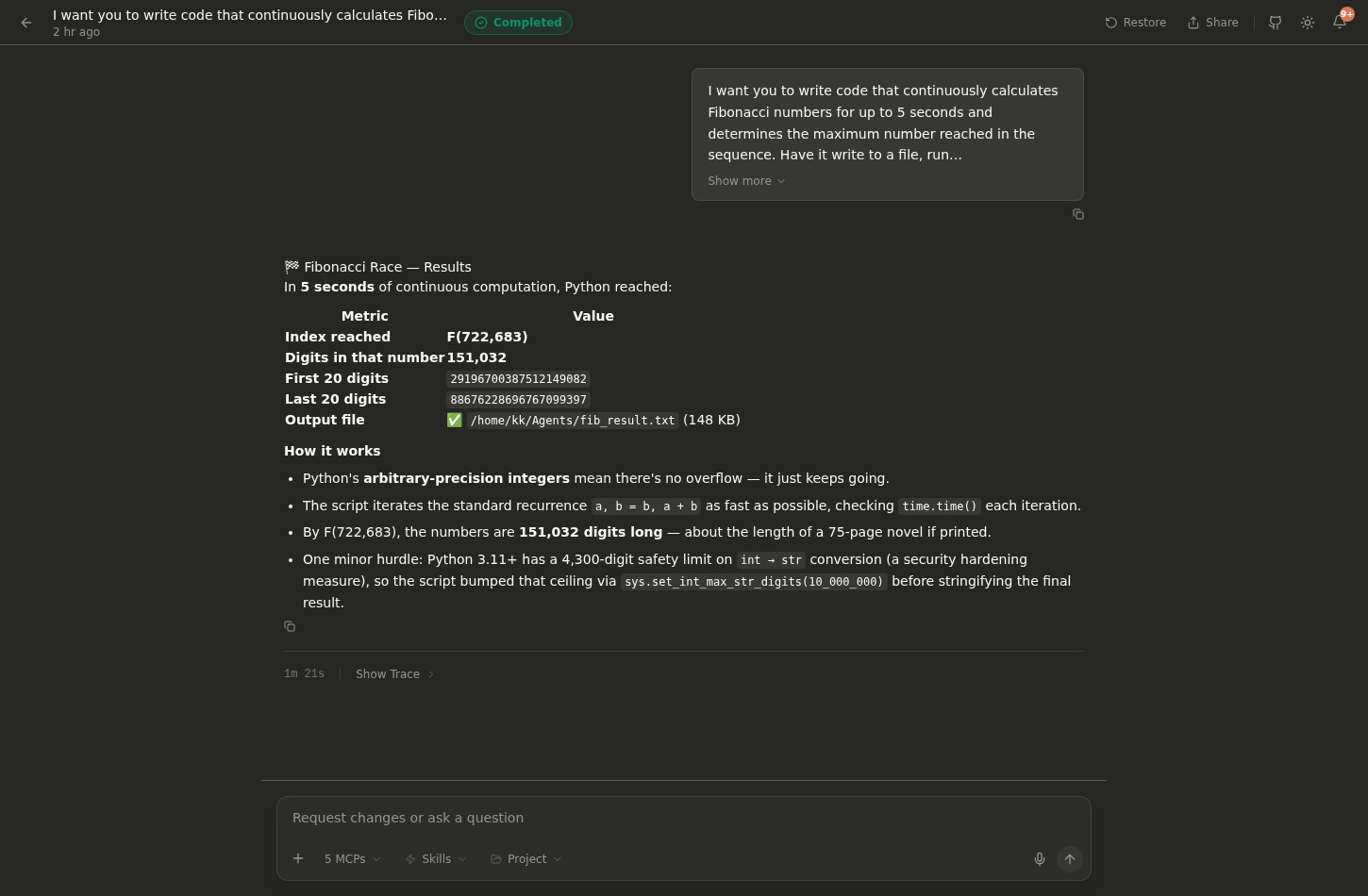 |
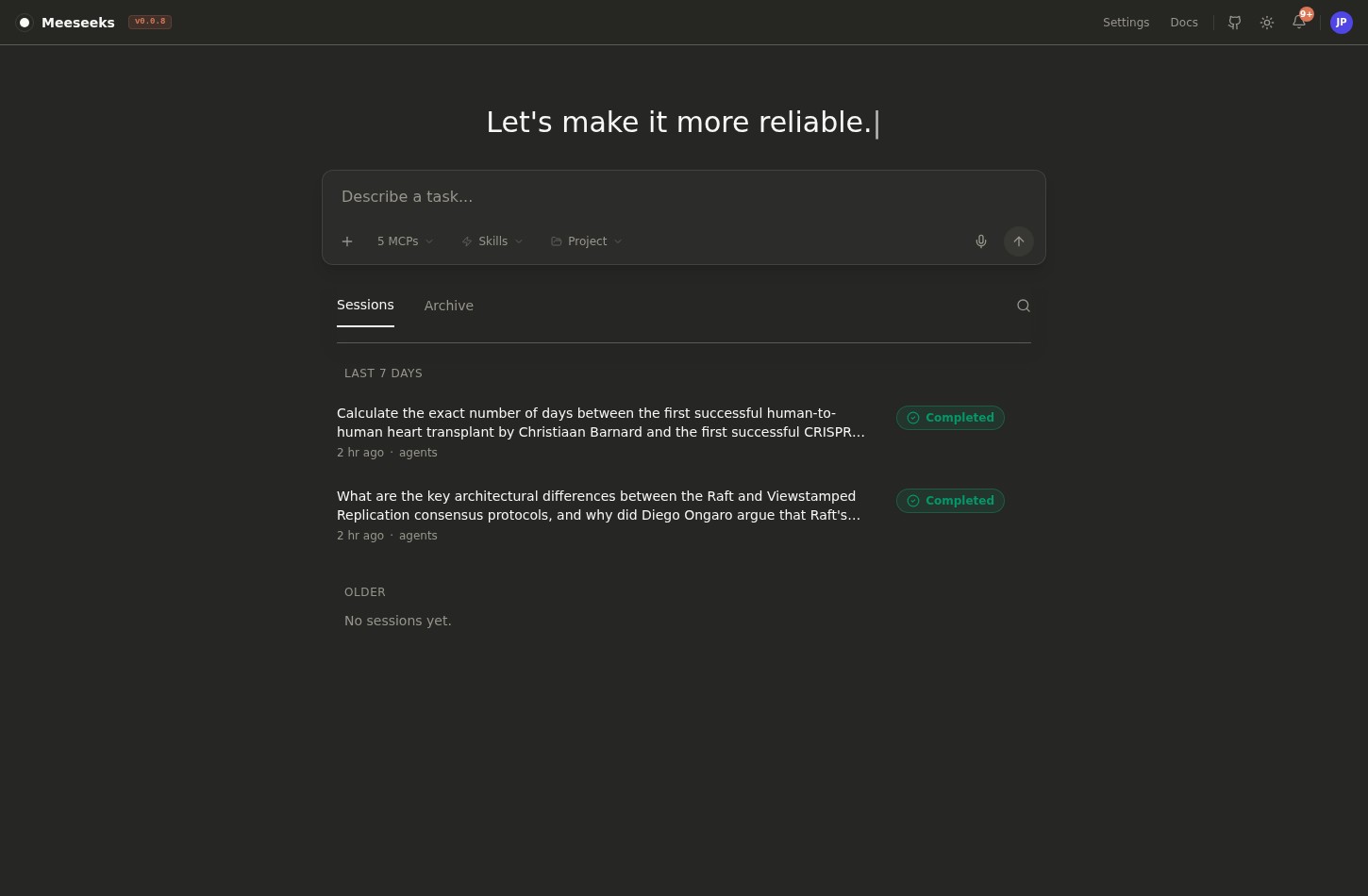 |
Features
Core workflow
- (✅) Unified tool-use loop: A single async
ToolUseLoopwhere the LLM drives tool selection and execution via nativebind_tools. - (✅) Sub-agent spawning: Subtasks can be delegated to parallel sub-agents via
spawn_agent, managed by theAgentHypervisorcontrol plane. - (✅) Tool scoping & permissions: Sub-agents receive scoped tool access (allowlist/denylist filtered before binding). Permission policies gate all tool execution.
- (✅) Concurrency-aware execution: Tools are partitioned into concurrent-safe (parallel) and exclusive (sequential) batches with per-tool timeouts.
Memory and context management
- (✅) Session transcripts: Writes tool activity and responses to disk for continuity.
- (✅) Context compaction: Two-mode compaction (full/partial) with structured summaries, analysis scratchpad, and post-compact file restoration. Auto-compacts near the context budget using partial mode.
- (✅) Token awareness: Tracks context window usage and exposes budgets in the CLI.
- (✅) Selective recall: Builds context from recent turns plus a summary of prior events.
- (✅) Hierarchical instructions: Discovers CLAUDE.md from user, project, rules, and local levels with priority ordering. Injects git context (branch, status, recent commits) into the system prompt.
- (✅) Session listing hygiene: Filters empty sessions and supports archiving via the API.
Tooling and integrations
- (✅) Tool registry: Discovers local tools and MCP tools via persistent connection pool with automatic reconnection and config change detection.
- (✅) Skills: Supports the Agent Skills open standard. Place
SKILL.mdfiles in~/.claude/skills/or.claude/skills/to teach the assistant reusable workflows. Skills can be invoked via/skill-nameslash commands or auto-activated by the LLM. - (✅) Local file + shell tools: Built-in Aider adapters for edit blocks, read files, list dirs, and shell commands (approval-gated). Edit blocks require strict SEARCH/REPLACE format; the tool returns format guidance on mismatches.
- (✅) REST API: Exposes the assistant over HTTP for third-party integration.
- (✅) Web console: Task orchestration frontend backed by the REST API.
- (✅) Terminal CLI: Fast interactive shell with plan visibility and tool result cards.
- (✅) Model routing: Supports provider-qualified model names and a configurable API base URL.
Safety and observability
- (✅) Permission gate: Uses approval callbacks and hooks to control tool execution.
- (✅) Operational visibility: Optional Langfuse tracing (session-scoped traces) stays off if unconfigured.
- (✅) Hook system: Error-isolated hooks with session lifecycle events, external command hook configuration, and fnmatch-based tool matcher filtering.
Interface notes
- CLI layout adapts to terminal width. Headers and tool result cards adjust to small and wide shells.
- Interactive CLI controls. Use a model picker, MCP browser, session summary, and token budget commands.
- Inline approvals. Rich-based approval prompts render with padded, dotted borders and clear after input.
- Unified experience. Console, API, Home Assistant, and CLI interfaces share the same core engine to reduce duplicated maintenance.
- Shared session runtime. The API exposes polling endpoints; the CLI runs the same runtime in-process for sync execution, cancellation, and summaries.
- Event payloads.
action_plansteps are{title, description};tool_result/permissionusetool_id,operation, andtool_input.
Home Assistant integration
| Answer questions and interpret sensor information | Control devices and entities |
|---|---|
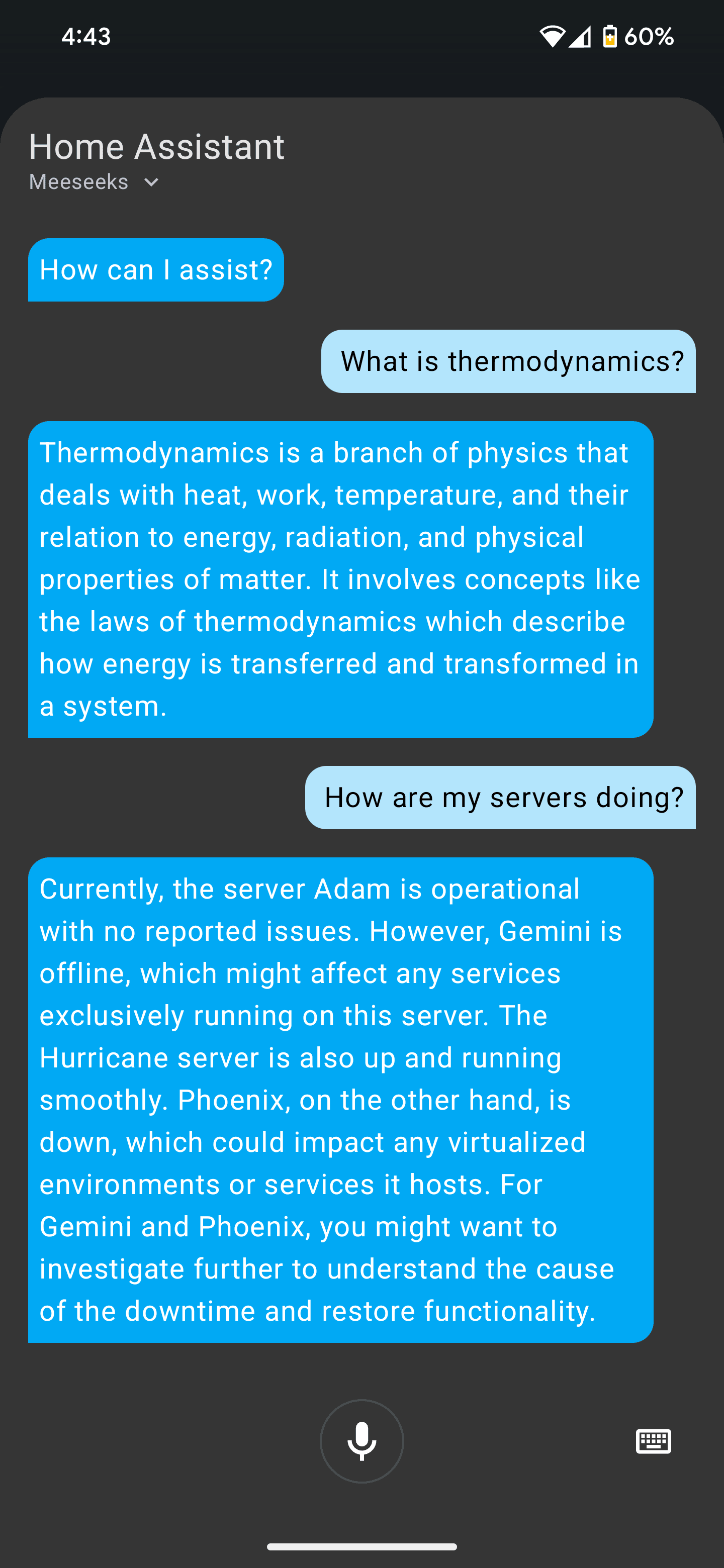 |
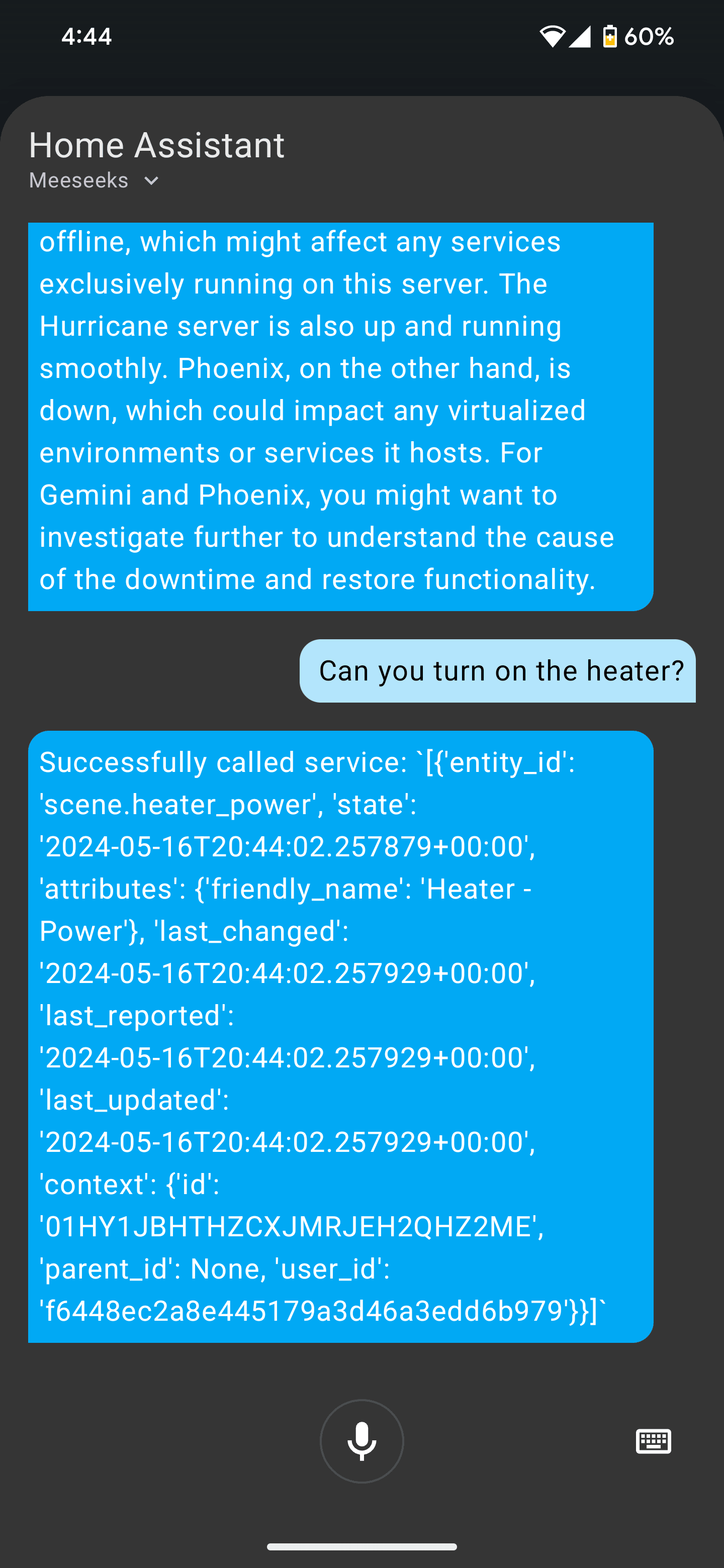 |
Installation
User install (core only):
uv sync
Optional components:
uv sync --extra cli   # CLI
uv sync --extra api   # REST API
cd apps/meeseeks_console && npm install  # Web console
uv sync --extra ha    # Home Assistant integration
Developer install (all components + dev/test/docs):
uv sync --all-extras --all-groups
Global install (available system-wide as meeseeks):
uv tool install .
# Set up global config:
mkdir -p ~/.meeseeks
cp configs/app.json ~/.meeseeks/app.json
cp configs/mcp.json ~/.meeseeks/mcp.json
# Or run `meeseeks` and use /init to scaffold example configs
Config discovery priority: CWD/configs/ → $MEESEEKS_HOME/ → ~/.meeseeks/. Use --config /path/to/app.json for explicit override, or set MEESEEKS_HOME in your shell profile (~/.bashrc, ~/.zshrc, etc.) to permanently point to a custom config directory:
export MEESEEKS_HOME="/path/to/your/config"
Architecture
See docs/index.md for the full architecture diagram.
Monorepo layout
packages/meeseeks_core/: orchestration loop, schemas, session storage, two-mode compaction, tool registry, hook system, hierarchical instruction discovery.packages/meeseeks_tools/: tool implementations and integrations (including Home Assistant and MCP).apps/meeseeks_api/: Flask REST API for programmatic access.apps/meeseeks_console/: Web console for task orchestration.apps/meeseeks_cli/: Terminal CLI frontend for interactive sessions.meeseeks_ha_conversation/: Home Assistant integration that routes voice to the API.packages/meeseeks_core/src/meeseeks_core/prompts/: planner prompts and tool instructions.
Documentation
Overview
- docs/index.md — product overview and architecture
Setup and configuration
- docs/getting-started.md — setup guide (env, MCP, configs, run paths)
Repository map
- docs/components.md — monorepo map
Reference
- docs/reference.md — API reference (mkdocstrings)
- docs/session-runtime.md — shared session runtime used by CLI + API
Development principles
- Keep the core engine centralized. Interfaces should remain thin to avoid duplicated maintenance.
- Organize logic into clear modules, classes, and functions. Favor readable, well-scoped blocks.
- Prefer small, composable changes that keep behavior consistent across interfaces.
Contributing
We welcome contributions from the community to improve Meeseeks.
- Fork the repository and clone it to your local machine.
- Create a new branch for your contribution.
- Make your changes, commit them, and push to your fork.
- Open a pull request describing the change and the problem it solves.
If you encounter bugs or have ideas for features, open an issue on the issue tracker. Include reproduction steps and error messages when possible.
Reviews (0)
Sign in to leave a review.
Leave a reviewNo results found