ai-storyboard-generator-skill
Health Uyari
- License — License: MIT-0
- Description — Repository has a description
- Active repo — Last push 0 days ago
- Low visibility — Only 9 GitHub stars
Code Gecti
- Code scan — Scanned 11 files during light audit, no dangerous patterns found
Permissions Gecti
- Permissions — No dangerous permissions requested
Bu listing icin henuz AI raporu yok.
AI storyboard generator agent skill for Claude Code, Cursor, Codex, Windsurf, Cline & OpenClaw: turn a script, scene, or ad brief into a practical shot list and a few storyboard key-frame images for film, ads, animation, and social video. AI分镜生成 · 分镜表
AI Storyboard Generator Skill
👉 See also Viral Video Remake Skill
Turn a script, scene, or ad brief into a practical shot list and one to four storyboard key-frame images, from inside Claude Code, Cursor, Codex, Windsurf, Cline, or OpenClaw.
[!IMPORTANT]
Rendering needs a Beatra account and uses credits. The skill itself is free to install.
| Question | Answer |
|---|---|
| What it does | Turn a script, scene, or ad brief into a practical shot list and one to four storyboard key-frame images. |
| Models | Qwen Image 3.0, MiniMax H3 Image, Qwen Image 2.0 Fast, Qwen Image 3.0 Pro, GPT Image 2.5 Flare, GPT Image 2.5 Sunburst, GPT Image 2, Wan Image 2.7 Fast, Qwen Image 2.0 Pro, Wan Image 2.7 Pro |
| Requirements | Python 3.10+ and an agent that loads SKILL.md |
| Cost | Free to install. Each render uses credits on your Beatra account, and paid steps run only when you ask for that exact render or approve its card. |
| Works with | Claude Code, Cursor, Codex, Windsurf, Cline, OpenClaw |
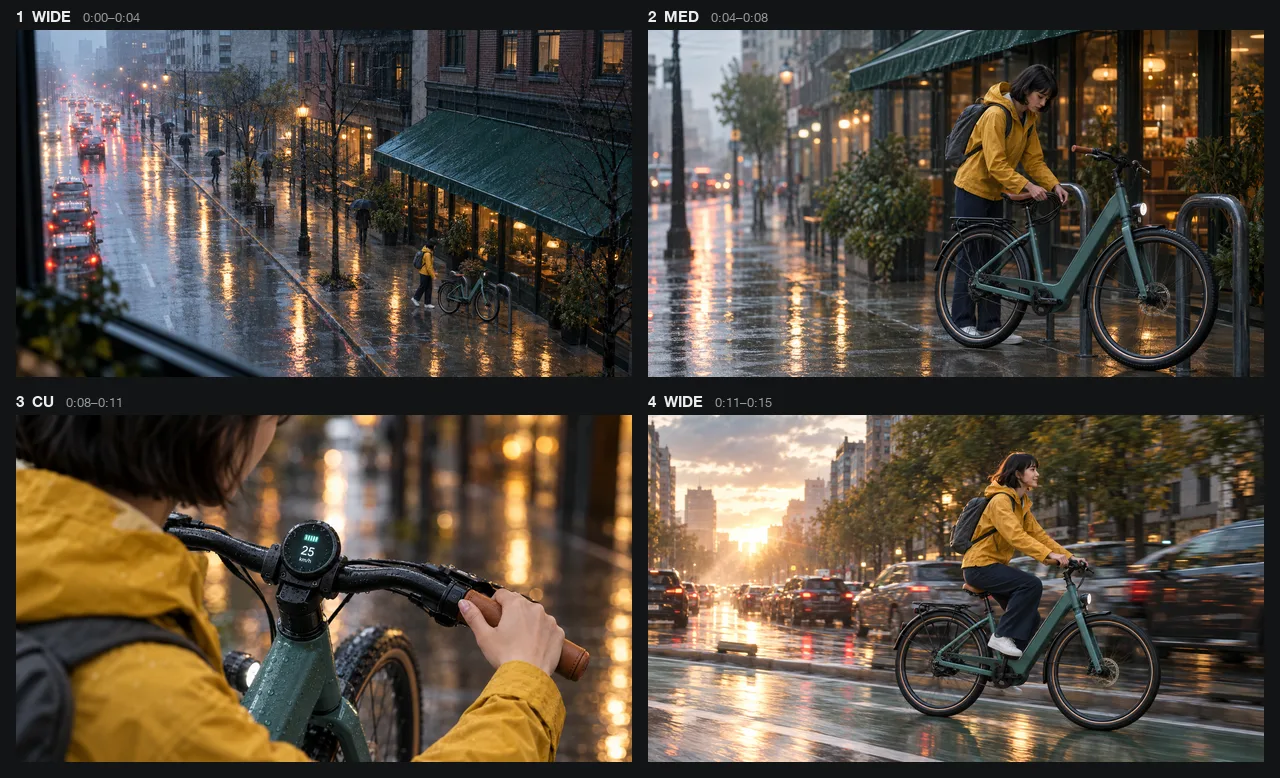
A four-shot storyboard for a 15-second ad for a fictional commuter e-bike, Voltline, going from a rainy morning wide shot to a sunrise ride past traffic, with the same rider and bike in every frame. AI-generated with Beatra.
| Skill | Entry point | Version |
|---|---|---|
ai-storyboard-generator |
SKILL.md | 0.2.8 |
This repository is published automatically from beatra-ai/beatra-skills. Report issues there.
Install
With the skills CLI:
npx skills add beatra-ai/ai-storyboard-generator-skill
As a Claude Code plugin:
claude plugin marketplace add beatra-ai/ai-storyboard-generator-skill
claude plugin install ai-storyboard-generator@ai-storyboard-generator-skill
As a Codex plugin:
codex plugin marketplace add beatra-ai/ai-storyboard-generator-skill
codex plugin add ai-storyboard-generator@ai-storyboard-generator-skill
As a GitHub Copilot CLI plugin:
copilot plugin marketplace add beatra-ai/ai-storyboard-generator-skill
copilot plugin install ai-storyboard-generator@ai-storyboard-generator-skill
As a Gemini CLI extension:
gemini extensions install https://github.com/beatra-ai/ai-storyboard-generator-skill
As an Antigravity CLI plugin:
agy plugin install https://github.com/beatra-ai/ai-storyboard-generator-skill
With the GitHub CLI:
gh skill install beatra-ai/ai-storyboard-generator-skill ai-storyboard-generator
Or clone this repository and copy skills/ai-storyboard-generator into ~/.claude/skills/ for Claude Code,~/.cursor/skills/ for Cursor, ~/.agents/skills/ for Codex, ~/.codeium/windsurf/skills/ for Windsurf,~/.cline/skills/ for Cline, or ~/.openclaw/skills/ for OpenClaw.
Or paste this into your agent:
Install the ai-storyboard-generator skill from https://github.com/beatra-ai/ai-storyboard-generator-skill (folder skills/ai-storyboard-generator), then follow its SKILL.md to connect my Beatra account.
Tested in clean-room CI: Antigravity CLI (2026-11-09).
Inputs and outputs
| Type | Formats | Specifications | |
|---|---|---|---|
| Input | Text — Script, scene, or ad brief | — | — |
| Input | Image — Character or location references (optional) | JPG, PNG, WEBP | — |
| Output | Text — Shot list with shot type, camera, action, timing, dialogue, and sound | — | editable |
| Output | Image — Storyboard key frames | PNG | up to 4 images per request |
Technical Specifications & Output Limits
As of 2026-11-14. Live list: https://docs.beatra.ai/en/docs/models
- Uploads — up to 100 MB per file; the per-model input limits below also apply
- Text to image — 10 models (Qwen Image 3.0, MiniMax H3 Image, Qwen Image 2.0 Fast, Qwen Image 3.0 Pro, GPT Image 2.5 Flare, GPT Image 2.5 Sunburst, GPT Image 2, Wan Image 2.7 Fast, Qwen Image 2.0 Pro, Wan Image 2.7 Pro); PNG; up to 4 images per request; canvas up to 16.8 MP
- 16.8 MP (4K tier): MiniMax H3 Image, Wan Image 2.7 Pro (up to 4 images per request); GPT Image 2.5 Flare, GPT Image 2.5 Sunburst, GPT Image 2 (1 image per request)
- Image to image — 10 models (Qwen Image 2.0 Fast, MiniMax H3 Image, Qwen Image 3.0, Qwen Image 3.0 Pro, Wan Image 2.7 Fast, Qwen Image 2.0 Pro, Wan Image 2.7 Pro, GPT Image 2.5 Flare, GPT Image 2.5 Sunburst, GPT Image 2); PNG; up to 4 images per request; canvas up to 16.8 MP
- 16.8 MP (4K tier): MiniMax H3 Image (up to 4 images per request); GPT Image 2.5 Flare, GPT Image 2.5 Sunburst, GPT Image 2 (1 image per request)
- Input images: up to 4 per request, 10–20 MB each; BMP, GIF, JPEG, PNG, TIFF, WEBP
- Image editing — 7 models (Qwen Image 2.0 Fast, MiniMax H3 Image, Qwen Image 3.0, Qwen Image 3.0 Pro, Wan Image 2.7 Fast, Qwen Image 2.0 Pro, Wan Image 2.7 Pro); PNG; up to 4 images per request; canvas up to 16.8 MP
- 16.8 MP (4K tier): MiniMax H3 Image (up to 4 images per request)
- Input images: up to 4 per request, 10–20 MB each; BMP, GIF, JPEG, PNG, TIFF, WEBP
Why use Beatra instead of calling model APIs directly
- One account for every model this skill uses — Text to image 10; Image to image 10; Image editing 7 (Qwen Image 3.0, MiniMax H3 Image, Qwen Image 2.0 Fast, Qwen Image 3.0 Pro, GPT Image 2.5 Flare, GPT Image 2.5 Sunburst, GPT Image 2, Wan Image 2.7 Fast, Qwen Image 2.0 Pro, Wan Image 2.7 Pro) (as of 2026-11-14), behind one Beatra sign-in; no keys from individual model providers to manage.
- You decide what gets paid for — Paid renders run only when you ask for that exact render or approve its card, which shows the live credit estimate.
- Direction before rendering — the skill plans, directs, and reviews the work, then renders it on Beatra.
- Files you can verify — every file under
skills/matches the release archive on cdn.beatra.ai byte for byte, checked by SHA-256 before each push. - Updates you control — no self-updater; update with the tool you installed it with.
- Runs in your agent — Claude Code, Cursor, Codex, Windsurf, Cline, OpenClaw.
What you get
- Plan before rendering — Define each beat, shot size, composition, camera intent, timing, dialogue, and sound before committing to visual frames.
- Generate only decisive frames — Choose one to four shots that need visual alignment, keeping the board focused and reviewable.
Use cases
- Short films and vertical drama — Translate a scene into an ordered shot plan with clear beats, camera choices, timing, and continuity cues.
- Advertising concepts — Map the product message, hook, action, and closing beat into frames that creative and production teams can compare.
- Animation and creative pitches — Establish composition, character placement, locations, and visual rhythm before a larger production begins.
FAQ
What do I need to start?
A script, scene outline, ad brief, or story concept that includes the core action, audience, and intended format.
How many storyboard images can I create?
One to four key frames, drawn as individual storyboard images alongside the full shot list.
Can I use character or location references?
Yes. Provide them in a clear order and say what each one is for; the key frames are drawn from them.
Updates and security
Since the 2026-10 release, this skill contains no self-updater: it runs only the
files you installed and never replaces them on its own. Update it with the tool
you installed it with — npx skills update ai-storyboard-generator or gh skill update ai-storyboard-generator.
Details: references/updates-and-security.md inside the skill.
License
The skill files in this repository (SKILL.md, references, and scripts) and this README are licensed under
MIT-0: free to use, modify, and redistribute, including commercially, with no attribution required.
Media generation runs on Beatra's cloud service under the Beatra Terms of Service.
Links
- Skill page — https://beatra.ai/skills/ai-storyboard-generator?utm_source=github&utm_medium=flagship&utm_campaign=ai-storyboard-generator-skill
- Website — https://beatra.ai?utm_source=github&utm_medium=flagship&utm_campaign=ai-storyboard-generator-skill
- Docs — https://docs.beatra.ai?utm_source=github&utm_medium=flagship&utm_campaign=ai-storyboard-generator-skill
- Console — https://console.beatra.ai
- For AI agents — https://beatra.ai/llms.txt (index) · https://beatra.ai/llms-full.txt (every skill in one file)
Yorumlar (0)
Yorum birakmak icin giris yap.
Yorum birakSonuc bulunamadi