photo-to-anime-skill
Health Warn
- License — License: MIT-0
- Description — Repository has a description
- Active repo — Last push 0 days ago
- Low visibility — Only 5 GitHub stars
Code Pass
- Code scan — Scanned 5 files during light audit, no dangerous patterns found
Permissions Pass
- Permissions — No dangerous permissions requested
No AI report is available for this listing yet.
Photo to anime agent skill for Claude Code, Codex & OpenClaw: restyle a photo as anime, manga, cartoon, watercolor, clay, or character art while people, pets, and products stay recognizable, with one look reused across a set. 照片转漫画 · 动漫风 · AI转绘
Photo to Anime Skill
English | 简体中文
Turn a photo into anime, manga, comic, cartoon, watercolor, clay, or 3D character art while the subject stays recognizable, and reuse the same look across a whole set, from inside Claude Code, Codex, or OpenClaw.
[!IMPORTANT]
Rendering needs a Beatra account and uses credits. The skill itself is free to install.
| Question | Answer |
|---|---|
| What it does | Turn a photo into anime, manga, comic, cartoon, watercolor, clay, or 3D character art while the subject stays recognisable, and repeat the same look across a whole set. |
| Requirements | Python 3.10+ and an agent that loads SKILL.md |
| Cost | Free to install. Each render uses credits on your Beatra account, and paid steps run only when you ask for that exact render or approve its card. |
| Works with | Claude Code, Codex, OpenClaw |
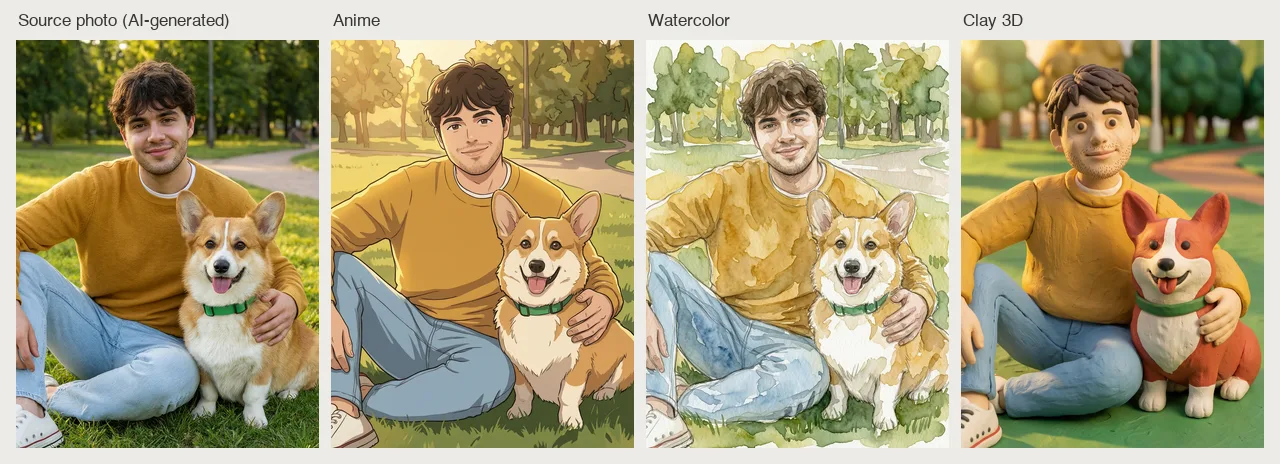
A photo of a fictional young man with his corgi in a park (the source photo is itself AI-generated) restyled as anime, watercolor, and clay 3D art with his face, hair, clothes, and the dog's markings kept recognizable. AI-generated with Beatra.
| Skill | Entry point | Version |
|---|---|---|
ai-photo-restyler |
SKILL.md | 0.2.0 |
This repository is published automatically from beatra-ai/beatra-skills. Report issues there.
Install
With the skills CLI:
npx skills add beatra-ai/photo-to-anime-skill
With the GitHub CLI:
gh skill install beatra-ai/photo-to-anime-skill ai-photo-restyler
Or clone this repository and copy skills/ai-photo-restyler into ~/.claude/skills/ for Claude Code,~/.agents/skills/ for Codex, or ~/.openclaw/skills/ for OpenClaw.
Or paste this into your agent:
Install the ai-photo-restyler skill from https://github.com/beatra-ai/photo-to-anime-skill (folder skills/ai-photo-restyler), then follow its SKILL.md to connect my Beatra account.
What you get
- Still looks like the subject — Keep the face, hairstyle, clothing, pet markings, or product label recognisable through the restyle.
- Anchor the exact look you want — Add your own style reference images so the result follows the palette, line weight, and shading you had in mind.
- Match a whole set — Lock in the first result you like, and every other photo in the set comes back in that same style.
Use cases
- Avatars and profile pictures — Turn a selfie or portrait into an anime, cartoon, or comic avatar for social profiles and communities.
- Sticker and emoji sets — Draw one character in a shared style across a set of poses and expressions for chat stickers.
- Pet, couple, and family portraits — Redraw a favourite photo as illustration art for prints, gifts, and merchandise.
FAQ
What kinds of photos work well for an anime or cartoon restyle?
Clear selfies, portraits, pet photos, group shots, product pictures, and travel scenes all work well when the subject is easy to see.
Can I match a specific art style I already like?
Yes. Add one to three style reference images alongside your photo and say what each should contribute, such as palette, line weight, or shading.
How do I keep a whole set of photos in the same style?
Pick the result you like best first, then the rest of the photos come back in that same style so the series matches.
Updates and security
Since the 2026-10 release, this skill contains no self-updater: it runs only the
files you installed and never replaces them on its own. Update it with the tool
you installed it with — npx skills update ai-photo-restyler or gh skill update ai-photo-restyler.
Details: references/updates-and-security.md inside the skill.
License
MIT-0 — free to use, modify, and redistribute, including
commercially. No attribution required. Same terms as these skills carry on
ClawHub.
Reviews (0)
Sign in to leave a review.
Leave a reviewNo results found