viral-video-remake-skill
Health Warn
- License — License: MIT-0
- Description — Repository has a description
- Active repo — Last push 0 days ago
- Low visibility — Only 5 GitHub stars
Code Pass
- Code scan — Scanned 5 files during light audit, no dangerous patterns found
Permissions Pass
- Permissions — No dangerous permissions requested
No AI report is available for this listing yet.
Viral video remake agent skill for Claude Code, Cursor, Codex, Windsurf, Cline & OpenClaw: break a short video that worked into its hook, beats, and call to action, then rebuild it around your own subject as a shot list, beat frames, narration, and a vertical clip or segmented sources. 爆款视频拆解 · 短视频复刻
Viral Video Remake Skill
English | 简体中文
Break a short video that worked into its hook, beats, and call to action, then rebuild that structure around your own subject as a shot list, beat frames, and narration, delivered as one vertical clip or as segmented sources with captions and a timecoded edit list, from inside Claude Code, Cursor, Codex, Windsurf, Cline, or OpenClaw.
[!IMPORTANT]
Rendering needs a Beatra account and uses credits. The skill itself is free to install.
| Question | Answer |
|---|---|
| What it does | Paste the link or bring the file, break a short video that worked into its hook, beats, and call to action, then rebuild that structure around your own subject as a shot list, beat frames, and narration — delivered as one vertical clip animated from your opening frame, or, when the reference cuts too fast or runs too long for a single take, as segmented sources with captions and a timecoded edit list. |
| Models | Qwen Image 2.0 Fast, Qwen Image 3.0, Qwen Image 3.0 Pro, GPT Image 2.5 Flare, GPT Image 2.5 Sunburst, GPT Image 2, Wan Image 2.7 Fast, Qwen Image 2.0 Pro, Wan Image 2.7 Pro, MiniMax Image 01 Live, MiniMax Voice Clone, MiniMax Speech 2.8 HD, MiniMax Speech 2.8 Turbo, MiniMax M3, Wan 2.7, Wan 3.0 Video, MiniMax H3, Seedance 2.0 Mini, HappyHorse 1.1, Seedance 2.0 Fast, Seedance 2.0, Wan 3.0 Video Prime, Seedance 2.5 |
| Requirements | Python 3.10+ and an agent that loads SKILL.md |
| Cost | Free to install. Each render uses credits on your Beatra account, and paid steps run only when you ask for that exact render or approve its card. |
| Works with | Claude Code, Cursor, Codex, Windsurf, Cline, OpenClaw |
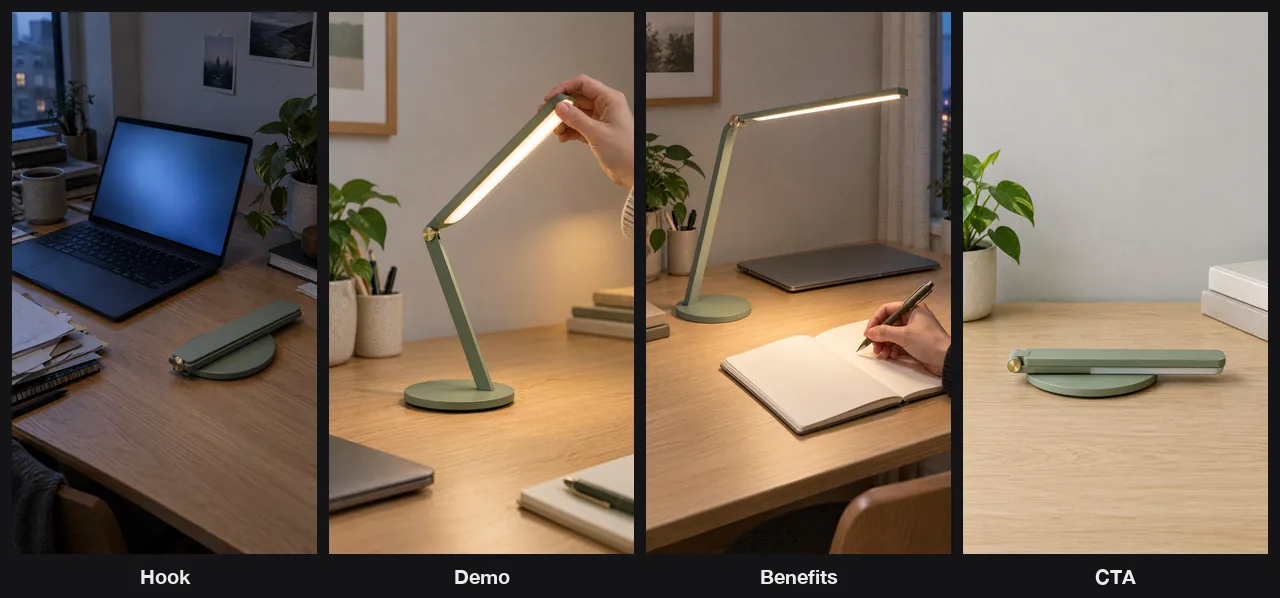
Four 9:16 beat frames (Hook, Demo, Benefits, CTA) remaking a hypothetical pain-first short structure for Brightfold, a fictional foldable desk lamp. AI-generated with Beatra.
| Skill | Entry point | Version |
|---|---|---|
viral-video-teardown-remake |
SKILL.md | 0.4.0 |
This repository is published automatically from beatra-ai/beatra-skills. Report issues there.
Install
With the skills CLI:
npx skills add beatra-ai/viral-video-remake-skill
With the GitHub CLI:
gh skill install beatra-ai/viral-video-remake-skill viral-video-teardown-remake
Or clone this repository and copy skills/viral-video-teardown-remake into ~/.claude/skills/ for Claude Code,~/.cursor/skills/ for Cursor, ~/.agents/skills/ for Codex, ~/.codeium/windsurf/skills/ for Windsurf,~/.cline/skills/ for Cline, or ~/.openclaw/skills/ for OpenClaw.
Or paste this into your agent:
Install the viral-video-teardown-remake skill from https://github.com/beatra-ai/viral-video-remake-skill (folder skills/viral-video-teardown-remake), then follow its SKILL.md to connect my Beatra account.
Examples

A 6-second vertical remake clip for the fictional lamp Brightfold: the Hook frame animated with the four-line narration covering hook, demo, benefits and call to action. AI-generated with Beatra.
Prompt:
Evening on a cramped desk. The folded sage-green desk lamp in the foreground slowly unfolds on its own: its single flat arm rises from the round base, the long flat light bar lifts open at the small brass hinge, and the light bar switches on with a warm white glow that brightens the desk. Slow gentle camera push-in toward the lamp. The laptop, papers, mug and plant stay still. Smooth, realistic product-video motion.
Technical Specifications & Output Limits
As of 2026-10-18. Live list: https://docs.beatra.ai/en/docs/models
- Uploads — up to 100 MB per file; the per-model input limits below also apply
- Text to image — 10 models (Qwen Image 2.0 Fast, Qwen Image 3.0, Qwen Image 3.0 Pro, GPT Image 2.5 Flare, GPT Image 2.5 Sunburst, GPT Image 2, Wan Image 2.7 Fast, Qwen Image 2.0 Pro, Wan Image 2.7 Pro, MiniMax Image 01 Live); PNG; up to 4 images per request; canvas up to 16.8 MP
- 16.8 MP (4K tier): Wan Image 2.7 Pro (up to 4 images per request); GPT Image 2.5 Flare, GPT Image 2.5 Sunburst, GPT Image 2 (1 image per request)
- Voice cloning — 1 model (MiniMax Voice Clone); sample 10–300 s, up to 20 MB; consent attestation required
- Text to speech — 2 models (MiniMax Speech 2.8 HD, MiniMax Speech 2.8 Turbo); FLAC, MP3, OPUS, PCM, WAV; 40 languages; sample rates 8, 16, 22.05, 24, 32, 44.1 kHz; up to 50000 characters per request
- Languages (ISO 639 codes): zh, yue, en, es, fr, ru, de, pt, ar, it, ja, ko, id, vi, tr, nl, uk, th, pl, ro, el, cs, fi, hi, bg, da, he, ms, fa, sk, sv, hr, fil, hu, no, sl, ca, nn, ta, af
- Video understanding — 1 model (MiniMax M3); 1 file per request; up to 50 MB each; up to 360 s; sampled at 1 fps
- Image to video — 9 models (Wan 2.7, Wan 3.0 Video, MiniMax H3, Seedance 2.0 Mini, HappyHorse 1.1, Seedance 2.0 Fast, Seedance 2.0, Wan 3.0 Video Prime, Seedance 2.5); 480p to 4K; 2–30 s; aspect ratios 16:9, 1:1, 21:9, 3:4, 4:3, 9:16; MOV, MP4
- 4K: Seedance 2.0, up to 15 s
- 30 s: Wan 3.0 Video, Wan 3.0 Video Prime, Seedance 2.5, up to 1080p
- Native audio: Wan 2.7, MiniMax H3
- First and last frames to video — 8 models (Wan 2.7, Wan 3.0 Video, MiniMax H3, Seedance 2.0 Mini, Seedance 2.0 Fast, Seedance 2.0, Wan 3.0 Video Prime, Seedance 2.5); 480p to 4K; 2–30 s; aspect ratios 16:9, 1:1, 21:9, 3:4, 4:3, 9:16; MOV, MP4
- 4K: Seedance 2.0, up to 15 s
- 30 s: Wan 3.0 Video, Wan 3.0 Video Prime, Seedance 2.5, up to 1080p
- Native audio: Wan 2.7, MiniMax H3
- Video extension — 7 models (Wan 2.7, Wan 3.0 Video, Seedance 2.0 Mini, Seedance 2.0 Fast, Seedance 2.0, Wan 3.0 Video Prime, Seedance 2.5); 480p to 4K; 2–30 s; aspect ratios 16:9, 1:1, 21:9, 3:4, 4:3, 9:16; MOV, MP4
- 4K: Seedance 2.0, up to 15 s
- 30 s: Wan 3.0 Video, Wan 3.0 Video Prime, Seedance 2.5, up to 1080p
- Native audio: Wan 2.7
- Reference to video — 9 models (Wan 2.7, MiniMax H3, Wan 3.0 Video, HappyHorse 1.1, Seedance 2.0 Mini, Seedance 2.0 Fast, Seedance 2.0, Wan 3.0 Video Prime, Seedance 2.5); 480p to 4K; 2–30 s; aspect ratios 16:9, 1:1, 3:4, 4:3, 9:16, 21:9, 4:5, 5:4, 9:21; MOV, MP4
- 4K: Seedance 2.0, up to 15 s
- 30 s: Wan 3.0 Video, Wan 3.0 Video Prime, Seedance 2.5, up to 1080p
- Native audio: Wan 2.7, MiniMax H3
Why use Beatra instead of calling model APIs directly
- One account for every model this skill uses — Text to image 10; Voice cloning 1; Text to speech 2; Video understanding 1; Image to video 9; First and last frames to video 8; Video extension 7; Reference to video 9 (Qwen Image 2.0 Fast, Qwen Image 3.0, Qwen Image 3.0 Pro, GPT Image 2.5 Flare, GPT Image 2.5 Sunburst, GPT Image 2, Wan Image 2.7 Fast, Qwen Image 2.0 Pro, Wan Image 2.7 Pro, MiniMax Image 01 Live, MiniMax Voice Clone, MiniMax Speech 2.8 HD, MiniMax Speech 2.8 Turbo, MiniMax M3, Wan 2.7, Wan 3.0 Video, MiniMax H3, Seedance 2.0 Mini, HappyHorse 1.1, Seedance 2.0 Fast, Seedance 2.0, Wan 3.0 Video Prime, Seedance 2.5) (as of 2026-10-18), behind one Beatra sign-in; no keys from individual model providers to manage.
- You decide what gets paid for — Paid renders run only when you ask for that exact render or approve its card, which shows the live credit estimate.
- Direction before rendering — the skill plans, directs, and reviews the work, then renders it on Beatra.
- Files you can verify — every file under
skills/matches the release archive on cdn.beatra.ai byte for byte, checked by SHA-256 before each push. - Updates you control — no self-updater; update with the tool you installed it with.
- Runs in your agent — Claude Code, Cursor, Codex, Windsurf, Cline, OpenClaw.
How it compares
| Beatra (this skill) | Clipcat-ai/clipcat-skill | xianyu110/ecommerce-video-skills | |
|---|---|---|---|
| Account or key needed | A Beatra account; no model provider keys | A Clipcat account and API key (source) | No API key; renders locally with Python and ffmpeg (source) |
| Models | Text to image 10; Voice cloning 1; Text to speech 2; Video understanding 1; Image to video 9; First and last frames to video 8; Video extension 7; Reference to video 9 (Qwen Image 2.0 Fast, Qwen Image 3.0, Qwen Image 3.0 Pro, GPT Image 2.5 Flare, GPT Image 2.5 Sunburst, GPT Image 2, Wan Image 2.7 Fast, Qwen Image 2.0 Pro, Wan Image 2.7 Pro, MiniMax Image 01 Live, MiniMax Voice Clone, MiniMax Speech 2.8 HD, MiniMax Speech 2.8 Turbo, MiniMax M3, Wan 2.7, Wan 3.0 Video, MiniMax H3, Seedance 2.0 Mini, HappyHorse 1.1, Seedance 2.0 Fast, Seedance 2.0, Wan 3.0 Video Prime, Seedance 2.5) | Video: Grok Imagine 1.5, Veo 3.1 Fast, Gemini Omni Flash, Seedance 2/2.5, Wan 3.0, MiniMax H3, HappyHorse 1.1 (source) | edge-tts voice-over; image-to-video models are optional (source) |
| Before spending | Paid renders run only when you ask for that exact render or approve its card, which shows the live credit estimate | Before a video task spends credits, shows a free checklist (model, duration, credits) and waits for your explicit yes (source) | Not stated |
| Agents | Claude Code, Cursor, Codex, Windsurf, Cline, OpenClaw | Agents that run shell commands: Claude Code, Codex, WorkBuddy, OpenClaw, Cursor (source) | Claude Code, Codex, Cursor (source) |
| Install | npx skills add beatra-ai/viral-video-remake-skill |
The clipcat CLI; OpenClaw installs it from the skill manifest (source) |
npx skills add xianyu110/ecommerce-video-skills (source) |
| License | MIT-0 | No license file in the repository (source) | MIT (source) |
| Last updated | Updated with every release (v0.4.0) | 2026-09-20 (source) | 2026-10-05 (source) |
Facts checked on 2026-10-16. Corrections: open an issue in beatra-ai/beatra-skills.
What you get
- Read the structure, not just the surface — Segment the clip into hook, body beats, and call to action with second-level timings, and name the script pattern underneath it.
- Know what actually carried it — Separate the structural move from the specific content and the presentation craft, so you carry over the part that transfers.
- End with shootable material, not a report — Get a shot list with visuals and narration kept apart, generated beat frames delivered as stills, a narration track, and — depending on how the reference cuts — either one vertical clip animated from your opening frame, or segmented sources with captions and a timecoded edit list for your own cut.
Use cases
- Study a competitor's breakout post — Work out why a rival's short took off and build your own version on the same structure.
- Turn a saved reference into a format — Convert a clip from your swipe file into a repeatable shape you can run on new subjects.
- Rebuild a benchmark under your brand — Keep the pacing and beat order that proved itself, and replace every claim with your own.
FAQ
What do I need to start?
A reference short and a sentence about what your version is about. The reference can be a link to the post on TikTok, Douyin, Xiaohongshu, Instagram, YouTube, or X, a video file, screenshots of the key moments, a transcript, or your own description of what happens beat by beat.
What does the teardown actually tell me?
A beat table with second-level timings, the script pattern the clip follows, a ranked read of what carried its performance, a score across hook strength, information density, pacing, subject presentation, emotional curve, and conversion pull, and the one weakness your remake can improve on.
What do I get at the end?
A shot list where the on-screen action and the spoken line are written as separate fields, generated frames for the beats you choose, and a narration track in a voice you select. For a short, low-cut reference that fits inside one model take, that becomes one 9:16 vertical clip animated from your opening frame with the narration running over it, and the other beat frames come back as stills for your own edit. For a reference with more cuts, or one that runs longer than a single take supports, you instead get segment sources for every beat, that same single narration track, captions, and a timecoded edit list to assemble in your own editor.
Updates and security
Since the 2026-10 release, this skill contains no self-updater: it runs only the
files you installed and never replaces them on its own. Update it with the tool
you installed it with — npx skills update viral-video-teardown-remake or gh skill update viral-video-teardown-remake.
Details: references/updates-and-security.md inside the skill.
License
MIT-0 — free to use, modify, and redistribute, including
commercially. No attribution required. Same terms as these skills carry on
ClawHub.
Links
- Website — https://beatra.ai
- Docs — https://docs.beatra.ai
- Console — https://console.beatra.ai
- For AI agents — https://beatra.ai/llms.txt (index) · https://beatra.ai/llms-full.txt (every skill in one file)
Reviews (0)
Sign in to leave a review.
Leave a reviewNo results found