beever-atlas
Health Gecti
- License — License: Apache-2.0
- Description — Repository has a description
- Active repo — Last push 0 days ago
- Community trust — 14 GitHub stars
Code Gecti
- Code scan — Scanned 12 files during light audit, no dangerous patterns found
Permissions Gecti
- Permissions — No dangerous permissions requested
Bu listing icin henuz AI raporu yok.
Your First LLM-Wiki Conversation Knowledge Base
 Beever Atlas
Turn your team's Slack, Discord, Teams & Mattermost chats
into a self-maintaining wiki — automatically.







Beever Atlas pulls the conversations your team already has on Slack, Discord, Microsoft Teams, and Mattermost, extracts atomic facts, deduplicates them, and clusters them into topic pages with citations. A graph store links the people, decisions, and projects mentioned across channels. Ask questions in natural language and get answers cited back to the source messages — through the dashboard, or through MCP into Claude Code and Cursor.
If you want a knowledge base that grows on its own from the chats your team already has, this is it.
✨ Features in action
Six short clips — connect a workspace, sync history, watch memory build, browse the auto-generated wiki, ask questions, plug external AI agents in via MCP.
Multi-Platform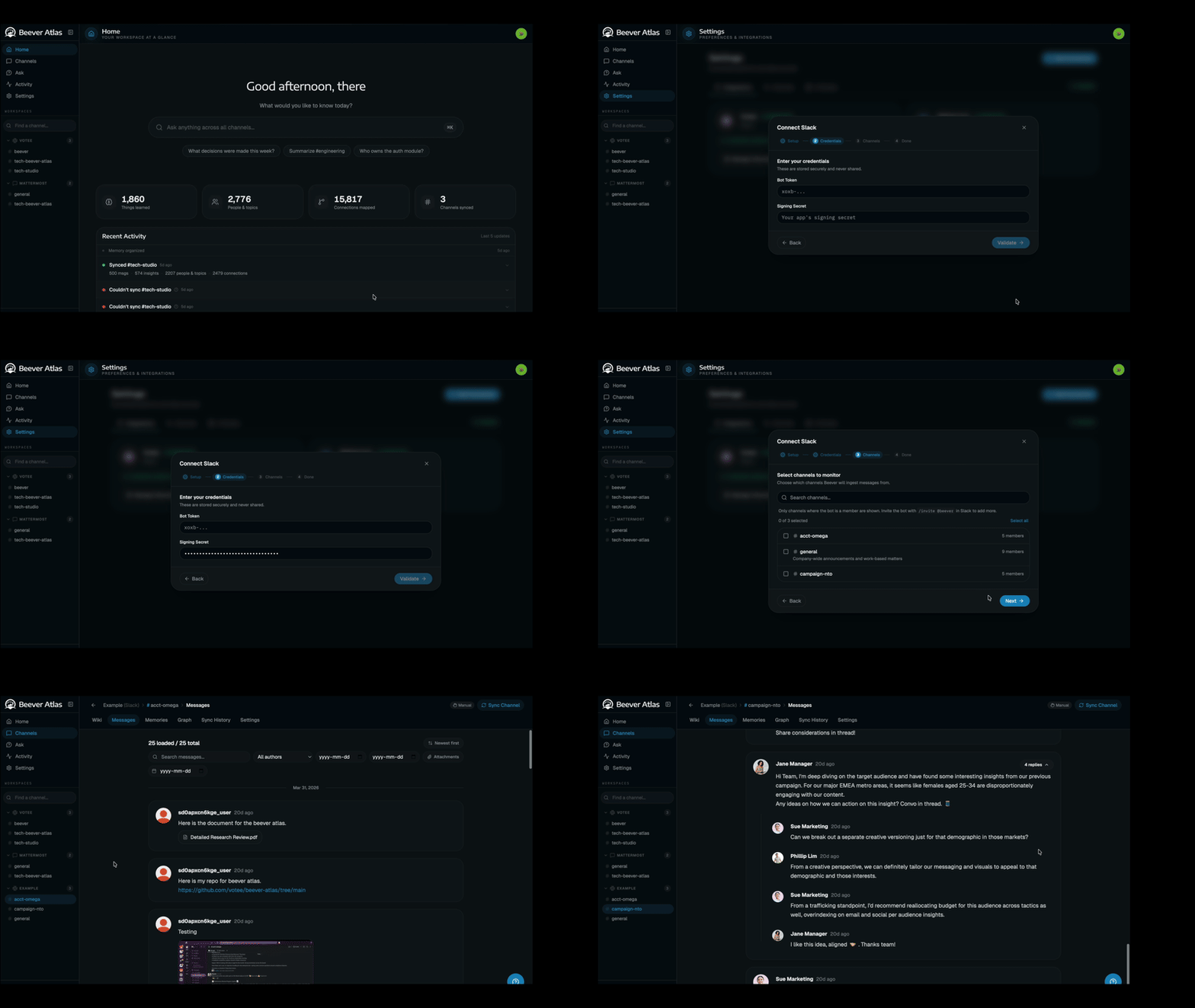 Connect Slack, Discord, Teams, Mattermost, or file imports. One bot, every workspace. |
Message Sync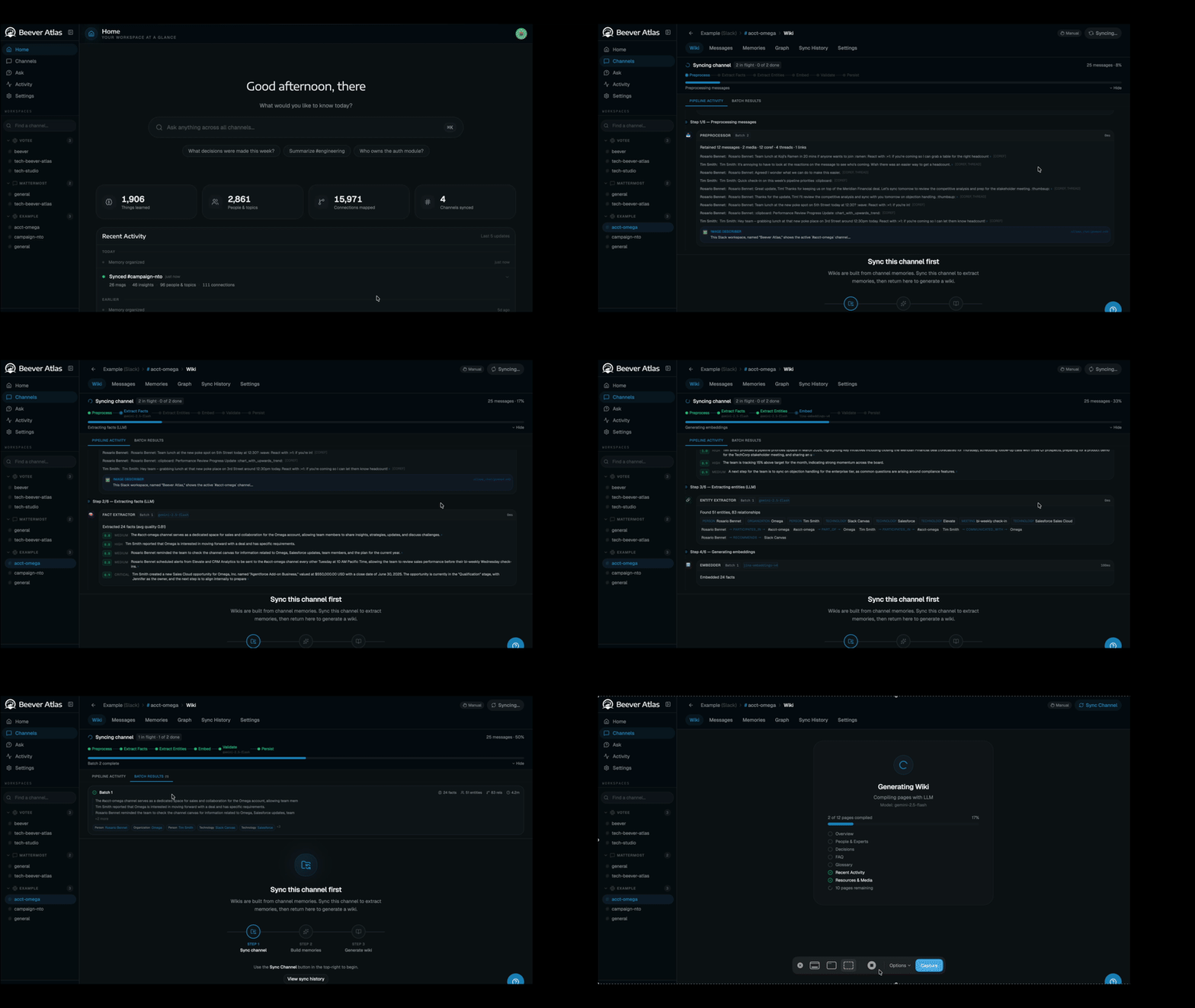 Pull channel history on demand or on a schedule. Resumable and rate-limit aware. |
Memory Ingestion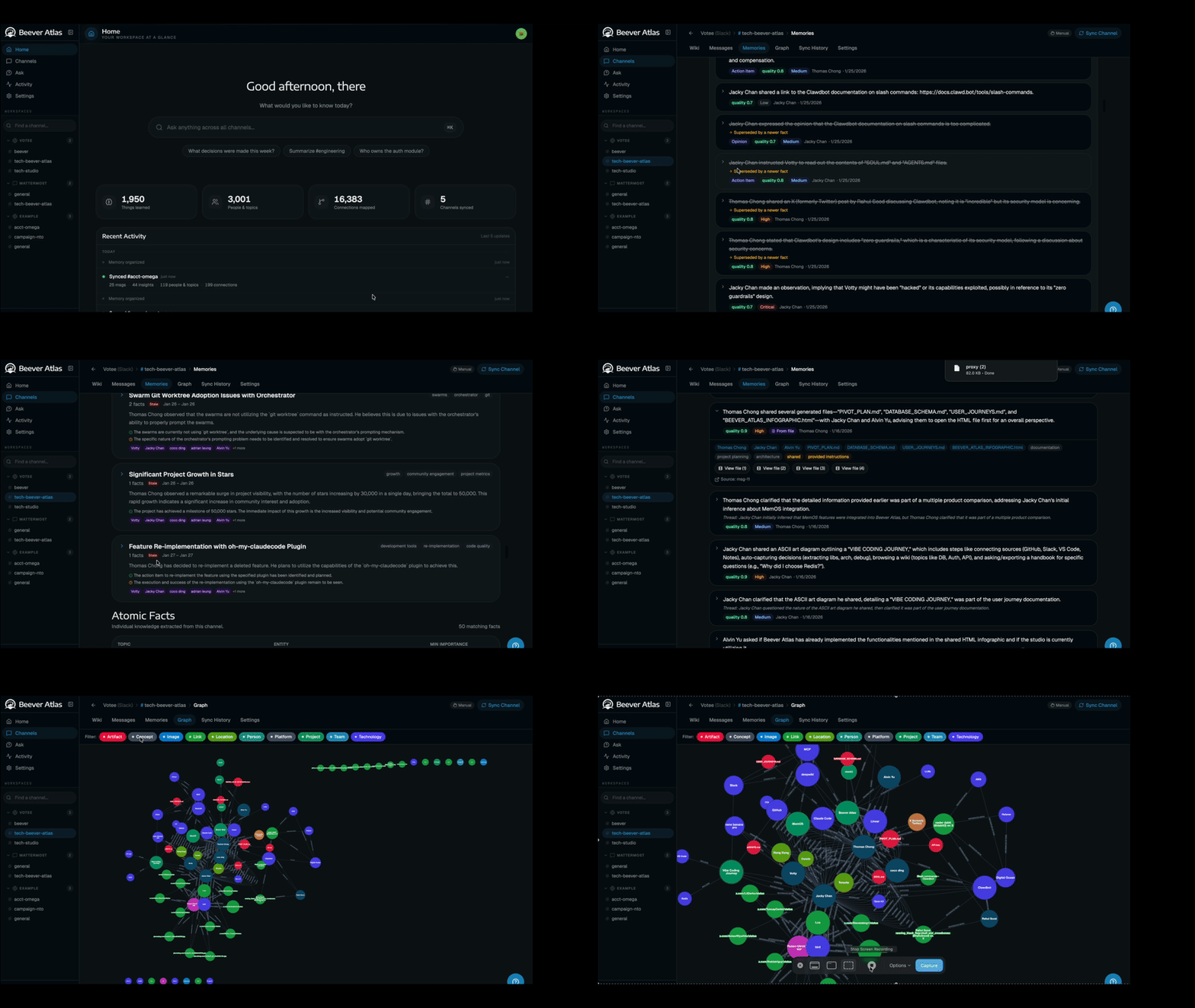 6-stage ADK pipeline distils messages into atomic facts, entities, and relationships. |
LLM Wiki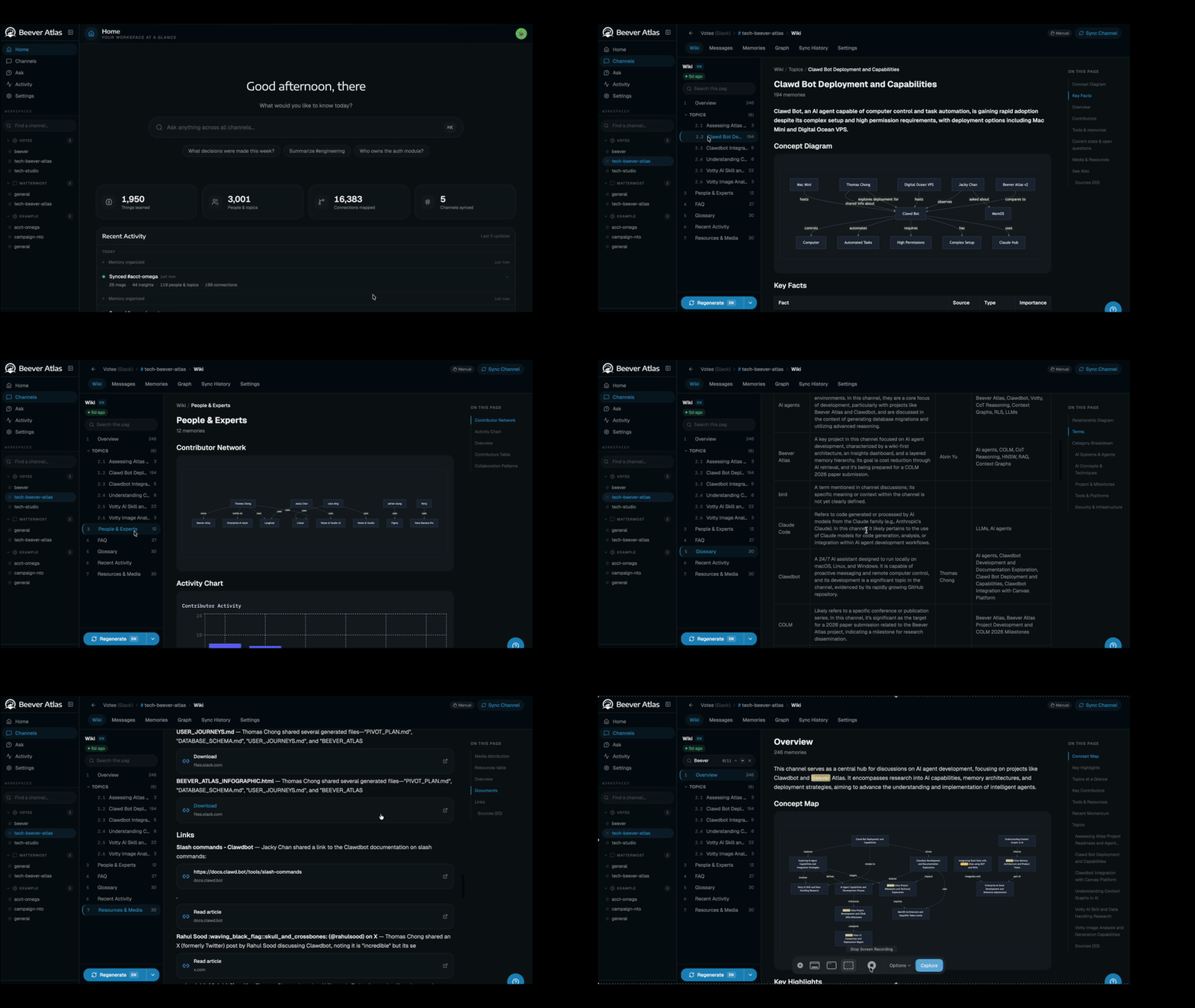 Auto-maintained wiki per channel — overview, topics, people, decisions, citations. |
QA Agent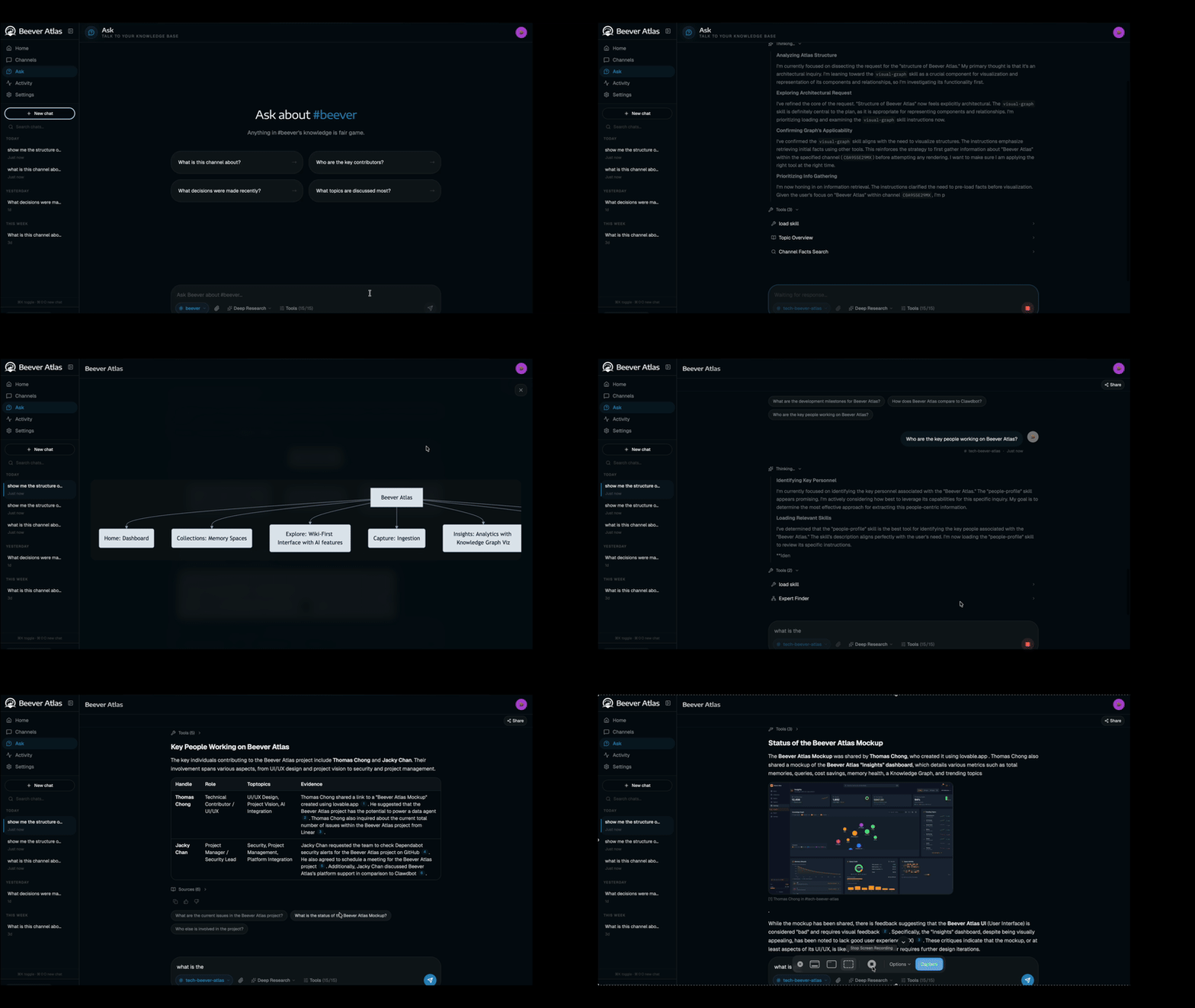 Streams cited answers over SSE. Smart router picks semantic or graph per question. |
MCP Server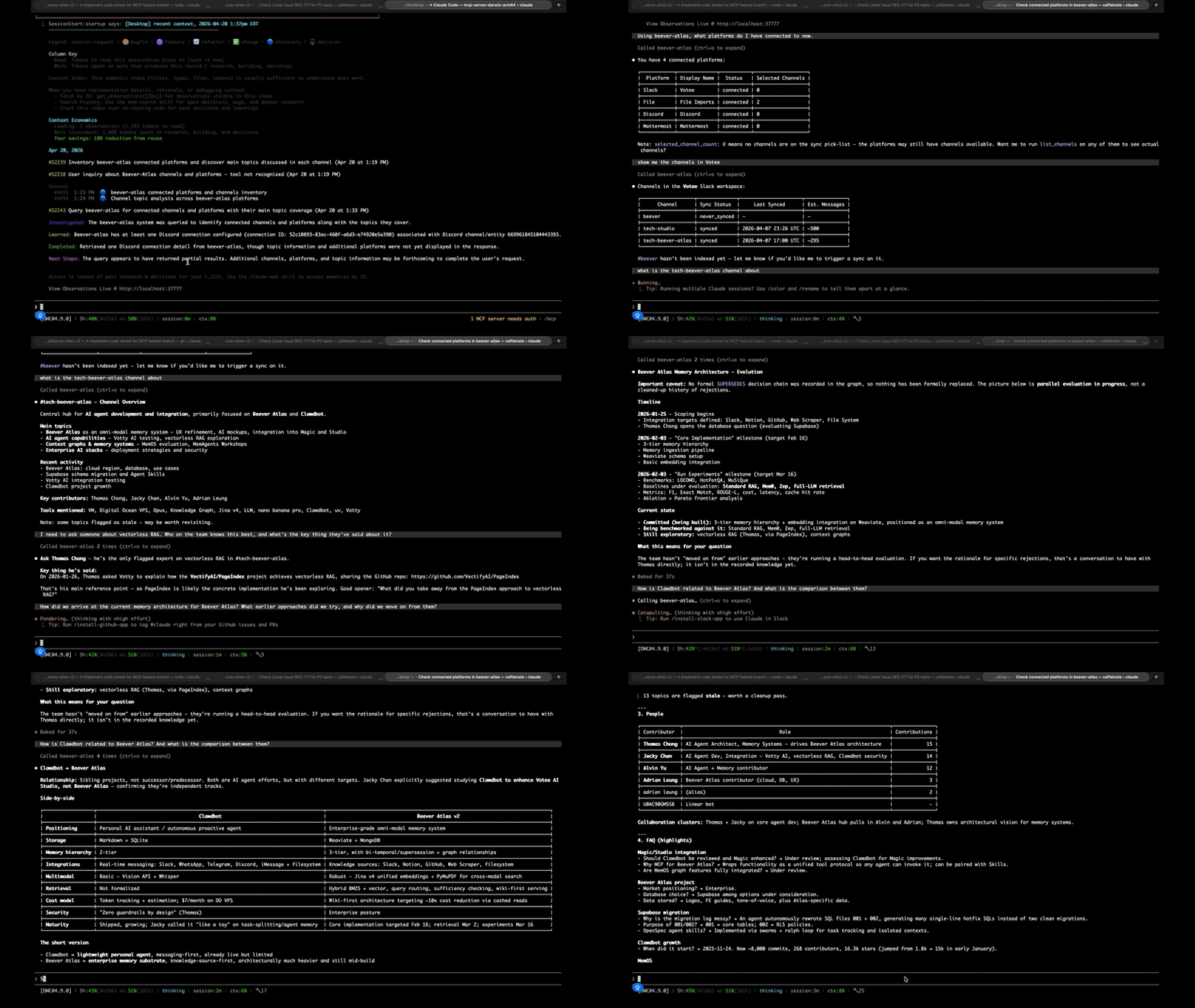 Plug Claude Code / Cursor into your knowledge base — 16 tools, per-agent auth. |
🏗️ Architecture
Conversations from any supported platform flow into a unified ingestion pipeline that produces two complementary memory systems — a 3-tier semantic store (channel / topic / atomic fact) for fast hybrid search, and a graph store that extracts entities and their relationships. Those memories fuel two consumer surfaces: the LLM Wiki (distilled, auto-maintained) and QA Agents (served through the dashboard directly, or through MCP into Claude Code / Cursor).
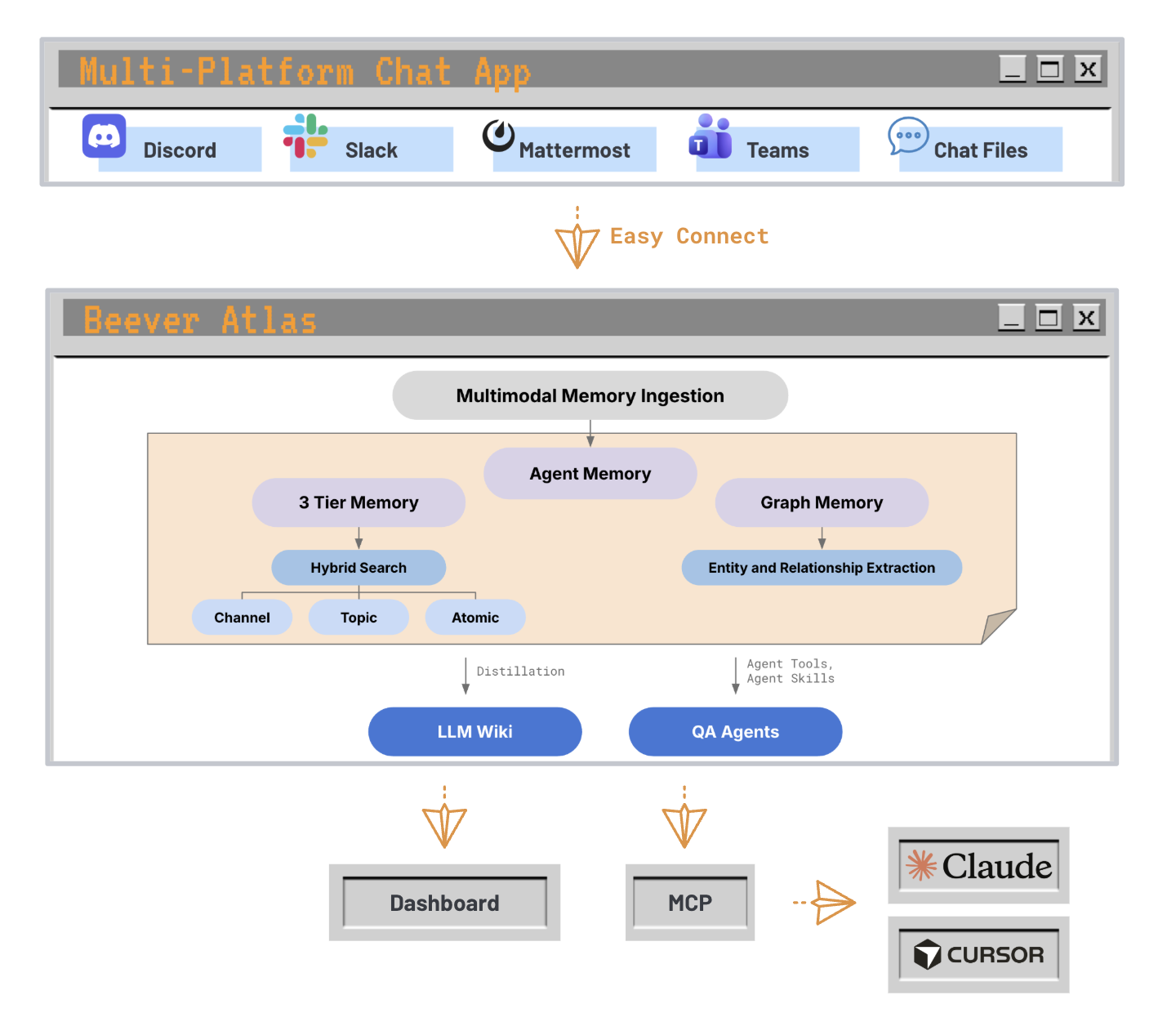
From chat platforms to MCP agents — one ingestion path, two memory systems, two delivery surfaces.
Under the hood, three services (backend, bot, frontend) are backed by four data stores (Weaviate, Neo4j, MongoDB, Redis). See the architecture overview on the documentation site for the full design — component responsibilities, dual-memory internals, and the smart query router.
💡 Why Wiki-First RAG?
Most RAG systems answer questions by retrieving raw message snippets and feeding them straight to an LLM. Beever Atlas takes a different approach: it continuously distils conversations into a structured, auto-maintained wiki — with topic pages, entity graphs, decisions, and citations — before any query is issued. When you ask a question, the retrieval layer works against clean, deduplicated knowledge rather than noisy chat history. This means answers are more consistent, citations are traceable to source messages, and the wiki itself becomes a useful artifact your team can browse independently of the Q&A interface. The dual-memory architecture (semantic + graph) lets the query router pick the right retrieval strategy per question, keeping latency low and context precise.
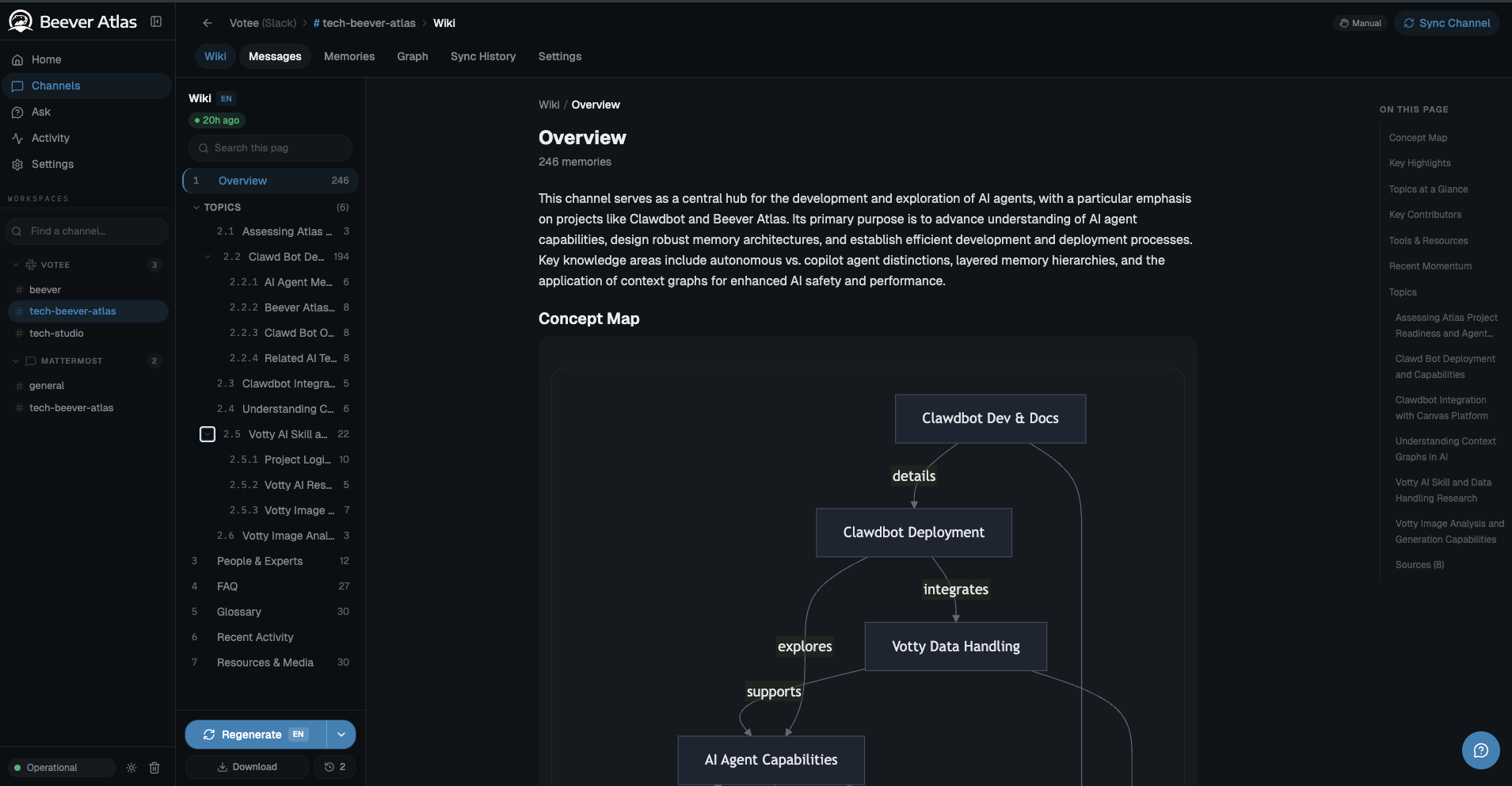
A live auto-generated channel wiki: overview, concept map, topics, FAQ, glossary — distilled from 246 Slack messages, not hand-written.
The inspiration: LLMs read wikis, not chat logs
The per-channel wiki concept is directly inspired by Andrej Karpathy's observation that LLMs are far better at reasoning over curated, encyclopedic content (books, docs, wikis) than over raw conversational transcripts. Chat history is noisy, redundant, temporally scattered, and full of implicit context that only humans resolve. A wiki, by contrast, is the already-distilled form of that knowledge — deduplicated, structured, citation-bearing, and organised by topic rather than by timestamp.
Beever Atlas operationalises this insight: every synced channel gets its own auto-generated, continuously-updated wiki — sections for topics, entities, decisions, open questions, and timelines — rebuilt incrementally as new messages arrive. The QA agent retrieves against this wiki first, falling back to raw messages only when a fact hasn't been distilled yet.
What this unlocks in practice
- Better answers, fewer hallucinations — retrieval operates on fact-dense prose with explicit entity relationships, not on fragmented turn-by-turn chat.
- Traceable citations — every wiki claim links back to the source messages that produced it, so answers are auditable all the way down to the original Slack/Discord/Teams thread.
- A browsable artifact, not just a Q&A box — the wiki is useful on its own. New teammates onboarding to a channel can read the distilled wiki instead of scrolling three months of history.
- Cheaper inference at query time — the expensive distillation work happens once, at ingestion. Queries hit compact, pre-digested context instead of re-summarising raw logs on every request.
- Graph-aware reasoning — the entity graph built alongside the wiki lets the query router answer relational questions ("who worked on X with Y?") that pure vector RAG struggles with.
For a detailed comparison with other LLM knowledge tools, see the comparison page on the documentation site.
🚀 Quick Start
Beever Atlas ships as a Docker Compose stack (backend + bot + web + 4 datastores). You can try a seeded demo in 30 seconds with zero keys, then pick one of three deployment options to install it for real.
1. Get the code
git clone https://github.com/beever-ai/beever-atlas.git
cd beever-atlas
2. Try the demo first (optional, no keys needed for seeding)
make demo
make demo brings up the full stack pre-loaded with a public Wikipedia corpus (Ada Lovelace + Python history). Seeding uses pre-computed fixtures — no API keys required. Asking questions via /api/ask needs a free-tier GOOGLE_API_KEY because the QA agent calls Gemini. See demo/README.md for curl examples.
Skip this step if you're ready to install for real.
3. Before you start: get your API keys
Two free keys are required before installing. Both offer generous free tiers — enough to sync a small team's channels for testing.
| Key | Purpose | Where to get it |
|---|---|---|
GOOGLE_API_KEY |
Gemini — extraction, entity graph, answers | aistudio.google.com/apikey |
JINA_API_KEY |
Jina v4 embeddings (2048-dim) for semantic search | jina.ai/api-dashboard |
Optional (skip unless you know you need them):
| Key | What it enables |
|---|---|
TAVILY_API_KEY |
External web search when QA retrieval confidence is low — tavily.com |
| Slack / Discord / Teams bot tokens | Configured via the web UI after setup, not .env — the bot stores platform credentials encrypted in MongoDB |
Tip: Keep the two required keys handy before you start. Option 1 prompts for them interactively; Options 2 and 3 need them pasted into
.env.
4. Choose a deployment option
| Option | When to use | Time to "up" |
|---|---|---|
| 1. One-line install (recommended) | You want the fastest path to a running stack. | ~2 min first run |
| 2. Manual Docker | CI/CD, ops environments, or when you want explicit control over every step. | ~3 min first run |
| 3. Local development | Active contributors who need hot-reload on backend and frontend. | varies |
Option 1 — One-line install (recommended)
./atlas
The atlas installer walks you through a guided 4-step checklist:
- Required LLM keys — prompts for
GOOGLE_API_KEY(Gemini) andJINA_API_KEY(embeddings); press Enter to skip either. - Optional integrations — Tavily web search, Ollama, MCP server for Claude Code / Cursor.
- Graph backend — Neo4j (default) or skip.
- Auth tokens — keep dev defaults or rotate now.
Under the hood it verifies docker + docker compose, copies .env.example → .env (preserves your values on re-run, chmod 600), auto-generates CREDENTIAL_MASTER_KEY (64 hex) and WEAVIATE_API_KEY (32 hex), runs a port-conflict preflight, launches the stack via docker compose up -d --build --force-recreate --remove-orphans, and polls /api/health before printing the ready card.
When you see "Beever Atlas is ready", open http://localhost:3000.
For CI or unattended installs — skip prompts, pre-seed keys from shell env:
GOOGLE_API_KEY=... JINA_API_KEY=... ./atlas --non-interactive
Re-running ./atlas on an existing stack is idempotent.
Option 2 — Manual Docker
Full control, step-by-step.
cp .env.example .env
Open .env and fill in the two required keys:
GOOGLE_API_KEY=your_gemini_key
JINA_API_KEY=your_jina_key
Generate two required secrets and paste them into .env:
# CREDENTIAL_MASTER_KEY — AES-256-GCM key for stored platform credentials (64 hex chars)
python -c "import secrets; print(secrets.token_hex(32))"

# WEAVIATE_API_KEY — auth between backend and Weaviate (required by docker-compose)
python -c "import secrets; print(secrets.token_hex(16))"
Launch:
docker compose up -d --build
Open http://localhost:3000.
Services started:
| Service | Port | Description |
|---|---|---|
| Web (nginx) | :3000 |
React dashboard |
| Backend | :8000 |
FastAPI + ADK agents |
| Bot | :3001 |
Platform bridge (Slack / Discord / Teams) |
| Weaviate | :8080 |
Semantic memory |
| Neo4j | :7474 / :7687 |
Graph memory |
| MongoDB | :27017 |
State + wiki cache |
| Redis | :6380 |
Sessions (internal :6379) |
First run takes 2–3 minutes while images build and databases initialize. Subsequent runs start in seconds.
Option 3 — Local development
Databases in Docker, app services native for hot-reload.
Prerequisites: Python 3.12+ with uv, Node.js 20+
cp .env.example .env
# Fill in GOOGLE_API_KEY, JINA_API_KEY, CREDENTIAL_MASTER_KEY, WEAVIATE_API_KEY (same as Option 2)

# Start just the databases
docker compose up -d weaviate neo4j mongodb redis

# Backend (terminal 1)
uv sync
uv run uvicorn beever_atlas.server.app:app --reload --port 8000

# Bot (terminal 2)
cd bot && npm install && npm run dev

# Web (terminal 3) — Vite dev server with HMR
cd web && npm install && npm run dev
Open http://localhost:5173 (the Vite dev port — not :3000).
The Vite dev server proxies /api/* to http://localhost:8000 (configured via VITE_API_URL).
Before going to production
.env.example defaults are tuned for local testing. Before any real deploy, rotate the secrets that ship with placeholder values and flip the environment flag:
| What to change | Why | How |
|---|---|---|
BEEVER_API_KEYS, BEEVER_ADMIN_TOKEN |
Ship as dev-key-change-me / dev-admin-change-me — public placeholders |
python -c "import secrets; print(secrets.token_hex(24))" per token |
BRIDGE_API_KEY |
Shared secret between backend and bot; blank by default, required outside local dev | Same secrets.token_hex(24) |
VITE_BEEVER_API_KEY, VITE_BEEVER_ADMIN_TOKEN |
Vite bakes these into the web bundle at build time — must mirror the rotated backend values above | Copy the rotated BEEVER_API_KEYS / BEEVER_ADMIN_TOKEN values |
NEO4J_PASSWORD + password half of NEO4J_AUTH |
Dev password is public in this repo | Pick a strong password; both values must match |
BEEVER_ENV=production |
Enables fail-fast startup that rejects every dev default above | Flip the value in .env |
Option 1 (./atlas) handles all of this through the "Rotate auth tokens" prompt in step 4 of the checklist — answer Y and the installer generates random tokens and mirrors the VITE_* values for you. If you used Option 2 or 3, you can re-run ./atlas on the existing .env, skip every other prompt with Enter, and only accept the rotation prompt.
5. Open the dashboard
Navigate to the URL for your chosen option:
- Options 1 & 2 → http://localhost:3000
- Option 3 → http://localhost:5173
From there:
- Real mode (default,
ADAPTER_MOCK=false): connect a workspace in Settings → Connections — Slack / Discord / Teams tokens are entered through the UI, not.env. - Mock mode (
ADAPTER_MOCK=true): uses fixture data — opt in for local UI iteration without platform credentials.
6. Sync a channel
From the dashboard: Connections → Add Workspace → Select channels → Sync.
Or via API (auto-extracts your bearer token from .env):
curl -X POST http://localhost:8000/api/channels/C12345/sync \
  -H "Authorization: Bearer $(grep -E '^BEEVER_API_KEYS=' .env | cut -d= -f2 | cut -d, -f1)"
MCP server (for external AI agents)
Beever Atlas exposes a curated MCP (Model Context Protocol) server at /mcp for AI agents like Claude Code and Cursor. This allows external code assistants to query your team's knowledge base without using the dashboard.
See docs/mcp-server.md for:
- Tool catalog — 16 tools for discovery, retrieval, graph traversal, and long-running operations
- Auth setup — generating and managing
BEEVER_MCP_API_KEYS - Client configuration — ready-to-use
.mcp.jsontemplates for Claude Code and Cursor - Rate limits — principal-keyed limits to prevent one agent from throttling others
Quick example (Claude Code):
{
  "mcpServers": {
    "beever-atlas": {
      "url": "https://atlas.example.com/mcp",
      "transport": "streamable-http",
      "headers": {
        "Authorization": "Bearer ${BEEVER_MCP_KEY}"
      }
    }
  }
}
Common commands
docker compose up -d                     # Start in background
docker compose logs -f beever-atlas      # Tail backend logs
docker compose down                      # Stop (keeps data)
docker compose down -v                   # Stop and DELETE all indexed data
make demo                                # Full stack + seeded demo corpus
make docker-up                           # Shortcut for `docker compose up -d`
🔒 Privacy & Telemetry
Beever Atlas collects no telemetry. No usage data, error reports, or analytics are sent anywhere by default. All LLM calls go through API keys you configure in your own .env, and all data stays in the databases you control.
📐 API Stability
All /api/* endpoints are UNSTABLE in 0.1.0. v0.2.0 will introduce a /api/v1/* prefix; clients pinning current paths will break. See SECURITY.md.
💬 Community & Contact
- Discord: discord.gg/VshBCUUX — get help, share what you're building, talk to the team
- X / Twitter: @Beever_AI — release notes, posts, announcements
- Website: beever.ai — about the company and other projects
- GitHub Discussions: github.com/Beever-AI/beever-atlas/discussions — longer-form questions and ideas
Commercial support, partnerships, or press: [email protected].
📜 License
Apache License 2.0 © 2026 Beever Atlas contributors. Third-party attributions in NOTICE.
Security policy: SECURITY.md | Community standards: CODE_OF_CONDUCT.md
Yorumlar (0)
Yorum birakmak icin giris yap.
Yorum birakSonuc bulunamadi