vsc-lsp-mcp
Health Pass
- License — License: MIT
- Description — Repository has a description
- Active repo — Last push 0 days ago
- Community trust — 24 GitHub stars
Code Pass
- Code scan — Scanned 12 files during light audit, no dangerous patterns found
Permissions Pass
- Permissions — No dangerous permissions requested
No AI report is available for this listing yet.
VSCode LSP MCP
VSCode LSP MCP


🔍 Overview
VSCode LSP MCP is a Visual Studio Code extension that exposes Language Server Protocol (LSP) features through the Model Context Protocol (MCP).
Extension ID: cjl.lsp-mcp — open Extensions (Ctrl+Shift+X / Cmd+Shift+X) and search for cjl.lsp-mcp to find this plugin precisely.
This allows AI assistants and external tools to utilize VSCode's powerful language intelligence capabilities without direct integration.
🌟 Why This Extension?
Large language models like Claude and Cursor struggle to understand your codebase accurately because:
- They rely on regex patterns to find symbols, leading to false matches
- They can't analyze import/export relationships properly
- They don't understand type hierarchies or inheritance
- They have limited code navigation capabilities
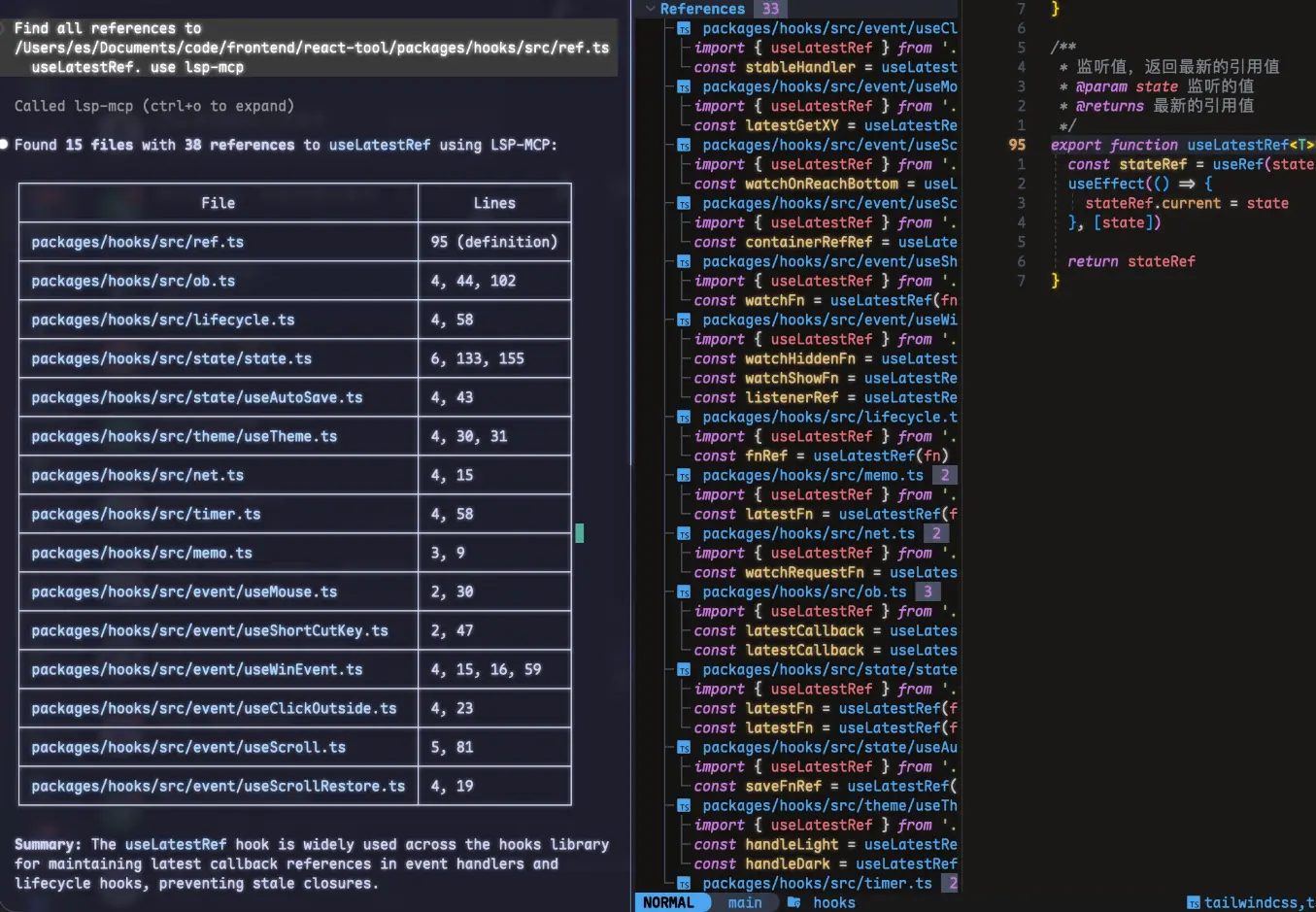
This extension bridges that gap, providing AI tools with the same code intelligence that VSCode uses internally!
⚙️ Features
- 🔄 LSP Bridge: Converts LSP features into MCP tools
- 🔌 Multi-Instance Support: Automatically handles port conflicts for multiple VSCode windows
- 🧠 16 LSP operations covering navigation (definition, declaration, implementation, references), documentation (hover, completions), structure (document/workspace symbols, call hierarchy), and manipulation (rename)
- ☕ Java dependency source: Get decompiled Java class source via jdt:// URI (from jdtls), so AI can read library implementations
- 📄 Dual output format: JSON for machine processing, Markdown for LLM-friendly reading
🛠️ Exposed MCP Tools
| Operation | Description |
|---|---|
hover |
Get hover information (documentation, type, etc.) at a position |
definition |
Get the definition location of a symbol |
declaration |
Get the declaration location of a symbol |
implementation |
Get the implementation location(s) of a symbol |
references |
Find all references to a symbol |
completions |
Get intelligent code completion suggestions |
document_symbols |
Get the symbol outline (tree) of a document |
workspace_symbols |
Search for symbols across the entire workspace by query |
class_file_contents |
Get decompiled Java class source via jdt:// URI (from jdtls), to read library/dependency implementations |
rename |
Rename a symbol across the workspace |
symbol_at_position |
Get symbol metadata (name, kind, range) at a position |
incoming_calls |
Find all callers of a symbol |
outgoing_calls |
Find all callees (calls made by) a symbol |
All operations are invoked through the single execute_lsp MCP tool with a unified input format:
operation— which LSP operation to executeuri— file path or URI string (supports both plain paths andfile:///jdt://URIs)position—line:character(0-based)newName— required only forrenamequery— required only forworkspace_symbols
📋 Configuration
| Key | Description | Type | Default |
|---|---|---|---|
lsp-mcp.enabled |
Enable or disable the LSP MCP server. | boolean |
true |
lsp-mcp.port |
Port for the LSP MCP server. | number |
9527 |
lsp-mcp.maxRetries |
Maximum number of port retry attempts when the default port is occupied. | number |
10 |
lsp-mcp.cors.enabled |
Enable or disable CORS (Cross-Origin Resource Sharing). | boolean |
true |
lsp-mcp.cors.allowOrigins |
Allowed origins for CORS. Use * to allow all origins, or provide a comma-separated list of origins (e.g., http://localhost:3000,http://localhost:5173). |
string |
* |
lsp-mcp.cors.withCredentials |
Whether to allow credentials (cookies, authorization headers) in CORS requests. | boolean |
false |
lsp-mcp.cors.exposeHeaders |
Headers that browsers are allowed to access. Provide a comma-separated list of headers (e.g., Mcp-Session-Id). |
string |
Mcp-Session-Id |
lsp-mcp.outputFormat |
Output format for LSP operation results. json for machine-readable JSON, markdown for LLM-friendly Markdown. |
string |
json |
🔗 Integration with AI Tools
Cursor
Config file: ~/.cursor/mcp.json (e.g. %USERPROFILE%\.cursor\mcp.json on Windows)
{
  "mcpServers": {
    "lsp": {
      "url": "http://127.0.0.1:9527/mcp"
    }
  }
}

OpenCode
Config file: ~/.config/opencode/opencode.jsonc
{
  "mcp": {
    "lsp-mcp": {
      "type": "remote",
      "url": "http://127.0.0.1:9527/mcp",
      "enabled": true
    }
  }
}
Claude Code
Config file: ~/.claude.json
{
  "mcpServers": {
    "lsp-mcp": {
      "type": "http",
      "url": "http://127.0.0.1:9527/mcp"
    }
  }
}
Gemini | IFlow
Config file: ~/.gemini/settings.json
{
  "mcpServers": {
    "lsp-mcp": {
      "type": "streamable-http",
      "httpUrl": "http://127.0.0.1:9527/mcp"
    }
  }
}
Roo Code
{
  "mcpServers": {
    "lsp": {
      "type": "streamable-http",
      "url": "http://127.0.0.1:9527/mcp",
      "disabled": false
    }
  }
}
💻 Development
- Clone the repository
- Run
pnpm install - Run
pnpm run updateto generate metadata - Press
F5to start debugging
Reviews (0)
Sign in to leave a review.
Leave a reviewNo results found