Kwipu
Health Gecti
- License — License: MIT
- Description — Repository has a description
- Active repo — Last push 0 days ago
- Community trust — 71 GitHub stars
Code Gecti
- Code scan — Scanned 3 files during light audit, no dangerous patterns found
Permissions Gecti
- Permissions — No dangerous permissions requested
Bu listing icin henuz AI raporu yok.
Ask questions across your Markdown notes using a fully local Graph RAG engine. Built for Obsidian vaults, works with any folder of Markdown files. Extracts entity-relation triples from wikilinks & YAML frontmatter, retrieves answers via hybrid search (vector + BM25 + temporal). Multilingual. No cloud. Runs on Ollama.
Kwipu




A local Graph RAG system that turns your markdown notes into a queryable knowledge graph. Ask questions in natural language and get answers that connect information across multiple files.
Built for Obsidian vaults but works with any folder of markdown files.
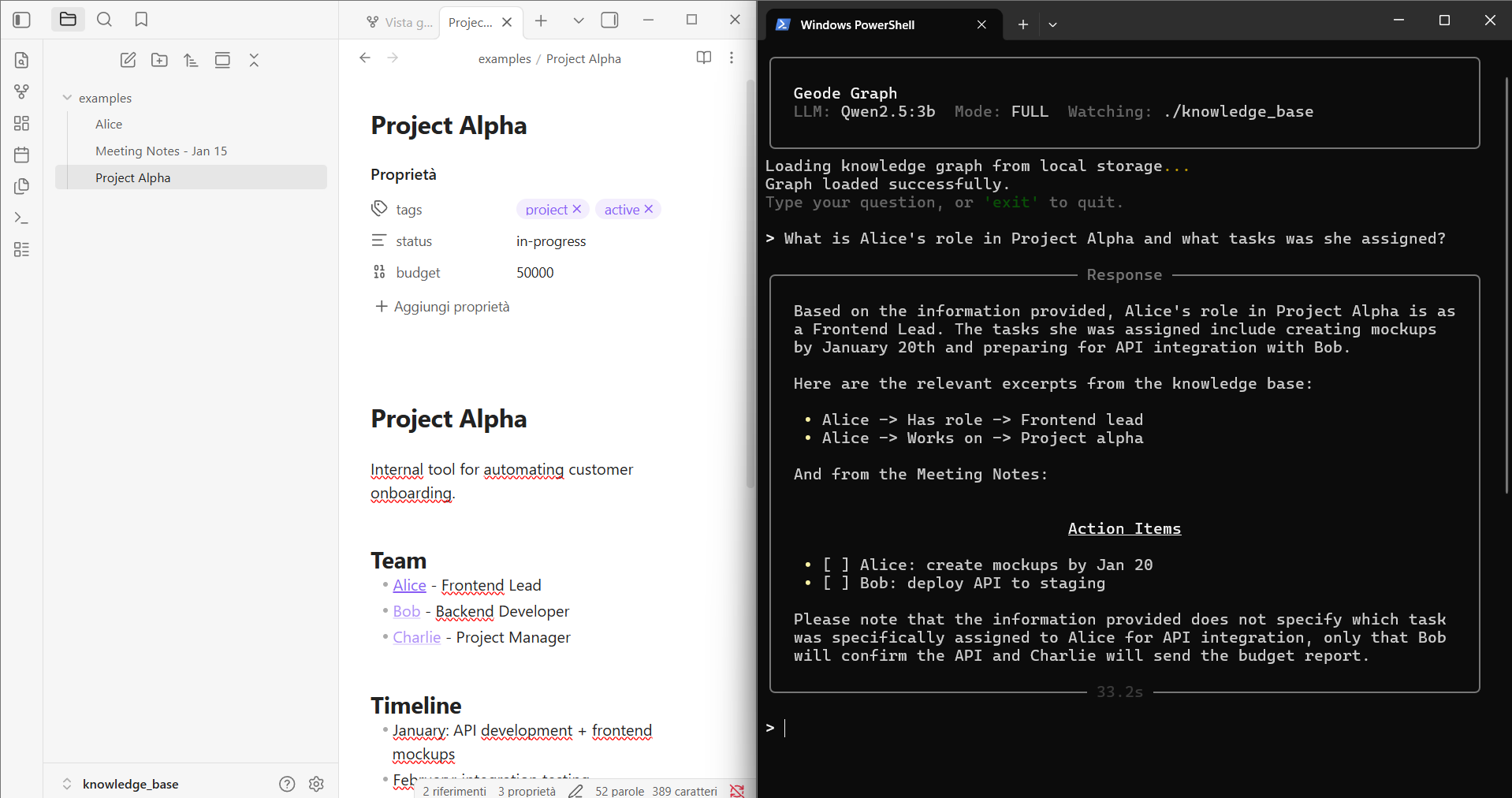
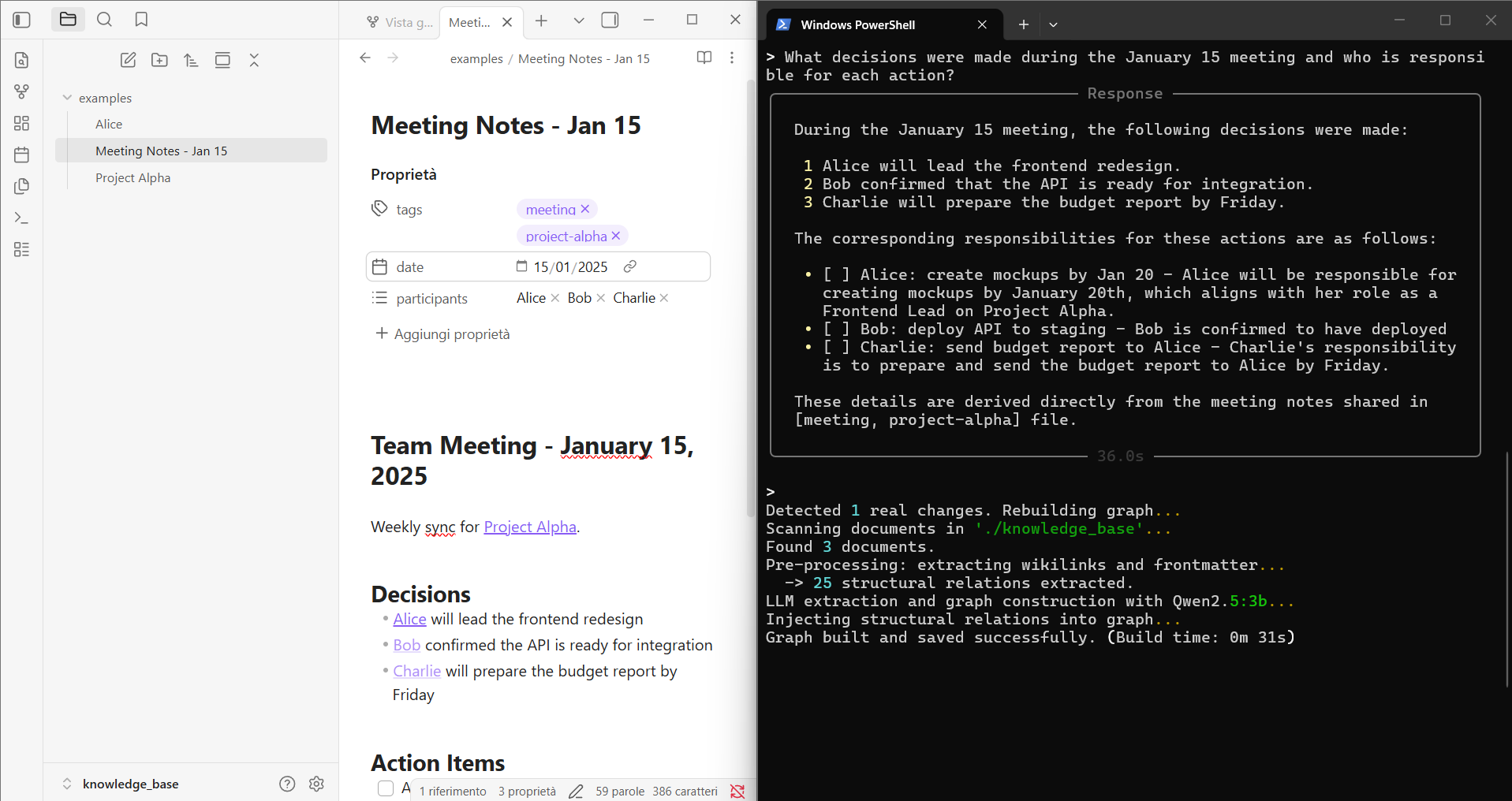
What's New
- MCP Server - use Kwipu as a tool inside Claude Desktop, Cursor, Windsurf, or any MCP-compatible agent. All processing runs locally via Ollama.
- Incremental updates - editing a note no longer rebuilds the entire graph. Modified files are updated in-place in seconds.
- CLI model override - switch LLM or embedding model without editing code:
--llm-model,--embed-model - Startup validation - checks that Ollama is running and models are available before starting. Clear error messages with suggested commands.
- Storage integrity - detects embedding model mismatches to prevent silent corruption of the graph.
- Refined prompt - rewritten anti-hallucination rules reduce false information while keeping answers complete.
Features
- Property Graph Index - builds a knowledge graph from your notes using LLM-extracted relationships
- Obsidian-native - automatically parses
[[wikilinks]]and YAML frontmatter into structured graph triples - Multilingual - supports Italian, English, French, German, Spanish, Portuguese (auto-detected)
- Hybrid retrieval - combines 4 retrieval strategies:
- LLM synonym expansion (optional, disable with
--fast) - Vector similarity search
- BM25 keyword scoring
- Temporal/metadata matching
- LLM synonym expansion (optional, disable with
- Real-time sync - watches your folder for changes and updates the graph incrementally
- Incremental updates - modified files are updated in-place (delete + re-insert) without rebuilding the entire graph
- Anti-hallucination prompt - strict instructions to cite sources and avoid inventing facts
- Fully local - runs on Ollama, no data leaves your machine
- Startup checks - verifies Ollama is running and models are available before starting
- Storage validation - detects embedding model mismatches to prevent silent corruption
- CLI model override - switch models without editing code via
--llm-modeland--embed-model
Requirements
- Python 3.11+
- Ollama running locally
- An LLM model (e.g.
llama3.1:8b,qwen2.5:7b,mistral:7b) - An embedding model (default:
nomic-embed-text)
Setup
# Install dependencies
pip install -r requirements.txt

# Pull models in Ollama
ollama pull llama3.1:8b
ollama pull nomic-embed-text
MCP Server (Claude Desktop, Cursor, Windsurf)
Kwipu can run as an MCP server, allowing AI agents to query your knowledge graph directly. All processing happens locally via Ollama - the agent only sends the question and receives the answer.
Add to your claude_desktop_config.json (or equivalent MCP config):
{
  "mcpServers": {
    "kwipu": {
      "command": "C:/path/to/python.exe",
      "args": ["C:/path/to/kwipu_mcp_server.py"]
    }
  }
}
Replace paths with your actual Python and project locations. Requires Ollama running with the configured model.
Usage
# Full mode (default, all retrievers)
python geode_graph.py

# Fast mode (skips LLM synonym retriever, faster queries)
python geode_graph.py --fast

# Override models from CLI (no need to edit the file)
python geode_graph.py --llm-model qwen2.5:7b --embed-model nomic-embed-text

# Build with cloud model, then query with local model
python geode_graph.py --llm-model gpt-oss:20b-cloud
# After build completes, restart with:
python geode_graph.py --llm-model qwen2.5:3b --fast
Place your markdown files in ./knowledge_base/ (or change KNOWLEDGE_DIR in the config). The system builds the graph on first run and watches for changes.
How It Works
Your Notes (.md)
      │
      ▼
┌─────────────────────┐
│   Pre-processing    │  ← Extracts [[wikilinks]], YAML frontmatter
│   (lang_config.py)  │  ← Infers relations from context (multilingual)
└─────────┬───────────┘
          │
          ▼
┌─────────────────────┐
│   LLM Extraction    │  ← Extracts additional entity-relation triples
│   (SimpleLLMPath)   │
└─────────┬───────────┘
          │
          ▼
┌─────────────────────┐
│  Property Graph     │  ← Merges structural + LLM triples
│  Index              │  ← Persisted to disk (storage_graph/)
└─────────┬───────────┘
          │
          ▼
┌─────────────────────┐
│  Hybrid Retrieval   │  ← Synonym + Vector + BM25 + Temporal
└─────────┬───────────┘
          │
          ▼
┌─────────────────────┐
│  LLM Response       │  ← Generates answer from retrieved context
└─────────────────────┘
Project Structure
├── geode_graph.py       # Main application (terminal interface)
├── kwipu_mcp_server.py  # MCP server for AI agent integration
├── lang_config.py       # Multilingual configuration (stopwords, patterns, relations)
├── requirements.txt     # Python dependencies
├── knowledge_base/      # Your notes go here
│   └── examples/        # Example notes to get started
└── storage_graph/       # Generated graph index (auto-created, gitignored)
Pointing to an Obsidian Vault
Change KNOWLEDGE_DIR to your vault path:
KNOWLEDGE_DIR = "C:/Users/YourName/Documents/MyVault"
The system reads files without modifying them. It ignores .obsidian/ configuration files automatically.
Model Recommendations
| Model | RAM (Q4) | Quality | Speed per query (CPU) | Speed per query (GPU) |
|---|---|---|---|---|
| 1B | ~2 GB | Basic | ~8s | ~2s |
| 3B | ~3 GB | Good | ~30-60s | ~5-8s |
| 7-8B | ~5-6 GB | Great | ~2-5 min | ~15-25s |
| 20B | ~12 GB | Best | Not practical | ~15s |
For serious use, 7B+ with a GPU is the sweet spot. The 3B is a good compromise for CPU-only setups.
Build Time Estimates
First-time graph construction requires an LLM call for each document chunk. Subsequent runs load the graph from disk instantly. Times can vary ±2x depending on note length and model.
| Notes | GPU (7B) | CPU (7B) | CPU (3B) |
|---|---|---|---|
| 5 | ~2 min | ~8 min | ~4 min |
| 20 | ~8 min | ~30 min | ~15 min |
| 50 | ~20 min | ~1.5 hrs | ~40 min |
| 100 | ~40 min | ~3 hrs | ~1.5 hrs |
| 500+ | ~3 hrs | Not recommended | Not recommended |
Adding a single new file is incremental (~20-60s) and does not rebuild the full graph. Modifying an existing file also uses incremental update (delete + re-insert). Only file deletion triggers a full rebuild.
Resource Usage
| Component | RAM | Notes |
|---|---|---|
| Ollama (LLM) | 2-14 GB | Depends on model size and quantization |
| Ollama (embeddings) | ~300 MB | nomic-embed-text |
| Kwipu (indexing) | 0.5-4 GB | Depends on number of notes |
| Kwipu (queries) | 200-500 MB | After graph is built |
| Total (7B Q4) | ~8-12 GB | Recommended minimum: 16 GB system RAM |
Tip: Use Cloud Models for Graph Building
If your hardware is limited, you can use a powerful cloud model via Ollama to build the graph once, then switch to a smaller local model for daily queries. The graph is persisted to disk, so you only need the large model during construction.
# Step 1: Build the graph with a cloud model (one-time, high quality extraction)
python geode_graph.py --llm-model gpt-oss:20b-cloud
# Wait for "Graph built and saved successfully", then exit.

# Step 2: Switch to a small local model for queries (fast, low resource)
python geode_graph.py --llm-model qwen2.5:3b --fast
This gives you the best of both worlds: a high-quality graph built by a 20B+ model, with fast and lightweight queries on a 3B model. The graph structure (entities, relations, triples) doesn't change when you switch models - only the response generation uses the smaller model.
Note: If you change the embedding model (
--embed-model), you must deletestorage_graph/and rebuild. Kwipu will detect the mismatch and warn you.
Contributing
Contributions are welcome. Here's how to get started:
# Clone and setup
git clone https://github.com/benmaster82/Kwipu.git
cd Kwipu
pip install -r requirements.txt
Areas where help is needed:
- CJK language support - Looking for help adding Chinese, Japanese, and Korean. Requires word segmentation and language-specific patterns. See open issues.
- Retriever attribution logging - Log which retriever (vector, BM25, temporal, synonym) contributed context for each answer
- Evaluation set - Build a categorized test suite (exact-source, multi-hop, temporal, negative questions)
- Provenance inspector - Surface the chain: answer claim -> cited note -> extracted entity/edge
- Telegram bot integration - Query the knowledge base remotely via Telegram
- Performance - Incremental update on file modification (currently triggers full rebuild)
Guidelines:
- Keep it simple. This is a local-first tool, not an enterprise platform.
- Test with real Obsidian vaults when possible.
- One feature per PR. Small PRs get reviewed faster.
- English for code, comments, and commit messages.
Open an issue first if you want to discuss an approach before coding.
Roadmap
- Telegram Bot - Query your Obsidian vault or knowledge base from anywhere via Telegram
License
MIT
Yorumlar (0)
Yorum birakmak icin giris yap.
Yorum birakSonuc bulunamadi