Pithos
Health Pass
- License — License: MIT
- Description — Repository has a description
- Active repo — Last push 0 days ago
- Community trust — 13 GitHub stars
Code Fail
- rm -rf — Recursive force deletion command in build.sh
Permissions Pass
- Permissions — No dangerous permissions requested
No AI report is available for this listing yet.
A dependency-free C inference engine for Liquid AI's LFM2 / LFM2.5 models. Terminal chat, an OpenAI-compatible server, a web agent and a terminal agent, all in one executable.
Pithos
A dependency-free C inference engine for Liquid AI's LFM2 / LFM2.5 / LFM3 models.
Terminal chat, an OpenAI-compatible server, a web agent and a terminal agent, all in one executable.





Website & setup guide · Quick start · Screenshots · Results · Terminal agent · Xbox One · MCP · Roadmap
| About 1.9× faster than llama.cpp | 17–22 tok/s against 11 tok/s with CUDA, on the same laptop and model (head-to-head) |
| Runs a 13.5 GB model on 16 GB of RAM | experts stream from disk, the hot ones live in a 4 GB GPU |
| Agents included | Pandora in the browser, and a terminal agent that runs commands, fixes code and checks its own work |
| Runs on an Xbox One | an OpenAI-compatible server for your home network, with LFM3-1.7B on the console's GPU: 29.5 tok/s generation, ~140 tok/s prompt (Xbox One) |
Pithos is an inference engine written from scratch in C11 with no dependencies: no external
libraries at build time, only the operating system API (Win32 or POSIX). It runs GGUF models of
Liquid AI's LFM2 / LFM2-MoE / LFM3 architectures and is tuned for LFM2.5-24B-A2B-Q4_K_M.gguf
(24 billion parameters, about 2 billion active per token) on an ordinary laptop. The small
LFM3-1.7B runs too: about 55 tokens per second with the GPU, 20 on the CPU alone.
Pithos is the engine and the server (in the myth, the pithos is Pandora's jar: it holds the
model). Pandora is the agent in the web interface.
- CPU inference with AVX2 / AVX / NEON integer kernels that read the quantized weights in place.
- Optional OpenCL GPU acceleration: hot experts and all dense layers in VRAM, with the remaining experts
computed on the CPU in parallel. - Optional Direct3D 12 GPU acceleration (
--d3d12, Windows and Xbox): for dense models such as
LFM3, the whole forward pass, prompt included, runs on the GPU. - An Xbox One app: the server runs on a console in Developer Mode, with a status and chat screen
on the TV. - Works with models larger than the free RAM (asynchronous read-ahead, expert prediction).
- OpenAI-compatible HTTP server with prompt reuse across turns, also after a restart.
- Pandora, a single-file web chat with an agent mode: web search, files, calculator and any
MCP server. - A terminal agent that works on tasks with shell commands, background processes, files and
the web, on Windows and Linux, in a safe mode (you approve every action) or an autonomous one.
Screenshots
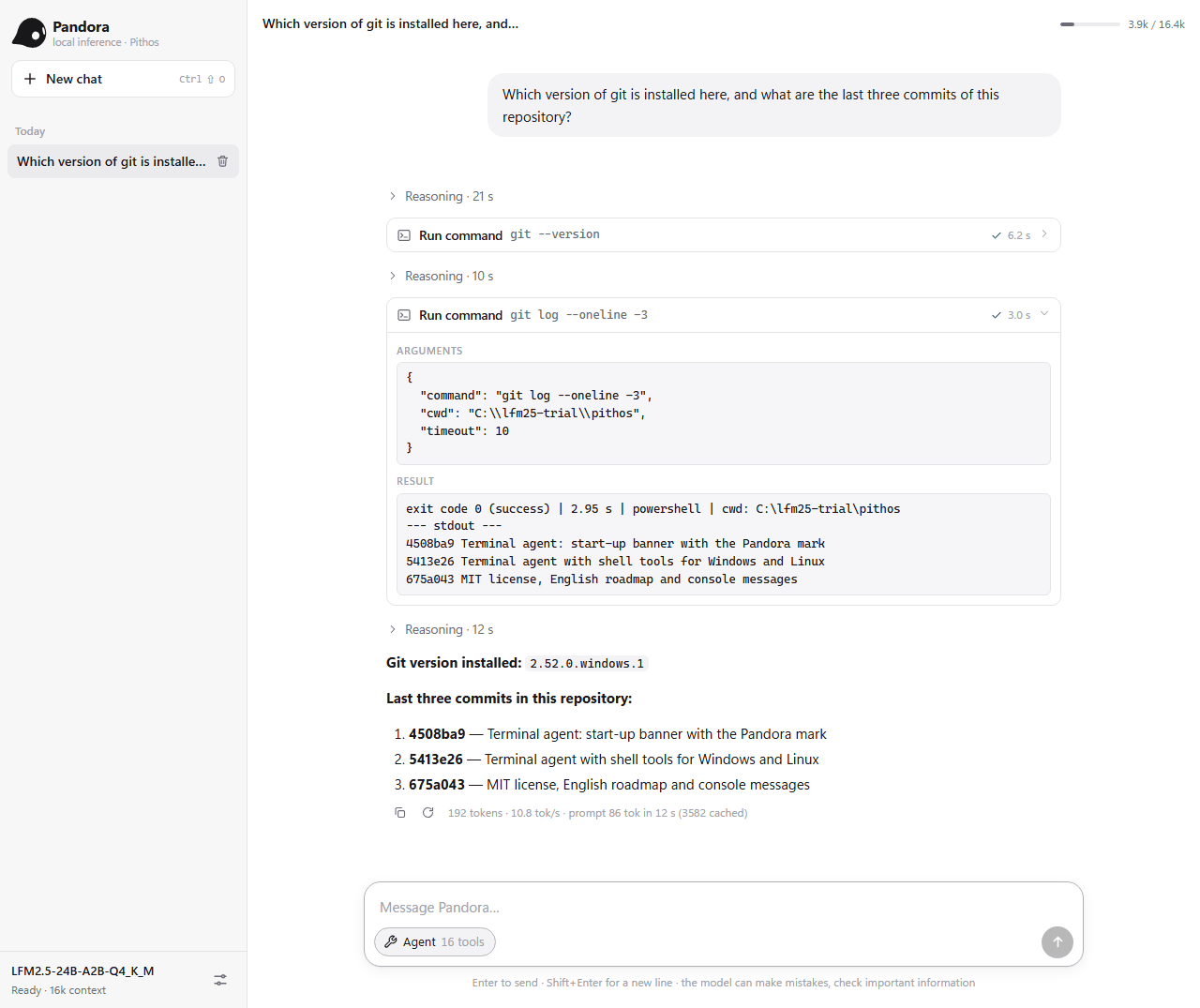
Pandora, the web agent, answers with real tools. Here it runs two git commands through the
shell tools (pithos --server --shell) and summarizes them. Each card shows the command, the exit
code, the run time and the output.
The terminal agent in autonomous mode (pithos --auto). It is asked to make failing tests
pass. It reads the code, finds the bug, fixes it with edit_file, runs the tests and reads the
file back. On Windows PowerShell 5.1 the && it wrote was rewritten automatically.
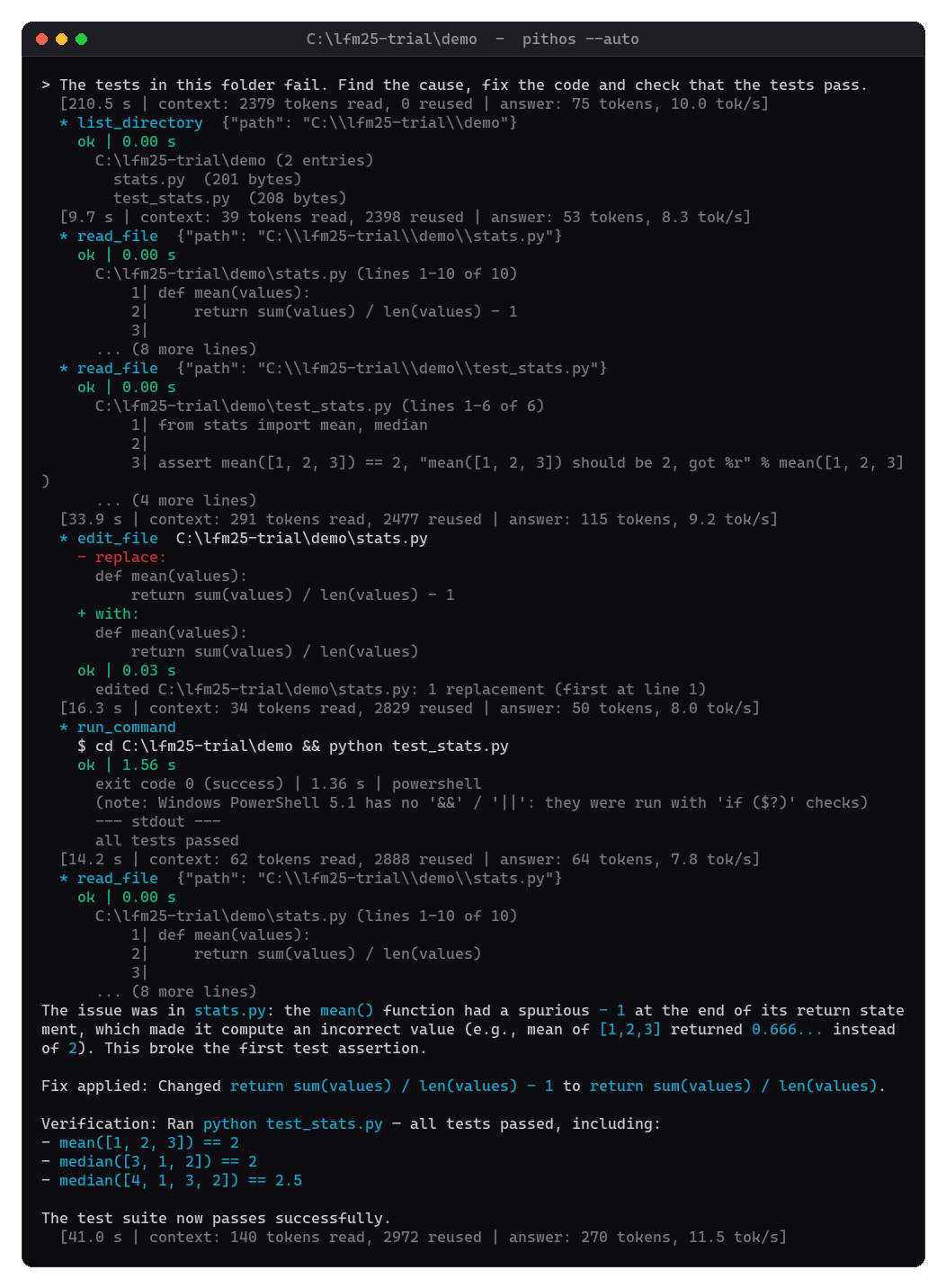
Both are real sessions with LFM2.5-24B-A2B on the reference laptop (i5-10500H, GTX 1650 4 GB).
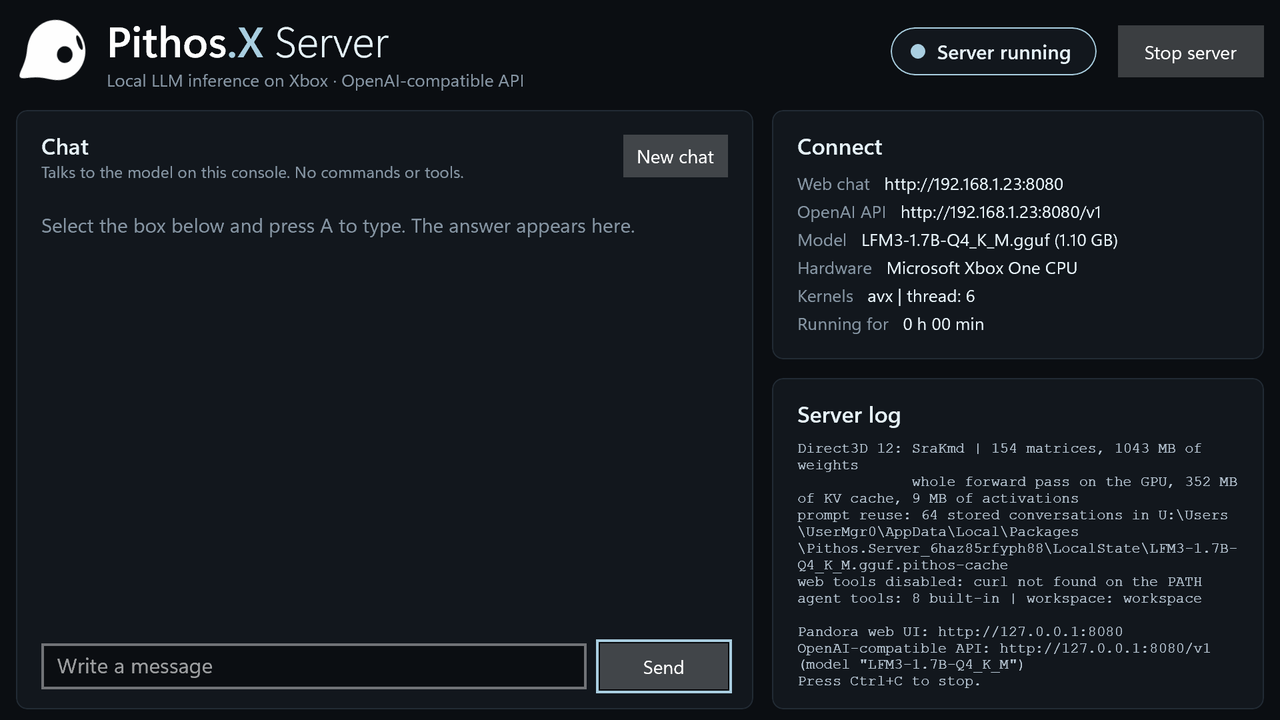
Pithos.X Server on an Xbox One S: the TV screen while the server runs. More in
Xbox One.
Quick start
- Get the model (see Downloading the model below).
On Linux,bash build.sh --download-modelcan handle both the build and this download
(--download-model=lfm3-1.7bfor the small model,--list-modelsfor the choices). - Build. On Windows run
build.cmd; on Linux runbash build.sh; on macOS runmake
(see Building). You can compile before downloading the model. - Run.
server.cmd                                 server + web chat in the browser (http://127.0.0.1:8080)
build\pithos.exe                           interactive chat in the terminal
build\pithos.exe -p "Hello, who are you?"  single answer
build\pithos.exe --server                  OpenAI-compatible API + web interface
build\pithos.exe --agent                   terminal agent in the current folder (safe mode)
build\pithos.exe --bench                   prompt and generation benchmark
On Linux / macOS the binary is build/pithos, with the same options. For the console, see
Xbox One: the app is built on a Windows PC and installed over the network.
Downloading the model
Pithos uses the file LFM2.5-24B-A2B-Q4_K_M.gguf from Liquid AI's public repository
LiquidAI/LFM2.5-24B-A2B-GGUF. No account
is needed.
| Size | 14,526,258,464 bytes (13.5 GiB): keep about 15 GB free on the disk |
| SHA-256 | d3334405b96228eb9908cdebb5c6194908f2da64282bda852afc3a3910c64e7d |
| Direct link | https://huggingface.co/LiquidAI/LFM2.5-24B-A2B-GGUF/resolve/main/LFM2.5-24B-A2B-Q4_K_M.gguf |
| License | LFM Open License v1.0 (see the model card) |
Where to put it. Pithos looks for models/LFM2.5-24B-A2B-Q4_K_M.gguf in the current folder, then
in ../models and ../../models. The simplest choice is a models folder inside the Pithos folder,
which .gitignore already excludes. Any other location works with -m PATH, and the terminal agent,
which runs in your project folders, usually needs it.
The commands below run from the Pithos folder. All of them resume an interrupted download when you
run them again.
Windows (PowerShell). curl.exe ships with Windows 10 and 11. Write curl.exe, not curl,
which in Windows PowerShell 5.1 is an alias of a different command.
New-Item -ItemType Directory -Force models | Out-Null
curl.exe -L -C - -o models\LFM2.5-24B-A2B-Q4_K_M.gguf https://huggingface.co/LiquidAI/LFM2.5-24B-A2B-GGUF/resolve/main/LFM2.5-24B-A2B-Q4_K_M.gguf
Get-FileHash models\LFM2.5-24B-A2B-Q4_K_M.gguf -Algorithm SHA256    # compare with the SHA-256 above
Linux / macOS.
mkdir -p models
curl -L -C - -o models/LFM2.5-24B-A2B-Q4_K_M.gguf https://huggingface.co/LiquidAI/LFM2.5-24B-A2B-GGUF/resolve/main/LFM2.5-24B-A2B-Q4_K_M.gguf
# or: wget -c -O models/LFM2.5-24B-A2B-Q4_K_M.gguf <the same URL>
sha256sum models/LFM2.5-24B-A2B-Q4_K_M.gguf     # macOS: shasum -a 256 models/LFM2.5-24B-A2B-Q4_K_M.gguf
With the Hugging Face CLI (any system). If Python is installed, this is the most robust option
on slow or unstable connections.
pip install -U huggingface_hub
hf download LiquidAI/LFM2.5-24B-A2B-GGUF LFM2.5-24B-A2B-Q4_K_M.gguf --local-dir models
With a browser. Open the direct link above and save the file into the models folder.
To check that the file is found and complete, run build\pithos.exe -p "Hello" (Linux:build/pithos -p "Hello"). The first lines report the model (model: lfm2moe | 40 layers ...).
Pithos also rejects a truncated file and names the tensor that is missing.
LFM3-1.7B: small and fast
LiquidAI/LFM3-1.7B is a 1.7-billion-parameter model
that fits in 1.1 GB, with the same chat, server, Pandora and terminal agent. With a GPU every layer
lives in VRAM (1.2 GB with a 8k context) and decoding runs there: about 55 tokens per second on the
reference laptop (GTX 1650), against about 20 on the CPU alone. With OpenCL the prompt is read on
the CPU (45-75 tokens per second). On Windows, --no-gpu --d3d12 runs everything on the GPU
through Direct3D 12 instead, which is faster on both counts: about 330 tokens per second of prompt
and 69 of generation on the same laptop. This is also the model that runs on the
Xbox One.
| LFM3-1.7B on the reference laptop | Prompt | Generation |
|---|---|---|
CPU only (--no-gpu) |
80–100 tok/s | 23 tok/s |
| OpenCL (default) | 67–103 tok/s | 56 tok/s |
OpenCL, with prompt matmuls on Direct3D 12 (--d3d12) |
190 tok/s | 56 tok/s |
Direct3D 12 only (--no-gpu --d3d12) |
330 tok/s | 69 tok/s |
build\pithos.exe -m models\LFM3-1.7B-Q4_K_M.gguf --no-gpu --d3d12 --server --open
| File | LFM3-1.7B-Q4_K_M.gguf from LiquidAI/LFM3-1.7B-GGUF |
| Size | 1,099,627,808 bytes (1.0 GiB) |
| SHA-256 | 3793e1e6e2266919d6e015287221b41100175a98eddaba92e111aed3b05c93c4 |
| Direct link | https://huggingface.co/LiquidAI/LFM3-1.7B-GGUF/resolve/main/LFM3-1.7B-Q4_K_M.gguf |
Download it with the same commands as above (replace the file name and the URL), then pass it
with -m:
build/pithos -m models/LFM3-1.7B-Q4_K_M.gguf -i
build/pithos -m models/LFM3-1.7B-Q4_K_M.gguf --server --open
Results
Reference machine: i5-10500H (6 cores, AVX2), 16 GB DDR4-2933, GTX 1650 Max-Q 4 GB, NVMe SSD.
The model (13.5 GB) does not fit in the free RAM (9–11 GB), so part of the weights is read from
disk.
| Measure | llama.cpp b11798 CPU only | llama.cpp, 8 layers on GPU | Pithos CPU only | Pithos CPU+GPU |
|---|---|---|---|---|
| Prompt (pp, warm) | 6.0 tok/s | 12.5 tok/s | 15–33 tok/s | 36–45 tok/s |
| Generation, bench (tg, warm) | 6.6 tok/s | 11.3 tok/s | 11–13 tok/s | 12–14.6 tok/s |
| Real generation, 1000 tokens of varied text (v0.2, experts only on GPU) | — | 7–12 tok/s | 7.7 tok/s | 9.3 tok/s |
| Real generation, 600-token essay (dense layers on GPU) | — | — | — | 14–18 tok/s (11.4–14.1 with --no-gpu-dense) |
| Working set (process RAM) | — | 10.7 GB (peak) | ~9.5 GB | ~6.9 GB |
| Perplexity (model license text, 4×256 tokens) | 2.683 | — | 2.638 | 2.671 |
Numbers move with the memory state and the temperature. On this laptop the CPU and GPU share one
heatsink, and under combined load the GPU throttles (88 °C measured). The generation runs with dense
layers on the GPU used Cooler Boost (fans at maximum) and started with the GPU below 62 °C. A desktop
with a dedicated GPU gains more in generation.
Head-to-head with llama.cpp (v0.4, 2026-10-24)
Same GGUF Q4_K_M, 8192 context, greedy sampling, prompt cache off, 6 threads, both running as
OpenAI servers. llama.cpp b11798 used -fit on, which picks the VRAM layout itself: all layers on
the GPU plus the experts of the first ~6 layers, the same scheme as Pithos. Engines alternated, the GPU was below 62 °C before
each measurement, Cooler Boost on, two rounds per engine (values r1 / r2). Script:python tests/versus.py ROUNDS ENGINE.
| Measure | llama.cpp Vulkan | llama.cpp CUDA 12.4 | Pithos |
|---|---|---|---|
| Generation, 600 tokens | 10.2 / 10.7 tok/s | 11.2 / 11.3 tok/s | 17.5–21.9 tok/s |
| 1345-token prompt | 10.5 / 12.9 tok/s | 10.6 / 20.8 tok/s | 22.1–34.7 tok/s |
| Server start-up | 13–23 s | 33–57 s | 3–10 s |
| Peak process RAM | 10.2–10.9 GB | 10.6–10.9 GB | 10.8–11.0 GB |
In generation Pithos is about 1.9× llama.cpp CUDA. For both engines the limit is the experts
computed on the CPU, which Pithos runs in parallel with the GPU and with far fewer queued
commands. On the long prompt the advantage varies a lot between rounds, from 2.7× to almost even
with CUDA, because it depends on how much of the model is in RAM. Not tried: llama.cpp's--load-mode none, which would load everything into RAM (the model does not fit in this
machine's free RAM).
Building
Windows: build.cmd uses gcc when present (on the PATH, or from MSYS2 in C:\msys64\mingw64
or ucrt64), otherwise MSVC (Visual Studio or Build Tools, found automatically); build.cmd msvc
forces MSVC. build.cmd test (or build.cmd msvc test) also builds the tests. The Direct3D 12 backend is always included: d3d12.dll is loaded at runtime and the
shaders are precompiled in src/kernels_dx.h, so no extra SDK is needed. The Xbox app has its own
build, described in Xbox One.
Linux / WSL
Download and extract the source ZIP, or clone the repository if Git is installed:
git clone https://github.com/benmaster82/Pithos.git
cd Pithos
bash build.sh
On a fresh Ubuntu/Debian installation, install Git first withsudo apt update && sudo apt install -y git, or use the ZIP download instead.
build.sh checks for GNU Make, a working C11 compiler, C development headers and
system libraries, and curl for model downloads/web tools. If anything is missing,
it shows the package commands and asks before installing prerequisites throughapt-get, dnf, pacman or zypper. Installation needs administrator access;
compilation runs as the user who launched the script. Run it as your normal user,
not with sudo bash build.sh. When prerequisites are already installed, no package
manager or administrator access is needed. On other distributions, install the
listed prerequisites manually. Only the Ubuntu/WSL build has been verified here;
other package-manager paths still need validation on their distributions.
bash build.sh --test             # build the C tests and run the shell tests
bash build.sh --list-models      # the models it can download (models.tsv), without building
bash build.sh --download-model   # also download/verify the reference 24B model
bash build.sh --download-model=lfm3-1.7b              # the small model instead (1.0 GiB)
bash build.sh --download-model=lfm3-1.7b,lfm2.5-24b   # both
bash build.sh --no-install       # build without installing anything (offline/CI)
bash build.sh --yes --test       # allow missing-package installation without prompting
bash build.sh --native --jobs 4  # optimize for this CPU; not for distributing binaries
bash build.sh --help
The script works from another working directory and rebuilds existing objects to
avoid reusing a build made with different compiler options. CC=gcc or CC=clang
selects a compiler executable; the usual CFLAGS setting is also supported.--yes does not supply a sudo password: unattended setup needs root or existing
passwordless/cached sudo access. No full system upgrade is requested; on Arch,
keep the package database and system up to date using the normal distribution procedure.
The output is build/pithos. No model, Python, OpenCL SDK or GPU driver is
needed to compile. Model download is opt-in; the script does not install GPU drivers.
Use bash build.sh --download-model (or combine it with --test) to fetch the
13.5 GiB reference model into models/, or --download-model=ID[,ID...] for the models
listed by --list-models. The list lives in models.tsv: one line per model with its
file name, exact size, SHA-256, a revision-pinned https URL and a status (validated models
were checked against a reference; experimental ones are only downloaded when named).
Adding a model is one line there. For every model the script pins the Hugging Face revision,
checks free disk space, resumes interrupted transfers in a .gguf.part file, and
verifies the exact size and SHA-256 before renaming it to .gguf. An existing valid
model is verified and reused; an invalid existing model is preserved and reported
as an error. If a partial download fails verification, move it aside or remove it
before retrying. Interrupted downloads release their lock and keep partial data;
after a crash/power loss, a stale .download.lock directory may need removal once
you have confirmed no other download is running. --no-install prevents package
installation; combine it with --download-model only when you do want network access.
After downloading the reference model, try CPU inference:
./build/pithos --no-gpu -m models/LFM2.5-24B-A2B-Q4_K_M.gguf -p "Hello"
./build/pithos --server --no-gpu  # web chat at http://127.0.0.1:8080
GPU acceleration is optional and requires a working OpenCL runtime/driver. In our
WSL2 test, the CPU path passed; no OpenCL device was exposed, so GPU inference was
not verified. Seeing the GPU in nvidia-smi alone does not establish OpenCL support.
--test runs only the model-independent shell test, in a temporary folder. For
numerical tests, use the reference 24B MoE GGUF, not the smaller dense model:
./build/test_kernels models/LFM2.5-24B-A2B-Q4_K_M.gguf
./build/test_gpu models/LFM2.5-24B-A2B-Q4_K_M.gguf
test_gpu may print no GPU and exit successfully: that is a skipped check.
For a manual build, make still works; make test only builds the test binaries.
Maintainers can check the setup/error-handling paths without changing system packages
with python3 tests/test_build_linux.py (Python is needed only for this optional check).
Running on Linux
From the Pithos folder, the model in models/ is found automatically. Start the mode
you need and use Ctrl+C to stop it:
| Mode | Command |
|---|---|
| Interactive terminal chat | ./build/pithos |
| One answer, then exit | ./build/pithos -p "Hello, who are you?" |
| Web chat and OpenAI-compatible API | ./build/pithos --server |
| Web chat with shell/process tools available | ./build/pithos --server --shell |
| Terminal agent: approve each action | ./build/pithos --agent |
| Autonomous agent for one task | ./build/pithos --auto -p "Review this project" |
| Prompt/generation benchmark | ./build/pithos --bench |
| All command-line options | ./build/pithos --help |
With --server, open http://127.0.0.1:8080 in your browser; the API base URL ishttp://127.0.0.1:8080/v1. Add --no-gpu to explicitly use the CPU, for example./build/pithos --server --no-gpu. Autonomous mode still asks before commands it
recognizes as destructive; see Terminal agent for details.
To work on another project, run the agent from that project's folder and give
absolute paths to the executable and model (replace /path/to/Pithos):
cd /path/to/your-project
/path/to/Pithos/build/pithos \
  -m /path/to/Pithos/models/LFM2.5-24B-A2B-Q4_K_M.gguf --agent
Manual builds and optional GPU
On macOS / MinGW, use make (or make NATIVE=1 to tune for the local CPU).
The x86-64 binary contains the portable scalar kernels, the AVX2/FMA/F16C ones and 128-bit
AVX/F16C ones for CPUs without AVX2 (Intel Ivy Bridge, AMD Jaguar as in the Xbox One), and picks
at runtime (--kernels avx forces the AVX set). On ARM64 the NEON kernels are used (withdotprod when available).
The GPU is optional: OpenCL.dll / libOpenCL.so is loaded at runtime, so no SDK is needed to
build. The web interface and the GPU kernels are embedded in the executable as generated headers
(src/webui_html.h, src/kernels_cl.h), so Python is only needed to regenerate them
(tools/embed.py).
Xbox One
Pithos runs on an Xbox One in Developer Mode as a UWP app, Pithos.X Server. The console becomes an
OpenAI-compatible server for your home network, with Pandora in the browser of any PC or phone, and
the TV shows the server state and a chat with the model. Tested on an Xbox One S with
LFM3-1.7B (the 24B model does not fit in the console's memory).
The TV shows the state, a chat with the model, the addresses to connect to and the server log
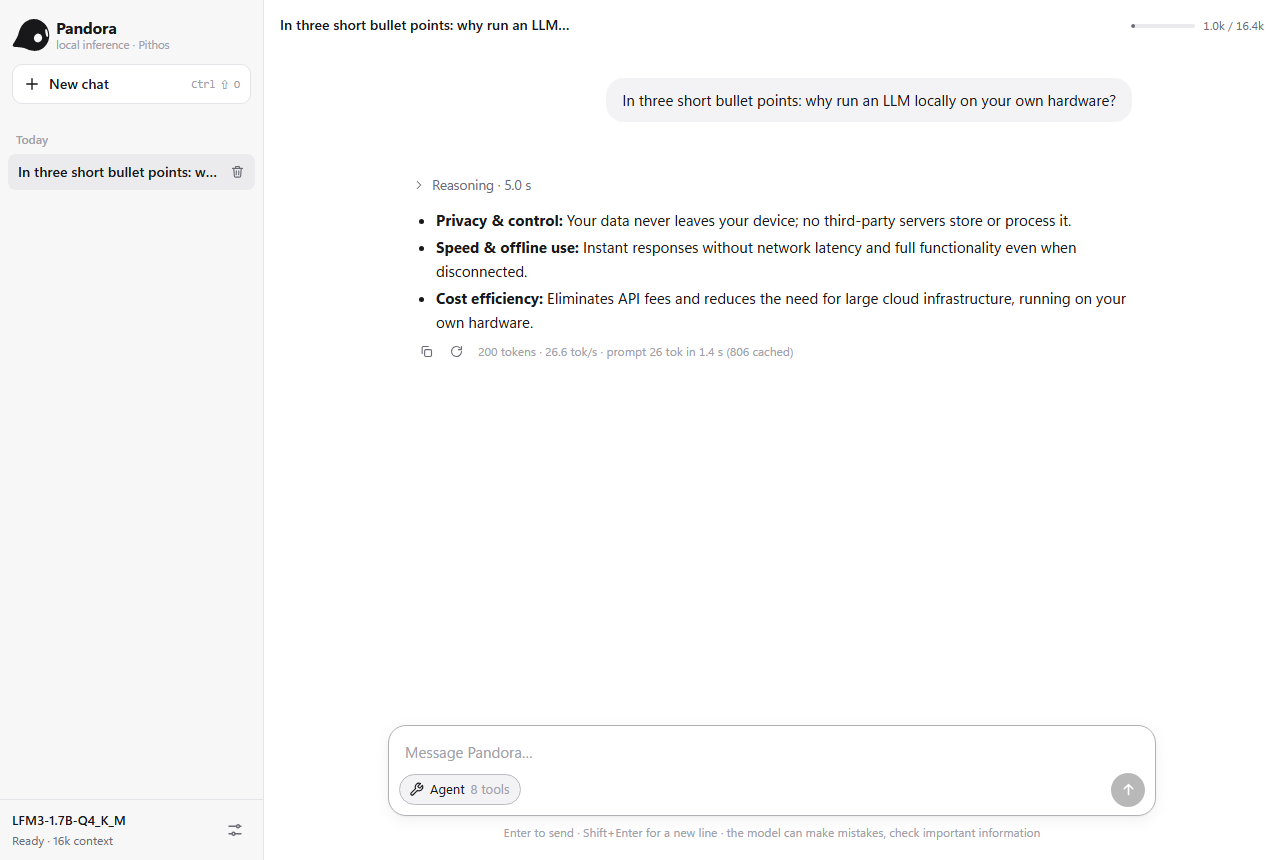
(screenshot). Below, in the browser of a PC on the same network: Pandora
served by the console, with an answer generated by the Xbox at 26.6 tokens per second.
| Xbox One S, LFM3-1.7B Q4_K_M | Prompt | Generation |
|---|---|---|
| App mode, CPU only (8 threads) | 17.6 tok/s | 7.3 tok/s |
Game mode, Direct3D 12 (-t 6 --d3d12) |
146 tok/s (121 at 1000 tokens) | 29.5 tok/s (26 after 1000 tokens of context) |
The console's CPU (8 AMD Jaguar cores) has no AVX2, so it uses the AVX kernels. In Game mode the
app gets about 5 GB of RAM and Direct3D 12 on the GPU, which runs the whole forward pass: weights,
KV cache and activations live in GPU memory, and only the logits come back.
What you need
- The console in Developer Mode. Install the Xbox Dev Mode app from the Store on the console
and follow Microsoft's activation guide
(it needs a Microsoft Partner Center developer account). Then, in Dev Home, turn on the
Device Portal under the remote access settings. It answers athttps://CONSOLE-IP:11443. - A Windows PC on the same network with:
- Visual Studio 2022 with the MSVC v143 and C++ Universal Windows Platform tools components;
- the Windows SDK 10.0.26100 (it provides
makeappx,signtoolandfxc); - Python 3, for the deployment script (standard library only).
- The model:
LFM3-1.7B-Q4_K_M.gguf(download).
Building the app
From the Pithos folder, on the PC:
powershell -ExecutionPolicy Bypass -File xbox\make_cert.ps1     once: signing certificate
xbox\build.cmd                                                   -> build-xbox\Pithos.appx
make_cert.ps1 creates a self-signed certificate (CN=Pithos, the publisher inxbox\Package.appxmanifest) in build-xbox\pithos_xbox.pfx. Developer Mode installs packages signed
this way. The build-xbox folder is not versioned: keep the certificate private, and do not
commit it. build.cmd compiles the same engine sources with PITHOS_UWP (file APIs allowed in an
app container, no child processes), the app shell xbox\app.cpp, and packs and signs the result.
Installing and starting
xbox\deploy.py talks to the Device Portal (add --user / --password if you enabled portal
authentication):
python xbox\deploy.py --xbox CONSOLE-IP install                        the app and its VCLibs dependency
python xbox\deploy.py --xbox CONSOLE-IP upload models\LFM3-1.7B-Q4_K_M.gguf
python xbox\deploy.py --xbox CONSOLE-IP launch
python xbox\deploy.py --xbox CONSOLE-IP log                            the server log
python xbox\deploy.py --xbox CONSOLE-IP files                          the app's LocalState folder
python xbox\deploy.py --xbox CONSOLE-IP stop
- Install the package, then upload the model. It goes into the app's
LocalStatefolder.
The app waits for a.ggufthere and starts as soon as the upload is complete. - Switch the app to Game mode for Direct3D 12 and 5 GB of RAM. On the console: Dev Home →
select Pithos.X Server → View details → App type: Game. This has to be done again after
every reinstall, because installing resets the type to App. - Choose the options in a
pithos.argsfile uploaded toLocalState(see below), then start
Pithos from Dev Home or withlaunch. Launching from the portal works only while a user is
signed in on the console. - Connect from any device on the network: Pandora at
http://CONSOLE-IP:8080, the API athttp://CONSOLE-IP:8080/v1(model name: the file name without.gguf). The TV shows the same
addresses.
To update the app, increase Version in xbox\Package.appxmanifest, rebuild, stop, install,
and set the app type to Game again. LocalState (the model, pithos.args and the saved
conversations) is kept across updates.
Options and best use
The app starts the server as pithos --server --host 0.0.0.0 --port 8080 --no-gpu -m MODEL
(--no-gpu refers to OpenCL, which the Xbox does not have). The options in LocalState\pithos.args
are added after these, so they can also override them. Upload the file, then restart the app:
| Mode | Recommended pithos.args |
Why |
|---|---|---|
| Game (recommended) | -t 6 --d3d12 |
the GPU does all the work; 6 CPU threads leave room for the system |
| App (no Game type) | -t 8 |
Direct3D 12 is not available; all 8 cores give the best CPU speed |
- Start-up: with
--d3d12the server answers about a minute after launch, while the weights
are copied into GPU memory. The log linewhole forward pass on the GPUconfirms the fast path. - Context: the server uses 16,384 tokens by default (352 MB of KV cache on the GPU).
-c 8192
halves it. - Batch:
-b 256gains only ~4% on long prompts over the default 64. - Access: the server listens on the whole local network without a key. Add
--api-key KEY
to require one on/v1. - Prompt reuse works as on the PC: conversations are saved in
LocalStateand continue after
a restart. - The TV screen shows the state, the addresses, the end of the log, a chat with the model
(without tools) and a button that stops the server. - What is missing on the console: there are no child processes, so no shell tools and no MCP
servers, and nocurl, so no web tools. Pandora's agent mode keeps the file tools (inLocalState\workspace), the calculator and the date.
Server and web chat
build\pithos.exe --server (or server.cmd, which also opens the browser) starts a
dependency-free HTTP server (Winsock / POSIX sockets) with:
the Pandora web interface at
http://127.0.0.1:8080:- multi-turn conversations saved in the browser;
- streaming answers with Markdown (tables, code with a Copy button) and a collapsible reasoning section;
- prompt-processing progress, stop, regenerate, edit the last message;
- system prompt and sampling parameters, light/dark theme.
It is a single file (
web/index.html) embedded in the executable, with no external resources.an OpenAI-compatible API:
POST /v1/chat/completionswith SSE streaming,reasoning_contentseparate from the answer,tools/tool_calls,stop,stream_options.include_usageandchat_template_kwargs.preserve_thinking;POST /v1/completionsandGET /v1/models;- like llama-server, also
GET /health,GET /props,POST /tokenize,POST /apply-template
and thetimings/prompt_progressfields (return_progress: true).
curl http://127.0.0.1:8080/v1/chat/completions -H "Content-Type: application/json" \
     -d '{"messages":[{"role":"user","content":"Hello!"}]}'
The chat template is implemented in C following the Jinja template in the GGUF: system prompt, tools,
call arguments in the f(arg='v') format, and reasoning removed from past turns. tests/test_server.py
compares it with Jinja2 character by character and token by token.
Agent mode
LFM2.5-24B-A2B and LFM3 are trained to use tools, and can make more than one call per answer.
LFM2.5 writes calls as <|tool_call_start|>[f(arg='v')]<|tool_call_end|>, LFM3 as<tool_call><function=f><parameter=arg>v</parameter></function></tool_call>; the server turns
both into OpenAI tool_calls, so clients see no difference.
- Turning it on: the Agent button under the text box enables tools. The model calls them,
each call shows up as a card (arguments, result, time), and the loop goes on until the model answers. - Confirmation: tools that change something ask for confirmation (Allow / Deny).
- Settings: you choose when to ask, the maximum number of steps and which tools are enabled.
Built-in tools, run by the server:
| Tool | What it does |
|---|---|
web_search, fetch_url |
DuckDuckGo search and page reading (HTML converted to text, in parts) through curl, which ships with Windows 10+, Linux and macOS |
list_directory, read_file, find_files, search_text, write_file |
files in the working folder (--workspace, default ./workspace); absolute paths and .. are rejected |
calculator, get_current_datetime |
exact arithmetic, local date and time |
The server starts with a 16k-token context, because tool results take space. The agent system prompt
and the tool list (~1,200 tokens) stay cached after the first request, so each later step only
processes the new result.
Terminal agent
pithos --agent starts an agent session in the current folder: you give it a task, it works through
the tools until the task is done, then waits for the next one. The conversation continues across
tasks.
cd my-project
pithos --agent                         safe mode: every action needs your approval
pithos --auto                          autonomous mode: it works on its own until the goal is reached
pithos --auto -p "make the tests pass" one task, then exit
At start-up, while the model loads, it shows the Pandora mark and the Pithos name in 24-bit color.
It also shows the operating system, the folder and the mode. Under 80 columns only the name is
shown, and plain text is printed when the output is not a terminal.
Modes.
- Safe (default): each tool call is shown before it runs. You answer y (run it), n
(skip it), a (always allow this tool for the session), or type what to do instead. Your
words go back to the model. - Autonomous (
--auto, or/autoduring the session): it plans, runs, checks and fixes on its
own, up to--max-stepsmodel calls per task (default 40). Commands that look destructive still
ask first: recursive deletes, formatting,git push,git reset --hard, killing processes,
registry changes,sudo, piping downloads into a shell.--yoloturns these checks off.
Knows the system it runs on. At start-up the agent detects the operating system (name, version,
build, architecture), the shell, the working folder and the programs on the PATH (git, python, node,
gcc, cargo, docker...). It also receives the syntax rules of that shell. On Windows the rules say
that Windows PowerShell 5.1 has no &&, which cmdlets replace grep, rm -rf and head, and how
quotes behave. On Linux, bash syntax applies and sudo cannot ask for a password.
Commands it can check.
| Tool | What it does |
|---|---|
run_command |
runs a command and waits for it. Returns exit code, run time, stdout and stderr apart. Default timeout 120 s, then the command is stopped with everything it started. |
start_process |
starts a long-running program (server, watcher, npm run dev) and returns at once with an id and its first output |
read_process |
status (running / exit code), elapsed time and new output. Can wait for the end or for a text such as listening on |
stop_process, list_processes |
stop a background process (and its children), list them |
edit_file |
replaces an exact piece of text in a file (must be unique, CRLF files work too) |
These come on top of the file and web tools. Commands run without a terminal and without input,
so a program waiting for an answer sees end of input instead of hanging. Pagers and colors are
turned off. Output is cleaned of escape sequences and progress bars, and long output keeps its start
and its end.
When a command fails, the model sees the exit code and the error and corrects itself. If it repeats
the exact same failing call three times, it is told to change approach. Ctrl+C stops the current
generation or command and gives the prompt back. During a session: /auto, /safe, /reset,/tools, /help, /exit.
The shell tools are also available to Pandora with pithos --server --shell, behind the usual
Allow / Deny cards. Pandora receives the same system information and shell rules (GET /v1/tools
returns them as env). tests/test_shell.c checks them without the model (build.cmd test, then runbuild\test_shell.exe from an empty folder).
Adding MCP servers
Pithos is an MCP (Model Context Protocol) client. No
third-party server is bundled or configured: you add the ones you want in a mcp.json file. It
is read from the current folder, or from the path given with --mcp FILE. The file is listed in.gitignore because it is local configuration.
The format is the same one used by Claude Desktop and other MCP clients:
{
  "mcpServers": {
    "myserver": {
      "command": "npx",
      "args": ["-y", "<npm-package>@<exact-version>"],
      "env": { "SOME_SETTING": "value" }
    },
    "another": {
      "command": "uvx",
      "args": ["<pypi-package>==<exact-version>"],
      "disabled": true
    },
    "local": {
      "command": "python",
      "args": ["-u", "path/to/my_server.py"]
    }
  }
}
| Field | Meaning |
|---|---|
key (myserver) |
server name; its tools appear to the model as myserver__toolname |
command |
program to start: npx (Node.js), uvx (Python, from uv), python, or any executable |
args |
command-line arguments; relative paths are resolved from the folder Pithos runs in |
env |
extra environment variables for that server only (optional) |
disabled |
true keeps the entry without starting it (optional) |
How it works:
- Starting: each server is started as a child process and talks JSON-RPC over stdin/stdout (the
stdio transport). Remote HTTP servers are not supported yet. - Tools: the server's tools are added to the agent's list, and they can be switched on and off one
by one in the web interface. - Confirmation: tools that declare
readOnlyHintrun without asking; all the others ask for
confirmation. - Shutdown: the servers stop together with Pithos, including the processes they start themselves
(npx→node). Windows uses a job object, Linux a process group.
Checking a configuration without loading the model:
build\pithos.exe --tools-list                          lists built-in and MCP tools, with each server's state
build\pithos.exe --tool myserver__toolname "{\"arg\": 1}"   calls one tool and prints the result
Over HTTP: GET /v1/tools returns the list in the OpenAI tools format plus the MCP server state,
and POST /v1/tools/call takes {"name", "arguments"}.
To write your own server, tests/mcp_test_server.py is a minimal one in plain Python (no SDK), andtests/mcp_test.json shows how to load it. Ready-made servers are listed in the
official MCP registry and in the
reference servers repository.
Security. A local MCP server runs with your user's permissions, and its tool descriptions and
results go straight into the model's context.
- Prefer official or well-known servers.
- Pin an exact version (
@1.2.3,==1.2.3) instead of always pulling the latest one. - Check the package's security advisories before updating.
- Give file-system servers a single folder, not your whole home.
- Do not leave test or debug servers running while secrets are in the environment: some of them
can read environment variables back to the model.
Prompt reuse
The model is hybrid. The KV cache of the 10 attention layers can be cut at any point, but the state
of the 30 convolution layers is recurrent, and going back needs a copy of it (480 KB) taken at that
point. So the server keeps the token sequence that is in the context and a checkpoint of the
recurrent state at the start of every message. Each request restarts from the longest common
checkpoint and only processes the rest:
- New turn of a chat: only the new message is processed, e.g. 4–25 tokens instead of 100–200.
- Regenerate or edit the last message: processing restarts from the previous message.
- While you read an answer: the context is rewritten the way the template presents past turns
(without reasoning), so the next turn matches exactly. - On disk: conversations are saved to
MODEL.gguf.pithos-cache/(KV + checkpoints,
~20 KB per token) and reloaded when a request continues one. This works after a server restart
too, and when switching between chats.--cache-mbsets the budget (default 4 GB); the least recent conversations are deleted first.--no-cachekeeps reuse in memory only.
Usage
| Option | Effect |
|---|---|
-m PATH |
GGUF file. Without it: models/LFM2.5-24B-A2B-Q4_K_M.gguf if present, otherwise the only .gguf in models/; with several, Pithos lists them. Also looked up in ../models and ../../models |
-p TEXT / -f FILE |
single prompt with the model's chat template |
-i |
interactive chat (default without a prompt). Commands /reset, /exit |
-s TEXT |
system prompt |
--raw |
plain text completion without the template |
-n N |
max tokens per answer (default 4096, reasoning included) |
-c N |
context in tokens (default 8192, max 131072) |
-t N |
threads (default: physical cores) |
-b N |
prompt-processing batch (default 64) |
--temp --top-k --top-p --min-p --repeat-penalty --seed |
sampling (defaults from the model card: 0.1 / 50 / 1.05) |
--hide-think |
do not print the reasoning (<think>…</think>) |
--keep-think |
keep the reasoning of past turns in the context |
--no-gpu, --gpu-device N, --gpu-mem MB, --list-gpus |
GPU control |
--no-gpu-dense |
in generation, use the GPU only for experts (attention, convolutions and output on the CPU) |
--d3d12 |
Direct3D 12 GPU (Windows, Xbox in Game mode). With --no-gpu, dense models (LFM3) run the whole forward pass on it, the fastest choice for them. With the OpenCL GPU also active, or for MoE models, only the prompt matmuls run there |
--kernels K |
force the CPU kernels: auto, scalar or avx (the set for CPUs without AVX2) |
--prefetch / --no-prefetch |
expert read-ahead (default: on when the model exceeds the free RAM) |
--mlock |
try to lock the model in RAM |
--bench [PP,TG] |
benchmark with a per-operation profile |
--ppl FILE |
perplexity with the same method as llama-perplexity |
--tokenize TEXT |
print the token ids |
--stats, -v |
detailed statistics |
--server, --host, --port |
HTTP server (default 127.0.0.1:8080; --host 0.0.0.0 for the local network) |
--open |
open the web interface when the server is ready |
--alias NAME, --api-key KEY |
model name in the API, key required on /v1 |
--cache-dir DIR, --cache-mb N, --no-cache |
prompt reuse on disk |
--ui FILE |
serve an external HTML file instead of the embedded interface |
--agent, --auto, --yolo |
terminal agent: safe mode, autonomous mode, autonomous without the checks on destructive commands |
--max-steps N, --show-think |
agent: model calls per task (default 40), stream the reasoning |
--workspace DIR |
folder for the file tools (default ./workspace; for the agent, the current folder) |
--shell |
also offer run_command and the process tools in the web UI |
--mcp FILE |
MCP servers to start (default ./mcp.json if present) |
--read-only, --no-web, --no-tools |
no write_file, no web tools, no tools at all |
--tools-list, --tool NAME [JSON] |
list / run one tool without loading the model |
The chat template is the one in the GGUF:<|startoftext|><|im_start|>user\n…<|im_end|>\n<|im_start|>assistant\n<think>.
As in the template, only the final answer of past assistant turns stays in the context. At the end of
each turn the state is rolled back to before the answer (KV cache + convolution state), and the answer
without its reasoning is processed again.
Other models
Any GGUF of the lfm2 (dense), lfm2moe or lfm3 architecture loads, as long as its tensors use
the supported formats: Q4_K, Q5_K, Q6_K, Q8_0, Q4_0, F16, F32. BF16, Q2_K, Q3_K and IQ formats are
not supported. GPU acceleration needs Q4_K / Q6_K weights: MoE models keep their hot experts and
dense layers in VRAM, dense models (LFM3) all their layers. Validated so far: LFM2.5-24B-A2B and
LFM3-1.7B.
lfm3 adds to LFM2: an RMSNorm on the output of every block before the residual sum (sandwich
norm), a sigmoid gate per head on the attention output, sliding-window attention (256 tokens) on 5
of the 11 attention layers, partial RoPE on the others, a convolution window of 7, and its own chat
template (generation starts inside <think>, past turns keep an empty <think></think>).
How it works
The model
lfm2moe: 40 hybrid layers, dimension 2048.
- 30 layers use a short convolution:
in_proj→ B·x → causal depthwise convolution with
window 3 → C·y →out_proj. - 10 layers use GQA attention: 32 query heads, 8 key/value heads, head size 64, RMSNorm on q
and k, NEOX RoPE with base 1e7. - Feed-forward: the first 2 layers have a dense SwiGLU FFN. The other 38 have a MoE with 64
experts: sigmoid router with a selection bias, top-4, normalized weights. - Embeddings: input and output embeddings are tied (Q6_K, 128,000 tokens).
The per-sequence state is small: a KV cache for only 10 layers (20 KB/token in f16) and 2 vectors
for each of the 30 convolution layers.
Source files
| File | Contents |
|---|---|
src/gguf.c |
zero-copy GGUF reader on the memory-mapped file |
src/tokenizer.c |
GPT-2 byte-level BPE with LFM2's pre-tokenizer and special tokens; generated Unicode tables (tools/gen_unicode.py) |
src/model.c |
forward pass, KV cache, matmul scheduler, MoE, prefetch |
src/quant.c, quant_avx2.c, quant_neon.c |
Q4_K/Q5_K/Q6_K/Q8_0/Q4_0/F16/F32 formats; scalar, AVX2 and NEON kernels |
src/gpu_opencl.c, src/kernels.cl |
expert cache and dense layers in VRAM through OpenCL loaded at runtime |
src/gpu_d3d12.c, src/kernels_dx.hlsl, src/kernels_dx_token.hlsl |
Direct3D 12 backend: matmul kernels and the other steps of the forward pass (compiled into src/kernels_dx.h by tools\dx_shaders.cmd, which needs fxc from the Windows SDK) |
src/quant_avx.c |
128-bit AVX/F16C kernels for CPUs without AVX2 |
xbox/ |
Xbox app: shell with the TV screen (app.cpp), manifest, build, signing and deployment scripts, GPU probe |
src/platform.c |
mmap, thread pool, prefetch, system info (Win32 / POSIX) |
src/sampler.c, src/main.c |
sampling, CLI, terminal chat |
src/server.c, src/json.c |
HTTP server, OpenAI API, chat template, tool calls, JSON |
src/pcache.c |
prompt reuse: recurrent-state checkpoints, sessions on disk |
src/tools.c, src/proc.c |
agent tools (files, web, shell commands, background processes), MCP client (JSON-RPC over stdio), child processes with pipes |
src/agent.c |
terminal agent: conversation, approvals, safe / autonomous modes (talks to the server in-process) |
web/index.html |
web interface (embedded into src/webui_html.h by tools/embed.py) |
web/brand/ |
Pandora logo: vector mark (currentColor), dark version for light UIs and light version for dark UIs (SVG, 512 px PNG), original in pandora-logo.jpg |
CPU optimizations
- Weights are never converted: the quantized format is read directly from the mapped file.
Activations are quantized to Q8_K (blocks of 256) and the dot products are integer
(maddubs/maddon AVX2,sdoton NEON). - Hand-written AVX2 kernels keep scales and minimums in vector registers. On Q4_K they are 2×
faster than the first version. - Multi-token kernels unpack each weight block once for all the tokens of the batch (prefill).
- MoE grouped by expert: during prefill each expert is read once per batch for all the tokens
that use it. - Thread pool without a per-worker barrier: completion is counted per task, and tasks carry the
generation number in the counter (64-bit CAS). A thread preempted by the OS does not block the
others. - Software prefetch a few rows ahead (+4%).
- Vectorized
expfor SiLU and softmax. The CRT version used to cost 22 ms per token.
Memory and disk (model larger than RAM)
- Asynchronous read-ahead: during prefill a thread asks the OS for large reads of the next layer
(PrefetchVirtualMemory/madvise(WILLNEED)). Cold prefill is 2–3× faster. - Expert prediction: during generation the next layer's router is applied to the current state.
85% of the predicted experts are correct, and those not used recently are read ahead.
GPU (optional, any OpenCL GPU)
- Runtime loading:
OpenCL.dll/libOpenCL.sois loaded at runtime. Without a driver the
engine stays CPU-only. - Expert cache in VRAM: VRAM holds a dynamic cache of the most used experts (547 of 2432
with 3 GB).- Usage scores decay over time, and replacements happen in a separate upload thread.
- The profile is saved next to the model (
*.gguf.pithos-experts), so the next start is already
warm.
- CPU and GPU in parallel: for each MoE layer the resident experts run on the GPU while the
others run on the CPU. Submission to the driver happens in a dedicated thread. Once an expert is
in VRAM it is dropped from the working set, so process RAM goes down by about 2.6 GB. - Kernels: on NVIDIA (compute capability ≥ 6.1) they use
dp4athrough inline PTX with int8
activations. Elsewhere they use an f32 path with permuted local memory, free of bank conflicts. - Dense layers in VRAM (generation, one token at a time):
- What lives on the GPU: all the non-expert weights (0.63 GB), the KV cache, the convolution
state and the residual stream. - What the CPU does: only the non-resident experts. For each MoE layer the GPU sends it the
state, the normalized input and the top-k choice in a single 8 KB read. The GPU runs its own
experts while the CPU runs the others, and adds the CPU part when it arrives. - Kernel fusion, to cut launches to ~200 per token:
- RMSNorm inside the matrix-vector products;
- q/k/v in one launch;
- norm + router + top-k in one kernel (the last work-group picks the experts);
- q/k preparation inside attention.
- Prompt: prompt processing stays on the CPU batch path. The KV cache and the convolution state
are synced only when switching between the two paths.
- What lives on the GPU: all the non-expert weights (0.63 GB), the KV cache, the convolution
GPU through Direct3D 12 (Windows and Xbox)
- Runtime loading:
d3d12.dllis loaded at runtime, and the shaders are precompiled DXBC
(shader model 5.0), so they also run on the Xbox One's GPU. The adapter with the most dedicated
memory is used. - Weights: every Q4_K / Q6_K matrix is copied once into GPU memory. Q6_K blocks are repacked
from 210 to 212 bytes, so that the shaders read aligned words. - Matmuls: tiles of 64 rows × 64 tokens for batches. Below 12 tokens, groups of 8 rows of one
token use integer dot products on the Q8_K activations, like the CPU kernels. - Whole forward pass (dense models): a token, or a prompt chunk of up to
-btokens, is
recorded into one command list and submitted once. It covers the norms and residual sums, Q8_K
quantization, q/k norm with RoPE and the KV cache writes, attention, the short convolution and
SwiGLU. For a chunk, the convolution runs causally over all of its tokens at once, and attention
uses a running softmax per head and token. Only the logits of the last token are read back. - State: the GPU keeps its own KV cache and convolution state, synced with the CPU copies only
when a request needs the other path (for example, a snapshot for prompt reuse).
Validation
build\test_kernels.exe MODEL: every kernel (scalar and AVX2) against the reference dequantization on real model rows (relative error ~1e-8).build\test_gpu.exe MODEL: experts computed in VRAM against an f32 reference (f32: 3e-7; int8: ~9e-3, like the activation quantization on the CPU).build\test_dx.exe MODEL(Windows): every Direct3D 12 matmul shape against the CPU (relative
error ~1e-6). Then the whole forward pass on real text, mixing prompt chunks of 100, 24 and 5
tokens with single tokens. The mean probability of the actual next token matches the CPU (NLL
2.678 vs 2.692), and so does the top choice (93%, the level of int8 rounding noise; the CPU
kernels differ among themselves in the same way).- Tokenizer identical to Hugging Face
tokenizers(each model'stokenizer.json) and tollama-tokenize, on texts with accents, numbers, spaces, code, CJK, emoji and special tokens. - Perplexity compared with
llama-perplexity(table above). - LFM3-1.7B: perplexity against an independent PyTorch implementation written from the model's
modeling_lfm3.py, on the same dequantized weights: 4.45 vs 4.39 with 256-token windows, 3.65
vs 3.62 with 1024 (sliding window active). The gap is the int8 activations and the f16 KV cache.
On the GPU, token by token (--ppl -b 1): 4.390 / 3.622 with the f32 kernels, the reference's
4.390 / 3.621; 4.408 / 3.626 with the int8 (dp4a) ones. python tests/test_server.py(with the server running): template against Jinja2, answers,
streaming, prompt reuse across turns, tool calls, completions, stop strings, errors.python tests/versus.py [ROUNDS] [llama.cpp|llama.cpp-cuda]: head-to-head with llama-server
(the paths of the llama.cpp builds are at the top of the script).build\test_shell.exe(from an empty folder): shell tools without the model, covering exit codes,
stderr, timeouts, working folder, background processes,edit_fileand destructive-command checks.python tests/test_tools.py(server started with--mcp tests/mcp_test.json): built-in tools,
workspace isolation, web, MCP client (pagination, errors,readOnlyHint) with the test MCP servertests/mcp_test_server.py.
Diagnostic environment variables
| Variable | Effect |
|---|---|
PITHOS_COLOR=1 / 0 |
colors even when the output is a pipe (e.g. less -R) / never |
PITHOS_PF=N |
rows of software prefetch (default 4) |
PITHOS_GPU_PROFILE=1 |
GPU kernel timings |
PITHOS_GPU_SYNC=1 |
sync after every kernel (debug) |
PITHOS_GPU_NODP4A=1 |
force the f32 path |
PITHOS_GPU_RPW=N |
rows per group of 32 lanes in the GPU kernels |
PITHOS_GPU_DENSE=0 |
same as --no-gpu-dense |
PITHOS_GPU_EAGER=0 |
do not flush the queue after every kernel |
PITHOS_GPU_LOOKAHEAD=1 |
queue the next layer behind a user event (slower with NVIDIA drivers on Windows) |
PITHOS_DX_DENSE=0 |
Direct3D 12: matmuls only, the rest on the CPU |
PITHOS_DX_CHUNKS=0 |
Direct3D 12: prompt chunks go through the CPU path (only single tokens run whole on the GPU) |
PITHOS_DX_MIN=N |
Direct3D 12, matmuls-only path: batches of fewer than N tokens stay on the CPU (default 1) |
PITHOS_DX_DEBUG=1 |
enable the Direct3D 12 debug layer and print its messages |
Limitations
Planned improvements, in order of priority, are in ROADMAP.md.
- Only the
lfm2/lfm2moe/lfm3architectures. Formats Q4_K, Q5_K, Q6_K, Q8_0, Q4_0, F16
and F32; on the GPU only Q4_K and Q6_K. With OpenCL only decoding runs on the GPU, and the prompt
is read on the CPU. Direct3D 12 runs the whole forward pass of dense models only: for MoE models
it takes just the prompt matmuls.--ppl(logits of every token) uses its matmuls-only path. - The Xbox app has been tested on an Xbox One S only, with LFM3-1.7B. It needs the app type set to
Game again after every reinstall. - LFM3's sliding-window layers keep the whole KV cache like the others (simpler; a ring buffer
would save almost half of it at long contexts). - The NEON kernels and the GPU f32 path are written for ARM64/AMD/Intel, but have only been tested
on x86-64 and NVIDIA. The POSIX shell/process tools have also passed tests on x86-64
Ubuntu 26.04 under WSL2; the macOS path remains unverified. - On Windows (WDDM) every queued command costs ~20 µs in the driver. With the dense layers on the
GPU this leaves ~200 launches and one sync per MoE layer, about 21 ms per token on top of the experts. The
current limit is computing the non-resident experts on the CPU (30–45 ms per token on the
reference laptop). - The server handles one request at a time and the others wait in a queue, because the context and
the expert cache are shared. - Web interface conversations live in the browser's
localStorage. - Text only: the vision and audio LFM models are not supported.
License
Pithos is released under the MIT License. The license covers the engine's code only; the
model weights keep their own license.
Credits
The quantized block formats and the perplexity method are compatible with ggml/llama.cpp (MIT). The
vectorized exp approximation follows ggml_v_expf. The model architecture and weights are by
Liquid AI; the weights are distributed under the LFM Open License v1.0
(see the model card).
Reviews (0)
Sign in to leave a review.
Leave a reviewNo results found