DeepAnalyze-8B-DeepSeek
Health Uyari
- License — License: GPL-3.0
- Description — Repository has a description
- Active repo — Last push 0 days ago
- Low visibility — Only 7 GitHub stars
Code Basarisiz
- exec() — Shell command execution in deepanalyze.py
Permissions Gecti
- Permissions — No dangerous permissions requested
Bu listing icin henuz AI raporu yok.
DeepAnalyze (DeepSeek Edition) — 面向自主数据科学探索、清洗、建模与可视化报告生成的 Agentic LLM 数据分析工具

DeepAnalyze: Agentic Large Language Models for Autonomous Data Science












Authors: Shaolei Zhang, Ju Fan*, Meihao Fan, Guoliang Li, Xiaoyong Du
Renmin University of China, Tsinghua University — Adapted by Fudan University
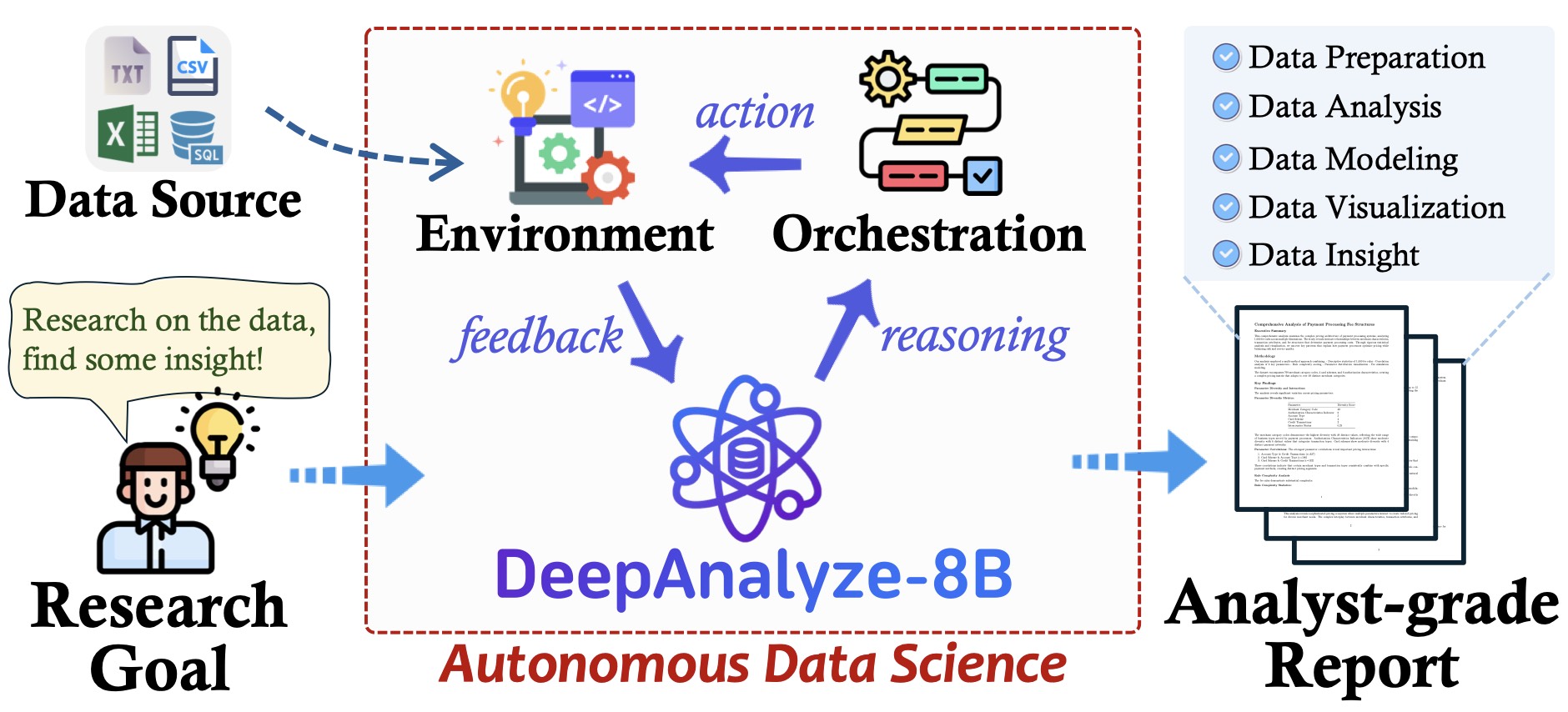
DeepAnalyze is the first agentic LLM for autonomous data science. It can autonomously complete a wide range of data-centric tasks without human intervention, supporting:
- 🛠 Entire data science pipeline: Automatically perform any data science tasks such as data preparation, analysis, modeling, visualization, and report generation.
- 🔍 Open-ended data research: Conduct deep research on diverse data sources, including structured data (Databases, CSV, Excel), semi-structured data (JSON, XML, YAML), and unstructured data (TXT, Markdown), and finally produce analyst-grade research reports.
- 📊 Fully open-source: The model, code, training data, and demo of DeepAnalyze are all open-sourced, allowing you to deploy or extend your own data analysis assistant.
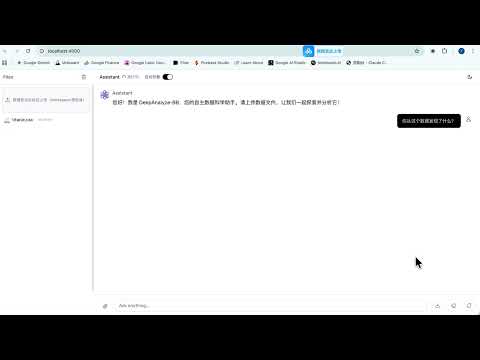
🎬 Demo Video
[!NOTE]
改编说明:本仓库在原始版本基础上进行了改编与增强,以便更便捷地在本地与远程环境中体验和部署。原始项目与模型来源如下:
- 原始代码仓库:
ruc-datalab/DeepAnalyze- 开源模型:
RUC-DataLab/DeepAnalyze-8B- 改编者:复旦大学(Fudan University)
兼容性:已在 macOS Apple Silicon(M1/M2/M3)上验证可用,支持无需 GPU 的本地快速体验(Mock OpenAI API)以及连接远程推理服务。下方提供简易使用步骤与 Mac 专用指南。
🍎 Mac (Apple Silicon) 使用指南
- 环境建议:
macOS 14+,Apple Silicon(M1/M2/M3),Python 3.12,Node.js(npm 或 pnpm)。 - 快速体验(无需 GPU,本地 Mock OpenAI API):
cd demo/chat npm install cd .. bash start.sh # 浏览器访问 open http://localhost:4000 - 连接远程模型(OpenAI/兼容服务或自建 vLLM):
- 前端:编辑
demo/chat/lib/config.ts,设置AI_API_BASE_URL、WEBSOCKET_URL。 - 后端:编辑
demo/backend.py,设置MODEL_PATH与API_BASE。 - 建议在 Mac 上将推理托管于远程 GPU,本机用于 UI 与业务逻辑。
- 前端:编辑
- 本地推理(仅 CPU/MPS):
- 如需纯本地推理,可使用 CPU 模式或连接远程 vLLM。当前 vLLM 在 macOS/MPS 上支持有限,建议远程部署以获得更佳性能。
- 多语言:前后端已支持中英文自动切换(随系统/浏览器语言),无需额外设置。
🔥 News
- [2025.11.08]: DeepAnalyze is now accessible through the JupyterUI, building based on jupyter-mcp-server. Thanks to the contributor @ChengJiale150.
- [2025.10.28]: We welcome all contributions, including improving the DeepAnalyze and sharing use cases (see
CONTRIBUTION.md). All merged PRs will be listed as contributors. - [2025.10.27]: DeepAnalyze has attracted widespread attention, gaining 1K+ GitHub stars and 200K+ Twitter views within a week.
- [2025.10.21]: DeepAnalyze's paper, code, model, training data are released!
🖥 Demo
WebUI
Upload the data, DeepAnalyze can perform data-oriented deep research 🔍 and any data-centric tasks 🛠
- Clone this repo and download DeepAnalyze-8B.
- Deploy DeepAnalyze-8B via vllm:
vllm serve DeepAnalyze-8B - Run these scripts to launch the API and interface, and then interact through the browser (http://localhost:4000):
cd demo/chat npm install cd .. bash start.sh # stop the api and interface bash stop.sh - If you want to deploy under a specific IP, please replace localhost with your IP address in ./demo/backend.py and ./demo/chat/lib/config.ts
JupyterUI
https://github.com/user-attachments/assets/a2335f45-be0e-4787-a4c1-e93192891c5f
Familiar with Jupyter Notebook? Try DeepAnalyze through the **JupyterUI**!
- This Demo runs Jupyter Lab as frontend, creating a new notebook, converting
<Analyze|Understand|Answer>to Markdown cells, converting<Code>to Code cells and executing them as<Execute>. - Go to demo/jupyter to see more and try!
- 👏Thanks a lot to the contributor @ChengJiale150.
[!TIP]
Clone this repository to deploy DeepAnalyze locally as your data analyst, completing any data science tasks without any workflow or closed-source APIs.
🔥 The UI of the demo is an initial version. Welcome to further develop it, and we will include you as a contributor.
🚀 Quick Start
Requirements
- Install packages:
torch,transformers,vllm>=0.8.5conda create -n deepanalyze python=3.12 -y conda activate deepanalyze pip install -r requirements.txt # For training (cd ./deepanalyze/ms-swift/ && pip install -e .) (cd ./deepanalyze/SkyRL/ && pip install -e .) requirements.txtlists the minimal dependencies required for DeepAnalyze inference.
For training, please refer to./deepanalyze/ms-swift/requirements.txtand./deepanalyze/SkyRL/pyproject.toml- We recommend separating the inference and training environments to avoid dependency conflicts.
Command Interaction
Deploy DeepAnalyze-8B via vllm:
vllm serve DeepAnalyze-8BRun these scripts for any data science tasks:
- You can specify any data science tasks, including specific data tasks and open-ended data research.
- You can specify any number of data sources, and DeepAnalyze will automatically explore them.
- You can specify any type of data sources, e.g., structured data (Databases, CSV, Excel), semi-structured data (JSON, XML, YAML), and unstructured data (TXT, Markdown)
from deepanalyze import DeepAnalyzeVLLM

prompt = """# Instruction
Generate a data science report.

# Data
File 1: {"name": "bool.xlsx", "size": "4.8KB"}
File 2: {"name": "person.csv", "size": "10.6KB"}
File 3: {"name": "disabled.xlsx", "size": "5.6KB"}
File 4: {"name": "enlist.csv", "size": "6.7KB"}
File 5: {"name": "filed_for_bankrupcy.csv", "size": "1.0KB"}
File 6: {"name": "longest_absense_from_school.xlsx", "size": "16.0KB"}
File 7: {"name": "male.xlsx", "size": "8.8KB"}
File 8: {"name": "no_payment_due.xlsx", "size": "15.6KB"}
File 9: {"name": "unemployed.xlsx", "size": "5.6KB"}
File 10: {"name": "enrolled.csv", "size": "20.4KB"}"""

workspace = "/home/u2023000922/zhangshaolei/deepanalyze_public/DeepAnalyze/example/analysis_on_student_loan/"

deepanalyze = DeepAnalyzeVLLM(
    "/fs/fast/u2023000922/zhangshaolei/checkpoints/deepanalyze-8b/"
)
answer = deepanalyze.generate(prompt, workspace=workspace)
print(answer["reasoning"])
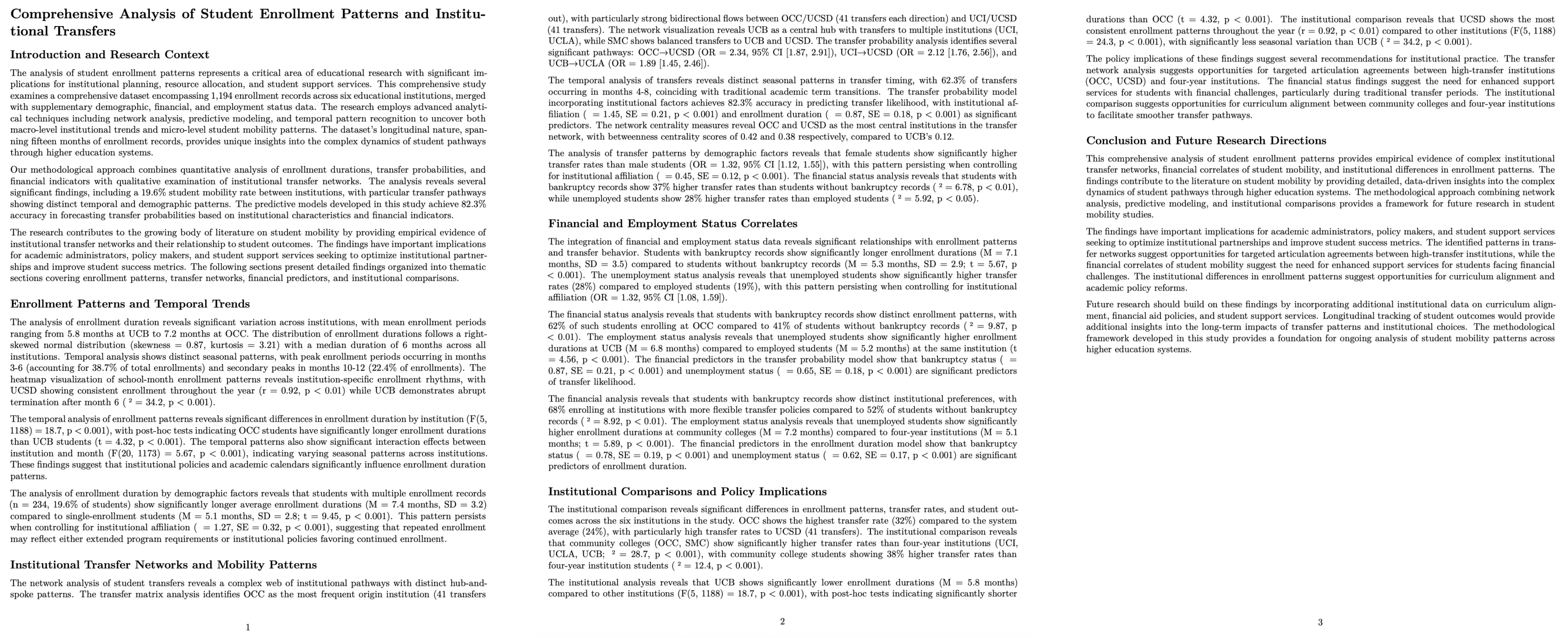
You shoud get a deep research report, which can be rendered as a PDF.:
# Comprehensive Analysis of Student Enrollment Patterns and Institutional Transfers

## Introduction and Research Context

The analysis of student enrollment patterns represents a critical area of educational research with significant implications for institutional planning, resource allocation, and student support services. This comprehensive study examines a comprehensive dataset encompassing 1,194 enrollment records across six educational institutions, merged with supplementary demographic, financial, and employment status data. The research employs advanced analytical techniques including network analysis, predictive modeling, and temporal pattern recognition to uncover both macro-level institutional trends and micro-level student mobility patterns. The dataset's longitudinal nature, spanning fifteen months of enrollment records, provides unique insights into the complex dynamics of student pathways through higher education systems.

Our methodological approach combines quantitative analysis of enrollment durations, transfer probabilities, and financial indicators with qualitative ...

The research contributes to the growing body of literature on student mobility by providing empirical evidence of institutional transfer networks and their relationship to student outcomes...
.....
For more examples and task completion details, please refer to DeepAnalyze's homepage.
API
You can build an OpenAI-Style API, using this script (note to change
MODEL_PATH = "DeepAnalyze-8B"in demo/backend.py to your vllm model name):python demo/backend.pyAPI usage (streaming response):
curl -X POST http://localhost:8200/chat/completions \
     -H "Content-Type: application/json" \
     -d '{
           "messages": [
             {
               "role": "user",
               "content": "Generate a data science report."
             }
           ],
           "workspace": "example/student_loan/"
         }'
🎈 Develop Your Own DeepAnalyze
1. Download Model and Training Data
Download DeepSeek-R1-0528-Qwen3-8B. Or you can directly finetune based on DeepAnalyze-8B.
If you use DeepSeek-R1-0528-Qwen3-8B as the base model, you should add the special tokens, using:
MODEL_PATH=path_to_DeepSeek-R1-0528-Qwen3-8B
SAVE_PATH=path_to_save_DeepSeek-R1-0528-Qwen3-8B-addvocab

python deepanalyze/add_vocab.py \
  --model_path "$MODEL_PATH" \
  --save_path "$SAVE_PATH" \
  --add_tags
Download training data DataScience-Instruct-500K.
- unzip
DataScience-Instruct-500K/RL/data.zip
- unzip
2. Curriculum-based Agentic Training
- Single-ability Fine-tuning: ./scripts/single.sh
- Multi-ability Agentic Training (cold start): ./scripts/multi_coldstart.sh
- Multi-ability Agentic Training (RL): ./scripts/multi_rl.sh
3. Evaluation
- We have unified the evaluation of most existing data science benchmarks using vLLM (with more being continuously added...). You can directly follow the introduction in ./playground to quickly evaluate DeepAnalyze or your own agent.
👏 Contribution
We welcome all forms of contributions, and merged PRs will be listed as contributors.
Contribution on Code and Model
- We welcome all forms of contributions on DeepAnalyze's code, model and UI, such as Docker packaging, DeepAnalyze model conversion and quantization, and submitting DeepAnalyze workflows based on closed-source LLMs.
- You can submit a pull request directly.
Contribution on Case Study
- We also especially encourage you to share your use cases and feedback when using DeepAnalyze; these are extremely valuable for helping us improve DeepAnalyze.
- You can place your use cases in a new folder under
.example/. We recommend following the folder structure of.example/analysis_on_student_loan/, which includes three parts:data/: stores the uploaded filesprompt.txt: input instructionsREADME.md: documentation. We suggest including the input, DeepAnalyze’s output, outputs from other closed-source LLMs (optional), and your evaluation/comments of the case.
- DeepAnalyze only has 8B parameters, so we also welcome examples where DeepAnalyze performs slightly worse than the closed-source LLMs — this will help us improve DeepAnalyze.
🤝 Acknowledgement
🖋Citation
If this repository is useful for you, please cite as:
@misc{deepanalyze,
      title={DeepAnalyze: Agentic Large Language Models for Autonomous Data Science},
      author={Shaolei Zhang and Ju Fan and Meihao Fan and Guoliang Li and Xiaoyong Du},
      year={2025},
      eprint={2510.16872},
      archivePrefix={arXiv},
      primaryClass={cs.AI},
      url={https://arxiv.org/abs/2510.16872},
}
Yorumlar (0)
Yorum birakmak icin giris yap.
Yorum birakSonuc bulunamadi