piaz-switch
Health Pass
- License — License: NOASSERTION
- Description — Repository has a description
- Active repo — Last push 0 days ago
- Community trust — 12 GitHub stars
Code Fail
- rm -rf — Recursive force deletion command in crates/pitstop-app/macos/bundle.sh
Permissions Pass
- Permissions — No dangerous permissions requested
No AI report is available for this listing yet.
Switch between Claude Code and Codex accounts in one click, track each account's limits, and see token usage and cost. Tray app + CLI for Windows and macOS. Free to use, not for resale.

Piaz Switch
Switch between your Claude Code and Codex accounts in one click — without signing
out — and see how much each account has left.





piaz-switch.vercel.app · Download · How it works · Use the app · Command line · Author · Tiếng Việt
Made by Ben Piaz · YouTube @benpiaz · X @benpiazai
Piaz Switch is a free tray / menu bar app (plus a piaz-switch command line) for
people who use more than one Claude Code or Codex CLI account:
- Switch accounts instantly from the tray menu; open Claude Code sessions follow.
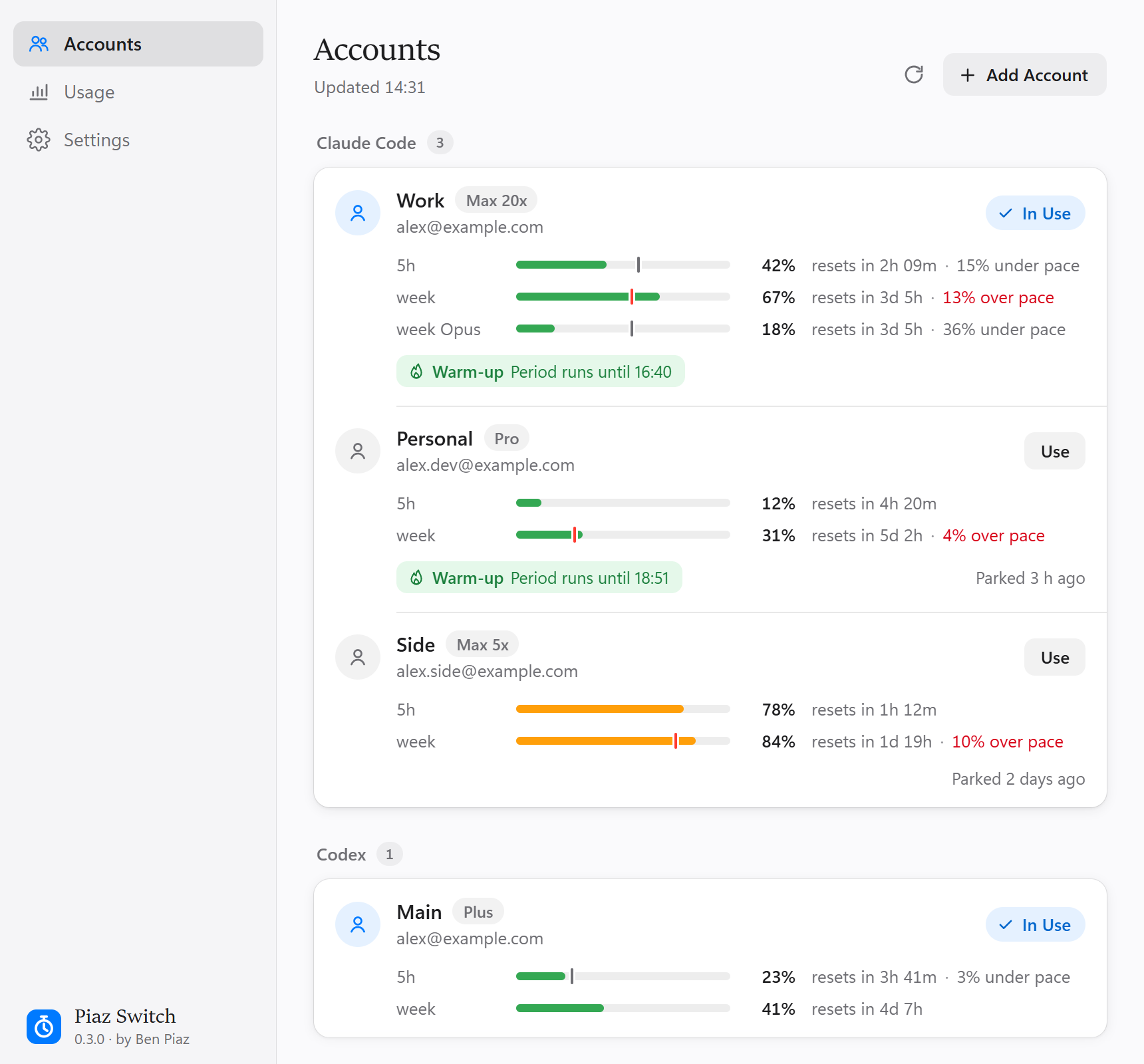
- See every account's limits — 5-hour, weekly and per-model usage, reset times
and your pace. - Switch automatically to the account with the most room left when the one in
use is about to run out, and warm up an account's next 5-hour window. - See what you used and what it would cost at API prices, from the logs on your
own computer. - Private by design: no server, no telemetry, no account of ours. Parked logins
are AES-256-GCM encrypted on disk (~/.pitstop/vault/; the folder keeps the project's first name so
existing logins keep working), with the key in the OS
keystore (Windows Credential Manager / macOS Keychain). Each login only ever goes
to the service that issued it.
English and Vietnamese interface; light and dark themes.
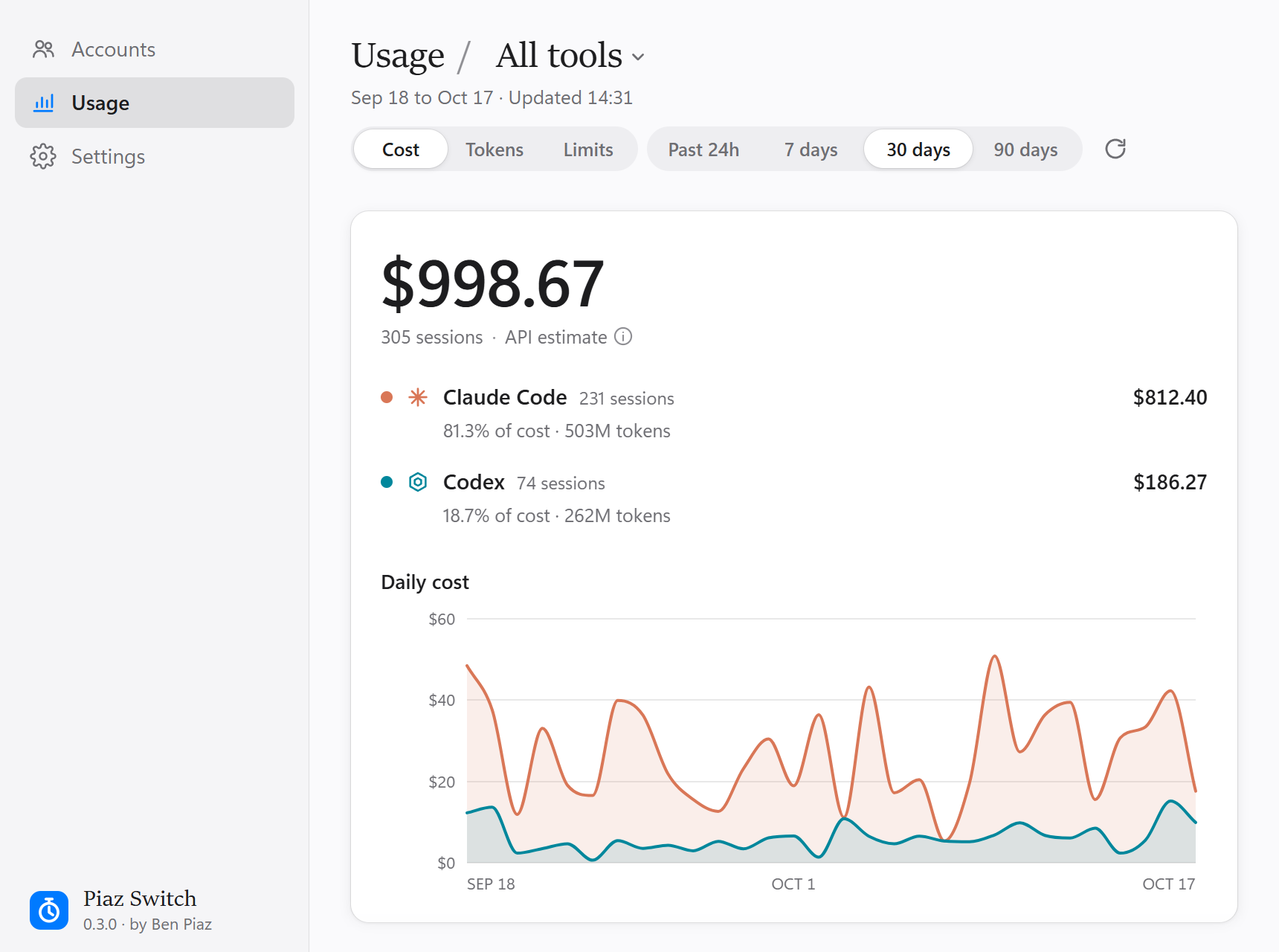
Usage: tokens and cost at API prices, per tool and per day |
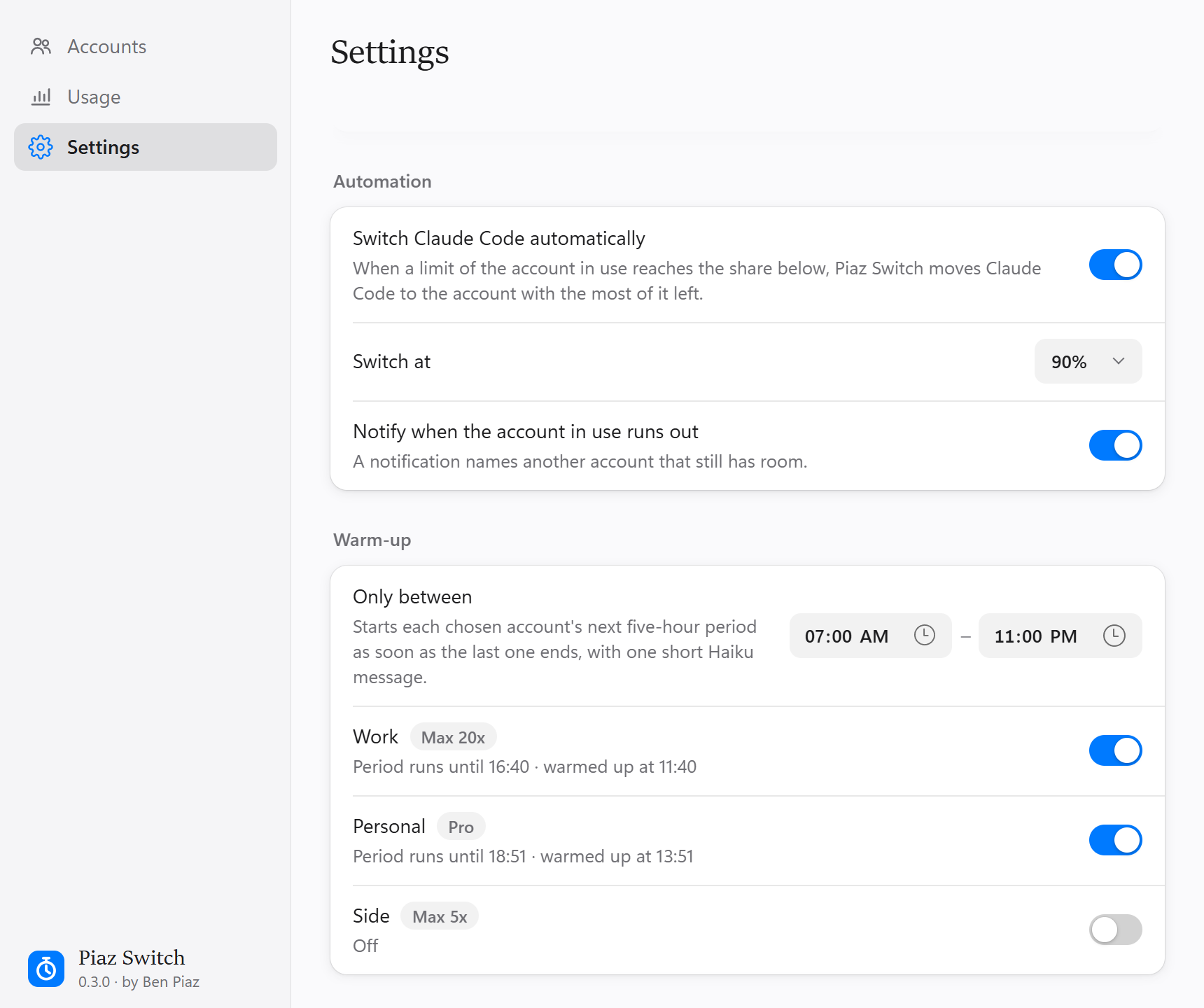
Automation: switch before you run out, warm up the next window |
Screenshots use sample accounts.
Download
| System | File |
|---|---|
| Windows 10/11 (64-bit) | PiazSwitch-windows-x64-setup.exe — installer |
PiazSwitch-windows-x64-portable.zip — no install, includes the piaz-switch.exe command line |
|
| macOS 11+ Apple Silicon (M1–M4) | PiazSwitch-macos-arm64.dmg |
| macOS 11+ Intel | PiazSwitch-macos-x64.dmg |
All versions: Releases.
First launch. The app is not code-signed yet, so the system warns once:
Windows — "Windows protected your PC": click More info → Run anyway.
The app needs WebView2, which Windows 11 (and up-to-date Windows 10) already has.macOS — the app isn't notarized by Apple, so macOS blocks it the first time
("Apple could not verify…"):- Open the
.dmgand drag Piaz Switch to Applications. - Open the app. When macOS blocks it, click Done (older macOS: Cancel or
OK). Don't click Move to Trash. - Go to System Settings → Privacy & Security, scroll to Security and
click Open Anyway next to "Piaz Switch was blocked…" (macOS 12 and older:
System Preferences → Security & Privacy → General). - Click Open Anyway (or Open) and enter your password if asked. From
then on it opens normally.
If macOS says the app "is damaged", or there is no Open Anyway button, run
this in Terminal and open the app again:xattr -dr com.apple.quarantine "/Applications/Piaz Switch.app"- Open the
The app then lives in the system tray (Windows: maybe behind the ^ by the clock —
drag it onto the taskbar) or the menu bar (macOS).
You also need the tools themselves: Claude Code
and/or the Codex CLI, signed in once.
Updates. From 0.3.0 on, the app looks for a new version every few hours and
says when there is one (a notification, and an item at the top of the tray menu).
Install and Restart downloads it, checks that it was signed by this project's
release key, installs it and starts it again; your accounts and settings stay as
they are. Nothing installs without your click, and Settings → Updates can turn
the checks off or run one now. The portable zip can't replace itself: it offers the
download page instead. Versions before 0.3.0 have no updater, so get 0.3.0 once by hand.
How it works
| Tool | Active credential location | Switch behavior |
|---|---|---|
| Claude Code (Windows/Linux) | ~/.claude/.credentials.json + oauthAccount in ~/.claude.json |
takes effect immediately, open sessions follow |
| Claude Code (macOS) | Keychain item Claude Code-credentials + oauthAccount in ~/.claude.json |
same |
| Codex CLI (all OSes) | ~/.codex/auth.json |
a running Codex keeps the old account until restarted |
A switch parks the live login under the account it belongs to — told apart by the
account and organization (or ChatGPT workspace) it carries, not just its email —
then puts the chosen account's parked login where the tool reads it. Every write is
atomic, and a failed switch rolls the live login back. A login Piaz Switch doesn't
manage is never parked under another account's name.
Adding an account never touches the one in use. Piaz Switch runs the tool's own
sign-in (claude auth login, codex login) in a private, empty directory, then
parks the login it produced. Don't add accounts with Claude Code's /login or withcodex login: both replace the login in use without parking it first, andcodex login also revokes the login it replaces. Don't log out in the tools
either: logging out ends the login Piaz Switch parked.
Build from source
Needs Rust (stable).
cargo build --release -p pitstop-app   # the app: target/release/pitstop-app
cargo build --release -p pitstop-cli   # command line: target/release/piaz-switch
On macOS, build on a Mac (same commands), then wrap the app so it opens from
Finder and Login Items:
crates/pitstop-app/macos/bundle.sh target/release/pitstop-app # → target/release/Piaz Switch.app
Set PITSTOP_HOME=/some/dir to run the app against a sandbox home instead of your
real accounts (the command line has --home for the same).
To build the installers the release uses: npx @tauri-apps/cli build --bundles nsis
in crates/pitstop-app (Windows). See CONTRIBUTING.md for
development.
Use the app
Start Piaz Switch (from the Start menu on Windows, or Piaz Switch.exe from the portable zip; Piaz Switch.app on macOS). It lives in the system tray
/ menu bar:
- Click the icon for the menu: your accounts by tool, a check on the one in
use, each one's usage under its name, and a suggestion to switch when the account
in use runs out of a limit. Choose an account to switch to it. On Windows the icon
may land in the hidden-icons area (the^by the clock): drag it onto the taskbar. - Open Piaz Switch for the window: each account with its plan, its limits as bars
(5-hour, weekly, per model), when they reset and how your pace compares to an even
one. Use switches; right-click an account to Sign In Again, Rename,
Copy Email Address or Forget it. - Add Account signs in to a new account in your browser, as described above.
If a tool is signed in to an account Piaz Switch doesn't manage yet, the window offers
to Name it, which parks that login as it is. - Usage: what Claude Code and Codex used over the past 24 hours, 7, 30 or 90
days — the estimated cost at API prices, sessions, a daily chart per tool, totals
(processed, cached and uncached input, cache writes, output, cache savings) and a
breakdown by model or by day. Filter by tool with Usage / All tools ▾; the
Limits tab shows every account's limits in one place. See
Cost and tokens. - Settings: English or Vietnamese, Open Piaz Switch at login (tray only, no
window, when you sign in to the computer), Updates (see Download),
and Automation: switch Claude Code
to the account with the most room left when a limit of the account in use reaches
a chosen share, a notification when the account in use runs out, and Warm-up,
which starts a chosen account's next five-hour period as soon as the last one ends
with one short Haiku message, optionally only between set hours.
Closing the window keeps Piaz Switch in the tray; Quit is in the tray menu.
Use the command line
piaz-switch enroll work --provider claude-code                 # park the login the tool is using now
piaz-switch enroll personal --provider claude-code --sign-in   # sign in to another account, leaving that one alone
piaz-switch enroll main --provider codex --sign-in

piaz-switch                    # list accounts, * marks active, usage under each
piaz-switch list --offline     # same, without asking Anthropic / OpenAI for usage
piaz-switch use work           # switch
piaz-switch rename work job    # rename, keeping the parked login
piaz-switch remove job         # forget an account and delete its parked credential
Usage (best-effort)
Piaz Switch shows each account's limits — percent used and time until reset. It reads
Claude Code's from Anthropic's usage endpoint (the one Claude Code's /usage uses)
and Codex's from ChatGPT's (/backend-api/wham/usage), with the live token of the
account in use or a parked account's vault copy. The app refreshes it on start, on
Refresh, after a switch, and every 5 minutes.
Piaz Switch never refreshes a token to read usage: renewing rotates the refresh token,
and two holders renewing one chain breaks it for both. A parked account whose access
token has lapsed shows as expired until you switch to it and the tool renews it.
Cost and tokens (the Usage pane)
The Usage pane reads the session logs the tools write themselves, on this computer
only:
- Claude Code:
~/.claude/projects/**/*.jsonl(and$CLAUDE_CONFIG_DIR/projects,~/.config/claude/projects), subagent transcripts included; - Codex:
~/.codex/sessions/and~/.codex/archived_sessions/(or under$CODEX_HOME).
Each request's tokens are priced with LiteLLM's public price
table:
a copy ships with Piaz Switch, and the app fetches the current one once a day into~/.pitstop/prices.json (nothing is sent along). A model the table doesn't know
shows as Unpriced and is left out of the dollar totals. The first read of the
logs takes a few seconds; later ones read only what was written since. Logs not
touched in 90 days are skipped.
It is an estimate at API list prices: Max, Pro and Plus subscriptions are billed
differently. Claude Code writes a message as several log lines; Piaz Switch counts each
message once with the usage of its last line (the first one undercounts output)
and prices one-hour cache writes at their own rate, so its totals run a few percent
above tools that count the first line, such as ccusage. Web searches and fast mode
aren't priced, and the logs don't say which account ran a session, so cost isn't
split by account.
To refresh the shipped table: cargo run -p pitstop-core --example update-prices.
Limitations (by design, for now)
- No Claude Desktop switching, no per-account browser windows, no code signing yet.
Automatic switching and warm-up cover Claude Code only. - Piaz Switch tells accounts apart by what the login files say. If another Claude Code
process rewritesoauthAccountin~/.claude.jsonfor a different login, the
login in use can look unmanaged; Piaz Switch then leaves it alone rather than park it
under the wrong account. - Claude Code on Windows can be switched to Windows Credential Manager (behind a
feature flag). Piaz Switch reads and writes.credentials.json, so it does not see a
login kept there. - If Piaz Switch's entry in your OS keystore (named
pitstop) is deleted, parked credentials cannot be
decrypted — add each account again. - Linux follows the Windows file paths and compiles (the app needs
webkit2gtk),
but is untested.
Author
Piaz Switch is made by Ben Piaz, who shares about AI, Claude Code and building
products with AI:
- YouTube: @benpiaz
- X: @benpiazai
- Website: piaz-switch.vercel.app
- Source: github.com/Benpiaz/piaz-switch
The same links are in the app, under Settings → About and in the tray menu.
License
Piaz Switch is free and source-available under the MIT license with the
Commons Clause:
- ✅ You may download, use (personally or at work), read, modify and share it, and
build on it — keeping the license notice. - ❌ You may not sell it: no selling the app, a modified copy, or a paid
product or service whose value comes mainly from it.
Because of that one condition it is not "open source" in the OSI sense. For any
other arrangement, open an issue.
Piaz Switch is an independent project, not affiliated with or endorsed by Anthropic
or OpenAI. Claude and Claude Code are trademarks of Anthropic; Codex and ChatGPT are
trademarks of OpenAI.
Tiếng Việt
Piaz Switch giúp bạn chuyển qua lại giữa nhiều tài khoản Claude Code và
Codex chỉ bằng một cú bấm, không phải đăng xuất rồi đăng nhập lại, và xem mỗi
tài khoản còn bao nhiêu hạn mức (5 giờ, tuần, theo model).
Tải về tại trang piaz-switch.vercel.app hoặc ở mục Download phía trên:
Windows: tải
PiazSwitch-windows-x64-setup.exevà chạy để cài. Nếu Windows
hiện "Windows protected your PC", bấm More info → Run anyway (app chưa có chữ
ký số, không phải virus).macOS: tải file
.dmgđúng loại máy (Apple Silicon M1–M4 hoặc Intel). App
chưa đăng ký chứng nhận với Apple nên lần đầu macOS sẽ chặn ("Apple could not
verify…"):- Mở file
.dmg, kéo Piaz Switch vào Applications. - Mở app. Khi Mac báo chặn, bấm Done (macOS cũ: Cancel hoặc OK). Đừng
bấm Move to Trash. - Vào System Settings → Privacy & Security, kéo xuống phần Security, bấm
Open Anyway ở dòng "Piaz Switch was blocked…" (macOS 12 trở xuống:
System Preferences → Security & Privacy → General). - Bấm Open Anyway (hoặc Open), nhập mật khẩu máy nếu được hỏi. Từ giờ app
mở bình thường.
Nếu Mac báo app "is damaged", hoặc không có nút Open Anyway, mở Terminal chạy
lệnh này rồi mở lại app:xattr -dr com.apple.quarantine "/Applications/Piaz Switch.app"- Mở file
Sau khi mở, app nằm ở khay hệ thống (Windows, góc phải dưới, có thể ẩn sau dấu ^)
hoặc thanh menu (macOS). Bấm vào biểu tượng để đổi tài khoản, chọn Open để mở
cửa sổ quản lý; vào Settings → Language để chuyển sang tiếng Việt.
Cập nhật: từ bản 0.3.0, app tự kiểm tra bản mới vài giờ một lần và báo khi có
(thông báo, và một mục ở đầu menu khay). Bấm Cài và khởi động lại là app tự tải,
kiểm tra chữ ký, cài và mở lại; tài khoản và cài đặt giữ nguyên. Không có gì được cài
nếu bạn không bấm. Bản 0.2.0 trở về trước chưa có tính năng này, nên cần tải bản
0.3.0 bằng tay một lần.
Thêm tài khoản: dùng nút Add Account trong app. Đừng dùng /login của
Claude Code hay codex login, vì chúng thay luôn tài khoản đang dùng.
Bảo mật: không có máy chủ, không thu thập dữ liệu. Thông tin đăng nhập được mã
hóa AES-256-GCM trên máy bạn, khóa nằm trong kho khóa của hệ điều hành.
Giấy phép: miễn phí, mã nguồn công khai (MIT + Commons Clause). Bạn được tải về,
dùng (kể cả cho công việc), sửa và chia sẻ lại, nhưng không được bán app này
hay bản sửa đổi của nó, hoặc dịch vụ thu phí dựa chủ yếu vào nó.
Tác giả: Ben Piaz — theo dõi kênh YouTube @benpiaz
và X @benpiazai để nhận bản mới và mẹo dùng.
Reviews (0)
Sign in to leave a review.
Leave a reviewNo results found