voicebridge
Health Uyari
- License — License: NOASSERTION
- Description — Repository has a description
- Active repo — Last push 0 days ago
- Low visibility — Only 5 GitHub stars
Code Gecti
- Code scan — Scanned 12 files during light audit, no dangerous patterns found
Permissions Gecti
- Permissions — No dangerous permissions requested
Bu listing icin henuz AI raporu yok.
Hands-free, two-way voice for your coding agent (Claude Code, Codex, Antigravity, Ollama) from your phone — free for noncommercial use, source-available, no ElevenLabs. Browser Web Speech + a tiny Node bridge over Tailscale HTTPS.
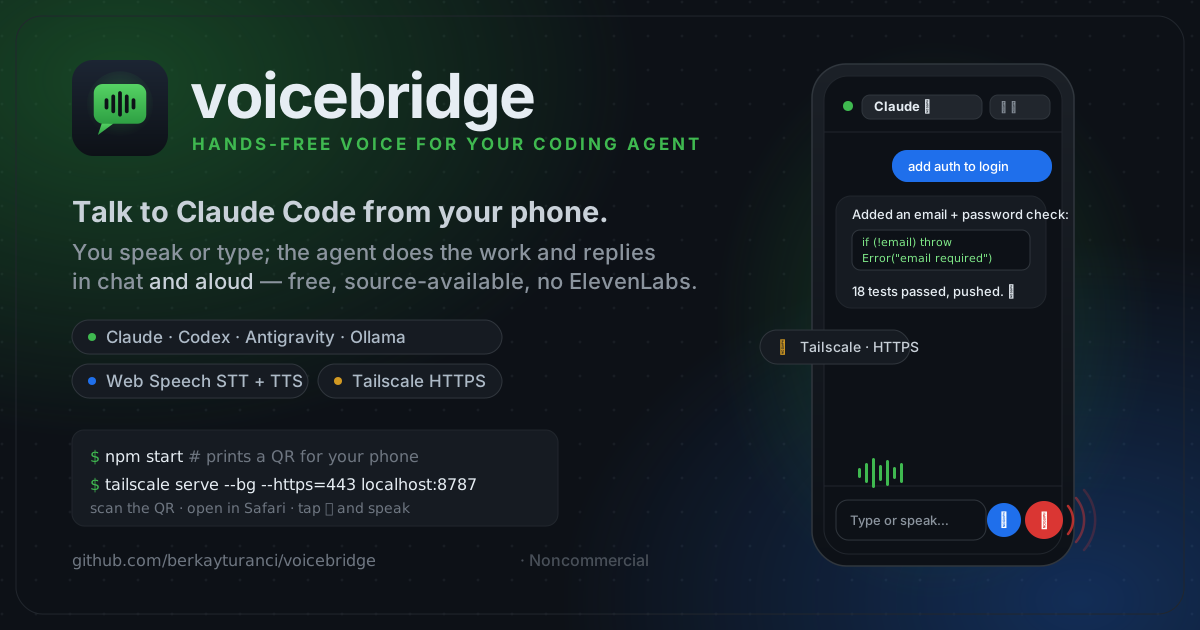
voicebridge




Hands-free, two-way voice for your coding agent from your phone — free, source-available, no ElevenLabs.
v0.7.0: Scan the bridge's startup QR code to connect instantly, and a new
first-run explainer walks first-time users through what VoiceBridge needs on
their computer before they connect.
You speak or type on your phone, a coding agent (running on your Mac/Linux
box) does the work, and the reply streams back as chat and spoken audio —
like a phone call with your agent, with a keyboard when you want one.
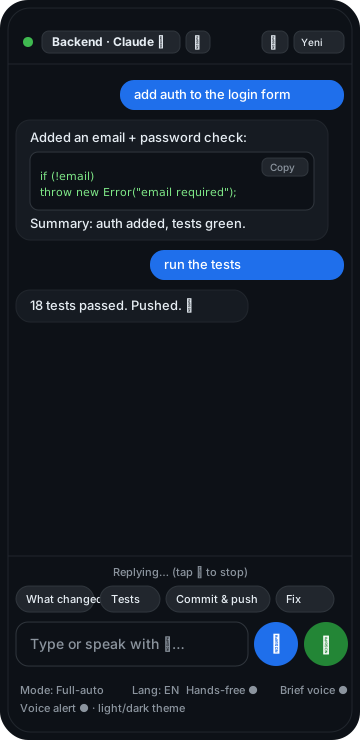
Type or speak; the agent replies in chat and aloud.
- 🤖 Multiple agents — Claude Code, Codex, Antigravity, and Ollama
(a fully-local open-source model), selectable per session, each with autonomy
modes (ask → full-auto). - 🗂️ Multiple sessions — run several conversations in parallel (e.g. "Claude on
repo A", "Codex on repo B") and switch between them in the UI. - ⌨️🎙️ Type or speak — a Claude-Code-like chat with a text box and a mic;
replies render with code blocks and are read aloud. - 🎙️ Speech-to-text runs in your phone's browser by default, or through your
own local Whisper command / streaming WebSocket transcriber; 🔊
text-to-speech stays in the browser — no per-minute voice cost. - ⚡ Streaming — the reply is spoken sentence-by-sentence as it's generated,
not after the whole turn finishes, with a Stop button to cut it off. - 🧩 A tiny Node bridge (one dependency:
qrcode-terminal) relays the text to
the agent CLI on your machine and streams its reply back. - 🔒 Reached over Tailscale (your private network) with real HTTPS, with an
optional shared access token — your code never touches a third-party voice
service. - 🗣️ Optional fully-local speech-to-text via your own Whisper command
(STT_MODE=whisper) or a local streaming Whisper WebSocket transcriber
(STT_MODE=whisper-stream), so even the transcription stays on your machine.
Honest scope: for Claude/Codex/Antigravity the model runs in its vendor's
cloud (that's how those CLIs work); with the Ollama backend the model runs
fully locally. voicebridge just removes the voice middleman (ElevenLabs)
and its limits. Speech recognition on iOS uses Apple's free dictation service;
text-to-speech is fully on-device.Agent support: the Claude backend is fully implemented and tested. The
Codex (codex exec) and Antigravity (agy --print) backends use the
same secure stdin prompt style as ai-jury
and stream their plain-text stdout. Conversation continuity is built-in for
Claude (--continue), Codex (codex exec resume), and Antigravity
(--conversation/--continue); see
docs/configuration.md for override hooks.
Quickstart
git clone https://github.com/berkayturanci/voicebridge.git voicebridge && cd voicebridge && npm install
cp .env.example .env                                  # set PROJECT_DIR + ACCESS_TOKEN
CLAUDE_BIN=$(which claude) npm start                  # prints a QR for your phone
tailscale serve --bg --https=443 localhost:8787       # expose over HTTPS (separate terminal)
Then open the printed https://…ts.net URL in your phone's browser (Safari on
iOS) and tap 🎤 or just type. New to it? See Requirements,
Troubleshooting, and the step-by-step
mobile voice setup (why the mic needs HTTPS).
Requirements
- A computer (macOS/Linux) with Claude Code installed and logged in
(npm i -g @anthropic-ai/claude-code, thenclaude→/login). - Node.js ≥ 18 (
brew install node). - Tailscale on both the computer and the phone (
brew install --cask tailscale,
and the Tailscale app from the App Store). Free. - iPhone/iPad: open in Safari (do not "Add to Home Screen" — installed PWAs
can't use the microphone on iOS).
Setup
1. On your computer
git clone https://github.com/berkayturanci/voicebridge.git voicebridge
cd voicebridge
npm install            # qrcode-terminal (web-push is optional, for real push)

# Configure with a .env file (or plain env vars):
cp .env.example .env   # then edit: PROJECT_DIR, ACCESS_TOKEN, …

# Start the bridge (binds to 127.0.0.1:8787 by default)
npm start
Any variable in .env is loaded at startup (real environment variables win).
On startup the bridge prints a QR code for the phone URL — scan it to open
the UI (and, when ACCESS_TOKEN/PUBLIC_URL are set, to authorize on open).
2. Expose it to your phone over HTTPS (Tailscale)
Web Speech needs a secure context (HTTPS) — over plain http://<lan-ip> a
phone's browser disables the mic. Tailscale gives your machine a real HTTPS cert
automatically:
tailscale serve --bg --https=443 localhost:8787
tailscale serve status     # shows the https://<your-machine>.<tailnet>.ts.net URL
The first time you run tailscale serve, you may have to enable the feature
once for your tailnet — it prints a login.tailscale.com/f/serve?node=… link;
open it and toggle Serve on. Full walkthrough (and the why) in
docs/mobile-voice-setup.md.
3. On your phone
- Make sure Tailscale is connected (same account).
- Open the
https://<your-machine>.<tailnet>.ts.netURL in Safari. - Tap the 🎤 button, allow the microphone, and speak.
- Toggle Eller serbest / Hands-free for a continuous back-and-forth loop.
That's it — talk, and Claude Code talks back. 🎧
Configuration
| Env var | Default | Meaning |
|---|---|---|
PORT |
8787 |
Port the bridge listens on |
HOST |
127.0.0.1 |
Bind address (keep local; expose via tailscale serve) |
PUBLIC_URL |
(none) | Public URL shown in the startup QR (e.g. your Tailscale https://…ts.net). Falls back to http://HOST:PORT. |
PROJECT_DIR |
current directory | Default working directory for new sessions |
AGENT |
claude |
Default agent for the boot session (claude/codex/antigravity) |
CLAUDE_BIN |
claude |
Path to the claude executable |
CODEX_BIN |
codex |
Path to the codex executable |
AGY_BIN |
agy |
Path to the Antigravity executable |
ACCESS_TOKEN |
(none) | If set, /api/* requires Authorization: Bearer <token>. The page prompts for it once and stores it. |
STT_MODE |
browser |
browser (Web Speech), whisper (local batch), or whisper-stream (local streaming) |
STT_CMD |
(none) | Whisper mode: shell command; {file} → recorded audio path; must print the transcript to stdout |
STT_STREAM_URL |
(none) | Whisper-stream mode: local WebSocket transcriber URL, e.g. ws://127.0.0.1:8910/listen |
Optional: a shared access token
export ACCESS_TOKEN="$(openssl rand -hex 16)"
echo "$ACCESS_TOKEN"   # type this into the phone once when prompted
npm start
Optional: fully-local speech-to-text (Whisper)
Keeps transcription on your machine too (nothing goes to Apple). Needs ffmpeg
and a Whisper CLI (e.g. whisper.cpp's whisper-cli):
export STT_MODE=whisper
export STT_CMD='ffmpeg -nostdin -i {file} -ar 16000 -ac 1 -f wav - 2>/dev/null | whisper-cli -m ~/models/ggml-base.bin -nt -f - 2>/dev/null'
npm start
In whisper mode the mic button is tap-to-start / tap-to-stop (record, then it
transcribes). Hands-free loop is browser-mode only.
For local streaming transcription, run a Whisper-compatible WebSocket transcriber
on the Mac and point voicebridge at it:
export STT_MODE=whisper-stream
export STT_STREAM_URL='ws://127.0.0.1:8910/listen'
npm start
In whisper-stream mode the browser streams mic chunks to /api/stt-stream; the
bridge proxies them to the local transcriber and relays partial/final transcript
JSON back to the UI. Hands-free talking mode works here because partial text can
drive the same silence timer as browser STT.
Agents, sessions & modes
- Session list home: the app opens to a list of conversations (mobile
Claude-Code style) — each card shows the name, agent · mode · runner badges,
and a last-message preview. Tap a card to open it; ← returns to the list. - Create a session with + Yeni: pick an agent (Claude / Codex /
Antigravity / Ollama), a mode, a project folder, and a name. The
folder field has a 📁 Browse tree browser (no typing long paths); save
frequent projects as favorites (★) (or seed them withFAVORITES). - Conversation history persists: each session keeps its own transcript,
restored on reload — come back and the conversation is still there. - Type or speak: the composer sends on Enter (Shift+Enter for a newline) or
tap ➤; the 🎤 button does voice. The 🎤 → ⏹ button becomes a Stop control
while the agent answers or speaks. - Talking mode (📞): a continuous, hands-free voice conversation — speak, it
auto-sends on a pause, the reply is read aloud, then it listens again. A minimal
voice screen shows listening / thinking / speaking; the orb grows and glows
as it hears you. Tap the orb while it's speaking to interrupt (barge-in),
or the 🎙️ (top-left) to mute the mic and pause without leaving — tap
again to resume. Backgrounding the tab (e.g. opening the camera) frees the mic
automatically. (Needs HTTPS for the mic.) - Command palette (⌘): pick from the project's own commands —
.claude/commands
slash commands (e.g./keel:ship) andpackage.jsonnpm scripts — searchable;
selecting one prefills the composer. - Settings sheet (⚙): theme, chat font size, language, mode, hands-free,
audio cues, voice-friendly, notifications, TTS voice + rate, and session
rename / delete / new-chat — all in one tidy place, so the chat area stays big. - Local or cloud runner: each session runs the agent locally (CLI on your
machine) or, whenCLOUD_RUNNER_URLis set, on a cloud runner — same UI,
same NDJSON protocol, and the folder picker browses the runner host. See
docs/configuration.md. - Eyes-free audio cues: optional earcons signal listening, reply done, and
error — so you can run or cycle without looking at the screen. - Quick commands: one-tap chips send canned prompts ("What changed?", "Tests",
"Commit & push", …) to the active session — handy one-handed. - Voice-friendly replies: a "Brief voice" toggle asks the agent to answer
concisely for text-to-speech (no long code dumps, ending with a one-line
summary) — the full text still shows in chat. - Notifications: opt-in "Notify" raises a notification when a reply
finishes in the background or ends with a question — so a hands-free task
pulls you back when it needs you. With VAPID keys configured it uses real
Web Push (works even when the app is closed); otherwise in-page notifications. - Rich replies: full markdown (headings, lists, http(s)-only links) with
code blocks (copy button) and diff coloring for```diffblocks. - Activity trail & collapsible output: tool use shows a subtle running log
(e.g.⚙︎ Edit server.js), and long output blocks (npm logs, etc.) collapse by
default with a show-more toggle so the conversation stays readable. - Installable PWA: a web manifest, icon, and service worker make it
installable and cache the app shell; notifications go through the service
worker. (On iOS, use the Safari tab for voice — installed PWAs can't use
the microphone there.) - Native app (Flutter): an optional iOS/Android client lives in
app/— same bridge backend, but native mic + TTS so voice works
even as an installed app (no Safari-tab caveat). The same code also runs as a
desktop client (macOS/Windows/Linux). The PWA stays the zero-install option. - Desktop app (Electron):
desktop/packages the bridge itself
into a Mac.dmg/ Windows / Linux app with a control panel + tray —
run the server with no terminal.
Modes (autonomy)
Each agent exposes modes that map to its CLI's approval/sandbox flags — pick a
fuller-auto mode for true hands-free use (cycling, running), with the obvious
caveat that the agent then edits/runs without asking.
| Agent | Modes (flag) |
|---|---|
| Claude | ask (none) · autoEdit (--permission-mode acceptEdits) · full (--dangerously-skip-permissions) |
| Codex | safe (-s read-only) · auto (-s workspace-write -c approval_policy="never") · full (--dangerously-bypass-approvals-and-sandbox) |
| Antigravity | safe (--sandbox) · full (--dangerously-skip-permissions) |
⚠️ Full-auto modes let the agent change files and run commands without
prompting. Use them only on trusted projects over your private tailnet.
How it works
[ iPhone Safari ]                         [ your Mac ]
  mic ─Web Speech or Whisper STT─▶ text ──https/Tailscale──▶ voicebridge ──spawn──▶ claude / codex / agy
  speaker ◀─speechSynthesis── reply ◀──────────── reply  ◀──────────────  (coding agent CLI)
- Each session maps to one agent + project dir. Claude, Codex, Antigravity, and
Ollama keep a rolling conversation where the underlying CLI/API supports it;
Yeni sohbet resets it. - For Claude the prompt is passed as a separate argv (no shell); for Codex and
Antigravity it's piped on stdin — both injection-safe.
Development
npm test       # zero-dependency test suite (node:test): adapters, parser,
               # session registry, streaming, modes, runners, push, and auth.
npm run smoke  # end-to-end HTTP smoke test against a stub agent (no real CLI)
Try it locally without a real agent
You don't need an agent CLI to see the bridge work end to end — point a *_BIN
env var at a stub that emits the expected output:
printf '#!/usr/bin/env node\nprocess.stdout.write(JSON.stringify({type:"assistant",message:{content:[{type:"text",text:"hello from the stub."}]}})+"\\n");\n' > /tmp/claude
chmod +x /tmp/claude
CLAUDE_BIN=/tmp/claude npm start   # open the printed URL, type or speak
Security notes
- The server binds to
127.0.0.1and is only reachable through your Tailscale
tailnet — it is not exposed to the public internet. - iOS speech recognition streams audio to Apple for transcription (free, but
not local). Speech synthesis is fully on-device. If you need fully-local
STT too, swap the browser recognizer for a local Whisper endpoint (see ideas
below). - Anyone on your tailnet who opens the URL can drive an agent in a session's
project directory (and create sessions pointing at other directories). Keep
your tailnet private and setACCESS_TOKEN.
Troubleshooting
| Symptom | Fix |
|---|---|
| Mic does nothing / "https required" | Web Speech needs HTTPS — open the tailscale serve URL, not http://…. |
| Mic button is greyed out / disabled on mobile | You're on a non-HTTPS origin (e.g. http://<lan-ip>). Open the https://…ts.net URL instead. See mobile voice setup. |
Serve is not enabled on your tailnet |
One-time: open the printed login.tailscale.com/f/serve?node=… link and enable Serve in the admin console. |
| iOS mic doesn't work | Use the Safari tab, not an installed PWA (iOS blocks the mic in installed PWAs). |
| "Could not find 'claude'…" | Set CLAUDE_BIN to the agent's path (which claude) and make sure it's logged in. |
| 401 / keeps asking for a token | ACCESS_TOKEN is set — enter it once on the phone, or scan the QR (it carries the token). |
| Replies don't speak | TTS is unlocked on your first tap (mic/send) — interact once, then replies speak. Still silent? Check the voice/rate options and that the device isn't on silent. |
| Mic indicator stays on when idle | The recognizer is released on pause/mute/exit, when hands-free is off, and when the tab is backgrounded. iOS may show the dot for a second after release; if it persists, turn Eller serbest off (it listens between turns by design). |
| No notifications | Enable Bildirim and allow the permission; real push needs VAPID keys (see configuration). |
Security checklist
- Reach the bridge only over Tailscale (keep
HOST=127.0.0.1); never expose it publicly. - Set
ACCESS_TOKEN(required if it's reachable beyond localhost — the bridge warns otherwise). - Use read-only / ask modes on unfamiliar repos; reserve full-auto for trusted projects.
- Keep your tailnet private; anyone on it who has the URL + token can drive an agent.
Details in docs/security.md.
Documentation
- docs/mobile-voice-setup.md — get the mic working on your phone (HTTPS + Tailscale, step by step).
- docs/architecture.md — components, request flow, and the agent-adapter design.
- docs/configuration.md — full env-var reference, agents, and modes.
- docs/security.md — threat model, the access token, Tailscale, and full-auto risks.
- docs/store-publishing-runbook.md — App Store / Google Play beta and production release checklist.
- CONTRIBUTING.md — dev setup, tests, and how to add an agent.
- CHANGELOG.md — release notes.
Roadmap
- A real screen recording to sit beside the UI illustration.
- ✅ Streaming replies, a Stop button, multiple agents, multiple sessions, a
type-or-speak chat UI, per-agent autonomy modes, persisted Codex/Antigravity
continuity, local streaming STT, and a startup QR code.
License
PolyForm Noncommercial License 1.0.0 — free to use, modify, and
share for any noncommercial purpose (personal, research, education,
nonprofit). Commercial use is not permitted, and the required copyright
notice (Copyright (c) 2026 Berkay Turancı) must be kept on copies. Want to use
voicebridge commercially? Contact the author for a separate license.
Yorumlar (0)
Yorum birakmak icin giris yap.
Yorum birakSonuc bulunamadi