beyondseo
Health Gecti
- License — License: MIT
- Description — Repository has a description
- Active repo — Last push 0 days ago
- Community trust — 227 GitHub stars
Code Gecti
- Code scan — Scanned 12 files during light audit, no dangerous patterns found
Permissions Gecti
- Permissions — No dangerous permissions requested
Bu listing icin henuz AI raporu yok.
Your AI SEO house. Audit your website, write useful content, compare competitors and plan backlinks inside your AI assistant. Free and open source.

Get started | Try a prompt | Watch the demo | Explore the SEO house | Backlinks | Questions



Choose your assistant | Download stable 2.10.0
BeyondSEO is a free, open-source AI SEO skill for website audits, AI search, content, competitors and backlinks. Give it your domain and a goal. Get a practical plan, useful drafts and help with authorised improvements.
For your own business or your clients. It covers SEO, answer engine optimisation (AEO) and generative engine optimisation (GEO). The illustrations explain the workflow; the demo shows real report output for a fictional business.
What's New
Meet your more capable SEO house
New in 2.10.0: a clearer way to understand your website, write useful content and put an agreed plan into action. Your existing crawler, backlink library, reports and design protection remain part of the house.
What this update adds- A focused team around your website. SEO, answer content, identity, reputation and competitor specialists share one business brief.
- Your Google data, when you choose. Optional read-only Search Console and Analytics access adds real performance evidence to the plan.
- Useful articles, written for you. An optional Publishing Agent prepares distinct articles and helps with approved submissions.
- More ways to keep moving. Permitted browser evidence, search alternatives and local performance checks help when one route fails.
Full change notes | Download 2.10.0
BeyondSEO at work
From a website question to a report you can use. The report walks through priorities, comparable businesses, specific page findings and the next actions.
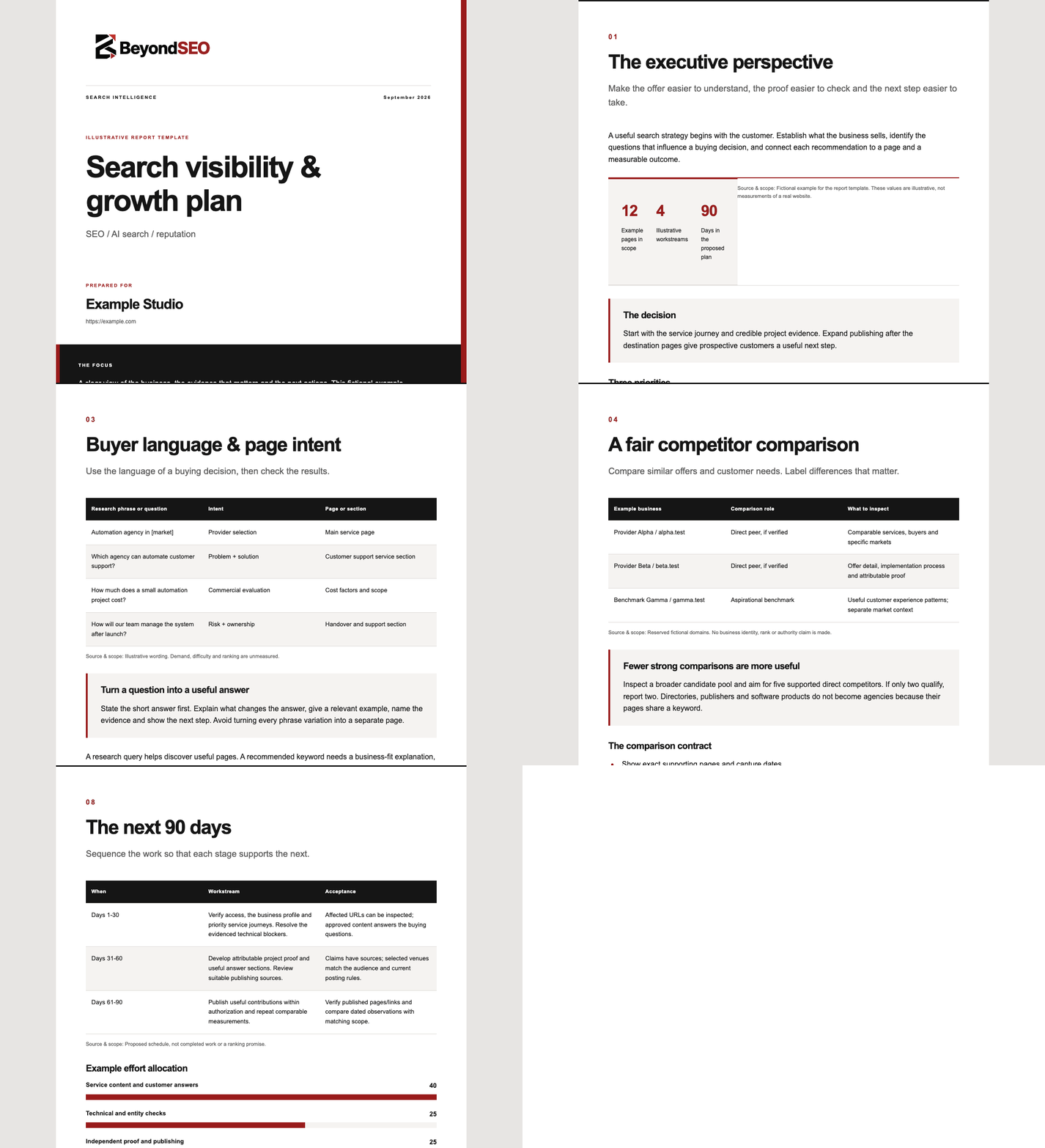
Real report output, fictional example business. This demonstrates the report format, not a client's rankings or growth. Static preview | See the example input | PDF and HTML reports
Start with one request:
Use BeyondSEO to audit https://example.com.
Understand our business first. Tell me what to fix, which competitors
really matter, and what to write next. Give me a clear 30/60/90-day plan.
You get the affected pages, the reason each change matters, useful drafts and a way to check the result. A normal audit starts with 15 priority page attempts. Choose a homepage, exact pages or a deeper review, and see what remains unchecked.
Give it a goal
You do not need to learn commands. Copy a prompt into your assistant after installing BeyondSEO, replace https://example.com with your website, and add anything it should know about your business.
The conversation is simple: share the website and goal, review the evidence and plan, then choose the work you want it to carry out.
“Show me where to start.”Use BeyondSEO to audit https://example.com.
Understand what we sell, who we help and which markets we serve.
Give me the five most useful next actions, with affected pages,
suggested changes and a clear way to check each one.
You get: a business brief and a prioritised action list tied to inspected pages.
“Help Google and AI search understand us.”Use BeyondSEO on https://example.com.
Check whether search engines and AI tools can access and understand
our main pages. Review our answers, business identity and structured
data. Show the evidence and draft the most useful improvements.
You get: access and content findings, clearer answers and proposed structured-data changes. Readiness does not prove indexing or AI citations.
“Find the competitors we should learn from.”Use BeyondSEO to understand https://example.com first.
Find up to five businesses with comparable services, customers and
markets. Verify their pages, explain why each belongs in the comparison,
and turn the useful gaps into a plan for us.
You get: verified comparison sources, relevant differences and actions suited to your business. If fewer competitors qualify, it explains why.
“Give me a backlink plan I can actually follow.”Use BeyondSEO for https://example.com.
Find 15 relevant publishing and reputation opportunities. Give me
the destination links, what to contribute, the page each could support,
current eligibility checks and a realistic four-week calendar.
You get: a shortlist from the publishing library and current research, with topics, links and next steps. Opportunities and verified backlinks remain separate.
“Write the next useful article.”Use BeyondSEO to review https://example.com and suggest a useful
customer question we have not answered well. Write the full article
with a direct opening answer, clear headings, trustworthy sources
and relevant internal links. Flag facts you need us to confirm.
You get: a complete article draft based on the business and inspected content, ready for your review.
“Apply the plan without disturbing our design.”Use BeyondSEO to apply the agreed on-site fixes to https://example.com
through the editing tools available here. Keep the layout, design and
concise paragraph sizes. Back up changes and show what was verified.
Ask before adding pages or publishing anything outside this scope.
You get: supported website changes, a change log and verification results. Your agent needs authorised access to the site or project.
“Turn this into a client-ready report.”Use our BeyondSEO audit to make a branded PDF report.
Include the business brief, evidence-backed findings, relevant
competitors and a 30/60/90-day plan. Make the priorities easy to
understand and show what was checked and what remains unknown.
You get: a BeyondSEO report using the branded report layout. Native PDF output needs the report renderer in your execution environment.
Be as brief or specific as you like. An audit alone does not edit your website or start background jobs; implementation and recurring work follow the scope you authorise.
Your complete SEO house
Your customer sees one business. Your website, answers, identity and reputation should tell the same story.

Illustrated workflow: inspect the page, write a useful answer and build a connection.
Look closely. Make it useful. Build trust. Small actions in the workshop represent a larger job: understand the website, answer real customer questions and check the proof behind the business.
SEO/AEO, SEO/GEO, Entity, Authority, Reputation and Backlink specialists bring their findings into one practical plan. Your host can run independent work in parallel where supported. The characters illustrate the idea; they do not certify simultaneous execution.
Inside the house: each specialist's job| Specialist | What it helps you decide |
|---|---|
| SEO / AEO | Which customer questions need clearer, direct answers? |
| SEO / GEO | Can AI search access, understand and trace the information? |
| Entity | Do your name, business facts, profiles and structured data agree? |
| Authority | Where can your genuine expertise and original proof be stronger? |
| Reputation | What do inspected third-party sources actually establish? |
| Backlinks | Which links exist, and which publishing opportunities fit? |
| Content | Which pages and articles should you write or improve next? |
| Competitors | Who offers something comparable, and what can you learn? |
| Technical SEO | Which crawling, indexing signals or delivery issues need attention? |
| Measurement | What changed, and what evidence would demonstrate progress? |
| Publishing, when requested | How do approved original articles reach suitable destinations? |
These are responsibilities using your host's available model. Independent work can run in parallel where the host permits it; otherwise it runs sequentially. The lead reconciles one plan. Installing definitions or generating a plan does not launch agents. Specialist setup and coordination
Explore every capability | How a complete engagement works
Compare businesses that belong together
An AI agency should be compared with agencies serving similar customers and needs. A shared keyword alone is not enough.

Illustrated workflow: compare equivalent pages, then record what the evidence supports.
Your business comes first. BeyondSEO reads the main pages to establish services, customers, location and markets. Then it looks for comparable businesses, checks their supporting pages and explains both the similarities and the differences.
Direct competitors, search competitors and aspirational examples stay separate. If the evidence supports only two useful comparisons, it reports two. A search snippet starts the investigation; inspected pages support the conclusion.
How business profiles and competitor research work
Our Academy, after using BeyondSEO
These are our Academy’s real search results, shared after using BeyondSEO on the site. Google Search Console shows 5,371 clicks and 222,268 impressions across the selected three-month period.
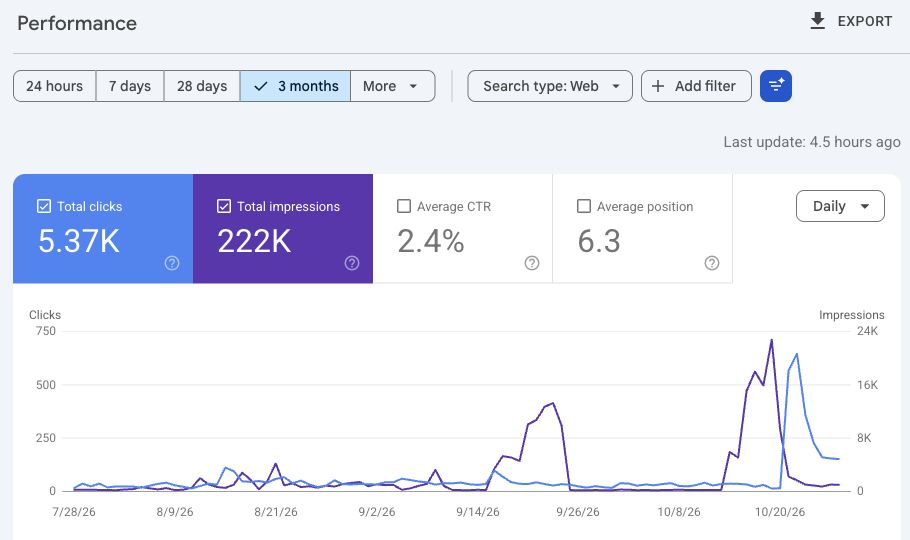
Shared by BeyondSEO creator Tahir. Google Search Console, Web search, 28 July–27 October 2026; captured on 30 October 2026. The screenshot rounds the totals to 5.37K clicks and 222K impressions. Image provenance
BeyondSEO helps turn performance evidence into better questions: Which pages deserve attention? Which searches fit the business? What should we check after a change?
Use a Search Console export now. The optional Google connection can read Search Console and Organic Search landing-page reports from Analytics, with your consent and property access. An existing suitable connector may be usable; native OAuth requires your own Google client setup. Real-account consent has not been verified in every host. Google connection and export guide
Our backlink and reputation system
A useful backlink plan tells you where to contribute, what to write and why that audience fits your business.

Illustrated workflow: a planned connection still needs a suitable contribution, publication and a check of the actual link.
Ask for 15 or 20 relevant destinations. Get actual links, an article topic or contribution, the page to support, posting instructions and a capacity-based calendar. The library includes article sites, newsletters, professional networks, answers and communities; each has a different purpose.
Find 15 relevant places for our business to contribute.
Give me the links, what to write, which page to support and when to post.
Write the first article using our real expertise and useful sources.
When you request a publishing campaign, the optional Publishing Agent can write complete original articles, help you sign up or use an authorised login, and submit through supported browser tools within your approved scope. Five articles a week is a proposed target across suitable destinations; actual rules, quality and your capacity take precedence.
A prospect is not a backlink. The crawler checks actual source pages. Mentions, owned posts, independent recognition and verified target links stay separate. The library's historical DR values are unverified context, not current authority ratings. Every proposed route needs current eligibility and policy checks.
Browse the 206-entry library | Writing and posting guide | Reputation scoring explained
Keep your design. Improve what matters.
Ask BeyondSEO to apply the agreed on-site plan through your agent's available editing or hosting tools. Preserve the layout, useful concise copy and real business facts while improving titles, answers, internal links, structured data and supported sitemap changes.
Review the change. Keep a backup. Check the result. New pages and publication need authorisation. An optional private dashboard can show progress while you keep giving instructions in your usual chat. Recurring work needs a real supported scheduler; a dashboard alone does not run jobs.
Website work and design protection | Progress, repeat checks and hosting
Quick start
Use it in your assistant
Choose your app. You can start by pasting this request into an assistant with installation tools:
Install BeyondSEO from https://github.com/beyondtahir/beyondseo.
Follow docs/agent-installation.md for my app. Confirm the skill is saved,
set up its crawler in an allowed runtime, and check that it can run.
Then use BeyondSEO to audit my website.
| Where you work | Start here |
|---|---|
| ChatGPT Work | Skill upload and runtime guide |
| Claude Desktop / Cowork | Claude skill upload guide |
| Claude Code | Local installation |
| Codex | Local installation |
| Hermes | Agent installation |
| OpenClaw | Agent installation |
| Cursor | Add it to your project |
| Lovable | Import the full skill |
| Vercel / v0 projects | Use the agent managing your project |
Download stable 2.10.0 skill ZIP | Full installation guide | Permissions
For app uploads, use the named skill ZIP. GitHub's source ZIP is for extraction, not direct skill upload. The prompt is a request to your host, not a universal installer: supported skill controls, model access and runtime permissions still apply. Vercel hosting itself does not install or run skills.
Prefer the terminal? Four commands to start.You need Python 3.10+ and Git; Python 3.12 is recommended for this version.
git clone https://github.com/beyondtahir/beyondseo.git
cd beyondseo
python3 scripts/setup.py
python3 scripts/run.py crawl https://example.com --include-www --out ../client-runs/example
Setup prepares an isolated runtime, the local engine, PDF renderer and Chromium. On Windows use py -3 instead of python3. No virtualenv activation or execution-policy change is needed. Open report.md, readiness.md and coverage.json in your output folder.
For a supported local assistant, run the matching installer from the checkout, for example:
python3 scripts/install_skill.py --host codex --setup
All host commands | Setup and troubleshooting | Local practice site
Why choose BeyondSEO?
| What you need | What stays connected |
|---|---|
| Understand the real business | Services, customers, location, markets and language before competitor selection |
| Decide what to do next | Affected pages, practical priorities, usable copy and acceptance checks |
| Move beyond the audit | Approved on-site work, complete article drafts and relevant publishing plans |
| Explain reputation honestly | Inspected links and mentions, source context and an evidence score with limits |
| Come back and improve | Saved evidence, repeat reviews and optional private progress monitoring |
Your evidence stays inspectable. Your plan stays specific. Your agent stays the place you work.
Project status
Release: 2.10.0. MIT license. The project remains in beta. Automated tests, local live acceptance and published CI are different checks; none certifies every assistant's permissions. Test fixtures are fictional, and private audit data stays outside the repository. The only live owner-property image here was expressly requested for this README.
Change notes | Development and validation | Contribute
Documentation and support
All guides | Setup | Questions and examples | Complete capabilities | Report design
Report a bug | Request a feature | Security
Common questions
New to BeyondSEO? Start here. Open any question for a short, practical answer.
Getting started
What is BeyondSEO?BeyondSEO is a free, open-source SEO skill for your AI assistant. Give it a website and a goal. It helps inspect the site, understand the business, compare relevant competitors, write useful content and turn the findings into an actionable plan. When you authorise implementation, it can help carry out supported changes and check the result.
Why call it a complete SEO house?The crawler is one part of the work. BeyondSEO also brings together technical SEO, customer questions, AI-search readiness, business identity, authority, reputation, backlinks, content and measurement. These areas share one business brief and one plan, so the conversation can continue from “what is wrong?” to “what should we write, change and check next?”
Who is it for? Do I need to be technical?Business owners, consultants, agencies and website teams can ask in everyday language. Start with your domain and what you want to achieve. An assistant with the right tools can handle setup and reports; someone with authorised website access is needed to apply changes. Try a prompt.
What do SEO, AEO, GEO and entity optimisation mean?SEO helps search engines discover and understand your pages. AEO makes answers clearer for people and answer systems. GEO considers how generative search can access, interpret and support information. Entity work keeps your business identity and facts consistent. Authority and reputation work looks for genuine expertise, independent recognition and useful supporting evidence. These areas overlap; they are not separate guarantees of visibility.
Is BeyondSEO free? Can I use it for clients?Yes. BeyondSEO is MIT-licensed, with no BeyondSEO subscription or per-website licence fee. You can use, modify and redistribute it under the licence notice, including for client work. Your assistant's plan or model usage, your hosting and any optional services keep their own costs. MIT licence.
Do I need API keys, tokens or paid SEO tools?The native crawler needs no API key or paid scraping subscription and makes no language-model calls. Your assistant uses its usual model when it analyses evidence or writes content. Optional Google account access needs suitable authorisation; the native OAuth route requires your own Google client setup. You can use supplied exports instead. Costs and requirements.
Which assistants can I use?There are guides for ChatGPT Work, Claude Desktop/Cowork, Claude Code, Codex, Hermes, OpenClaw, Cursor and agents managing Lovable or Vercel/v0 projects. They have different skill, browser and execution controls. BeyondSEO checks what the current environment can actually do. A guide does not mean every account has identical access; Vercel hosting itself does not run a skill. Choose your assistant.
What is the easiest way to install it?Use the matching guide and the named release skill ZIP for apps that accept uploads. In an assistant with installation tools, you can paste the repository URL and ask it to follow the guide. Reading a GitHub page alone does not save a skill. Confirm both that BeyondSEO appears in the host's skill controls and that its engine can run. Local engine setup needs Python 3.10+; Python 3.12 is recommended. Step-by-step installation.
Audits and AI search
Can I start with just a domain?Yes. BeyondSEO starts by reading available homepage, about, contact and service evidence to establish what the business does, who it serves and where it operates. Extra context helps: your goal, customers and markets can prevent a mistaken assumption. Office location, target market and website language stay separate. Unknown or conflicting facts remain visible.
How many pages does it check, and how long does it take?The normal starting point is 15 priority page attempts. You can request a homepage check, exact URLs or a deeper review with a chosen limit, then continue with another batch. Time depends on page count, JavaScript, website response, search access and host tools; there is no fixed completion time for every site. The report shows inspected, partial, blocked and unchecked coverage. A sample is not a complete-site inspection.
How does the crawler read my website?It checks robots and sitemaps, follows bounded in-scope links, and captures content, titles, metadata, headings, links and JSON-LD. Local Chromium can render public JavaScript content when needed. Rendering still depends on available runtime and page behaviour. Login walls, CAPTCHAs and access restrictions remain real limits; failed captures do not become claims that content or schema is missing. Crawler and browser guide.
Will it get my website into Google and AI answers?It helps improve the things we can inspect: access, useful answers, factual structured data, identity and supporting proof. Actual indexing, rankings and AI citations need separate dated evidence from the relevant system. BeyondSEO can guide a strong plan and check implementation, but it cannot guarantee a position, citation or percentage increase. The Academy screenshot is a real owner example, not a forecast for another website.
Can it work for local and international businesses?Yes. The workflow considers services, customer intent, genuine locations, markets and relevant languages. It can help plan local pages, international positioning and language-specific research when evidence and host capabilities permit it. An English website is not automatically an international business, and a country's domain extension does not establish its whole market. Capability map.
Content, competitors and backlinks
Will it write content or only give advice?It can write complete articles, service-page drafts, titles, descriptions, direct answers, useful FAQs and factual schema drafts through your assistant's model. Ask for finished copy. It uses the business brief and inspected sources, flags missing facts and preserves concise writing when the layout calls for it. Keyword ideas are hypotheses unless actual demand data supports them; traffic and search volumes are not invented.
How does it choose competitors?It understands your business first, then researches candidates with comparable services, customers and markets. It checks supporting pages and explains relevant similarities, differences and evidence gaps. Direct competitors, search competitors and aspirational examples stay separate. Directories, publishers and software products are not automatically agency competitors. It reports fewer candidates when the evidence does not support the requested number.
What do I get in a backlink plan?Ask for 15 or 20 suitable destinations. The 206-entry publishing library and current research help produce relevant links, topics, contribution formats, target pages, posting steps and a practical calendar. Eligibility, policies and free/paid terms need current checking. Articles, professional profiles, answers, communities and independent reviews serve different purposes. A shortlist is a plan, not acquired backlinks. Library | Posting guide.
Can it discover and rate existing backlinks?It can discover candidates through available permitted search/browser routes, supplied URLs and supported saved results, then verify source pages with its crawler or retained browser evidence. Links, mentions, owned posts and independent recognition remain distinct. Its documented reputation-evidence score is conservative and withholds unsupported results; sampled searches are never a complete backlink index. Library DR figures are unverified historical context, not live authority measurements. Scoring explained.
Can it help publish articles for me?The optional Publishing Agent can prepare distinct complete SEO/AEO articles and help submit them through supported, permitted browser tools within an approved campaign. It can reuse an authorised signed-in session or guide you through signup. You complete user-only authentication, verification and required agreements. Five articles a week is a proposed target across suitable destinations, subject to quality, current rules and your capacity. Submission, an observed live link, indexing and authority gains are different outcomes. Publishing workflow.
Making improvements and following progress
Can it improve my website without changing the design?Yes, when you authorise implementation and provide a supported editing route. The workflow protects the layout, useful concise copy and real business facts while improving supported titles, answers, links, schema and sitemap work. Changes need a review or agreed scope, backup and relevant checks, including rendered desktop/mobile checks for copy changes. New pages and deployments require authorisation; an audit alone makes no edits. Design protection.
Does it work with WordPress, coding projects and hosting access?Public pages can be audited regardless of the site's builder. Editing depends on actual access: a coding agent can work in an authorised repository; a CMS needs a suitable administration/API workflow; the guarded file editor supports reviewed single-file changes locally or through encrypted SFTP/FTPS. It is not a general CMS database editor, and plain FTP is unsupported. Keep passwords and keys in the host's approved secret storage, outside reports and Git. Website work | Hosting access.
Can it make a professional PDF or client report?Yes. Ask for a branded report with the business brief, prioritised findings, affected URLs, evidence, competitor comparisons and an action roadmap. The included design uses the BeyondSEO logo and provides HTML/PDF output. Native PDF export needs the report renderer in the execution environment; HTML remains available if that renderer cannot run. Report guide.
Can I connect Search Console and Google Analytics?Yes, through a suitable authorised host connector or the optional native read-only Google workflow. Native browser consent needs your own configured Google OAuth client and exact property access; there is no bundled universal Google login. Search Console CSV exports also support offline review without connecting an account. A Google login alone does not prove permission for every service or property. Google and export setup.
Do the SEO agents work together in parallel?The lead coordinates named SEO/AEO, SEO/GEO, Entity, Authority, Reputation, Backlink and other specialist responsibilities. Independent work can run in parallel where the host actually offers permitted delegation; otherwise those responsibilities run sequentially. A shared brief and evidence set feed one plan. Installing definitions or generating a swarm plan does not itself launch agents. Specialist coordination.
Can it keep checking the site and show a dashboard?Yes, within an agreed scope. Saved evidence supports repeat comparisons, and an optional private dashboard can show recorded jobs and progress while you keep using your usual chat. A downloaded dashboard is a snapshot; a live local monitor needs its process running. Recurring reviews need a real supported scheduler and available worker. The dashboard itself does not call a model, publish articles or run website edits. Monitoring and schedules.
Privacy, troubleshooting and updates
Where does my data go?The native engine saves evidence locally and sends website requests to the inspected sites. Your AI host handles any evidence you share with it under its own settings; optional Google, connector and publishing routes have their own data flows. Local files are not automatically private from the model when you ask it to analyse them. Keep client reports, exports and credentials outside public repositories. Permissions | Security.
What if installation, a website or Google search is blocked?BeyondSEO distinguishes a saved skill, engine readiness, browser readiness, target access, discovery and source verification. It should retain the actual error and try another permitted available route, such as a host browser, native discovery, supplied URLs or saved evidence. DNS failure, denied execution, CAPTCHA, empty search results and parsing failure are different problems. It continues useful available work and explains coverage limits. A failed search does not mean paid tools are required. Troubleshooting | Browser access.
Can I use it without live internet access?It can analyse supported saved crawls, supplied pages and imported reports when the necessary runtime is already installed. Fresh crawling, current search results, account services and publication require network access. Initial dependency installation usually needs downloads. Saved evidence is dated; an offline review cannot establish what is live today.
How do I update or remove BeyondSEO?Use your host's skill controls to replace or remove the installed skill. For a local installation, follow the update guide and preserve private project files and runtime settings. Keep client work outside the skill folder before replacement. Optional Google grants, hosting access and real schedules are separate: remove or revoke the connections and jobs you no longer want. Updates | Local runtime removal.
Still need help? Read the detailed questions guide, report a problem or ask BeyondSEO to explain its findings in plain language.
About the creator
Created by Muhammad Tahir Ashraf, known as Beyond Tahir. Based in Pakistan, Tahir works in AI consulting, development and practical training. BeyondSEO brings that hands-on approach to websites: understand the business, explain the evidence, create useful improvements and check what changed.
Website | Instagram | YouTube | LinkedIn | Academy
Copyright © 2026 Muhammad Tahir Ashraf — Beyond Tahir. MIT license. Dependency notices: THIRD_PARTY_NOTICES.md.
Yorumlar (0)
Yorum birakmak icin giris yap.
Yorum birakSonuc bulunamadi