bot-inator
Health Uyari
- License — License: MIT
- Description — Repository has a description
- Active repo — Last push 0 days ago
- Low visibility — Only 6 GitHub stars
Code Gecti
- Code scan — Scanned 12 files during light audit, no dangerous patterns found
Permissions Gecti
- Permissions — No dangerous permissions requested
Bu listing icin henuz AI raporu yok.
Local-first macOS agent that watches what you do and offers to help. Nothing runs without your approval.
bot-inator
A local-first macOS agent that watches what you do and offers to help.
Nothing runs without your approval.
Download for macOS
(Apple Silicon, macOS 14 or later, signed and notarized) or
build from source.
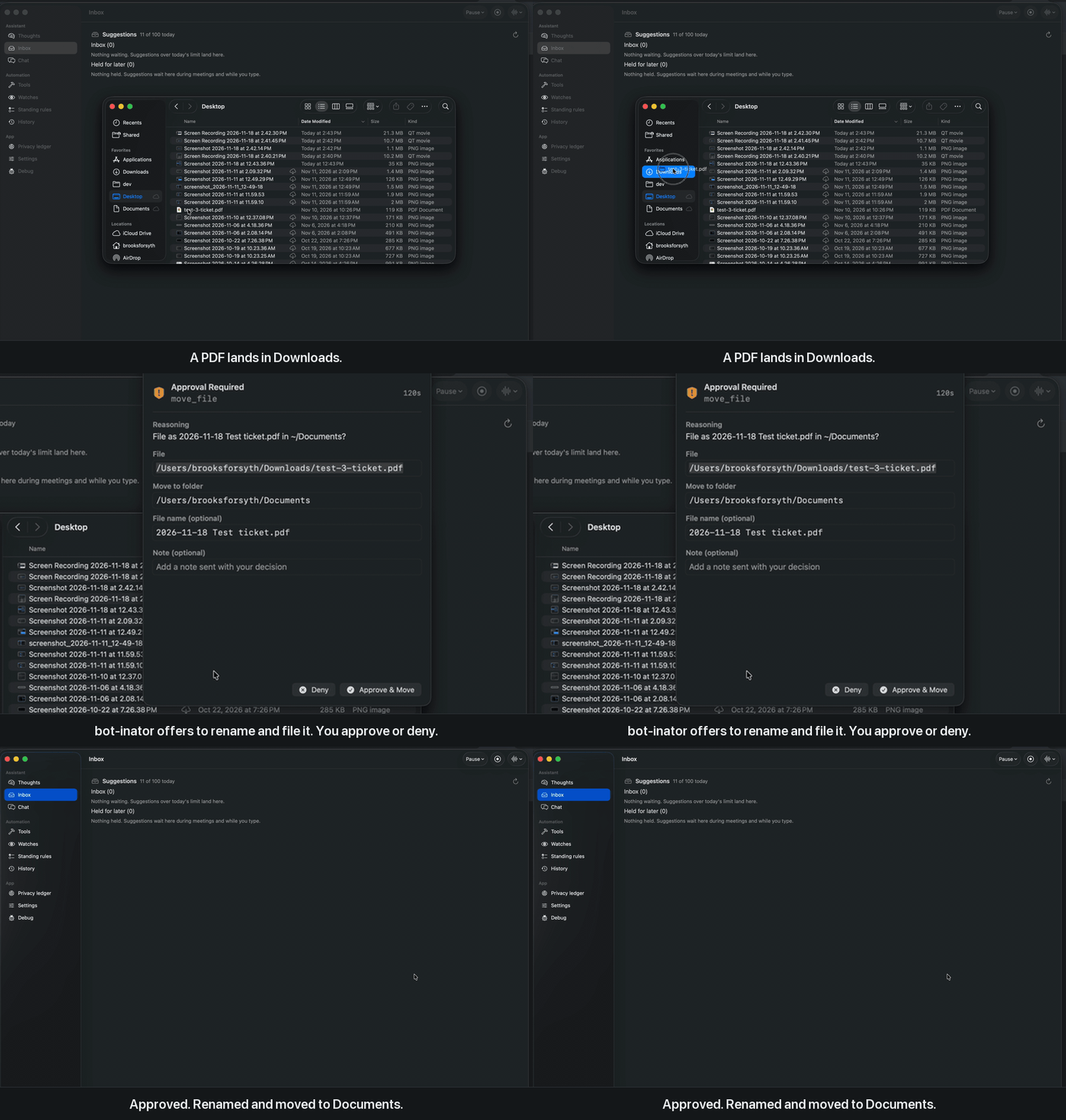
It notices activity on your Mac (new files in Downloads, incoming mail and
iMessages, upcoming meetings, app switches), asks an LLM "how could I help
here?", and offers an action, or a small tool it writes itself, as a card
in the menu bar.
It writes its own tools, and you review them
bot-inator is not limited to the tools it ships with. When it spots
something you keep doing by hand, or something you asked for in chat that
it couldn't do, it offers to build a tool for it:
- It offers the idea first. A card says what the tool would do;
nothing is written until you approve. - It drafts and checks the code. Static checks, a second model pass
that compares the code with the idea, and a dry run in a throwaway
sandbox with a fake home folder that closes the same folders as the
real sandbox. Problems go back to the model to fix before you see
anything. - You read the full source and approve it, edit it or throw it away.
- It runs sandboxed. Each call starts a short-lived child under
macOSsandbox-exec, and still asks before it runs. - It stays fixable. Every installed tool is versioned in its own git
repo, and a tool that keeps failing gets a repair offer with a diff.
Ways in besides the automatic offers: ask in Chat, or use Watch me to
do a task once while it records the steps.
What you can check for yourself, in this repo:
- Every action is a card. Tools that change something (move a file,
create a reminder or event, draft an email) ask first; only read-only
tools skip the card. SeeREAD_ONLY_TOOL_NAMESinagent-daemon/tools/__init__.py. - Generated tools are reviewed, then sandboxed. You read the full
source before a tool is installed, and each call runs in a short-lived
child under macOSsandbox-exec
(How generated tools run). - Local by default. Models run on your Mac with MLX. A cloud provider
is opt-in, and email and message text stay on the Mac unless you also
allow them to leave. Settings → Privacy ledger lists what left today.
MIT licensed (LICENSE).
How it fits together
| Part | What it is |
|---|---|
agent-daemon/ |
Python service (FastAPI on 127.0.0.1:8000). Listens to system events, runs the LLM, holds the tools. |
MenuBarUI/ |
SwiftUI menu bar app. Shows the agent's thoughts, asks for approvals, chat, tool manager, settings. |
The two talk over a WebSocket (/ws/stream) plus a small HTTP API. See
ARCHITECTURE.md for diagrams and
LIVING_SPEC.md for the full protocol and design history.
Requirements
- macOS 14+ on Apple Silicon (local models use MLX)
- To build from source only: Python 3.11+ (developed and tested on 3.14)
and the Xcode command line tools (xcode-select --install). The
download needs neither. - Optional: a Groq API key to run models
in the cloud instead of on your Mac
Quick start
Download the app
- Download
bot-inator-<version>.zip(about 540 MB) from the
latest release. - Unzip it and move
bot-inator.appto Applications. - Open it. A brain icon appears in the menu bar and Set up bot-inator
opens.
The app is signed and notarized and carries its own daemon and Python, so
it needs no terminal, Python or Xcode. It starts the daemon when it opens
and stops it when it quits. Models are not in the download: with the local
provider they download from the setup screen (about 12.7 GB).
Build from source
git clone https://github.com/Bforsyth1234/bot-inator.git
cd bot-inator
./install.sh
./run.sh
install.sh checks for macOS 14+, Apple Silicon, Python 3.11+ and the
Xcode command line tools (it names anything missing), sets up the daemon's
Python environment and builds the menu bar app. It is safe to run again.
run.sh starts the daemon in that terminal (Ctrl-C stops it) and opens
the app once the daemon answers. With the default local provider the first
start downloads the models (about 12.7 GB, or 8 GB on a Mac under 24 GB); run.sh lists them first. It
adds no login item: run it again after a restart.
Pick a model provider
On the first start the app opens Set up bot-inator: it reads how much
memory this Mac has, marks one choice "Recommended for this Mac", and
waits for you to pick. No model downloads and nothing reaches a cloud
provider before you choose.
- Local (MLX): everything stays on your Mac.
- Cloud key: faster and stronger models with your own key from any
OpenAI-compatible provider. Presets fill in OpenAI, Anthropic, Gemini,
xAI, Groq and OpenRouter. Event summaries, chat and tool drafts go to
that provider. - Mixed: local for everything except writing new tools.
Change it later in Settings… (⌘,), then Restart Daemon. Provider
setup, presets and model lists: docs/providers.md.
Settings are saved to ~/.bot-inator/settings.json (readable only by you).
They override .env, and variables exported in the daemon's shell override
both.
| Engine | Local default | Groq default |
|---|---|---|
| Main (agent loop, idea detection) | Hermes-3-Llama-3.1-8B-4bit | openai/gpt-oss-120b |
| Analysis (event summaries) | Qwen2.5-1.5B-Instruct-4bit | openai/gpt-oss-20b |
| Drafting (writing new tools) | Qwen2.5-Coder-14B-Instruct-4bit | openai/gpt-oss-120b |
Manual build
What install.sh and run.sh do, step by step.
Start the daemon
cd agent-daemon
python3 -m venv .venv
.venv/bin/pip install -r requirements.txt
cp .env.example .env
.venv/bin/uvicorn main:app --host 127.0.0.1 --port 8000
If the venv was made with uv (it has no pip), install withuv pip install --python .venv/bin/python -r requirements.txt instead.
Vector memory search needs sqlite-vec (in requirements). If the log says
"Vector memory search disabled (sqlite3 built without load_extension
support)", also install pysqlite3-binary. Without either, recall falls
back to the most recent memories.
With the default local provider, the first start downloads three MLX models
from Hugging Face (several GB) and can take a few minutes.
The first start also creates ~/.bot-inator/token (readable only by you).
Every route except GET /health, and the WebSocket, needs it as a bearer
token; the menu bar app reads it automatically. Requests that carry a
browser Origin header are refused, so web pages can't reach the daemon.
For curl:
curl -H "Authorization: Bearer $(cat ~/.bot-inator/token)" http://127.0.0.1:8000/api/tools
Build and launch the menu bar app
There is no Xcode project in the repo; build it straight from the sources:
cd MenuBarUI/MenuBarUI
mkdir -p build/MenuBarUI.app/Contents/MacOS
xcrun swiftc -O -parse-as-library -target arm64-apple-macos14 \
  -o build/MenuBarUI.app/Contents/MacOS/MenuBarUI $(find . -name '*.swift')
sed -e 's/$(DEVELOPMENT_LANGUAGE)/en/' -e 's/$(EXECUTABLE_NAME)/MenuBarUI/' \
  -e 's/$(PRODUCT_BUNDLE_IDENTIFIER)/com.botinator.MenuBarUI/' \
  -e 's/$(PRODUCT_BUNDLE_PACKAGE_TYPE)/APPL/' -e 's/$(PRODUCT_NAME)/MenuBarUI/' \
  Info.plist > build/MenuBarUI.app/Contents/Info.plist
codesign --force --sign - build/MenuBarUI.app
open build/MenuBarUI.app
A robot icon appears in the menu bar. It connects to the daemon on its own
and reconnects if the daemon restarts.
macOS permissions
- Full Disk Access for the terminal or process running the daemon,
so the iMessage watcher can read~/Library/Messages/chat.db. Without
it, that listener logs an error and the rest keeps working. - Calendars belong to the menu bar app, not the daemon: Calendar tools
and the meeting watcher work only while the app is running and
connected (otherwise they answer "open the bot-inator menu bar app to use
Calendar"). The app asks for Calendar access the first time the agent
needs it. An ad-hoc signed rebuild may ask again.AGENT_CALENDAR_BACKEND=applescript(oreventkit) pins the old
in-daemon paths. - Contacts also belong to the menu bar app. It asks the first time you
ask the agent to write to someone by name, and reads names, email
addresses, phone numbers and organisations only. - Notification and Automation prompts may appear the first time a tool
that needs them runs.
Using it
- Thoughts tab: a live log of what the agent noticed and decided.
- Approvals: a window pops up before any tool runs. Approve, deny, or
add a note. - Code review: when the agent writes a new tool, you see the full
source and approve it before it's installed. - Chat… (⇧⌘C): ask for things directly.
- Web search is off until you turn it on in Settings. Searching needs
your own Brave Search API key; reading a
page you name does not. Every request is listed in the Privacy ledger,
and once a turn has read your mail or files a search asks first. - Weekly report: Fridays at 16:00 by default, a count of what the
agent did for you that week. Settings → Weekly report. - Manage Tools… (⇧⌘T): see built-in and generated tools; delete
generated ones.
Generated tools live in agent-daemon/tools/generated/, which is its own
nested git repo so every installed tool is versioned.
How generated tools run
An installed generated tool does not run inside the daemon. Each call
starts a short-lived Python child under macOS sandbox-exec:
- it can write under your home folder, but not in
~/Library,~/.ssh,~/.bot-inator, your shell start-up files, or this repo; - it can't read
~/.ssh,~/.bot-inator(API token, memory) oragent-daemon/.env, and gets no API keys in its environment; - a tool that needs a file of its own (a list, saved state) is told to
keep it under~/Documents/bot-inator/. The dry run before review
closes the same folders as the two rules above, so a draft that puts
its file in~/.bot-inatorgoes back to the model with the reason
(if it still fails after three tries, you see it with a note); - it has no network unless its source imports a network module
(urllib,http,socket,ssl, …). The tool'ssandbox_notesays
which; - it can only run
osascript,open,shortcuts,mdfindand Python; - a call that takes longer than
AGENT_TOOL_SANDBOX_TIMEOUTseconds
(default 60) is stopped.
You still approve every call. Built-in tools a generated tool calls
(e.g. show_notification) run inside the same sandbox without a second
approval. If sandbox-exec is missing or fails its self-test, generated
tools are not loaded. AGENT_TOOL_SANDBOX=0 turns the sandbox off and
runs them in the daemon process as before. A tool run in the daemon (trusted, or sandbox off) gets privacy-ledger
rows for the hosts its Python code connected to, best effort, not a boundary.
A sandboxed tool can call the MCP tools you switched on withfrom tools.mcp import call_mcp. The daemon runs the call for it, only for
a tool name written literally in the reviewed code and enabled at the
moment of the call; an MCP tool you did not mark "runs without asking" shows
its own approval card. The tool never sees the server config or the token.
Configuration
Everything else is set in agent-daemon/.env. See.env.example for all options with comments.
Useful ones:
| Variable | Default | Effect |
|---|---|---|
AGENT_PROVIDER |
local |
local or groq (also settable in the UI) |
AGENT_OPEN_HELP_INTERVAL |
600 |
Seconds between open-ended "how could I help?" checks |
AGENT_OPEN_HELP_MIN_SCORE |
7 |
Judge score (0-10) an idea needs before you see it |
AGENT_DRAFT_CRITIC |
1 |
Review each drafted tool against its spec |
AGENT_DRAFT_DRY_RUN |
1 |
Dry-run each drafted tool in a sandbox |
AGENT_TOOL_SANDBOX |
1 |
0 runs installed generated tools in the daemon process, unsandboxed |
AGENT_DISABLE_LISTENERS |
unset | 1 turns off all system event listeners |
AGENT_LOG_LEVEL |
INFO |
Daemon log level |
Development
cd agent-daemon
.venv/bin/python -m pytest -q
Tests run with listeners off and the local provider pinned, and never read
your real .env provider or ~/.bot-inator/settings.json.
Yorumlar (0)
Yorum birakmak icin giris yap.
Yorum birakSonuc bulunamadi