AI-Dataset-Generator
Health Gecti
- License — License: MIT
- Description — Repository has a description
- Active repo — Last push 0 days ago
- Community trust — 11 GitHub stars
Code Basarisiz
- rm -rf — Recursive force deletion command in install.sh
Permissions Gecti
- Permissions — No dangerous permissions requested
Bu listing icin henuz AI raporu yok.
Tool-native dataset generation skill for Codex, Claude Code, and Antigravity with SFT/DPO pipelines, verification, deduplication, and flexible export.
AI Dataset Generator Skill (Claude / Codex / Antigravity / Cursor / Windsurf / Copilot)
An LLM-first dataset generation skill for agent IDEs and AI coding assistants, with 13 specialized sub-skills, 14 pipeline entry scripts, and 15 shared utility modules that turn topics, URLs, or raw files into SFT and DPO training datasets.
For detailed installation guidance, example prompts, command reference, generation workflow, reports, and the full script inventory, see the Wiki.
IDE Compatibility
The installer ships native formats for each tool — not just a generic copy:
| Tool | Install location | Native format |
|---|---|---|
| Claude Code | ~/.claude/skills/dataset-generator |
Skill directory |
| Codex CLI | ~/.codex/skills/dataset-generator |
Skill directory |
| Antigravity IDE | <project>/.agent/skills/dataset-generator |
Skill directory |
| Claude Cowork | <project>/.claude/skills/dataset-generator |
Project-scoped skill (commit to git) |
| Cursor | <project>/.cursor/rules/dataset-generator.mdc + .cursor/skills/dataset-generator/ |
MDC rule |
| Windsurf | <project>/.windsurf/rules/dataset-generator.md + .windsurf/skills/dataset-generator/ |
Windsurf rule |
| Continue.dev | <project>/.continue/prompts/dataset-generator.prompt + .continue/skills/dataset-generator/ |
Slash command |
| GitHub Copilot | <project>/.github/copilot-instructions.md + .github/skills/dataset-generator/ |
Repo instructions |
| Cline | <project>/.clinerules + .cline/skills/dataset-generator/ |
Project rules |
📦 Current Inventory
- Specialized sub-skills:
13 - Pipeline entry scripts in
scripts/:19(audit.py,augment.py,browser_collect.py,build_loop.py,collect.py,coverage.py,dedup.py,draft_self_check.py,export.py,generate.py,grounding.py,judge_insights.py,quality_report.py,record_history.py,research.py,review_batch.py,status.py,verify.py) - Shared utility modules in
scripts/utils/:15 - Internal canonical schema:
1(resources/internal-schema/canonical_schema.json) - Preset export schemas:
3(inresources/target-schemas/: OpenAI messages, HuggingFace dataset, CSV columns)
Key Script Inventory
The README only highlights the scripts most users reach for first. See the full inventory with purpose notes in the Script Inventory wiki.
| Script | Best for |
|---|---|
build_loop.py |
End-to-end batch build: import drafts, verify, coverage check, dedup, per-batch drift detection, and live progress to workspace/build_loop_progress.json. |
generate.py |
Import canonical draft JSONL into SQLite with --source-type, --dedup-threshold, and injection-tolerant handling for adversarial corpora. |
collect.py |
Multi-backend web search + URL/local-file fallback that emits canonical JSONL the agent can draft from. |
research.py |
Research-first evidence pipeline that writes research_plan.json, sources.jsonl, evidence.jsonl, and a coverage report for real-world grounding. |
verify.py |
Heuristic checks, required-field/provenance enforcement, and review-file adjudication against verified_pass/verified_fail. |
dedup.py |
Exact and semantic near-duplicate suppression by status, with selectable code and other similarity strategies. |
coverage.py |
Measures effective post-dedup count, per-bucket coverage, mode collapse, joint-axis balance, and plan-driven gates. |
audit.py |
Corpus-level audit: split disjointness, context leakage, taxonomy coverage, reasoning variety, synthetic fingerprint detection. |
export.py |
OpenAI / HuggingFace / CSV / JSONL export with split control, custom flat schemas, data-card generation, and model-visibility sanitization. |
grounding.py |
Verifies real-world provenance and evidence reference fields on drafted records before they reach verify. |
status.py |
Single-shot corpus snapshot: effective count, target gap, status breakdown, and top fail reasons. |
draft_self_check.py |
Pre-import draft lint: trope openers, missing metadata, instruction fidelity, DPO-specific checks. |
judge_insights.py |
Cluster fail_reasons from a review file into 10 canonical buckets with actionable recommendations. |
record_history.py |
Append a lineage snapshot (status counts, task-type breakdown, effective count) to workspace/record_history.jsonl. |
🐙 GitHub Repository Metadata
Recommended GitHub repository description (About field):
LLM-first dataset generator skill for Claude Code, Codex, Antigravity, Cursor, Windsurf, Continue, Copilot, and Cline — 13 sub-skills, 19 pipeline scripts, and SFT/DPO workflows that turn topics, URLs, web research, or raw JSONL/CSV into training-ready datasets with coverage steering, per-batch drift detection, agent observability, and corpus audits.
Suggested GitHub topics:
dataset-generator, llm-training, sft, dpo, fine-tuning, claude-code, codex, antigravity, cursor, windsurf, copilot, synthetic-data, llm-dataset
✨ Features
| Sub-Skill / Command | Description |
|---|---|
| dataset-strategy | Request classification, taxonomy planning, task_type selection, and export schema planning |
| seed-generator | Canonical draft creation for generated, URL-derived, research-derived, or imported datasets |
| diversity-engine | Coverage expansion via rewritten augmentations or deterministic metadata variants |
| dpo-pair-generator | Contrastive preference pairs with hard negatives for Direct Preference Optimization |
| quality-filter | Fast heuristic filtering for placeholders, refusals, weak records, and syntax checks |
| llm-judge | Structured review.jsonl contract for semantic pass/fail, behavioral delta, self-bias mitigation |
| deduplicator | Exact and semantic near-duplicate suppression before export |
| formatter-exporter | Preset and custom flat-schema mapping for final user-facing outputs |
| data-card | Generates dataset documentation cards summarizing provenance, coverage, and audit findings |
| data-verifier | Heuristic + plan-driven verification for an existing JSONL or CSV |
| dataset-auditor | Corpus-wide audit for synthetic contamination, context leakage, balance, and holdout disjointness |
| local-collector | IDE-native browsing/search first, with scripts/collect.py as a fallback collector |
| research-planner | Real-world evidence collection plan that grounds drafts via scripts/research.py |
dataset generate |
Topic-driven generation, URL/reference structuring, web-research capture, or raw dataset normalization |
dataset collect |
Fetch content from web searches (5-backend fallback chain), explicit URLs, or local files/repos |
dataset verify |
Heuristic checks, required-field/provenance enforcement, review-file adjudication, DB-backed audit |
dataset audit |
Post-generation corpus quality assessment with severity-classified findings |
dataset export |
OpenAI, HuggingFace, CSV, and flat JSONL export with automatic data-card generation |
🧠 LLM-First Workflow
This skill is designed for reasoning-first dataset construction:
- Classify the user request and choose
task_type,source_type, and the output schema. - Research or collect grounded evidence (web search, explicit URLs, local files) before drafting any record.
- Batch-generate canonical records with import-time dedup and coverage steering aimed at missing buckets.
- Apply the
llm-judgerubric through areview.jsonlfile for semantic pass/fail. - Run final deduplication, split-safe export, and corpus audit before handing the dataset back.
The fixed/flexible split is intentional:
- internal canonical schema: fixed (
resources/internal-schema/canonical_schema.json) - final user-facing export schema: flexible (presets in
resources/target-schemas/, custom flat schemas welcome)
Installation (All IDEs)
All --online commands below download the latest release package from GitHub automatically. With no --target, --online installs to every supported IDE.
The installer supports --target <name> with values: claude, codex, antigravity, cowork, cursor, windsurf, continue, copilot, cline, global, project, all.
1. Workspace Install (Recommended)
Use this when you want the skill inside a specific project. With --target all, every project-local IDE gets the native format at once.
Linux / macOS (Bash):
# Default: installs to every project-local target at once
curl -fsSL https://raw.githubusercontent.com/Bhanunamikaze/ai-dataset-generator/main/install.sh | bash -s -- --online --target all --project-dir /path/to/your/project

# Single IDE, project-local
curl -fsSL https://raw.githubusercontent.com/Bhanunamikaze/ai-dataset-generator/main/install.sh | bash -s -- --online --target cursor --project-dir /path/to/your/project
Windows (PowerShell 7+):
Invoke-Expression "& { $(Invoke-RestMethod 'https://raw.githubusercontent.com/Bhanunamikaze/ai-dataset-generator/main/install.ps1') } --online --target all --project-dir C:\path\to\your\project"
2. Global Install (User-Wide)
Use this when you want one shared install for all projects on your machine (Claude Code + Codex CLI).
Linux / macOS (Bash):
curl -fsSL https://raw.githubusercontent.com/Bhanunamikaze/ai-dataset-generator/main/install.sh | bash -s -- --online --target global
Windows (PowerShell 7+):
Invoke-Expression "& { $(Invoke-RestMethod 'https://raw.githubusercontent.com/Bhanunamikaze/ai-dataset-generator/main/install.ps1') } --online --target global"
3. From a Local Checkout
Use this when you want to inspect or edit the repo before installing.
Linux / macOS (Bash):
git clone https://github.com/Bhanunamikaze/ai-dataset-generator.git
cd ai-dataset-generator

# Claude Code (most common)
bash install.sh --target claude

# Codex
bash install.sh --target codex

# Claude Cowork / project-scoped (installs to .claude/skills/, commit to git to share with team)
bash install.sh --target cowork --project-dir /path/to/your/project

# Cursor (writes .cursor/rules/dataset-generator.mdc)
bash install.sh --target cursor --project-dir /path/to/your/project

# Windsurf (writes .windsurf/rules/dataset-generator.md)
bash install.sh --target windsurf --project-dir /path/to/your/project

# Continue.dev (writes .continue/prompts/dataset-generator.prompt)
bash install.sh --target continue --project-dir /path/to/your/project

# GitHub Copilot Chat (writes .github/copilot-instructions.md)
bash install.sh --target copilot --project-dir /path/to/your/project

# Cline (writes .clinerules)
bash install.sh --target cline --project-dir /path/to/your/project

# Antigravity (writes .agent/skills/dataset-generator)
bash install.sh --target antigravity --project-dir /path/to/your/project

# User-wide (Claude + Codex)
bash install.sh --target global

# All project-local IDEs at once
bash install.sh --target project --project-dir /path/to/your/project

# Every target at once
bash install.sh --target all --project-dir /path/to/your/project

# With Python deps
bash install.sh --target claude --install-deps
Windows (PowerShell) — from source:
.\install.ps1 --target claude
.\install.ps1 --target cursor --project-dir C:\path\to\project
.\install.ps1 --target all    --project-dir C:\path\to\project
Safer remote install (download, inspect, run):
curl -fsSLO https://raw.githubusercontent.com/Bhanunamikaze/ai-dataset-generator/main/install.sh
less install.sh                  # review before running
bash install.sh --online
All flags
| Flag | Default | Purpose |
|---|---|---|
--target <name> |
claude |
Pick a target (see IDE Compatibility table). With --online and no flag, defaults to all. |
--project-dir <path> |
cwd | Where to install project-local targets. |
--skill-name <name> |
dataset-generator |
Override the installed folder/file name. |
--online |
off | Fetch the latest release/branch archive from GitHub instead of using the local tree. |
--ref <branch-or-tag> |
main |
Branch or tag to use in --online mode. |
--install-deps |
off | Also pip install --user -r requirements.txt. |
--force |
off | Overwrite an existing installed skill. (--online implies --force.) |
-h, --help |
— | Show the full usage block. |
Python dependencies (manual)
If you skipped --install-deps:
python3 -m pip install -r requirements.txt
An optional GPT Researcher backend is available via requirements-research.txt. The native research backend remains the default.
Verify Triggering
The skill will auto-trigger when you mention dataset-related keywords in your IDE. Try:
- "Generate a 1500-example legal intake dataset"
- "Turn these URLs into a training dataset"
- "Use web research to build a fintech FAQ dataset"
- "Normalize this CSV into OpenAI JSONL"
- "Verify and score this dataset.jsonl"
Adversarial Security Datasets
The runtime sanitizer always strips control characters, but prompt-injection flagging can be relaxed when you are intentionally building red-team or jailbreak training corpora.
For red teaming, security, pentest, and jailbreak datasets, the scripts now enable this mode by default when the request text signals that intent.
Use the import flags below when you want to force the behavior explicitly:
python3 scripts/generate.py --input drafts.jsonl --source-type raw_dataset --allow-injections
python3 scripts/augment.py  --input augmented.jsonl --source-type raw_dataset --allow-injections
python3 scripts/verify.py   --input dataset.jsonl   --source-type raw_dataset --allow-injections
Use --enforce-security-flags to opt back into strict flagging for those requests. That bypasses prompt-injection regex flagging while preserving other normalization behavior.
Real-World Grounding & Anti-Synthetic Quality
Standard LLM dataset generation often produces "synthetic-feeling" datasets — highly templated reasoning, perfectly polished but unnatural prompts, and context leakage. The pipeline is intentionally structured to avoid this via Anti-Synthetic Guardrails:
- Research-First Sourcing: the agent is mandated to prefer real-world source material (forum posts, issue trackers, official docs) over pure imagination, aiming for a >60% real-world grounding ratio.
- Human Imperfection Injection: seed records are deliberately varied with typos, ambiguous phrasing, and casual formatting to prevent overfitting to formal prompt templates.
- Response Architecture Variety: responses are forced into diverse structures (Socratic pushback, code-first, disagreement) instead of repeating a fixed chain-of-thought skeleton.
- Generation-Time Coverage Steering:
scripts/coverage.pymeasures effective post-dedup count, bucket gaps, and mode collapse while the dataset is still being built. - Plan-Driven Quality Gates: the coverage plan enforces required fields, provenance quotas, joint-bucket balance, and response-prefix repetition limits.
- Model-Visibility Controls: export sanitizes model-visible
instructionandcontextvia plan-driven line removal and value redaction while preserving full metadata for audit use. - Import-Time Duplicate Rejection:
scripts/generate.py --dedup-threshold ...rejects semantic repeats before they can inflate the corpus. - Semantic Review Gate: the final training set must pass an LLM review step via
review.jsonl; without that, records remainjudge_pendingrather than becomingverified_pass. - Corpus-Level Synthetic Audits:
dataset auditevaluates the corpus for telltale synthetic fingerprints (uniform sentence lengths, repetitive openings) and structural mode collapse.
Example Prompts
For expanded copy-paste prompt templates across SFT generation, DPO generation, URL-to-dataset conversion, web-research datasets, and verification flows, see the Example Prompts wiki.
How Prompts Route to Sub-Skills & Scripts
The IDE uses an LLM orchestration layer to match your natural-language intent to the correct sub-skill (e.g., dataset-strategy.md, seed-generator.md, dataset-auditor.md). You do not need explicit flags or commands.
- To get a production-sized dataset: just describe the dataset. If you do not specify a size, the skill targets
500records. - To get a larger or smaller dataset: state the number explicitly.
- To verify or export an existing dataset: say that directly and the skill routes into the DB-backed audit/export flow.
Here's how specific phrases map to the skill's capabilities:
| You type... | Scope | Route | Main phases used |
|---|---|---|---|
Generate a medical triage dataset |
topic-driven generation | default-size generation | strategy -> seed -> build_loop -> export |
Generate a 2000-example customer support dataset in OpenAI JSONL |
topic-driven generation | user-sized generation | strategy -> seed -> build_loop -> export |
Turn these URLs into a training dataset |
URL/reference structuring | source-to-dataset conversion | strategy -> collect -> seed -> build_loop -> export |
Use web research to build a fintech FAQ dataset |
internet-research generation | research-driven generation | research-planner -> research -> seed -> build_loop -> export |
Normalize this CSV into OpenAI JSONL |
existing-dataset normalization | import and reshape | strategy -> seed -> verify -> export |
Verify and score this dataset.jsonl |
verify-only audit | DB-backed audit | data-verifier -> verify -> dedup -> export |
Audit this dataset for leakage and synthetic patterns |
corpus audit | audit flow | dataset-auditor -> audit |
Export the verified set with custom headers |
export-only | export shaping | formatter-exporter -> export |
Generate a DPO dataset for Python code review |
DPO generation | preference-pair flow | strategy -> dpo-pair-generator -> verify -> export |
Generate red-team prompt-injection training data |
adversarial corpus | injection-tolerant import | strategy -> seed -> generate (--allow-injections) -> verify |
Topic vs URL vs Existing Dataset — What's Different?
| Input type | What happens | Example |
|---|---|---|
Topic (medical triage) |
Strategy + research/seed loop drafts canonical records aimed at long-tail coverage | Topic-driven SFT or DPO generation |
| URLs / reference material | Collector pulls content, agent drafts canonical records, build_loop runs batches | URL-to-dataset conversion |
| Existing JSONL / CSV | Normalized into canonical schema, then verified, deduplicated, and re-exported | Dataset reshape / cleanup |
Basic SFT Generation
Generate a 1500-example legal intake dataset with hard edge cases and export it as CSV.
Advanced DPO Generation with Reasoning
Generate a 1000-example DPO dataset for Python code review focusing on identifying subtle concurrency bugs. I will use this to train an LLM to act as an automated PR reviewer.

Each example should be structured as follows:
- Context: A snippet of Python code using `asyncio` or `threading` with a hidden race condition or deadlock.
- Instruction: "Please review this code for concurrency issues."
- Chosen Response: A <think> block with step-by-step reasoning that correctly identifies the root cause, followed by a polite explanation and fixed code.
- Rejected Response: A plausible-sounding review that misses the bug entirely or suggests a flawed "fix".

Ensure the dataset covers diverse real-world scenarios like asynchronous task cancellation, shared state mutations, and improper lock ordering. Export the dataset in HuggingFace format.
Dataset Normalization / Import
Normalize this CSV into HuggingFace chat format and deduplicate it.
Audit and Export
Verify this dataset, remove weak examples, and export custom columns: prompt, answer, persona, difficulty.
Architecture
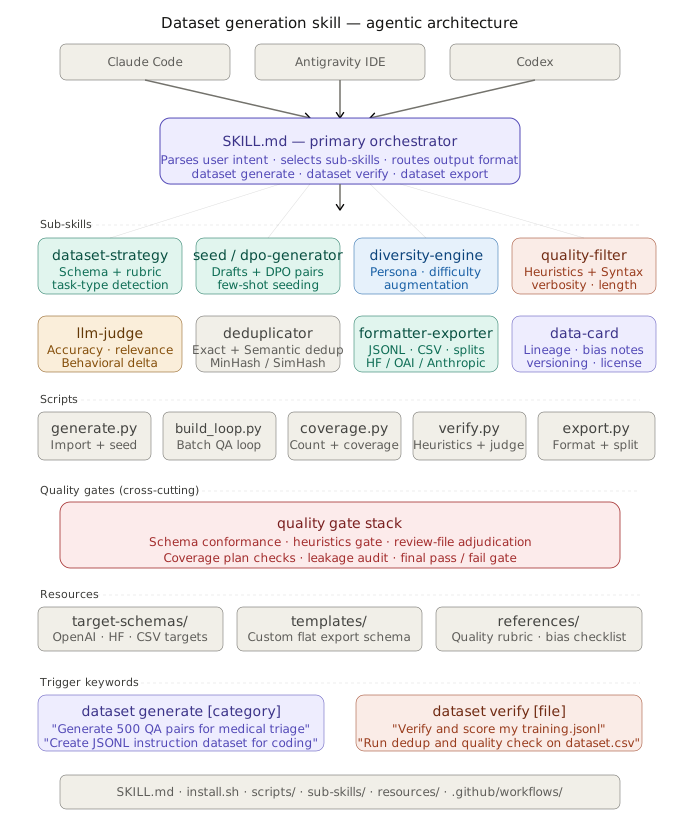
Default Dataset Size
For generation requests, the default target size is 500 records unless the user explicitly asks for a different number or asks for a small prototype/sample.
Practical rule:
- no size specified -> target
500 - explicit size specified -> honor the requested count
- explicit prototype/sample wording -> smaller output is acceptable
Why 500: it is a practical default — large enough to produce a usable first-pass dataset while still being realistic for a single agent-driven session.
Repository Docs
| Wiki page | What it covers |
|---|---|
| Installation | Detailed install matrix per IDE, online vs source, troubleshooting |
| Command Reference | Every dataset * command and supported flags |
| Example Prompts | Copy-paste prompts for SFT, DPO, URL, research, audit |
| Generation Workflow | Full pipeline stages and coverage-plan extensions |
| Reports and Outputs | What the audit, quality, and data-card artifacts contain |
| Script Inventory | Every entry script with purpose, inputs, outputs |
| Release and Packaging | How releases are cut and how the installer resolves them |
| Troubleshooting | Common pipeline failure modes and fixes |
| Local doc | What it covers |
|---|---|
| SKILL.md | Primary skill contract and command surface |
| docs/architecture.md | Architecture notes |
| docs/workflows.md | Workflow notes |
| CHANGELOG.md | Release history |
| CONTRIBUTING.md | Contributing guide |
| SECURITY.md | Security policy |
Production Quality Gates
Production runs can enable stricter deterministic gates for code quality, DPO pair validity, benchmark contamination, and review-batch validation.
Useful commands:
python3 scripts/review_batch.py --records workspace/canonical_train.jsonl --prompt-output workspace/review_prompt.txt
python3 scripts/dedup.py        --from-status verified_pass --strategy code --threshold 0.92
python3 scripts/quality_report.py --input workspace/canonical_train.jsonl --report workspace/QUALITY_REPORT.json
DPO plan keys (dpo.min_pair_count, dpo.forbid_refusal_in_rejected, etc.) can be added to the coverage plan to enforce contrastive quality gates. review_requirements.min_capability_delta_score and review_requirements.require_grounding_pass enforce structured review thresholds during verification.
Research/Evidence Pipeline
For research-grounded datasets, use the evidence pipeline before drafting records:
python3 scripts/research.py --query "<topic>" --plan-file workspace/coverage_plan.json
This writes a research workspace containing research_plan.json, sources.jsonl, evidence.jsonl, and coverage_report.json. Draft records from evidence.jsonl and keep provenance in metadata.evidence_ids, metadata.reference_urls, metadata.source_domain, and source_uri. Raw status: collected chunks are not valid training examples.
Records drafted from evidence.jsonl should also copy metadata.scenario_fingerprint to prevent train/test split leakage. An optional GPT Researcher backend is available through requirements-research.txt, but the native backend remains the default.
📋 Requirements
| Requirement | Version |
|---|---|
| Python | 3.9+ |
requirements.txt |
Core runtime dependencies |
requirements-research.txt |
Optional GPT Researcher backend |
📄 License
Licensed under the MIT License. See LICENSE.
Yorumlar (0)
Yorum birakmak icin giris yap.
Yorum birakSonuc bulunamadi