trading-research-agents
Health Pass
- License — License: MIT
- Description — Repository has a description
- Active repo — Last push 0 days ago
- Community trust — 12 GitHub stars
Code Pass
- Code scan — Scanned 12 files during light audit, no dangerous patterns found
Permissions Pass
- Permissions — No dangerous permissions requested
No AI report is available for this listing yet.
Autonomous trading agents for crypto that cannot lie about their own results.

trading-research-agents
Autonomous trading agents for crypto that can't fudge their own results.











Language models are good at reading a market and saying what they think. They are bad at
arithmetic, they don't know what a trade costs, and they will happily overrule a limit you set.
This project uses them for the first part only. The system itself, fixed rules with no model
involved, fetches the data and works out every figure. The agents read those figures and give an
opinion. Then the system prices the trade, applies your limits, sizes it, and either writes it
down or sends one order with the stop attached. Every decision and every refusal is kept on disk
with its reason, so you can check afterwards what happened and why.
It's an early release, so expect settings to change between versions. What works
today: a universe of perpetuals found and measured by the system, a screener that picks where to
look, the full autonomous cycle on live data, four analysts and up to three validators, stops and
targets the analyst names inside bounds you set, the gates that decide, sizing from your own rules,
real orders on a venue's practice environment behind a mandate you sign, a risk manager that can
only make the desk more careful, and two auditors that read the records.
Contents
- What it solves
- Get started
- What you see, in order
- How one cycle decides
- Venues
- Models and providers
- Toward real orders
- Your money, your orders, your positions
- Watching a desk, and what is kept
- Command line
- What it guarantees, and what is not built yet
- Documentation
What it solves
| The usual problem with trading agents | What happens here |
|---|---|
| The model invents or miscalculates a number | Models never compute. Every figure comes from the system, and a figure a model cites is checked against its brief, value included. |
| Nobody knows what a trade cost until it's done | The round trip (fees, spread, impact, funding, slippage) is priced before an order exists, and a trade whose claimed edge doesn't clear it is refused. |
| The agent sizes its own position | Size comes from your conviction ladder and your risk limit. No model can make a trade bigger. |
| A model "decides" to ignore your settings | Your declared thresholds decide. A model's opinion is recorded beside them, never instead of them. |
| Something went wrong and there is no trace | Each cycle keeps its snapshot, briefs, answers, the intent and what the venue said. Nothing is rewritten. |
| A crash leaves a position with no stop | The stop and take profit go to the venue attached to the entry, so they survive this process dying. |
Get started
A few minutes and one model key. Every setting has a working default, so a new desk runs before you
change anything; the table under step 6 says what those defaults are.
1. Install. You need Python 3.11 or newer. uv is the quickest way:
uv tool install 'trading-research-agents[ccxt,openai,anthropic,google,data]'
That brings every model provider and every exchange in. Without uv, runpip install 'trading-research-agents[ccxt,openai,anthropic,google,data]' inside a virtual
environment. To move to the newest release later:
uv tool upgrade trading-research-agents      # or: pip install -U 'trading-research-agents[ccxt,openai,anthropic,google,data]'
tra --version
2. Make a desk. A desk is a folder holding your settings and everything the agents decide. Name
the provider you have a key for:
tra init my-desk --profile autonomous --agent groq
cd my-desk
--agent |
Key in .env |
Model, when you name none |
|---|---|---|
groq |
GROQ_API_KEY (free tier) |
openai/gpt-oss-120b |
google |
GEMINI_API_KEY |
gemini-flash-latest |
anthropic |
ANTHROPIC_API_KEY |
claude-opus-5-5 |
openai, deepseek, xai, openrouter, ... |
see Models and providers | name one with --model; tra models <provider> lists them |
Add --venue okx (or any ccxt id) to trade somewhere other than Bybit.
3. Add your key. Copy the example file and put your key in it. Every command reads the .env
next to strategy.toml on its own.
cp .env.example .env # then set GROQ_API_KEY=... in .env
4. Check. tra check reads every setting against the others and names the one thing to fix
next. A desk that is ready ends with:
ok    provider groq: ready
ready to run `tra run`
5. Run. tra run decides once on live market data, in the sandbox: nothing leaves your
machine. tra run --every 15m keeps deciding, once per fifteen-minute bar, on the clock. Or typetra on its own for the console, which takes the same commands.
tra run
tra run --every 15m
6. When you want real orders. Start on the exchange's practice account:
- put its keys in
.env; - read the mandate with
tra mandate, then sign it withtra mandate --sign "Your Name"; - in
[execution]ofstrategy.toml, setmode = "venue", aleverageandmax_notional(the
most one order may be worth).
tra check lists whatever is still missing. Toward real orders has the
whole path.
What a new desk does before you change anything
| Default | Where to change it | |
|---|---|---|
| Orders | none: the sandbox writes each decision down and sends nothing | [execution].mode |
| What it trades | BTCUSDT on Bybit, as a taker | [run].instrument, [universe], --venue |
| Timeframe | decides on 15-minute bars, reads 1h and 4h as context | [run].bar_interval_s, context_intervals |
| Strategy | none fixed: the analyst picks the setup the measured regime supports, or stays flat | [agents].mechanism |
| Stop and target | the analyst names them; the stop is held between 0.2% and 3% and never inside one ATR, the target between 1.5x and 4x the stop | [exit] |
| Risk per trade | 0.5% of equity lost at the stop, whatever the stop's distance | [controls].max_risk_per_trade_bps |
| Bad days | no new entry after a 3% loss on the day or a 10% fall from the peak | [controls] |
| Time limit | a position closes after 4 hours | [exit].timeout_bars |
| Trades worth taking | the edge at least 2x the round trip, break even at half the trades or better, at most 6 a day | [targets] |
| Oversight | a risk manager that can only cut, pause or halt; two auditors that report | [audit] |
Working on the code itself? See Development.
What you see, in order
1. The console. Run tra inside your desk and it opens the console: what is ready, what isn't,
and the next command to run. Under it is a prompt that takes every command and draws it right
there. Arrow keys go back through what you typed, tab completes, help lists the commands andexit leaves. For scripts and cron, tra -c "run --now" runs one command and exits.
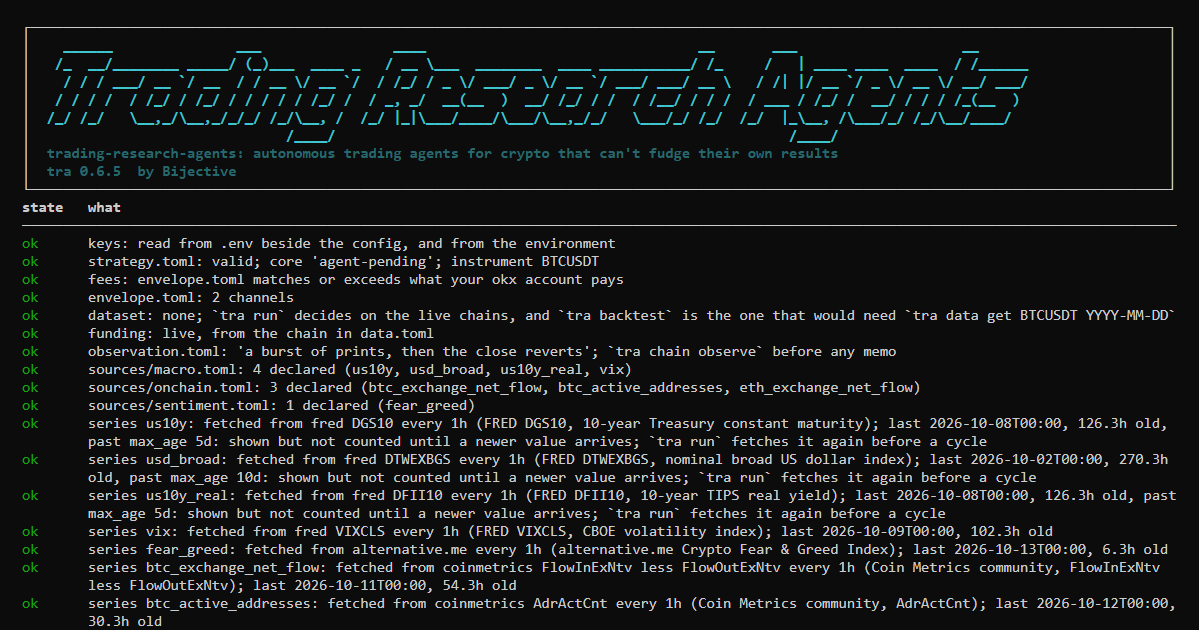
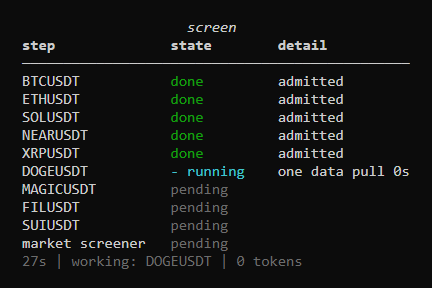
2. The pass over your instruments. Type run --every 15m and the desk first refreshes any data
series that are due, one line each. Then it looks at every instrument on your list, one data pull
apiece, and measures it. The screen steps through them live:
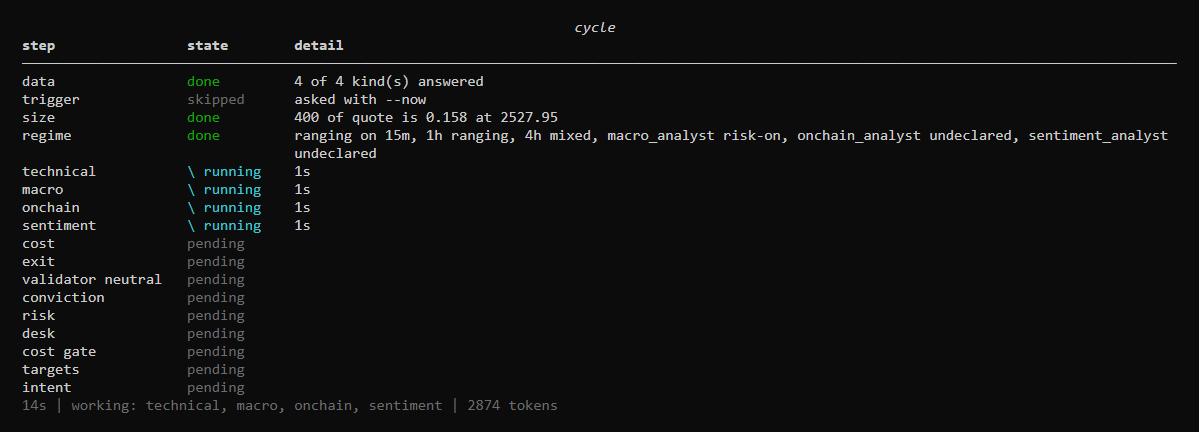
3. One cycle per instrument it takes. The system found the candidates and measured them; the screener
chose among them and cited each instrument's own figures; the system's own order is kept beside the
choice. The instruments taken get a full cycle. The terminal shows the whole pipeline from the
start and updates it as each step begins and ends. Steps that run at the same time spin at the same
time, each with its own clock, and the line underneath says who is working right now:
4. The result. When the cycle finishes, the table gives way to the pass over the universe: what the screener took,
what waited and what was held, and why. Then the cycle itself: what the analyst proposed and from
which figures, and every refusal with the number behind it. Here an ETH short in a ranging market
stopped at its exits: with its own stop and target and the round trip, more than half of trades
like it would have had to win just to break even:
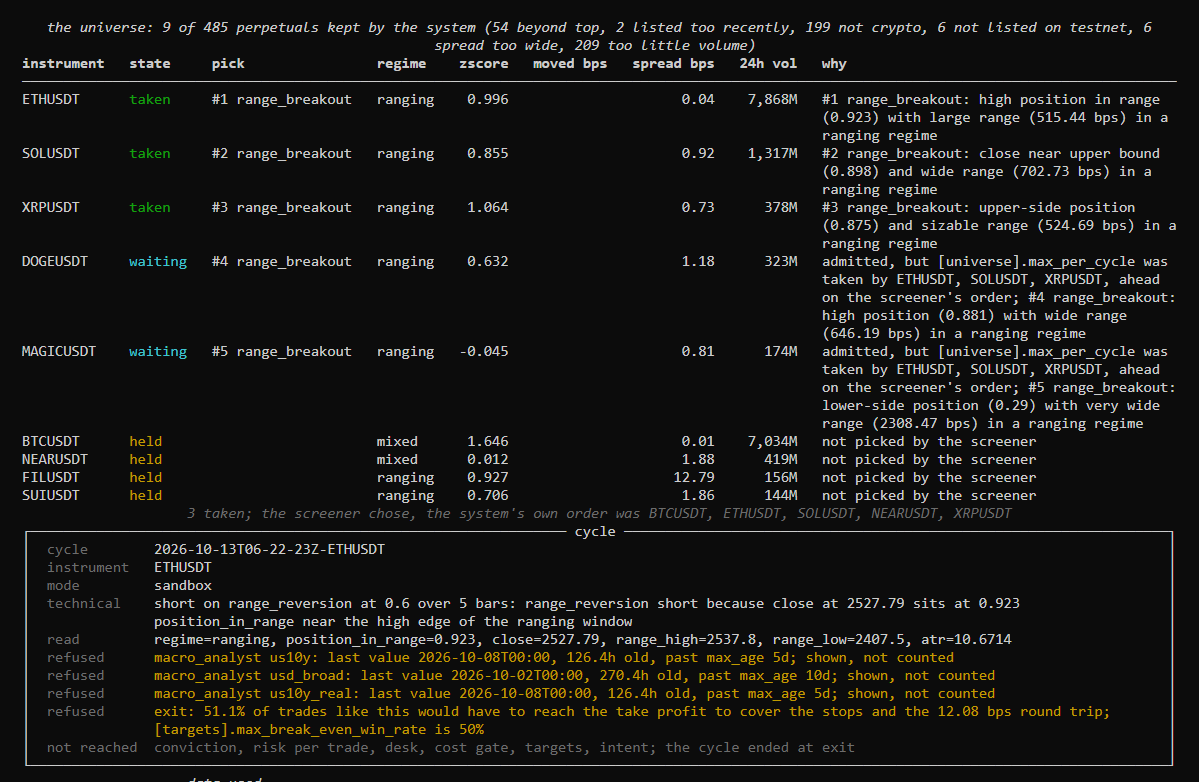
Then the data the cycle used and how old it was, the series the reading analysts read, the stop and
take profit it would have placed, and which agents answered. A cycle that goes further adds what
each validator argued, how conviction weighed the analysts, the risk at the stop and the targets:
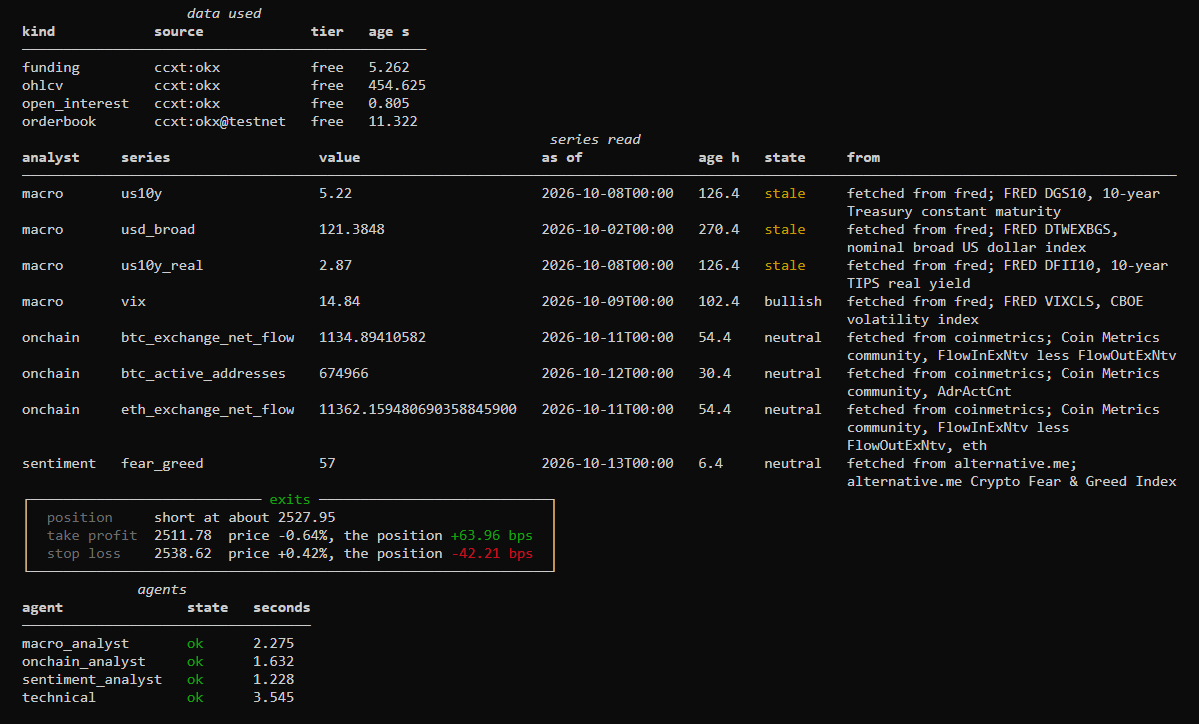
5. Between cycles. The desk says when the next pass is, on the clock and in minutes, for
example next pass at 14:30:00 UTC, in 10m 57s, and counts down to it. An auditor woken by an alarm
gets a spinner of its own.
The same cycle as plain text (--plain, a pipe or a log), from a real run on live data, shortened:
cycle 2026-09-29T02-59-16Z BTCUSDT: 5.344s of agents, 15.042s of validators
  funding        ccxt:bybit         age 4.267s
  ohlcv          ccxt:bybit         age 32.746s
  orderbook      ccxt:bybit         age 7.544s
macro      risk-off: the operator declared a bullish state for US10Y; measured correlation is
           neutral (0.0) on a modest sample, weak evidence that does not overturn the declaration
sentiment  positive: declared state is bullish, and the measured figures both support it
technical: long on range_reversion at 0.65 over 5 bars: the close is stretched low in the window
read: zscore=-0.587, vwap_gap_bps=-3.99, ret_1_bps=1.59
validator contra   oppose on 2 cited figure(s)
validator pro      support on 3 cited figure(s)
conviction: 0.800 of 1.0 (macro 1.0, sentiment 0.5, technical 1.300)
risk: 8.29 bps of equity at the stop against the declared 50 bps, size 0.010
cost: 12.87 bps round trip, 2.00 of it estimated
gate: 25.0000 bps claimed clears 12.8723 bps cost plus 0.0000 bps margin
  refused targets: the claimed edge is 1.94x the round trip and the desk declared 2.0x;
                   the cost is certain and the edge is not
That trade was refused. It cleared the cost gate and still died, because this desk asks for an edge
of twice the cost and got 1.94 times. A refusal names the figure behind it, every time.
How one cycle decides
flowchart TD
    find[["the system finds the universe and measures each instrument<br/>one data pull each; every value carries its source and age"]] --> wake
    wake{"trigger<br/>has anything moved since the last look?"}
    wake -- "no" --> held["held: one data pull, no tokens spent"]
    wake -- "yes" --> pick["the screener picks among what the system admitted<br/>citing each instrument's own figures"]
    pick -- "none taken" --> held
    pick -- "taken" --> briefs
    briefs["the system writes the briefs<br/>each role sees only the figures its job needs"] --> round1
    subgraph round1["asked at the same time"]
        direction LR
        tech["technical analyst<br/>a direction, a confidence, a horizon"]
        macro["macro analyst"]
        chain["on-chain analyst"]
        mood["sentiment analyst"]
    end
    round1 --> price["the system prices the round trip<br/>fee, spread, impact, funding, slippage"]
    price --> exits{"the stop and the target<br/>the analyst's levels, held inside your bounds<br/>does the trade break even at half its kind winning?"}
    exits -- "no" --> refused
    exits -- "yes" --> round2["validators, as many as you declare<br/>a claim that cites no figure is thrown away"]
    round2 --> matrix{"confluence<br/>do your declared states agree with the direction?"}
    matrix -- "no" --> refused["a refusal that names its figure"]
    matrix -- "yes" --> size["conviction<br/>how much, from your ladder"]
    size --> risk{"risk per trade<br/>what does it lose at the stop?"}
    risk --> gate{"cost gate and targets<br/>does the edge clear the cost, by your margin?"}
    gate -- "no" --> refused
    gate -- "yes" --> intent["the intent, written into the cycle"]
    intent --> venue["venue mode only<br/>one order, the stop and take profit attached"]
Who does what:
| Role | Reads | Answers | Can never |
|---|---|---|---|
| technical analyst | candles, spread, funding, book imbalance, open interest change, and the regime on its timeframe and the higher ones you declare | a direction, a setup from a fixed list, a confidence, a horizon, and where its stop and target sit | size the trade, place a level outside your [exit] bounds, run a trend setup in a range, or fade a market that is not a measured range |
| macro analyst | dated rates and levels, dated text | risk-on, risk-off or neutral | propose a direction |
| on-chain analyst | chain and derivatives figures | accumulation, distribution or neutral | propose a direction |
| sentiment analyst | dated scores and notes you curate | negative, neutral, positive, or not declared | invent a mood no figure supports |
| market screener | what the system measured for each admitted instrument: move, spread, regime, volume, correlation to BTC | which instruments to take, in what order, citing their figures | add an instrument the system did not admit |
| validators (pro, contra, neutral) | the proposal and the figures behind it | support, oppose or abstain, with cited claims | decide, or cite a figure it wasn't given |
| risk manager | what the run recorded: round trips, the losing streak, your limits, the alarm that woke it | continue, cut the size of new entries, pause instruments, or halt, each for a stated number of hours | loosen a limit you set, or add size |
| technology and quant auditors | the cycles this desk recorded | findings and proposed changes | change anything |
The macro, on-chain and sentiment analysts read dated series you declare under sources/. Each one
is either a file you keep or a feed the desk refreshes itself (FRED, the Crypto Fear & Greed Index,
or any paid vendor that answers JSON over https). tra sources show lists every series with where it
came from and how old its last value is, and a value older than its max_age is shown as stale and
never counted. Data sources has the details.
Which validators run is yours to declare. A vote never decides on its own: it moves conviction by
the weight you give it ([conviction].validator_weight), and a stance counts for what it says beyond
its assignment, since a pro that supports is expected to.
Analysts are allowed to disagree. Each one's view becomes a score between -1 and 1, computed from
its own figures against the lines you drew, so a macro reading barely past its line counts as a small
voice and one far past it counts as a big one. Conviction adds them up: agreement grows the size,
opposition shrinks it in proportion, and only opposition that outweighs the case stops the trade. A
short at 0.70 confidence against a barely bullish macro and sentiment scores 0.56 and trades at half
size; against a strongly bullish context it scores 0 and doesn't trade.
The technical analyst knows what kind of market it is working in before it decides. The system measures
the regime on its timeframe (trending up, trending down, ranging or mixed) and on the higher
timeframes you list in [run].context_intervals, and it hands over what your macro thresholds say
this cycle as well. A setup that doesn't fit the regime, such as a trend trade in a sideways
market, is refused by name; [regime] holds the lines.
Everything after the analysts is arithmetic over numbers you declared. No model can place, cancel or
resize an order, read a file outside the project, or edit your configuration. Agents has
the full table of what an agent can reach, and The cycle walks through every step.
Venues
A cycle reaches venues through ccxt. Here is what that means in practice today:
| Venue | What a cycle can do there | Practice environment | Run end to end by us |
|---|---|---|---|
| Bybit (the default) | everything: orders with the stop and take profit attached | demo, testnet | yes, on demo: real orders, exits attached, a resting order cancelled |
| OKX | everything | demo (ccxt's testnet switch) | yes, on demo: real orders, exits attached, closed by the venue's own exits |
| Bitget, BingX, KuCoin Futures, Hyperliquid | everything | varies, see tra venues |
not yet |
| Binance, Deribit, HTX, Gate, MEXC | orders, but you carry the stop yourself (exits = "none") |
varies | not yet |
| Kraken, Kraken Futures, Phemex | data only: they can't report the position, so no order is sent |
"Everything" means ccxt reports the five things a safe order needs: send it, attach the exits, read
the position, read the open orders, cancel. Only Bybit and OKX have been run end to end with real
orders, so treat every other venue as untested: start on its practice environment and read what
it sends.
Adding the venue you trade on is four steps, and one command writes most of it:
tra venues okx            # what it can do, and which keys it signs with
tra venues okx --setup    # the blocks to paste into envelope.toml, data.toml, strategy.toml and .env
Your fees are filled in from your account when it reports them, and from the venue's standard
tier until then, labelled as such; a fee you write yourself is kept and checked against the account. Venues has the full table, the keys each
venue needs, and the four steps.
Models and providers
You choose the provider and the model; nothing is hard-coded. Each provider reads its key from the
environment (or the .env beside your config) and nowhere else.
| Provider | Key in .env |
Install with | Structured output | Tested live here |
|---|---|---|---|---|
groq |
GROQ_API_KEY |
openai |
JSON schema, falling back to JSON mode; checked by the system | yes: openai/gpt-oss-120b and openai/gpt-oss-20b, every live cycle in our records |
google |
GEMINI_API_KEY or GOOGLE_API_KEY |
google-genai |
JSON schema | yes: gemini-flash-latest, as the fallback |
anthropic |
ANTHROPIC_API_KEY |
anthropic |
JSON schema | unit-tested; default model claude-opus-5-5 |
openai |
OPENAI_API_KEY |
openai |
strict JSON schema | unit-tested |
deepseek |
DEEPSEEK_API_KEY |
openai |
JSON mode | preset only |
mistral |
MISTRAL_API_KEY |
openai |
JSON schema | preset only |
xai |
XAI_API_KEY |
openai |
JSON mode | preset only |
openrouter |
OPENROUTER_API_KEY |
openai |
JSON mode | preset only |
qwen |
DASHSCOPE_API_KEY |
openai |
JSON mode | preset only; pass --base-url for your region |
ollama |
none | openai |
JSON mode | preset only; a local server |
local |
none | openai |
JSON mode | any OpenAI-compatible server; pass --base-url |
9router |
9ROUTER_API_KEY |
openai |
JSON schema | preset only; a local router |
Whatever the provider, every answer is parsed against a closed schema by the system before anyone reads
it, so a model that only offers JSON mode is held to the same shape as one with strict schemas.
[agents]
provider = "groq"
model = "openai/gpt-oss-120b"
effort = "medium"                    # minimal | low | medium | high | xhigh | max, where the
                                     # vendor takes it; left out, the vendor's default applies
fallback = ["google:gemini-flash-latest", "anthropic:claude-opus-5-5"]

[agents.roles.sentiment_analyst]     # a role that only labels can run on a cheaper model
model = "a-cheaper-model"
effort = "low"
fallback is tried in order when a provider is rate limited or down, with the same brief. A vendor's
free tier meters each model on its own, so roles can share a provider across two models and each
model keeps its own allowance; tra check judges the load per model and says when one is too much. Every
call is a line in usage.jsonl with its tokens and latency, and nothing caps spend unless you
declare a ceiling. tra keys --probe proves each key works without sending a prompt. A vendor of
your own is about thirty lines (Model providers).
Toward real orders
What it trades: linear perpetual futures (USDT- or USDC-margined swaps) on any venue ccxt
reaches, long and short, with the leverage and margin mode you declare. Spot, dated futures,
inverse contracts and options are not built yet; until they are, venue mode checks the market type
on every order and refuses anything that is not a linear perpetual. Boundaries says what
adding one would take.
An agent desk goes through three steps, and you can stay at any of them as long as you like:
| Step | How | What happens | Needs |
|---|---|---|---|
| 1. Sandbox | tra run |
the full cycle on live data; every decision written down, no order sent | a model key |
| 2. Practice account | tra run with [execution].mode = "venue" and environment = "demo" or "testnet" |
real orders on the exchange's practice account, exits attached, positions looked after | a signed mandate, a leverage, max_notional, practice keys |
| 3. Real capital | the same, with environment = "mainnet" |
real orders with real money | all of the above, plus the ladder at its canary tier (tra ladder promote, with evidence) |
Steps 1 and 2 have been run end to end on Bybit's and OKX's practice accounts. Step 3 has not
been run by us; treat it as yours to verify, small, first.
If you bring a scripted strategy of your own instead of the agents, it has a research path of its
own before any of this: tra data get BTCUSDT 2025-01-01 and tra backtest replay a day of the
exchange's archive net of every cost, tra paper --minutes 30 runs it on the live feed with
nothing sent, and tra live is a small canary session behind hard caps. The replay of that day
printed net -294.19 bps for the example core, and it is shown as it came out: a backtest that
only shows good news is one nobody should believe. The live tier
has the details.
Venue mode is the only mode that can lose money, so it has a door in front of it. Read the
mandate with tra mandate; when you accept it, tra mandate --sign "Your Name" keeps it in the
project as MANDATE.md and signs [execution] with your name and today's date, in one step.
Signing does not switch anything on. tra check names whatever else is missing.
Your money, your orders, your positions
Once orders flow, three things look after the money, all of them the system's own rules and none of them a model:
| Before an order | When it is sent | While it is open |
|---|---|---|
| the account's real equity and free margin are read | your leverage is applied at the venue and read back | at the start of every pass, each position is checked against the venue |
| sizing uses the smaller of the real equity and what you allow the desk | an order whose liquidation would sit inside its stop is refused | one that outlives its hold limit is closed with a reduce-only order |
| an order may use only part of the free margin | a taker entry is a limit IOC within your slippage band, never a naked market order | one the venue's stop or take profit closed is written up with its real fees and funding |
| a day's loss past your limit stops new entries | the stop and take profit go with the entry, so they outlive this process | the kill switch flattens everything before the desk stops |
Who decides what, in one line each: the analysts propose the direction, your risk rule sets the
size, you choose the leverage, and no model touches the last two. Leverage never makes a trade
bigger. It only decides how much margin the trade ties up and how far away liquidation sits.
[execution]
mode = "venue"
environment = "demo"             # demo | testnet | mainnet
leverage = 3                     # yours to choose; it never makes a trade bigger
max_notional = 400               # the most one order may be worth, in quote currency
margin_mode = "isolated"         # isolated | cross
hold_limit = "timeout"           # close by time after [exit].timeout_bars; or horizon, or none
Underneath, on every venue: the order goes only to the environment you declared (demo, testnet or
mainnet); an open position or a working order refuses a second entry; a size off the venue's step is
refused rather than rounded; a clock more than a second off the venue's refuses before anything is
signed; and Ctrl-C or a service stop cancels a resting order before the process leaves. Every close
goes to positions.jsonl and every finished trade to round_trips.jsonl. Capital, orders and positions has
every setting, every refusal and the arithmetic behind each one.
One thing to know before you rely on it: the position checks run at the start of each pass oftra run --every. With no desk running, an open position has its venue-side stop and take profit
and nothing else, so a desk meant to run unattended belongs under a supervisor.
Orders cross the book by default (taker-taker): they always fill, which is how most desks trade.
Point [run].venue_key at a maker-taker channel and entries rest on the book as post-only orders
instead - a lower fee, fewer fills, since a resting order can be left behind by the market. Either
way the cost gate prices the fee of the channel you chose.
Watching a desk, and what is kept
The console runs commands in its own process, so closing it ends what it was running. A desk that
should keep running belongs under a supervisor (systemd, a service manager, tmux), and then you
look at it from anywhere with:
tra watch --every 5s # a read-only view built from the records the desk writes
tra watch opens no connection, holds no key and takes no lock, so opening and closing it does
nothing to the desk.
What is kept, and where:
| What | Where | Notes |
|---|---|---|
| everything one cycle did | runs/cycles/<id>/ |
snapshot, briefs, answers, intent, placed.json, cycle.json, and inputs.json.gz with the raw inputs; cycle.json holds a sha256 of each file |
| the pass over the universe | runs/screens/ |
every instrument measured, what the screener chose and why |
| every model call | runs/cycles/usage.jsonl |
tokens, latency, price |
| when the desk ran and what stopped it | runs/cycles/scheduler.jsonl |
one line per start and stop |
| every position closed, by time, by the venue or by the kill switch | runs/cycles/positions.jsonl |
venue mode |
| every finished trade with entry, exit, fees and funding | runs/cycles/round_trips.jsonl |
venue mode; what the quant auditor reads |
| the first equity reading of each day | runs/cycles/equity.jsonl |
what the daily loss limit is measured from |
| what you typed at the prompt | .tra-history |
a convenience only; tra -c keeps none |
Command line
Every command says what it did. Exit code 0 means cleared, 1 means a gate said no, 2 is a usage
error. --json gives machine-readable output and --plain gives text instead of panels.
Getting started
| Command | What it does |
|---|---|
tra |
opens the console |
tra init my-desk --profile autonomous |
a project wired for the agents, every file commented |
tra check |
every setting read against the others, with what to fix |
tra keys --probe |
proves every key works; no key is printed, no prompt or order sent |
tra models groq |
the models your key can use on a provider, read from the vendor; no prompt sent |
tra init my-desk --profile autonomous --venue okx |
a desk wired for one exchange: data, orders, practice account, keys |
tra venues |
every venue the docs describe, and what each can do |
tra venues okx --setup |
what a venue can do, and the blocks to paste to trade on it |
tra mandate |
the text venue mode requires; --sign "Your Name" keeps it as MANDATE.md and signs [execution] in one step |
Running
| Command | What it does |
|---|---|
tra run |
one autonomous cycle |
tra run --every 15m --cycles 12 |
twelve scheduled passes: the first now, then one on every fifteenth minute of the clock |
tra run --now |
ask the roster even if the trigger would have held a quiet market |
tra watch --every 5s |
a read-only view of a running desk |
tra audit |
both auditors over the records; nothing is applied |
tra backtest, tra paper, tra live |
replay, shadow, canary |
Data
| Command | What it does |
|---|---|
tra data get BTCUSDT 2025-01-01 |
download a day, verify its checksum, audit it, write Parquet and funding |
tra data audit export.csv --mapping mapping.toml |
your own CSV, through the same audit |
tra data pull BTCUSDT |
one live snapshot through the chains in data.toml |
tra sources show, tra sources pull |
where the reading analysts' series come from and how old they are; refresh them now |
tra sources add macro us10y --from fred --id DGS10 --high bearish |
a series onto the shelf in one step: pulled now, its lines drawn from its own history |
tra universe |
which perpetuals discovery finds on the venue now, and what each filter took out |
tra runs verify |
every cycle's files against their hashes, and its briefs against its raw inputs |
tra runs prune --keep 90d |
what old cycle directories would be removed; add --yes (and --archive) to do it |
The ladder, research and hosts
| Command | What it does |
|---|---|
tra ladder show, promote, demote |
which tier the desk stands at; one step up with evidence, or down |
tra chain floor, observe, check, validate |
the research chain, layer by layer (The falsification chain) |
tra ledger show |
every idea that died, and what killed it |
tra agent session, eval, trace |
the research session, model comparison, a run read back |
tra mcp serve |
the read-only gates as tools for any MCP host |
What it guarantees, and what is not built yet
Some rules are guarantees, enforced by the system and tests, and every change has to keep them:
- No model touches an order or a key. Models read figures and answer; the system sizes, prices,
limits and sends. - No model can loosen a control. A model can tighten a limit, step the ladder down or arm the
kill switch; never widen, promote or disarm. - One decision, at most one order. A venue error is recorded and the next cycle decides again;
nothing is retried around real capital. - Stale or missing data is refused, never read as zero or as current.
Other things are simply not built yet, and contributions are welcome: spot, inverse, dated futures
and options; decentralised venues; more than one account; transfers and treasury; routing and
execution algorithms; portfolio accounting. Boundaries lists each one with what it does
today and what a contribution would need. The example strategy cores are examples: your edge is
yours to declare.
Liability says plainly where responsibility sits when real capital is involved.
Documentation
The full documentation is at docs.bijectivelabs.dev. Its source is indocs/, so a change in behaviour and the page that describes it go in the same pull request.
| Read this | For |
|---|---|
| The cycle | the cycle step by step, and every setting that shapes it |
| Agents | each role, what it reads, and what an agent can and cannot reach |
| Data sources | where the macro, on-chain and sentiment figures come from, fetching them, and freshness |
| Capital, orders and positions | equity, margin, leverage, liquidation, daily loss, time exits, the kill switch, and the records they leave |
| Venues | which venues work, and adding yours |
| Working with language models, Model providers | how models are used: fallback, spend, adding a provider |
| The live tier, The trading agent | the ladder from replay to a live session |
| The data gate | the data gate, and bringing your own data |
| Boundaries, Liability | what is guaranteed, what is not built yet, and who is responsible |
| The agent, The MCP server | the research agent, and the MCP server |
| Architecture | packages, import rules, file formats |
| The falsification chain, Execution realism, The kill ledger | the research chain, execution realism, verdicts |
| Command line | every tra command |
CHANGELOG.md |
what changed |
Development
git clone https://github.com/BijectiveLabs/trading-research-agents && cd trading-research-agents
uv sync --all-extras
uv run ruff check . && uv run ruff format --check .
uv run mypy
uv run pytest
CONTRIBUTING.md has the branch flow and the standards the code is held to.
Where it comes from
This repository opened to the public in October 2026. Its history starts on 12 September 2026,
when the code was separated from Bijective's internal work, and every commit, tag and contributor
since then is here. The ideas it is built on are older: the falsification chain, the cost model and
the controls in front of every order come from Bijective's research and from the trading platform
it was building before this repository existed. The language-model agents came later and sit on top
of those gates, which is why they can propose but never size, price or send.
License
MIT. See LICENSE; NOTICE lists the third-party software this package builds on.
Built by Bijective Labs.
Reviews (0)
Sign in to leave a review.
Leave a reviewNo results found