skipper
Health Warn
- License — License: MIT
- Description — Repository has a description
- Active repo — Last push 0 days ago
- Low visibility — Only 8 GitHub stars
Code Fail
- os.homedir — User home directory access in bin/skipper.js
- process.env — Environment variable access in bin/skipper.js
- network request — Outbound network request in bin/skipper.js
- network request — Outbound network request in public/app.js
Permissions Pass
- Permissions — No dangerous permissions requested
No AI report is available for this listing yet.
Mission control for Claude Code: see and steer every session, subagent, /loop and todo list from one local dashboard. Zero dependencies.

Skipper
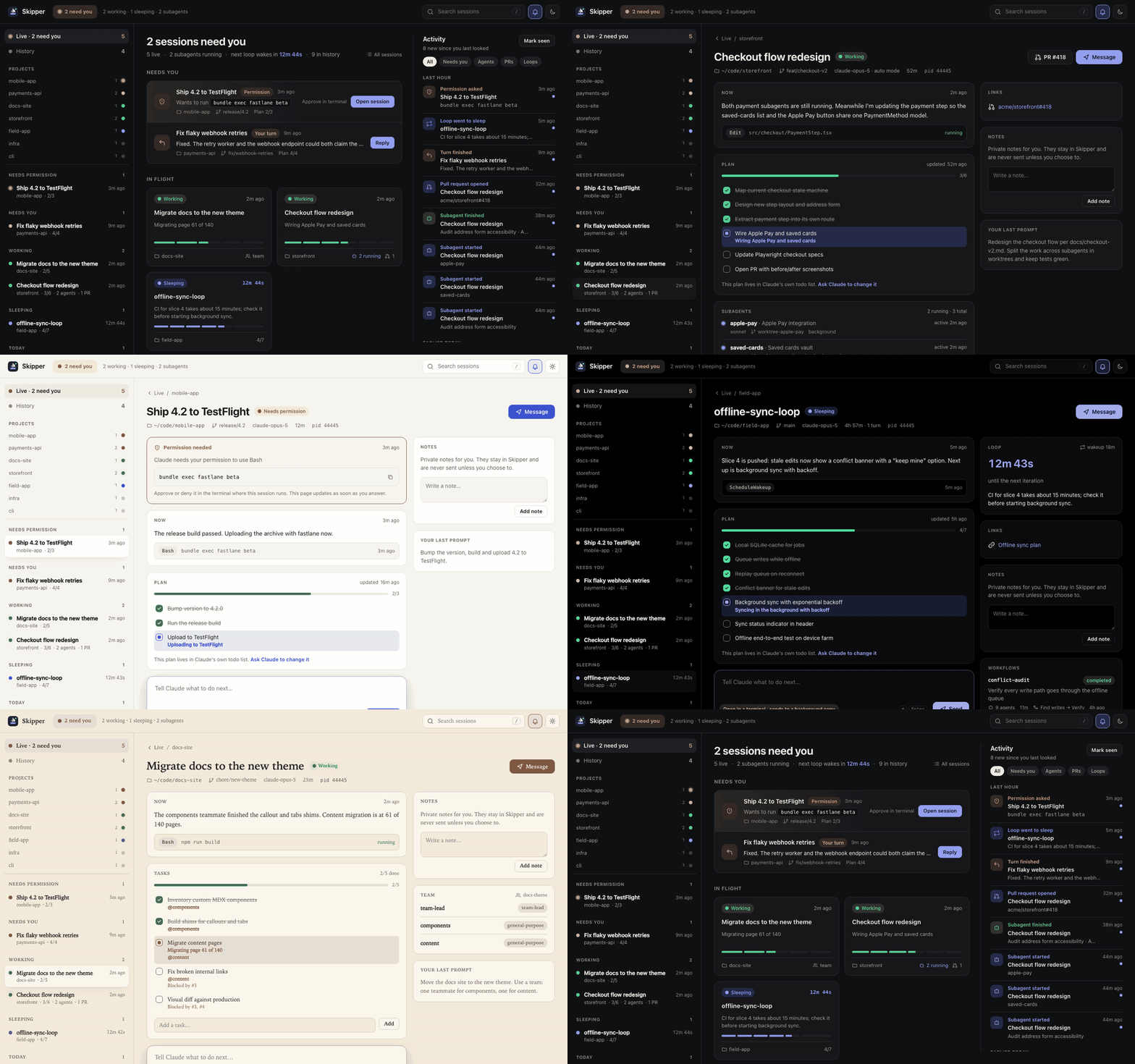
Mission control for Claude Code. See every Claude Code session, subagent, /loop and todo list live in one local dashboard, and steer them without switching terminals.





Quick start · Permission alerts · Usage · Shortcuts · Options · Privacy · FAQ
Quick start
Try it once, no install:
npx skipper-cc
Then open http://localhost:4317. Skipper finds your sessions in ~/.claude automatically, and new ones appear the moment they start. Add --demo --open for a tour with sample sessions.
Set it up for everyday use
npm install -g skipper-cc
skipper hooks install     # chime and notify on permission prompts
skipper service install   # keep it running in the background, start at login
Requires Node.js 20 or newer. Skipper has zero runtime dependencies.
The package is published as skipper-cc because skipper on npm belongs to an unrelated project. The command you run is still skipper.
From source
git clone https://github.com/bilol-makhmudov/skipper.git
cd skipper
npm start          # or: npm run demo
Why Skipper?
Running several Claude Code agents at once is powerful and hard to follow. One terminal is waiting for an answer, another has three background subagents in worktrees, a third is a /loop sleeping until CI finishes. Skipper answers the question you keep asking: which session needs me right now?
- Needs you, Working, Sleeping. Every live session gets a clear state, taken from Claude Code's own session status. Sessions waiting on you rise to the top, the browser tab title shows the count, and the tab icon turns amber or red so a pinned tab still tells you. Sessions started with
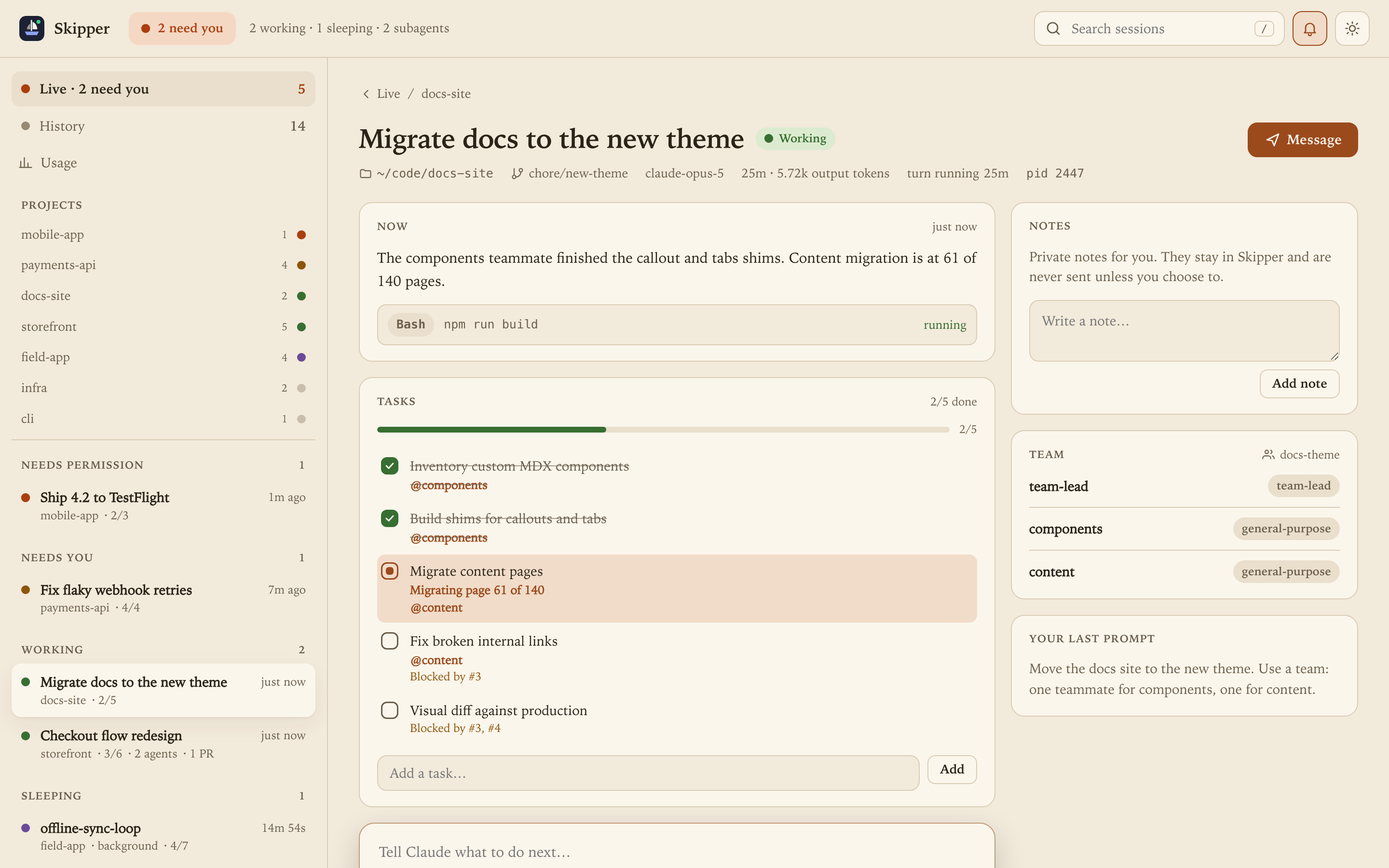
claude --bgare labeled Background. - Todo lists and task lists. Watch Claude's plan fill up in real time, including team task lists with owners and blockers.
- Subagents. Background agents with name, model, worktree branch, and when each one last did something.
/loopcountdowns. See when a self-paced loop wakes next and why it went to sleep.- Workflows, PRs and artifacts. Multi-agent workflow runs, linked pull requests and published artifacts, one click away.
- Activity feed. What happened while you were away, across every session: permission prompts, finished turns, loop ticks, subagents, PRs and workflow runs, with unread markers and filters.
- Usage and history. Exact token counts per day, project and model, plus turns and lines changed for every session.
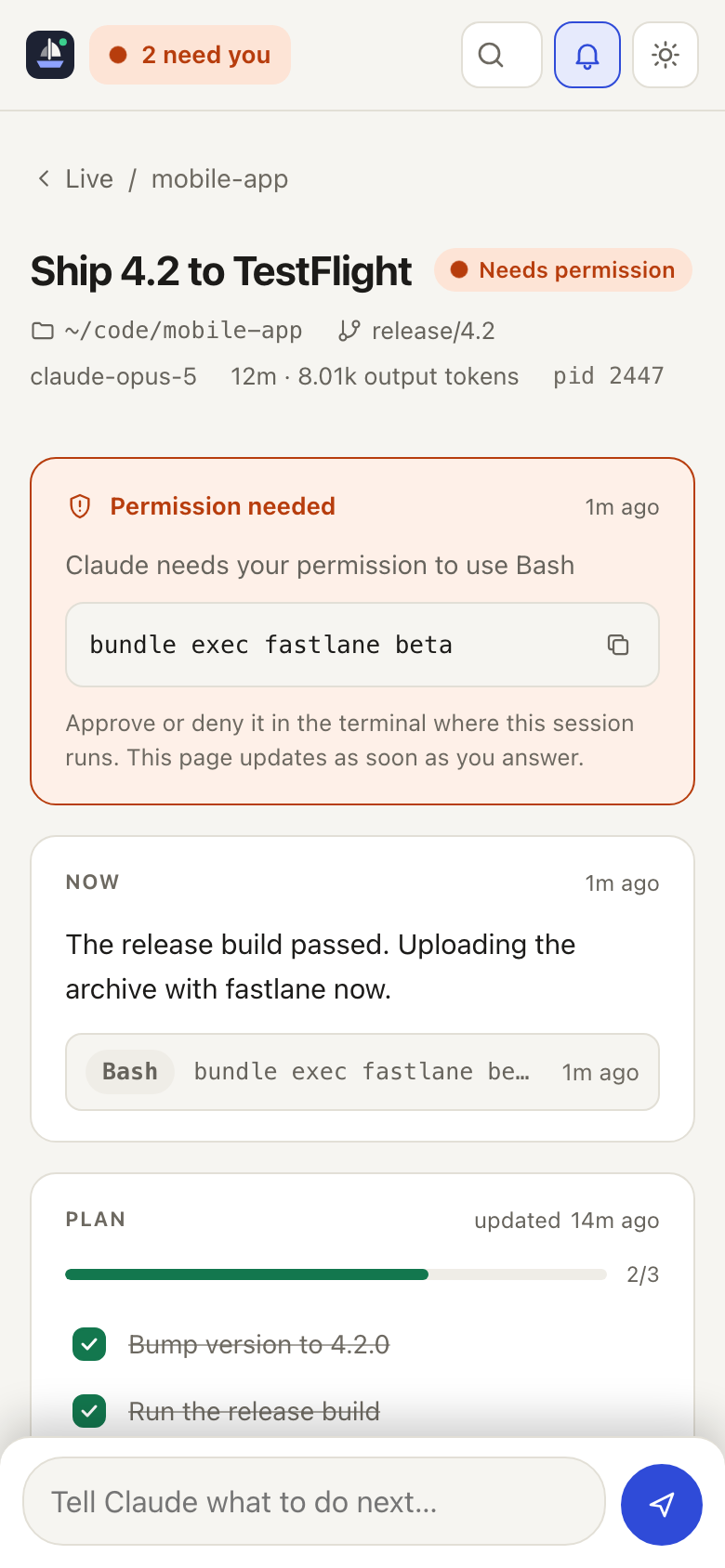
- Permission alerts with sound. The moment Claude asks to run a command or edit a file, Skipper plays a chime, shows a desktop notification and moves the session to Needs permission.
- Light on the network. Responses are gzipped and static files are cached with ETags, which keeps phone access over Wi-Fi quick.
- Accessible. Every theme meets WCAG AA contrast (checked by a test), motion respects reduced-motion settings, and status colors stay visible in Windows High Contrast.
Usage without guesswork
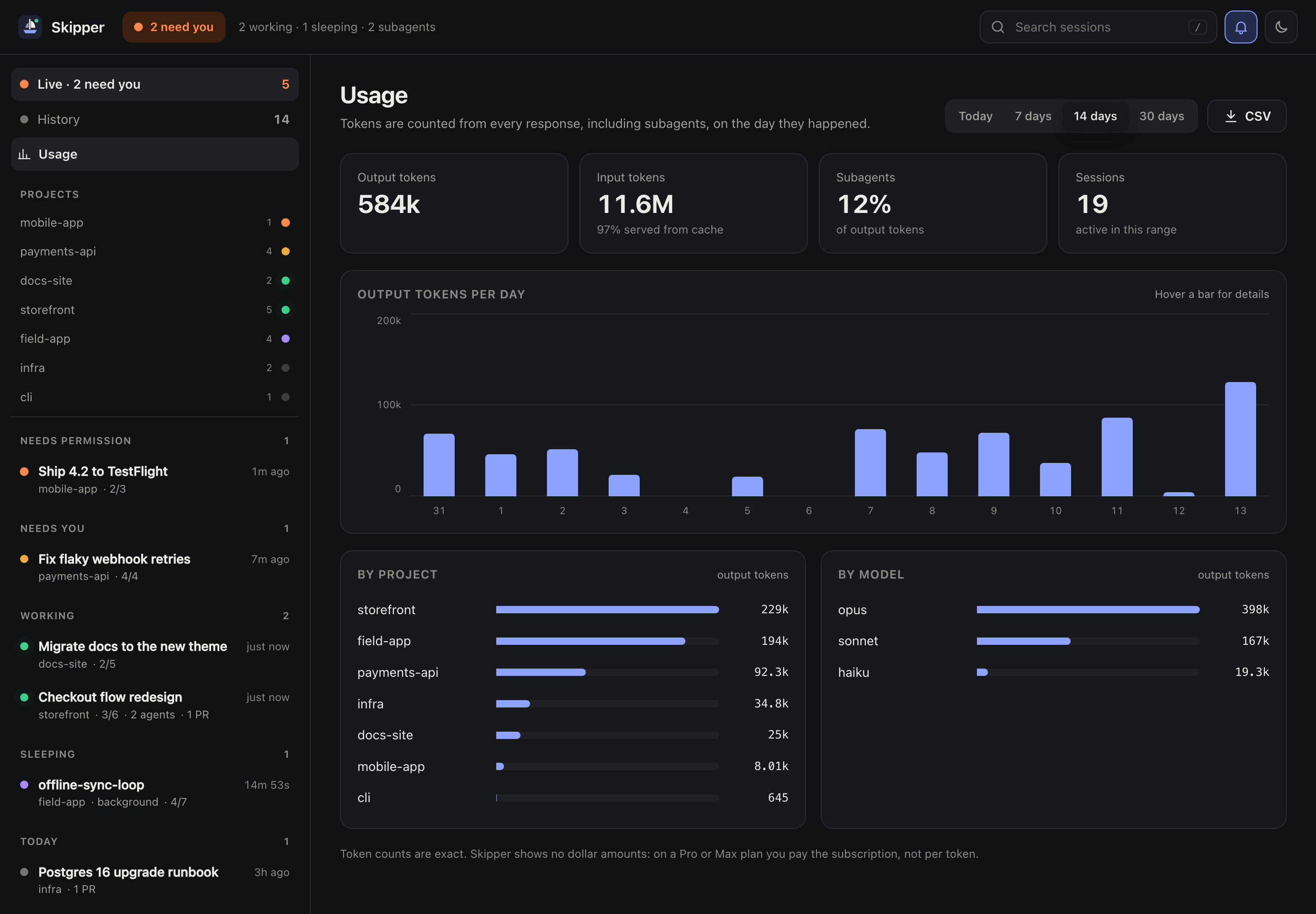
Exact token counts from every response, including subagents, per day, project and model. Skipper counts each response once and shows no dollar amounts, because on a Pro or Max plan you pay the subscription, not per token. CSV downloads the tokens per day for that range, ready for a spreadsheet.
Steer, not just watch
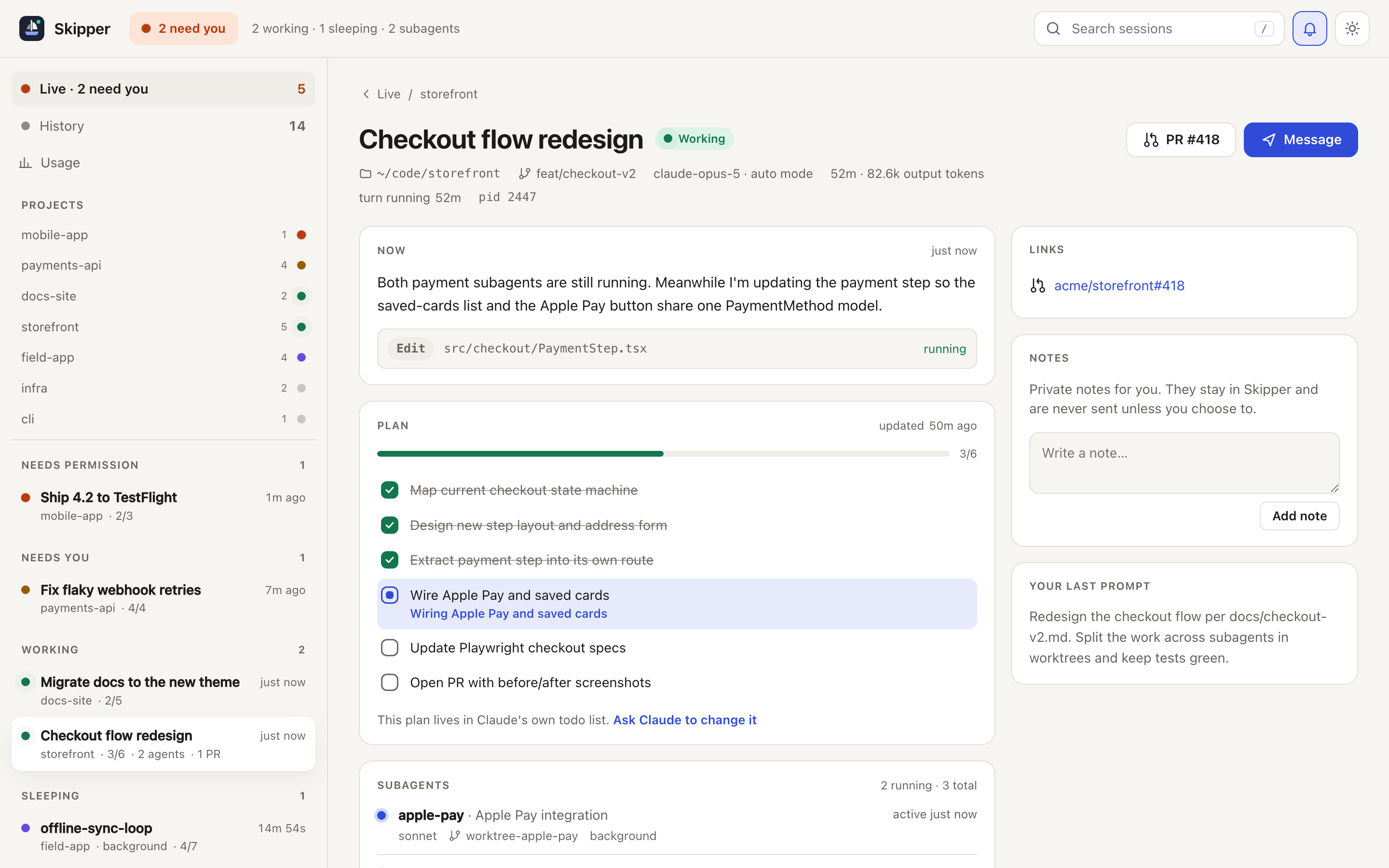
- Message Claude. Type the next instruction. A session that is open (in a terminal or in the background) receives it through Claude Code's session-to-session messaging, so it lands in that conversation. A closed session is continued in the background with
claude --bg --resume <session>from the directory it started in; attach any time withclaude attach. - Edit tasks. Add, rename, complete and delete tasks in a session's task list. Deleting a task that still blocks others is refused.
- Private notes. Keep notes per session, and send one to Claude when you are ready.
- Read-only when you want it. Start with
--read-onlyand every write is switched off.
 |
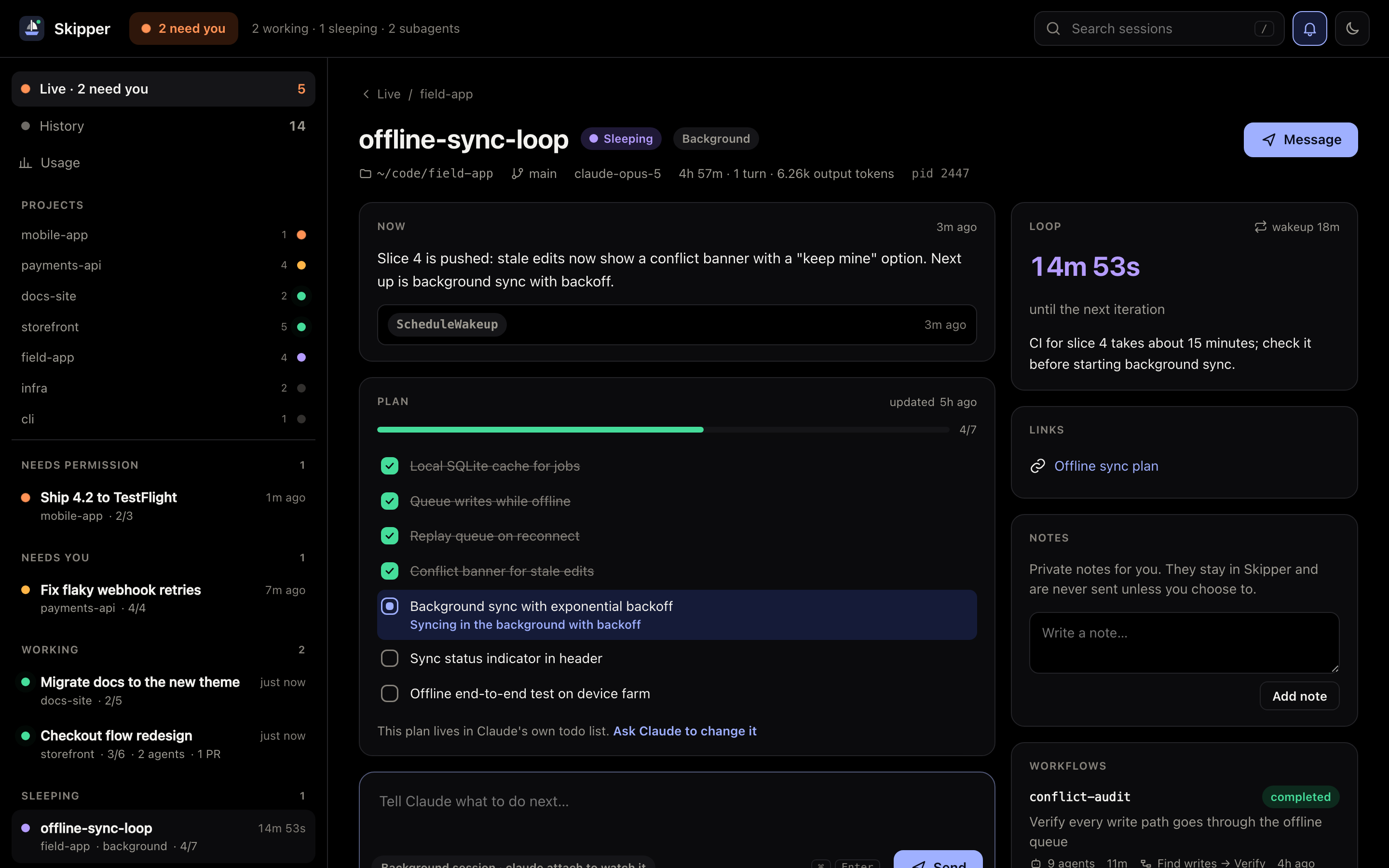 |
| Team tasks with owners and blockers (Paper theme) | A sleeping /loop and its workflow run (Midnight theme) |
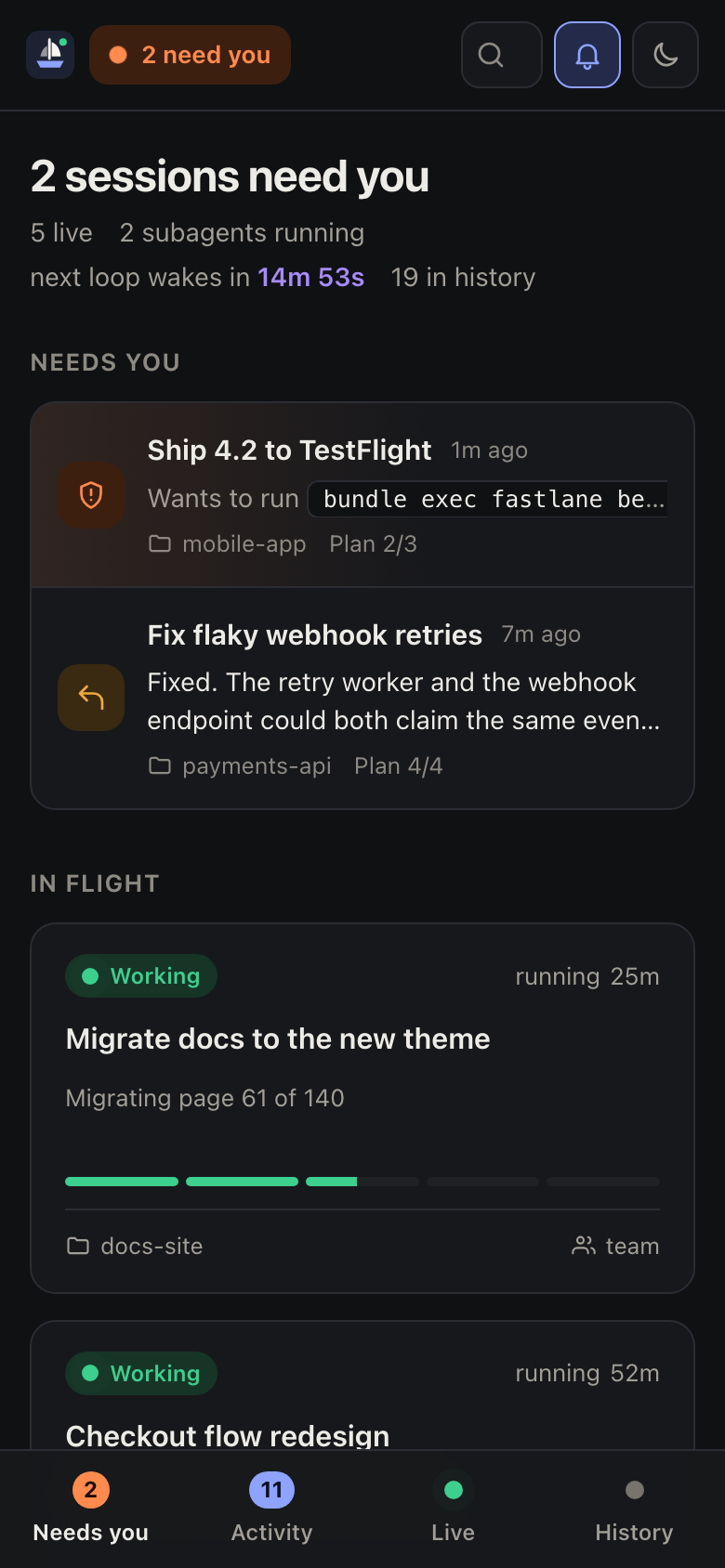
On your phone
 |
 |
skipper --host 0.0.0.0
Skipper prints a link with an access token for every network address. Open it on your phone once and a secure cookie keeps you signed in. Without the token, nothing is served. The token is kept across restarts so paired devices stay signed in; skipper pair reset issues a new one.
To keep it reachable in the background, install the service with skipper service install --host 0.0.0.0.
iPhone app. The Flutter app in mobile/ pairs by scanning the QR code from the dashboard's phone button, and adds a hands-free voice assistant for your sessions in English or Uzbek. Tap the mic once and talk: it listens continuously, answers aloud, and stops as soon as you talk over it. Nothing it drafts is sent to a session until you say yes (or tap Send). Voice is optional. Skipper uses free local voice automatically when whisper-cli (whisper.cpp), the ggml-large-v3-turbo-q5_0.bin model in ~/.skipper/models and edge-tts in ~/.skipper/voice-venv are installed; otherwise run skipper voice setup --region <azure-region> for Azure AI Speech.
Never miss a permission prompt
skipper hooks install
This adds two official Claude Code hooks (Notification and Stop) to ~/.claude/settings.json. Your other settings and hooks are kept, and a backup is saved next to the file. From then on, every new Claude Code session tells Skipper instantly when it:
| Event | What you get |
|---|---|
| Needs permission to use a tool | Urgent chime, desktop notification that stays until you click it, Needs permission state |
| Asks you a question | Chime and notification |
| Finishes its turn | Soft chime: "waiting for your next message" |
| Has been idle, waiting for input | Reminder chime |
Choose sound and desktop notifications from the bell menu, and use Test alert to hear it.
Want alerts even when no dashboard is open? skipper hooks native on sends a system notification (macOS Notification Center, or notify-send on Linux) the moment a session asks for permission or asks you a question. Remove the hooks any time with skipper hooks uninstall. The hook only appends a line to ~/.skipper/events.jsonl and exits, so it can never slow down or break a session.
Tip: browsers only play sound after you have clicked the page once, so click anywhere in Skipper after opening it.
Themes
System, Light, Dark, Midnight (true black for OLED screens), Paper (warm and serif) and High contrast. Pick one from the moon/sun button in the top bar. Skipper also works as an installable app on your phone or desktop.
Keyboard shortcuts
j / k move between sessions, g o / g a / g l / g h jump to Overview, Activity, Live and History, m focuses the message box, t cycles themes, / searches, and ? shows the full list.
Options
| Flag | Default | What it does |
|---|---|---|
-p, --port <n> |
4317 |
Port to listen on ($PORT works too) |
--host <addr> |
127.0.0.1 |
Interface to bind. A non-loopback address turns on token access |
--claude-dir <dir> |
~/.claude |
Claude Code data directory ($CLAUDE_CONFIG_DIR works too) |
--data-dir <dir> |
~/.skipper |
Where Skipper keeps your notes |
--read-only |
off | Disable messages, notes and task edits |
--demo |
off | Serve fictional sample sessions |
-o, --open |
off | Open the dashboard in your browser |
hooks install / uninstall / status |
Manage the permission and turn-finished alerts | |
hooks native on / off |
off | System notifications for permission prompts, even with no dashboard open |
doctor |
Check that hooks, notifications, the service and the dashboard are working |
Keep it running in the background
npm install -g skipper-cc
skipper service install
Skipper starts at login and restarts if it stops: a launchd agent on macOS, a systemd user service on Linux, and a Task Scheduler task on Windows. Check it with skipper service status and remove it with skipper service uninstall.
To reach the dashboard from your phone, install the service with --host 0.0.0.0; without it the service listens on loopback only.
How it works
Claude Code already records everything Skipper needs on your disk:
| Source | What Skipper reads |
|---|---|
~/.claude/projects/*/<session>.jsonl |
Titles, prompts, latest messages, todo lists, subagents, loops, workflows, PRs, lines changed |
~/.claude/projects/*/<session>/subagents, /workflows |
Subagent names, models, worktrees; workflow run results |
~/.claude/sessions/*.json |
Which sessions are live, and whether they are busy or idle |
~/.claude/tasks, ~/.claude/teams |
Task lists and agent teams |
~/.skipper/events.jsonl |
Permission prompts and finished turns, written by skipper hooks |
Transcripts are read incrementally from the last byte seen, so a history of hundreds of megabytes stays fast. File watchers push changes to the browser over Server-Sent Events, with no polling and no refresh.
Privacy and security
Your sessions contain your code and prompts, so Skipper treats them that way:
- Nothing leaves your machine. No telemetry, no CDN, no external requests. The UI is plain HTML, CSS and JavaScript served from the package. The one exception is optional voice for the phone app: spoken answers are read aloud by Microsoft's online voices (edge-tts or Azure), so that answer text is sent to Microsoft. Speech recognition with Whisper stays on the Mac.
- Loopback only by default, with Host header checks against DNS rebinding.
- Writes are locked down. They need a custom header, a JSON body and a same-origin request, and every ID and path is validated. Messages go to the
claudeCLI as an argument list, never through a shell. - Strict Content Security Policy. Everything is rendered with
textContent, never raw HTML.
See SECURITY.md to report a vulnerability.
FAQ
Can Skipper send to a Claude Code terminal that is already open?
Yes. Open sessions receive the message through Claude Code's own session-to-session messaging, the same way one session messages another, and it shows up in that terminal's conversation. Delivery takes about ten seconds. For closed sessions, the message continues the session itself in the background.
Does it work with agent teams, worktrees and background agents?
Yes. Team task lists, owners, worktree branches and background subagents all show up.
Windows and Linux?
Skipper is plain Node.js and runs anywhere Claude Code does. All three platforms are covered by CI, and skipper service install works on each: launchd on macOS, a systemd user service on Linux, Task Scheduler on Windows.
Is this an official Anthropic product?
No. Skipper is an independent open-source project for people who use Claude Code.
Contributing
Issues and pull requests are welcome, and good first issues are a friendly place to start. Run npm test before you open a PR (and npm run screenshots if you changed visuals), and see CONTRIBUTING.md. If Skipper saves you a trip through your terminals, a ⭐ helps other Claude Code users find it.
License
Reviews (0)
Sign in to leave a review.
Leave a reviewNo results found