managoat
Health Gecti
- License — License: Apache-2.0
- Description — Repository has a description
- Active repo — Last push 0 days ago
- Community trust — 16 GitHub stars
Code Gecti
- Code scan — Scanned 12 files during light audit, no dangerous patterns found
Permissions Gecti
- Permissions — No dangerous permissions requested
Bu listing icin henuz AI raporu yok.
Run Claude Code, Codex and Gemini CLI as an HTTP API, each on its own sandbox.
Managoat
Use Claude Code, Codex and Gemini CLI from a chat app, with a real computer
behind each conversation. Watch the agent work, steer it, and come back to
the same files.
Open Conversations ·
Build with the API · Self-host
The apps
Choose a chat, or a workbench for a shared project.
| App | What it is | |
|---|---|---|
| Conversations | ChatGPT, except the model has a real computer and you can watch it use one: start a run, follow it turn by turn, steer it, read the raw log. | Open it |
| Workbench | Multiplayer engineering: projects over an environment and a vault, work items in them, and agents you put on a work item by typing. | Open it |
What runs underneath
A conversational API to a computer. The machine runs while an agent works
and parks while it waits, so a conversation nobody is talking to burns no
compute.
Send a prompt to an HTTP endpoint. On the other end a machine wakes up with
your repositories cloned, your packages installed and your credentials already
in the environment, a coding agent runs on it, and the answer comes back.
Between messages the machine parks. A parked machine holds its disk and does
not count against the deployment's sandbox ceiling, so the next prompt lands
on the same files instead of on a fresh box that has to be told everything
again.
Coding agents are not the scarce thing. There are dozens of them and Managoat
runs Claude Code, Codex and Gemini CLI behind one API. The scarce
thing is the computer underneath: building it, installing on it, configuring
it, getting the networking right, getting a credential onto it that the model
never reads, and turning it off before the bill notices. Nobody sets out to
build that, and everybody shipping an agent ends up building it.
Managoat is that half. You write the conversation.
In one picture
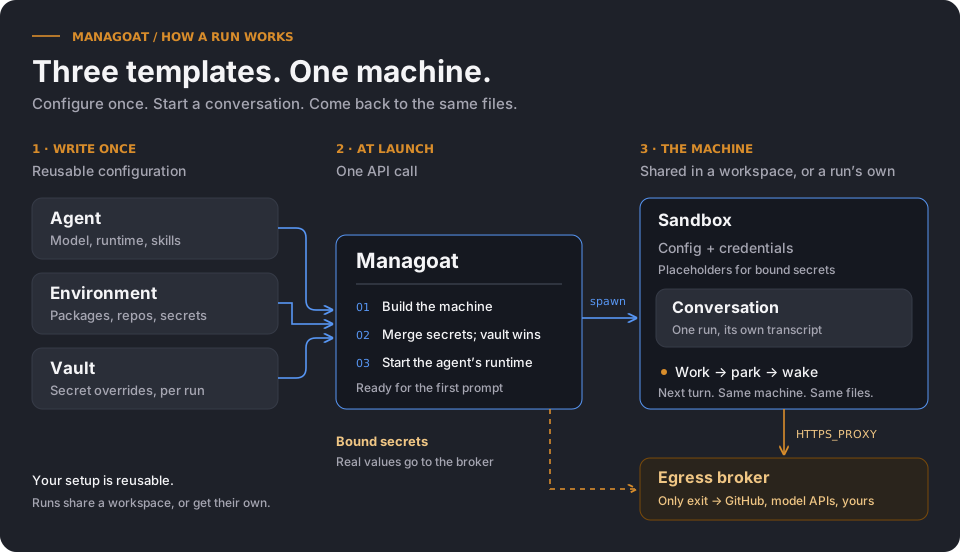
Agent, Environment and Vault are templates: rows you write once and use many
times. A Conversation is a run of an Agent on a machine that Managoat builds,
warms, parks and reclaims. Secrets merge at launch, the Vault winning; on a
deployment with the egress broker on, a bound secret never enters the
sandbox at all. The four primitives says why there are
four.
Self-hosting
Run your own Managoat instance with the same apps,
API, CLI and SDK under your own keys and infrastructure.
Managoat's own UI is an operator console. You configure things in it; you do
not watch an agent work in it. The three apps we build for that are separate
single-page apps on their own origins, talking to /api with a key you paste
in or an OAuth sign-in. Each is static files, so a hosted build works against
your instance as soon as it admits the origin
(API_CORS_ORIGINS=https://fountain-conversations.demo.managoat.com).
CONVERSATIONS_APP_URL points the console's own links at a copy you host. The console, the apps, and the API
says why the line is drawn there.
Four surfaces
Every public feature lives on the first three; the SDK wraps the verbs most
code actually reaches for.
| Surface | Use it when |
|---|---|
Web UI (/dashboard) |
Getting started, managing agents, environments, vaults, keys and audit visually |
REST API (/api/*) |
Scripting, CI/CD pipelines, integrating Managoat into your own tools |
CLI (fountain) |
Local workflows, manifest-driven apply, shell scripting |
| TypeScript SDK | Running an agent from your own code: run(prompt, { agent, vault }) |
The CLI and the SDK are convenience wrappers over the REST API. Everything they do, you can do with curl.
npm install @managoat/fountain-sdk
import { Fountain } from "@managoat/fountain-sdk";

const run = await new Fountain().run("Upgrade us to Phoenix 1.8 and open a PR", {
  agent: "reposage",
  vault: "github-bot",   // the token lands in the sandbox, never in the prompt
});

console.log(run.text, run.url);
The sandbox is still there afterwards. A follow-up continues on the same
machine, with the same checkout and the same session. Seesdk/typescript/ or the
TypeScript SDK docs. The Python, Elixir and
Swift SDKs are retired: their published releases stay on PyPI, Hex and thesdk-swift-v* tags but are no longer maintained
(ADR 0059).
Get started with the CLI
Install the fountain binary from the Homebrew tap:
brew install managoat/tap/fountain
Log in against your Managoat instance:
fountain auth login
Before the first run, add an Anthropic credential under Account, then
Inference keys. From this checkout, apply the smallest example and run its
agent against a real repository. (Not in the checkout? The
quickstart downloads the manifest first.)
fountain apply -f examples/quickstart/fountain.yml
fountain run fountain-reader -p \
  "Find the code that reclaims an idle sandbox. Explain when it runs and name the files you read."
fountain apply walks the directory and applies every *.yml / *.yaml doc that declares both apiVersion and kind. See cli/README.md for the rest of the command surface.
Use the API directly
The examples below run against your own instance — point FOUNTAIN_URL at it
(http://localhost:4000 for the compose quick start):
FOUNTAIN_URL=http://localhost:4000
Authenticate
# Get a session token (email + password)
TOKEN=$(curl -sX POST $FOUNTAIN_URL/api/auth/token \
  -H 'Content-Type: application/json' \
  -d '{"email":"[email protected]","password":"..."}'  | jq -r .token)

# Or create a long-lived API key in the UI: Account → API Keys
# Then use it directly:
TOKEN=ftn_your_api_key
Manage resources
# Create an environment
curl -sX POST $FOUNTAIN_URL/api/environments \
  -H "Authorization: Bearer $TOKEN" \
  -H 'Content-Type: application/json' \
  -d '{"name":"python-data","networking_type":"unrestricted"}'

# Upsert a secret
curl -sX POST $FOUNTAIN_URL/api/environments/$ENV_ID/secrets \
  -H "Authorization: Bearer $TOKEN" \
  -H 'Content-Type: application/json' \
  -d '{"key":"OPENAI_API_KEY","value":"sk-..."}'

# Create an agent
curl -sX POST $FOUNTAIN_URL/api/agents \
  -H "Authorization: Bearer $TOKEN" \
  -H 'Content-Type: application/json' \
  -d '{"name":"researcher","model":"anthropic/claude-sonnet-5","runtime":"claude","environment_id":"$ENV_ID"}'
Run a conversation and stream output
# Start a conversation
CONV=$(curl -sX POST $FOUNTAIN_URL/api/conversations \
  -H "Authorization: Bearer $TOKEN" \
  -H 'Content-Type: application/json' \
  -d "{\"agent_id\":\"$AGENT_ID\",\"prompt\":\"Audit the auth module for security issues\"}")

CONV_ID=$(echo $CONV | jq -r .id)

# Stream log events (SSE)
curl -sN $FOUNTAIN_URL/api/conversations/$CONV_ID/stream \
  -H "Authorization: Bearer $TOKEN"
Each SSE event is a JSON object:{"kind":"output","stream":"stdout","data":"...","stage":"turn","state":null,"turn_id":"...","ts":"..."}
— the timestamp key on the wire is ts, and stage/state/turn_id let a
client group output under its owning stage without inferring it from event
interleaving.
Explore the full API
Interactive Swagger UI: $FOUNTAIN_URL/api/docs
OpenAPI spec: $FOUNTAIN_URL/api/openapi.json
Point an LLM at Managoat
The manual publishes a plain-text /llms.txt, a bundled /llms-full.txt, and a drop-in /skill at managoat.com (an instance's own copies of those paths redirect there), so any agentic IDE (Claude Code, Cursor, Continue, Aider, ...) can learn the API from one fetch:
mkdir -p ~/.claude/skills/fountain
curl -fsSL https://managoat.com/skill > ~/.claude/skills/fountain/SKILL.md
After that, telling Claude “spin up a researcher agent on Managoat and have it audit the auth module” Just Works — the skill describes the four primitives (Environment / Vault / Agent / Conversation), the CLI commands, the API endpoints, the SSE format, and the per-runtime result filters.
Bootstrap a workstation
See SETUP.md for the full local bootstrap (mise + Postgres + deps). The local toolchain is pinned in .tool-versions (via mise), so a fresh laptop or ephemeral VM gets the same Erlang/Elixir as everyone else. Production images build from the repo-root Dockerfile, whose hexpm/elixir base pins the production toolchain — a toolchain bump must update both .tool-versions and the Dockerfile; see the parity reference in SETUP.md.
Contributing
See contributing/server.md for the server's conventions, test setup and tenant isolation rules, and CLAUDE.md for the rules that are easy to get wrong. Architecturally significant choices are recorded as ADRs in decisions/.
Licence
Managoat is licensed under the Apache License 2.0:
| What | Licence | What it means for you |
|---|---|---|
The server (apps/fountain) |
Apache-2.0 | Run it, modify it, host it, ship it inside your own product. Keep the licence and notice when you redistribute it |
cli/, sdk/typescript |
Apache-2.0 | Build on the API or ship a client in a proprietary product; follow the Apache license and notice terms when you redistribute it |
Releases v0.13.0 through v0.21.0 of the server were AGPL-3.0-or-later, and
v0.12.0 and earlier were MIT. The AGPL copyleft was there
to stop a competing host improving Managoat in private. Managoat is a
self-hosted application now, not a hosted service, so the server moved to
Apache-2.0. Each release stays under the licence it was made under for anyone who has
it.
Managoat is a self-hosted application and is not sold as a hosted service.
managoat.com is the maintainer's own instance of this
code; its home page and the manual are the static site insite/. The long form, and where everything lives, is
docs/self-hosting.md, published at
managoat.com/docs/self-hosting.
See NOTICE for third-party attribution,CONTRIBUTING.md for how to contribute, anddecisions/0068-relicense-the-server-under-apache.md
for the reasoning.
Yorumlar (0)
Yorum birakmak icin giris yap.
Yorum birakSonuc bulunamadi