mav
Health Uyari
- License — License: MIT
- Description — Repository has a description
- Active repo — Last push 0 days ago
- Low visibility — Only 5 GitHub stars
Code Basarisiz
- rm -rf — Recursive force deletion command in scripts/build-mav-vm-image.sh
Permissions Gecti
- Permissions — No dangerous permissions requested
Bu listing icin henuz AI raporu yok.
Deterministic iOS app validation CLI for AI coding agents.
MAV


The iOS and macOS control plane for AI coding agents: one command surface, native
drivers underneath, and evidence your agent can hand back to a human.
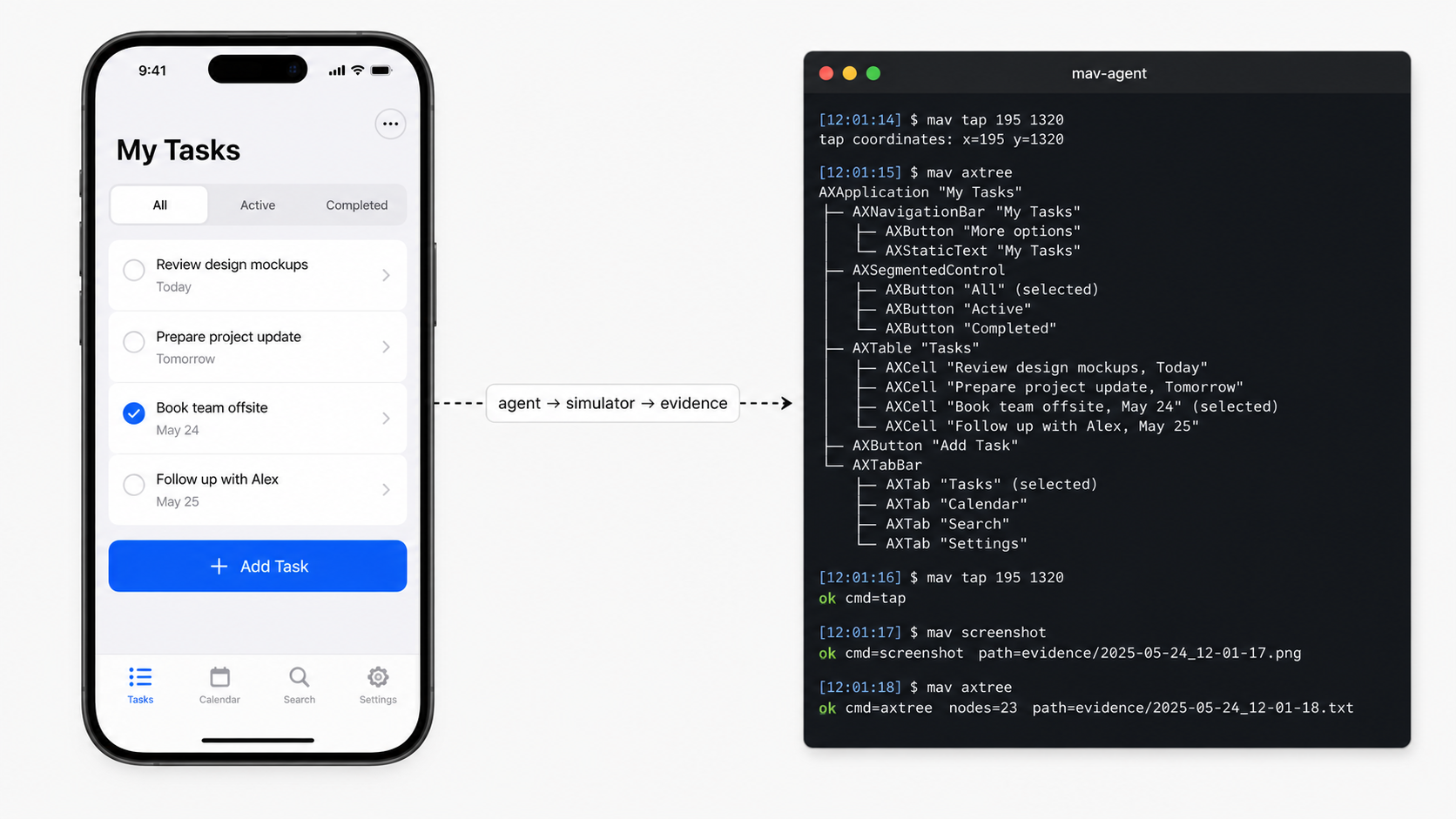
Mobile Agent Verifier (mav) is the interface between an agent and Apple platforms:
iOS simulators, physical devices, and macOS apps. The
agent asks for intent-level operations like ui tree, tap, pinch,network start, or evidence report; MAV routes each operation to the best
native backend available on that target, records what happened, and returns a
compact result the next turn can act on.
MAV is intentionally not an autonomous testing agent. It runs the command. The agent decides what to run next.
Why MAV?
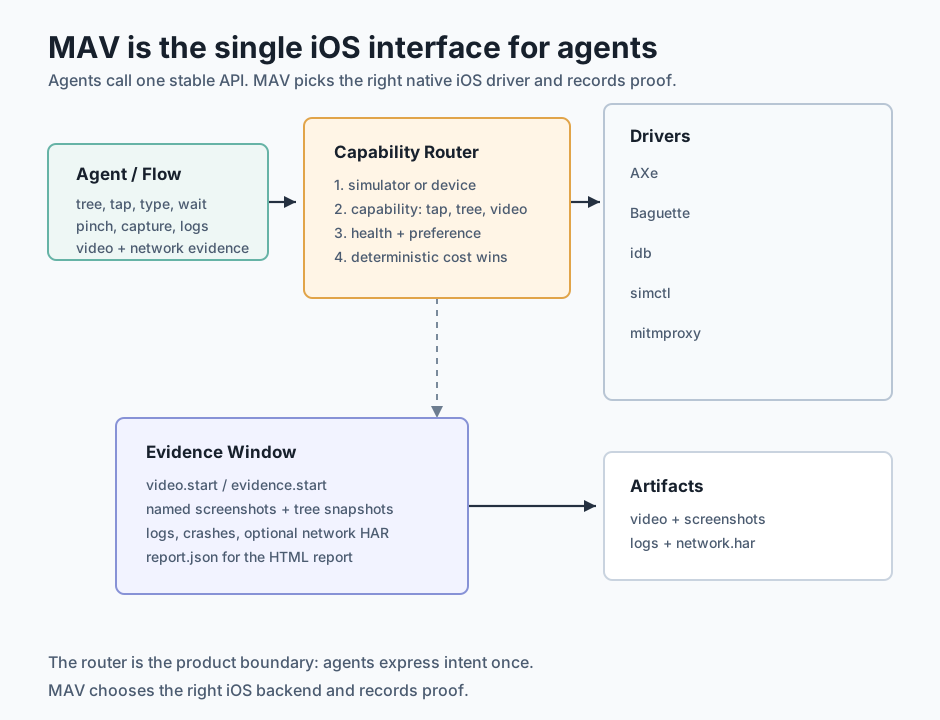
MAV gives agents one stable API over the messy Apple toolchain. Agents ask for a
capability; MAV picks the driver for the selected simulator or device and
returns compact output the next turn can parse:
- Accessibility tree, semantic taps, waits, and screenshots go through AXe when
it is healthy. - Simulator multitouch, system UI, hardware buttons, erase, and hideKeyboard go
through Baguette. - Physical device install, launch, coordinate input, logs, screenshots, and
crashes go through idb. - Simulator crash checks read local DiagnosticReports directly.
- Simulator lifecycle, video, and logs go through simctl.
- Simulator and macOS network evidence goes through mitmproxy HAR capture.
- macOS accessibility tree, window capture, taps, and typing go through cua-driver;
axcli delivers input to accessory windows cua-driver cannot resolve. - macOS lifecycle, video, logs, and crashes go through the system:
screencapture,log stream, and the same.ipscrash format iOS uses.
Runs can record accepted video, named screenshots, accessibility tree snapshots,
log tails, crash reports, command trails, and optional HAR network traffic.mav evidence report writes a verified manifest for those artifacts; the MAV
skill turns the manifest into a visual HTML report for humans.
Native MAV YAML flows compose setup, UI actions, waits, assertions, logs,
crashes, network capture, and report generation without hiding the underlying
command trail.
MAV uses a project-local launch recipe to build, locate, install, and launch
the app. Bazel, Xcode, Tuist, Make, Just, and project scripts are setup-time
templates only; runtime executes the configured recipe.
How an agent uses MAV
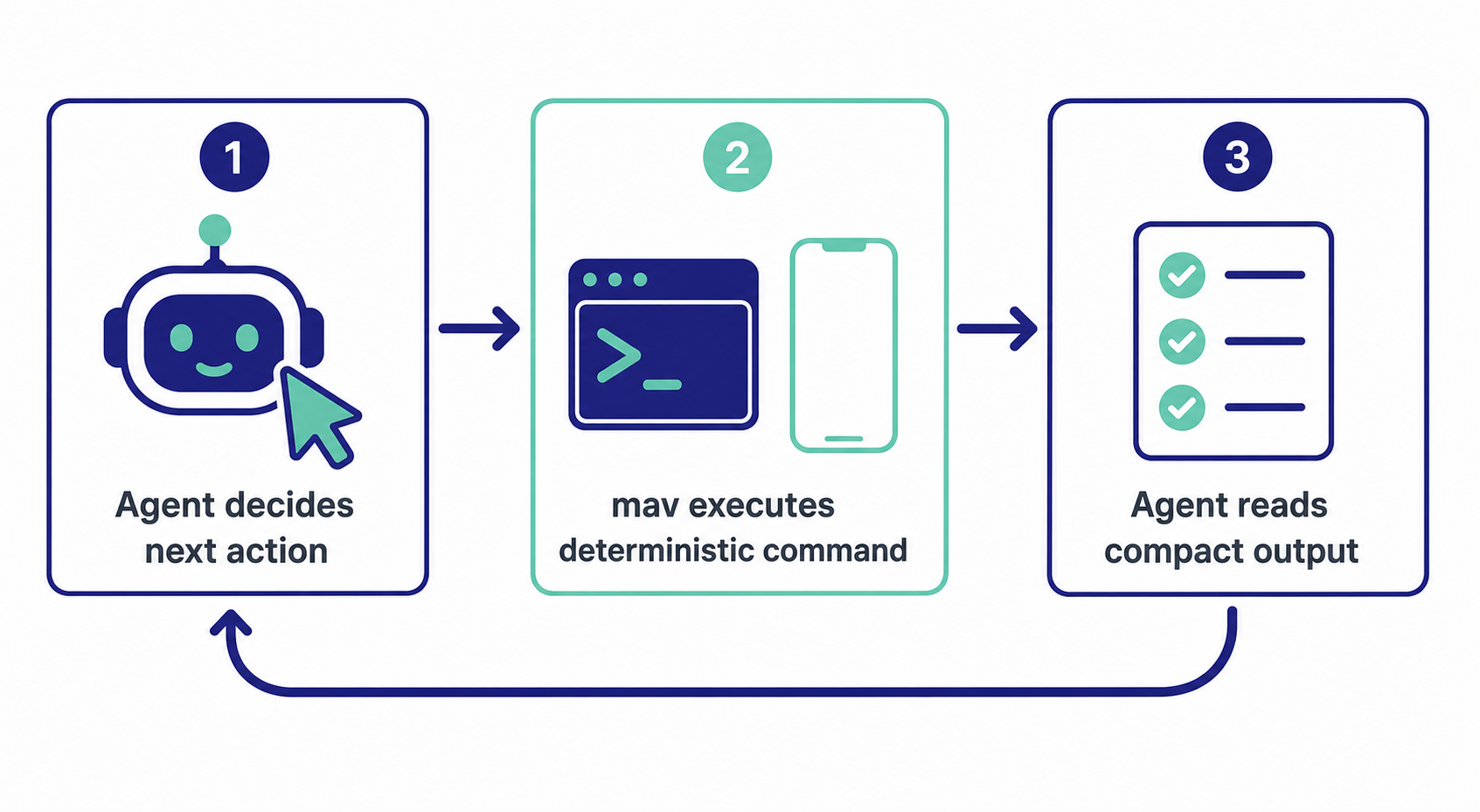
Each call is one verb. The agent picks the next verb based on the previous
output. The commands that cover most flows are mav ui tree, mav ui tap,mav capture, and mav logs. Use mav --help and nested help such asmav ui tap --help or mav evidence report --help for the full command
surface.
Used at
mav runs in development on these production iOS apps:
- Undolly — finding duplicate photos
- Boxy — organising physical items
- HiddenFace — privacy-first face blur
Status
MAV is early and evolving. The current stable pieces are:
- Configurable project launch recipes.
- Setup-time detection for common project launch commands.
- Simulator selection, boot, install, launch, screenshot, and video.
- Physical device selection, install, launch, logs, screenshots, UI actions,
crashes, and evidence screenshots. - AXe-first accessibility tree inspection and semantic interactions.
- idb coordinate taps and device/simulator fallback capabilities.
- Baguette-backed multitouch gestures, system UI tree, hardware buttons, and
keyboard helpers on simulator. - Native MAV YAML flows through
mav run. - Verified evidence manifests in
.mav/runs/<run-id>/report.json; the MAV
skill authors the visual HTML report from that data. - Filtered unified log capture for explicit MAV probes.
- macOS targets: launch, quit, openURL, clipboard, clear-state, accessibility tree,
window capture, taps, and typing through cua-driver, with axcli as the
accessory-window input hatch. - macOS network capture through mitmproxy, with automatic system-proxy setup and
restore, and VM-gated system-clock time travel. - Platform profiles and named fixtures in
.mav/config.yaml.
Platforms
mav drives iOS simulators, physical iOS devices, and macOS apps. target_kind in.mav/config.yaml picks one: simulator, device or macos.
macOS
target_kind: macos is a first-class target. A macOS app has no UDID: its identity is
its bundle id plus the .app path the launch recipe resolves at runtime. Everything in
the core loop — ui tree, ui tap, ui type, capture, logs, crashes,evidence — works. ui swipe translates to a scroll with the direction inverted, so a
flow written once means the same motion on both platforms. Multitouch gestures,
hardware buttons and hideKeyboard do not exist on macOS and return structured errors.
Drivers
The canonical driver is cua-driver (MIT). The reason
is structural, not preference: macOS grants Accessibility and Screen Recording only
to interactive GUI processes, so a CLI cannot hold them no matter how many times you
grant them to your terminal. The only architecture that works is a broker — an app that
owns the permissions, plus a socket — and cua-driver ships one: the binary mav invokes
lives inside /Applications/CuaDriver.app. It provides the accessibility tree with
geometry, window capture, and background input in one tool, and tree and capture come
out of the same call, so both describe the same instant.
mav starts the CuaDriver daemon itself when it is not running, with open -g so it
does not steal focus. Nobody has to know the launch command.
axcli stays installed as an escape hatch, input
only, for one case: cua-driver resolves the window through list_windows, and an app
whose entire UI lives in an accessory window — a floating panel, a HUD, a popover, a
SwiftUI onboarding — needs to be addressed by pid. axcli targets by --app and needs
no window id. When cua-driver hits this it fails with no on-screen window for pid,
which is not "the app is not open"; retry the interaction with --prefer-driver axcli.
Video and full-screen capture fall back to the system screencapture. A full-screen
shot is worse evidence than a window-scoped one, so it only wins when nothing better
can resolve the window.
Putting a macOS app under control
mav setup --install cua-driver axcli
cua-driver permissions grant
mav doctor
mav --profile mac open
mav --profile mac ui tree
mav setup --install cua-driver runs the upstream install script
(curl -fsSL https://cua.ai/driver/install.sh | bash). cua-driver permissions grant
is the only tested flow that registers the app in the System Settings panes by itself;
every other tool has to be added by hand through the panel's "+". mav doctor reports
Accessibility and Screen Recording by asking the daemon — the process that actually
holds the permissions — not the process running mav, and answers unknown instead of
lying with your terminal's permissions when the daemon is down.
Network capture
mav network start works end to end on macOS: it starts mitmproxy, sets the system
proxy itself with networksetup — no sudo — on the network service the default route
leaves through, and mav network stop, and mav stop, restore it. The previous proxy
state is saved in the run directory, because start and stop are separate invocations
and a run that dies must not leave the machine pointing at a dead proxy. Verified:GET https://example.com/ -> 200 decrypted in the HAR.
If the mitmproxy CA is not trusted, the command says so with the exactsecurity add-trusted-cert command in a ca_next field. Without that trust, HTTPS
comes out as CONNECT tunnels with no content: a capture that looks like it works and
proves nothing.
Time and location
mav time travel --to <RFC3339> and mav time reset work on macOS. freeze andscale do not: on macOS the clock is the system's, not the app's, and a system
clock runs — it cannot be stopped or accelerated. On iOS, simtime interposes the
clock the app sees; on macOS the only per-process route is libfaketime throughDYLD_INSERT_LIBRARIES, which the hardened runtime blocks in any app signed for
distribution. Because travel moves the whole machine's clock, it is closed by default
outside a VM (detected through kern.hv_vmm_present); pass --system-clock to force
it on a host on purpose.
Location cannot be faked on macOS, and knowing why saves an afternoon: Xcode's
"Simulate Location" is not a debugger feature — it travels over the DVT channel, which
serves iOS devices, and does nothing against a macOS app. lldb has no equivalent
command. The tools that exist fake a connected iPhone, not the Mac. CoreLocationCLI
only reads. What remains is private locationd API or disabling SIP, and mav takes
neither road.
Profiles
An app that ships iOS and macOS variants from one repo usually shares the debug bundle
id between them, so the bundle id cannot tell them apart. Profiles are a
per-platform overlay on the flat config: a block that overrides target_kind,app_target, process_name, target_command, the log fields, and the launch recipe.
Selection order is --profile, then MAV_PROFILE, then default_profile; a requested
profile that does not exist fails naming the valid ones instead of silently falling
back to the base. A repo with one platform writes no profiles and nothing changes.
bundle_id: com.example.app
target_kind: simulator

launch:
  mode: custom
  commands:
    build: bazelisk build //App:ExampleiOS
    app_path: ./scripts/mav-app-path.sh
    install: xcrun simctl install "$MAV_UDID" "$MAV_APP_PATH"
    launch: xcrun simctl launch "$MAV_UDID" "$MAV_BUNDLE_ID"

profiles:
  mac:
    target_kind: macos
    app_target: "//App:ExampleMac"
    process_name: Example
    launch:
      commands:
        build: bazelisk build //App:ExampleMac
        app_path: ./scripts/mav-app-path-mac.sh
        install: ""
        launch: ""

fixtures:
  empty:
    - ./scripts/wipe-demo-data.sh
  seeded:
    - ./scripts/seed-demo-data.sh
An absent profile key inherits from the base; an explicit empty string annuls it, and
the distinction matters: install: "" and launch: "" are how the mac profile cancels
the inherited simctl commands. On macOS there is nothing to install — the app runs from
wherever it was built — and an empty launch routes to the driver, which executesContents/MacOS/<binary> directly because open does not propagate environment
variables, and the environment is how mav injects its configuration.
Running the app in a disposable VM
A macOS target can run inside a throwaway VM instead of on your machine. The whole
config surface is one key:
target_kind: macos
vm: true
There is no host, no IP, no job name and no tool name to configure, and that is
deliberate: which hypervisor mav leases the machine from is mav's business, and the
day it changes no config.yaml on anybody's disk should have to. vm also works
inside a profile, so one repo can carry a mac profile that runs here and a mac-vm
profile that does not.
Nothing else changes. mav open, mav ui tree, mav ui tap, mav capture,mav logs, mav crashes, mav network and mav evidence take the same arguments and
answer the same way; only vm=true appears in their output so an agent chaining loose
commands can tell what it just drove. Evidence lands in the local .mav/runs/<id>/,
same as always — captures, trees, logs, HAR and report.json are pulled back out of
the guest after every command, because evidence that stays inside a machine that is
then handed back is not evidence.
The launch recipe splits across the two machines: healthcheck, build and app_path
run here, because a VM image carrying every project's build dependencies is not an
image anybody can share; install, the fixture, launch and cleanup run there,
because that is where the app runs. mav ships the checkout and the built bundle across
in between, at the same absolute paths they have here.
The machine is handed back on mav stop, at the end of a flow, and on an idle timeout
so an agent that crashes does not leave one running. That last one is not tidiness:
Virtualization.framework and the macOS EULA cap you at two concurrent macOS VMs, so
a leaked lease blocks the next run.
Two commands set it up:
mav setup --install vm            # installs the VM tooling
./scripts/build-mav-vm-image.sh   # builds the image, once
mav doctor reports vm_tooling, vm_image, the current lease and, once one is held,vm_guest. Failures name the command that fixes them rather than dying deep inside a
run: tooling problems point at mav setup --install vm, image problems atscripts/build-mav-vm-image.sh.
The machine itself is verified when mav takes it, once. An image missing a driver, or one
whose permission switches were never flipped, is caught before the run starts and handed
straight back instead of holding one of your two slots. The image build ends with
two switches you flip by hand — macOS 26 has no scriptable way to grant Accessibility
or Screen Recording — and after that they live on the disk that becomes the image.
One thing worth knowing before you rely on it: a development-signed bundle does not
launch in a clean VM. The entitlements tied to your team and device list get it killed on
sight, so mav re-signs the guest's copy ad-hoc and reports resigned=adhoc on open. You
are no longer running the exact binary you ship, and iCloud and push go with it.
The measured findings behind all of this, including four ways of seeding TCC.db that
do not work on macOS 26, live in examples/macos-vm/.
Fixtures
Fixtures are named states: lists of commands that leave the app in a known
situation before launch. mav does not know what a fixture does internally — it only
runs the commands — because how to seed is specific to each app. Pick one per run with--fixture <name> on mav open, or fixture: on a flow's open step.
They run between the install and launch steps, and that placement is the point: it
is the only window where the app container already exists and nothing holds the app's
database open. mav quits a live instance from an earlier run before seeding, for the
same reason. Fixtures complement launch.commands, they do not replace them.--clear-state composes: the container is wiped first, then the fixture seeds on top.
The applied fixture is recorded in the run's report.json — a run whose evidence does
not say which state it started from is not reproducible.
Fixtures work the same on iOS (the simulator's app container) and on macOS
(~/Library/Containers/<bundle-id>/Data/). --fixture is rejected together with--no-relaunch, like --clear-state and for the same reason: --no-relaunch skips
the whole recipe, so the fixture would never run and the agent would validate against
data nobody seeded.
On macOS, --clear-state is the honest equivalent of an uninstall: it deletes the
app's container and preferences, not the app.
What does not carry over from iOS
- cua-driver elements do not expose
AXIdentifier. Theidmav reports is the
element'selement_token, valid within the current snapshot — somav ui tap --id
on macOS does not have the across-runs stability that axe accessibility ids give on
iOS. Read the tree first and target what it reports, or use--text. - There is no menu-bar interaction and no window management:
mavreads and drives an app's
own UI, not the desktop around it. - Running
mavover SSH leaves it outside the Aqua session, wherescreencapture
fails withcould not create image from display. This is why the VM recipe needs
the broker — seeexamples/macos-vm/.
See the macOS scope evaluation for how this was
decided and what was deliberately left out.
Requirements
- macOS.
- Xcode command line tools.
- Go, for development builds.
- AXe, for accessibility tree and semantic UI actions.
- idb, for coordinate taps and device/simulator fallback operations.
- Baguette, for simulator multitouch (pinch, two-finger pan), the
SpringBoard / system UI tree, hardware buttons, keyboard erase, and
hideKeyboard. Sim-only — device multitouch is intentionally unsupported. - cua-driver, for macOS targets: accessibility tree, window capture, taps, and
typing. Install withmav setup --install cua-driver. - axcli, for macOS input into accessory windows that cua-driver's
list_windows
cannot see. Installed frombitomule/tap/axcli. - mitmproxy, optional, for
mav network start|stopHAR capture on the
simulator and on macOS. Install withmav setup --install mitmproxy.
Check the local environment:
mav doctor
mav doctor reports capability availability. MAV routes commands by
capability: accessibility and semantic actions use AXe, coordinate taps and
device fallback use idb, multitouch and system UI use baguette on simulator.
Physical iOS devices require idb for install, launch, logs, screenshots, and
crashes. Simulator crash checks use local DiagnosticReports directly, avoiding
idb_companion crash-list parser failures from unrelated malformed reports.
Multitouch gestures, system-UI trees, and hideKeyboard return structured errors
on device — use a simulator for those flows.
On macOS targets, mav doctor reports Accessibility and Screen Recording by asking
the cua-driver daemon — the process that holds them — and the fix it prints iscua-driver permissions grant.
Configure the project or install supported helper tools:
mav setup
mav setup is idempotent and interactive by default. It scaffolds or refreshes.mav/config.yaml by detecting app identity, simulator defaults, UI tools, and
an editable launch recipe, then asks you to accept or replace each value.
Existing explicit choices in .mav/config.yaml are preserved. Usemav setup --non-interactive for CI/scripts.
mav setup --install axe idb baguette
mav setup --install idb prefers pipx with Python 3.12/3.13 for fb-idb and
uses Homebrew for idb-companion. AXe and Baguette are installed via Homebrew
(cameroncooke/axe/axe and tddworks/baguette/baguette).mav setup --install cua-driver runs the upstream install script
(curl -fsSL https://cua.ai/driver/install.sh | bash); the binary it installs lives
inside /Applications/CuaDriver.app. axcli comes from bitomule/tap/axcli.
Install
With Homebrew:
brew install bitomule/tap/mav
Install the MAV skill globally with Vercel's Skills CLI:
mav install-skills
This runs:
npx skills add bitomule/mav --skill mav --global --yes
Build from source:
git clone https://github.com/bitomule/mav.git
cd mav
make build
Run the development binary:
.build/mav help
Or put it on your PATH:
ln -sf "$PWD/.build/mav" /usr/local/bin/mav
Release binaries are built by the GitHub release workflow for tagged releases.
Homebrew packaging lives in packaging/homebrew/mav.rb and is published tobitomule/tap.
The release workflow can also update bitomule/homebrew-tap automatically. Thebitomule/mav repo must define a COMMITTER_TOKEN secret with permission to
push to bitomule/homebrew-tap; this is the same pattern used by Koubou.
Quick Start
Run from the root of an iOS app repo:
mav setup
mav sim list
mav sim select --device "iPhone 17 Pro Max" --ios 26
mav open
mav ui tree
mav setup scaffolds .mav/config.yaml. By default it is interactive: MAV detects a bundle id, selected simulator, locale/language,
available tools, and a launch recipe when it can infer one, then lets you accept
or replace each value. Use mav setup --non-interactive for CI/scripts.
Launch recipe detection is intentionally conservative: MAV recognizes explicitMakefile/justfile MAV targets, scripts/mav-build plusscripts/mav-app-path, and standard Bazel/Tuist/Xcode project shapes.
mav open executes the configured launch recipe. It creates a persistent run
directory under .mav/runs/<run-id>/ and starts logs.txt for MAV probes. Usemav open --clear-state to uninstall the configured bundle before install and
launch. If a Bazel app bundle from bazel-out fails simulator install with a
permission error, MAV copies the .app into the run directory with writable
permissions and retries the install.
Use mav open --skip-build when the app is already built and the recipe'sbuild step would only rebuild the same artifact. app_path, install andlaunch still run -- only the build is skipped. mav run flow.yaml --skip-build applies it to every open step in the flow, so a caller can build
once and then run the flow repeatedly (per language, per appearance) without
paying for the build again. See Reusing a build across runs below.
Use mav open --no-relaunch when the app was launched manually with custom
environment such as SIMCTL_CHILD_* and MAV should only attach run logging to
the app already in front.
Example compact output:
ok cmd=setup bundle=com.example.app config=/repo/.mav/config.yaml launch_recipe=ok multitouch=missing multitouch_next="mav setup --install baguette"
ok cmd=open run=7fd logs=/repo/.mav/runs/7fd/logs.txt target="iPhone 17 Pro Max"
ok cmd=ui.tree driver=axe nodes=42 screen=unknown recognized_screen=settings screen_source=recognized
node index=1 id=settings_button label=Settings role=button enabled=true frame="{{20, 120}, {180, 44}}"
Use --raw only when the underlying tool output is needed:
mav --raw ui tree
Help
mav --help
mav ui --help
mav ui tap --help
mav flow lint --help
mav evidence report --help
Help is intentionally hierarchical. The README explains the workflow; the CLI
owns the current command reference.
Output Contract
Default output starts with one compact status line. Commands that inspect
structured state, such as mav ui tree, may add bounded detail lines after it:
ok cmd=<command> key=value key=value
fail code=<error_code> key=value key=value
Examples:
ok cmd=capture file=/tmp/mav/7fd/captures/20260503T120000.000.png run=7fd target_kind=simulator udid=E4C10E36-2C4E-4B2B-9C9C-1F4C6A9B7A11
ok cmd=logs file=/tmp/mav/7fd/logs.txt matches=1 run=7fd target_kind=simulator udid=E4C10E36-2C4E-4B2B-9C9C-1F4C6A9B7A11
fail code=ui_tree_empty driver=axe reason=simulator_accessibility_unavailable recovered=false
A fail line comes with exit status 1, and output is written even when the
command fails. Every command used to exit 0 regardless, somav ui tap ... && next-step chained past a failure; scripts and agents can
now branch on the exit code instead of parsing stdout.
Commands that acted on a simulator or device add udid/target_kind to
their success fields -- see Knowing which target you just
used.
The goal is to give agents the minimum useful fields: what happened, where the
artifact is, and what to do next when the command failed.
Project And Run State
Project state:
.mav/config.yaml
Run state:
.mav/runs/<run-id>/logs.txt
.mav/runs/<run-id>/commands.jsonl
.mav/runs/<run-id>/evidence.jsonl
.mav/runs/<run-id>/steps/*.png
.mav/runs/<run-id>/trees/*.json
.mav/runs/<run-id>/video.mov
.mav/runs/<run-id>/crashes/
.mav/runs/<run-id>/report.json
.mav/runs/<run-id>/booted-simulator.json
/tmp may resolve to a macOS per-user temporary directory such as/var/folders/.../T.
Prefer target selectors in this order:
- Accessibility id:
mav ui tap --id home_settings_button - Coordinates:
mav ui tap --x 398 --y 84 - Text:
mav ui tap --text Settings
On macOS, --id values are cua-driver element_tokens: valid within the current
snapshot, not stable across runs the way axe accessibility ids are on iOS.
Coordinates should be used only when the accessibility tree is insufficient and
a screenshot makes the target unambiguous. Text is the last fallback because
labels change with localization and copy edits.
UI Usage
Start with the accessibility tree:
mav ui tree
mav ui tree --include-system
MAV chooses drivers by capability. AXe is the default fast path for
accessibility tree inspection, semantic taps, typing, swipes, waits, and
assertions. idb is used for coordinate taps and device/simulator fallback
operations. Baguette provides multitouch, system UI, hardware buttons, erase,
and hideKeyboard on simulator.
For mav ui tree and semantic mav ui tap, --prefer-driver auto is the
default. Use --prefer-driver axe to debug AXe-only behavior. mav ui tree --include-system asks baguette for the SpringBoard/system tree when a system
process or cross-app surface is in front (PHPicker, App Tracking Transparency,
permission prompts, SpringBoard, iOS 26 service processes). System-tree
inspection is simulator-only.
If mav ui tap --text X fails because AXe sees X as a value/placeholder but
not as a label, MAV reports ui_tap_text_no_label_match with matched_value.
Prefer stable accessibility ids when possible.
For exact syntax, ask the command:
mav ui tap --help
mav ui wait --help
mav ui pinch --help
mav ui erase and mav ui hideKeyboard dispatch through baguette on
simulator. On a physical device they return erase_unsupported_on_device andhide_keyboard_unsupported_on_device respectively. Tap and retype the field,
or tap outside the input area to dismiss the keyboard.
mav ui longPress --x X --y Y [--duration 800ms] is a single-finger hold, not
multitouch, and runs on a simulator and on a physical device alike: baguette
serves it on a simulator, idb on a device.
True multitouch gestures that Baguette currently exposes (pinch and
two-finger pan) go through baguette on simulator. On device they returngesture_unsupported_on_device with a remediation hint — use a simulator for
multitouch flows. Rotate and W3C Actions remain reserved flow/CLI surfaces
until MAV adds a reliable Baguette translation for them.
Observation priority:
mav ui treemav capture- Video through
mav evidence start/stopor flows
Screenshots are for visual layout, custom rendering, media/canvas UI, or
user-facing proof. The accessibility tree is cheaper and more useful for most
agent decisions.
If AXe/idb return a single empty AXApplication tree, MAV treats simulator
accessibility as unavailable. It attempts a simulator reboot, app relaunch, and
tree retry before returning ui_tree_empty.
Native MAV Flows
mav run <flow.yaml> executes a native MAV YAML flow.
Use flows for repeatable feature validation:
name: verify_daily_reminder
steps:
  - open: { clearState: true }      # clear-state is also accepted
  - go: { screen: settings }
  - wait: { text: Daily Reminder, timeout: 5s }
  - evidence.start: { network: true }
  - evidence.step: { name: before-toggle, note: Daily Reminder before tap }
  - tap: { text: Daily Reminder }
  - type: "Search text"
  - type: { text: "[email protected]" }
  - erase: { focused: true }
  - hideKeyboard: {}
  - delay: 500ms
  - when: { visible: { text: Continue } }
    do:
      - tap: { text: Continue }
  - whileNotVisible:
      text: "You"
      timeout: 30s
      do:
        - tap: { id: onboarding_dismiss, optional: true }
        - delay: 500ms
  - waitUntil:
      any:
        - text: "Don't Allow"
        - text: "Allow"
        - changedFrom: before-toggle
      timeout: 5s
  - evidence.step: { name: after-toggle, note: Result after tapping reminder }
  - pinch: { x: 200, y: 450, scale: 0.5, panX: 80, panY: -40, duration: 800ms }
  - twoFingerPan: { x: 200, y: 450, panX: 80, panY: -40, duration: 800ms }
  - logs: { key: SettingsReached }
  - crashes: {}
  - evidence.stop: {}
  - report: {}
Semantic flow steps inherit the process-level --prefer-driver auto|axe
setting from mav run. A step can override it with prefer-driver when one
interaction needs a specific backend:
- tap: { text: "Deporte y ocio", prefer-driver: axe }
- wait: { text: "Continuar", prefer-driver: axe, timeout: 5s }
This applies to tree, tap, swipe, wait, assert, waitUntil, andscrollUntil.
Supported step types:
open
go
tree
tap
type
erase
hideKeyboard
swipe
pinch
twoFingerPan
wait
waitUntil
when
whileNotVisible
include
assert
capture
scrollUntil
delay
sleep
logs
exec
crashes
sim.appearance
sim.statusbar.set
sim.statusbar.clear
network.start
network.stop
network.status
evidence.start
evidence.step
evidence.stop
video.start
video.stop
report
hideKeyboard dispatches through baguette on simulator. On device it returnshide_keyboard_unsupported_on_device.
sim.appearance and sim.statusbar.set|clear control the simulator's light/dark
style and its status bar for App Store screenshots. Both are simulator-only; see
App Store screenshots.
type, delay, and sleep accept both scalar and object forms. These are
equivalent:
- type: "Search text"
- type: { text: "Search text" }
- delay: 500ms
- delay: { duration: 500ms }
- sleep: 500ms
- sleep: { duration: 500ms }
On failure, MAV stops run-owned processes, tries to capture failure evidence,
writes report data, and returns a compact failure line.
Use wait for a single id, text, or value. Use waitUntil with any
when more than one result is acceptable, and use changedFrom after a named
evidence step when the UI change is visual rather than semantic.
Use when for optional UI. MAV evaluates the condition once; if it is visible,
it runs the do block, otherwise it skips the block without failing. do
blocks are for UI/evidence steps and cannot contain open or exec:
- when: { visible: { id: ToggleX } }
  do:
    - tap: { id: ToggleX }
Use whileNotVisible for chained onboarding or permission surfaces. MAV repeats
the do block until the target id, text, value, or any condition is
visible, or until timeout expires:
- whileNotVisible:
    text: "You"
    timeout: 30s
    do:
      - tap: { id: dismiss_button, optional: true }
      - delay: 500ms
Use include to compose reusable sub-flows. The included file path is resolved
relative to the file that declares it, and env values are available to the
included flow as ${env.NAME}. The file field may also reference values from
the same env block:
- include:
    file: "components/auth/${env.USER}.mav.yaml"
    env:
      USER: sellersXp
      FRESH_INSTALL: true
Evidence
Evidence is explicit. Use it when a user needs proof of verification.
For feature behavior, use a flow with named evidence points:
- open: {}
- tap: { id: HomeView.settingsButton }
- wait: { id: daily_reminder_button, timeout: 5s }
- video.start: {}
- evidence.step: { name: before-toggle, note: Before tapping Daily Reminder }
- tap: { id: daily_reminder_button }
- waitUntil:
    any:
      - id: notification_permission_alert
      - changedFrom: before-toggle
    timeout: 5s
- evidence.step: { name: after-toggle, note: After tapping Daily Reminder }
- video.stop: {}
- report: {}
Start recording as late as possible: navigate and wait for the state first when
navigation is setup, then record the behavior under test. Screenshots should
prove the behavior itself, not only that the app opened. The supported video
recording flow steps are video.start and video.stop; evidence.start andevidence.stop remain supported aliases. Add network: true toevidence.start when the proof window should also capture a simulator HAR via
mitmproxy:
- evidence.start: { network: true }
- tap: { id: refresh_button }
- wait: { id: loaded_state, timeout: 10s }
- evidence.stop: {}
- report: {}
Flows can also control network capture explicitly:
- network.start: {}
- tap: { id: refresh_button }
- network.status: {}
- network.stop: {}
mav evidence report writes .mav/runs/<run-id>/report.json for project runs
and printsvideo=<path> only when a valid video exists. It prints video=missing when
the run has no recording, and video=invalid with video_issue=... when the
file exists but is not acceptable evidence. When network.har exists, the
manifest includes request, response, status, and domain counts so the HTML
report can prove which network traffic happened inside the evidence window. A
report without an accepted video does not prove video evidence was captured.
The CLI owns the evidence data. The MAV skill owns the visual HTML report: it
reads the manifest, uses skills/mav/templates/evidence-report.html as a
reference, and writes a self-contained .mav/runs/<run-id>/report.html
tailored to the run. MAV does not open HTML automatically; inspect the reported
HTML file after the skill writes it.
Logs
mav open and mav run capture a filtered unified log stream into logs.txt.
The predicate includes the configured MAV probe subsystem/category, MAV_LOG
messages, the app process when process_name is configured, and the app bundle
subsystem when bundle_id is configured.
Use OSLog.Logger probes to prove code execution:
import OSLog

private let mavLog = Logger(
    subsystem: "mav.com.example.app",
    category: "probe"
)

mavLog.notice("MAV_LOG key=SettingsReached")
Then read logs from the current run:
mav logs --key SettingsReached
mav logs --contains SettingsReached
mav --raw logs --key SettingsReached
Prefer OSLog.Logger for validation probes. NSLog from the configured app
process is also captured when process_name is set.
For trusted project-local shell assertions, opt in through .mav/config.yaml:
allow_shell: true
Then use an exec step:
- exec: { cmd: "grep -F 'MAV_LOG key=SettingsReached' $MAV_LOGS", contains: SettingsReached, timeout: 5s }
exec runs in the project root with MAV_ROOT, MAV_RUN_ID, MAV_RUN_DIR,
and MAV_LOGS set. This is an opt-in guard for trusted project checks, not a
security sandbox for untrusted commands.
Use out to bind trimmed stdout for later steps. The binding name must use
letters, numbers, _, or -, and cannot start with a number or -. JSON
stdout exposes nested fields; plain text stdout is available as the binding
itself:
- exec:
    cmd: "node utils/get_test_user.js sellersXp"
    out: credentials
    timeout: 10s
- tap: { id: EmailField }
- type: "${exec.credentials.email}"
Simulators
mav sim list
mav sim select --device "iPhone 17 Pro Max" --ios 26 --locale es_ES --language es
mav sim select --udid <simulator-udid>
mav sim boot
mav sim appearance light
mav sim appearance dark
mav sim statusbar set --preset appstore
mav sim statusbar clear
You can also pass simulator selection flags to mav open:
mav open --device "iPhone 17 Pro Max" --ios 26 --locale es_ES --language es
App Store screenshots
App Store listings are expected to show a clean status bar — 9:41, full battery,
full signal — and, increasingly, the same screen in both appearances. Both are
simulator-wide state, so they are set once per matrix cell and survive relaunches:
mav sim appearance dark
mav sim statusbar set --preset appstore
mav capture --name home-dark
mav sim statusbar clear
--preset appstore is the status bar Apple uses in its own marketing shots:--time 9:41 --data-network wifi --wifi-mode active --wifi-bars 3 --cellular-mode active --cellular-bars 4 --battery-state charged --battery-level 100. It is a starting point, not a lock: every field stays
individually settable and an explicit flag overrides the preset.
mav sim statusbar set --time 11:30 --battery-level 42 --battery-state discharging
mav sim statusbar set --operator-name Telefonica --cellular-mode notSupported
The override is additive, matching simctl itself: --time alone changes the
clock and leaves the rest as it was. Values are validated before the call, so an
out-of-range --wifi-bars 9 comes back as status_bar_value_invalid naming the
allowed range instead of simctl's usage dump.
Both are simulator-only. On a physical device they fail withappearance_unsupported_on_device / status_bar_unsupported_on_device, and on a
macOS target with the _unsupported_on_macos variants. Those codes come out of
the CLI; inside a flow the step fails as appearance_set_failed /status_bar_set_failed, the same way location.set does.
In a flow, the same two knobs make a localized screenshot matrix one file:
name: app_store_shots
steps:
  - sim.statusbar.set: { preset: appstore }
  - sim.appearance: { appearance: light }
  - open: { clearState: true }
  - capture: { name: home-light }
  - sim.appearance: { appearance: dark }
  - capture: { name: home-dark }
  - sim.statusbar.clear: {}
sim.statusbar.set accepts preset, time, dataNetwork, wifiMode,wifiBars, cellularMode, cellularBars, operatorName, batteryState andbatteryLevel. Quote time in YAML.
sim.appearance waits two seconds after the switch, long enough for the screen
to repaint: the capture path otherwise serves the pre-switch frame, and the dark
cell of the matrix comes out light. No delay step is needed before the capture.
The language is a launch argument, not a flow param, so a localized matrix is
one mav run per language against the same build. Pass --skip-build on every
run after the first and the artifact is built once instead of once per language:
mav open                             # builds
for locale in en_US de_DE es_ES; do
  # Name the device: `mav sim select` with no target selector re-picks one,
  # and a leftover booted simulator from another project can win it.
  mav sim select --device "iPhone 17 Pro Max" --ios 26 \
    --language "${locale%%_*}" --locale "$locale"
  mav run app_store_shots.yaml --skip-build
done
mav flow lint checks those values with the same parser the run uses, so a
matrix with appearance: sepia, preset: marketing or wifiBars: 9 fails
before the first capture instead of halfway through it. A value the run resolves
for itself (${params.theme}) is left alone. sim.statusbar.clear
takes no fields; carrying any is a warning, because the step resets the whole
status bar rather than overriding what it was given.
Knowing which target you just used
Every command that acts on a simulator or device reports udid (andtarget_kind) in its success output, not just sim.select / sim.boot:
$ mav open
ok cmd=open target=booted target_kind=simulator udid=E4C10E36-2C4E-4B2B-9C9C-1F4C6A9B7A11 session=worker run=7fd

$ mav open --udid E4C10E36-2C4E-4B2B-9C9C-1F4C6A9B7A11   # next agent/run: pin the same device
In hot-path usage -- an agent driving mav command-by-command
(mav open, mav ui tap, mav logs, ...) rather than only through mav run flow.yaml -- this is how the next call knows which device to keep targeting
instead of guessing. With several agents on one machine, guessing wrong means
silently driving someone else's simulator: taps still succeed and assertions
still pass, so nothing looks wrong until the evidence doesn't match.
Most project configs no longer pin simulator_udid, so absent an explicit
target most commands actually target "whatever simulator is booted". The
reported udid is resolved for real in that case too, so it reflects the
concrete device a command acted on instead of staying blank.
Resolving "whatever's booted" costs about 0.75s -- that's inherent to asking
CoreSimulator, not to any particular way of asking it -- and mav starts a new
process per command, so paying it on every command in a hot-path navigation
would add tens of seconds per session. MAV resolves it once per run and
caches the result in .mav/runs/<run-id>/booted-simulator.json (see
Project And Run State), trusted for a couple of
minutes -- generous for a normal navigation, bounded so a run resumed much
later doesn't keep reporting a simulator that's since been rebooted or
swapped outside mav. A 30-command navigation against an unpinned simulator
went from ~23s of resolution overhead to under a second with this cached.
Routing to a specific simulator automatically
Hot-path usage is dozens of standalone commands (mav tap, mav swipe,mav screenshot, ...), not one wrapped invocation, so there is no single
place to prefix a pool-manager command by hand -- and an agent driving mav
command-by-command has no way to know it should. When several simulators are
booted at once (several agents, several worktrees, on one machine), settarget_command in .mav/config.yaml to a command that prints the UDID to
target on stdout:
target_command: simpool lease --device "iPhone 17 Pro" --os 26.3
The command answers one question -- "which simulator?" -- and the repo
answers it once, in a file that travels with the repo, instead of every
caller having to know. Nobody types the command themselves; mav runs it.
target_command is generic: mav never imports or knows about simpool or any
other pool manager. It is exactly one possible value for a field that just
runs a shell command and reads a UDID off stdout -- a project-local script, a
different pool tool, echo with a hard-coded UDID for a one-off. It runs
from the project root (like launch commands) with MAV_ROOT exported, so a
repo-relative script works.
The contract is deliberately small, so anything can satisfy it:
- stdout is a UDID, and nothing else
- exit 0 means the UDID is good; anything else fails the command
- it must return within
target_command_timeout(3 minutes by default),
which is sized for a coldsimpool lease-- one that has to create and
boot a simulator and wait outsimctl bootstatus. A command that holds a
lock for the whole session is still the wrong shape here (simpool lease
returns and leaves a TTL behind for exactly this reason, wheresimpool withwould hold)
Precedence, most to least specific:
- An explicit
--targetonmav run(and theMAV_TARGET_KIND/MAV_TARGET_UDID/MAV_TARGET_NAME/MAV_TARGET_RUNTIMEenv vars it
sets on matrix children). MAV_TARGET_KIND/MAV_TARGET_UDIDset directly in the environment.simulator_udidpinned in.mav/config.yaml(mav sim select).target_command.- The pre-existing fallback: whatever simulator is booted. Reached only
when notarget_commandis configured, or when one is configured withtarget_command_required: falseand it failed -- never as a silent
substitute for atarget_commandthat was supposed to answer.
target_command only fires where case 5 used to apply -- the case that used
to mean "guess the booted simulator" -- so it never overrides an explicit
flag, env var, or pinned selection.
It is cached per run the same way the booted-simulator fallback already is
(.mav/runs/<run-id>/target-command.json, same couple-of-minutes TTL): a hot
navigation of dozens of commands runs it once, not once per command, and a
new mav process per command still finds the cached result on disk.
Keeping a pool manager's slot alive during mav run
That per-run cache is exactly right for a hot navigation of short commands,
but it is the wrong shape for mav run: a single step -- an open that
builds the app, or an exec step wrapping a build -- can run for minutes
without mav dispatching any other command, so nothing would touchtarget_command again in that whole window. A pool manager on the other end
that reserves its slot by wall-clock TTL (simpool lease is exactly this)
has no way to know the run is still alive during that silence, and reclaims
the slot out from under it -- precisely the collision target_command exists
to prevent.
mav run covers that gap itself: for as long as it runs, it reinvokestarget_command roughly once a minute as a pure liveness signal, comfortably
inside any TTL a pool manager plausibly uses. It never changes which UDID the
run actually dispatches against -- that was already fixed for the run's
whole lifetime by the resolution bindFlowTarget captured before the first
step -- it only pings the same command so a sticky-renewal pool manager keeps
the same slot alive. A pool manager with no such TTL at all (or one driven
through simpool with instead, which holds a real flock for the run's whole
lifetime and needs no pinging) is unaffected either way -- a repeated ping is
inert for anything that isn't actually watching a clock.
If a ping ever resolves to a UDID different from the one the run started
with, that means something else has already taken the slot. mav run does
not switch simulators mid-run to chase it -- that would relocate the
collision, not prevent it -- it keeps dispatching against the original UDID
and appends an actionable warning to the run's own logs.txt instead. The
same is true if a ping starts failing partway through: logged, never fatal,
the same "warn and keep going" shape the single-command path uses undertarget_command_required: false. The keepalive is a liveness ping, not a
resolution, so it stays non-fatal even when target_command is required --
the run's target was already resolved and fixed before the first step.
When target_command fails
Setting target_command is a declaration of how the target is chosen, so
mav does not choose differently behind your back. If the command exits
non-zero, prints nothing, or exceeds its timeout, the mav command fails
and no fallback is taken:
$ mav ui tap --id save
fail code=target_command_timeout detail="no UDID after 3m0s" fallback=none remediation="Raise target_command_timeout in .mav/config.yaml, or set target_command_required: false to allow the booted-simulator fallback" target_command="simpool lease --device \"iPhone 17 Pro\" --os 26.3" target_command_timeout=3m0s title="Configured target_command timed out; no fallback"
Three codes, because the next step differs: target_command_failed (the
command exited non-zero -- the pool said no), target_command_timeout (it
may still be working; raise the timeout) and target_command_empty (it
exited 0 without printing a UDID -- the command breaks the contract). All
three carry fallback=none, the process exits non-zero, and no simulator is
resolved at all.
This matters most where nobody is reading stdout. A screenshot script that
pipes mav run to /dev/null used to get exit 0 and images captured from
whichever simulator happened to be booted; now it gets a non-zero exit, and
the run directory keeps a commands.jsonl entry, a failed run.json and a
report to look at afterwards.
Two commands are deliberately exempt. mav doctor reports the failure as atarget_command_warn field and still produces its diagnosis -- it is the
command you run because the target is broken. mav sim select does not
resolve target_command at all, because pinning simulator_udid (case 3
above, which beats target_command) is the documented escape from a broken
pool manager, and failing it would close the only exit. See also
If simulator_udid is also pinned
below: a pin is a warning, never a failure.
Two knobs control this:
target_command: simpool lease --device "iPhone 17 Pro" --os 26.3
target_command_timeout: 3m      # Go duration; default 3m
target_command_required: true   # default when target_command is set
target_command_timeoutbounds a single invocation. The default is three
minutes: past the roughly two a coldsimpool leasecosts, and equal to
(not under) simpool's own default lease TTL of 3m0s -- a lease that burns
the whole timeout can therefore come back with its TTL already spent,
since the keepalive that renews it only starts after resolution returns.
Lower it if your pool manager's TTL is shorter. A malformed value is an
error
(target_command_timeout_invalid), not a silent fall back to the default.target_command_required: falseis the explicit opt-out, and restores the
previous behaviour: a failure falls back to the booted simulator (case 5 above)
and reportstarget_command_warn=<reason and next step>on the command's
success output.
# with target_command_required: false
$ mav ui tap --id save
ok cmd=ui.tap driver=axe target_kind=simulator udid=... target_command_warn="target_command_failed: simpool: no free slot (next: fix or remove target_command in .mav/config.yaml; falling back to the booted simulator)"
Failures are cached for the run's TTL only in that opt-out mode, where the
run keeps going and would otherwise pay the timeout again on every command
that follows. A required failure is never cached: the command already
exited, so there is no sequence left to protect, and caching it would make
the next run inside the TTL fail on evidence it never re-tested.
If simulator_udid is also pinned
A pin still wins over target_command (case 3 beats case 4 above) -- that
part of the precedence doesn't change. But a repo that pins simulator_udid
(via mav sim select, or carried over from before target_command existed)
and also sets target_command would otherwise have dead configuration: the
field does nothing and nothing says so. mav surfaces that conflict instead of
staying silent about it, through the same target_command_warn field, on
every affected command:
$ mav ui tap --id save
ok cmd=ui.tap driver=axe target_kind=simulator udid=7D0487E4-DD78-4E43-80EB-EDBFDB1C875B target_command_warn="target_command_ignored: simulator_udid=7D0487E4-DD78-4E43-80EB-EDBFDB1C875B is pinned in .mav/config.yaml and wins over target_command (next: remove simulator_udid to let target_command route automatically, or remove target_command if the pin is intentional)"
This never fails or blocks the command -- an ambiguous config is still a
working config, just a warned one. If you want target_command to actually
route the simulator, remove simulator_udid from .mav/config.yaml.
Physical Devices
List and select connected iOS devices:
mav device list
mav device select --udid <device-udid>
mav device select --name "David iPhone"
mav device select switches the active target to target_kind: device in.mav/config.yaml. mav sim select switches it back to target_kind: simulator. For physical devices, MAV uses idb for install, launch, log
capture, screenshots, and crash listing:
launch:
  mode: custom
  commands:
    build: ./scripts/mav-build-device.sh
    app_path: ./scripts/mav-app-path-device.sh
    install: idb install --udid "$MAV_UDID" "$MAV_APP_PATH"
    launch: idb launch --udid "$MAV_UDID" -f "$MAV_BUNDLE_ID"
The generated simulator install/launch recipe is automatically mapped to idb
when the active target is a physical device. Video recording is simulator-only
in this release; use capture / evidence.step screenshots for device
evidence.
Launch Recipes
MAV does not own the build system. Configure project commands in.mav/config.yaml:
app:
  bundle_id: com.example.app
  process_name: Example

launch:
  mode: custom
  commands:
    build: ./scripts/mav-build.sh
    app_path: ./scripts/mav-app-path.sh
    install: xcrun simctl install "$MAV_UDID" "$MAV_APP_PATH"
    launch: xcrun simctl launch "$MAV_UDID" "$MAV_BUNDLE_ID"
Each command runs from MAV_ROOT with stable environment variables:MAV_ROOT, MAV_RUN_DIR, MAV_TARGET_KIND, MAV_IS_DEVICE, MAV_UDID,MAV_BUNDLE_ID, MAV_APP_PATH, MAV_DEVICE_NAME, MAV_RUNTIME, andMAV_PLATFORM. app_path must print one .app path. If the app is already
installed, configure only launch.
Giving the app its own environment
A launch command can carry NAME=value assignments in front of it, the way a
shell would, and they reach the app:
launch: BOXY_FORCE_PAID=1 xcrun simctl launch "$MAV_UDID" "$MAV_BUNDLE_ID"
MAV translates them per target — SIMCTL_CHILD_* on a simulator, IDB_* on a
physical device, the process environment on macOS — which is the translation you
would otherwise do by hand. Values may refer to the MAV_* variables above
(OUT=$MAV_RUN_DIR/out). The run's commands trail records the names that were
passed (launch.launch driver=simctl env=BOXY_FORCE_PAID) and never the values,
because evidence gets pasted around and a recipe can carry a token — on the
shell path the prefix is written as NAME=<redacted> for the same reason.
Values follow the shell's own rules: single-quoted means literal, and a value
using command substitution ($(...), backticks) is refused rather than shipped
as its own text, since the driver path has no shell to run it in. A launch line
that parses as nothing but assignments — one missing quote does it — fails withlaunch_command_only_env instead of launching the bundle as if the command had
run. On a physical device a name idb reads for itself (UDID, COMPANION,COMPANION_TLS) is refused instead of retargeting idb; the comparison is exact,
so a lowercase udid, which idb never reads, goes through.
The translation only happens when the launch line is recognized as one MAV can
route to a driver: the canonical xcrun simctl launch "$MAV_UDID" "$MAV_BUNDLE_ID" / idb launch ... "$MAV_BUNDLE_ID" form, or an empty launch
command with bundle_id set. Any other launch line — a hardcoded bundle id, a
wrapper script — runs verbatim in a shell instead, where the prefix sets the
variable on the launch tool, not on the app (SIMCTL_CHILD_* is still yours to
write by hand there). MAV warns (launch_env_not_translated) when it can tell
the drop is certain; a wrapper script is not warned about, since it can and
often does re-export the variables itself.
A prefix on install is left to the shell verbatim: those variables are for the
install tool, not for the app.
mav open --clear-state runs xcrun simctl uninstall "$MAV_UDID" "$MAV_BUNDLE_ID" || true before the launch recipe. When the configured install
step fails with a permission error for a bazel-out .app, MAV retries with a
writable copy at /tmp/mav/<run-id>/app.tmp/<App>.app.
Reusing a build across runs
The build step is the expensive one -- a cold Bazel or Xcode build is minutes,
sometimes tens of minutes -- and it is also the one that produces nothing new
when the checkout has not changed. --skip-build drops it and keeps the rest:
mav open                                # builds once
for locale in en_US de_DE es_ES; do
  # Name the device: `mav sim select` with no target selector re-picks one,
  # and installing on a different simulator each cell defeats the reuse.
  mav sim select --device "iPhone 17 Pro Max" --ios 26 \
    --language "${locale%%_*}" --locale "$locale"
  mav run shots.yaml --skip-build       # reuses the same artifact
done
It is applied to the recipe's build step, not to one build system, so it works
for every launch mode -- with the caveat that mode: already_installed has nobuild and no app_path to begin with, so there it is a no-op rather than a
saving.
- On
mav open, it covers that one launch. - On
mav run, it covers everyopenstep the flow dispatches, includingopensteps that do not mention it. There is nothing to edit per invocation. - In a flow,
open: { skipBuild: true }marks a single step, for a flow that
builds in its firstopenand reuses in the later ones. mav run --target ... --target ...already worked this way: the matrix builds
once up front and each target's child run carries--skip-build.
--skip-build is rejected together with --no-relaunch, which skips the whole
recipe and so has no build to skip.
If nothing was ever built, app_path has nothing to resolve. mav open reports
that as its own failure rather than passing your build system's error through:
fail code=build_skipped_app_missing logs=.mav/runs/439a2e85/logs.txt next="rerun without --skip-build" run=439a2e85 stderr="build was skipped (--skip-build) and no built app was found: app_path printed /repo/build/App.app, which does not exist" step=app_path
The same code comes back when app_path prints a path that is not on disk,
which is what a stale recipe looks like when the build never ran.
Inside a flow the step fails as open_failed, the way every command wrapped
into a flow step does, and carries that whole line in detail:
fail code=open_failed action=open detail="fail code=build_skipped_app_missing ... next=\"rerun without --skip-build\" ..." step=1
Either way the run's commands.jsonl gets a launch.skip_build_check entry
naming the path MAV looked for.
Cleanup
mav open uses a 15-minute inactivity lease. Every command renews it, including
heartbeats while a long command is running. When the lease expires, MAV stops
the worker, Baguette, logs and LLDB, resets non-preserved time control, and
releases the simulator lock automatically.
Use mav stop only when immediate cleanup is useful:
mav stop
mav run stops run-owned streams deterministically without waiting for the
lease. Each mav run flow.yaml always creates its own run and never reads or
kills whatever .mav/current-run currently names -- two concurrent mav run
invocations against the same repo never adopt or tear down each other's run.
It still writes .mav/current-run for manual follow-up commands (mav logs,mav stop, mav evidence report without --run), but only when the pointer
doesn't already name a run that's still alive, so it never steals it from a
different agent's live session. A standalone mav open (outside a flow) keeps
the older behavior: it reads .mav/current-run, stops whatever it names, and
overwrites it with the newly opened run.
mav run flow.yaml --run RUN_ID continues an existing run instead of creating
a new one -- e.g. a second flow appending evidence to a run a caller already
opened. RUN_ID must name a run that already exists on disk (under.mav/runs/<id> or the temp fallback); an unknown or typo'd id fails withrun_not_found rather than silently running against a directory nothing else
will ever read.
Troubleshooting
fail code=config_not_found
Run:
mav setup
fail code=ui_tap_failed after a screen transition
The target element is not in the current AX tree. Inspect what mav sees:
mav open
mav ui tree --include-system
Then refine the selector based on what shows up. Prefer accessibility ids over
text.
fail code=ui_tree_empty
The simulator accessibility service did not recover after MAV retried. Re-runmav open or select another simulator with mav sim select.
cua: no on-screen window for pid <n>
The app's UI lives in an accessory window — a floating panel, a HUD, a popover, a
SwiftUI onboarding — which cua-driver's list_windows cannot see. It does not mean
the app is not open. Retry the interaction with --prefer-driver axcli, which
targets by --app and needs no window id.
CoreSimulator or idb permission failures
MAV needs direct simulator/device access for launch, accessibility, coordinate
taps, screenshots, video, and multitouch. If output says to rerun outside the
sandbox, do that instead of retrying the same command in the sandbox.
mav logs --key ... returns no matches
Make sure the app logs with OSLog.Logger using the configured MAV subsystem
and category, and make sure the behavior happened after MAV started the run.
MAV v0.6: fast agent loops
mav open starts a transparent per-run worker over a private Unix socket and
falls back to session=direct if it cannot start. Actions can wait and observe
in one invocation:
mav ui tap --id createCategoryButton \
  --wait-id categoriesView --wait-timeout 5s --observe delta
Flow YAML supports strict typed selectors, parameters, extraction, retries,
boolean conditions, count assertions and tree deltas. Unknown fields fail
linting.
params:
  category: { required: true }
steps:
  - tap:
      where: { id: createCategoryButton, role: button, enabled: true }
      after:
        wait:
          any: [{ id: categoriesView }, { textContains: Error }]
          timeout: 5s
        observe: delta
Use repeated --target plus --jobs for isolated concurrent runs. Install and
verify optional runtime dependencies withmav setup --install simtime lldb-dap; this checks bothlibsimtime.dylib and the lldb-dap bundled with the selected Xcode.
Simulator time control is enabled by mav open --time-control. Simulator
debug builds with dSYM support mav debug attach|wait|state|break|eval|pause|step|detach.
Legacy swipe/drag fields startX/startY/endX/endY remain accepted. New flows
should use from: {x, y} and to: {x, y}.
Development
make test
make build
make check
make check runs gofmt, tests, and a local build.
Contributing
Issues and pull requests are welcome. Keep changes deterministic and preserve
compact output: commands should report the minimum information an agent needs to
continue, parse, or present evidence.
See CONTRIBUTING.md.
License
MIT. See LICENSE.
Yorumlar (0)
Yorum birakmak icin giris yap.
Yorum birakSonuc bulunamadi