Logue
Health Gecti
- License — License: MIT
- Description — Repository has a description
- Active repo — Last push 0 days ago
- Community trust — 165 GitHub stars
Code Gecti
- Code scan — Scanned 12 files during light audit, no dangerous patterns found
Permissions Gecti
- Permissions — No dangerous permissions requested
Bu listing icin henuz AI raporu yok.
A local-first workspace for documents, tasks and meetings on macOS — nested spaces, typed properties, relations and saved views, with transcription, Smart Minutes and an agent running entirely on-device via MLX on Apple Silicon

A local-first workspace for documents, tasks and meetings on macOS.
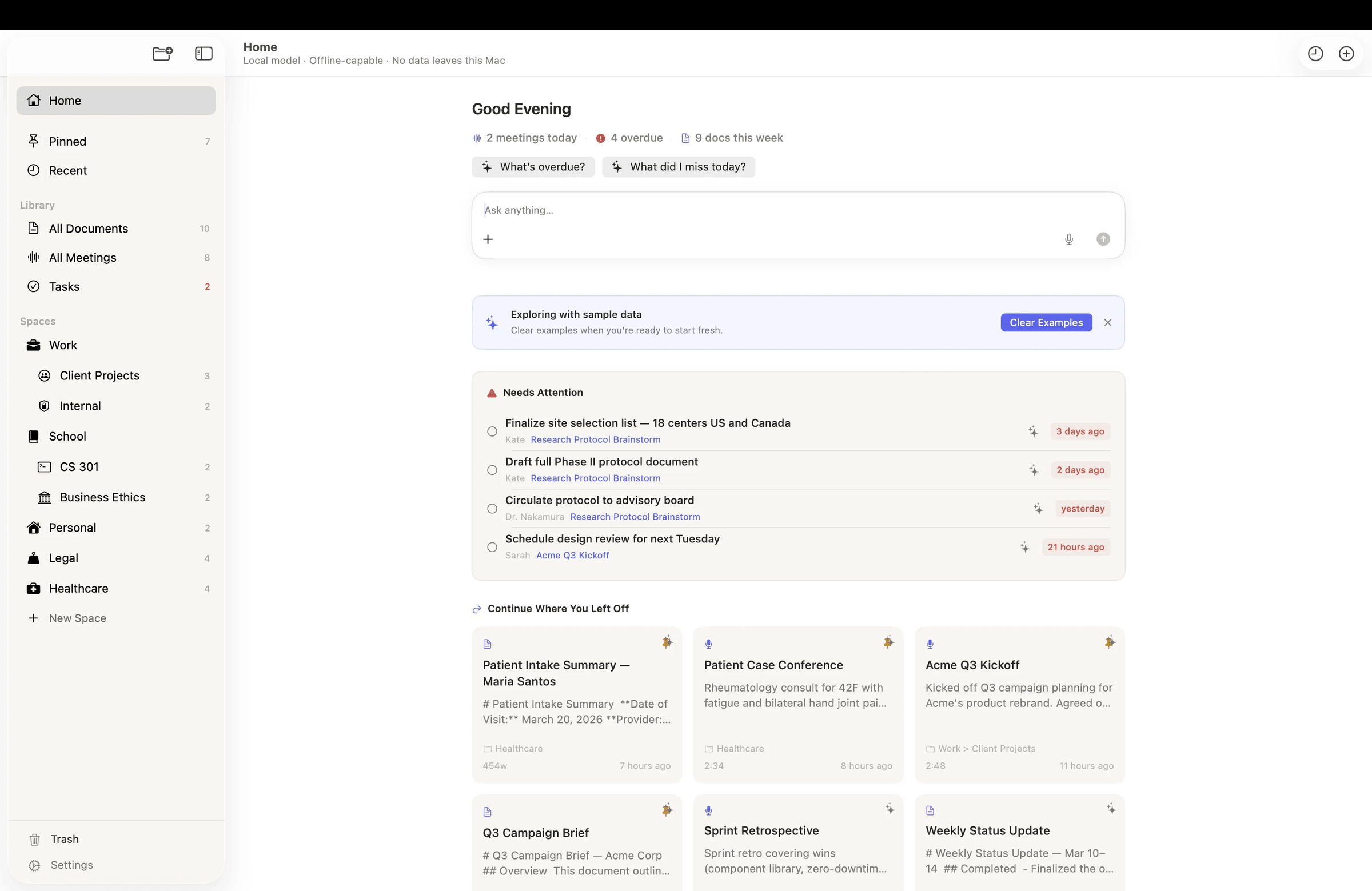
Nested spaces, typed properties, relations and saved views — with on-device transcription, Smart Minutes and an agent across all of it. Nothing leaves your Mac.
First reached July 28, 2026



Download for macOS • Build from Source • Contributing • Request a feature
Introduction
Logue is a workspace. Nested spaces, a block editor, typed properties on any document,
relations that compute their own inverses, [[wiki links]] with backlinks and a graph,
saved views with nested filter groups, and 55 templates. If you have used Notion or
Obsidian, you know the shape.
It also records your meetings — transcribing them, separating the speakers, writing the
minutes, and turning what people committed to into tasks that live in the same workspace
as everything else. And an agent runs across all of it, able to reach your documents,
meetings, calendar, reminders and files, from the app, from a floating panel over whatever
you are using, or from a Chrome extension.
All of it runs on-device via MLX on Apple Silicon — transcription, diarization,
summarization and the agent alike. The only network calls are model downloads, update
checks, and the opt-in features you explicitly enable (web search and external AI
providers). Documents are encrypted on disk, or you can keep them as plain .md files in
a folder you own and edit them in anything else.
This repository contains the full app source: the LLM engine, the recording pipeline, the
agent and its tools, the editor, and the test suites. Bitwize builds
Logue for people who want the full power of AI without handing over their work.
New here? Read CONTRIBUTING.md to get set up and learn the standards
every pull request follows.
Table of contents
- ✨ Features
- 🖼 Screenshots
- 📥 Install (users)
- 🚀 Build from Source
- ⚙️ Configuration
- 📚 Documentation
- 🗺 Project Layout
- 👏 Contributing
- ❓ FAQ
- 📄 License
✨ Features
🏠 One Place to Start
- Home is the assistant — Home and Ask Logue used to be two screens doing one job; they are now a single landing surface. Your day, what needs attention, what to pick back up, and a prompt bar that becomes the conversation without navigating away
- Needs Attention — overdue tasks and loose ends from recent meetings, surfaced before you go looking for them
- Continue where you left off — recent documents and meetings as cards, each able to hand its own question straight to the prompt bar
- Suggestion chips drawn from your workspace — the starter questions are built from what is actually in your library, not a canned list
📁 Documents & Workspace
- Nested spaces — organise documents into spaces and sub-spaces, each with its own icon and colour
- Block editor — headings, lists, quotes, callouts, code blocks, tables, dividers, Mermaid diagrams and LaTeX equations, built on
NSTextViewwith full SwiftUI integration - Typed properties — give any document fields of type text, number, date, checkbox or list, editable in a side panel
- Relations between documents — named links (
belongs to,has,related to) that compute their own inverses, so declaring one side is enough - Wiki links & backlinks — type
[[Document Name]]to link documents; links show the target's real name, are clickable, survive renames, and every document lists what links back to it - Document graph — a Connect panel showing a document's neighbourhood, grouped by how each item connects
- Saved views — filter on title, body, tag, created/modified date, any property, pinned or unfiled, with six comparators, nested all/any groups, relative dates and regex; save any filter as a sidebar entry
- Inbox — triage unfiled documents with keyboard-driven bulk actions
- 55 built-in templates — meeting notes, PRDs, project plans, retrospectives, post-mortems, technical design docs and more, plus your own
- Import markdown files and whole vaults — right-click a space → Import…; a vault arrives as a tree, with subfolders becoming sub-spaces and frontmatter surviving as document properties
- Plain markdown storage (opt-in) — store documents as ordinary
.mdfiles in~/Logueinstead of encrypted storage, and edit them in any editor, track them in git, or point an agent at them. The folder is the storage, not a copy: edits, new files, renames, moves and deletions flow both ways, and folders map to spaces including nested ones. Off by default, and Logue explains the encryption you give up before turning it on
✍️ AI Writing Tools
- Grammar & clarity suggestions — inline AI-powered suggestions with one-tap acceptance
- Tone analysis — detects and adjusts the tone of selected text
- Vocabulary enhancement — suggests richer alternatives, validated against the actual document content
- Rewrite & review panels — rewrite selected passages or get structural feedback on the whole document
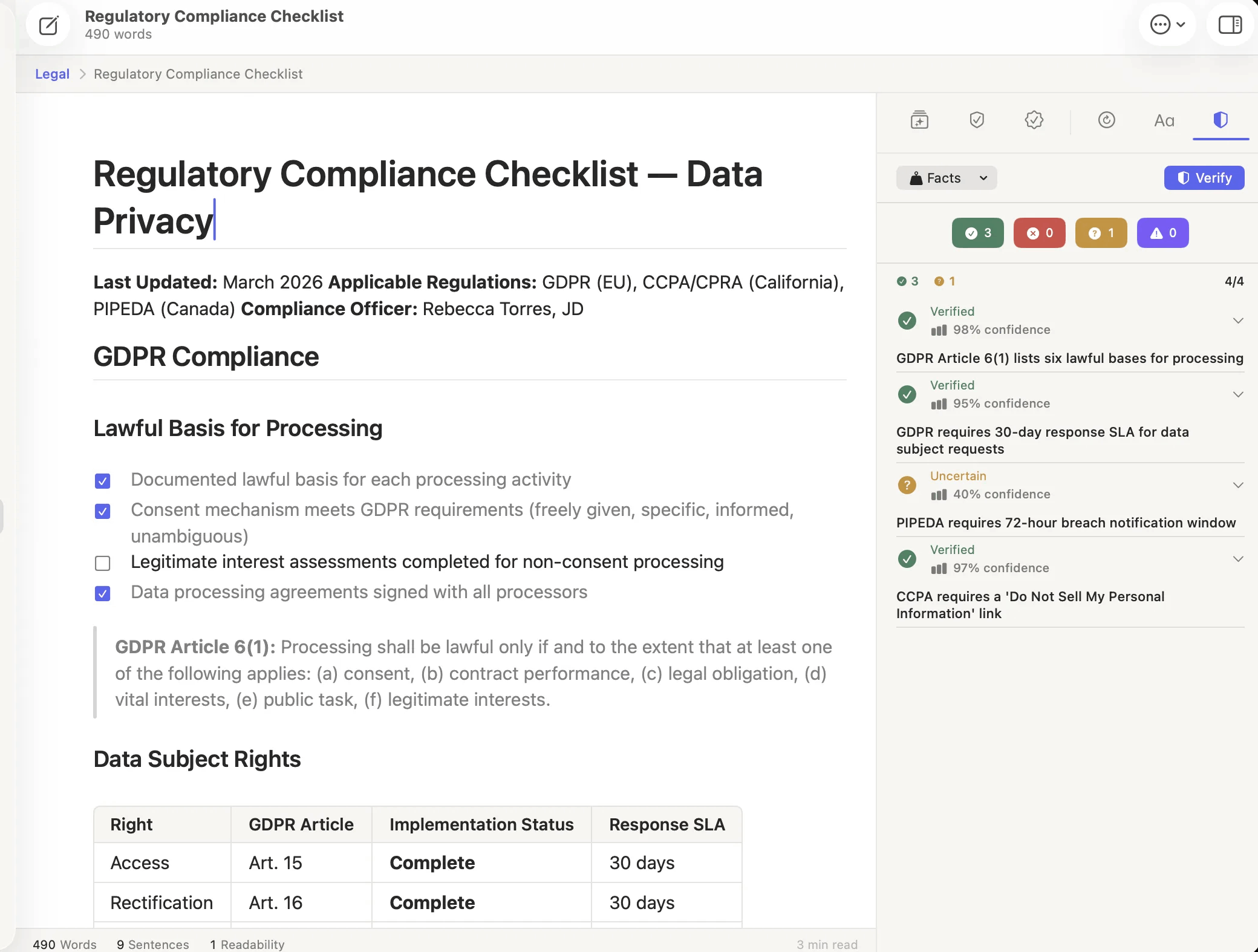
- Fact verification — flags claims that may need a source
- Writing goals — set and track word count, reading level, and tone targets
🎙 Meeting Intelligence
- Real-time transcription — powered by Apple's
SpeechTranscriber(macOS 26+), streaming audio directly with no buffering delays - Speaker diarization — identifies and labels individual speakers using FluidAudio's Sortformer model, with a batch fallback for accuracy
- System audio capture — records mic and system audio simultaneously via ScreenCaptureKit; no meeting bot joins your call
- Recordings that survive the worst — unplug a headset mid-call, mute for ten minutes, or quit the app outright: the recording keeps its place on the meeting's timeline and the transcript is rebuilt when Logue reopens, instead of ending where the trouble started
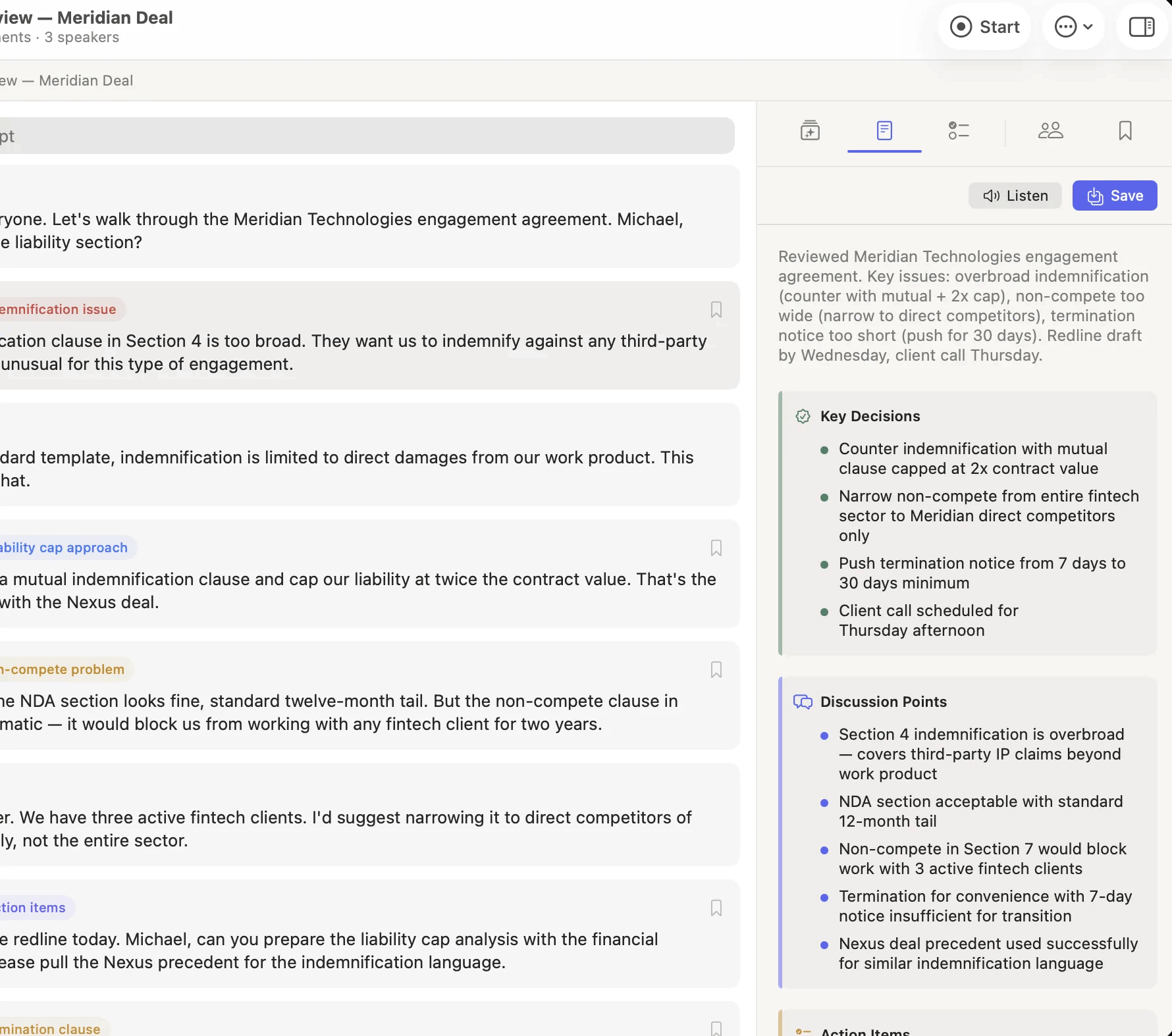
- Smart Minutes — generates structured summaries with key decisions, themes, and follow-ups
- Smart transcript highlights — AI automatically extracts the most important moments; manual bookmarks are always preserved
- Action item extraction — pulls tasks, owners, and due dates from the transcript automatically
- Meeting prep briefing — AI-generated context brief before a meeting starts, based on linked documents and prior notes
- Meeting ↔ Document links — bidirectional links between meetings and related documents with back-link chips in the editor
✅ Tasks & Action Items
- A real task list — action items Logue finds in a meeting land in Tasks with due dates, priorities and tags, alongside anything you add yourself
- Natural-language entry — typing
Send the deck tomorrow #launch !files itself: due date, tag and priority parsed out of the sentence - Triage, not a second list — a meeting's extracted action items are triaged into tasks you can actually work, and the meeting shows which of its items became one
- Filters, search and an overdue badge — All / Pending / Overdue / Today / This Week / Completed, searchable by title, tag and notes, with a live overdue count in the sidebar
🤖 Ask Logue — Agentic AI Chat
- The same assistant in every window — the Command Center island you summon over whatever app you are in runs the same agent as the main window: the same tools, the same memory, the same attachments, web search and Deep Research. Which window you asked from no longer decides what Logue can do, and Open in Logue hands the thread to the main window whenever you want the room to think in
- Multi-step agentic reasoning — powered by LangGraph-Swift; plans, reasons, and executes multi-step workflows
- A real toolbox — documents and spaces, meetings, semantic search, Calendar, Reminders, Contacts, files, email, web search, diagrams, slides and exports, with an approval gate in front of anything destructive
- Streaming responses — live token-by-token output with animated indicators
- Inline diagrams & LaTeX — renders Mermaid diagrams and math expressions directly in the chat thread
- Deep research mode — progress tracking for long-running multi-source research tasks, on either surface
- Tool execution UI — shows exactly what actions the agent took, paired with the results that answered them
- Sources panel — lists every document and meeting the agent consulted
- Persistent memory & history — the agent remembers context across conversations, all searchable
🌐 Logue in Your Browser
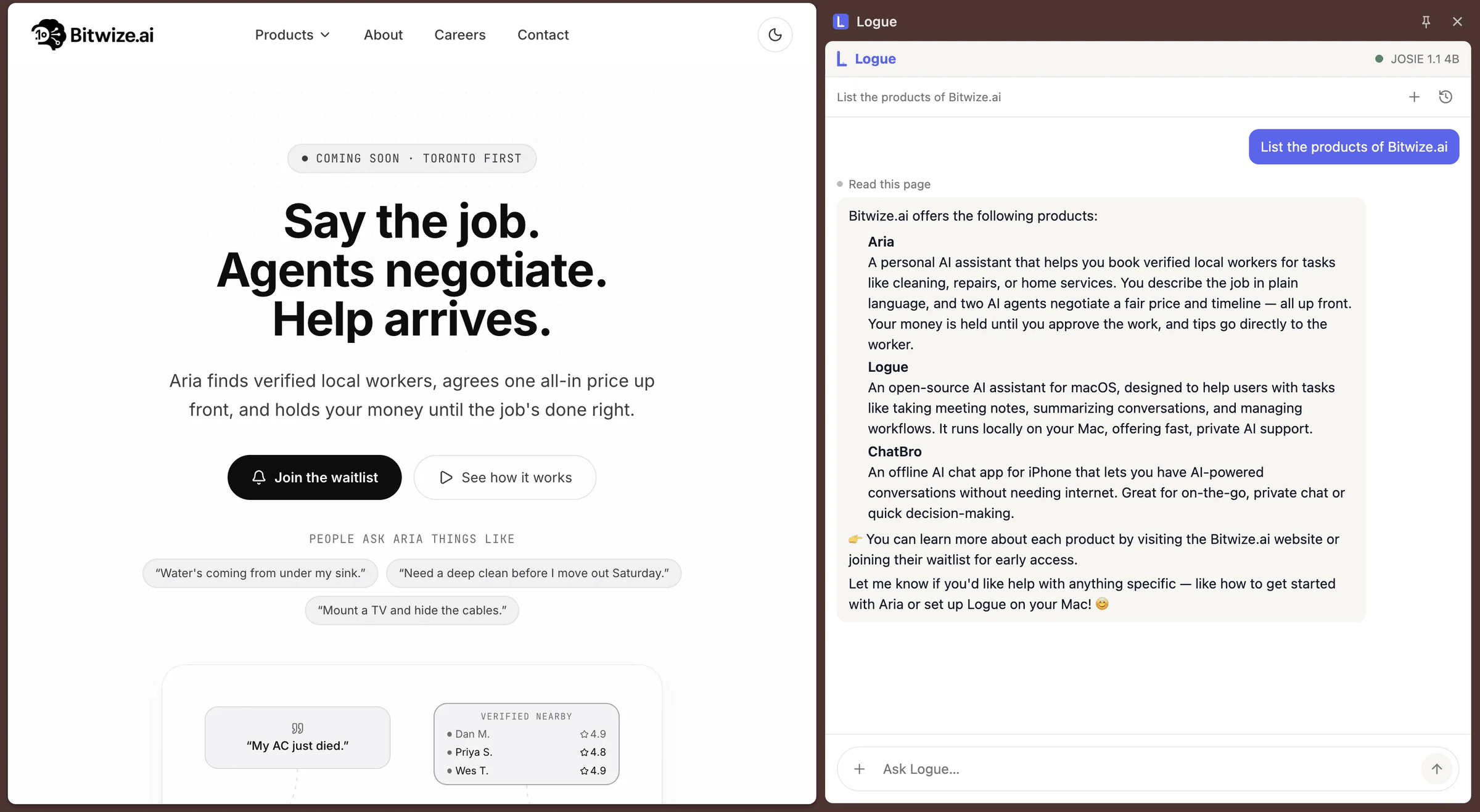
- A Logue extension for Chrome — the same chat and writing tools, in any tab. Ask about the page you are on and it is answered by the model running on this Mac. Install it from the Chrome Web Store
- The page never leaves your machine — the extension talks to Logue over a bridge bound to your Mac's loopback address only, so nothing off the machine can reach it. There is no account and no server in the loop
- Visible and revocable — Home says plainly when the bridge is listening and carries the switch to stop it; the same switch lives in Settings → Privacy
⌨️ Beyond the App Window
- Inline assistant (⌘⌃I) — rewrite, fix or continue text in whatever app you are typing in, via the Accessibility API
- Command Center island — a global hotkey summons the assistant as a floating pill over any app; drop files onto it, and it stays in front while it holds a conversation
- Menu bar companion — start an online or in-person meeting, or open Ask Logue, without switching to the app
🔍 Search & Discovery
- Unified ⌘K search — searches across documents, meetings, and action items in one keystroke, with keyword-centered snippets
- Quick open (⌘P / ⌘O) — a flat, title-ranked list filtered on every keystroke, separate from the ⌘K command palette
- Full-text search (FTS5) — fast, ranked full-text search across all meeting transcripts and document bodies
🔒 Privacy & Security
- On-device AI by default — inference, transcription, and diarization run locally via MLX on Apple Silicon; no content is sent to any cloud service unless you opt into web search or an external AI provider
- AES-256-GCM encryption at rest — meetings, transcripts, audio and documents are encrypted on disk. Documents are the one thing you can opt out of, by turning on plain markdown storage; meeting data is always encrypted
- The Privacy tab lists what leaves this Mac, route by route — including the routes you cannot turn off, rather than describing encryption and stopping there
- No account required — download and start working; there's no sign-up, no telemetry gate, no cloud dependency
- Hardened Runtime, notarized, not sandboxed — Logue ships Developer ID signed and notarized with the Hardened Runtime on. It is deliberately not sandboxed: a sandboxed process cannot be an Accessibility API client, so macOS never lists it under Privacy & Security → Accessibility, which silently disables the inline assistant, global hotkeys and Command Center. Every entitlement exception is documented in the entitlements files
🖼 Screenshots
| Ask Logue — the agent, its tools and its sources | Tasks, triaged out of a meeting |
|---|---|
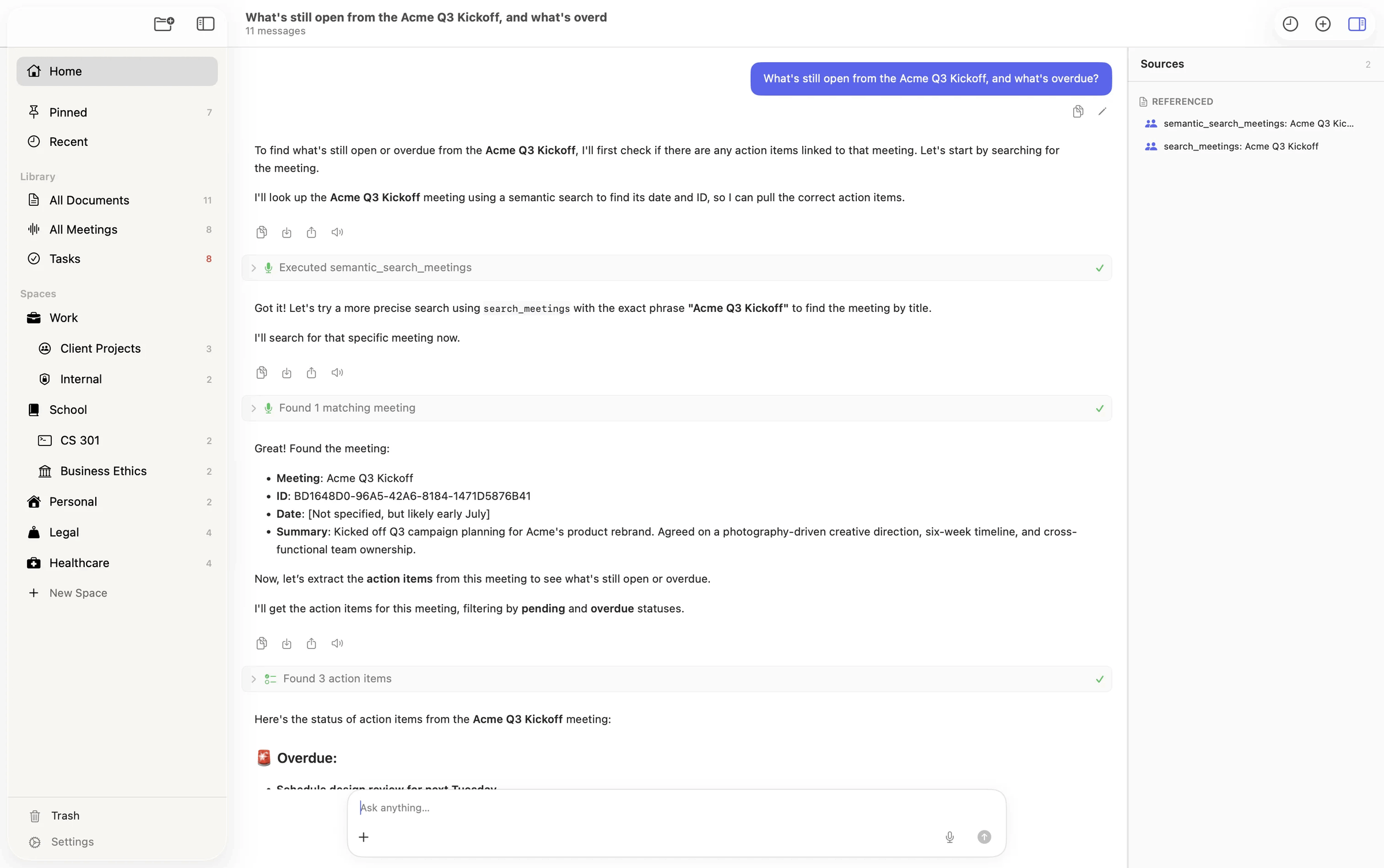 |
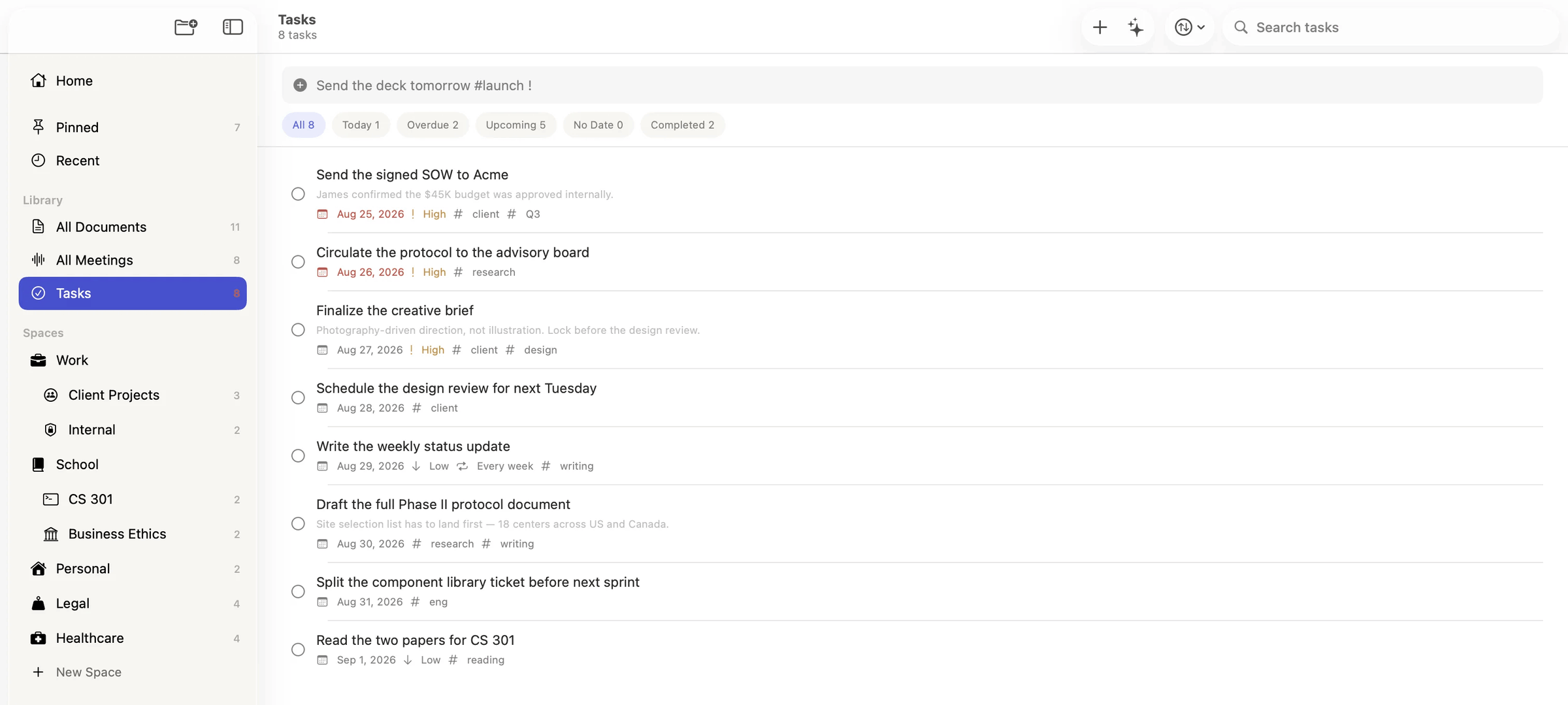 |
| Meeting transcription + Ask Logue | Smart Minutes |
|---|---|
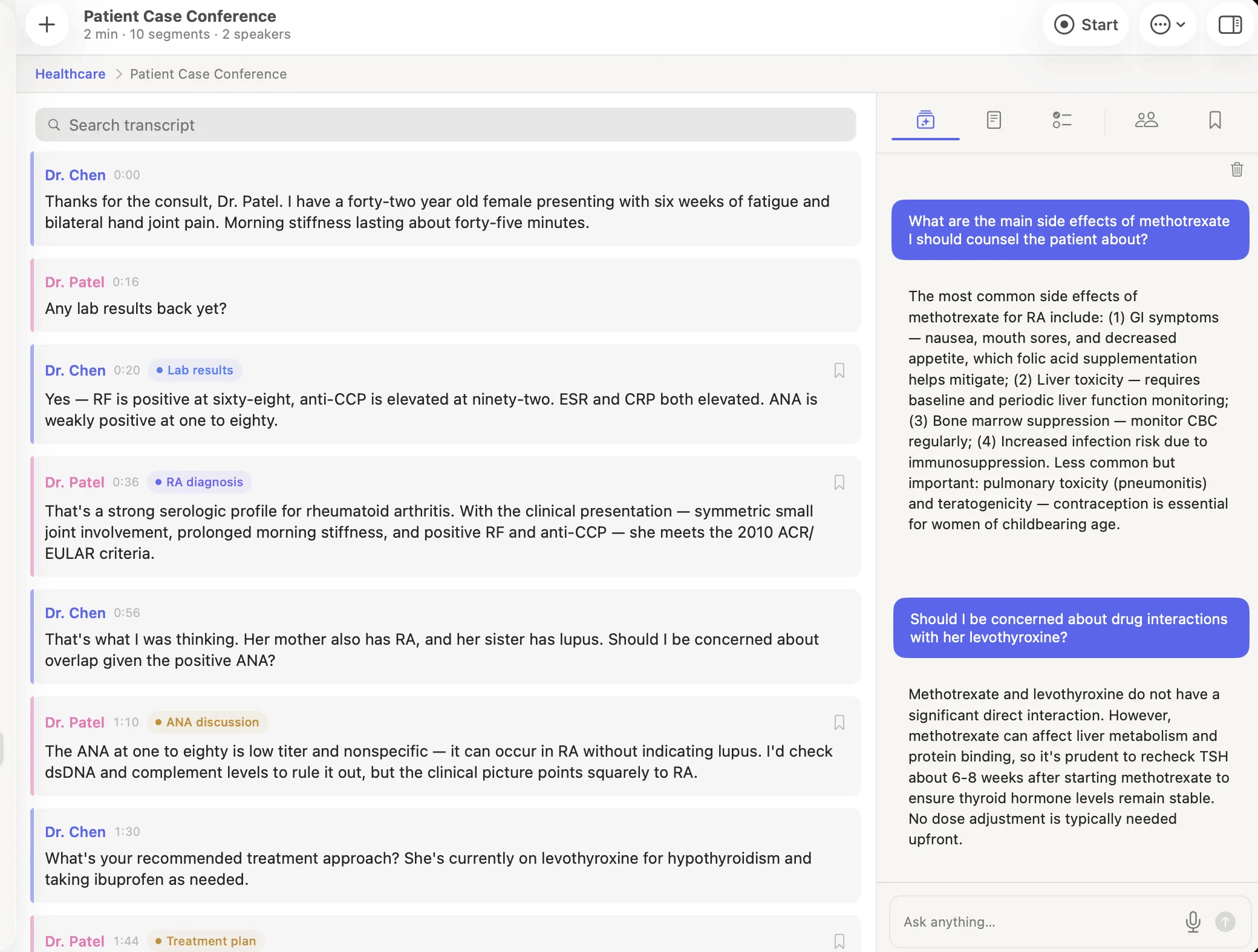 |
 |
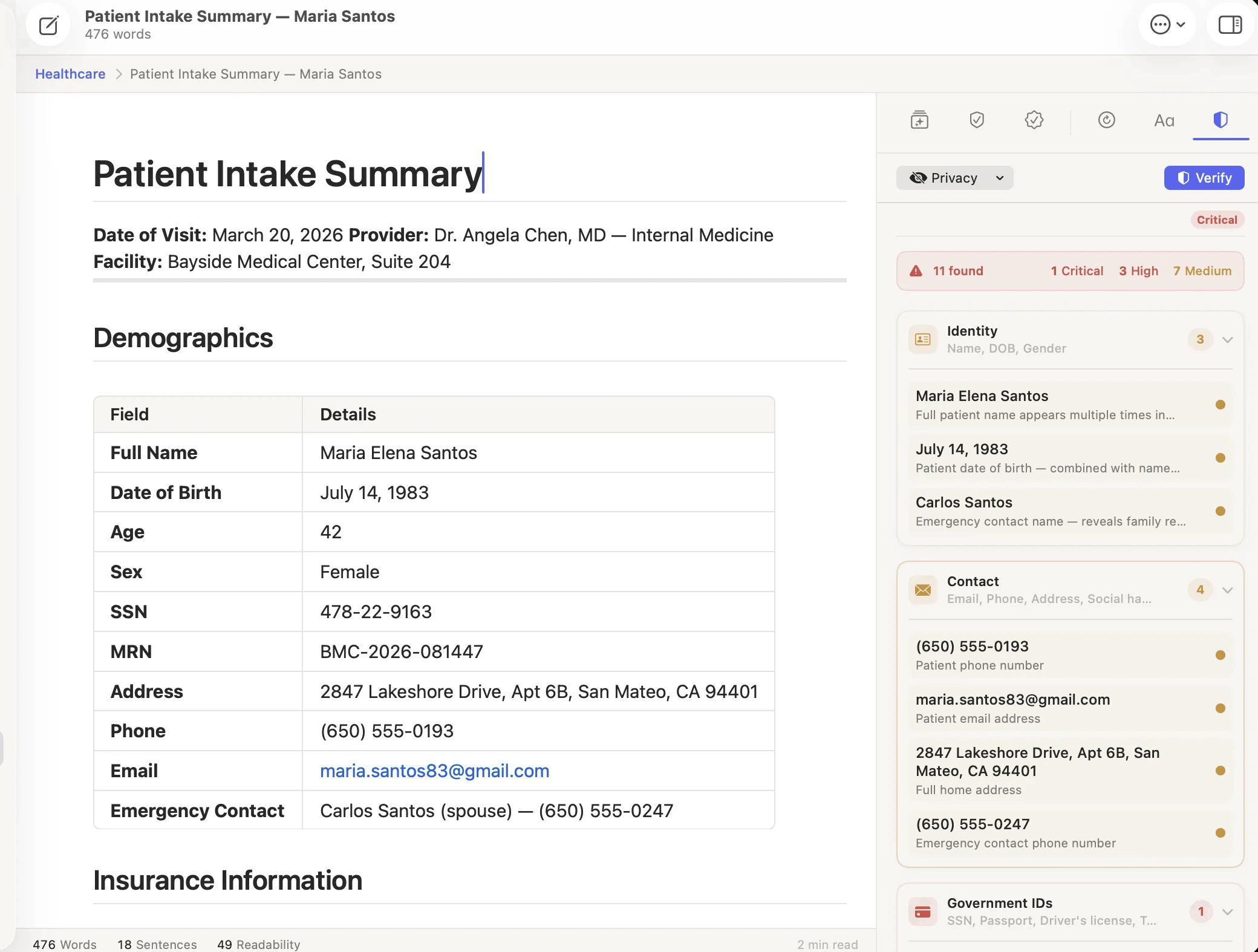
| AI writing editor with fact-checking | On-device PII detection |
|---|---|
 |
 |
| The Chrome extension — the same assistant, answered by the model on this Mac |
|---|
 |
📥 Install (users)
Requirements: macOS 26.0 (Tahoe) or later on Apple Silicon (M1 or newer).
- Download the latest
Logue-<version>.dmgfrom the Releases page. - Open the DMG and drag Logue into your Applications folder.
- Launch it. On first run, macOS Gatekeeper may prompt — right-click the app → Open.
Browser extension (optional). Install Logue for Chrome
to ask about the page you are on. It talks to the Logue app over your Mac's loopback
address — the page never leaves your machine, and there is no account or server involved.
Updates are delivered in-app via Sparkle: Logue checks the GitHub-hosted feed on
launch and prompts you to install new versions. Updating only replaces the app —
your meetings, documents, and downloaded models are stored separately and are never
touched. To update manually, download the newest DMG and drag it over the old app.
🚀 Build from Source
Prerequisites: macOS 26.0+ (Tahoe) on Apple Silicon, Xcode 26+ (it ships the macOS 26 SDK required by SpeechTranscriber), and XcodeGen.
1. Clone with submodules (vendored dependencies live under Vendor/):
git clone --recurse-submodules https://github.com/bitwize-ai/Logue.git
cd Logue
2. Download the Metal toolchain (one-time; required by MLX):
xcodebuild -downloadComponent MetalToolchain
3. Install tooling and generate the Xcode project:
brew install xcodegen swiftformat swiftlint
xcodegen generate
4. Build and run — open in Xcode and hit Run, or from the CLI:
# The signing flags let you build without an Apple Developer account.
xcodebuild build -project Logue.xcodeproj -scheme Logue -destination 'platform=macOS' \
  CODE_SIGN_IDENTITY="-" CODE_SIGNING_REQUIRED=NO CODE_SIGNING_ALLOWED=NO
open Logue.xcodeproj
Already cloned without submodules? Run
git submodule update --init --recursive.
Re-runxcodegen generatewhenever you add/remove.swiftfiles or editproject.yml.
Dev builds use ad-hoc signing with the sandbox off — no Apple Developer account
needed just to build and run. (In Xcode, if the build stops at signing, either
pick your team under Signing & Capabilities or use the CLI flags above.) Full linting and git-hook setup are indocs/dev-setup.md.
⚙️ Configuration
Logue runs fully on-device out of the box — no keys or accounts are required to
build, run, or use it. Everything below is optional and only relevant if you fork
the project or cut your own signed releases. Nothing is hardcoded to secrets: all
credentials are read from your own environment / GitHub Actions secrets.
Optional external AI providers. Alongside the on-device MLX models, you can add
OpenAI-/Anthropic-compatible or OpenRouter/Ollama/LM Studio endpoints under
Settings → Models. Keys are entered in-app and stored in your macOS Keychain —
never in the repo.
Running your own signed builds / releases. To ship notarized builds under your
own identity, set these as GitHub Actions repository secrets (the release
workflow reads them — none are committed):
| Secret | Purpose |
|---|---|
APPLE_TEAM_ID |
Apple Developer Team ID |
APPLE_CERTIFICATE_BASE64 / APPLE_CERTIFICATE_PASSWORD |
"Developer ID Application" cert (base64 .p12 + password) |
APPLE_ID / APPLE_APP_PASSWORD |
Apple ID + app-specific password for notarization |
SPARKLE_PRIVATE_KEY |
EdDSA key that signs auto-update ZIPs |
For a signed fork you'll also want to change, in project.yml:
- the bundle identifier (
PRODUCT_BUNDLE_IDENTIFIER, defaultcom.bitwize.logue); - the iCloud container identifiers (
iCloud.com.bitwize.logue) inLogue.entitlements— these are tied to your Apple
Developer account, so point them at a container you own if you want iCloud sync (or remove
them). The shipped release entitlements don't include iCloud, so signed release builds
aren't affected; - to run your own update channel,
SUFeedURL+SUPublicEDKey.
Building and running unsigned dev builds needs none of the above. Seedocs/dev-setup.md anddocs/SPARKLE_UPDATE_FLOW.md.
📚 Documentation
🗺 Project Layout
Logue/— Main Swift source; SwiftUI + AppKit application target.Logue/Engine/— LLM inference actor, prompt builders, and retry helpers. All AI logic lives here.Logue/Agent/— Ask Logue: the agent graph, run state, routing, Deep Research, and the tools the agent can call.Logue/CrossApp/— Everything outside the app window: the Command Center island, inline assistant, global shortcuts, and menu bar companion.Logue/Services/— Recording pipeline, transcription, speaker diarization, encryption, document storage, the browser bridge, and scheduling services.Logue/Views/— All SwiftUI views: the document workspace and block editor, meetings, Ask Logue, Tasks, Templates, Settings, and more.LogueTests/— Swift Testing suites (@Suite,@Test), including real-inference LLM integration tests.Vendor/— Vendored git submodule dependencies — no remote access required at build time.docs/— Developer setup and release documentation.scripts/— Release build script, Sparkle appcast updater, and export options plist.
👏 Contributing
Contributions are welcome! Read CONTRIBUTING.md for setup and the
security, concurrency, and SwiftLint standards enforced on every pull request. The full,
always-current ruleset the project builds against lives in CLAUDE.md.
Found a bug or have an idea? Open an issue.
❓ FAQ
Have questions about using Logue? Check the FAQ on our site,
or email us at [email protected].
📄 License
Logue is open source under the MIT License — © 2026 Bitwize.
Some vendored dependencies under Vendor/ are licensed separately (MIT, BSD,
Apache-2.0); see each package for details.
Yorumlar (0)
Yorum birakmak icin giris yap.
Yorum birakSonuc bulunamadi