shoulder
Health Uyari
- License — License: MIT
- Description — Repository has a description
- Active repo — Last push 0 days ago
- Low visibility — Only 8 GitHub stars
Code Basarisiz
- rm -rf — Recursive force deletion command in .github/workflows/release.yml
Permissions Gecti
- Permissions — No dangerous permissions requested
Bu listing icin henuz AI raporu yok.
Watch over your agents' shoulder. A TUI that shows Claude Code, Codex, Gemini CLI and opencode work in your project, live.
shoulder
Watch over your agents' shoulder.
See your coding agents work, live. shoulder follows Claude Code, Codex, Gemini CLI and opencode through your project. It shows the file that each agent reads or edits, the diff against your last commit, and the commands that it runs.
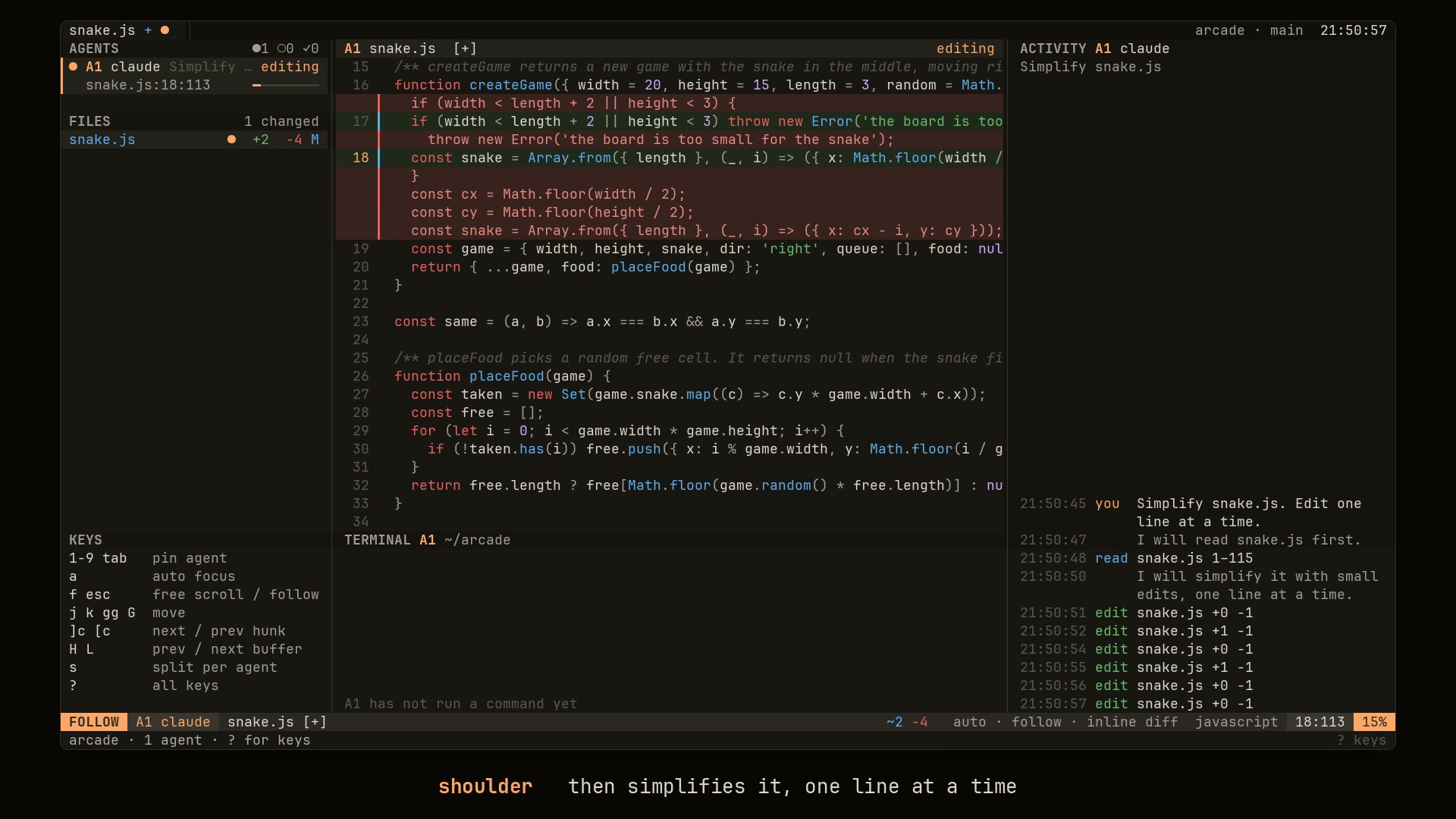
To see the 47-second demo, open the website or download shoulder-demo.mp4.
Install
Install shoulder with Go 1.26 or later:
go install github.com/bjarneo/shoulder@latest
Or download a binary from the latest release. There are binaries for linux-amd64, linux-arm64, darwin-amd64 and darwin-arm64:
curl -sL https://github.com/bjarneo/shoulder/releases/latest/download/shoulder-linux-amd64.tar.gz | tar xz
sudo mv shoulder-linux-amd64/shoulder /usr/local/bin/
To verify a download, compare it with checksums.txt in the release:
sha256sum -c checksums.txt --ignore-missing
Run
Run shoulder in the project where your agents work:
cd ~/Code/myproject
shoulder
Then start your agents in the same project. Each agent shows up within a few seconds. To watch a different project, give its path:
shoulder ~/Code/myproject
shoulder watches the git top level of the directory. It shows the sessions that started there or in a subdirectory.
| Flag | Default | Description |
|---|---|---|
--since |
1h |
Show sessions with activity in this period, for example 30m or 6h |
--splits |
off | Start with one split per agent |
--signs |
off | Show changes as signs in the gutter, without the deleted lines |
--version |
Print the version |
Supported agents
shoulder reads the session logs that the agents already write. You do not configure the agents.
| Agent | Session data | To use another location, set |
|---|---|---|
| Claude Code, with subagents | ~/.claude/projects/ |
CLAUDE_CONFIG_DIR |
| Codex | ~/.codex/sessions/ |
CODEX_HOME |
| Gemini CLI | ~/.gemini/tmp/ |
GEMINI_CLI_HOME |
| opencode 2.x | ~/.local/share/opencode/opencode.db |
XDG_DATA_HOME |
shoulder only reads. It does not send input to an agent, it does not change files, and it does not connect to the network. It opens the opencode database read-only.
Screen
- The left panel lists the agents and the changed files. A dot next to a file shows which agent is in that file now.
- The center pane shows the file of the focused agent. A cursor and a label, such as
● A1 editing, show where the agent works. - In the inline diff, deleted lines show in red above the new lines. Added and changed lines have a green background. Press
dto show the changes as signs in the gutter. - The terminal pane under the file shows the commands of the focused agent and their output.
- The right panel shows the activity log of the focused agent: reads, searches, edits, commands, replies and prompts.
- Press
sfor the split layout. Each agent gets a pane with its file and its activity log.
The bar under each agent shows how full its context window is.
Auto focus
Auto focus is on when shoulder starts. The view jumps to the work of the agents:
- When an agent edits a file in the project, the focus goes to that agent and its file.
- When the focused agent finishes, the focus goes to an agent that still works in the project.
shoulder waits at least 1.5 seconds between two jumps, so agents that work at the same time do not make the view flicker. In free scroll, the view does not jump.
To keep the focus on one agent, select it with 1 … 9, tab or a click. This pins the agent and turns auto focus off. To turn auto focus on again, press a. The status line shows auto or pinned.
Agent states
●The agent runs a tool or writes a reply.○The agent waits for you. It asked a question, or a tool call needs your approval.✓The turn ended. The state isidlewhen the agent had no activity for 10 minutes.
Gemini CLI logs when a tool call waits for approval. For the other agents, shoulder assumes approval when a file tool has no result after 20 seconds.
Keys
| Key | Action |
|---|---|
1 … 9 |
Pin an agent and follow it |
tab, shift+tab |
Pin the next or the previous agent |
a |
Turn auto focus on or off |
f |
Toggle follow and free scroll |
esc |
Go back to follow |
j, k |
Move the cursor |
ctrl+d, ctrl+u |
Move half a page down or up |
gg, G |
Go to the top or the bottom of the file |
]c, [c |
Go to the next or the previous change |
H, L, gT, gt |
Open the previous or the next file tab |
s |
Toggle the follow layout and the split layout |
d |
Toggle the inline diff and the signs |
R |
Read all sessions again |
? |
Show all keys |
q |
Quit |
You can also click an agent, a file, a tab or a split pane.
Colors
shoulder uses the colors of your terminal theme. Text uses the default colors and the 16 ANSI colors, so it changes when you change the theme.
The panel shades and the line highlights are mixed from the colors that the terminal reports. shoulder asks the terminal again every 3 seconds, so a theme change shows while shoulder runs. If your terminal does not report its colors, the panels use the terminal background and the change signs show the diff.
In tmux, shades show correctly only when tmux supports true color. To turn it on, add set -as terminal-features ",*:RGB" to your tmux configuration.
Diff baseline
In a git repository, shoulder compares each file with HEAD. Outside git, it compares each file with the first content that it read.
Limits
- shoulder reads opencode 2.x. It does not read the older
parttables of opencode 1.x. - For Claude Code, Codex and opencode, the approval state is an estimate. See Agent states.
- The binaries are for Linux and macOS. shoulder is not tested on Windows.
Develop
go test ./...
go build -o shoulder .
The code has three packages:
internal/watchreads the session logs of each agent and turns them into one event model.internal/reporeads the project files and compares them with the last commit.internal/uidraws the TUI with Bubble Tea.
To record the demo video again, run demo/record.py. The script header lists what it needs.
License
MIT. See LICENSE.
Yorumlar (0)
Yorum birakmak icin giris yap.
Yorum birakSonuc bulunamadi