hermes-bot-forge
Health Gecti
- License — License: MIT
- Description — Repository has a description
- Active repo — Last push 0 days ago
- Community trust — 101 GitHub stars
Code Gecti
- Code scan — Scanned 12 files during light audit, no dangerous patterns found
Permissions Gecti
- Permissions — No dangerous permissions requested
Bu listing icin henuz AI raporu yok.
Hermes Agent plugin: say 'make me a <role>' and your agent builds a complete, working Bot — name, face, SOUL.md, memory, tools, skills, routines, gateway.



Hermes Bot Forge
Describe the job. Reuse what fits; provision a new Bot when it needs its own persistent role.
hermes plugins install bot-forge
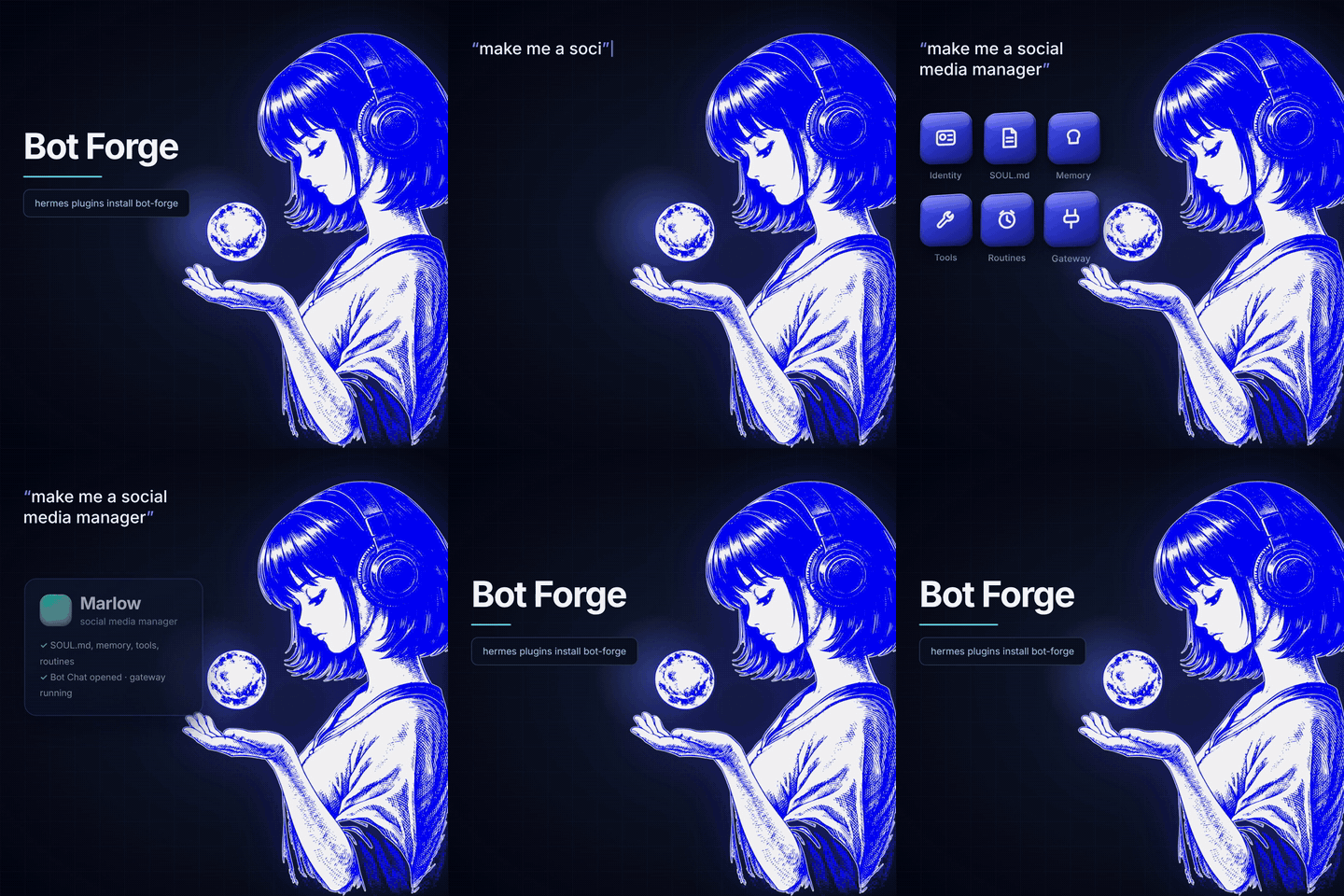
Bot Forge is a Hermes Agent plugin that lets any agent spawn a complete, working Bot Mode Bot from one sentence — no New Agent dialog, no setup:
| The new Bot gets | |
|---|---|
| 🪪 Identity | a unique, Proper Case name and a blob face in the Bots roster |
| 📜 SOUL.md | written by your agent for that one job |
| 🧠 Memory | starter facts, plus what Hermes already knows about you |
| 🛠️ Tools & skills | file, web and browser, plus what the role needs |
| ⏰ Routines | optional cron jobs that post into its Bot Chat |
| 💬 Bot Chat | introduction attempted; sign-in may still be needed |
| 🔌 Gateway | live host serving checked; a hot-rescan is requested when needed |
Creation failures attempt cleanup of that Bot. Sign-in and gateway readiness may remain
pending; the result says which. A team is not an all-or-nothing transaction.
Does this job need a new Bot?
For a generic job or team request, the existing bundled skill asks the caller to inspect the
roster and relevant skills/routines first. Reuse an existing owner, a skill, temporary delegation
or a routine when sufficient. Create a new profile for a justified persistent responsibility,
state or configuration difference, not just a new specialty. Profiles are not security sandboxes.
This is advisory guidance, not a deterministic classifier or a new planning service. Explicit
authorized profile creation remains direct, with the existing duplicate and safety checks.
The same decision applies to each proposed team member.
Demo
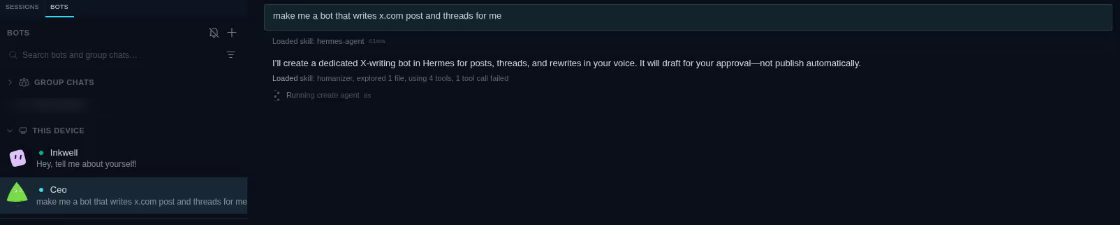
1. Ask any Bot for a new teammate. It checks the roster, designs the Bot and calls create_agent — the new Bot (Inkwell) appears in the roster while it works:
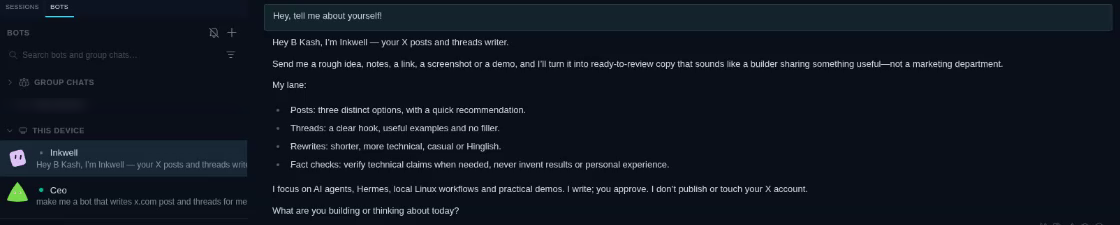
2. The new Bot is already alive. Its Bot Chat opens with it introducing itself:
Onboarding
1. Requirements
- Hermes Agent 0.21+ with the
hermesCLI on yourPATH - Hermes Desktop for Bot Mode (the CLI works too — Bots are profiles)
- Linux and macOS are tested. Windows is not supported. Nobody runs the suite on Windows and
no release has been tried there. The reports that do come from Windows have been real breakage —
a manifest the doctor could not read (#41),
a plugin that would not load on a clean install (#38).
Gateway services, sandboxes and Bot Screen are skipped there by design. Creating a Bot from the
CLI may well work — it is simply not a claim this project can make yet. Fixes are welcome
PyYAML is installed for you: plugin.yaml declares it under python_dependencies, andhermes plugins install puts it in the environment the plugin runs in, re-applying it after
later updates. Nothing to add to your own environment; --no-deps skips it if you manage
Python packages yourself.
2. Install
hermes plugins install BkashJEE/hermes-bot-forge
3. Enable it where you chat
Plugins are opt-in per profile. Enable Bot Forge on each profile that should be able to create Bots — your main profile, and any "manager" Bot:
hermes plugins enable bot-forge              # the default profile
hermes -p ceo plugins enable bot-forge       # a Bot named "ceo"
If enable asks to grant tool overrides, answer no — Bot Forge doesn't override anything.
4. Restart Hermes
hermes gateway restart
# With independent legacy services, restart their owners instead; do not create new services here.
Then quit and reopen Hermes Desktop.
5. Check it's loaded
hermes bot-forge-doctor
It tells you exactly what is missing — a profile you forgot to enable, a gateway still running the old code (the usual reason the tools never appear), a model that needs a per-Bot sign-in, and which sandbox backends this machine can run. Or, the long way:
hermes plugins list | grep bot-forge
Or ask your agent: "what tools do you have for creating agents?" — it should name create_agent, update_agent, list_agents and the rest.
6. Make your first Bot
Open Bot Mode, click the Bot you enabled, and type:
make me a bot that writes x.com posts and threads
Wait 1–3 minutes. The reply looks like:
🧪 Inkwell is alive — find it in Bot Mode.
job: turns ideas, links and demo notes into X posts and threads
brain: gpt-6-astra   tools: browser, file, web, …
Click the new Bot — its Bot Chat already has its introduction.
7. Choose how new Bots sign in
Unless given an explicit route, new Bots retain the existing model inheritance behavior.create_agent.model, create_team.lead.model and create_team.members[].model accept:
{"default": "<model-id>", "provider": "<provider-id>"}
Optional base_url and api_mode travel with that route. The complete block is applied
before the first inference, without carrying over the creator's provider transport settings.
Creation-tool calls reject missing/empty names or providers and unsupported fields before
spawning; credentials must never be supplied here. Omit model to inherit, rather than {}.
This does not select tiers automatically or authorize changing providers/budgets. An omitted
team-member route inherits the calling profile as before, not the newly configured team lead.
Whether the selected model can be used right away depends on the provider:
| Your model's provider | What happens | What to do |
|---|---|---|
| API key (OpenRouter, OpenAI API, Anthropic API, …) | Works immediately — keys are copied to new profiles | Nothing |
| Local model (llama.cpp, Ollama, LM Studio) | Works immediately | Nothing |
| OAuth sign-in (ChatGPT/Codex, Claude subscription, …) | The Bot is created; the result tells you it needs a sign-in | Run the command it gives you once per Bot, or set a fallback_model, or see share one login below |
Shared operating policy
One file — ~/.hermes/shared/BOT-POLICY.md — holds the rules that apply to every Bot:
spend nothing without asking, never paste a secret, report what you didn't check.create_agent inlines it into each Bot's SOUL.md, so one edit reaches every Bot on the
next build instead of being pasted into N copies that drift apart. The file is created with a
short starter policy on first use; edit it to taste.
$EDITOR ~/.hermes/shared/BOT-POLICY.md   # edit once
check_policies                            # → which Bots are now stale
check_policies reports stale (built before your edit) and no_shared_policy (opted out),
read-only. A Bot can opt out with "shared_policy": false in its spec. It audits only Botsforge created, so every row it prints is one you can act on.
To bring a stale Bot up to date, run update_agent with refresh_shared_policy: true — it
re-injects the policy in place and keeps the Bot's identity and persona. (create_agent
refuses a name that is already taken, so re-running it is not how you refresh an existing Bot.)
It refuses a Bot whose SOUL.md has no content of its own, rather than handing one house rules
and no identity.
A policy edit is compared by its meaning, not its bytes: comments, line endings, bullet
markers and the indentation shared by a whole block are ignored, but a sub-bullet added,
removed or re-nested is a real change and shows up as drift.
This is prompt text, not enforcement: the policy sits in the Bot's system prompt and the model
is asked to follow it, exactly as it is asked to follow the rest of SOUL.md. Nothing blocks a
tool call that breaks a rule. It borrows the discipline from
steipete/agent-scripts — one canonical file,
change once — but not its symlink mechanism, because a symlinked SOUL.md would give every Bot
the same identity, and a pointer line would put the policy outside the system prompt. The
reasoning, and the tests that hold it, are in docs/shared-policy.md.
Settings
Set per profile under plugins.entries.bot-forge.settings in that profile's config.yaml:
plugins:
  entries:
    bot-forge:
      settings:
        inherit_model: true
        fallback_model: {}
        probe_local_models: false
        install_gateway: true
        journal_enabled: true
        suggest_connectors: true
        allow_delete: false
| Key | Default | Meaning |
|---|---|---|
inherit_model |
true |
Inherit the calling profile's model unless an explicit creation route is supplied. |
fallback_model |
{} |
Model to switch a Bot to when its inherited model can't sign in, e.g. {default: qwen3, provider: custom, base_url: http://127.0.0.1:8080/v1}. |
probe_local_models |
false |
With no fallback_model, look for a local llama.cpp / Ollama / LM Studio server to fall back to. |
install_gateway |
true |
Verify live host serving and request a hot-rescan if needed. Install a dedicated service only for an explicitly standalone profile. Skipped on Windows. |
journal_enabled |
true |
Give new Bots a private, append-only work journal for outcomes, evidence and next steps. |
allow_delete |
false |
Let delete_agent work at all. Off by default — an agent should not be able to destroy a Bot on its own. |
backup_before_delete |
true |
Export the Bot to a .tar.gz before deleting it, so it can be restored. If the backup fails, the delete is refused. |
allow_secrets |
false |
Let share_agent write / import_agent accept a template the secret scanner marked BLOCK. Operator-only; the model cannot pass it as an argument. |
suggest_connectors |
true |
After building a Bot, suggest matching servers from Hermes' MCP catalog. Suggestion only — connecting an account always needs you. |
inherit_plugins |
[] |
Plugins from your main profile to copy into every new Bot, by name, or ["all"] for every plugin enabled there. Off by default — see Plugins in a Bot. |
Plugins in a Bot
A new Bot is a clone of your main profile's config, and that config lists the plugins you have enabled — but Hermes keeps plugin directories per profile and profile create --clone-from does not copy them, so a plugin you run on your main profile is enabled but inert in every Bot: named in its config.yaml, never loaded. Nothing breaks, so nothing said so. That is the right default — a Bot should get only what it was asked for — and now it is a choice:
inherit_plugins: ["my-style-plugin"]in the settings above carries those plugins into every new Bot;["all"]carries every plugin enabled on your main profile.create_agent(..., inherit_plugins: [...])does it for one Bot, andupdate_agent(name, inherit_plugins: [...])for a Bot you already have.check_agentsflags a Bot whose config names a plugin that is not installed in it.
A copied plugin is enabled in the Bot's config and gets its own plugin-data. Bot Forge itself is never copied into a Bot (a Bot must not be able to create or delete Bots), the reaction companion is installed on its own path, and no .env, key or credential file travels with a plugin — a plugin that needs a secret needs you to set it in that Bot, once.
Optional: share one login across Bots
The plugin itself never touches credentials. If you want OAuth models to work in new Bots with no per-Bot sign-in, there is an unsupported helper you run yourself:
python extras/share_login.py <bot-name>
It copies the root profile's auth.json into an independent file with permissions 0600. It never copies or links auth.lock, and removes a destination lock symlink left by the older helper. Existing destination credential links are replaced without writing through them; linked profile directories are refused. Each selected Bot receives every provider login in the copied file. OAuth refresh tokens can still compete at the provider, so signing each Bot in independently is recommended. POSIX only. Remove the copied <profile>/auth.json to discard that Bot's copy.
Tools
Fifteen tools, all driven by plain requests in chat:
| Tool | Say this | What it does |
|---|---|---|
create_team |
"set me up a content team" | Builds a whole team at once: a lead plus up to 6 specialists, each reporting to it. The lead learns the roster and delegates. |
teach_agent |
"remember how I write my weekly report" | Saves a procedure as a skill the Bot keeps and loads when the job comes up. |
create_agent |
"make me a bot that writes X posts" | Builds a Bot: name, face, SOUL.md, memory, tools, skills, routines, approvals, Bot Chat intro, gateway. |
update_agent |
"make Inkwell funnier", "give Atlas the browser" | Edits a Bot in place — persona, name, description, memory, tools, skills, model, face, routines. Backs up what it replaces. |
copy_agent |
"make another one like Inkwell, for LinkedIn" | Duplicates a Bot under a new name (no chat history, no routines). |
list_agents |
"what bots do I have?" | Roster with description, model, routine count and hidden state. |
check_install |
"the tools aren't showing up" | Checks the install itself: enabled profiles, whether each gateway runs the current code, Bot Mode, model sign-in, sandbox backends. |
check_agents |
"anything waiting on me?" | Leads with waiting_on_you — every Bot blocked on something only you can do, with its age. Then the read-only health check: routines that run too often (and their cost in runs/day), paused or never-run routines, unused Bots, stopped gateways, a persona missing its name or approvals. |
check_policies |
"are my bots up to date with the house rules?" | Read-only. Compares every Bot's inlined shared operating policy against ~/.hermes/shared/BOT-POLICY.md and reports which are stale or have none. |
agent_journal |
"what did Inkwell work on this week?" | Enables, appends to, and reads a Bot's dated work journal. Entries capture outcomes and evidence, never credentials or private reasoning. |
ask_agent |
"ask Inkwell for 3 post ideas" | Asks another Bot a question and returns its reply. |
handoff_agent |
"pass this to Nova", "let Scout take the research" | Hands a task and its context to another Bot, which then owns it. Runs in that Bot's own Bot Chat; comes back as ✅ done / ✋ needs you / ⚠️ blocked plus the reply. Both Bots journal it. If the receiving Bot declared what it needs before it can start, a handoff that does not carry it is refused before it is sent. |
share_agent |
"share Inkwell with a friend" | Writes a readable .botforge.json template — persona, its own memory, tools, skills, routines. Never chat history, facts about you, or keys, and secret-scanned (CLEAN / WARN / BLOCK). mode: backup makes a full private backup instead. |
import_agent |
"import this bot" | Builds a Bot from a .botforge.json template (scanned again), or restores a backup. |
hide_agent |
"hide Inkwell from the list" | Hides or unhides it in the roster. It keeps running. |
delete_agent |
"delete Inkwell" | Permanent. Off unless you enable it, and it must repeat the Bot's exact name. |
Start from a proven template
Five starters, modelled on the most-used Grok Bot patterns:
| Template | Bot | What it does | Routine |
|---|---|---|---|
chief-of-staff |
Marshal | Routes work to specialists, keeps open loops, pings you only when you must act | 7:00 brief, 18:00 handoff (weekdays), Friday 16:00 review |
morning-brief |
Dawn | Calendar, what's waiting on you, 3 headlines — drafts only | 7:30 weekdays |
research-digest |
Scout | What changed on your topics in the last 24 hours, sourced | 8:00 daily |
competitor-watcher |
Lookout | Reports real changes on competitors' pricing, product and hiring pages | 9:00 weekdays |
engineering-outer-loop |
Foreman | Failing checks, stuck PRs, new issues → small tasks. Never writes or merges code | 9:30 weekdays |
make me a chief of staff from the template
Any field you give overrides the template's, so "a morning brief bot called Sol that also covers crypto" works.
Bots that hand work to each other
Marshal, get Thursday's launch thread written
Marshal doesn't write it. It calls handoff_agent with the task and everything it already knows — audience, the hook, where the notes are — and Inkwell takes it from there, in Inkwell's own Bot Chat, where you can watch. The result comes back as a state, not a paragraph to interpret:
| Inkwell's reply began with | so Marshal reports | |
|---|---|---|
completed |
✅ | done, and where the work is |
needs_you |
✋ | what you have to approve — and it's already in what's waiting on you |
blocked |
⚠️ | what it needs — also in the waiting queue |
scheduled |
⏳ | when it will run |
The state is read from the acknowledgement every Bot Forge Bot already starts its replies with, so no second convention is needed. Both Bots journal the handoff ("Handed off to Inkwell", "Handoff from Marshal"), the record lives with the Bot that owns the work, and check_agents lists every handoff still in flight — so "where did that task go?" has an answer, even a week later.
Only words cross between Bots. No file is copied, no credential or environment travels, and the task and context are secret-scanned before anything is sent: a key pasted into the context is refused with the reason, and nothing runs.
A team in one sentence
set me up a content team
first considers what already exists. Only justified, authorized new profiles go intomembers; use lead_name to reuse an existing lead. The tool does not enroll arbitrary
existing members. If no new profiles are needed, no team creation call is needed.
For a multi-Bot creation, each new member gets its own role and optional model route.
Failed members are cleaned up individually; successful members remain. Inspect each
member's warning and gateway, rather than assuming the whole team is online.
A Bot that tells you where your request stands
Every new Bot starts its reply with one emoji for the state of your request:
| 👀 | picked it up, working on it |
| 💬 | answering now |
| ✅ | done |
| ✋ | needs your approval before going further |
| ⚠️ | blocked, or something failed |
| ⏳ | scheduled for later |
In Hermes Desktop a reaction lands on your own message as a tapback, the moment you send it — and it fits what you asked: 🔧 for a fix, 🔎 for research, ✍️ for writing, 📊 for numbers, ⏳ for something scheduled, 📋 for a review, 🛠️ for something to build, 💬 for a question, 👀 when it can't tell. Then it becomes ✅ / ✋ / ⚠️ for how the turn ended. The reaction is placed by a hook, not by the model — and because a Hermes hook only runs in the profile running the turn, that hook ships inside each Bot as a tiny companion plugin (bot-forge-marks: two hooks, no tools, so a Bot never gains the power to create or delete Bots). New Bots get it automatically; for a Bot made before it, ask an agent to "turn on reactions for ". It needs Settings → Appearance → Message Reactions on, and switches off with ack_tapback: false. check_install reports which Bots can react and which cannot.
Everywhere else, the state rides on the reply: one emoji, at the very start, then the answer as normal — it is never the whole reply. Because it rides on the reply itself, it works the same in Hermes Desktop, an editor client, the CLI, a cron run or a messaging platform.
This deliberately does not use Hermes' emoji tapbacks:
react_to_messageis documented as a human touch, "never as a status signal", and a Bot told to do both follows neither.
Turn it off for a Bot with create_agent(ack_reactions=false), or on for an older Bot:
turn on acknowledgements for Inkwell
Give a Bot its own computer
A Bot with terminal or code_execution runs commands on your machine by default — the same weakness people hit with other bot platforms, where every Bot shares one computer and one set of logins. Ask for a sandbox instead:
make me a coding bot, sandboxed
create_agent(sandbox="docker") puts that Bot's shell in its own container: it cannot read your files and cannot block the other Bots. singularity and apptainer work too. If the backend is not usable on this machine, the call is refused before any Bot is created, with the reason. check_agents reports each Bot's sandbox and flags shell-capable Bots that run on the real machine.
A journal for work that survives the chat
Every new Bot gets a private journal/YYYY-MM-DD.md log. After meaningful work it records a short factual entry:
- what it tried and the observable outcome
- evidence such as a file, command, link or measurement
- blockers and the next step
Routine conversation is skipped. Credentials, facts unrelated to the Bot's job, private reasoning and hidden chain-of-thought are refused. Journals stay local, are excluded from shareable .botforge.json templates, and are included only in explicit private backups.
For a Bot created before this feature:
enable journaling for Inkwell
Then ask "what did Inkwell work on this week?" to read recent entries.
What's waiting on you
A blocked Bot writes the blocker in its journal and then goes quiet — so blockers pile up unseen, one Bot at a time. Ask once:
anything waiting on me?
check_agents answers with waiting_on_you: every unresolved blocked or failed entry across every Bot, newest first, each with the Bot's name, what it needs and how many days it has sat there.
2 waiting on you — Marlow: Need the Stripe API key to pull invoices; Nova: Weekly post draft could not publish
The item closes itself when the Bot records the same piece of work as completed — nothing to tick off by hand.
It knows where it landed
A new Bot normally arrives knowing its job and nothing about your machine, so the first thing you do is explain your own workspace to it. Bot Forge reads that once, at birth:
make me a social media manager
🧪 Quill is alive — find it in Bot Mode.
fits: x-content — X Content Studio (~/work/x-content)
already here: social-media, media-use
heads up: Nova already works in this territory
It scores the Bot's own SOUL.md and one-job against the directory Hermes is running in, the repos under it, and this install's Bots, skills and plugins — then writes the answer into the Bot's memory, so it knows on turn one and never researches your machine again. Deterministic word matching, not a model call: no tokens, no waiting, no questions.
It also refuses to build a Bot you already have. If an existing Bot's job covers the new one, create_agent stops and names it, so a roster of twenty Bots doesn't quietly become a roster of twenty overlapping ones.
Read-only and shallow — directory names, git remotes, and the head of a README / AGENTS.md / CLAUDE.md. Never your source files, never your home directory unless you point workspace_roots at it, and anything that looks like a credential never reaches a Bot's memory. Off with workspace_survey: false.
A blocked Bot tells you
The waiting queue answers when you ask. This is the other half: when a Bot records a blocker, it emails you.
[Bot Forge] Marlow is blocked — Need the Stripe API key

Marlow stopped and needs you.

  Need the Stripe API key

Invoice sync cannot run without a read-only key.

Next step: add the key, then rerun

Reply to Marlow in Hermes — this address does not take replies.
It uses the email Hermes already has (EMAIL_SMTP_HOST / EMAIL_ADDRESS / EMAIL_PASSWORD), so there is nothing new to configure and no new credential anywhere. Set notify_email to send somewhere other than your own mailbox, or false to switch it off.
Outbound only, on purpose. The recipient is resolved from your config and nothing else — never from a tool call, a persona, or anything a model wrote. A Bot can write to your address and no other, so it cannot be talked into mailing a stranger and two Bots cannot reply to each other forever. Nothing here reads a mailbox. Messages are rate limited per Bot so a stuck routine can't become a mail storm, secret-scanned before they leave, and skipped in silence when mail isn't set up — a mail server being down never breaks a turn.
For the whole queue on a schedule — no email needed. Hermes delivers the job's output wherever that profile already delivers (Bot Chat, Telegram, wherever), and it runs with --no-agent, so it costs no model turn:
python3 ~/.hermes/plugins/bot-forge/notify.py schedule "0 8 * * *"
An empty queue prints nothing, so a quiet week is a quiet inbox — a digest that greets you every morning with "nothing is waiting" is one you stop reading. check_install tells you whether anything is scheduled.
To send it by email instead:
python3 ~/.hermes/plugins/bot-forge/notify.py digest
Send someone a Bot
share Pane and give me a link
🔗 https://gist.github.com/you/cb9d2e7d6a0a26c7a8d9dad83b912de4
   unlisted — anyone with this link can read the Bot's design
   (not your chats, memory of you, or keys)
They import it with the link, and get their own copy:
import this bot: https://gist.github.com/you/cb9d2e7d…
The template carries the Bot's design — persona, tools, skill choices, taught skills, routines — and never your chat history, your work journal, facts about you, or any key. It is secret-scanned on the way out and on the way in, so a Bot carrying someone's leaked credential is refused at both ends.
Publishing goes through your own gh CLI, which already holds your GitHub login. Bot Forge stores no token and asks for none; with gh missing or signed out it says so and still writes the file.
A screen of its own
make me a procurement bot that works in our supplier portal, give it a screen
On a Linux gateway host each Bot can have its own desktop — not yours. It browses and clicks there; you watch it live in Hermes Desktop, take over when it hits a login, 2FA prompt or CAPTCHA, then hand control back and it carries on with the session you just signed in to. The screen lives on the gateway, so the work continues after you shut your laptop.
bot_screen: true grants computer_use and browser. It is off by default — a screen costs roughly 1.1–1.5 GB while it is open — and it is for jobs that need a real browser session a human may have to rescue, not for reading public pages.
When it cannot get past a sign-in, it asks for you. A Bot that hits a login, a 2FA prompt or a
CAPTCHA calls request_takeover with the reason. That writes a blocked entry — so you are mailed and
it appears in what's waiting on you — carrying the command that opens that Bot's screen. You sign
in there, not in chat: Hermes' desktop lease discards any frame captured across the hand-over, so
what you type never reaches the Bot. It will not resume by itself; tell it to carry on once you have
handed back.
It refuses rather than half-delivering. On macOS or Windows there is no separate screen to give, so the Bot would act on your display; Bot Forge says so and declines instead of quietly handing a Bot your desktop. If the host is missing TigerVNC/Xfce or the cua-driver, the refusal names what is missing and the command that fixes it, and no Bot is created.
Cost and safety built in
- Draft-first by default. Every Bot is born with approval checkpoints — sending/publishing, spending money, deleting data — unless you explicitly ask for none.
- No runaway routines. Schedules faster than every 30 minutes are refused unless you explicitly ask (every run is a model call; every 15 minutes is 96 runs a day).
- Nothing private leaves in a share. Templates carry the Bot's design, never your chats, your facts or your keys — and they're scanned for secrets on the way out and on the way in.
- One identity per Bot. Renaming, copying or importing rewrites the persona's name instead of stacking a second one, so a Bot never introduces itself as another.
Guardrails a new Bot is born with
create_agent takes an approvals list and a reports_to Bot, written into the new Bot's SOUL.md and memory:
Ask first — never do these without the user saying yes: publish or send anything; spend money; delete files.
Escalate to — @ceo for scope, priorities and final calls.
So a Bot that drafts posts never publishes one, and knows who to escalate to.
Bundled skill: bot-forge:bot-forge — role defaults, naming rules and a SOUL.md template your agent follows.
How it works
create_agent runs forge.py in a subprocess with a clean environment (Hermes agent terminals point HOME/HERMES_HOME at the calling profile):
- Name check — against live profiles, display names and Bot titles; generic or taken names are refused with suggestions before anything is created
hermes profile create <id> --clone-from default— messaging channels are left behind- Bot Mode metadata in
profile.yaml(ui_meta.hermes-bots: title, description, blob face) — the same shape Desktop's New Agent dialog saves - SOUL.md (guaranteed to state the Bot's own name),
memories/MEMORY.md, andmemories/USER.mdminus entries that name the assistant — otherwise the new Bot adopts another Bot's name - Journal — private, dated Markdown entries plus a concise factual journaling policy
- Config:
platform_toolsets.cli, unrelated skill categories disabled (not deleted), explicit or inherited model before the first inference - Routines —
hermes cron create … --deliver bot-chat:<id> - Smoke test — the kickoff message in its
Bot Chat - Gateway: query the live host, request one native hot-rescan if needed, and verify the fresh served roster; no automatic per-profile service in multiplex mode
Failures during creation attempt to delete that profile. An authentication failure can instead
leave it waiting for sign-in. Gateway setup is best-effort and does not delete a created Bot.
The gateway check uses the installed gateway.control_socket client with an explicit home,
including named-profile host owners. It does not treat a config flag, stale PID file or rescan
ACK as proof of serving, and never restarts/migrates the host or uses --force. An explicitly
standalone profile keeps the native installation path and its refusal rules; parked profiles
are not unparked. install_gateway: false skips this setup, not the host's own discovery.
Older Hermes versions or unavailable control clients return pending, not an automatic
legacy-service fallback. Consult the installed Hermes documentation for operator setup.
The existing general check_agents/check_install diagnostics are outside this change.
Note: step 3 writes Desktop's Bot Mode metadata directly. It isn't a public API and may change between Hermes releases.
What makes it different
| Grok Bots | OpenMausBot | OpenClaw | Bot Forge | |
|---|---|---|---|---|
| Build a Bot from one sentence, no dialog | partial | roster UI | config/CLI | ✅ |
| Creation checks and failure cleanup | — | — | — | ✅; pending sign-in/gateway reported separately |
| Persona file you can read and edit | instructions | SOUL.md |
SOUL.md |
✅ SOUL.md |
| Edit by chatting | UI | UI | delegation tool | ✅ update_agent |
| Share / import a Bot | templates | markdown teams | ClawHub | ✅ share_agent |
| Approval checkpoints written in at birth | set later | permission cards | policy | ✅ approvals |
| Whole team from one sentence | — | markdown file | — | ✅ create_team |
| Bots hand work to each other, with context, ownership recorded | group chat | — | delegation tool | ✅ handoff_agent, outcome as a state |
| Where a handed-off task went, a week later | — | — | — | ✅ check_agents → handoffs |
| Teach a skill by chatting | ✅ | playbooks | ClawHub | ✅ teach_agent |
| Connector suggestions for the job | ✅ | ✅ | — | ✅ from Hermes' MCP catalog |
| Routine cost health check | community bots | — | — | ✅ check_agents |
| Secret scan on shared templates | community bots (Bouncer, Vet) | — | — | ✅ built in |
| Chat history excluded from shares | ✅ | — | — | ✅ |
| Runs entirely on your machine | — | ✅ | ✅ | ✅ |
| Per-Bot sandbox chosen at creation | — (one shared computer) | — | — | ✅ sandbox |
| Every reply says where the request stands | — | — | — | ✅ built into every Bot |
| Install doctor | — | — | — | ✅ hermes bot-forge-doctor |
Troubleshooting
| Symptom | Fix |
|---|---|
| Agent suggests reuse or asks a relevant question | Expected for a generic/ambiguous job; explicitly request a new persistent profile when that is the intended design. |
Agent doesn't know create_agent |
Run hermes bot-forge-doctor — usually the profile isn't enabled or the gateway still runs the old code |
| "name … is taken" | Expected — your agent picks another name automatically |
| New Bot says it needs a sign-in | See step 7 |
| New Bot doesn't appear in the roster | Click another Bot and back, or reopen Hermes Desktop |
| Gateway pending/not started | Read the reason and hermes gateway status; do not force a per-profile service or unpark a Bot to hide a warning. |
| An edit didn't take | Changes apply on the Bot's next turn; send it a message. Previous files are in <profile>/backups/bot-forge/ |
delete_agent refuses |
By design: set allow_delete: true, or run hermes profile delete <name> yourself |
Uninstall
hermes plugins disable bot-forge
hermes plugins remove bot-forge
Bots you created stay. Remove one with hermes profile delete <name>.
Development
python -m unittest discover -s tests
hermes plugins validate .
hermes plugins doctor .
Thanks
People outside this repo who found things in it, and what they found:
- @samideckers-cmd — that
ask_agentforwarded the caller's whole environment to a different Bot, so a gateway holding the main profile's.envhanded those secrets to a Bot with its own credentials (#22, shipped in v0.15.2). Also reported, in #21 on 26 September, that bare in-package imports break when Hermes loads the plugin as a package — five days before the same bug shipped in v0.15.0 and dropped all 14 tools. Both fixes reachedmainthrough rebuilt branches, so git records them under the maintainer's name; the work is theirs. - @teknium1 — the catalog review that caught the v0.15.0 load failure before it was listed, an SMTP path that could send a password in cleartext, mail switches that silently did nothing, adoption writing into every profile on load, and a credential store shared between profiles by symlink (#28 and the fixes in #29).
- @sealca — reuse-first provisioning and multiplex readiness (#24).
- @gittyforthehub — the shared operating policy: one
BOT-POLICY.mdinlined into every Bot with a fingerprint that makes drift visible, plus thecheck_policiestool and a mutation gate that proves the drift detector can fail. Built in a fork, upstreamed on request with the design and its rejected alternatives written down (#56). - @akinduroifedayo — that
ask_agentdroppedUSERfrom the child environment, so on macOS the Claude CLI reported no login at all and a Bot on a working subscription could not be reached. Traced to that single variable (#43). - @ChrisCarlCao — that a credential-copy test compared an unresolved temp path against a resolved one, failing deterministically on every fresh macOS checkout while Linux CI never hit the path. The product code was right; the test was not (#37).
- @esbaptista — the clearest report of the load failure, including the
hermes plugins doctoroutput showingregistrations: 0 tool(s), 0 hook(s)whileplugins liststill saidenabled(#39). - @zhaees — that the plugin declared no dependency on PyYAML while four of its modules import it, so a clean install logged one warning and silently lost all 14 tools and both hooks. Found on Windows against the exact commit the Nous catalog had pinned, with a full reproduction, and fixed with a test that fails without the declaration (#38, rebased as #49, shipped in v0.17.1).
- @Plub-Supanut — that
forge.load_yaml()read manifests with no encoding, so on Windows the emoji in the plugin's ownplugin.yamlraised aUnicodeDecodeErrorthat escaped anexceptclause catching onlyOSErrorandyaml.YAMLError, crashing the doctor (#41, shipped in v0.17.1).
License
MIT © Bikash Joshi
Yorumlar (0)
Yorum birakmak icin giris yap.
Yorum birakSonuc bulunamadi