open-bridge
Health Uyari
- License — License: MIT
- Description — Repository has a description
- Active repo — Last push 0 days ago
- Low visibility — Only 6 GitHub stars
Code Gecti
- Code scan — Scanned 12 files during light audit, no dangerous patterns found
Permissions Gecti
- Permissions — No dangerous permissions requested
Bu listing icin henuz AI raporu yok.
Your AI coding agent starts every session knowing your repos, your clients, and how you work — a plain git repo of markdown + YAML it reads at session start, independent of model or frontend. Context compounds instead of restarting. MIT.
open-bridge
Your AI coding agent starts every session knowing your repos, your clients, and how you work — because open-bridge is a plain git repo of markdown and YAML it reads at the start of every session, independent of which model or frontend you run. No database, no SaaS, no second app to maintain.
The fix isn't a smarter prompt. It's giving the agent a place to remember.
Status: Public, MIT (with a separate trademark policy). Built at BKS-Lab and used to run it — one self-hosted instance, no external users yet. This README documents the method and substrate, not adoption.





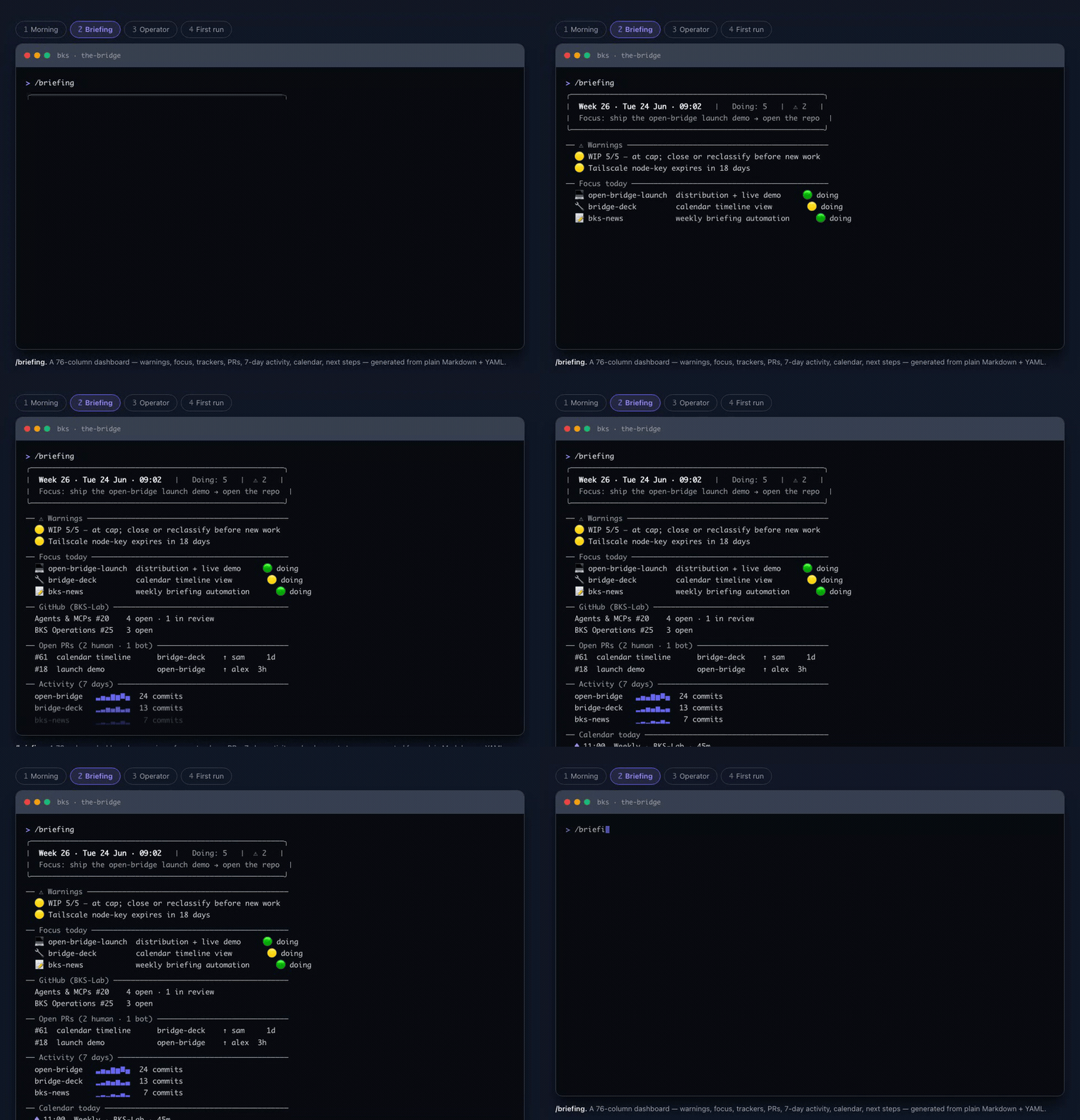
▶ See the full live session — the clip above is the /briefing dashboard; the browser walkthrough adds three more real flows: the morning session-start, an incident taken from log triage to a TDD fix shipped to UAT, and first-run onboarding.
The problem
Most people's AI work is a bare My-Documents folder — every conversation rebuilds context and structure from scratch:
- "I switch between clients and load the wrong context."
- "I have no record of what I decided last week."
- "My agent forgets which conventions apply where."
- "Every session, I re-explain who I am and what I'm working on."
The fix isn't a smarter prompt — it's a persistent place the agent reads and writes every session.
What it is — the substrate
Everything in open-bridge is plain text: markdown and YAML in a git repo, read at session start. The substrate itself runs nothing — no database, no daemon, no SaaS, no hosted service. It's just files your agent reads. There's nothing to host and no second app to maintain.
That choice is the whole point:
Agents can read a file but can't hold an API key. What you write into open-bridge today, your agent still reads in six months — no migration, no second app, no vendor lock-in.
Because the substrate is inspectable text, you don't have to trust a black box. Clone the repo and cat any file your agent reads. Diff it. Version it. The agent's "memory" is just files you own.
Two properties this substrate enables
These are the two named claims the project is built around. Both were coined at BKS-Lab; the plain-English meaning leads, the coined term follows.
Context Booster
Whatever model and frontend you use, open-bridge adds an independent layer of context the agent always reads — a "third side" beside your model and your tool. The project/ecosystem registry (ecosystem.example.yaml — your live ecosystem.yaml is generated at onboarding) plus always-on standing orders give the agent persistent, structured knowledge of your world: who you are, your repos and clients, what you worked on yesterday. So it stops asking "GitHub or Jira?", stops loading the wrong client, and you can just say "good morning, briefing" and get what matters today.
It works across Claude Code, Codex, and Copilot CLI through a single skills/ tree — because plain text is something every agent runtime can read.
Coined at BKS-Lab as the "Context Booster" — the most important purpose of open-bridge.
Chaos Tamer
Most people's AI work looks like that bare My-Documents folder — everyone piles up their own chaos, and every new conversation starts over. open-bridge tames that by shipping example structures you don't have to invent, then helping you keep them. It does three things: it holds a structure (a board, a daily log, and per-task status — backlog → doing → review → done); it files away knowledge as you go, so decisions, findings, and status land in plain text the agent reads back later; and it keeps the work from drifting back into an unsorted pile. The concrete instance is the Task-Management system: finite tasks in work/tasks/, long-running streams in work/streams/, closed work in work/done/. Unstructured sessions become a filed, persistent, compounding record.
Coined at BKS-Lab: "structuring unstructured AI dialogues."
Design stance — roadmap (BET/OPEN). The intended default is workspace separation: tasks kept separate per context, no information bleeding between engagements, with a general rule — "if you can't place it into your known world-models, ask." This is agreed in principle but not yet built into open-bridge, and the hard-silo-vs-soft-folder default is unresolved. See What's proven, what's a bet, what's open. Do not read it as a shipped feature.
Show, don't tell
A fresh clone starts mostly empty — the value compounds as you fill work/log.md. examples/agency/ ships a complete two-client configuration (identity, infra, workflow, standing orders) to clone and read. The work/ tree below is the shape your own work gets filed into as you go:
your-bridge/
├── identity/                  WHO am I, to WHOM do I send
├── infra/                     WHERE runs what, HOW to reach it
├── workflow/                  WHAT happens when (contexts, projects)
└── work/
    ├── board.md               live task board
    ├── log.md                 daily work log
    ├── tasks/                 finite tasks
    │   ├── bigcorp-migration/STATUS.md      ← client A, isolated
    │   └── startupxyz-mvp/STATUS.md         ← client B, isolated
    ├── streams/               long-running streams (never "done")
    └── done/2026-06/          closed, archived monthly
A task STATUS.md and a work/log.md row are just text the agent reads and writes:
# STATUS — bigcorp-migration
status: doing
context: bigcorp
last: Migrated the invoice pipeline to the new schema; one test still red.
next: Fix the failing UBL-validation case, then open the PR.
| 14:22 | Decision | bigcorp | Pinned the schema to v2 — v3 breaks the old exports. |
That row is in the repo six months from now, in a diff, readable by any agent.
A day with it
You say it plainly; you get the work, already in context:
- "good morning, briefing" → today's board, the day's git activity, and what's gone stale — it already knows which repos and which client you're on.
- "where was I on the bigcorp migration?" → the task's exact state read back ("last: migrated the pipeline, one test still red. next: fix it, then open the PR") so you resume mid-thought.
- "switch to startupxyz" → that client's repos, conventions, and open tasks loaded from its own workspace — the agent works from startupxyz's facts, not bigcorp's.
- "why did we pin the schema to v2?" → the answer pulled from a dated log row you wrote months ago, still in the repo as plain text.
- "draft a status mail to the bigcorp lead" → a ready message in your voice and signature, facts pulled from the task — you read it and send; the agent never sends for you.
/archive→ the week's log rolled into a dated summary and a fresh log started — a paper trail that compounds week over week.
Why not just a CLAUDE.md / my own folder?
A CLAUDE.md is one flat instruction sheet. open-bridge is a persistent, structured workspace that does three things a dotfile can't:
- It separates per-context worlds. Each client/engagement gets its own workspace, so the agent doesn't load the wrong client's facts into this client's summary.
- It keeps a persistent work record across sessions — a board, a log, and per-task status that survive when the conversation ends.
- It updates shared templates without ever clobbering your private data — the CORE/USER split (below) merges upstream improvements in while your config stays yours.
The relief is that the structure is shipped, not invented: you get a clear, opinionated place for everything instead of reinventing your own My-Documents chaos.
Not for a single-repo project or ad-hoc one-off scripting — the coordination layer is overhead you won't use.
What's proven, what's a bet, what's open
open-bridge is built and used at BKS-Lab to run BKS-Lab — a small team at BKS-Lab, self-used on one instance (N=1). It has zero external users today — it is newly public, not yet adopted. This README documents method and substrate, not a user base.
PROVEN — built and self-used (N=1):
- The three-cluster layout (
identity/·infra/·workflow/), the Task-Management system (board, log, per-task STATUS), the CORE/USER branch split, personas, standing orders, and the skills layer all run from a fresh clone today. - Scope-routing works in practice: each file carries a scope (
core/org/user);/promoteroutes per scope — demonstrated, not theoretical. - GitHub task sync works for our own use (the agent already knows whether a task also exists in GitHub and syncs it). Jira is untested.
BET — falsifiable wagers:
- Markdown + YAML + git is the substrate successive agent-runtime generations keep reading natively, because models read text, not a vendor API. Falsified if the dominant agent stack later forces a schema-vendor (e.g. Notion-MCP / Linear-MCP) as the standard.
- A lean, opinionated, MIT-OSS method beats a vendor workflow-builder for users who want to switch models freely. Falsified if Cursor/Anthropic ship a first-class markdown-in-git mode.
- Workspace separation as a hard default — once built — is the right call for most users, not an opt-in switch. (The default itself is still on the roadmap; see OPEN.)
OPEN — unsolved:
- Zero external users today — newly public, not yet adopted. Until real users arrive, every statement about a target audience is a hypothesis, not a market test.
- Workspace-separation-as-default, the "if you can't place it into your known world-models → ask" rule, and off-topic stripping of unrelated tangents are agreed in principle — off-topic stripping is hand-tested as a separate Bridge skill, but none of these are built into open-bridge yet; the hard-silo vs soft-folder default is unresolved.
- First-session value is thin: a fresh clone gives little reward until
work/log.mdis filled. - Terminology cleanup is pending (
work-task→ Task-Management; thework/folder made unambiguous). - The submodule architecture between open-bridge and a private org overlay is deferred and must be settled before the fork.
How it works
What is a bridge — and one or many
A bridge is your agent's memory of your world: a plain folder of text files (markdown + YAML in git) it reads at the start of every session. No database, no app to run — who you are, your repos and clients, your rules, and what you worked on yesterday, all in files you own.
And you can run many. An organisation can run several bridges — one per client, team, or context. A consultancy might run one for bigcorp, one for startupxyz, and one for its own internal ops — each with its own rules, processes, and workflows, each keeping that context's data to itself. All of them stand on one shared foundation: a common CORE of skills, templates, and docs that updates once for everyone, while each bridge keeps its own private data separate — one shared foundation, separate private rooms. The mechanism (the CORE/USER split below, plus per-instance isolation) ships and is documented; today it runs on one self-hosted bridge.
CORE/USER split — why the context compounds safely
open-bridge uses two branches that split your data from shared templates. Your accumulated context — tasks, config, agent definitions, credentials — lives on user/{name}. Shipped templates, skills, and docs live on CORE (main). The two touch different paths, so:
- Merges never conflict — pull CORE updates anytime with
git fetch upstream && git merge upstream/main(CORE and your data touch disjoint paths). - Your data stays private — your
user/{name}branch lives on your own private repo, never a public upstream; apre-pushguard (rules/push-guard.md) blocks publishing it by accident. Privacy is about which remote you push to, not just which branch. - Improvements flow back —
/promotereads each file'sscope:and routesscope: corechanges upstream as fork-based PRs.
The branch-model mermaid and the full promote-routing rules live in docs/structure.md and docs/extension-model.md.
Skills — the model-agnostic verbs
Skills are the verbs over the substrate. They live in one skills/ tree, symlinked into the paths Claude Code, Codex, Copilot CLI, and Cursor each scan — so the same skill loads no matter which tool you run. Describe what you need in plain language ("draft the daily briefing", "process this transcript") and the matching skill loads itself. The point is the cross-tool agnosticism, not a number.
Standing orders
Always-on rules in protocols/standing-orders/ get injected into every agent dispatch's system prompt — code-style rules, security baselines, logging habits. They are the supporting mechanism behind the Context Booster: third-side rules that ride into every prompt, which a static CLAUDE.md can't do per-context.
Sub-agents
open-bridge ships the pattern plus one reference sub-agent (archivist, for document intake); you add the rest by dropping another .claude/agents/{name}.md next to it — auto-discovered at session start. This is Claude Code-specific: under Copilot CLI, Codex, Gemini, or Cursor, skills run inline in the main session instead of an isolated sub-process, with no capability loss.
A few commands
Commands are skills whose description declares a /cmd trigger. The handful that demonstrate the claim:
| Command | Action |
|---|---|
/bridge-status |
Status dashboard: ecosystem, agents, work |
/briefing |
Daily briefing: board, git activity, goals |
/debrief |
Turn a meeting transcript into filed tasks + a protocol |
/archive |
Archive the week + generate a summary |
/bridge-onboard |
New-user setup or reconfiguration |
System Overview
%%{init: {'theme': 'dark'}}%%
flowchart LR
    USER((You)) -->|"/briefing /debrief /archive"| AGENT[AI coding agent]
    AGENT -->|reads at session start| BRIDGE[open-bridge repo]

    subgraph BRIDGE_INTERNALS["open-bridge (plain text)"]
        CONFIG[bridge-config.yaml<br/>prefs]
        ECO[ecosystem.yaml<br/>repos + clients]
        STANDING[protocols/standing-orders/<br/>always-on rules]
        WORK[work/<br/>board + log + tasks]
    end

    AGENT --> CONFIG
    AGENT --> ECO
    AGENT --> STANDING
    AGENT --> WORK
Everything is plain text the agent reads at session start — no database, nothing to host.
Safety & trust
open-bridge drives an AI agent over your repos, infra, and cloud — so the guardrails matter as much as the features. They are written into how the agent is instructed to behave (AGENTS.md / CLAUDE.md), and because the substrate is plain text you can read and change every one of them:
- Propose, then confirm. The agent proposes; you decide. Every persistent change to its own configuration goes through a human gate, and it pauses before writing into your productive folders.
- Destructive and outward actions are gated per action. Shutdown / reboot / delete, sending a message, merging a PR, rotating a credential — each needs an explicit
[y], never a blanket yes. - Secrets never live in the repo. Only reference URIs (
azure-keyvault://…,1password://…,keychain://…) — the real values stay in your vault, and CI fails on a committed secret. - Nothing phones home. open-bridge is files your agent reads locally — no telemetry, no analytics, no hosted service. Nothing leaves your machine.
- It's inspectable. Clone the repo and
catexactly what the agent reads; its "memory" is a diffable git history you own.
These are conventions the agent follows, not an OS-level sandbox — read them in AGENTS.md and adapt them to your own risk tolerance.
Get started
⚠️ This is a public repo — give your data a private home first
Onboarding writes your private data — personas, client names,
work/logs,
credential-reference URIs — onto auser/{name}branch. It stays private for
exactly one reason: it never leaves your machine. A baregit cloneof this
repo leavesoriginpointing at this public repo, so a singlegit push(or
the agent's auto-end-of-work cycle) would publish your branch to the world. The
intended setup is therefore not "clone this and push here" — it's: make your
own private repo yourorigin, keep open-bridge as a read-onlyupstream,
and let CORE flow back only through/promote(a fork-based PR). The steps below
do exactly that.
# 1. Make your own PRIVATE copy. Cleanest: GitHub "Use this template" → Private,
#    then clone THAT. (A fork of a public repo is itself public, so a fork won't do.)
#    No template button yet? Clone here and re-home the remotes in steps 2–3:
git clone https://github.com/bks-lab/open-bridge.git my-bridge
cd my-bridge

# 2. open-bridge becomes a READ-ONLY upstream; your private repo becomes origin:
git remote rename origin upstream
gh repo create <you>/my-bridge --private --source=. --remote=origin --push

# 3. Onboard inside Claude Code — it writes your data to a user/{name} branch
#    on your PRIVATE origin, never the public upstream:
/bridge-onboard
/bridge-onboard walks the guided onboarding and sets everything up (optional ecosystem detection, work-system config, your own user/{name} branch). It also pins the instance's one-line purpose, so the feature catalog leads with what fits that instead of fanning out the whole feature universe at once (a compass, never a fence — every feature stays one flip away). It also arms the pre-push guard (git config core.hooksPath scripts/hooks) before creating that branch, so the deterministic backstop is live from your first commit. Because origin is now your private repo, that branch never touches the public upstream — and the guard (rules/push-guard.md) blocks it at the git layer if anything tries. Pull CORE updates anytime, conflict-free, with git fetch upstream && git merge upstream/main. If you skip the wizard, run ./bin/setup once on any OS — it arms the same guard and repairs the cross-tool discovery symlinks (on native Windows use bin/setup.ps1).
Before any of that "ecosystem detection" runs, onboarding asks one privacy choice — discovery.mode, default confined: the Bridge stays inside this folder and never scans your other repos, installed apps, devices, files, or mail. Broader is the opt-in alternative — a per-item-permissioned look at your machine so it can suggest features that fit what you already use (names and structure only, never file/mail content or secrets; findings stay local and gitignored). Either way the features are modular: confined costs you nothing, you just enable each capability yourself when you want it — reversible anytime with /bridge-onboard --rescan or by editing discovery.mode in bridge-config.yaml.
Just kicking the tires? Clone, read, and run locally — but don't git push (a bare clone's origin is this public repo). What's instant: a running, empty workspace. What's a bet: the compounding value — work/log.md filled with real work over time, on your private origin.
Cross-tool reality: tested with Claude Code (most complete — slash commands and hooks live under .claude/). Codex and Copilot CLI work via AGENTS.md plus the skills/ symlink. Gemini CLI, Cursor, and Windsurf follow the same standard but are untested. Windows symlink mechanics and the .agents//.github/ discovery paths are covered in the layout table in docs/structure.md.
See examples/agency/ for a complete two-client configuration to clone and read.
Optional integrations (USER-scope, enable as needed)
open-bridge ships more than the four core pieces, but none of it is needed to get value, and it stays out of the hero on purpose. Each is a USER-scope capability you turn on when you want it; the code ships, the README just doesn't narrate it:
- Channels — outbound messaging transports (email, Telegram, Signal, iMessage, …):
docs/channels.md - Remotes — machine inventory, SSH, services, health checks:
docs/remotes.md - doc-system — inbox scan, classify, route, file documents (another "ship example structures" instance):
docs/doc-system.md - Personas — self-identities with signatures and destination paths:
docs/personas.md - Themes — vocabulary layer;
professional(en, default) andprofessional-deare runtime toggles, not a reason to bilingualize this README:rules/theme.md - Agent Identity — the orchestrator's own
SOUL.md/IDENTITY.mdvoice and posture:identity/agent/README.md - GitHub / ADO Projects — advisory integration via the
project-advisorskill, gated inbridge-config.yaml:trackers/README.md
The full layout map — every path and the CORE/USER split — lives in docs/structure.md. How open-bridge relates to a private org overlay — the CORE/USER/overlay tier model — is in docs/extension-model.md.
Contributing
See CONTRIBUTING.md. Short version:
Contributing CORE is a separate action from running your own Bridge — don't conflate them. You contribute from the private instance you set up in Get started; you do not run /bridge-onboard into a public fork, and you never push your user/{name} branch upstream.
- On CORE, build something generic (docs, commands, skills, templates).
- Run
/contribute(or/promote) — it categorises commits byscope:, runs the mandatory content-safety gate (leak scanner + blocklist, refuses on PII/customer hits), then mints its own throwaway personal fork and opens a fork-based PR againstbks-lab/open-bridgewith a DCO sign-off (git commit -s) for you. It pushes to that fork — never your privateorigin, and never a direct push tobks-lab/open-bridge.
Routing by scope:: scope: core belongs upstream — /promote PRs it here. scope: org content goes to your own shared overlay repo, if you maintain one. scope: user stays on your private origin and is never pushed anywhere public. A manual git push to a public remote bypasses this router and its safety gate — let /promote do it.
License & trademark
open-bridge is released under the MIT License — code and content alike, so there is a single, unambiguous reuse path. A separate trademark policy governs the project name, brand, and logo, because licenses cover copyright, not brands.
| Layer | Covers | Terms | File |
|---|---|---|---|
| Code & content | Everything in this repository | MIT | LICENSE |
| Brand | open-bridge, project name and logo |
Trademark policy | TRADEMARK.md |
MIT is the deliberate choice: it keeps reuse frictionless while the separate trademark policy protects BKS-Lab's brand for commercial offerings built on the same architecture.
Copyright (c) 2026 BKS-Lab (Boiman Kupermann Solutions GmbH) and Contributors.
Contributions are accepted under the MIT License and require a Developer Certificate of Origin sign-off (git commit -s); CI enforces it. This is community open-source software, provided as-is and without warranty.
Acknowledgments
open-bridge draws on a large body of public work — agent-orchestration patterns, the propose-then-confirm posture, the identity/voice split, config-as-data conventions. A non-exhaustive list of named inspirations, plus the inspiration-is-not-endorsement note, lives in ACKNOWLEDGMENTS.md.
Try it
open-bridge is public and MIT — there's no waitlist and nothing to sign up for. Clone it, read it, run it. It's newly released with no external users yet, so expect rough edges and tell us where they are.
- Read the code on GitHub:
bks-lab/open-bridge - See a complete example:
examples/agency/ - Found a rough edge? Open an issue — that's the most useful thing you can do right now.
Yorumlar (0)
Yorum birakmak icin giris yap.
Yorum birakSonuc bulunamadi