aswap
Health Uyari
- License — License: MIT
- Description — Repository has a description
- Active repo — Last push 0 days ago
- Low visibility — Only 6 GitHub stars
Code Basarisiz
- spawnSync — Synchronous process spawning in scripts/build.ts
- process.env — Environment variable access in scripts/build.ts
- spawnSync — Synchronous process spawning in scripts/install.ts
- spawnSync — Synchronous process spawning in scripts/patches.ts
- process.env — Environment variable access in scripts/patches.ts
- spawnSync — Synchronous process spawning in scripts/release-version.ts
- process.env — Environment variable access in scripts/release-version.ts
Permissions Gecti
- Permissions — No dangerous permissions requested
Bu listing icin henuz AI raporu yok.
Multi-account switcher for Claude Code and Claude Desktop: claude-swap (cswap) plus a maintained patch series.
aswap
English | 简体中文 | 繁體中文 | 日本語 | 한국어 | Русский | Français | Español
Account swap for Claude Code: claude-swap (cswap) with a maintained set of fixes.
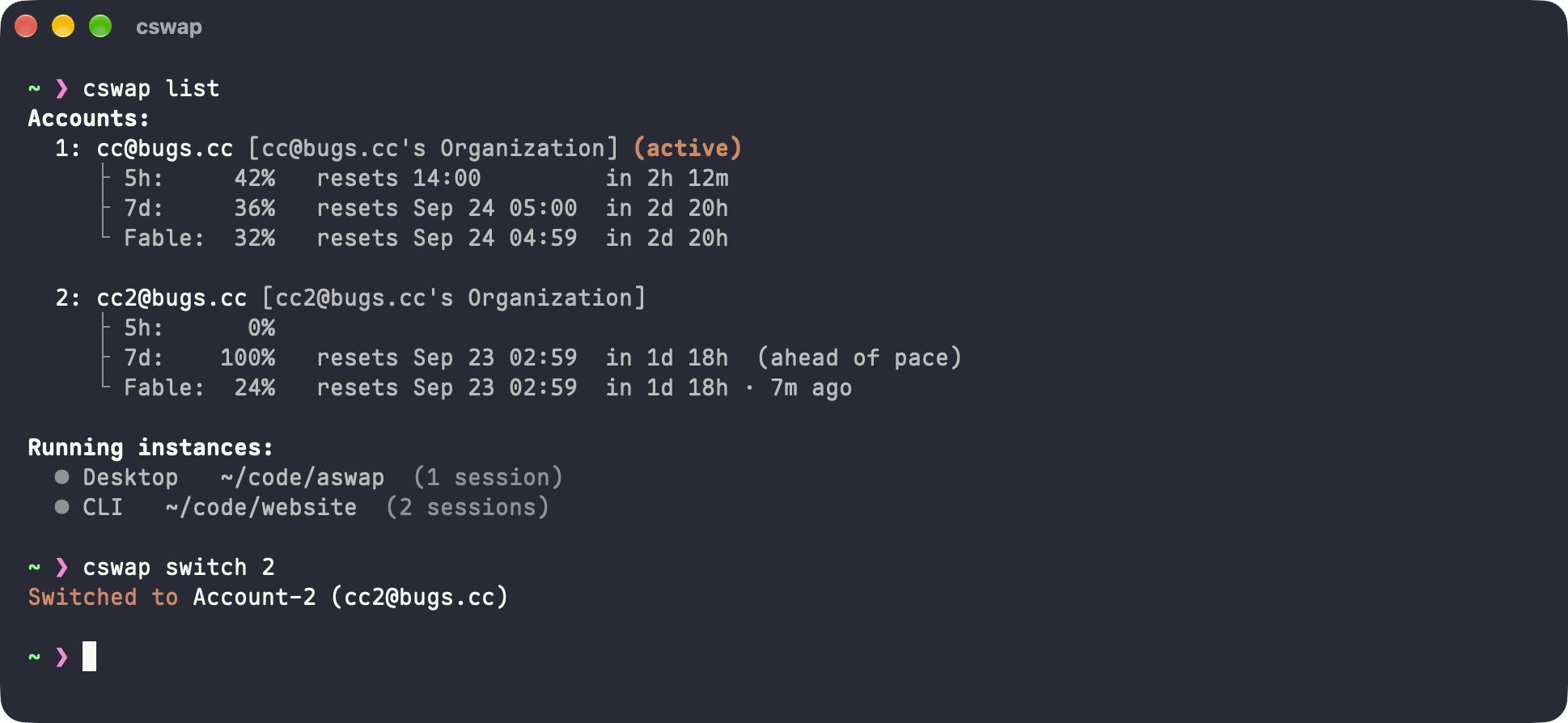
cswap switches among several Claude accounts, tracks each account's usage, and can switch you to the account with the most remaining quota. aswap is the same tool, built from unmodified upstream source plus a small patch series for bugs upstream has not fixed. You still run cswap.
The name
aswap is short for account swap, which is what the tool does. Next to cswap, the a is also what this project adds: aswap is cswap plus a patch series. As Claude Code grows into a general agent runtime, that same a also fits the AI and agent accounts that come with it.
Install
uv tool install aswap  # or: pipx install aswap
aswap --version
aswap accepts every cswap command. It installs alongside an upstream cswap without changing it. To run aswap under the name cswap as well:
aswap link # creates a cswap launcher next to aswap; aswap unlink removes it
aswap link only replaces a cswap that an aswap install created (this one, a development build, a previous install). For an upstream cswap, uninstall upstream first (uv tool uninstall claude-swap) or pass --force.
Upgrading
aswap upgrade # uv tool upgrade aswap / pipx upgrade aswap, whichever installed it
Building from source, and replacing an installed PyPI cswap with the patched build, are covered in CONTRIBUTING.md.
What the patches fix
| patch | problem |
|---|---|
| Follow the live credential's owner | A stale ~/.claude.json can still name account B after the keychain already holds account A's token. Upstream then marks A as "re-login needed" and never refreshes B. The patch follows the credential's real owner and remembers it across runs. |
| Follow the installed distribution | Version, update check, and upgrade hard-code the name claude-swap, so they break when the install is aswap. The patch follows the distribution that actually provides the code. |
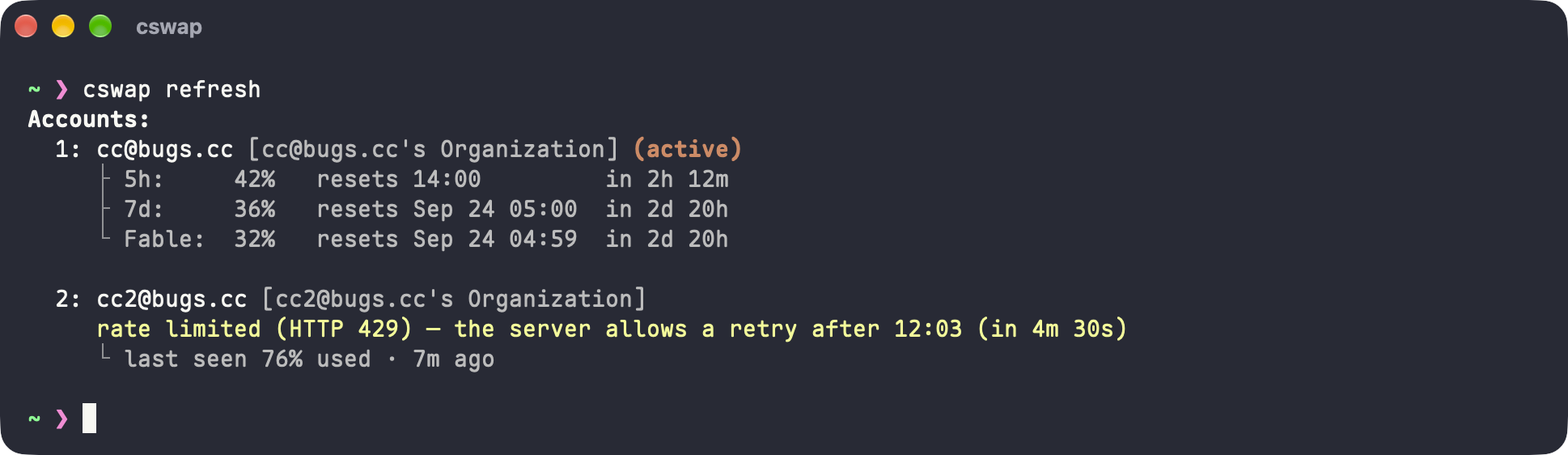
| Refresh usage on demand | Upstream fetches usage only on its own schedule. Until the serve TTL, poll plan, and failure backoff all allow another request, every screen shows the cached number, and the server's retry time is never shown. cswap refresh [account ...] fetches immediately, each account on its own, and reports when a rate-limited account may retry. |
| Keep history files when merging | When cswap run merges a profile's own history into ~/.claude, upstream treats every same-named file as a duplicate and deletes the profile's copy without reading it. A session continued after sharing was turned off, or a project's memory/MEMORY.md, is lost with no warning. The patch drops a copy only when the two files are identical, and keeps a differing copy under history-conflicts/. |
| Share one conversation history | Each account keeps its own projects/ unless every launch passes --share-history. When that account is the default login, cswap run skips the profile entirely. One account's sessions end up in two places, and claude --resume cannot find a conversation after the default account changes (upstream #239). The patch makes sharing the default, stores it in the session.shareHistory setting, and merges the profile's history into ~/.claude on the default-login path as well. |
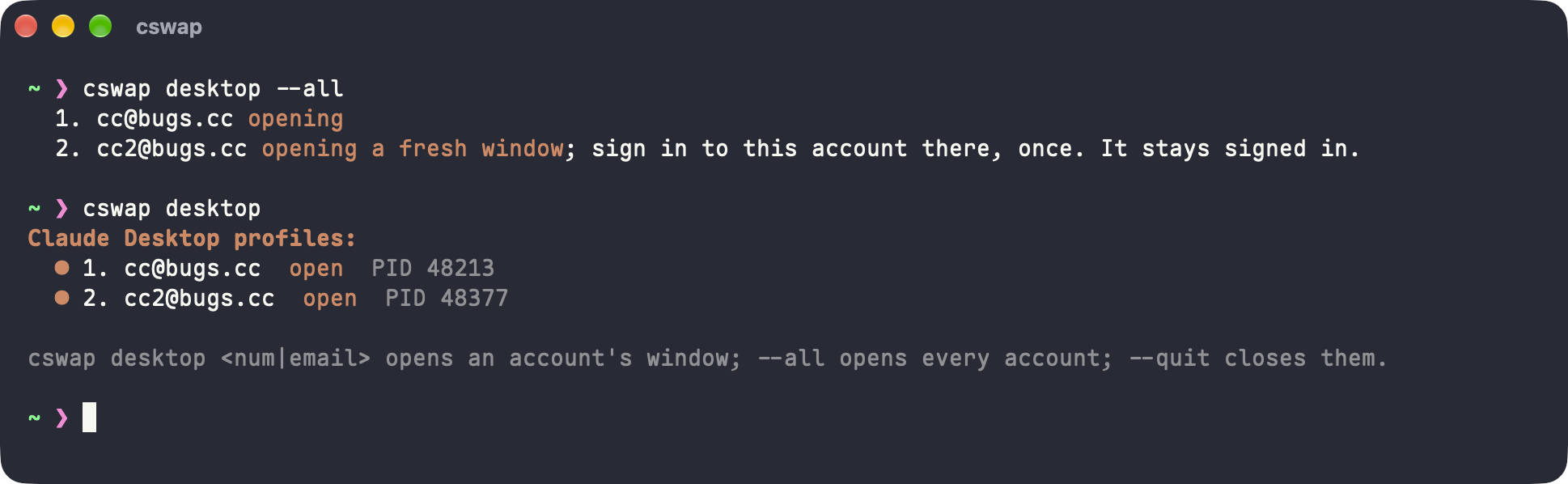
| Open Claude Desktop per account | Claude Desktop holds one login per profile, so a second account means signing the first one out and back in every time. The patch gives every stored account its own permanent desktop profile and opens the app against it with --user-data-dir, the way guise does: cswap desktop 2 opens account 2 in its own window, signed in once and staying signed in, while the other accounts' windows stay open beside it. The Code tab's local sessions are shared with the stock profile, so a window opened this way lists the same sessions. |
| Open Chrome per account for Claude in Chrome | cswap switch moves Claude Code to another account, but the Claude in Chrome extension keeps acting as whoever is signed in to claude.ai in the browser, a cookie that is a different credential from the one cswap stores (upstream #256). Swapping that cookie would mean decrypting Chrome's storage and rewriting another extension's state. The patch gives every stored account its own permanent Chrome profile and opens the browser against it with --user-data-dir: cswap chrome 2 opens account 2 in its own browser: a copy of your stock Chrome profile minus its claude.ai cookies, so other sites stay signed in and your extensions come along; sign in to Claude there once and it stays that way. Each profile is named after its account with its own window colour, and an account that is already open is brought forward, and cswap chrome --sync 2 copies the stock profile in again later while keeping the account's login. chrome.appPath points it at Edge, Brave or Chromium instead. |
Each patch is a single commit. The commit message explains the upstream problem. The full list is in patches/.patches.
cswap refresh fetches usage right now, one account at a time, and shows when a rate-limited account may retry:
cswap desktop --all opens one Claude Desktop window per stored account, each signed in on its own:
How it is built
The project pins one upstream commit in upstream.json, clones it unchanged into cswap/, and keeps every change in patches/ as an ordinary git am patch. Patches apply in the order listed in patches/.patches. This matches the layout Electron uses for its Node and Chromium patches: diffs stay small and readable, and moving to a newer upstream is a rebase of the series. Details, commands, and the patch workflow are in CONTRIBUTING.md.
License
MIT, like claude-swap. See LICENSE.
Yorumlar (0)
Yorum birakmak icin giris yap.
Yorum birakSonuc bulunamadi