leo
Health Uyari
- License — License: MIT
- Description — Repository has a description
- Active repo — Last push 0 days ago
- Low visibility — Only 5 GitHub stars
Code Gecti
- Code scan — Scanned 12 files during light audit, no dangerous patterns found
Permissions Gecti
- Permissions — No dangerous permissions requested
Bu listing icin henuz AI raporu yok.
CLI tool that sets up and manages Claude Code agents as persistent, proactive personal assistants with Telegram integration and cron scheduling
🐈⬛ Leo
Supervises Claude Code agents and schedules tasks.
Install · Quick Start · What it does · CLI · Docs



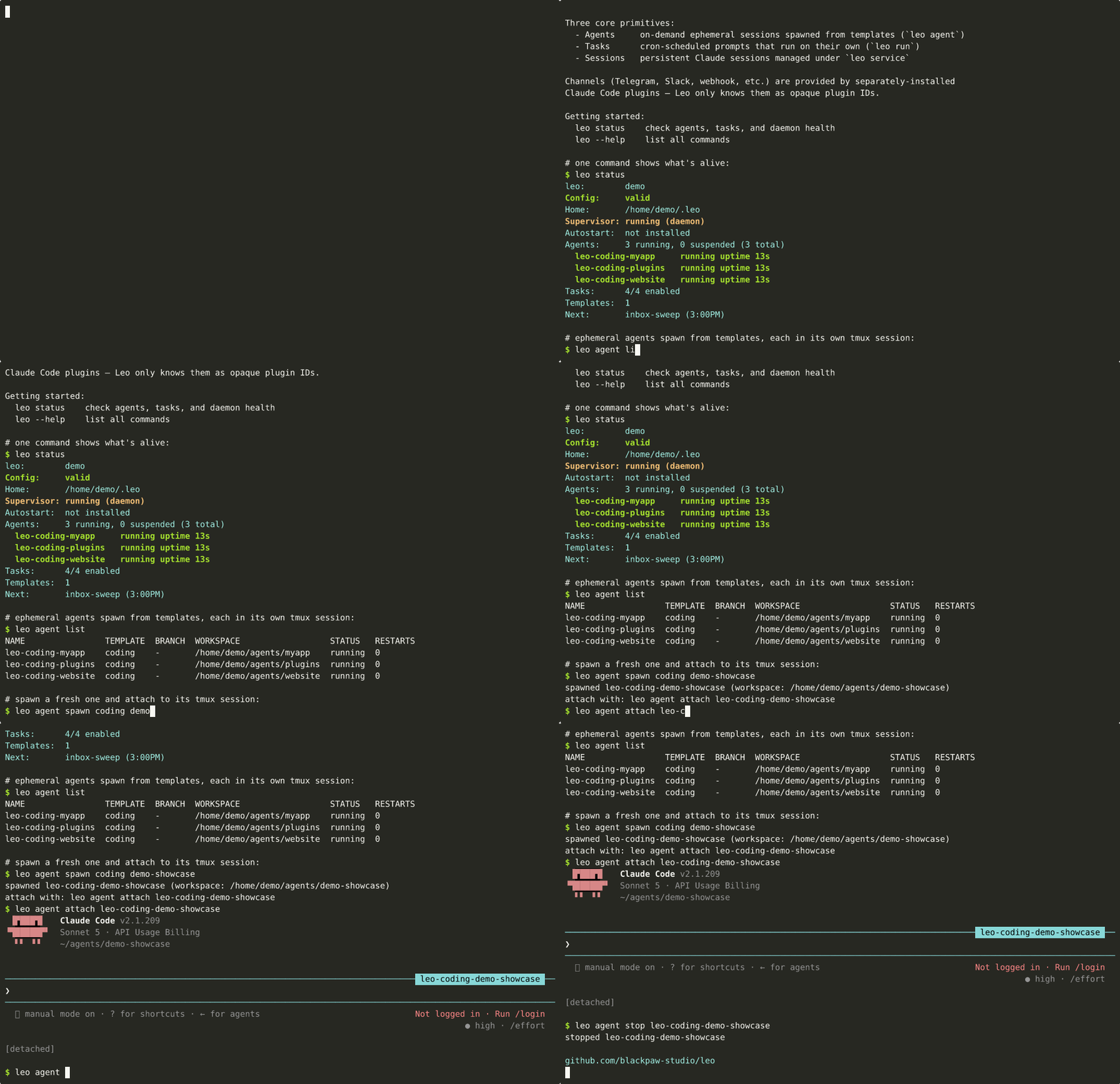
Leo supervises long-running Claude Code agents — spawned from templates, restarted on crash — and runs cron-driven Claude tasks (which can inject into those agents). Manage it from the CLI, a browser, or any Claude Code channel plugin (Telegram, Slack, webhook, …).
Install
Homebrew (recommended):
brew install --cask blackpaw-studio/tap/leo
Shell installer:
curl -fsSL leo.blackpaw.studio/install | sh
Go:
go install github.com/blackpaw-studio/leo/cmd/leo@latest
Prerequisites: authenticated Claude Code CLI, tmux 3.2+ (required — Leo passes agent env via new-session -e, added in 3.2, and uses display-popup). Channel plugins (e.g. claude plugin install telegram@claude-plugins-official) are optional.
Leo runs on its own tmux socket (
-L leo) so your personaltmux lsstays clean. Inspect Leo's sessions directly withtmux -L leo ls. See tmux Config for recommended settings.
macOS Local Network privacy: third-party tools spawned by an agent can be silently denied LAN access (connections fail with "no route to host") if macOS never got the chance to attribute the local-network operation to the signed
leobinary and prompt for consent. Leo runs its tmux server in the foreground so agent processes inherit that consent grant once you've approved it. Runleo doctorto trigger the one-time Allow/Deny dialog and check the current grant state.
Upgrading: leo update replaces a tarball install in place and verifies the new release before swapping the binary. Homebrew users should run brew upgrade --cask blackpaw-studio/tap/leo && leo service restart instead — leo update detects the Homebrew install and prints these commands.
Each release publishes install.sh with a install.sh.sha256:
VER=$(curl -fsSLI -o /dev/null -w '%{url_effective}' \
  https://github.com/blackpaw-studio/leo/releases/latest | awk -F/ '{print $NF}')
curl -fsSLO "https://github.com/blackpaw-studio/leo/releases/download/${VER}/install.sh"
curl -fsSLO "https://github.com/blackpaw-studio/leo/releases/download/${VER}/install.sh.sha256"
shasum -a 256 -c install.sh.sha256
sh install.sh
leo update itself verifies the release's Sigstore cosign signature against the release workflow's GitHub OIDC identity, then verifies the tarball SHA-256. Pre-signing releases can be installed with --allow-unsigned (or LEO_ALLOW_UNSIGNED_RELEASE=1); SHA-only verification with a warning. Will be removed once every supported release is signed.
Leo verifies the Fulcio keyless signature but does not consult Rekor. For transparency-log verification, run cosign manually:
VERSION=v0.3.2
curl -fsSL -O https://github.com/blackpaw-studio/leo/releases/download/$VERSION/checksums.txt
curl -fsSL -O https://github.com/blackpaw-studio/leo/releases/download/$VERSION/checksums.txt.sig
curl -fsSL -O https://github.com/blackpaw-studio/leo/releases/download/$VERSION/checksums.txt.pem

cosign verify-blob \
  --certificate checksums.txt.pem \
  --signature checksums.txt.sig \
  --certificate-identity "https://github.com/blackpaw-studio/leo/.github/workflows/release.yml@refs/tags/$VERSION" \
  --certificate-oidc-issuer "https://token.actions.githubusercontent.com" \
  checksums.txt
Quick Start
leo setup              # interactive: profile, workspace, first agent
leo service start      # start the daemon in the foreground
leo service start -d   # install as a launchd/systemd service
Open the dashboard at http://127.0.0.1:8370. For mobile or chat access, install a channel plugin and add its ID to the agent's channels: list.
What Leo does
Two primitives, one daemon:
| Primitive | What it is |
|---|---|
| Agents | Spawned from reusable templates via CLI, web UI, or a channel — with or without a repo. Auto-restart with exponential backoff, own workspace/model/channels/permissions, each in its own tmux session. A long-lived assistant is just an agent that never stops: it persists in the agent store and auto-restores on daemon restart. |
| Tasks | Cron-driven non-interactive Claude runs. Prompt file + schedule. Optional retry, channel notify on failure. |
A web dashboard, a token-authed HTTP API, and a built-in MCP server (so every channel gets /clear, /compact, /stop, /tasks, /agent, /agents for free) all live in the same daemon.
Agents / Templates
Templates are reusable blueprints — spawn an agent from one with or without a repo:
templates:
  assistant:
    model: sonnet
    channels: [plugin:telegram@claude-plugins-official]
    harness_options:
      remote_control: true

  coding:
    model: sonnet
    workspace: ~/agents
    harness_options:
      permission_mode: auto
      remote_control: true
leo agent spawn assistant                                 # no repo — run the template as-is, agent named "assistant"
leo agent spawn coding                                    # same, for a repo-driven template
leo agent spawn coding --repo blackpaw-studio/leo --name demo
leo agent spawn coding --repo blackpaw-studio/leo --worktree feat/cache
leo agent attach demo                                     # full tmux attach
leo attach                                                # no name → interactive picker
leo attach demo --cc                                      # iTerm2 / WezTerm native tab via tmux control mode
leo agent stop feat-cache                                 # stop — always dormant, never deletes
leo agent delete feat-cache --delete-branch               # clean up the worktree + branch
A repo-less spawn (like assistant above) is how you run a long-lived, always-on assistant — it just keeps running, restarts on crash, and comes back after leo service restart.
Scheduled tasks
tasks:
  daily-briefing:
    schedule: "0 7 * * *"
    timezone: America/New_York
    prompt_file: prompts/daily-briefing.md
    model: opus
    channels: [plugin:telegram@claude-plugins-official]
    notify_on_fail: true
    enabled: true
Remote CLI
The same leo binary becomes a thin SSH client when client.hosts is set — manage agents on a remote leo host without leaving your laptop:
client:
  default_host: prod
  hosts:
    prod: { ssh: [email protected] }
See the Remote CLI guide.
Channel plugins
Leo doesn't ship a messaging channel. Install any Claude Code channel plugin and reference its ID in channels:. The plugin owns its own auth and routing; Leo just hands the resolved list to the spawned Claude process via --channels flags.
For Telegram slash-command autocomplete:
leo channels register-commands telegram
Web dashboard & API
web:
  enabled: true
  port: 8370
Browser UI for agents, tasks, config, and cron previews. Binds to 127.0.0.1 by default.
Two layered controls protect the daemon:
- Host + Origin pinning on every
/web/...and/api/...route. Requests must target127.0.0.1,localhost, or[::1]on the configured port — or any hostname/IP listed inweb.allowed_hosts(required whenweb.bindis non-loopback). ForeignHost/Origin→403. Blocks DNS rebinding and drive-by cross-origin POSTs. - Bearer-token auth on every
/api/...route. The daemon mints a 32-byte token on first start at~/.leo/state/api.token(mode0600). A valid token alone isn't enough — the request must also pass Host pinning.
Breaking change:
/api/*previously required no auth. Channel plugins must now sendAuthorization: Bearer $(cat ~/.leo/state/api.token)or get401.
TOKEN=$(cat ~/.leo/state/api.token)
curl -sH "Authorization: Bearer $TOKEN" http://127.0.0.1:8370/api/task/list
The token file is readable by any process running as the same Unix user — intentional, so co-tenant plugins can read it directly. Rotate by deleting the file and restarting the daemon.
CLI
| Command | What it does |
|---|---|
leo setup |
Interactive setup wizard |
leo status |
Overall snapshot — service, agents, tasks, templates, web |
leo validate |
Check config, prerequisites, workspace health |
leo doctor |
Diagnose local network and daemon health (macOS Local Network privacy) |
leo service start / stop / restart / logs |
Supervisor lifecycle |
leo task … |
list, add, remove, enable, disable, history, logs |
leo template … |
list, show, remove |
leo agent … |
list, spawn, attach, stop, logs (local or over SSH) |
leo run <task> |
Run a task once on demand |
leo config show / edit |
Inspect (--raw, --json) or edit the effective config |
leo update |
Self-update the binary |
Full reference: blackpaw-studio.github.io/leo/cli.
Documentation
- Getting Started — install, prereqs, first run
- Configuration — full reference, workspace layout
- CLI Reference — every command and flag
- Guides — tasks, agents, scheduling, remote
- Development — contributing, architecture, releases
Development
make build      # → bin/leo
make test       # go test -race -cover ./...
make lint       # go vet + staticcheck
License
MIT
Named for my void Leo. He's a good kitty.
Yorumlar (0)
Yorum birakmak icin giris yap.
Yorum birakSonuc bulunamadi