LitterBox
Health Gecti
- License — License: GPL-3.0
- Description — Repository has a description
- Active repo — Last push 137 days ago
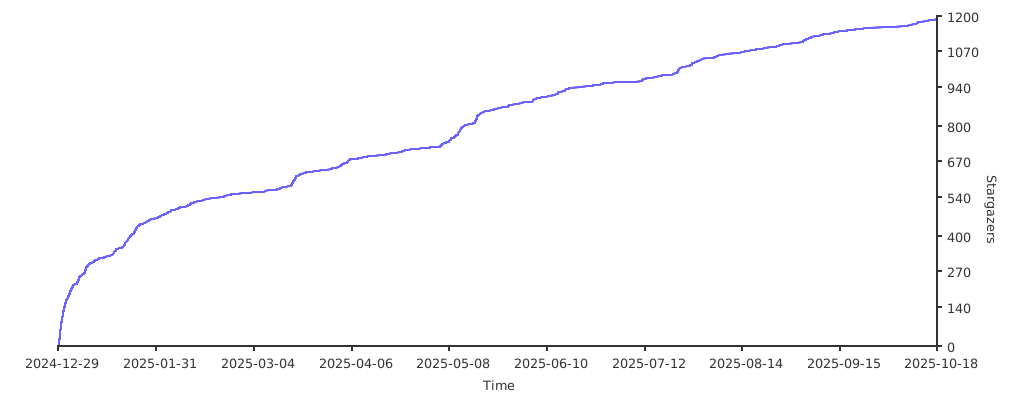
- Community trust — 1335 GitHub stars
Code Gecti
- Code scan — Scanned 12 files during light audit, no dangerous patterns found
Permissions Gecti
- Permissions — No dangerous permissions requested
Bu listing icin henuz AI raporu yok.
A secure sandbox environment for malware developers and red teamers to test payloads against detection mechanisms before deployment. Integrates with LLM agents via MCP for enhanced analysis capabilities.
LitterBox







Table of Contents
- Overview
- Documentation
- Analysis Capabilities
- Analysis Engines
- Integrated Tools
- API Reference
- Installation
- Configuration
- Client Libraries
- Contributing
- Security Advisory
- Acknowledgments
- Interface
Overview
LitterBox provides a controlled sandbox environment designed for security professionals to develop and test payloads. This platform allows red teams to:
- Test evasion techniques against modern detection techniques
- Validate detection signatures before field deployment
- Analyze malware behavior in an isolated environment
- Keep payloads in-house without exposing them to external security vendors
- Ensure payload functionality without triggering production security controls
The platform includes LLM-assisted analysis capabilities through the LitterBoxMCP server, offering advanced analytical insights using natural language processing technology.
Note: While designed primarily for red teams, LitterBox can be equally valuable for blue teams by shifting perspective – using the same tools in their malware analysis workflows.
Documentation
LitterBox Wiki - Advanced configuration and technical guides
Key sections:
- Scanner Configuration - HolyGrail, Blender, and FuzzyHash setup
- YARA Rules Management - Custom rules and organization
- Configuration Reference - Complete config.yml options
- Architecture & Development - System design and custom scanners
Analysis Capabilities
Initial Processing
| Feature | Description |
|---|---|
| File Identification | Multiple hashing algorithms (MD5, SHA256) |
| Entropy Analysis | Detection of encryption and obfuscation |
| Type Classification | Advanced MIME and file type analysis |
| Metadata Preservation | Original filename and timestamp tracking |
| Runtime detection | Compiled binary identification |
Executable Analysis
For Windows PE files (.exe, .dll, .sys):
- Architecture identification (PE32/PE32+)
- Compilation timestamp verification
- Subsystem classification
- Entry point analysis
- Section enumeration and characterization
- Import/export table mapping
- Runtime detection for Go and Rust binaries with specialized import analysis
Document Analysis
For Microsoft Office files:
- Macro detection and extraction
- VBA code security analysis
- Hidden content identification
- Obfuscation technique detection
LNK Analysis
For Windows shortcut Files (.lnk)
- Target execution paths and arguments
- Machine tracking identifiers
- Timestamps and file attributes
- Network share information
- Volume and drive details
- Environment variables and metadata
Analysis Engines
Static Analysis
- Industry-standard signature detection
- Binary entropy profiling
- String extraction and classification
- Pattern matching for known indicators
Dynamic Analysis
Available in dual operation modes:
- File Analysis: Focused on submitted samples
- Process Analysis: Targeting running processes by PID
Capabilities include:
- Runtime behavioral monitoring
- Memory region inspection and classification
- Process hollowing detection
- Code injection technique identification
- Sleep pattern analysis
- Windows telemetry collection via ETW
HolyGrail BYOVD Analysis
Find undetected legitimate drivers for BYOVD attacks:
- LOLDrivers Database: Cross-reference against known vulnerable drivers
- Windows Block Policy: Validation against Microsoft's recommended driver block rules for Windows 10/11
- Dangerous Import Analysis: Detection of privileged functions commonly exploited in BYOVD attacks
- BYOVD Score Calculation: Risk assessment based on exploitation potential and defensive controls
Doppelganger Analysis
Blender Module
Provides system-wide process comparison by:
- Collecting IOCs from active processes
- Comparing process characteristics with submitted payloads
- Identifying behavioral similarities
FuzzyHash Module
Delivers code similarity analysis through:
- Maintained database of known tools and malware
- ssdeep fuzzy hash comparison methodology
- Detailed similarity scoring and reporting
Integrated Tools
Static Analysis Suite
- YARA - Signature detection engine
- CheckPlz - AV detection testing framework
- Stringnalyzer - Advanced string analysis utility
- HolyGrail - BYOVD Hunter
Dynamic Analysis Suite
- YARA Memory - Runtime pattern detection
- PE-Sieve - In-memory malware detection
- Moneta - Memory region IOC analyzer
- Patriot - In-memory stealth technique detection
- RedEdr - ETW telemetry collection
- Hunt-Sleeping-Beacons - C2 beacon analyzer
- Hollows-Hunter - Process hollowing detection
API Reference
File Operations
POST   /upload                    # Upload samples for analysis
GET    /files                     # Retrieve processed file list
Analysis Endpoints
GET    /analyze/static/<hash>     # Execute static analysis
POST   /analyze/dynamic/<hash>    # Perform dynamic file analysis
POST   /analyze/dynamic/<pid>     # Conduct process analysis
HolyGrail BYOVD Analysis
POST   /holygrail                 # Upload driver for BYOVD analysis
GET    /holygrail?hash=<hash>     # Execute BYOVD analysis on uploaded driver
Doppelganger API
# Blender Module
GET    /doppelganger?type=blender               # Retrieve latest scan results
GET    /doppelganger?type=blender&hash=<hash>   # Compare process IOCs with payload
POST   /doppelganger                            # Execute system scan with {"type": "blender", "operation": "scan"}

# FuzzyHash Module
GET    /doppelganger?type=fuzzy                 # Retrieve fuzzy analysis statistics
GET    /doppelganger?type=fuzzy&hash=<hash>     # Execute fuzzy hash analysis
POST   /doppelganger                            # Generate database with {"type": "fuzzy", "operation": "create_db", "folder_path": "C:\path\to\folder"}
Results Retrieval (JSON)
GET    /api/results/<hash>/info      # Retrieve file metadata
GET    /api/results/<hash>/static    # Access static analysis results
GET    /api/results/<hash>/dynamic   # Obtain dynamic analysis data
GET    /api/results/<pid>/dynamic    # Retrieve process analysis data
GET    /api/results/<hash>/holygrail # Access BYOVD analysis results
HTML Report Generation
GET    /api/report/          # Generate comprehensive HTML report (target = hash or pid)
GET    /api/report/?download=true  # Download report as file attachment
GET    /report/              # Download report directly (redirects to api with download=true)
Web Interface Results
GET    /results/<hash>/info      # View file information
GET    /results/<hash>/static    # Access static analysis reports
GET    /results/<hash>/dynamic   # View dynamic analysis reports
GET    /results/<pid>/dynamic    # Access process analysis reports
GET    /results/<hash>/byovd     # View BYOVD analysis results
System Management
GET    /health                   # System health verification
POST   /cleanup                  # Remove analysis artifacts
POST   /validate/<pid>           # Verify process accessibility
DELETE /file/<hash>              # Remove specific analysis
Installation
Windows Installation
System Requirements:
- Windows operating system
- Python 3.11 or higher
- Administrator privileges
Deployment Process:
- Clone the repository:
git clone https://github.com/BlackSnufkin/LitterBox.git
cd LitterBox
- Configure environment:
python -m venv venv
.\venv\Scripts\Activate.ps1
pip install -r requirements.txt
Operation:
# Standard operation
python litterbox.py

# Diagnostic mode
python litterbox.py --debug
Access:
- Web UI:
http://127.0.0.1:1337 - API Access: Python client integration
- LLM Integration: MCP server
Linux Installation
System Requirements:
- Linux operating system
- Docker and Docker Compose
- Hardware virtualization support
Deployment Process:
- Clone the repository:
git clone https://github.com/BlackSnufkin/LitterBox.git
cd LitterBox/Docker
- Run automated setup:
chmod +x setup.sh
./setup.sh
Note: Initial setup takes approximately
1 hourdepending on internet speed and system resources.
The setup script automatically:
- Installs Docker, Docker Compose, and CPU checker
- Verifies KVM hardware virtualization support
- Creates Windows 10 container environment with automated LitterBox installation
- Starts containerized Windows instance
Access:
- Installation monitor:
http://localhost:8006(track Windows setup progress) - RDP access:
localhost:3389(available after installation completes, creds in docker file)
Once installation completes, LitterBox provides:
- Web UI:
http://127.0.0.1:1337 - API Access: Python client integration
- LLM Integration: MCP server
For API access, see the Client Libraries section.
Configuration
All settings are stored in config/config.yml. Edit this file to:
- Change server settings (host/port)
- Set allowed file types
- Configure analysis tools
- Adjust timeouts
Client Libraries
For programmatic access to LitterBox, use the GrumpyCats package:
The package includes:
grumpycat.py: Dual-purpose tool that functions as:
- Standalone CLI utility for direct server interaction
- Python library for integrating LitterBox capabilities into custom tools
LitterBoxMCP.py: Specialized server component that:
- Wraps the GrumpyCat library functionality
- Enables LLM agents to interact with the LitterBox analysis platform
- Provides natural language interfaces to malware analysis workflows
Contributing
Development contributions should be conducted in feature branches on personal forks.
For detailed contribution guidelines, refer to: CONTRIBUTING.md
Support 🍺
If LitterBox has been useful for your security research:

Stargazers 🌟
Security Advisory
- DEVELOPMENT USE ONLY: This platform is designed exclusively for testing environments. Production deployment presents significant security risks.
- ISOLATION REQUIRED: Execute only in isolated virtual machines or dedicated testing environments.
- WARRANTY DISCLAIMER: Provided without guarantees; use at your own risk.
- LEGAL COMPLIANCE: Users are responsible for ensuring all usage complies with applicable laws and regulations.
Acknowledgments
This project incorporates technologies from the following contributors:
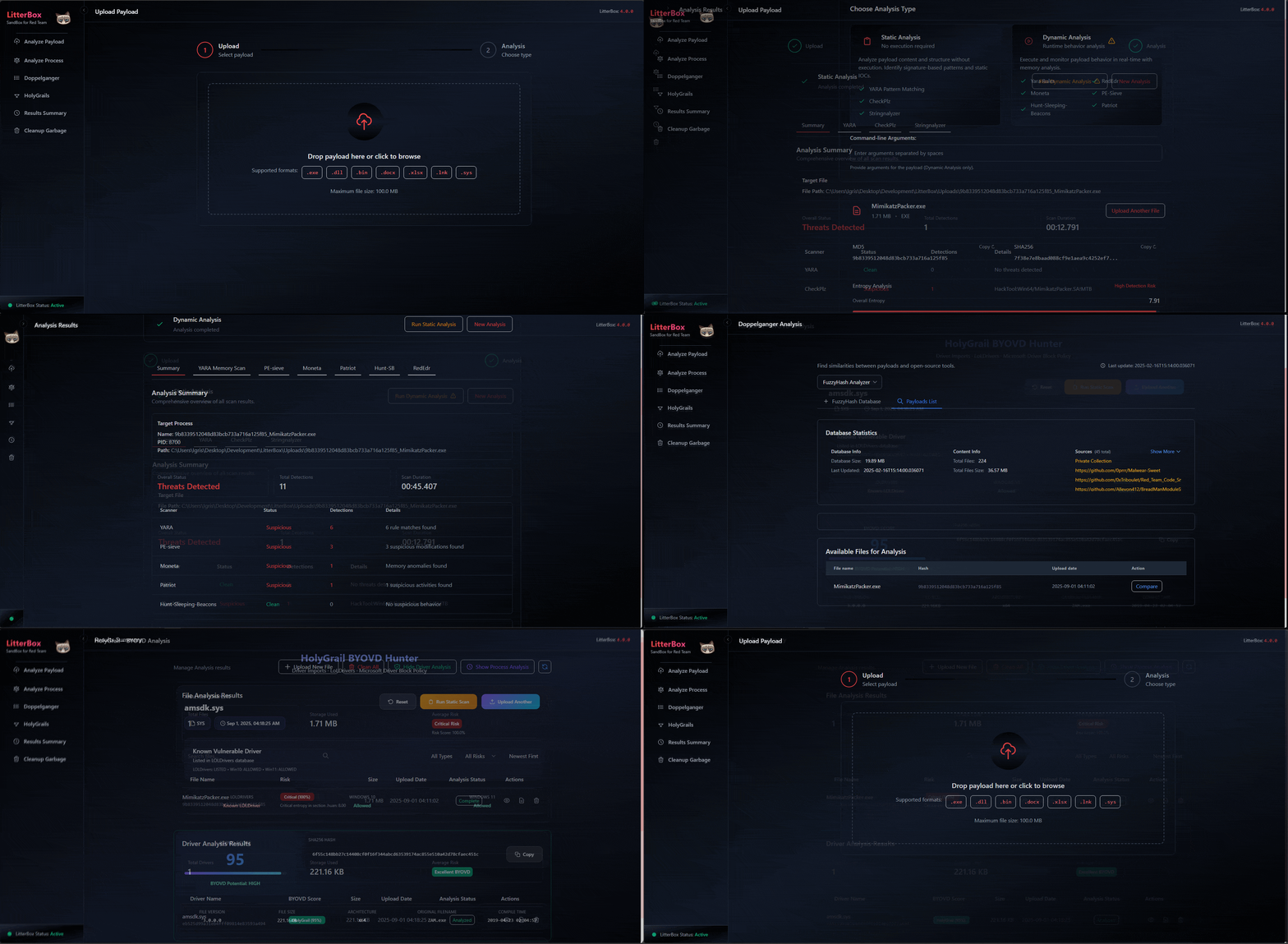
Interface
Yorumlar (0)
Yorum birakmak icin giris yap.
Yorum birakSonuc bulunamadi