tabsh
Health Uyari
- License — License: MIT
- Description — Repository has a description
- Active repo — Last push 0 days ago
- Low visibility — Only 8 GitHub stars
Code Basarisiz
- child_process — Shell command execution capability in .agents/skills/brainstorming/scripts/server.cjs
- exec() — Shell command execution in .agents/skills/brainstorming/scripts/server.cjs
- fs.rmSync — Destructive file system operation in .agents/skills/brainstorming/scripts/server.cjs
- process.env — Environment variable access in .agents/skills/brainstorming/scripts/server.cjs
- fs module — File system access in .agents/skills/brainstorming/scripts/server.cjs
- rm -rf — Recursive force deletion command in .agents/skills/brainstorming/scripts/stop-server.sh
- exec() — Shell command execution in .agents/skills/writing-skills/render-graphs.js
- process.env — Environment variable access in .github/scripts/select-e2e.mjs
Permissions Gecti
- Permissions — No dangerous permissions requested
Bu listing icin henuz AI raporu yok.
Your shells and coding agents, one calm scroll. A browser tab for the terminal, the board and every coding agent. Local-first, MIT.
tabsh
A calmer way to work with agents, in a browser tab.
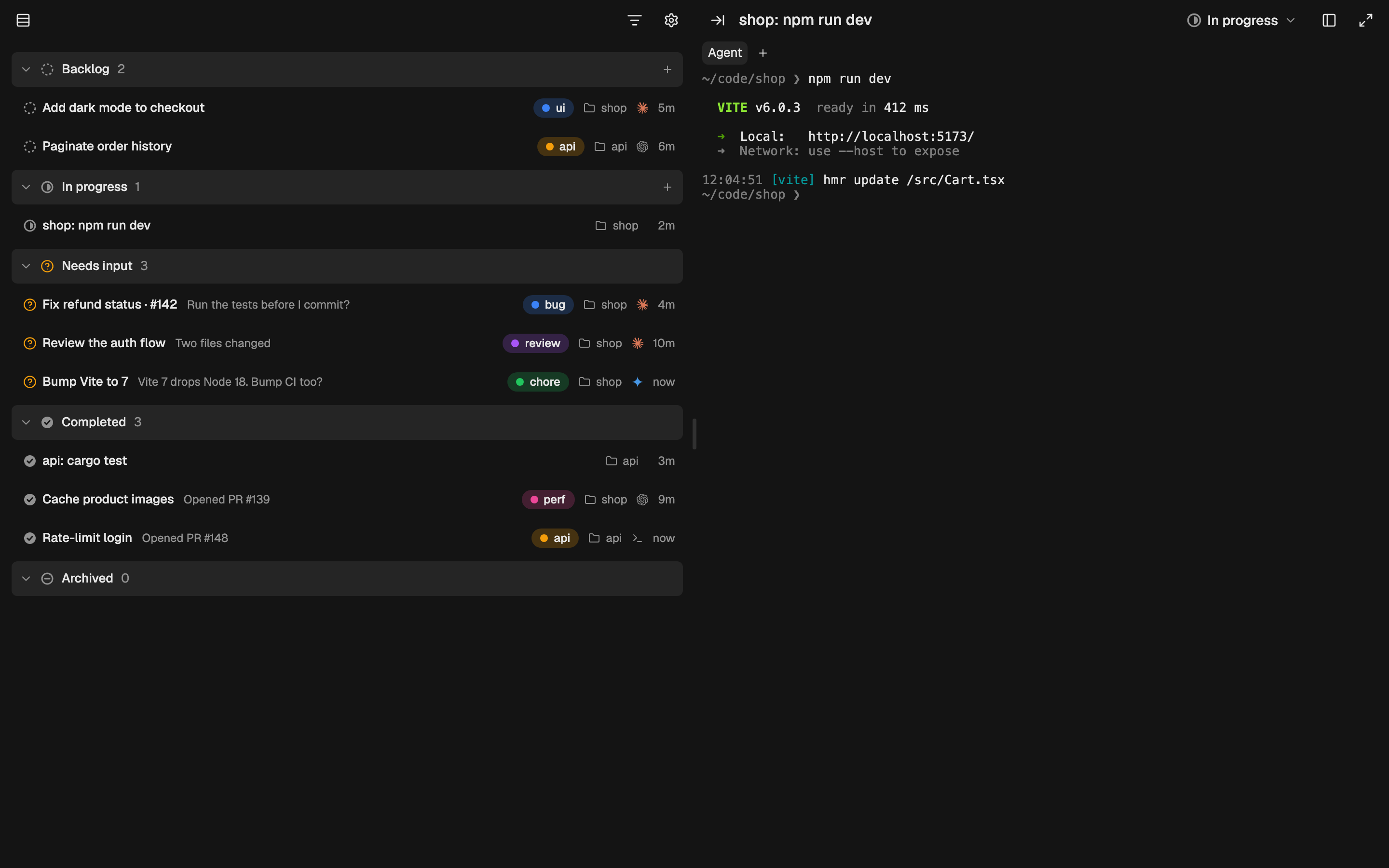
tabsh runs your shells and agents in the browser tab next to your work, and the list view puts
every card, across every project, in one calm scroll: what's moving, what needs you, and what's
done.
A small Rust daemon runs your shells on your machine, and a board keeps every card in one place.
Open it from any browser tab at https://tabsh.cc; shells and agents survive reloads, restarts and
closed laptops.
curl -fsSL https://tabsh.cc/install.sh | sh
tabsh   # opens the app in your browser, paired
That installs the release binary to ~/.local/bin (macOS or Linux,
checksum-verified), then runs tabsh until you close the terminal. Re-run the
installer to upgrade. Set TABSH_VERSION to pin a release orTABSH_INSTALL_DIR to install elsewhere. Or build it with Rust:cargo install --git https://github.com/Blaise1030/tabsh.
Prefer Homebrew? Install with:
brew install blaise1030/tap/tabsh
To keep the Homebrew install running from login, runbrew services start tabsh, then open http://127.0.0.1:7681 to pair this
browser. Upgrade with brew upgrade tabsh (then brew services restart tabsh
if you use the service).
Safari (and every iOS browser) won't let https://tabsh.cc reach the daemon, so
tabsh also serves the app itself, and tabsh.cc sends Safari there:http://tabsh.localhost:7681. File → Add to Dock opens it like an app.
Set TABSH_NO_BROWSER=1 to start without opening a browser (e.g. as a service);
it's skipped over SSH and on Linux without a display anyway.
Why a browser tab?
Look at where your work happens. The issue is in a tab. So are the pull request,
the docs, the design, the chat with your team, the AI you ask for help, and the
app you're building, running on localhost.
The browser has quietly become where we work. The terminal is the last tool
still in a separate window, one ⌘-Tab away from everything it touches.
tabsh brings it home: your shells and agents sit where the work already is,
with a board that keeps every card in one place, in the tab next to the thing
it builds.
Features
| Feature | What it means |
|---|---|
| Shells outlive the tab | Close, reload or quit; they reattach |
| Survives restarts | Tabs, folders and scrollback are restored |
| Drop files in | Dragged files type their path |
| Bells you notice | The tab rings and the favicon gets a badge |
| Themes and fonts | 12 themes, 9 fonts and a ⌘K palette |
| Nothing leaves localhost | Keystrokes stay on 127.0.0.1 |
The board
Every card is a shell or an agent on a kanban board (⌘B): Backlog, In progress,
Needs input, Completed, and a collapsed Archive. The same cards also have a
list view: one scroll, grouped by status, across every project. Drag cards to
change their status; click one to open its terminal or chat.
Let your coding agent keep the board current. Tell Claude Code, Codex, Cursor
CLI, OpenCode or any agent with hooks:
Run
tabsh setupand follow it.
It wires its own hooks to tabsh status: a prompt moves the card to In
progress, the agent stopping or asking permission moves it to Needs input,
and the agent marks it Completed when the task is done. Outside tabsh the
hooks do nothing. The agent reports what it changed and how to undo it.
New card (+) can start an agent on a first prompt: claude {prompt} by
default, or any command, such as gemini -i {prompt}. Each card runs in a
terminal (TUI) or a chat panel (UI).
tabsh status <status> [--note <text>] sets the card by hand.
The walkthrough is at https://tabsh.cc/docs/. Assets and blurbs are at
https://tabsh.cc/press/.
How it connects
The app is a plain web page. It talks to the daemon on your own machine athttp://127.0.0.1:7681, with no server of ours in between.
[ browser tab ]     tabsh.cc/app/
       │
       │  HTTP + WebSocket, 127.0.0.1 only
       ▼
[ tabsh daemon ]    your machine
       │
       │  PTY
       ▼
[ your shells ]     zsh, bash, fish…
- Run the daemon. It listens only on loopback and creates a secret token in
~/.tabsh/token. - Open the link it prints. The token is in the URL fragment, which browsers
never send to a web server. - That's it. The daemon only accepts requests that come from the tabsh app and
carry the token. Other sites get nothing.
Chrome may ask to let the site access apps on your device. That's the connection
to the daemon; allow it once. Lost the link? Open http://127.0.0.1:7681 in the
same browser and the daemon sends you back to the app, paired.
Working on the app page
The daemon embeds a copy of the app page (src/app.html). npm run build inweb/ refreshes it; commit it along with your changes. The release build
checks that the committed copy matches the web source.
To build the app page and start a development daemon, run from the repo root:
(cd web && npm install && npm run build) && TABSH_DB=target/dev/state.db TABSH_ORIGINS= cargo run -- 7682
It runs beside your everyday tabsh on 7681, with its own port, sessions and
token. The empty TABSH_ORIGINS makes it open its own build of the app athttp://tabsh.localhost:7682 instead of https://tabsh.cc.
Commits and releases
Commit messages (or squash-merge PR titles) follow
Conventional Commits: feat: …, fix: …,perf: …, and ! for breaking changes (feat!: …). Other types (chore, ci,docs, refactor, …) are fine too but stay out of the changelog.
Releases are automatic:
- Every push to
mainupdates achore(release): vX.Y.Zpull request.
changelogen writes the newCHANGELOG.mdsection and bumps the version (inpackage.json, copied intoCargo.toml). - Merging that PR runs the full end-to-end suite, builds the web site and the
daemon for macOS and Linux, and publishes a GitHub release with the
changelog section as its notes. The site deploys to tabsh.cc after the
release is published; ordinary pushes tomaindo not deploy it. - The same run regenerates
Formula/tabsh.rbin
Blaise1030/homebrew-tap from
the release's checksums (.github/scripts/homebrew-formula.sh), sobrew upgrade tabshpicks it up. It pushes with theHOMEBREW_TAP_DEPLOY_KEYsecret, a deploy key that can write to the tap only.
Change the formula in that script, never in the tap. If this step fails, the
release is already out; rerun the script against the release's.sha256
files and push the result to the tap by hand.
Before 1.0, feat and fix bump the patch version and breaking changes bump the
minor version. To release a specific version, run the Release PR workflow by
hand with a version.
License
MIT — see LICENSE.
Yorumlar (0)
Yorum birakmak icin giris yap.
Yorum birakSonuc bulunamadi