herdr-blaxel-sandbox-plugin
Health Uyari
- License — License: MIT
- Description — Repository has a description
- Active repo — Last push 0 days ago
- Low visibility — Only 5 GitHub stars
Code Gecti
- Code scan — Scanned 12 files during light audit, no dangerous patterns found
Permissions Gecti
- Permissions — No dangerous permissions requested
Bu listing icin henuz AI raporu yok.
Run coding agents in persistent Blaxel sandboxes from Herdr.
Blaxel Sandbox for Herdr




Run Codex, Claude Code, OpenCode, or Pi in a persistent Blaxel Sandbox without leaving Herdr.
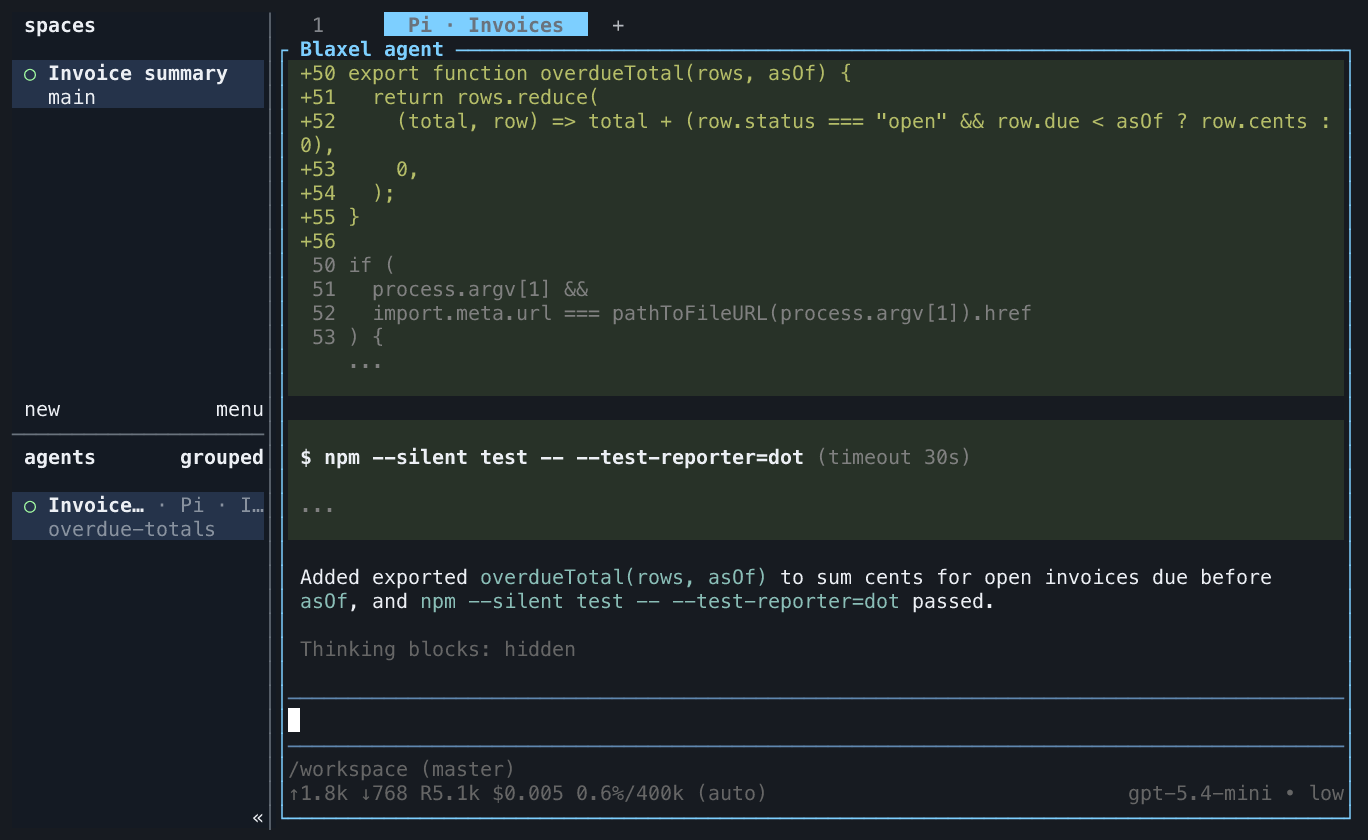
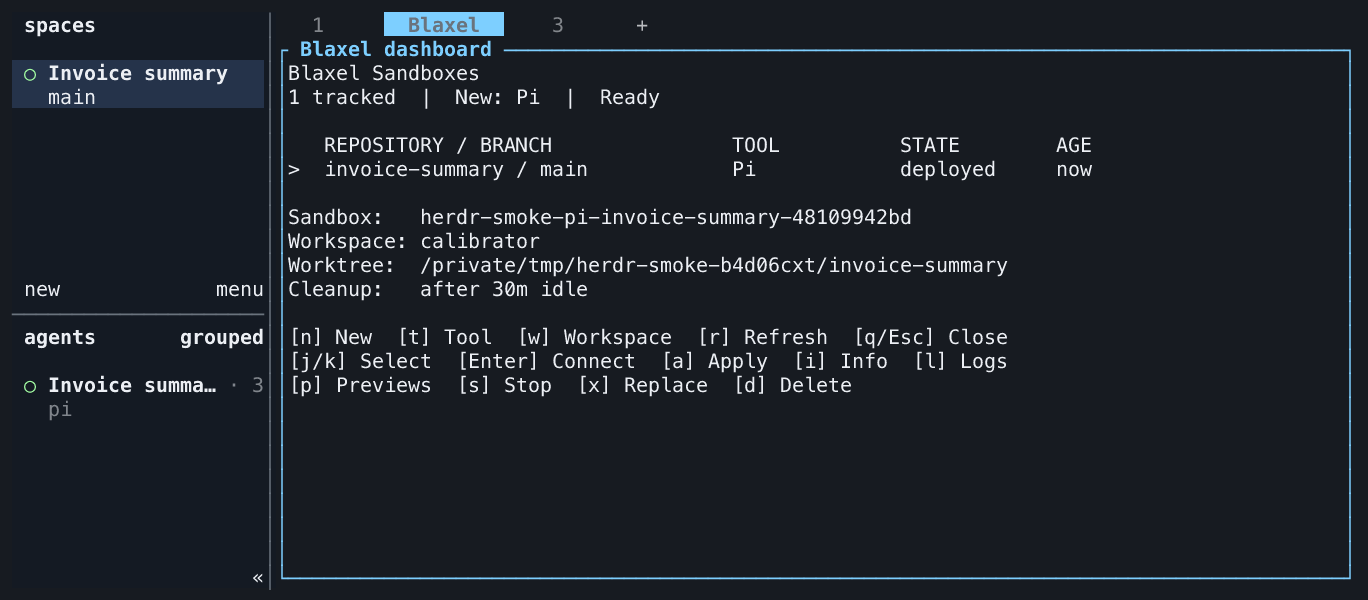
Your worktree stays local. The plugin sends a safety-filtered snapshot to Blaxel, keeps the agent running in a persistent remote session, and brings its changes back as a checked Git patch.
flowchart LR
    A["Worktree in Herdr"] --> B["Safety-filtered snapshot"]
    B --> C["Persistent Blaxel Sandbox"]
    C --> D["Codex, Claude Code, OpenCode, or Pi"]
    D --> E["Checked Git patch back"]
Quick start
You need Herdr 0.8.0 or newer, Node.js 22 or newer, Git, and the Blaxel CLI.
Install the plugin:
herdr plugin install blaxel-ai/herdr-blaxel-sandbox-plugin
Then:
- Open a Git worktree in Herdr.
- Run
herdr plugin action invoke start-agent --plugin blaxel.sandbox. - Start immediately shows the target and filtered upload while it creates, uploads, sets up, and verifies the Sandbox.
- Work in the new Blaxel agent pane.
That is the complete default setup. The plugin uses Codex and your current Blaxel workspace unless you choose something else.
If you are signed out, Start runs the official Blaxel login flow and then continues automatically.
Compatibility and maintenance
| Component | Supported or pinned version |
|---|---|
| Herdr | Minimum 0.8.0; current release checked: 0.9.5 |
| Local Node.js | 22 and 24 in CI |
| Blaxel CLI | 0.1.110 used for lifecycle verification |
| Blaxel TypeScript SDK | 0.3.20 |
| Codex / Claude Code / OpenCode / Pi | 0.147.0 / 2.1.226 / 1.14.48 / 0.73.1 |
Michael Stolarz maintains this integration. CI exercises the real minimum and latest Herdr on Linux and macOS, with weekly checks for upstream changes. Dependabot proposes npm and GitHub Actions updates. See verification for the disposable live smoke test, credentials setup, and the distinction between lifecycle and model verification.
Start with llms.txt for an index of the usage guides; contributors should also read AGENTS.md.
What you get
- Every
sbxinvocation creates an independent persistent Sandbox, even from the same worktree and pane. - Built-in Codex, Claude Code, OpenCode, and Pi support.
- Reconnectable agent sessions that survive local terminal disconnects.
- Private application previews for common development ports.
- A checked Git patch when you bring remote changes back.
- A responsive repository-aware dashboard for creating, connecting, applying, inspecting, stopping, replacing, and deleting every tracked Sandbox.
Choose an agent
Open Blaxel dashboard and press t to choose a coding tool. Press w to select the workspace for new Sandboxes. Existing Sandboxes keep their original tool and workspace.
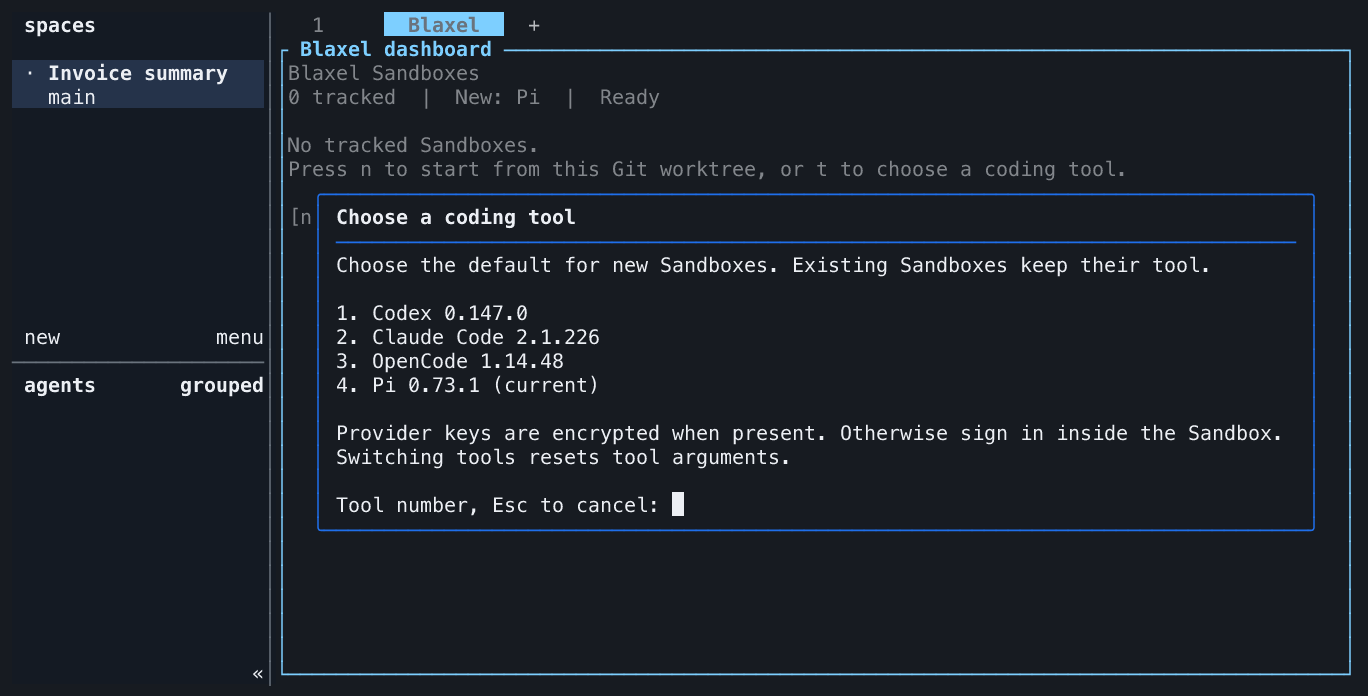
For advanced tool arguments, find the plugin's managed configuration directory:
herdr plugin config-dir blaxel.sandbox
Create config.json there with the agent you want:
{
  "agent": "claude-code",
  "agentArgs": []
}
Use codex, claude-code, opencode, or pi. Every setting is optional. See the configuration reference for workspace, region, image, memory, preview, upload, and lifecycle options.
Short commands
The plugin is complete after installation. If you want a short local command, add this optional Zsh function to ~/.zshrc:
sbx() {
  case "${1:-new}" in
    new)
      command herdr plugin action invoke start-agent --plugin blaxel.sandbox
      ;;
    list|ls|dashboard)
      command herdr plugin action invoke dashboard --plugin blaxel.sandbox
      ;;
    *)
      print -u2 "usage: sbx [new|list|dashboard]"
      return 2
      ;;
  esac
}
Reload Zsh, then run:
# Create a new Sandbox from the current Git worktree.
sbx
sbx new

# Manage every tracked Sandbox.
sbx list
Every sbx or sbx new creates another independent Sandbox. The function only shortens Herdr commands; the installed plugin owns all behavior.
Dashboard
herdr plugin action invoke dashboard --plugin blaxel.sandbox opens the primary management interface. The optional sbx list function opens the same dashboard. It renders local mappings immediately, refreshes Blaxel state in the background, and shows each Sandbox's repository, branch, agent, state, age, workspace, and idle-deletion policy. Open Info with i to inspect the installed tool version.
| Key | Action |
|---|---|
t / w |
Choose the tool / workspace for new Sandboxes |
Enter or c |
Connect to the persistent agent |
n |
Create another Sandbox for the selected repo |
a |
Review and apply remote changes locally |
i, l, or p |
Open info, logs, or previews |
s |
Stop the agent but preserve files |
x or d |
Replace or delete after typed DELETE |
r, j/k, or q |
Refresh, move selection, or close |
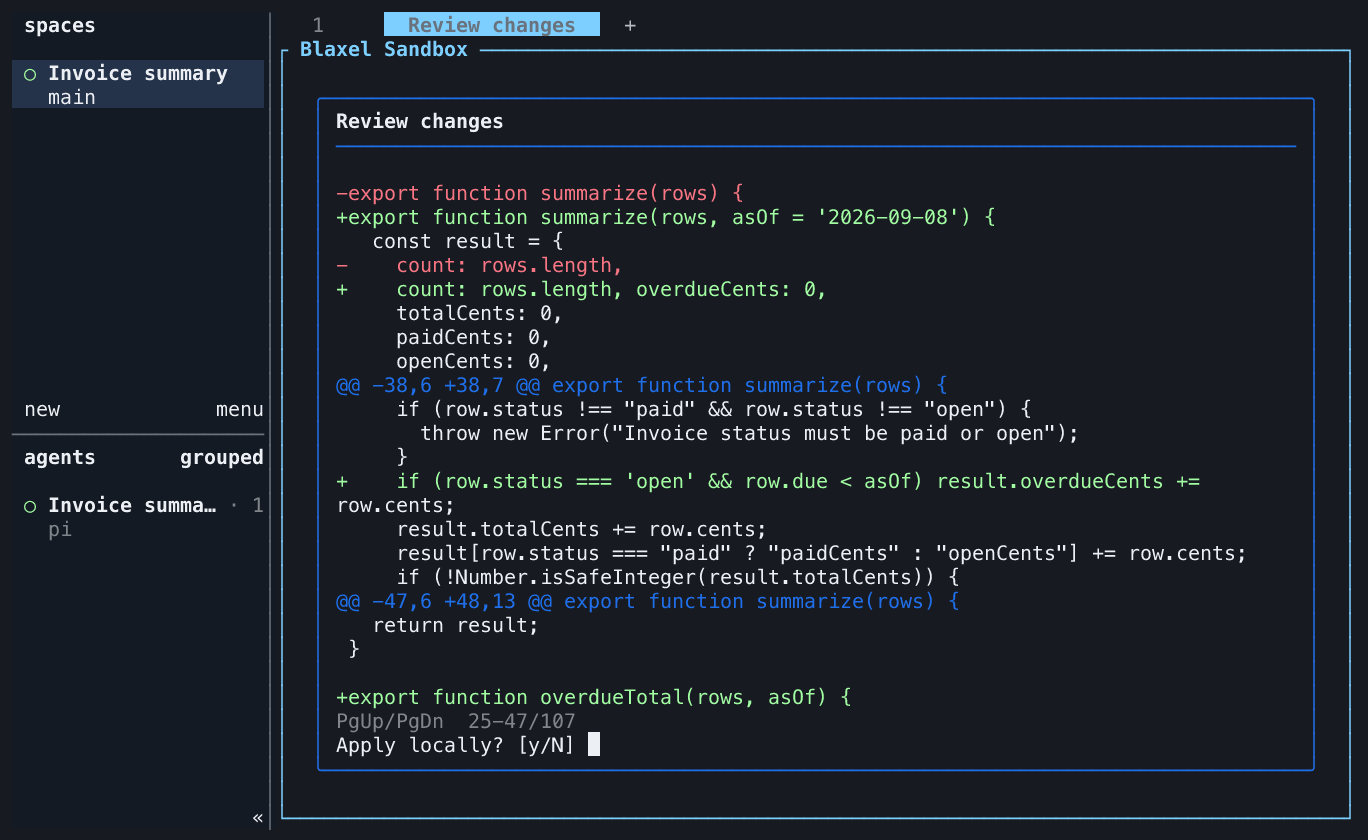
Dialogs dim the dashboard, keep keyboard input inside the active dialog, and restore the selected row when closed. Use Page Up and Page Down to read long logs and complete patches. Escape cancels an unanswered prompt or closes a finished dialog. Start works from an empty dashboard with n. Apply reviews complete patches up to 1 MiB; larger exports are refused before download or local changes. Reduce the remote changes before retrying.
Actions
| Action | What it does |
|---|---|
| Start configured agent in Blaxel | Creates a Sandbox from the filtered worktree and opens the agent. |
| Reconnect to Blaxel agent | Reopens the persistent agent session. |
| Apply Blaxel changes locally | Checks and applies the next remote Git patch. |
| Show Blaxel agent output | Shows recent terminal output without reconnecting. |
| Open Blaxel previews | Opens private application previews for configured ports. |
| Open Blaxel dashboard | Manages every tracked Sandbox from one repository-aware TUI. |
| Stop Blaxel agent | Stops the agent session but keeps its Sandbox and files. |
| Replace Blaxel sandbox | Deletes the mapped Sandbox and creates a clean replacement. |
| Delete Blaxel sandbox | Permanently deletes the Sandbox and forgets its mapping. |
Run an action from a local shell in the relevant Herdr workspace, use the dashboard, or add a keybinding. These are the direct CLI forms for agents and scripts:
# Immediately create another Sandbox from the current worktree.
herdr plugin action invoke start-agent --plugin blaxel.sandbox

# Open the dashboard for every tracked Sandbox.
herdr plugin action invoke dashboard --plugin blaxel.sandbox

# Reopen the same persistent agent session.
herdr plugin action invoke reconnect --plugin blaxel.sandbox

# Review and approve a checked remote patch before it changes local files.
herdr plugin action invoke apply-changes --plugin blaxel.sandbox

# Inspect status, recent agent output, and application previews.
herdr plugin action invoke info --plugin blaxel.sandbox
herdr plugin action invoke logs --plugin blaxel.sandbox
herdr plugin action invoke previews --plugin blaxel.sandbox

# Stop the agent without deleting files, or permanently delete with typed DELETE.
herdr plugin action invoke stop --plugin blaxel.sandbox
herdr plugin action invoke delete-sandbox --plugin blaxel.sandbox
Each command opens its readable interface inside Herdr. The Blaxel agent pane is a remote shell, so local functions and the local herdr executable are not available inside it. Use the dashboard or keybindings while that pane is focused; Herdr uses its mapping to target the exact Sandbox.
Safety without friction
Start shows the complete target and filtered upload while provisioning immediately. If the target or snapshot changes before the first remote write, the plugin stops and asks you to run Start again.
The plugin excludes Git-ignored files, dependencies, environment files, common credentials, private keys, cloud configuration, Terraform state, symlinks, and recognized token formats. It never copies host coding-agent sessions or configuration. When the selected provider API key exists, it is sent only as a Blaxel encrypted secret environment variable; the value is never displayed or saved in plugin state.
Remote edits stay remote until you choose Apply Blaxel changes locally. The plugin checks the complete binary Git patch before changing your worktree. A conflict changes nothing.
Only permanent replacement and deletion require a typed DELETE. Normal start, reconnect, stop, preview, and patch workflows do not.
Learn more
- Runnable invoice summary example
- Configuration
- Keybindings
- Troubleshooting
- Design and lifecycle
- Verification
- Contributing
- Herdr plugin documentation
- Blaxel Sandbox documentation
Development
npm ci
npm run check
npm run test:coverage
npm audit
See the verification guide for local checks and the required live lifecycle coverage.
Yorumlar (0)
Yorum birakmak icin giris yap.
Yorum birakSonuc bulunamadi