CrossGen
Health Uyari
- License — License: MIT
- Description — Repository has a description
- Active repo — Last push 0 days ago
- Low visibility — Only 8 GitHub stars
Code Basarisiz
- process.env — Environment variable access in scripts/electron-builder-pnpm.mjs
- process.env — Environment variable access in scripts/measure-gallery-performance.mjs
- network request — Outbound network request in scripts/measure-gallery-performance.mjs
- exec() — Shell command execution in scripts/mock-gemini-image-api.mjs
- process.env — Environment variable access in scripts/mock-gemini-image-api.mjs
Permissions Gecti
- Permissions — No dangerous permissions requested
Bu listing icin henuz AI raporu yok.
Local-first AI image workspace for people and agents. Generate, edit, organize, and reuse images through the desktop app, JSON CLI, or MCP.
CrossGen 0.3.1
Local-first AI image workspace for people and AI agents.
Generate, edit, organize, and reuse images from the desktop app, JSON CLI, or MCP-compatible agents.




English · 简体中文
Why 0.3.1 · Visual Tour · Core Workflows · Agent Runtime · Download · Discord · Technical Notes
Why CrossGen 0.3.1
CrossGen 0.3.1 turns the desktop image workspace into an agent-ready local runtime. You can still use the full visual app, while Codex, Claude Code, Cursor, and other local AI agents can discover models, generate or edit images, monitor durable jobs, and export results into a project through CLI or MCP.
The desktop app, CLI, and MCP server share the same API profiles, durable generation queue, History, and Gallery. Install CrossGen once; installed CLI and MCP use require no separate Node.js, npm, pnpm, global package, or local HTTP service.
It is built for real image-generation work, not just one-off prompting. Designers, comic and storyboarding teams, UI makers, operators, product teams, and AI image hobbyists often need the same loop:
- connect an image model with an API key,
- generate a batch of ideas,
- keep useful outputs,
- crop, annotate, pick colors, or make quick edits,
- reuse the result as a reference image,
- generate again.
CrossGen keeps that whole loop inside one app. No repeated file hunting, no scattered browser downloads, no separate folder cleanup before the next image-to-image attempt.
For agent-driven work, the loop becomes equally direct:
- inspect configured providers and verified model capabilities,
- submit text-to-image or reference-image work,
- track, cancel, or retry the queue-backed job,
- inspect the resulting Gallery asset,
- export it into the agent's current project.
Visual Tour
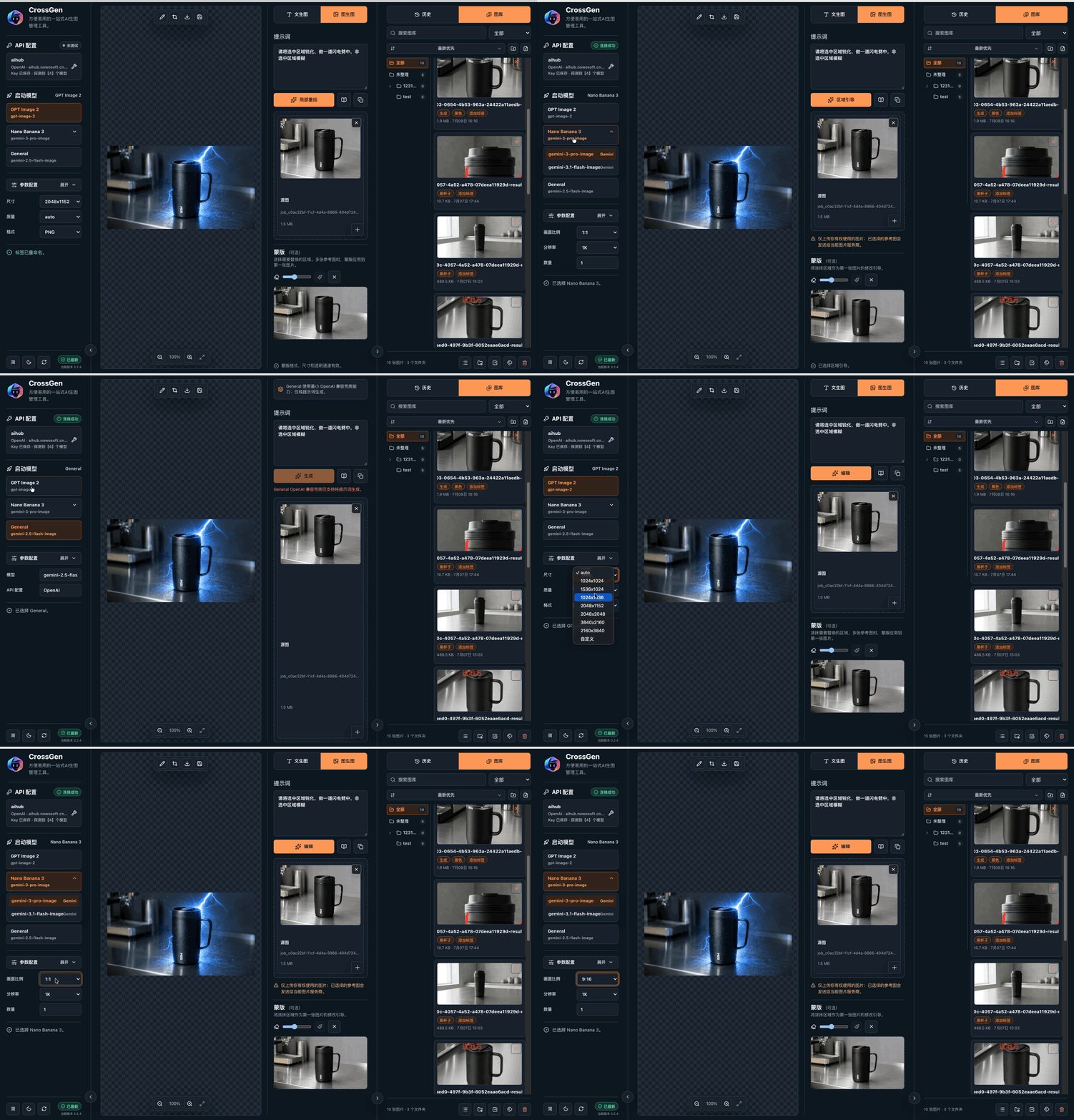
API access and model switching. Save API keys, switch access profiles, discover models, and let CrossGen pick the most compatible image route. |
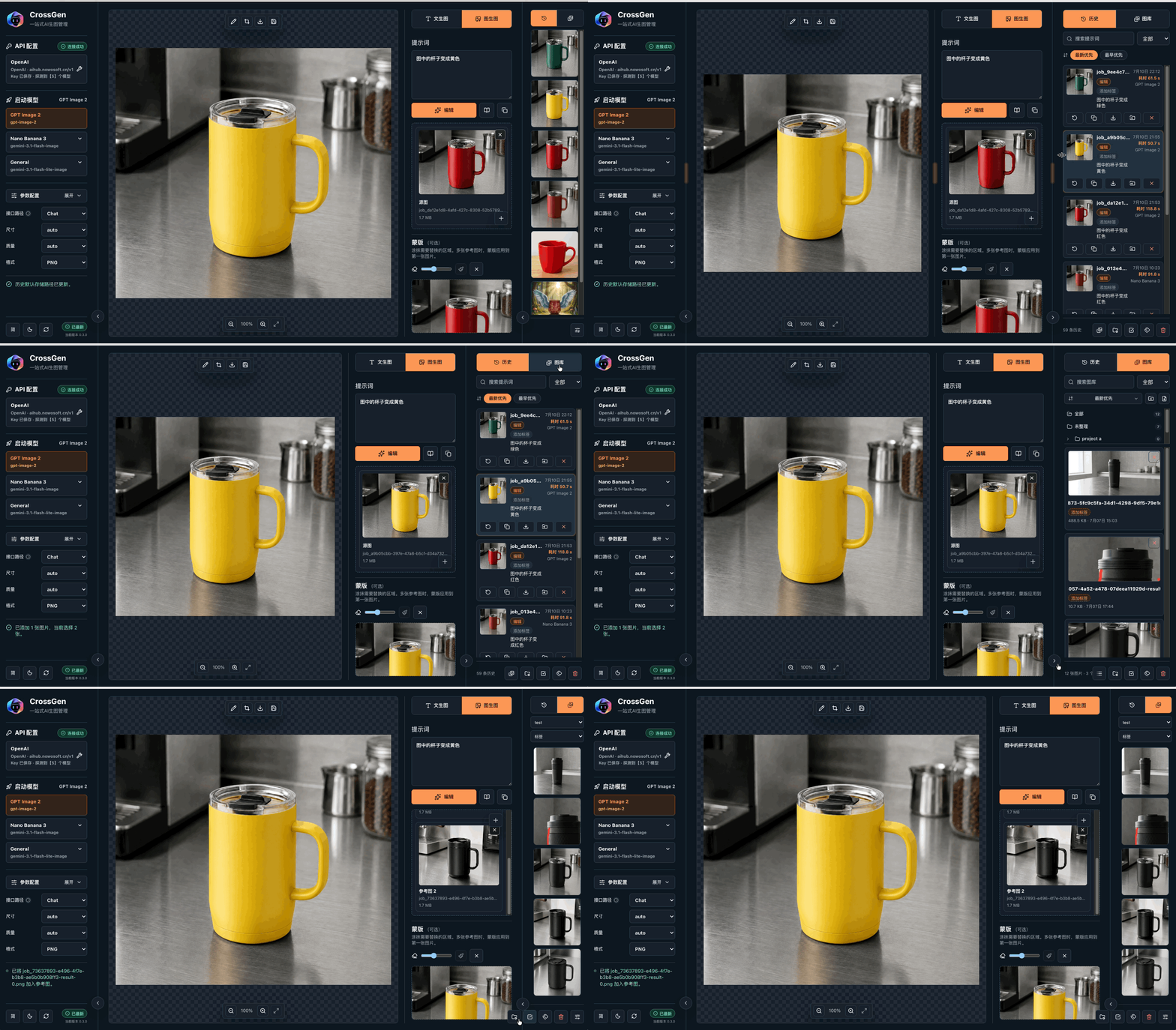
History and Gallery become reusable references. Drag results or saved assets directly into image-to-image reference slots. |
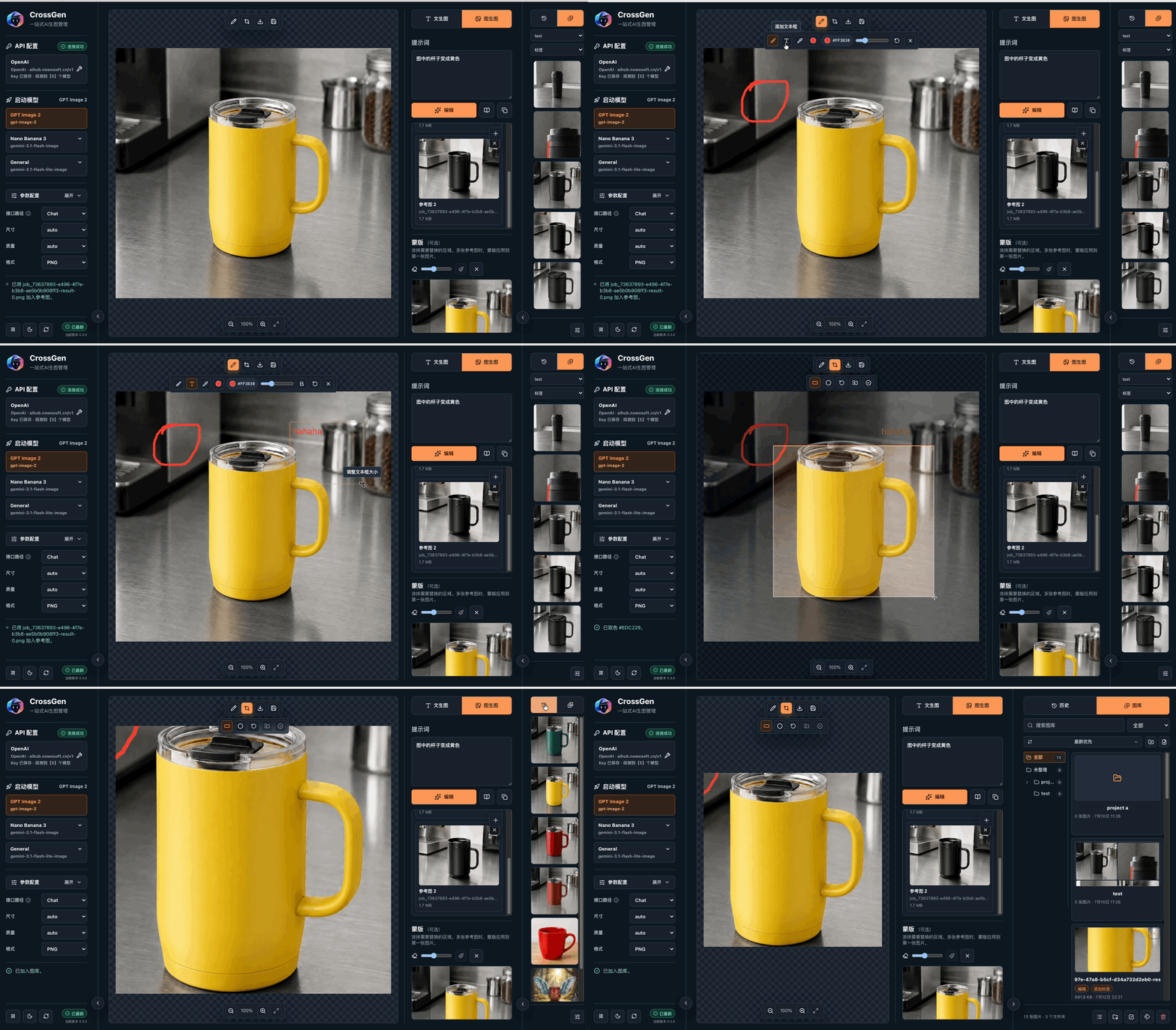
Edit without leaving the workflow. Preview, crop, draw, add text, pick colors, save to Gallery, then use the edited image for the next generation. |
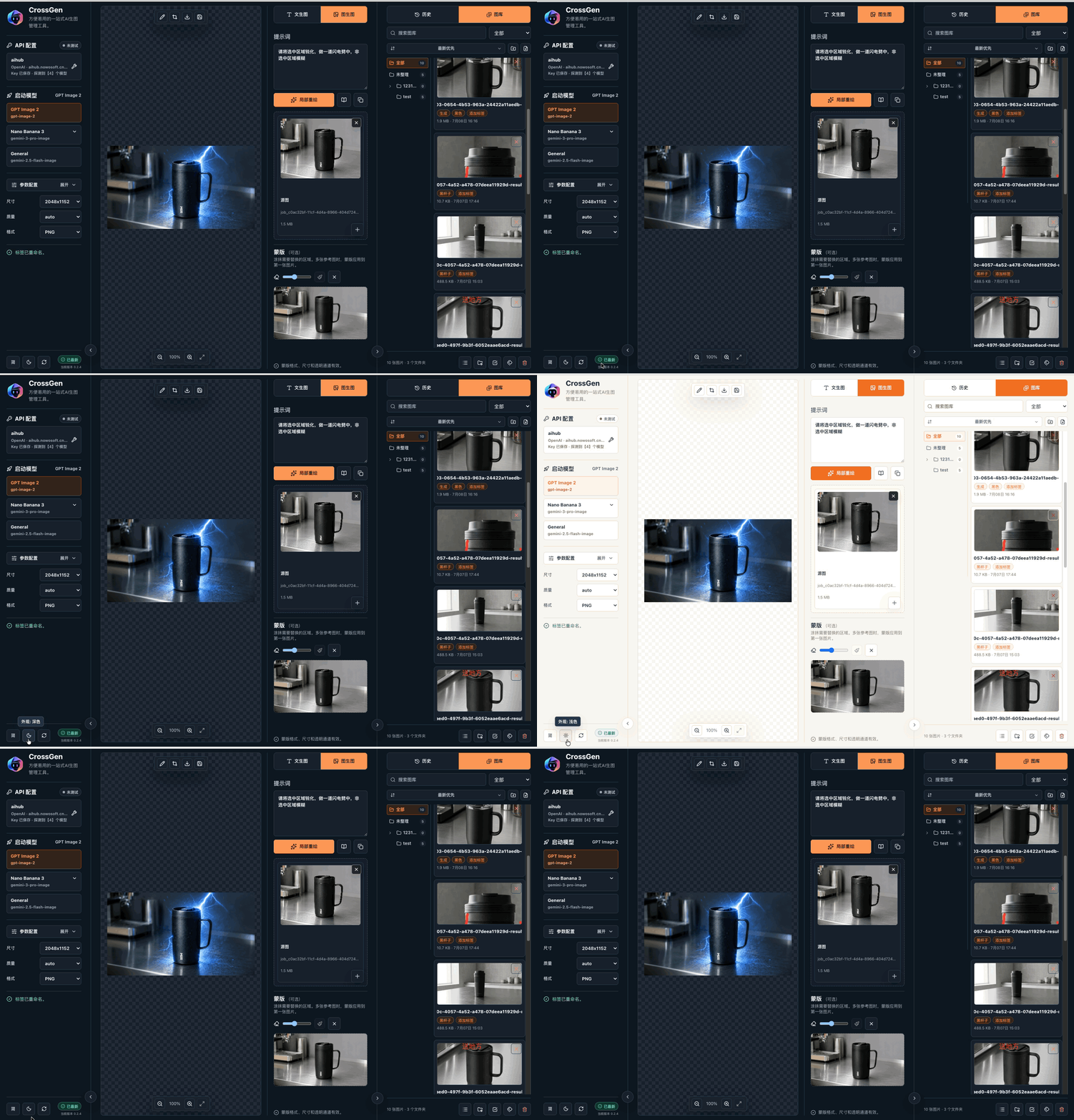
Dark mode. A calmer workspace for long image-selection and editing sessions. |
Core Workflows
1. One API Key Hub
CrossGen keeps API access simple:
- save multiple API keys and Base URLs,
- switch between OpenAI, Gemini, and OpenAI-compatible providers,
- run model discovery from the app,
- detect available image models,
- automatically probe compatible generation routes,
- keep the active API profile visible without crowding the workspace.
For aggregation platforms, route compatibility matters. CrossGen can prefer the route that actually works for the configured provider, including chat-style image generation paths used by compatible gateways.
2. Gallery And History That Actually Help
Generated images are not throwaway files. CrossGen treats them as reusable working material:
- History records every generation result with prompt, model, duration, and output actions.
- Gallery stores selected images as reusable assets.
- Gallery folders map to local files so assets remain manageable outside the app.
- Tags, folders, search, sorting, and compact/collapsed views keep large libraries usable.
- History and Gallery images can be clicked for preview/editing or dragged into image-to-image references.
- Right-click actions include local path copy for workflows that still need direct file access.
The goal is simple: the image you generated ten minutes ago should be easy to find, edit, and reuse.
3. Generate, Edit, Reuse, Generate Again
CrossGen includes a stronger image preview and editing area:
- crop results and save the selected region as a new image,
- draw quick annotations,
- add text boxes,
- pick colors from the image,
- save edited results into Gallery,
- use Gallery/history items as reference images,
- continue the next image-to-image round without leaving the app.
This makes CrossGen useful for iterative visual work: generate a base image, crop a detail, annotate or adjust it, save it, then feed it back into the next prompt.
Other Highlights
- GPT Image 2 and Gemini image workflows: focused launch entries for GPT Image 2 and Nano Banana/Gemini image models.
- Agent-ready CLI/MCP runtime: local agents can discover providers and models, submit queue-backed image jobs, inspect status, and export Gallery assets.
- Aggregation-provider compatibility: release gates include real-provider validation through OpenAI-compatible aggregation endpoints and Gemini-compatible image models.
- Durable generation queue: generation and edit work runs through a bounded local queue with status tracking, retry, cancel, and safe defaults.
- Prompt templates: save reusable prompt structures and apply them quickly.
- Prompt chips: insert Gallery assets, color values, and templates into prompts.
- Image-to-image reference handling: drag local files, Gallery assets, or History outputs into reference slots.
- Dark mode: built for longer visual review sessions.
- Local-first storage: history, outputs, templates, and Gallery assets are stored locally.
- Open source: released under the MIT License.
Agent Runtime
CrossGen 0.3.1 exposes the local image runtime through structured JSON CLI commands and an MCP stdio server. The same queue and Gallery rules protect desktop, CLI, and MCP workflows:
crossgen doctor --agent --jsonreports the app path, data directory, provider readiness, queue configuration, and MCP launch hints.crossgen mcp config --client codex|claude-code|cursor --mode readonly|write|generate --jsonprints client-ready MCP configuration.crossgen generate ... --yes --wait --jsonand MCPcrossgen_generate_imagesubmit work through the durable queue.crossgen asset export <asset-id> --to <path> --yes --jsoncopies a managed image into a project without moving the Gallery source.
CLI and MCP are separate entry points. MCP can point directly at the installed CrossGen app executable with --mcp and does not require a CLI wrapper. The packaged CLI launcher forwards to the app executable and does not require Node.js, npm, pnpm, or a global package. CLI and MCP default to read-only behavior. Write and generation modes are explicit, paid generation requires confirmation, and local path disclosure is opt-in.
Generate from a local agent or terminal
After configuring an API profile in the desktop app, use the packaged crossgen launcher:
crossgen doctor --agent --json
crossgen models list --json
crossgen generate --prompt "A precise isometric app icon" --yes --wait --json
crossgen job status <job-id> --json
crossgen asset export <asset-id> --to ./assets/app-icon.png --yes --json
Image editing uses the same queue and can accept a local reference image:
crossgen edit \
  --prompt "Keep the composition and change the background to white" \
  --input ./reference.png --yes --wait --json
All machine-facing responses are JSON. Read-only inspection omits API keys and absolute asset paths; paid generation, destructive actions, queue-control changes, exports, and path disclosure require explicit confirmation.
Connect Codex, Claude Code, Cursor, or another MCP host
CrossGen can generate client-ready MCP configuration:
crossgen mcp config --client codex --mode readonly --json
crossgen mcp config --client claude-code --mode generate --json
crossgen mcp config --client cursor --mode generate --json
MCP connects directly to the installed CrossGen executable with --mcp; enabling the crossgen shell command is not required. Choose the smallest permission mode that fits the workflow:
| Mode | Agent capabilities |
|---|---|
readonly |
Inspect providers, models, capabilities, queue, jobs, folders, and Gallery assets |
write |
Read-only tools plus controlled Gallery and folder changes |
generate |
Write tools plus queue-backed image generation and editing |
Typical agent workflows include generating UI assets during coding, producing several visual directions and polling them as durable jobs, editing an existing reference image, and exporting selected Gallery results directly into a repository.
See docs/cli-mcp.md for command examples and docs/KNOWN_LIMITATIONS.md for current agent/runtime limits.
Download And Use
CrossGen is distributed as a desktop release package. Download the latest installer from the GitHub Releases page, install it, open the app, add your API key, and start generating.
| Platform | Package |
|---|---|
| macOS Apple Silicon | .dmg |
| Windows x64 | .exe installer |
| Linux x64 | AppImage |
Basic setup:
- Open API access.
- Add an API key and Base URL.
- Run model discovery.
- Launch GPT Image 2, Nano Banana/Gemini, or a compatible model.
- Generate, edit, save useful images to Gallery, and reuse them as references.
The macOS arm64 release is Developer ID signed and Apple notarized. If Gatekeeper blocks a local unsigned build, right-click the app and choose Open, or clear the quarantine attribute:
xattr -dr com.apple.quarantine /Applications/CrossGen.app
If Windows SmartScreen appears, choose More info and then Run anyway.
Brand
CrossGen means a cross-model, cross-step generation workspace: one local runtime for API access, generation, editing, Gallery management, repeated image-to-image iteration, and AI-agent workflows.
The product promise is deliberately practical:
configure once, generate from the app or an agent, keep useful images organized, and reuse or export every result.
CrossGen is maintained by Nowo and Corgnitor. Nowo focuses on AI-native product design and applied workflows. Corgnitor focuses on AI engineering and productization.
Join the CrossGen community on Discord for feedback, release discussion, and workflow ideas.
Technical Notes
CrossGen is an Electron + React + Tailwind desktop app. The app focuses on local-first workflows and supports OpenAI, Gemini, and compatible image providers.
Useful commands:
pnpm install
pnpm dev:electron
pnpm build
Validation:
pnpm verify:mock-api
pnpm verify:mock-gemini-api
pnpm verify:mock-model-discovery
pnpm verify:release-evidence
Packaging:
pnpm package:dir
pnpm package:mac
pnpm package:win
pnpm verify:release:mac
pnpm verify:release:windows
pnpm verify:release:linux
Release evidence is tracked in docs/release/evidence.json. Mock verifiers do not spend real API credits. Real-provider gates require explicit cost approval and local environment variables.
License
CrossGen is released under the MIT License.
Yorumlar (0)
Yorum birakmak icin giris yap.
Yorum birakSonuc bulunamadi