goat-flow
Health Warn
- License — License: MIT
- Description — Repository has a description
- Active repo — Last push 0 days ago
- Low visibility — Only 5 GitHub stars
Code Fail
- rm -rf — Recursive force deletion command in .claude/hooks/deny-dangerous.sh
- process.env — Environment variable access in .claude/hooks/deny-dangerous.sh
- rm -rf — Recursive force deletion command in .codex/hooks/deny-dangerous.sh
- process.env — Environment variable access in .codex/hooks/deny-dangerous.sh
- rm -rf — Recursive force deletion command in .gemini/hooks/deny-dangerous.sh
- process.env — Environment variable access in .gemini/hooks/deny-dangerous.sh
- process.env — Environment variable access in .github/actions/goat-flow-audit/action.yml
- rm -rf — Recursive force deletion command in .github/hooks/deny-dangerous.sh
- process.env — Environment variable access in .github/hooks/deny-dangerous.sh
Permissions Pass
- Permissions — No dangerous permissions requested
This tool provides a structured workflow system and local web dashboard for configuring, managing, and auditing AI coding agents like Claude Code and Gemini CLI. It helps developers generate guided prompts and monitor agent quality across multiple projects.
Security Assessment
The overall risk is Medium. The static scanner flagged multiple instances of recursive force deletion commands (`rm -rf`) and environment variable access (`process.env`). However, these are predominantly located inside appropriately named security hook files (e.g., `deny-dangerous.sh`). These scripts are almost certainly designed to intentionally search for and block dangerous operations in your project, meaning the `rm -rf` flag is a feature rather than a malicious payload. The tool does not request overtly dangerous permissions. That said, the workspace feature utilizes a WebSocket-based PTY (xterm.js) to execute shell commands and run agents directly in your browser. Because it handles live terminal execution and accesses environment variables, you should inspect the code to ensure the local server is properly secured and inaccessible to external networks.
Quality Assessment
The project is very new and has low community visibility with only 5 GitHub stars. It is actively maintained, with repository updates pushed as recently as today. It uses the standard, permissive MIT license. While community trust cannot be strongly established yet due to the low adoption, the active development and clear documentation are positive indicators of a legitimate project.
Verdict
Use with caution—the tool is likely safe and well-intentioned, but its low community adoption and deep integration with your local system and terminal environment warrant a quick manual code review before relying on it.
A structured workflow system for AI coding agents - harness engineering, execution loop, skills, hooks, and a learning loop. Works with Claude Code, Gemini CLI, Codex.
GOAT Flow
A dashboard for auditing, configuring, and running your AI coding agents.
One command opens a local menu for auditing, deterministic setup, guided agent prompts, and the dashboard. Supports Claude Code, Codex, Gemini CLI, and Copilot CLI.


npx @blundergoat/goat-flow@latest
output:
What do you want to do?
  1. Start dashboard
  2. Install/update goat-flow files
  3. Generate setup prompt
  4. Audit current project
  5. Show project status
Dashboard views
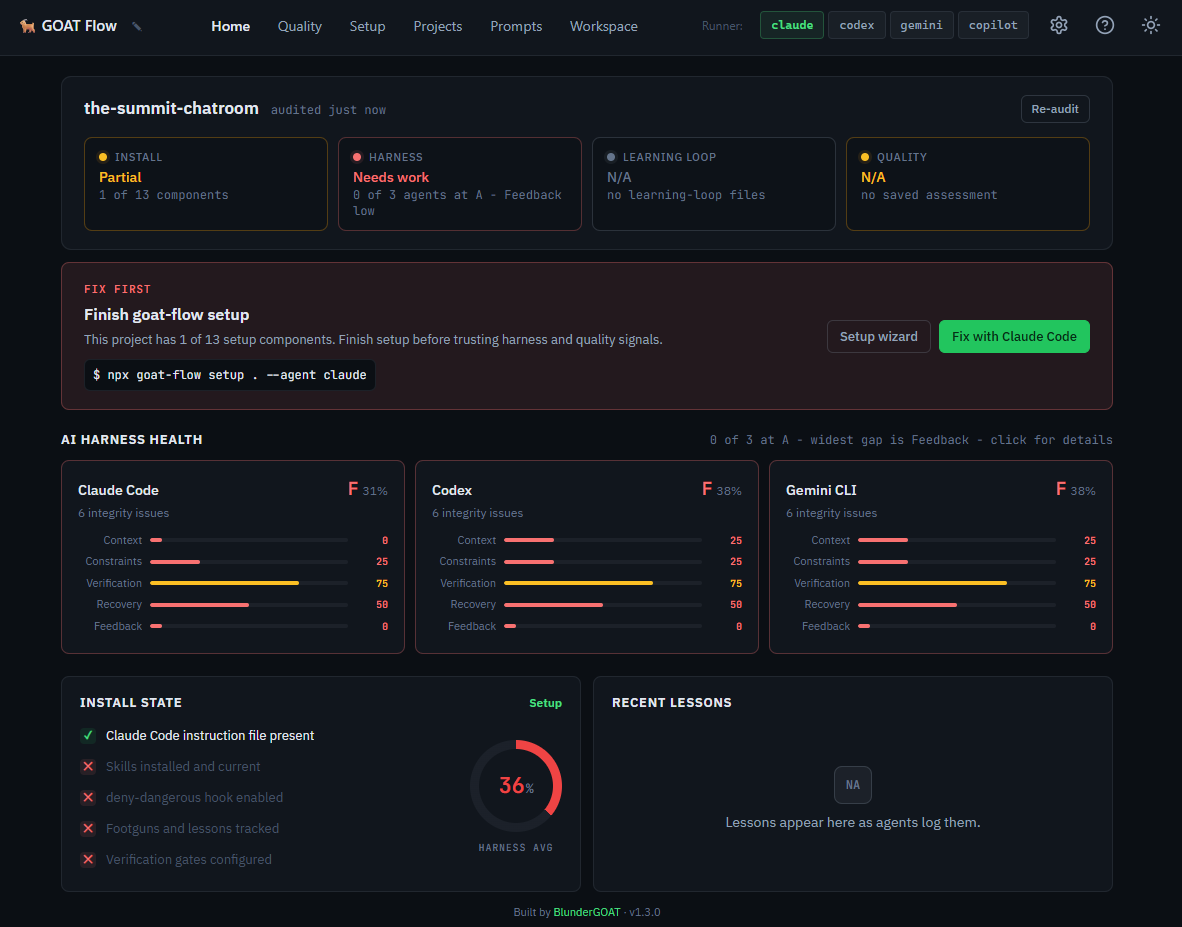
Home
Live audit results for every supported agent. Per-agent cards show pass/fail across two scopes (GOAT Flow Setup, Agent Setup) with actionable fix hints. An AI Harness section scores each agent across five concerns - Context, Constraints, Verification, Recovery, and Feedback Loop - so you can see exactly where your setup is strong and where it's weak. "What to do next" action cards surface the highest-priority gaps. Re-audit after changes without leaving the page.
Setup
Guided setup flow. Detects your project stack and existing configuration, lets you pick a target agent, then generates a setup prompt you can preview and launch directly in a terminal session. The agent configures your project: instruction file, skills, hooks, and learning loop.
Prompts
A library of 29 preset prompts across six categories: critique, debug, plan, QA, review, and security. Two-pane layout with search, category filters, and favorites. Select a prompt and launch it in a new terminal, send it to an active session, or copy it to clipboard. Keyboard-navigable: / to search, arrows to browse, Enter to launch.
Prompts include structured workflows like pre-walk-through notes with targeted testing plans, multi-lens critiques, full threat assessments, dependency scans, coverage audits, and milestone planning.
Workspace
Split layout for terminal work. A sessions rail lists all running terminal sessions (up to 10) with runner, age, and idle indicators. Single-click switching between sessions. The right pane is a full xterm.js terminal with WebSocket-based PTY - run Claude, Codex, Gemini, or Copilot directly in the browser.
Projects
Multi-project browser. Register multiple project paths, view their audit status at a glance, and "Audit All" in one click. Select a project to switch context across the entire dashboard.
Quality
Generate agent quality-assessment prompts. Select a target agent, generate the prompt, and preview the full output with embedded audit results.
What's under the hood
The dashboard is the interface. Underneath, GOAT Flow installs a harness that makes agents more reliable:
| Component | What it prevents |
|---|---|
| Execution Loop (READ → SCOPE → ACT → VERIFY) | Guessing at unread code, shipping without checks |
Skills (seven /goat-* commands + dispatcher) |
Free-form prompting that drifts mid-task |
Enforcement Hooks (deny-dangerous.sh) |
rm -rf, all git push, secret file access |
| Learning Loop (footguns, lessons, decisions) | Same mistake recurring next session |
| Autonomy Tiers (Always / Ask First / Never) | Agent overreach, missed approvals |
Skills have phases and human gates. Hooks intercept tool calls before they execute. The learning loop gets read at session start so mistakes compound into context, not repetition.
Why not just CLAUDE.md / Cursor rules?
Instruction files tell the agent what to do. They don't enforce it.
| Instruction file alone | GOAT Flow | |
|---|---|---|
| Tell the agent the rules | yes | yes |
| Block dangerous commands at tool level | no | yes |
| Structured workflows with human gates | no | yes |
| Capture lessons across sessions | no | yes |
| Audit whether setup is actually correct | no | yes |
Use an instruction file for rules the agent should remember. Use GOAT Flow for rules the agent cannot skip.
Getting started
Requires Node.js 20+.
1. Start with the menu
npx @blundergoat/goat-flow@latest
No install required. Choose dashboard, deterministic install/update, setup prompt generation, audit, or status from the menu.
2. Install/update system files
For a brand new project, copy the goat-flow system files first. This step is deterministic and does not require an agent:
npx @blundergoat/goat-flow@latest install . --agent claude
Use --force only when you want to overwrite existing settings and .goat-flow/config.yaml.
3. Generate the setup prompt
The installer copies shared system files. The setup prompt still creates or refreshes project-specific content such as the instruction file, architecture, code map, and real project footguns/lessons.
npx @blundergoat/goat-flow@latest setup . --agent claude
Equivalent deterministic setup/update command:
npx @blundergoat/goat-flow@latest setup . --agent claude --apply
4. Re-audit
Back on the Home view, click Re-audit. All checks should pass. The AI Harness cards now show scores across the five concerns.
5. Use a prompt
Open the Prompts view, pick a workflow (code review, bug diagnosis, UI debugging with browser evidence, security assessment, test planning), and launch it in a terminal session. Each prompt invokes a structured /goat-* skill with phases and human gates.
Install locally (optional)
npm install --save-dev @blundergoat/goat-flow    # npm
pnpm add -D @blundergoat/goat-flow               # pnpm
For the dashboard's embedded terminal, you'll need node-pty to compile. See Troubleshooting if the terminal doesn't appear.
Multi-agent support
GOAT Flow supports Claude Code, Codex, Gemini CLI, and Copilot CLI. All agents share the same execution loop, autonomy tiers, skills, and learning loop. The dashboard's runner switcher (top nav bar) lets you toggle between agents and see per-agent audit results side by side.
Run npx @blundergoat/goat-flow@latest manifest to inspect the live agent matrix.
CLI commands
The dashboard covers most workflows visually. For CI or scripting, the same features are available as CLI commands:
npx goat-flow dashboard .                  # Launch the dashboard
npx goat-flow audit .                      # Run audit (pass/fail output)
npx goat-flow audit . --harness            # Add AI harness scoring
npx goat-flow audit . --format json        # JSON output for CI
npx goat-flow install . --agent claude     # Copy/update system files
npx goat-flow setup . --agent claude       # Generate setup prompt
npx goat-flow quality . --agent claude     # Generate quality-assessment prompt
npx goat-flow status .                     # Project state (bare/partial/v0.9/v1.0/v1.1)
npx goat-flow manifest                     # Agent support matrix
See docs/cli.md for the full reference.
The five harness concerns
Every major source in harness engineering (Hashimoto, Fowler/Böckeler, Anthropic, HumanLayer) converges on the same concerns. The dashboard's AI Harness section scores each agent across all five:
| Concern | Question |
|---|---|
| Context | Is the agent's context accurate, lean, and useful? |
| Constraints | Do deterministic rules catch failures before the LLM runs? |
| Verification | Can the agent verify its work, and does failure feed back? |
| Recovery | Can the agent resume after crash or interruption? |
| Feedback Loop | Is the harness getting smarter from failures over time? |
See docs/audit-and-quality.md for the full framework and sources.
Troubleshooting
Terminal not showing in dashboard?
goat-flow installs without a C++ toolchain as of v1.2.4. If you need the dashboard's embedded terminal, you'll also need node-pty to compile. Install build tools (sudo apt install build-essential python3 on Debian/Ubuntu, xcode-select --install on macOS), then run npm rebuild node-pty. If using pnpm: pnpm approve-builds (select node-pty). To skip the native build entirely: npm install @blundergoat/goat-flow --omit=optional.
Audit fails on a fresh project?
Expected. Run npx @blundergoat/goat-flow@latest install . --agent claude, then generate the setup prompt with npx @blundergoat/goat-flow@latest setup . --agent claude.
Audit still fails after setup?
Re-run npx @blundergoat/goat-flow@latest audit . --verbose to see which check failed. The howToFix hint on each failure points at the missing file or config key.
Agent isn't following the execution loop?
Restart the agent session after setup so it re-reads the instruction file. Agents only pick up instruction-file changes on session start.
Setup prompt looks wrong or incomplete?
Regenerate from the dashboard Setup page, which shows detected stack info alongside the prompt.
Documentation
| Document | What it covers |
|---|---|
| CLI Reference | All commands, flags, and output formats |
| Dashboard | Views, terminal, API endpoints |
| Skills Reference | All 7 skills: modes, phases, gates, outputs |
| Audit & Quality | The two evaluation commands, 5 harness concerns, and when to use each |
Author
Built by Matthew Hansen.
License
Reviews (0)
Sign in to leave a review.
Leave a reviewNo results found