ilmari
Health Gecti
- License — License: MIT
- Description — Repository has a description
- Active repo — Last push 0 days ago
- Community trust — 13 GitHub stars
Code Gecti
- Code scan — Scanned 11 files during light audit, no dangerous patterns found
Permissions Gecti
- Permissions — No dangerous permissions requested
Bu listing icin henuz AI raporu yok.
Minimal tmux popup radar for Codex, Amp, Claude Code, OpenCode, Pi, Gemini and Auggie.
ilmari



Minimal tmux popup radar for Codex, Amp, Claude Code, OpenCode, Pi, Gemini CLI, and Auggie.
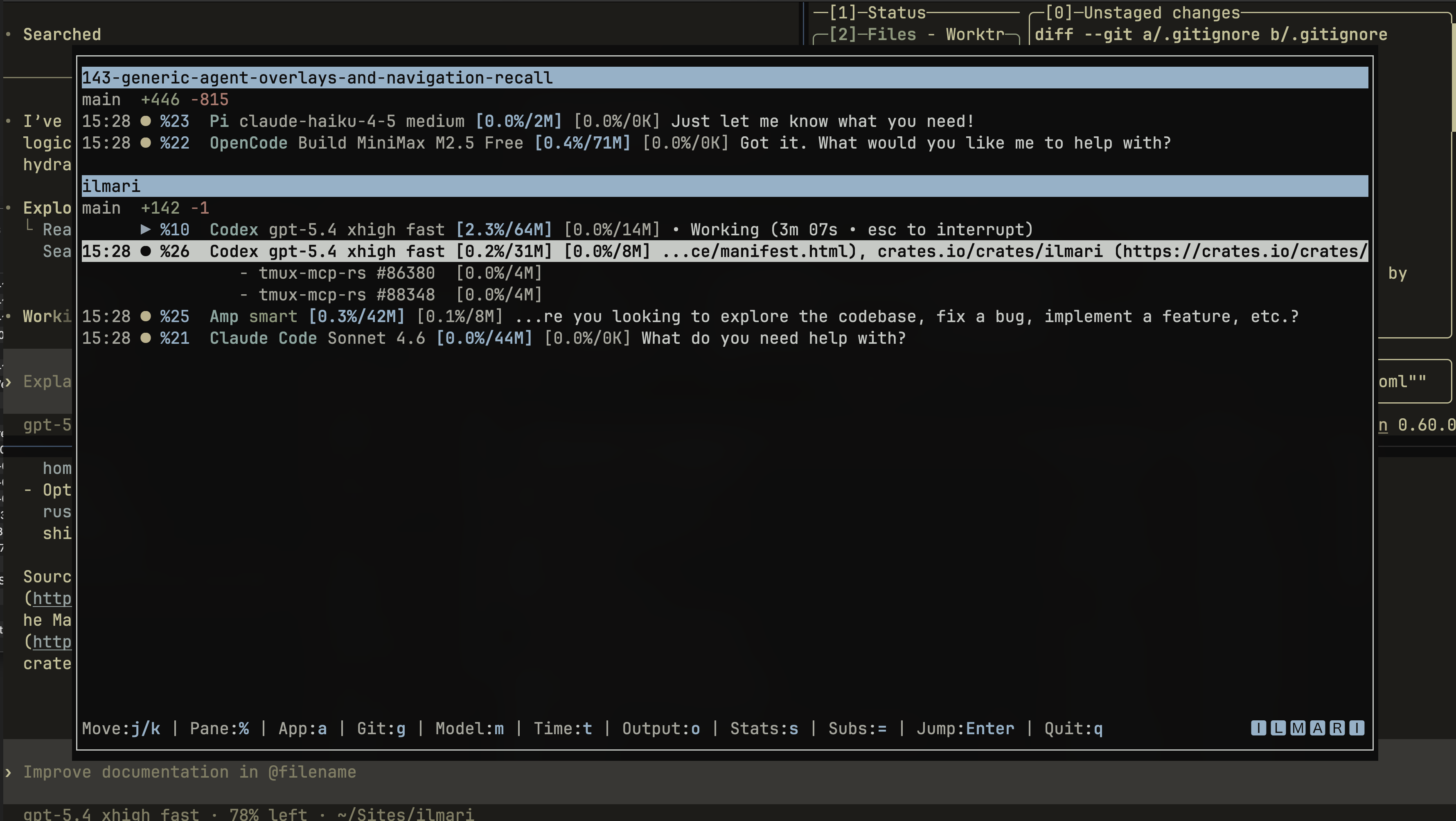
Ilmari exists for the moment when a tmux workspace has multiple agent panes and
you need to answer three questions quickly:
- which pane is still running
- which pane is waiting on you
- which workspace that pane belongs to
It opens as a tmux popup, inspects the panes you already have running, groups
them by workspace, shows agent state plus a visible output excerpt, and jumps
you straight to the selected pane.
Ilmari is popup-first and observer-only. It does not launch agents, manage
workflows, or own your tmux layout. It gives you a fast index over the agent
sessions that already exist.
What Ilmari Solves
When several agents are running at once, the normal tmux workflow gets noisy:
- waiting panes are easy to miss
- finished panes and still-running panes blur together
- workspaces get split across sessions and windows
- you end up cycling panes manually just to find the one that matters
Ilmari reduces that to a popup:
- detect supported agent panes from tmux metadata and output
- classify panes as running, waiting, finished, terminated, or unknown
- group panes by workspace path
- show lightweight git change context per workspace
- jump to the selected pane and get out of the way
Installation
Cargo (crates.io)
cargo install ilmari
Homebrew
brew install bnomei/ilmari/ilmari
GitHub Releases
Download a prebuilt archive from the GitHub Releases page, extract it, and
place ilmari on your PATH.
From source
git clone https://github.com/bnomei/ilmari.git
cd ilmari
cargo build --release
Popup-First Setup
tmux popup support requires tmux 3.2 or newer.
1. Add a tmux binding
Assuming ilmari is already installed and available on your PATH:
bind-key i display-popup -E -w 90% -h 85% "ilmari"
Reload tmux after editing ~/.tmux.conf:
tmux source-file ~/.tmux.conf
2. Open the popup
Press your tmux prefix, then the bound key.
Typical popup flow:
- open
ilmari - move selection with
j/kor arrow keys - press
Enterto jump to the selected pane
When ilmari is launched as a tmux popup, activation returns you to the target
pane and closes the popup.
Configuration
Ilmari currently configures through environment variables.
| Variable | Purpose | Default | Notes |
|---|---|---|---|
ILMARI_REFRESH_SECONDS |
Main tmux scan cadence | 5 |
Positive integer seconds. Empty, invalid, or non-positive values fall back to the default. |
ILMARI_PROCESS_REFRESH_SECONDS |
CPU and memory sampling cadence | 15 |
Separate from the main refresh so ilmari does not call ps on every redraw. Empty, invalid, or non-positive values fall back to the default. |
ILMARI_TUI_PALETTE |
Primary palette override | terminal ANSI theme | Takes an 18-slot CSV palette. Takes precedence over ILMARI_PALETTE. |
ILMARI_PALETTE |
Compatibility alias for palette override | terminal ANSI theme | Used only when ILMARI_TUI_PALETTE is unset. |
Examples:
ILMARI_REFRESH_SECONDS=10 ilmari
ILMARI_PROCESS_REFRESH_SECONDS=30 ilmari
Ilmari uses semantic color roles in code, but by default those resolve through
your terminal's current ANSI palette. If you want explicit colors, provide an
18-slot CSV palette override using ILMARI_TUI_PALETTE or ILMARI_PALETTE.
Slot order:
fg,bg,black,red,green,yellow,blue,magenta,cyan,white,bright_black,bright_red,bright_green,bright_yellow,bright_blue,bright_magenta,bright_cyan,bright_white
Accepted color formats:
#RRGGBB0xRRGGBB0XRRGGBBRRGGBBrgb:RR/GG/BBrgb:RRRR/GGGG/BBBB
Behavior:
ILMARI_TUI_PALETTEtakes precedence overILMARI_PALETTE- empty or malformed palette values are ignored
- if neither is set,
ilmariuses the terminal's default ANSI theme
Yorumlar (0)
Yorum birakmak icin giris yap.
Yorum birakSonuc bulunamadi