claudecodeX
Health Uyari
- License — License: MIT
- Description — Repository has a description
- Active repo — Last push 0 days ago
- Low visibility — Only 5 GitHub stars
Code Basarisiz
- rm -rf — Recursive force deletion command in mac/claudecodex-macos.sh
Permissions Gecti
- Permissions — No dangerous permissions requested
Bu listing icin henuz AI raporu yok.
Run two Claude Desktop instances simultaneously: Anthropic subscription in one, third-party provider in the other.
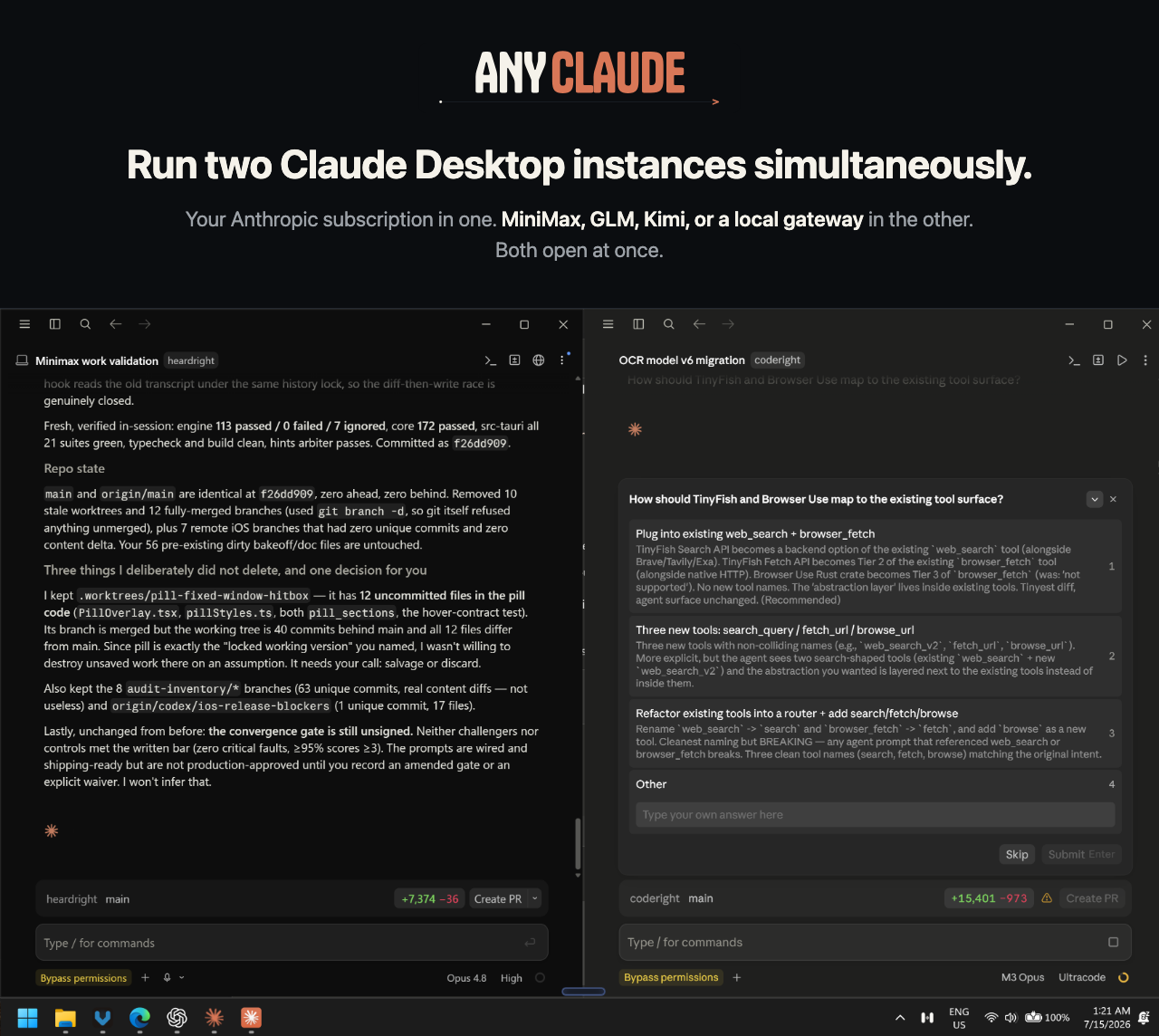
Use your Anthropic subscription in the first. Use MiniMax M3 or another third-party Anthropic-compatible provider in the second.
Both stay open on the same computer.
The second instance talks to the provider you configure, so its work does not draw down your Anthropic usage limits.
Set up the second instance · How it works · How-tos · Provider status · Codex · Windows · macOS · Changelog
Real proof, in the card above: left is subscription Claude on Opus 4.8, right is an isolated ClaudeCodeX profile on MiniMax M3, and the taskbar shows both running at once.
Your Claude stays your Claude
ClaudeCodeX does not replace, patch, or reroute your subscription Claude. The launcher opens a second, isolated Claude profile pointed at another model provider, so both windows remain open and work independently.
What you get
| Your regular Claude | Your second Claude |
|---|---|
| Opens normally | Opens from the ClaudeCodeX shortcut |
| Uses your Anthropic subscription | Uses MiniMax, GLM, Kimi, LiteLLM, vLLM, or a local gateway |
| Keeps its existing chats, projects, and settings | Separate Desktop, Claude Code, and Cowork state; shares your ~/.claude skills and subagents |
| Runs Anthropic models | Runs the upstream model you configure |
| Stays open | Runs beside it at the same time |
Three reasons people run the second instance:
- Keep working after you hit a limit. The second window bills to your provider, not to Anthropic, so a long or repetitive job there leaves your subscription capacity intact.
- Work on two things at once. Two live sessions, two repositories, one desktop.
- Compare models on the same task. Same interface, same prompt, different upstream model.
You keep the Claude interface and workflows you already know without committing the whole app to one provider.
Features
- Two Claude Desktop instances at once. Subscription Claude and an isolated ClaudeCodeX instance on a third-party provider, live together on one machine, each with its own profile.
- Claude Code through the proxy, interactive or headless. Point Claude Code's
ANTHROPIC_BASE_URLat the local proxy to run the CLI on the provider: an interactive session, or a scriptedclaude -prun for pipes and CI, beside a separate subscription terminal. - Codex CLI on the same provider and the same key. Codex 0.122 removed
wire_api = "chat", so a custom provider must speak the OpenAI Responses API that almost no provider serves. The proxy serves it and talks Chat Completions upstream, socodex -p qwenruns on your provider while plaincodexstays on your ChatGPT subscription. See the Codex guide. - Any Anthropic-compatible provider. MiniMax, GLM, Kimi, Alibaba, LiteLLM, vLLM, or a local gateway. Each is one small JSON template in
examples/; adding one is a template plus a verification run. - Live streaming. Token deltas are streamed through to Claude and re-emitted as Responses events for Codex, so long answers appear as they are generated.
- Per-model routing and thinking policy. Map different incoming Claude model names to different upstream models or thinking modes (
adaptive,disabled). - No fork, no patch. A standard-library Python proxy that only renames the model and forwards the request. It binds to
127.0.0.1, and your provider key stays in an environment variable.
Setup is below. Per-task how-tos (interactive CLI, headless CLI, adding a provider) are in How-tos.
Set up the second Claude instance
You need Python 3.9+, Claude Desktop, and an API key for an Anthropic-compatible endpoint. The proxy is standard-library Python: there is no pip install, Claude fork, patched binary, or second Electron download.
1. Clone and choose a provider
git clone https://github.com/Orthic-Labs/claudecodeX.git
cd claudecodeX
cp examples/minimax.json config.json
On Windows PowerShell, use Copy-Item examples\minimax.json config.json. Templates for GLM, Kimi, and local gateways are also in examples/. config.json is ignored by Git.
2. Save the provider key
Both helpers read the value with the echo off, so the key never lands in your shell history, in ps output, or in this repository. Re-run either one to rotate the key.
macOS stores it in the login Keychain:
./mac/save-key.sh CLAUDECODEX_MINIMAX_API_KEY
The name you pass is the Keychain service. Put the same string in the provider's keychain field in config.json.
Windows stores it as a User environment variable:
powershell -ExecutionPolicy Bypass -File windows\save-key.ps1 MINIMAX_API_KEY
That name must match the provider's key_env. A provider may carry both fields: the environment variable wins when it is set, and macOS falls through to the Keychain, so one config file works on both machines. The key is never written into the Desktop Gateway config, which stays router-dummy.
3. Install the isolated launcher
Windows
powershell -ExecutionPolicy Bypass -File windows\install.ps1
This adds an ClaudeCodeX Desktop/Start shortcut and registers the local proxy to start at login. Open Claude normally, then open ClaudeCodeX. They receive separate taskbar identities and isolated profiles. See the Windows guide for exactly what changes and how to remove it.
Both official Windows install types are supported: Microsoft Store/MSIX and Anthropic's updater-managed Windows installer. ClaudeCodeX resolves the current signed Claude version on every launch, so the second instance follows normal Claude Desktop updates automatically.
macOS
Start the proxy in one terminal:
python3 proxy.py
Then install and open the isolated launcher:
./mac/claudecodex-macos.sh --install-app
./mac/claudecodex-macos.sh
Open Claude normally, then open /Applications/ClaudeCodeX.app. See the macOS guide for profile isolation, login startup, and the optional ask-on-sandbox-escape policy.
4. Verify it
curl -fsS http://127.0.0.1:8801/health
"status": "ok" proves the local proxy is ready without spending an inference request. Open both applications and confirm the normal window shows your Anthropic model while the ClaudeCodeX window shows the Gateway model label.
curl -fsS http://127.0.0.1:8801/v1/messages \
  -H "anthropic-version: 2023-06-01" \
  -H "content-type: application/json" \
  -d '{"model":"claude-opus-4-8","max_tokens":16,"messages":[{"role":"user","content":"ping"}]}'
Success means the response names the upstream model and proxy.log records status=200. This consumes a small provider inference call.
How it works
Claude Desktop's Gateway mode speaks the Anthropic Messages API but requires Anthropic-shaped claude-* model names. Many compatible providers expose the same API under names such as MiniMax-M3, glm-*, or kimi-*.
subscription Claude ───────────────────────────→ Anthropic

isolated ClaudeCodeX Desktop ─→ 127.0.0.1:8801 ─→ your provider
                              rename model only
proxy.py listens only on localhost, replaces the incoming model name with the configured upstream name, applies the selected thinking policy, and forwards the request with the provider key from your environment. The second-instance launchers give Claude a separate profile rather than changing the subscription profile.
{
  "port": 8801,
  "upstream": {
    "host": "api.minimax.io",
    "prefix": "/anthropic",
    "scheme": "https",
    "auth_header": "x-api-key",
    "key_env": "MINIMAX_API_KEY"
  },
  "models": {
    "default": { "name": "MiniMax-M3", "thinking": "adaptive" },
    "haiku": { "name": "MiniMax-M3", "thinking": "disabled" }
  }
}
models matches keywords in the incoming Claude model name; default is the fallback. Routes may point to different upstream models or thinking policies.
Provider status
| Provider | Endpoint | Status |
|---|---|---|
| MiniMax M3 | api.minimax.io/anthropic |
Verified: Claude Code + Desktop, Windows + macOS |
| Alibaba Model Studio Token Plan | token-plan.ap-southeast-1.maas.aliyuncs.com |
Example config; not yet tested |
| Zhipu GLM | open.bigmodel.cn/api/anthropic |
Example config; not yet tested |
| Moonshot Kimi | api.moonshot.ai/anthropic |
Example config; not yet tested |
| Local gateway | 127.0.0.1:<port> |
Example config; not yet tested |
Only MiniMax is currently verified. The other entries are compatible configurations, not support claims.
The Alibaba template is the reference for a provider that serves both protocols from one key: /apps/anthropic for Claude and /compatible-mode/v1 for Codex. Its Token Plan carries Qwen plus DeepSeek, GLM, Kimi, and MiniMax models, so one subscription covers both windows.
Adding a provider is a JSON template plus a verification run. Any Anthropic-compatible endpoint can be a new row here. See CONTRIBUTING.md for the template fields, the /v1/messages check that counts as proof, and how to move a row from untested to verified.
How-tos
Run Claude Code through the proxy (interactive)
Keep plain claude on your Anthropic subscription. Give the proxied route its own command by wrapping the environment in a shell function, so you never re-export by hand.
Add to ~/.zshrc or ~/.bashrc:
claudecodex-code() {
  ANTHROPIC_BASE_URL="http://127.0.0.1:8801" \
  ANTHROPIC_AUTH_TOKEN="router-dummy" \
  ANTHROPIC_MODEL="claude-opus-4-8" \
  ANTHROPIC_DEFAULT_HAIKU_MODEL="claude-haiku-4-5-20251001" \
  claude "$@"
}
Windows PowerShell (add to $PROFILE):
function claudecodex-code {
  $env:ANTHROPIC_BASE_URL="http://127.0.0.1:8801"
  $env:ANTHROPIC_AUTH_TOKEN="router-dummy"
  $env:ANTHROPIC_MODEL="claude-opus-4-8"
  $env:ANTHROPIC_DEFAULT_HAIKU_MODEL="claude-haiku-4-5-20251001"
  claude @args
}
Run claudecodex-code. /status shows the localhost proxy URL. It runs beside a separate subscription-backed claude terminal just as the two Desktop windows do.
Run Claude Code headlessly (scripted)
The same function drives non-interactive runs. claude -p prints one response and exits, so provider-billed work goes in scripts, pipes, and CI:
claudecodex-code -p "Summarize this diff in three bullets" < changes.patch
git log -1 --format=%B | claudecodex-code -p "Write a release note for this commit"
Because these bill to your provider, they are a cheap way to run bulk or repetitive Claude Code jobs without spending Anthropic subscription capacity. Add --output-format json when a script needs to parse the result.
Use several providers at once
One proxy can serve every provider you own. Name them under providers, then let each route pick one. examples/multi-provider.json is the reference:
"models": {
  "haiku":   { "provider": "minimax",   "name": "MiniMax-M3" },
  "sonnet":  { "provider": "alibaba",   "name": "qwen3.7-max" },
  "default": { "provider": "anthropic", "name": "passthrough" }
}
Three things make this work. "auth": "passthrough" on a provider forwards the caller's own credentials instead of a stored key, so a route can reach your real Anthropic subscription. "name": "passthrough" keeps the model id the client sent. A route key may list alternatives, as in "qwen|glm|deepseek|kimi".
Only providers you route to need their key set, so the file can list everything you own. curl http://127.0.0.1:8801/health prints the resolved provider:model for every route.
Run Codex on the same provider
Codex needs the OpenAI Responses API, which providers do not serve. The proxy serves it and translates to Chat Completions upstream. Add a codex block to config.json (see examples/alibaba.json), register the provider once in ~/.codex/config.toml:
[model_providers.ClaudeCodeX]
name = "ClaudeCodeX (local proxy)"
base_url = "http://127.0.0.1:8801/v1"
env_key = "CLAUDECODEX_PROXY_KEY"
wire_api = "responses"
then put the selection in ~/.codex/qwen.config.toml:
model = "qwen3.7-max"
model_provider = "ClaudeCodeX"
codex                      # your ChatGPT subscription, untouched
codex -p qwen              # the provider, in a second terminal
codex -p qwen -m glm-5.2   # any model the provider serves
Full setup, capability table, and troubleshooting are in the Codex guide.
Add another provider
Any Anthropic-compatible endpoint can be a new route:
cp examples/minimax.json config.json # start from the verified reference
Edit upstream (host, prefix, scheme, auth_header, key_env) and the models map to the provider's real model names, save the key in the environment variable named by key_env, restart python3 proxy.py, then confirm a real request returns the provider's model:
curl -fsS http://127.0.0.1:8801/v1/messages \
  -H "anthropic-version: 2023-06-01" -H "content-type: application/json" \
  -d '{"model":"claude-opus-4-8","max_tokens":16,"messages":[{"role":"user","content":"ping"}]}'
Full field reference and the rule for moving a provider from untested to verified are in CONTRIBUTING.md.
Point the stock Desktop app directly at ClaudeCodeX insteadIf you do not need simultaneous Desktop windows, open Developer → Configure Third-Party Inference and use:
| Setting | Value |
|---|---|
| Provider | Gateway |
| Base URL | http://127.0.0.1:8801 |
| Credential kind | Static API key |
| API key | router-dummy |
| Auth scheme | x-api-key |
| Model discovery | Off |
Add Anthropic-shaped model names such as claude-opus-4-8 and claude-haiku-4-5-20251001. Switch the provider back to Anthropic to restore the normal app.
Troubleshooting
CONNECT tunnel failed, response 403
Claude Desktop can inject a managed sandbox policy that allows only Anthropic and localhost. “Bypass permissions” does not override that network policy. Use the macOS ask-on-escape fix to retain sandboxing while restoring approval prompts.
A folder is skipped because it is protected or is the home/root directory
Older launchers let Claude Code or Cowork state overlap the selected workspace. Current launchers place Desktop, Claude Code, and default Cowork state inside the isolated ClaudeCodeX profile on both Windows and macOS.
Desktop “Test connection” fails
Many gateways do not expose /v1/models, which Desktop probes. Use /health, the real Messages API request above, or confirm status=200 in proxy.log.
Your skills or subagents are missing in the ClaudeCodeX window
Both launchers link ~/.claude/skills and ~/.claude/agents into the isolated profile on every start, so the library you already have resolves in both instances. If a skill is still missing, confirm it exists in ~/.claude and that nothing has replaced the link with a real directory, which the launcher will not overwrite.
settings.json is deliberately not linked. It commonly pins an Anthropic-only model name, which the gateway provider does not serve, so sharing it would break the second instance. The cost is that hooks defined there do not run in the ClaudeCodeX window. Set CLAUDECODEX_SHARE_CLAUDE_CODE=0 if you want a fully sealed profile with no sharing at all.
A Claude-3p directory appears
The second-instance isolation did not apply. Stop the gateway instance and check that your Claude Desktop build still supports CLAUDE_USER_DATA_DIR. Both launchers stop with a warning when that support disappears rather than silently opening your subscription profile.
The app cannot see the provider key
The Windows launcher reads user-level variables created by setx. On macOS, GUI launchers do not reliably inherit ~/.zshrc; keep the proxy running separately or put the export in the login environment used by its service, commonly ~/.zprofile. Never put the real key in Desktop's Gateway API-key field; that field remains router-dummy.
Project map
| Path | Purpose |
|---|---|
proxy.py |
Local proxy: model routing, thinking policy, streaming, both front ends |
codex_bridge.py |
Responses to Chat Completions translation for the Codex front end |
examples/ |
Provider configuration templates |
configLibrary/ |
Secret-free Claude Desktop Gateway seed |
windows/ |
Windows launcher, installer, key helper, and separate taskbar identity |
mac/ |
Isolated macOS launcher and key helper |
docs/codex.md |
Codex setup, capability table, and troubleshooting |
docs/windows.md |
Windows setup, isolation, and uninstall guide |
docs/macos.md |
macOS setup and sandbox policy |
CHANGELOG.md |
User-visible fixes and changes by date |
BRAND.md |
Wordmark, color, composition, and voice rules |
CONTRIBUTING.md |
How to add a provider and run the checks |
tests/ |
Offline regression checks for launcher invariants |
AGENTS.md |
Repository contract and verification commands for coding agents |
Security
- The provider key is read from the named environment variable and is never required in a tracked file.
- The proxy binds to
127.0.0.1, not the LAN. config.json,.env, keys, and logs are ignored by Git.- The second Desktop profile is isolated, but it still acts with your operating-system account's permissions.
- Keep Claude Code sandboxing enabled for untrusted repositories and treat approval prompts as security decisions.
- Review provider terms and data handling before sending code or prompts upstream.
License
MIT. Independent community software; not affiliated with Anthropic or any model provider. MiniMax documents Claude Code use; verify the current terms and endpoints for your provider.
Yorumlar (0)
Yorum birakmak icin giris yap.
Yorum birakSonuc bulunamadi