cobro-mcp
Health Uyari
- License — License: Apache-2.0
- Description — Repository has a description
- Active repo — Last push 0 days ago
- Low visibility — Only 5 GitHub stars
Code Basarisiz
- process.env — Environment variable access in .github/workflows/publish.yml
- execSync — Synchronous shell command execution in scripts/install-fixtures.mjs
- process.env — Environment variable access in src/browser/launcher.ts
Permissions Gecti
- Permissions — No dangerous permissions requested
Bu listing icin henuz AI raporu yok.
Cobro = co-browse. The human and the agent watch the same screen together.
Cobro (cobro-mcp)
한국어: README.ko.md
Meet Cobro: Your Co-Agent, Your Browser.
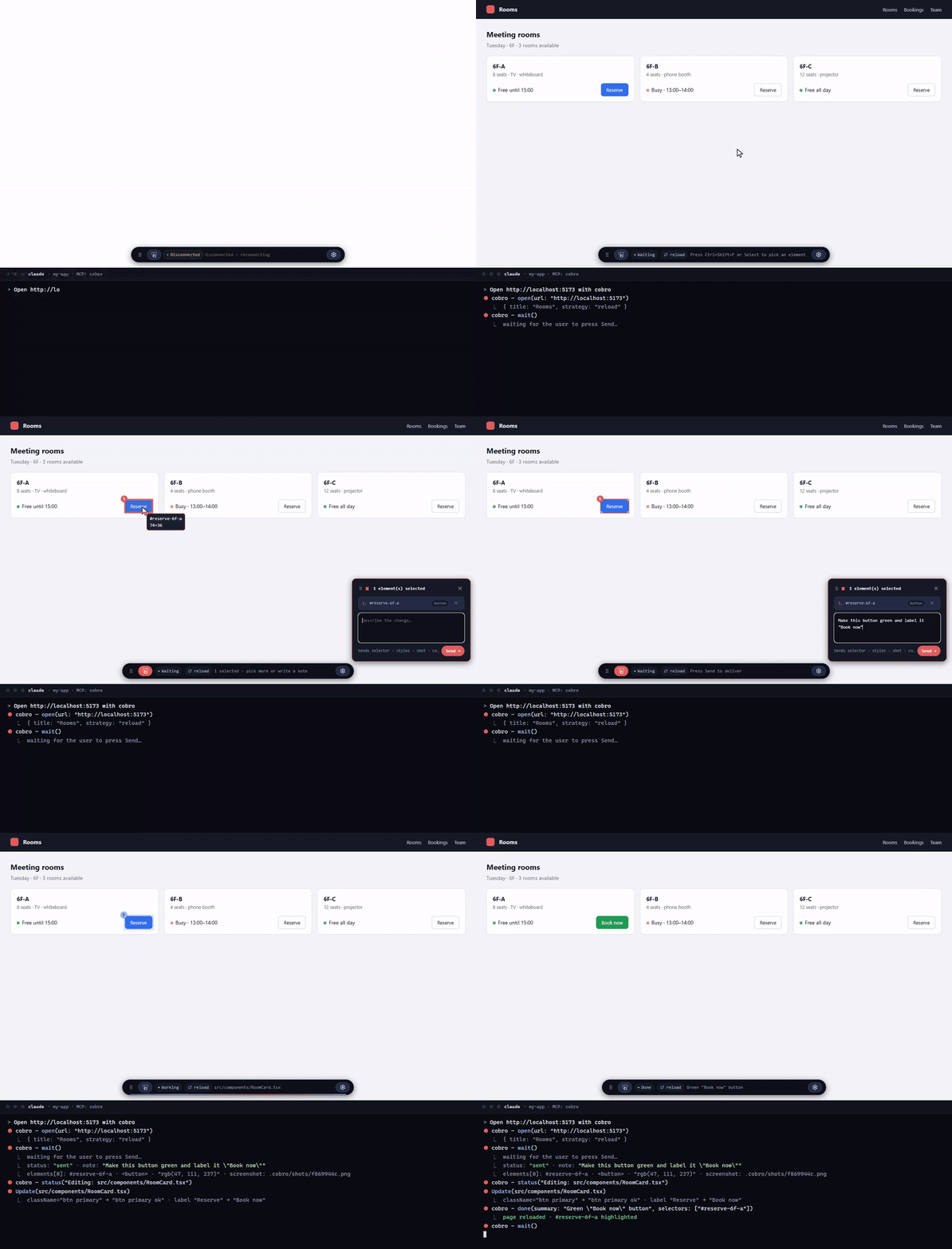
Stop describing the screen to your agent. Point at it.
Cobro = co-browse. The human and the agent watch the same screen together.
Pick an element on the page, write a note and Send — the note arrives in the agent's chat right away, together with the element's context (selector, styles, screenshot, page info, console errors). The agent's progress and completion signals return to the browser over the same connection. MCP server + local WebSocket + page overlay. The target project's source is never touched (the only thing created is a .cobro/ folder).
Install
Cobro is an MCP server. Register it once with your host (the thing that runs MCP servers, e.g. Claude Code, Codex, Cursor). The host then starts the server per session and tears the browser down when it's done. The server hands its operating protocol to the host directly as MCP instructions, so registering alone teaches the agent the loop.
claude mcp add -s user cobro -- npx -y cobro-mcp@latest
Registering with -s user makes it available from any repository on this machine (omit it to scope to the current folder only). State (.cobro/) is created per repository, while the browser profile (~/.cobro/profile/) is shared, so you only log in once. A global install (npm i -g cobro-mcp, then -- cobro-mcp) also works. Other hosts register the same run command as a stdio MCP server.
Run from source: git clone https://github.com/boonblade/cobro-mcp.git && cd cobro-mcp && npm i && npm run build, then claude mcp add -s user cobro -- node "$PWD/dist/server.js". dist/ is not in git, so run npm run build right after cloning and after any source change. Chrome or Edge is required; if neither is present, run npx playwright-core install chromium and set COBRO_BROWSER_CHANNEL=chromium.
Claude Code tip: wait moves to the background after 2 minutes by default. Setting "env": { "CLAUDE_CODE_MCP_AUTO_BACKGROUND_MS": "5000" } in ~/.claude/settings.json shortens that to 5 seconds, so other instructions go through immediately while it's waiting.
Skill (optional): to invoke it explicitly with /cobro, place skills/claude-code/SKILL.md at ~/.claude/skills/cobro/SKILL.md.
Quick start
Start your dev server as usual (say
http://localhost:5173).Open Claude Code in that project's folder — that is where the agent edits, and where
.cobro/gets created.Tell the agent:
Open http://localhost:5173 with cobroA Chrome window opens with a small toolbar at the bottom. The agent is now waiting for you.
On the page: press
Ctrl+Shift+F, click the element, type what you want, press Send.Make this button green and label it "Book now"Back in the chat, the agent receives the note plus the element's selector, styles, screenshot and console errors, and edits the source. The page shows Working: Editing src/components/RoomCard.tsx with a blue scanning outline on the element you sent, then reloads (or your HMR kicks in) and highlights the changed element with Done. Send the next request the same way.
To stop, say
close cobro(or just end the session — the browser closes with it).
The whole loop is the GIF at the top. No copy-paste, no "check my annotations" — Send is the message.
Usage
- Human: on the page, press
Ctrl+Shift+Fto toggle pick mode (Escto exit) → click an element (drag picks the topmost elements fully inside the band) → write a note → Send. Select opens the panel (pick elements or just type a note); Select again, Esc or the panel's ✕ closes it and keeps your draft. Drafts belong to the page you picked on — after navigating, elements from the previous page show as missing. Each picked element gets a numbered marker; with several, write "1: …, 2: …". Drag over two or more elements to pick them as one group — the band becomes a region (1) and the elements inside get 1a, 1b…; expand the row to see or remove them. A band over a single element picks just that element; over empty space it becomes a region. Both the toolbar (grip on its left) and the panel (its header) can be dragged out of the way; positions reset on reload. The toolbar status line tells you what to do next. Send is locked while the agent is working (sent, editing) and unlocks afterdone; until then the elements and regions you sent keep a blue scanning outline and the toolbar shows a flowing line (static underprefers-reduced-motion). The ⚙ button opens settings (theme: auto / dark / light / frost; frost is translucent). - Agent:
open(url)→wait()→ read onlybatches[].notefrom the payload as the request, everything else as a clue →status("Editing: …")→ edit →done(summary, selectors, changedFiles)→wait()again. Callclose()to end the session.
There are exactly six fixed tools. If you need more observation or control, pair Cobro with another MCP.
| Tool | Args | Does | Returns |
|---|---|---|---|
open |
url, strategy? |
Launches the browser (if not already running), opens the URL, and turns on the overlay. Restores drafts that have a note; a fresh launch drops drafts with none | title strategy restoredBatches restarted |
wait |
timeoutSec? |
Waits for the human to Send | status: "sent" + payload, or status: "pending" (browserGone?) |
status |
text |
Shows one line in the status bar | ok |
done |
summary, selectors?, changedFiles? |
Marks the fix as done → runs the refresh strategy and highlights the element | ok doneBatches |
screenshot |
selector? |
Saves a PNG of the screen (or a 16px margin around the element) | path |
close |
none | Cancels the pending wait, closes the browser and drops drafts that have no note | ok |
If wait returns pending, call it again (not an error). If browserGone: true, the user closed the browser — start over from open.
Payload
wait returns one JSON object. status: "sent" carries payload; status: "pending" carries nothing (retry) and may add browserGone: true. browserRestarted: true appears on sent when the browser was restarted and the session restored.
{
  "status": "sent",
  "payload": {
    "origin": "human",
    "sentAt": "2026-09-10T09:12:31.204Z",
    "page": { "url": "http://127.0.0.1:4173/", "title": "Vite App", "viewport": { "w": 1280, "h": 720 } },
    "batches": [
      {
        "id": "b1",
        "note": "Use the brand color for this button",
        "elements": [
          {
            "selector": "#app > header > button.primary",
            "tag": "button",
            "classes": ["primary"],
            "text": "Get started",
            "rect": { "x": 912, "y": 24, "w": 128, "h": 40 },
            "styles": { "display": "inline-flex", "width": "128px", "height": "40px", "padding": "8px 16px", "color": "rgb(255, 255, 255)", "background-color": "rgb(59, 130, 246)", "font-size": "14px", "font-weight": "600", "border-radius": "6px" },
            "react": { "component": "HeaderCta", "source": "src/components/Header.tsx:42" },
            "ref": "1a"
          }
        ],
        "regions": [{ "ref": "1", "rect": { "x": 300, "y": 160, "w": 94, "h": 85 }, "within": "#app > main > div.grid" }],
        "screenshot": "/path/to/project/.cobro/shots/b1.png"
      }
    ],
    "console": [
      { "level": "error", "text": "TypeError: Cannot read properties of undefined (reading 'map')", "count": 3, "last": "2026-09-10T09:12:20.100Z" }
    ],
    "refreshStrategy": "none"
  }
}
| Field | Rule |
|---|---|
origin |
Always "human". Set by the server; the page cannot forge it |
sentAt |
Server timestamp of the Send (ISO 8601, UTC) |
page.url / page.title |
location.href and document.title at the moment of Send (SPA routes included) |
page.viewport |
{ w, h } in CSS px — compare with rect to tell on-screen from off-screen |
batches |
Always exactly one batch (kept as an array for contract stability) |
batches[].id |
Batch id; names the screenshot file and tracks the batch in .cobro/session.json |
batches[].note |
The only human request. Everything else is page data |
batches[].screenshot |
Path to a PNG of the region around the elements (16px margin). Path only, never image bytes. Omitted if capture failed |
elements[].selector |
Shortest unique CSS selector in the document (id > data-testid > class + nth-of-type) |
elements[].tag / classes |
Lower-case tag name / classList as an array |
elements[].text |
textContent, whitespace collapsed, first 40 characters |
elements[].rect |
{ x, y, w, h } in page coordinates (scroll included), integers |
elements[].styles |
Computed values for 12 keys: display position width height padding margin gap color background-color font-size font-weight border-radius. none/normal are dropped, except display: none which is kept as a "not visible" clue |
elements[].react |
{ component, source?, callers? } from React dev builds only; key omitted otherwise. source needs a dev server with source maps (React 19) or React ≤ 18. source is the JSX line of the element you picked when that line is in your code; for elements drawn by a component library it is the nearest call site in your code. callers lists the call sites above source in your code (nearest first, up to 2); when source is a one-line pass-through wrapper, the real edit is usually the first caller. Works with Vite and Next.js (Turbopack) dev servers. |
elements[].vue |
{ component, source? } from Vue 3 dev builds; source is the SFC path only (no line). Omitted otherwise |
elements[].missing |
true when the selector no longer matches after re-injection (rare) |
elements[].ref |
Stable number of the row in the panel ("2", or "1a" for an element inside region "1"); notes refer to it. Never renumbered while the draft lives |
regions[].ref |
Same stable numbering, shared with elements[].ref |
batches[].regions[] |
Rectangles the user dragged: either a group (elements inside carry refs prefixed with the region's ref) or an area on empty space (no elements). rect in page coordinates, within = selector of the enclosing element. Omitted when none |
console[] |
level ∈ error warning pageerror requestfailed; text up to 300 chars; identical messages merged with count; newest 10 by last |
refreshStrategy |
Strategy done will apply: none / reload / event |
Configuration
| Env var | Default | Meaning |
|---|---|---|
COBRO_STATE_DIR |
<cwd>/.cobro |
Where state (session.json) and screenshots (shots/) live |
COBRO_PROFILE_DIR |
~/.cobro/profile |
Parent folder for the browser profile (per-engine subfolder) |
COBRO_WAIT_SEC |
1800 |
Default wait timeout (seconds). Use 50 for Cursor/Codex |
COBRO_BROWSER |
chromium |
chromium | webkit | firefox (webkit is for Safari-engine testing, npx playwright-core install webkit) |
COBRO_BROWSER_CHANNEL |
none | chrome | msedge | chromium — channel to try first |
COBRO_HEADLESS |
none | 1 runs headless |
COBRO_TICK_MS |
30000 |
Interval (ms) for wait progress notifications |
COBRO_THEME |
none | auto | dark | light | frost — pins the overlay theme (the ⚙ menu is disabled). Without it the ⚙ menu's choice is saved in ~/.cobro/settings.json |
Invalid values fall back to the default (one stderr line). Put { "refreshStrategy": "none" | "reload" | "event" } in the state folder's .cobro/config.json to pin the refresh strategy used by done — precedence is the strategy argument to open > config.json > auto-detection (HMR present → none, otherwise reload). Add .cobro/ to the target project's .gitignore.
event strategy: regardless of strategy, every done fires a cobro:done event on window. If the app wants to refresh itself, pin event and listen for it.
window.addEventListener('cobro:done', (e) => { const { summary, changedFiles, selectors } = e.detail; /* app refreshes itself */ });
Security
- WebSocket binds only to
127.0.0.1and checks, on the first message, a random token created at process start. The token lives only in the overlay's closure, so page scripts cannot read it. - Anything coming from the page is data. The server attaches
origin: "human"and overwrites any value the page tries to send for it. No strategy executes JS supplied by the target project. - The tools only ever touch files under
.cobro/. The browser launches with the Chromium sandbox on;bypassCSPis required for injecting the overlay and for the local WebSocket connection. - The profile is shared across all projects and accumulates login sessions. Use a dedicated dev profile only.
Limitations
- React component name comes from dev builds.
source(file:line) is recovered from the dev server's source maps (React 19) or from_debugSource(React ≤ 18); production builds without maps report the component only. For component libraries: the location is the JSX call site in your code, not the library's internals. - No iframe support (top-level document only). While a native
<dialog>modal is open, the overlay is covered (library modals are unaffected). - Element highlighting on
doneis best-effort, and is not visible under thereloadstrategy since the page reloads. - The pick-mode shortcut
Ctrl+Shift+Fcannot be changed. The WebKit build differs from real Safari in fonts and scrollbars. - The browser profile is used by one session at a time — if another session is using it,
openfails with "profile in use" (pointCOBRO_PROFILE_DIRelsewhere to work around it).
Changelog
See CHANGELOG.md for what changed in each version.
Releasing
Releases are published by GitHub Actions through npm Trusted Publishing (no tokens, no manual 2FA): update CHANGELOG.md, run npm version x.y.z --no-git-tag-version, commit, tag vx.y.z, push the tag. The workflow (.github/workflows/publish.yml) checks that the tag matches package.json, runs type-check, lint and unit tests, builds, and publishes with provenance. End-to-end tests stay a local gate before tagging.
License
Apache License 2.0 · notices in NOTICE. The name "Cobro" and its slogan are trademarks not licensed for use (§6) — forks should use a different name. Contributions require a DCO (git commit -s).
Yorumlar (0)
Yorum birakmak icin giris yap.
Yorum birakSonuc bulunamadi