claude-code-lsps
Health Gecti
- License — License: MIT
- Description — Repository has a description
- Active repo — Last push 0 days ago
- Community trust — 160 GitHub stars
Code Gecti
- Code scan — Scanned 12 files during light audit, no dangerous patterns found
Permissions Gecti
- Permissions — No dangerous permissions requested
Bu listing icin henuz AI raporu yok.
LSP plugins for Claude Code — Bash/Shell, C/C++/Objective-C, C#, Clojure, Dart/Flutter, Elixir, Gleam, Go, Java, Kotlin, Lua, Nix, OCaml, PHP, Python, Ruby, Rust, Swift, Terraform, TypeScript/JavaScript, YAML & Zig
Claude Code LSPs
A collection of Language Server Protocol (LSP) plugins for Claude Code.
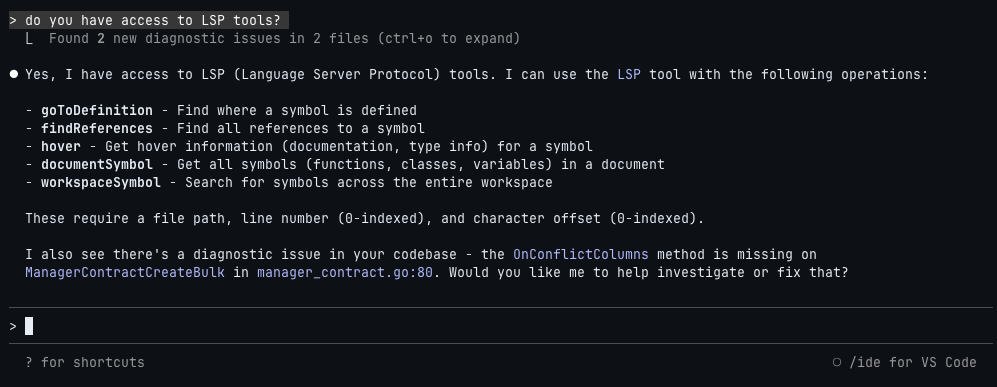
What is LSP Integration?
[!NOTE]
LSP Integration: If you're on v2.0.69 through v2.0.x, LSP integration is broken due to a race condition (#14803, #13952). This has been fixed in v2.1.0+. Please upgrade to the latest version.
The Language Server Protocol provides IDE-like intelligence to Claude Code. On startup, Claude Code automatically starts LSP servers from installed plugins and exposes them to Claude in two ways:
LSP Tool - A builtin tool with 9 operations mapping directly to LSP commands:
| Operation | Description |
|---|---|
goToDefinition |
Find where a symbol is defined |
findReferences |
Find all references to a symbol |
hover |
Get hover info (docs, type info) for a symbol |
documentSymbol |
Get all symbols (functions, classes, variables) in a document |
workspaceSymbol |
Search for symbols across the entire workspace |
goToImplementation |
Find implementations of an interface/abstract method |
prepareCallHierarchy |
Get call hierarchy item at a position |
incomingCalls |
Find all functions/methods that call the function at a position |
outgoingCalls |
Find all functions/methods called by the function at a position |
Automatic Diagnostics - Real-time error and warning detection similar to the VS Code integration, but operating independently. These diagnostics tend to be faster and more comprehensive than the VS Code equivalent.
Available Plugins
| Plugin | Language | Extensions | LSP |
|---|---|---|---|
| bash-language-server | Bash/Shell | .sh .bash .zsh .ksh |
bash-language-server |
| clangd | C/C++/Objective-C | .c .h .cpp .hpp .cc .cxx .hxx .m .mm |
clangd |
| clojure-lsp | Clojure | .clj .cljs .cljc .edn |
clojure-lsp |
| dart-analyzer | Dart/Flutter | .dart |
Dart SDK |
| elixir-ls | Elixir | .ex .exs |
elixir-ls |
| gleam | Gleam | .gleam |
gleam |
| gopls | Go | .go |
gopls |
| intelephense | PHP | .php .phtml |
Intelephense |
| jdtls | Java | .java |
jdtls |
| kotlin-lsp | Kotlin | .kt .kts |
kotlin-lsp |
| lua-language-server | Lua | .lua |
lua-language-server |
| nixd | Nix | .nix |
nixd |
| ocaml-lsp | OCaml | .ml .mli |
ocaml-lsp |
| omnisharp | C# | .cs .csx |
OmniSharp |
| pyright | Python | .py .pyi |
pyright |
| rust-analyzer | Rust | .rs |
rust-analyzer |
| solargraph | Ruby | .rb .rake .gemspec |
Solargraph |
| sourcekit-lsp | Swift | .swift |
sourcekit-lsp |
| terraform-ls | Terraform | .tf .tfvars |
terraform-ls |
| vtsls | TypeScript/JavaScript | .ts .tsx .js .jsx .mjs .cjs |
vtsls |
| yaml-language-server | YAML | .yaml .yml |
yaml-language-server |
| zls | Zig | .zig .zon |
zls |
Getting Started
1. Add the Marketplace
claude
/plugin marketplace add boostvolt/claude-code-lsps
2. Install Plugins
Install individual plugins:
/plugin install bash-language-server@claude-code-lsps
/plugin install clangd@claude-code-lsps
/plugin install clojure-lsp@claude-code-lsps
/plugin install dart-analyzer@claude-code-lsps
/plugin install elixir-ls@claude-code-lsps
/plugin install gleam@claude-code-lsps
/plugin install gopls@claude-code-lsps
/plugin install intelephense@claude-code-lsps
/plugin install jdtls@claude-code-lsps
/plugin install kotlin-lsp@claude-code-lsps
/plugin install lua-language-server@claude-code-lsps
/plugin install nixd@claude-code-lsps
/plugin install ocaml-lsp@claude-code-lsps
/plugin install omnisharp@claude-code-lsps
/plugin install pyright@claude-code-lsps
/plugin install rust-analyzer@claude-code-lsps
/plugin install solargraph@claude-code-lsps
/plugin install sourcekit-lsp@claude-code-lsps
/plugin install terraform-ls@claude-code-lsps
/plugin install vtsls@claude-code-lsps
/plugin install yaml-language-server@claude-code-lsps
/plugin install zls@claude-code-lsps
Or browse and install interactively:
/plugin
Manual LSP Installation
Each plugin will attempt to auto-install its LSP server on first use. If auto-install fails, use the manual instructions below.
Bash/Shell (bash-language-server)brew install bash-language-server
Or via npm:
npm install -g bash-language-server
brew install llvm
Or via Xcode Command Line Tools:
xcode-select --install
Supports C, C++, Objective-C (.m), and Objective-C++ (.mm) files.
C# (omnisharp)brew install omnisharp/omnisharp-roslyn/omnisharp-mono
Or via dotnet:
dotnet tool install -g csharp-ls
brew install clojure-lsp
Or download from GitHub releases.
Dart/Flutter (dart-analyzer)Install Dart SDK:
brew tap dart-lang/dart
brew install dart
Or install Flutter (includes Dart):
# See https://docs.flutter.dev/get-started/install
Ensure dart is in your PATH.
brew install elixir-ls
Requires Elixir to be installed:
brew install elixir
brew install gleam
Or download from GitHub releases.
Go (gopls)go install golang.org/x/tools/gopls@latest
Ensure ~/go/bin is in your PATH.
brew install jdtls
Or download manually from Eclipse JDT Language Server.
Requires Java 21+ runtime.
Kotlin (kotlin-lsp)brew install JetBrains/utils/kotlin-lsp
Or download from GitHub releases.
Requires Java 17+.
Lua (lua-language-server)brew install lua-language-server
Or download from GitHub releases.
Nix (nixd)nix profile install nixpkgs#nixd
Requires Nix to be installed. See nixos.org.
OCaml (ocaml-lsp)opam install ocaml-lsp-server
Requires opam to be installed:
brew install opam
opam init
npm install -g intelephense
pip install pyright
gem install solargraph
brew install rust-analyzer
Or via rustup:
rustup component add rust-analyzer
sourcekit-lsp is bundled with Xcode. Install Xcode from the App Store:
# Verify installation
xcrun --find sourcekit-lsp
Or install a Swift toolchain from swift.org/install.
Terraform (terraform-ls)brew install terraform-ls
Or download from GitHub releases.
TypeScript/JavaScript (vtsls)npm install -g @vtsls/language-server typescript
brew install yaml-language-server
Or via npm:
npm install -g yaml-language-server
brew install zls
Requires Zig to be installed. Download from ziglang.org.
Creating Your Own Plugin
Plugin Structuremy-lsp/
├── .claude-plugin/
│ └── plugin.json
├── .lsp.json
└── hooks/
├── hooks.json
└── check-my-lsp.sh
The .lsp.json file configures the language server:
{
  "language-id": {
    "command": "lsp-server-command",
    "extensionToLanguage": {
      ".ext": "language-id"
    }
  }
}
Required Fields
| Field | Type | Description |
|---|---|---|
command |
string | Command to start the LSP server |
extensionToLanguage |
object | Maps file extensions to language IDs |
Optional Fields
| Field | Type | Description |
|---|---|---|
args |
string[] | Arguments passed to the command |
transport |
string | Communication method: "stdio" (default) or "socket" |
env |
object | Environment variables to set when starting the server |
initializationOptions |
object | Options passed during LSP initialization |
settings |
object | Server-specific settings via workspace/didChangeConfiguration |
workspaceFolder |
string | Workspace folder path for the server |
startupTimeout |
number | Max time to wait for server startup (milliseconds) |
shutdownTimeout |
number | Max time to wait for graceful shutdown (milliseconds) |
restartOnCrash |
boolean | Whether to automatically restart the server if it crashes |
maxRestarts |
number | Max restart attempts before giving up (default: 3) |
.lsp.json:
{
  "go": {
    "command": "gopls",
    "extensionToLanguage": {
      ".go": "go"
    }
  }
}
.claude-plugin/plugin.json:
{
  "name": "gopls",
  "description": "Go language server",
  "version": "1.0.0",
  "author": {
    "name": "Your Name"
  },
  "license": "MIT",
  "repository": "https://github.com/boostvolt/claude-code-lsps"
}
hooks/hooks.json (optional auto-install):
{
  "hooks": {
    "SessionStart": [
      {
        "hooks": [
          {
            "type": "command",
            "command": "bash ${CLAUDE_PLUGIN_ROOT}/hooks/check-gopls.sh",
            "timeout": 30
          }
        ]
      }
    ]
  }
}
License
MIT
Yorumlar (0)
Yorum birakmak icin giris yap.
Yorum birakSonuc bulunamadi