botbus-protocol
Health Gecti
- License — License: Apache-2.0
- Description — Repository has a description
- Active repo — Last push 0 days ago
- Community trust — 106 GitHub stars
Code Gecti
- Code scan — Scanned 12 files during light audit, no dangerous patterns found
Permissions Gecti
- Permissions — No dangerous permissions requested
Bu listing icin henuz AI raporu yok.
The BotBus protocol: how a menu bar app on your computer and the companion apps on your phone and watch stay in sync — with public fixtures. BotBus lets you follow, approve and start Codex and Claude Code tasks from anywhere: https://botbus.io/en
BotBus Protocol
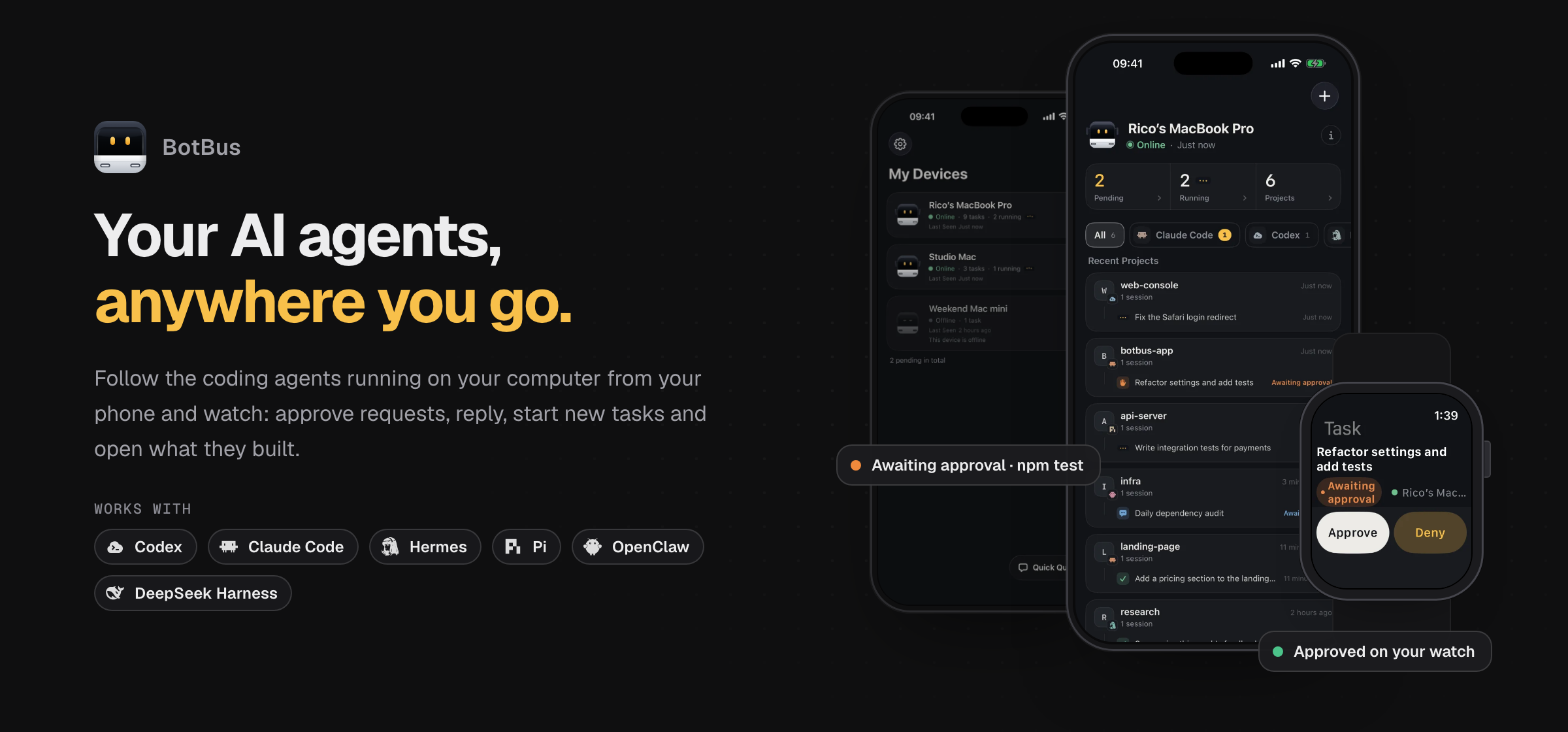
Your AI agents, anywhere you go.
Follow the coding agents running on your computer from your phone and watch.
Approve requests, reply, start tasks, and open what they built.
Website · Download BotBus · App Store · Security · Connect your agent · 简体中文
The BotBus app
BotBus connects the AI coding agents on your computer to your phone and watch. Your agents keep running beside your repositories, tools and credentials while you check progress and act on their requests from anywhere.
- Keep every session in view. Tasks are grouped by computer and project, including sessions started in your own terminal or IDE.
- Approve and keep going. Approve or deny commands, answer questions, follow up, interrupt, and start new tasks from your phone or Apple Watch.
- Open the results. Receive screenshots, videos, documents and links, preview dev-server pages, and review working changes on your phone.
- Reach your computer. Browse files and use a terminal from your phone. On macOS, you can also open the desktop and send clicks and keystrokes when a task needs your help.
- Pair your devices. Connect multiple computers and phones; your Apple Watch receives pairing from your iPhone and then connects independently.
- Keep content private. Conversations, commands, artifacts, notification text and remote-control traffic are end-to-end encrypted. The relay forwards ciphertext; developer web previews are a separate proxy and are not end-to-end encrypted.
Built-in integrations include Codex, Claude Code, Hermes, Pi, OpenClaw and DeepSeek Harness. BotBus also supports agents that implement the Agent Client Protocol (ACP); see the agent connection guide for availability and setup. Actions depend on connector support, task state and whether your computer is online.
Download and get started
| Platform | Download / install | Requirements and status |
|---|---|---|
| macOS | Download the latest DMG | macOS 26 or later; Apple Silicon and Intel. Signed and notarized menu bar app. |
| Linux | Install guide | Available for x86_64 and aarch64; with or without systemd. |
| iPhone, iPad + Apple Watch | Download on the App Store | iOS 26 / watchOS 26 or later. The watch app comes with the iPhone app. |
| Android | Download the APK | Android 8.0 or later. The website links to the current APK. |
| Windows | Release status | In development; not yet available to download. |
- Install BotBus on your computer and the companion app on your phone.
- Open pairing from the Mac menu bar, or run
botbus pairon Linux, and scan the QR code with your phone. - Open your tasks on the phone. On Apple Watch, pairing syncs automatically from your iPhone.
See botbus.io for current releases and setup instructions.
What is in this repository?
This repository is the public half of the BotBus computer app: the stable wire contract the mobile apps decode, and the Swift code that adapts each upstream agent (Codex, Claude Code, Hermes, Pi, OpenClaw, DeepSeek Harness, any ACP agent) into that contract. The BotBus app repository is the source of truth for this code and syncs it here through pull requests, so what you read here is exactly what the Mac app compiles; there is no second, display-only copy.
When an upstream agent changes its files, CLI or protocol, the fix ships in a Mac update and is synced here. iPhone, Android and Apple Watch never parse an agent's native format, so they do not need a release for that.
Packages
| Product | What it holds | Who links it |
|---|---|---|
BotBusProtocol |
Wire types, envelopes, version rules, fixture round-trip tests | Mac, iPhone, Watch (Android has a Kotlin port in the app repository) |
BotBusConnectorKit |
Connector contracts (TaskConnector, MessageReader), TaskStore, CommandDispatcher, local infrastructure (SQLite, JSON-RPC, hooks server, task tokens) |
Mac |
BotBusConnectors |
One connector per agent plus ACP discovery, the reverse extension and the registry snapshot | Mac |
Dependency direction: BotBusProtocol ← BotBusConnectorKit ← BotBusConnectors. The Mac app's private code (Relay client, pairing keys, artifact upload, previews, remote control) sits on top and is not here.
Start here
- Wire protocol: the current BotBus message and envelope contract.
- Agent integration: how ACP agents, Mac-side bridges and the built-in connectors map onto the mobile contract.
- Compatibility policy: which changes ship in a Mac update and which need a client release; frozen enums and stable task IDs.
- Public fixtures and upstream fixtures: synthetic samples checked against Swift, Kotlin and TypeScript.
- ACP guide: manifests, the ACP subset BotBus uses and the reverse extension.
- ConnectorKit guide and Connectors guide: file-by-file map of the two Swift packages and the behaviours their tests pin down (Chinese).
Build and test
Swift needs Xcode 27 on macOS 26 (the packages target the 26.0 SDKs); TypeScript needs Node.js 22.
swift build
swift test
npm ci && npm run typecheck && npm test
protocol-fixtures/ sealed vectors are regenerated from plain/ with npm run seal-fixtures; npm run check:remote-page checks the remote-control page's JavaScript crypto against the Swift implementation.
Where changes come from
These files are synced from the BotBus app repository: Sources/, Tests/, PROTOCOL.md, protocol-fixtures/*.json, upstream-fixtures/, src/protocol.ts, test/protocol.test.ts, scripts/seal-fixtures.mjs, scripts/check-remote-page-crypto.mjs and scripts/acp-registry-snapshot.py. Changes arrive in pull requests titled "Sync from app repository" and are merged by fast-forward, so every commit keeps its original author. README, docs/, CHANGELOG.md, Package.swift, CI and .gitleaks.toml are maintained in this repository.
Contributing a connector fix
- Reproduce the upstream change with a synthetic sample under
upstream-fixtures/<source>/<version>/(see its README) — never real conversations, tokens, cookies or home directories. - Fix the connector in
Sources/BotBusConnectors/<Source>/and add or update tests. - Keep task IDs, statuses, request kinds and command kinds unchanged;
ProtocolFreezeTestsfails if a frozen enum moves. - Open a pull request. CI runs without any BotBus credentials. A maintainer ports the reviewed change into the app repository, which syncs it back here and ships it in the next Mac build.
See CONTRIBUTING.md. Code and documentation are licensed under Apache-2.0.
简体中文
BotBus:走到哪里,都能继续指挥电脑上的 AI Agent。
Agent 继续在你的电脑上使用原来的代码仓库、工具和凭据;你可以从手机和手表查看进度、审批命令、回答问题、续聊、中断或新建任务,也能在手机上查看截图、视频、文档、网页预览和代码改动。任务按电脑与项目分组,支持多台电脑和多台手机互相配对;Apple Watch 从 iPhone 同步配对后独立连接。
手机还可以浏览电脑文件、使用终端;macOS 另支持查看与操作桌面,帮助 Agent 完成登录或确认等步骤。对话、命令、产物、通知正文与远程操作流量都采用端到端加密;开发网页预览经服务器代理,不在端到端加密范围内。具体操作取决于连接器支持、任务状态与电脑是否在线。
下载与开始使用
| 平台 | 下载 / 安装 | 要求与状态 |
|---|---|---|
| macOS | 下载最新 DMG | macOS 26 或更新版本;支持 Apple Silicon 与 Intel,已签名并公证。 |
| Linux | 安装指南 | 已发布;支持 x86_64 与 aarch64,有无 systemd 均可。 |
| iPhone、iPad + Apple Watch | App Store 下载 | iOS 26 / watchOS 26 或更新版本;手表 app 随 iPhone app 一同安装。 |
| Android | 下载 APK | Android 8.0 或更新版本;官网提供当前版本安装包。 |
| Windows | 查看发布状态 | 开发中,尚未提供下载。 |
电脑和手机分别安装 BotBus,在 Mac 菜单栏打开配对,或在 Linux 运行 botbus pair,再用手机扫描二维码即可。Apple Watch 会自动从 iPhone 同步配对。
本仓库公开 BotBus 的线上协议、Swift 协议与连接器实现、ACP 接入契约及测试样本,采用 Apache-2.0 许可证。应用的完整介绍与最新发布状态见 botbus.io;开发者可从 PROTOCOL.md 和 ACP 接入指南 开始。
Yorumlar (0)
Yorum birakmak icin giris yap.
Yorum birakSonuc bulunamadi