insilode
Health Uyari
- License — License: AGPL-3.0
- Description — Repository has a description
- Active repo — Last push 0 days ago
- Low visibility — Only 5 GitHub stars
Code Basarisiz
- process.env — Environment variable access in .claude/hooks/arch-on-stop.mjs
- exec() — Shell command execution in .claude/hooks/implementer-gate.mjs
- process.env — Environment variable access in .claude/hooks/implementer-gate.mjs
- exec() — Shell command execution in .claude/hooks/typecheck-on-stop.mjs
- process.env — Environment variable access in .claude/hooks/typecheck-on-stop.mjs
- spawnSync — Synchronous process spawning in .claude/skills/probe/scripts/demo-workspace.mjs
- network request — Outbound network request in .claude/skills/probe/scripts/demo-workspace.mjs
- exec() — Shell command execution in .claude/skills/probe/scripts/wait-url.mjs
Permissions Gecti
- Permissions — No dangerous permissions requested
Bu listing icin henuz AI raporu yok.
Insilode: the open-source code editor built on VS Code that shows how your code runs: a live call-flow canvas of every request, and Claude Code and Codex side by side.

Insilode™
Every code editor shows your files. Insilode shows how your code runs.
Built on VS Code. Your extensions, themes and keybindings work.



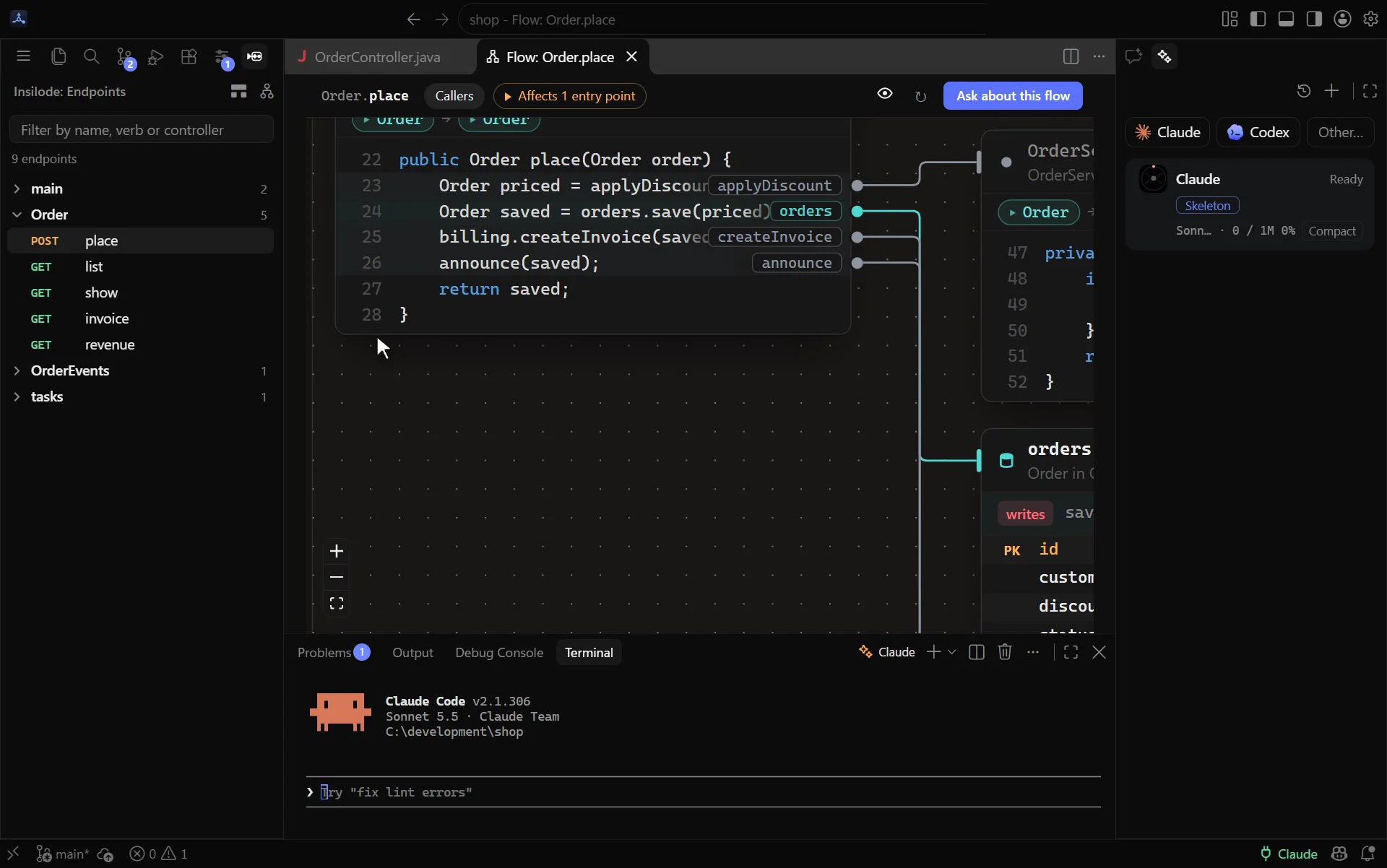
Try it in your browser: follow a request across services, review what an agent changed, and answer an agent waiting for you. Nothing to install.
https://github.com/user-attachments/assets/0e8d49db-7eec-40ef-9815-a625069425ae
Coming from VS Code
Insilode is a fork of VS Code (Code - OSS, the open-source core of VS Code), so the editor you know is all there: Git, the terminal, the debugger, language servers, IntelliSense, search, tasks, multi-root workspaces, profiles. Insilode adds to it.
- Extensions install from Open VSX, the open registry VS Code forks use. A few of Microsoft's own extensions (Pylance, C# Dev Kit, the Remote - SSH / WSL / Dev Containers family, GitHub Copilot) are licensed for Microsoft's builds only and are not there; open alternatives are.
- Themes, keybindings and settings work the same: the same commands, shortcuts and
settings.json. - Import from VS Code: on first launch, or with Insilode: Import from VS Code…, import your settings, keybindings, snippets and theme from VS Code or Cursor; extensions available on Open VSX are installed, the rest are listed. Your Insilode settings are backed up first. How it works →
See how your code runs
Pick an endpoint and watch the chain it runs, card by card: controller → handler → services → database, each with its real, editable code. Database cards show the table the query touches. The flow follows calls across services too: an HTTP call continues into the route it reaches, a message continues into the listener of its topic or queue (Kafka, RabbitMQ, JMS, SQS, Celery, NestJS). Links found by matching names or paths are drawn dashed as guesses (HTTP?, topic?), so you always know what is certain.
Review what an agent changed, on the flow
Ask the agent to "show what you did in flow", or run Show Git Changes in Flow. One canvas holds the whole change set: every endpoint the changed code reaches, cut down to the changed methods, added lines in green and removed lines in red. Compare against your uncommitted work, the whole branch since main, or the last commit. Test files and whitespace-only changes are left out, and so are comment-only changes in Java, Kotlin, C#, Go and Python (JavaScript and TypeScript need a parser to tell a comment from JSX text or a regex, so for now only their whitespace changes go); the root card says how many files were hidden. A Changes rail lists the changed methods by file with their + and − counts; j and k step through them, v marks one viewed, and f finds a card by name. After each prompt, the Agents dock lists the flows that turn touched.
Run agents side by side, and know when they need you
Claude Code, Codex and any CLI you add run as their real tools, in terminals. The Agents dock shows each one at a glance and ranks what needs you first: an approval with its text, a question, an error, a finished turn you have not read. Each row carries the model and how full its context window really is, tokens and estimated cost, and the PR and CI state of its branch. Start an agent in its own git worktree, merge it back with one click, and get warned when two agents edit the same file, method or flow. Questions from Home or the canvas go to the agent you pick, and Insilode remembers the choice. The Agents page and the dock also list the sessions of your other Insilode windows, grouped by project, and Open in IDE brings that project's window up. The status bar shows what is left of your 5-hour and weekly limits.
Outside the editor, an optional app badge counts the agents waiting for you, and an optional status island at the top of the screen (or any corner) shows every agent's state at a glance with an avatar per agent, on macOS and Windows. While an Insilode window has focus, it shows only the other windows' agents that are working or waiting for you. On a MacBook with a camera housing it sits on both sides of the camera. It never takes focus.
Keep your harness healthy
One map of what shapes your agents: CLAUDE.md and AGENTS.md, rules, skills, subagents, hooks, MCP servers, permissions and the agents' own memory, with a health score and what each piece costs in tokens before you type.
- Lint without an LLM: rules whose paths match nothing, broken frontmatter, duplicated instructions across tools, hooks that never fire.
- Context X-ray: what fills a running agent's window, and what you could drop.
- What actually runs: which hooks, skills, subagents and MCP tools fired, and which have not been used in a month.
- Why?: the instructions, rules and permissions that apply to a file, and a simulator that tells you whether
Bash(git push --force)would be allowed, asked or denied, and by which rule. - Friction inbox: permissions you keep granting, corrections you keep repeating and tool calls that keep failing become proposed rules, instructions and hooks, applied only when you say so.
- MCP servers: see, check, add, edit and remove the servers of Claude Code and Codex, with secrets kept out of view.
Works with your stack
C# / .NET · Java · Python · JavaScript / TypeScript · Go · PHP · Ruby · Rust, from ASP.NET and Spring to FastAPI, NestJS, Rails and axum. Full support table → · Agent tools and the insilode MCP server: docs/agent-tools.md
Updates
A running Insilode checks the latest GitHub release and shows Update available (on the gear and under Help, Check for Updates). On Windows it downloads and installs the update and offers Restart to Update; on macOS and Linux the notification's button opens the release page. Set update.mode to manual or none to turn the automatic check down or off. How it works →
Contributing
Issues and pull requests are welcome: see CONTRIBUTING.md. Report security problems privately (SECURITY.md).
Open source under the GNU AGPL v3 (versions before 0.5.0: MIT); contributors sign a short CLA. Insilode™ and its logo are trademarks of Recep Batuhan Dikmen; see the trademark policy. Insilode is built on VS Code (Code - OSS) and is not affiliated with Microsoft; the Claude and Codex marks belong to their owners.
Yorumlar (0)
Yorum birakmak icin giris yap.
Yorum birakSonuc bulunamadi