t3-fleet-gateway
Health Uyari
- License — License: MIT
- Description — Repository has a description
- Active repo — Last push 0 days ago
- Low visibility — Only 5 GitHub stars
Code Basarisiz
- process.env — Environment variable access in scripts/check-t3-compatibility.ts
- exec() — Shell command execution in scripts/e2e-live.ts
- process.env — Environment variable access in scripts/e2e-live.ts
- network request — Outbound network request in scripts/e2e-live.ts
Permissions Gecti
- Permissions — No dangerous permissions requested
Bu listing icin henuz AI raporu yok.
Let hosted AI agents connect to your T3 Code servers over MCP on all of your computers.
t3-fleet-gateway

Let long-running AI agents in the cloud hand coding work to the T3 Code servers on your own machines, and follow that work to completion.
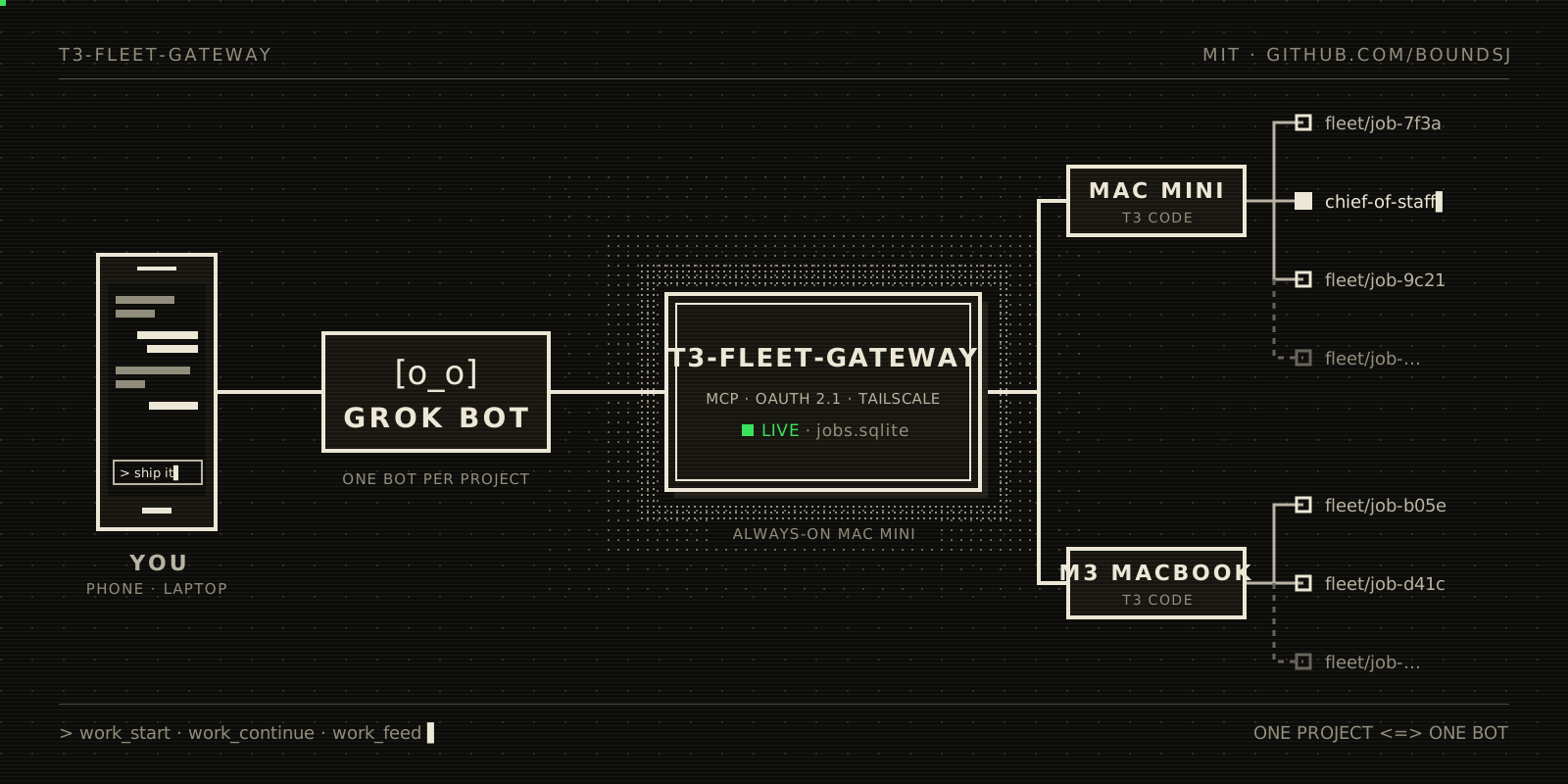
The agent says what to do in which project. The gateway decides where and how: which machine, which T3 project, a fresh git worktree per job, the T3 thread, and watching it. You never have to pick worktrees or threads, or keep checking threads by hand. Every job is an ordinary T3 thread you can open, read and interrupt.
The first supported agent is Grok Bot; any MCP client with OAuth support should work.
Try it
Setup is a few prompts. Agents like Grok Bot run in the cloud, so the gateway needs a public HTTPS URL; it listens only on loopback, so you expose it with a tunnel you run (Tailscale Funnel, Cloudflare Tunnel, ngrok, …).
1. Set up the gateway. Give this to a coding agent on the always-on machine that runs T3 Code:
Set up https://github.com/boundsj/t3-fleet-gateway on this machine by
following its README. Enroll this machine's T3 Code server as a host
and add these projects as aliases: <your projects>. Run the gateway as
a service and expose it over HTTPS with <your tunnel>. Make sure
`doctor` passes, then give me the public /mcp URL. When I connect an
agent, mint a one-time approval code for it.
2. Connect an agent. One agent can run your whole fleet; you do not need a bot per project. Give it this:
Connect to my T3 fleet gateway at https://<your public URL>/mcp.
Call fleet_status and tell me which machines and projects you can
use. When I ask you to get something done, start it with work_start
in the right project, follow it with work_feed and work_status, read
replies with work_messages, answer the worker's questions with
work_respond, and tell me when it is ready for review or stuck.
The agent opens the gateway's approval page. Ask the agent from step 1 for a code (pair; codes expire after 15 minutes by default) and choose Operate, and All machines or just the ones this agent should touch. If you want it to check in on its own, give it a routine with the cadence you like; the gateway does not set one up for you.
3. Let it discover (optional). By default the agent sees exactly the project aliases you configured, and that stays the way to work. If you would rather not write a config entry for every project, turn on discovery for a machine:
In my gateway config, enable discovery on host <id>: set
"discovery": { "enabled": true } on it, restart the service, and run
doctor. Keep allowWorkStart off for now: I want agents to browse the
machine's T3 projects and models, not to start work outside the
configured aliases yet.
Then the agent can look around and pick its tools:
Call fleet_projects and fleet_models for host <id>. Which T3 projects
are there, and which models and reasoning efforts does the machine
offer? Then start this task in the project called "<name>": <task>.
If the project has an alias, use it; otherwise use the target it
lists. Pick the model and effort you think fit, say what you chose,
and follow the job to completion.
Browsing does not grant launching. A project that has an alias is always started as that alias, with all of its rules (including a project that only accepts work through its coordinator). Starting work in a project without an alias needs one more switch on the host, "discovery": { "enabled": true, "allowWorkStart": true }, plus the runtime mode, base branch and branch prefix you want such jobs to use (see docs/configuration.md). An agent's model choice is accepted only if that machine really advertises it; otherwise the start is refused and nothing is launched.
The manual steps behind the first prompt are in Setup below.
How it works
Agent (Grok Bot, any MCP client)
   │  HTTPS through your tunnel, OAuth 2.1 (tokens issued by this gateway)
   ▼
t3-fleet-gateway  ── SQLite (clients, tokens, host credentials, jobs)
   │  MCP client per host, bearer credential issued by that host's T3
   ▼
T3 Code server(s)  ──► one T3 thread per job, in a fresh worktree on its own branch
- One process on an always-on machine, listening on loopback; your tunnel is the only way in.
- The gateway is an MCP server to agents and an MCP client to each T3 server. Instead of T3's raw tools, agents get a small job-level contract:
fleet_status(hosts and configured projects),fleet_projectsandfleet_models(a host's T3 projects, models and options, where you enabled discovery),work_start,work_continue,work_respond,work_cancel,work_status,work_messages(a job's replies in full),work_listandwork_feed(what changed since the agent's last check, from a cursor it keeps). - Agents sign in through the gateway's own OAuth 2.1 server: on first connect an agent opens an approval page, and you type a one-time code minted on the gateway machine and choose Read (follow work) or Operate (start and steer work).
- The gateway holds its own credential for each T3 server and renews it before it expires (T3 credentials last 30 days). Agent tokens never reach T3, and T3 credentials never leave the gateway.
Talk to a coordinator: standing jobs
By default each piece of work is a new T3 thread. If you run a long-lived thread that coordinates a project (a "chief of staff" that plans, delegates to child threads of its own and reports back), let the agent talk to that thread instead:
node bin/t3-fleet-gateway.js jobs adopt pilot <thread id> --title "Chief of Staff"
The gateway checks that the thread belongs to project pilot and records it as a standing job. The agent sees it with standing: true in work_list, work_feed and work_status (and in fleet_status under its project), sends it instructions with work_continue, and follows its turns with work_feed, work_status and work_messages, just as for jobs it started. A standing job takes no concurrency slot, work_cancel only interrupts its current turn (it stays open), and the agent can never close it. jobs release <job id> stops the gateway from following it without touching the thread. Set "allowWorkStart": false on the project to make the coordinator the only way in: work_start there then fails with start_disabled, naming the standing job to use instead.
For example, asking the bot for a project (here a fictional toy app) for a new feature:
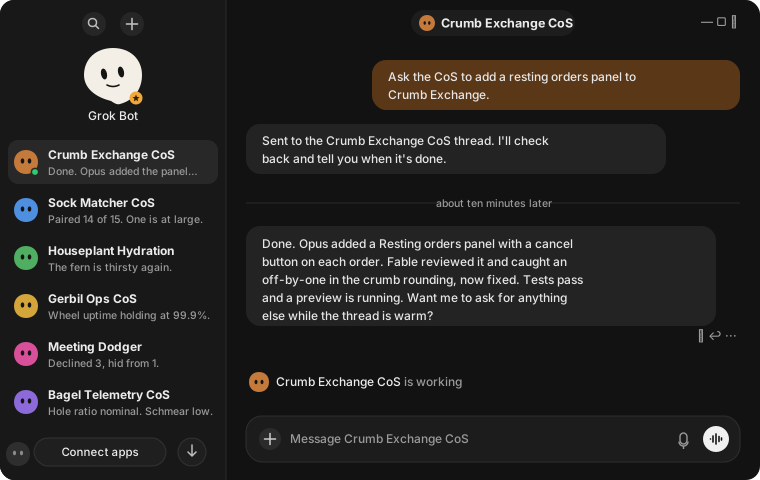
In Grok Bot: the request, then the summary the bot relays when the coordinator is done.
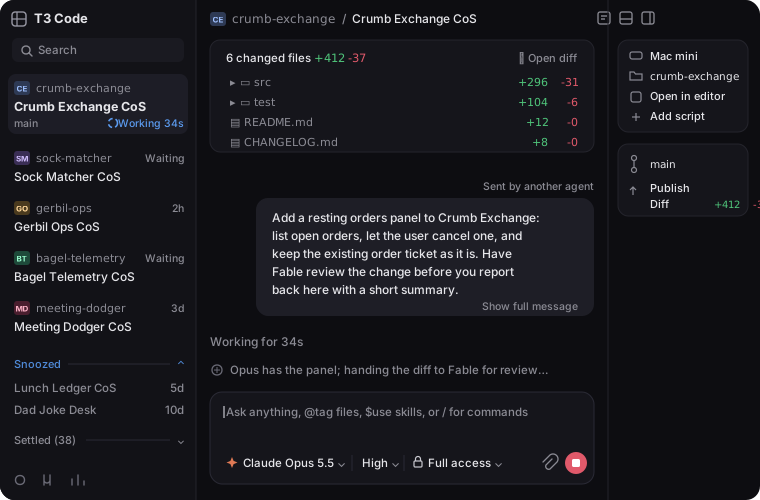
The same request arriving in the project's coordinator thread in T3 Code, sent by the gateway.
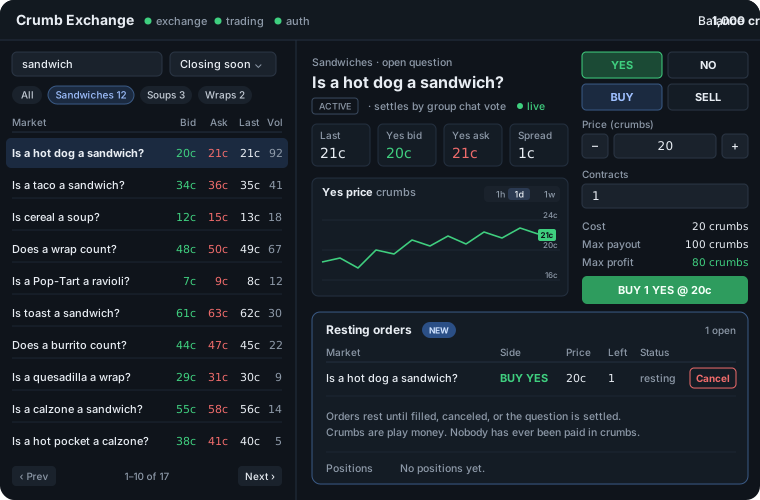
The result: the app with its new resting orders panel.
How a coordinator looks to the agent. When a T3 coordinator delegates, its own turn ends while the child thread works, and T3 starts its next turn by itself when the child is done. So the agent sees the standing job go idle (with waitingOnDelegatedWork: true and the delegated task titles while T3 shows that work running), then running and idle again with no action of its own; work_feed reports those turns (turn_started, turn_finished). The tool descriptions tell the agent to read the coordinator's reply and, while it waits on delegated work, to wait for its next turn rather than send new instructions (which would start a competing turn). Replies are always the coordinator's own messages, never a child's summary. Details: docs/operations.md and docs/configuration.md.
See the fleet: the operator dashboard
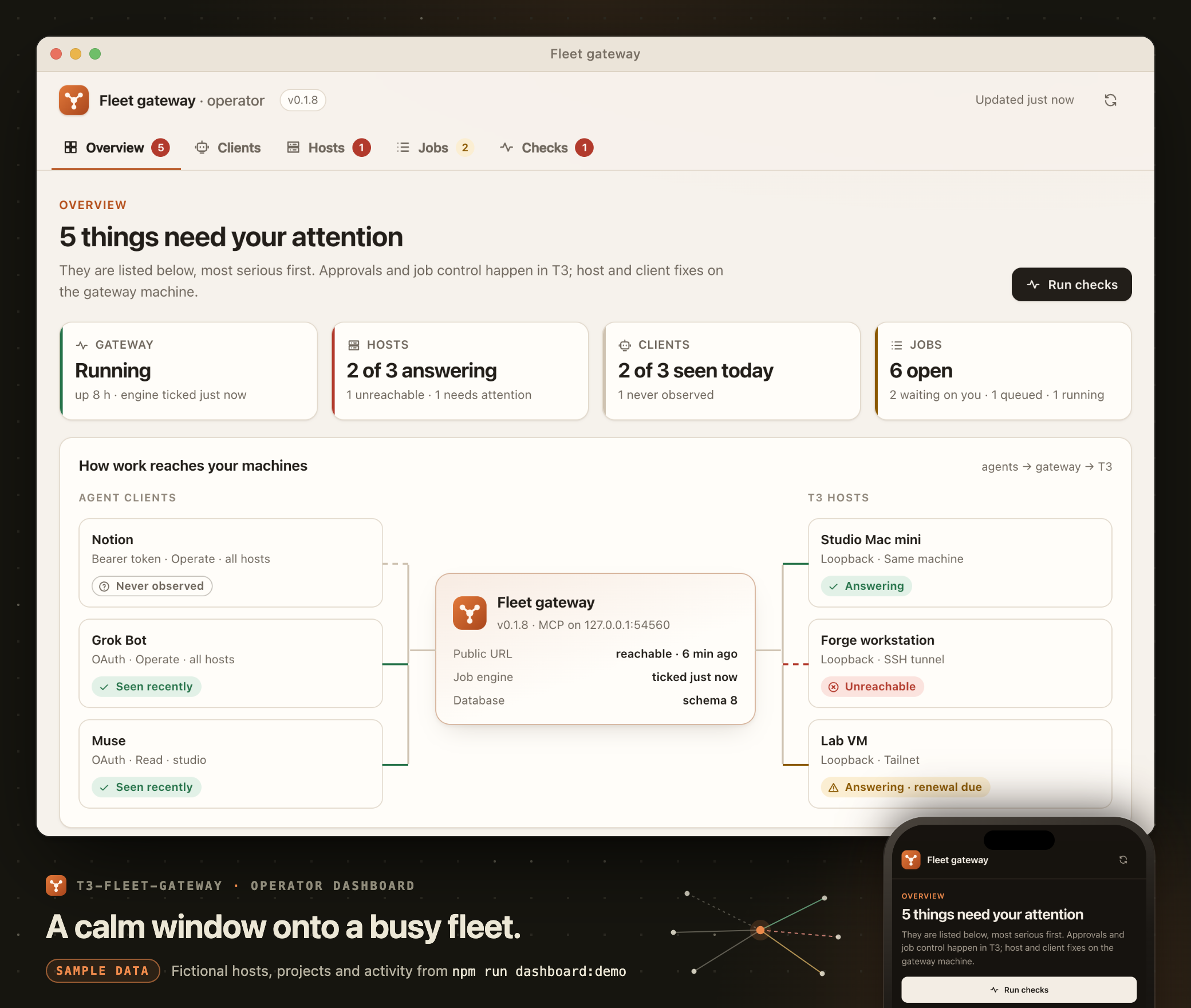
Sample data: real screenshots of the dashboard running on the demo fleet from npm run dashboard:demo (desktop in light mode, phone in dark mode). Grok Bot, Muse and Notion are demo clients; the hosts, projects and activity are made up.
Agents hand off the work, T3 does it, and the gateway keeps track. The operator dashboard is the page you glance at to see how it is all going: optional, read-only, on desktop or phone. It answers five questions:
- Is the gateway running? Its job engine, its database, and whether the public URL reaches it.
- Which machines answer? Each host's last health check and when it ran, plus credentials due for renewal.
- Which agents can connect, and which actually did? What each client may do now, kept apart from its last successful request, so a usable token that has never been used stands out.
- What is waiting on you? Approvals, questions, failed runs and unreachable hosts, most serious first. Each says where to act: Open in T3 for a thread, or a command to copy and run on the gateway machine.
- What happened recently? Job events, shown as codes.
It controls nothing: approvals, answers and stopping work happen in T3, and enrolling hosts or approving agents happens in the CLI. It shows no tokens, task text, replies or questions, never contacts T3 when you open it, and asks the hosts only when you press Run checks.
Try it on a made-up fleet from a checkout. It uses temporary data on loopback, never reads your config and never touches a real T3:
npm install
npm run dashboard:demo                            # open the URL it prints; Ctrl-C stops it and deletes its data
npm run dashboard:demo -- --scenario host-down    # or healthy, auth-issue, empty; --list describes them
Turn it on for real with a dashboard block in your config ("enabled": true, its own loopback port, 3791 by default) and restart the gateway. It runs inside serve on that listener, never on the public MCP URL: publish it to your tailnet only, for example with tailscale serve on a path (never Funnel), and list the host name your browser uses in allowedHosts. doctor then checks that it answers and that the public URL does not serve it. Steps: docs/operations.md; fields: docs/configuration.md.
Wake a routine with job webhooks
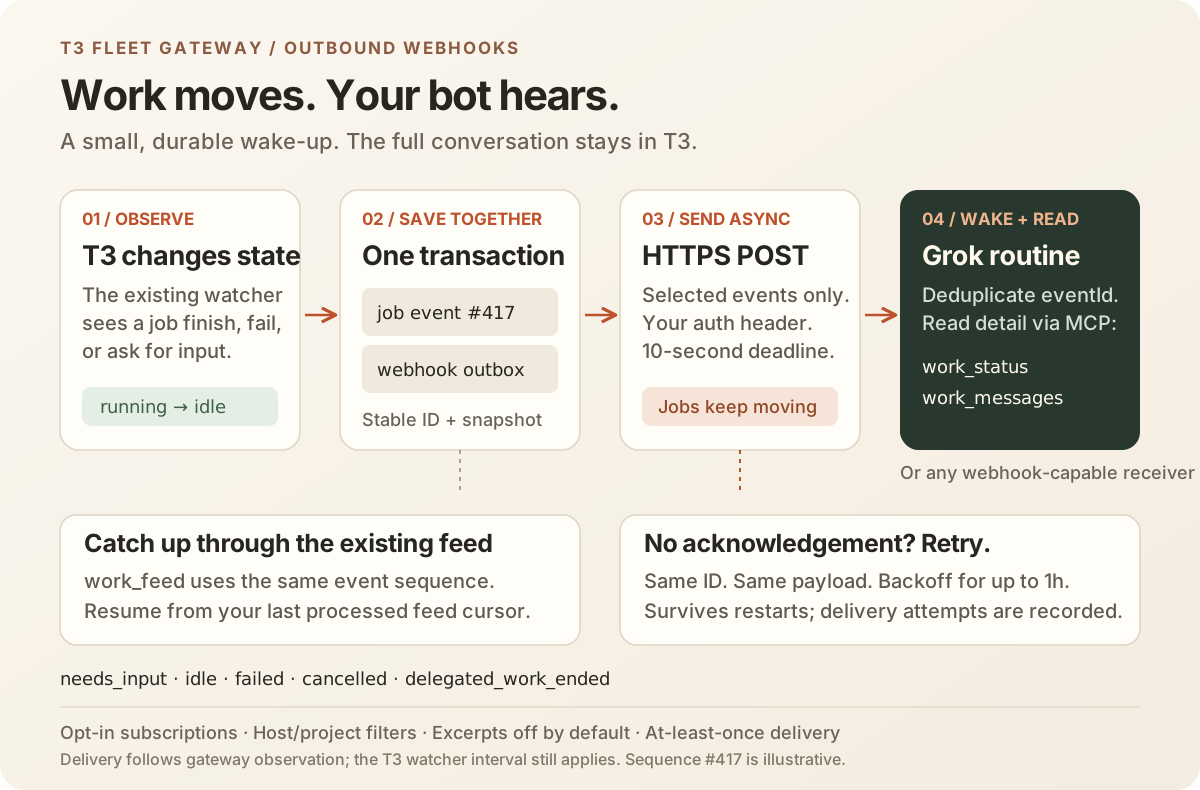
Outbound webhooks are opt-in. They POST a small event when a job becomes needs_input, idle, failed or cancelled, or when its delegated work ends without a new turn. running is an optional event. The gateway needs outbound HTTPS access to the routine; this adds no inbound endpoint or dashboard control.
For a Grok Bot routine with a webhook trigger, copy that routine's URL, sender-key header name and sender key from Grok. The names below are placeholders: use the exact header name Grok supplies. Store the key as the contents of grok-routine.key in the gateway's private data directory (owner-only 0600, directory 0700), using a private editor or stdin, never a command-line argument. A final newline is accepted. Add this block to your private config:
"webhooks": {
  "subscriptions": [{
    "id": "grok-routine",
    "enabled": true,
    "url": "https://receiver.example/routines/REPLACE_WITH_ROUTINE_URL",
    "auth": { "header": "X-Sender-Key", "secretFile": "grok-routine.key" },
    "projects": ["pilot"],
    "hosts": ["main"],
    "events": ["needs_input", "idle", "failed", "cancelled", "delegated_work_ended"],
    "excerptChars": 0
  }]
}
Treat the URL as a secret too: keep the config private and out of version control. Test the routine without a job or worker content, then restart serve to apply the configuration:
node bin/t3-fleet-gateway.js webhooks ping grok-routine
node bin/t3-fleet-gateway.js webhooks list
node bin/t3-fleet-gateway.js webhooks attempts grok-routine --limit 20
Each event carries a stable eventId, UTC timestamp, numeric feedSequence and equivalent string feedCursor, job/project/host IDs, title, state and previous state, T3 thread link, standing/delegation flags, and turnInitiator. Only confirmed gateway-started run IDs carry the actual caller's client ID. Other turns report unknown: T3 does not provide an authoritative operator-origin signal. idle says a turn ended; check waitingOnDelegatedWork before sending more work.
Routine instructions: save/deduplicate eventId, call work_status for the current state and questions, and work_messages for the full reply when needed. Keep the existing scheduled work_feed poll as fallback. Catch up from the last contiguous saved work_feed.nextCursor, process every page, then persist its next cursor. Do not replace that cursor with the largest webhook sequence: deliveries can arrive late, duplicated or out of order, and subscriptions filter out some feed events. Never skip an unseen event merely because a larger sequence already arrived. Use the feed sequence to correlate a webhook with a feed event; deduplicate separately from advancing the feed cursor. Reading details still requires the routine's normal MCP grant.
Payloads omit worker excerpts by default. An explicit excerptChars from 1 to 500 includes only that bounded worker excerpt and excerptTruncated; no task body, questions or transcript are added. Worker output can contain arbitrary secrets that cannot be reliably redacted, so enable excerpts only for a receiver trusted to read them. Job titles are always included and may be derived from the task's first line; use a non-sensitive title.
Pending events survive restarts. Attempts have a 10-second total deadline and retry with exponential backoff for up to one hour. Delivery is at least once; a receiver may accept an attempt whose acknowledgement never reaches the gateway. Redirects are refused, including redirects to the same host. Config changes take effect on restart: new subscriptions do not replay history; disabling, removing or changing a subscription cancels its old queued deliveries. A request already sent may still arrive. Use feed catch-up for any gap. Diagnostic commands expose only IDs, counts, timestamps, HTTP status and fixed outcome codes; they never show URLs, auth headers or payloads. See configuration and design for limits and recovery details.
Try it as a developer: npm run webhooks:smoke exercises real HTTPS delivery, a failed receiver and process crashes using temporary data and a fake T3 host. It needs Node 24+ and OpenSSL, takes about 90 seconds, and does not use your installed gateway. Reproduce the checks and read the evidence.
Setup
Requirements: Node.js 24 or newer (the latest Node 24 or 26 release is recommended), a T3 Code server, and the t3 CLI on the machine that can mint pairing codes for it.
git clone https://github.com/boundsj/t3-fleet-gateway.git
cd t3-fleet-gateway
npm ci --omit=dev

mkdir -p ~/.config/t3-fleet-gateway
cp config.example.json ~/.config/t3-fleet-gateway/config.json
# Edit publicUrl, hosts and projects. See docs/configuration.md.

node bin/t3-fleet-gateway.js hosts enroll main   # obtain a T3 credential for host "main"
deploy/launchd/install.sh                         # macOS: run as a launchd service (Linux: deploy/systemd/)
node bin/t3-fleet-gateway.js doctor               # check everything, including the public URL
- Point your tunnel at the gateway's listen address (default
127.0.0.1:3790) so thatpublicUrlreaches it over HTTPS;doctor'spublic URLcheck passes once it does.node bin/t3-fleet-gateway.js serveruns it in the foreground instead of as a service. - The service runs the code in its checkout directly, so give it a clone of its own rather than one you develop in, and deploy updates in the order in docs/operations.md.
- The service runs
t3to renew its T3 credential. T3 keeps each version in its own directory, so ifcommand -v t3points into~/.t3/runtime/versions/, the service would go on running that version after T3 updates itself; give the installer at3that follows T3's updates (T3_BIN=...). The installer warns about this. See docs/operations.md. - The package runs its TypeScript sources directly with Node's type stripping, so run it from a checkout (or
npm linkit). It is not published to npm.
Connect an agent
- In Grok Bot, add a remote MCP server with the URL
https://<your public URL>/mcp. - Grok Bot registers itself and opens the gateway's approval page. On the gateway machine run
node bin/t3-fleet-gateway.js pair, enter the printed code on the page, choose Read or Operate, choose All machines or Selected machines (with the hosts ticked), and approve. All machines covers every host, including hosts you add later; Selected machines limits the agent to the ticked hosts, and it never sees or touches jobs anywhere else. - Ask the agent to call
fleet_status: it should list your hosts and project aliases. Then ask it to start a small task withwork_start(or send one to a standing job withwork_continue) and to checkwork_feedon a schedule. Each launched job is a T3 thread titled with[job:<id>]in a fresh worktree on its own branch, so you can open it in T3 at any time.
An agent that can't sign in with OAuth and only takes a bearer token (Notion's custom MCP connections, for example) gets one from node bin/t3-fleet-gateway.js clients token --name <name> instead: Operate access to all hosts, valid a year by default (--access read, --hosts mini,macbook, --ttl 90d or --ttl never to change that); see docs/operations.md.
t3-fleet-gateway clients list shows registered agents (an unrevoked OAuth grant is not proof of usable saved credentials); clients revoke <id> disconnects one. If approvals or registrations are throttled (someone probing your URL), pair lifts an approval pause and throttle reset clears both limits; see docs/operations.md.
Recover a disconnected agent
node bin/t3-fleet-gateway.js clients list
node bin/t3-fleet-gateway.js clients diagnose <client-id>  # offline grants, expiries, revocation, separate success times
node bin/t3-fleet-gateway.js doctor                      # operator-route public URL and separate downstream checks
A network outage is separate from token expiry. Keep the OAuth credentials and saved work_feed.nextCursor, restore ingress, then reconnect with those credentials: a usable saved refresh token can replace an expired access token without another approval. Resume work_feed after the saved cursor; reuse the same request id and input for any uncertain work mutation. Static bearer clients have no refresh; replace an expired/revoked token in the connector settings. Inspect and re-enable a disabled bot routine yourself: longer token lifetimes cannot restart it. Actual Grok/Notion retry thresholds remain unverified; recovery instructions and tested SDK limits explain the evidence and next steps.
Status
v0.1.8 adds the opt-in, read-only operator dashboard (above; dashboard in docs/configuration.md): a separate loopback listener with a strict CSP and no login of its own, meant for a tailnet-only proxy, with honest host, client, job and event views built from the database and a manual Run checks. doctor checks that it answers and that the public URL does not serve it. No migration; nothing changes unless dashboard.enabled is set. Covered by synthetic tests (listener isolation, Host/Origin/Funnel handling, privacy, bounds, safe rendering of hostile names in every view) and a demo fleet with five scenarios; no live deployment is claimed by this release note.
v0.1.7 fixes the startup and doctor probe deadline: the configured non-mutating mintPairingCodeProbe now has ten seconds instead of two, because a launchd agent with ProcessType Background runs its children at a lower priority and the T3 version probe was measured at just over two seconds there, warning probe_timeout on every start (evidence). Nothing else about the probe or the service template changes. It also carries opt-in discovery (issue #12). Per host, discovery.enabled lets agents list that machine's T3 projects (fleet_projects) and its providers, models and options such as reasoning effort (fleet_models), read live from T3 and bounded; work_start then also takes a target by T3 project id and an explicit modelSelection, validated against what the host advertises. Launching into projects without an alias is a separate switch (discovery.allowWorkStart), and configured aliases keep all their rules. Everything is off by default and existing setups are unchanged. Covered by synthetic two-host tests and a bounded isolated smoke against one fresh QA-only T3 instance (28 of 28 checks, evidence); not yet a live fleet, production or hosted-connector qualification.
v0.1.6 accepts current T3 thread responses without a link field, generates the documented thread URL, and retains older links. Watchers recover and clear stale response-shape errors after a successful observation. No database migration or configuration change.
v0.1.5 adds per-machine authorization: an agent can be approved (or a bearer token minted) for selected hosts only, enforced by the gateway on every tool. Grants and tokens issued before it keep their fleet-wide access without reauthorization. It is covered by synthetic two-host tests; no live multi-host qualification is claimed. See approval-page and two-host evidence.
v0.1.4. Released and deployed. Supervised scratch QA found and fixed an incompatible 200-character limit on T3's opaque pending request IDs. Real Codex questions can now be answered with work_respond and selected with work_status.pendingRequestId; a transient waiting status alone no longer invents an approval. v0.1.4 question and lifecycle retests passed, covering all nine tools together. Operator approval completed on v0.1.4 in both the isolated QA gateway and the production gateway's scratch project: the expected marker was written and the approval flag cleared. The native zero-count waiting sample was collected before the state-rule fix; its synthetic regression fails before the fix and passes after it, and real question resumption after the fix showed no false approval.
The supervised run began on v0.1.3 and continued through the fix builds. Across those stages it confirmed the lifecycle, an actual isolated provider failure, standing-job use after a failed run, coordinator delegation through automatic parent resumption, and SDK ingress recovery across access-token expiry. A direct HTTP client using only MCP content text passed the isolated v0.1.4 question/answer, messages and feed checks. After deployment, Grok Bot confirmed that its connector is registered as Cursor: it read a real Codex question and options from work_status as plain text and answered through work_respond with the full 228-character request ID. An actual Notion Custom Agent passed a fleet check through its existing MCP connection to v0.1.3. T3FG-3 is complete under the agreed QA scope: Grok verified the shared MCP question/answer contract and Notion connectivity passed. A separate Notion job workflow and hosted-connector recovery remain optional, unrun coverage. T3FG-1 monitoring remains blocked on the operator decision. Owned QA jobs and temporary runtimes/access were cleaned up; the production gateway's original settings were restored and all doctor checks passed. The automated suite uses a fake T3 built from its published tool schemas; scripts/e2e-live.ts is the opt-in lifecycle check, with an explicit scratch alias and honest tool coverage (see docs/operations.md).
Known limits:
- Permission approvals can only be given in T3 itself (T3's tools do not expose them), so jobs in projects with
runtimeModeapproval-required(the default) wait for you to approve in T3; projects that should run unattended needautoorfull-access(see docs/configuration.md). - Sign-in from browser-based MCP clients is not supported: there is no CORS on the OAuth endpoints (see docs/security.md).
Security model, in short
- Agents authenticate with tokens this gateway issues; approval needs a one-time code minted on the gateway machine. Codes and tokens are stored only as hashes.
- The gateway obtains T3 credentials by automating T3's pairing-code consent with your own machine access (the same access
t3 auth pairing createneeds). Choose the T3 access level per host. - Everything listens on loopback; the tunnel is the only way in. Logs never contain tokens, codes, authorization headers, task text or message content.
Details: docs/security.md. To report a vulnerability, see SECURITY.md.
Documentation
- docs/configuration.md: every config field
- docs/operations.md: enroll, pair, revoke, renewal, standing jobs, doctor, the operator dashboard, running as a service, logs, backup, uninstall
- docs/security.md: threat model and what is stored where
- docs/design.md: the design specification
Development
npm install
npm run check      # typecheck and the full test suite
npm test           # tests only (node:test)
npm run typecheck  # tsc --noEmit
npm run compat:check  # on-demand, read-only check of the configured T3 hosts
npm run dashboard:demo  # the operator dashboard on a synthetic fleet (loopback, temporary data)
Tests use a fake T3 server built with the MCP SDK and never touch a real T3. CI runs npm run check on Node 24 and 26 (Linux) and 26 (macOS). See CONTRIBUTING.md and AGENTS.md.
The developer compatibility check compares T3's advertised MCP schemas with a private accepted baseline and exercises the gateway's read parsers against existing threads. It reports changed tools, failed checks and skipped coverage. Use -- --accept to establish or deliberately replace the baseline after review, and -- --json for a machine-readable report. It installs no schedule and runs no jobs. See manual compatibility checks.
License
MIT. See LICENSE.
Yorumlar (0)
Yorum birakmak icin giris yap.
Yorum birakSonuc bulunamadi