myjarbis
Health Uyari
- License — License: MIT
- Description — Repository has a description
- Active repo — Last push 0 days ago
- Low visibility — Only 7 GitHub stars
Code Gecti
- Code scan — Scanned 12 files during light audit, no dangerous patterns found
Permissions Gecti
- Permissions — No dangerous permissions requested
Bu listing icin henuz AI raporu yok.
Persistent memory, per-module workflow and scoped skills for Claude Code — over MCP, backed by SQLite + FTS5. One slash command.
MyJarbis
Persistent memory + per-project workflow + scoped skills for Claude Code.
One slash command. Everything else is a conversation.
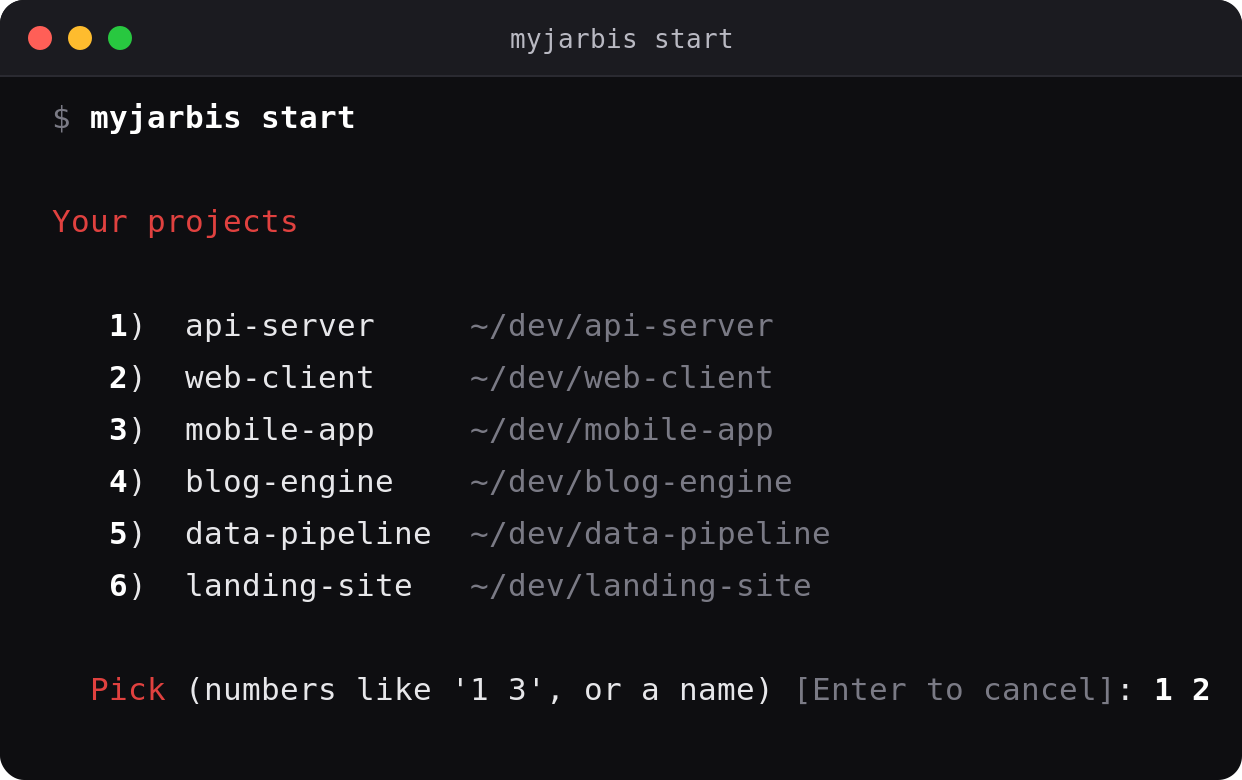
Run myjarbis start from anywhere → pick a project → it opens a terminal already running Claude + /jarbis.
In plain terms
AI coding assistants forget everything when you close them. Every morning
you re-explain the same things: how this project is built, the rules the
team follows, what you were in the middle of yesterday.
MyJarbis is the notebook the assistant never had. It remembers:
- the decisions — what you chose and why, so nobody re-opens it later
- the traps — the thing that broke once, so it doesn't break twice
- where you stopped — so tomorrow starts with "here's where you were",
not a blank page - how your team works — the review rules, the release checklist, the
order things get done in
It also enforces that last one. If the team's process says "someone else
approves before this merges", the assistant stops and asks instead of
deciding on its own.
Everything is stored on your own machine, in a plain database file. Nothing
is uploaded anywhere.
The rest of this page is for developers.
What it is
Claude Code has no project memory. You repeat conventions, re-explain
architecture, and lose "what was I doing yesterday."
MyJarbis is a persistent-memory layer over MCP (Model Context
Protocol). It turns Claude Code into a project-aware orchestrator that
remembers what you decided, where you left off, and which workflow
applies to each part of the project — without dumping everything into
context every session.
Every read/write goes through standard MCP tools + a local SQLite DB, so
any MCP-compatible client (Cursor, OpenClaw, future agents) can sit
on the same memory.
MyJarbis is installed on top of Claude Code, and /jarbis is an
explicit override, not a suggestion: what the project says outranks the
agent's defaults, and a workflow gate is a stop rather than a hint.
It does not override safety — no workflow authorises deleting
without a backup or skipping a confirmation you'd want.
What's new in v0.3
v0.2 gave the memory a schema. v0.3 is about what the memory was
still doing in prose — and the three habits that proves.
| The habit that formed | Why it formed | v0.3 |
|---|---|---|
| A new note titled "CORRECTS note 80" | nothing could say "this replaces that" | topic_key — saving again updates the note |
| "Don't repeat: comments 4-29337–41" written into a paragraph | the brain was being used as an idempotency ledger with no structure to be one | find_by_ref — a boolean, not a re-read |
| A fresh "RESUME HERE" note every session | the current state had no home | project_state — one row, with an expiring lock |
Plus the four structural ones:
- Org packs — load how your team works instead of teaching it to each
project.overrides/replaces a baseline skill;org syncre-applies
to every project in one command. - Workflows as data — process as rows with org → project → user
inheritance, addressed by abstract capability (tracker.comment), so
the core never learns a vendor's name. - A fixed taxonomy —
kindcomes from a catalogue. Three real
projects had invented three vocabularies for the same seven ideas. - Sessions that close themselves —
summarywas NULL on 2 of 2
sessions in one real project. Now the harness closes them, in two
places, so it survives a killed terminal.
Everything is additive. Existing projects keep working on their current
schema until you run myjarbis migrate, which backs up first.
Full details below.
Start in 30 seconds
# 1. install (once)
git clone https://github.com/braiantroncoso/myjarbis.git
cd myjarbis && ./install.sh

# 2. register a project (once per project)
cd ~/projects/my-app
myjarbis init

# 3. work — from anywhere, any day
myjarbis start
myjarbis start lists your projects, you pick one (or several), and it
opens a fresh terminal already cd'd in, with claude running and/jarbis fired. No more cd → claude → /jarbis by hand.
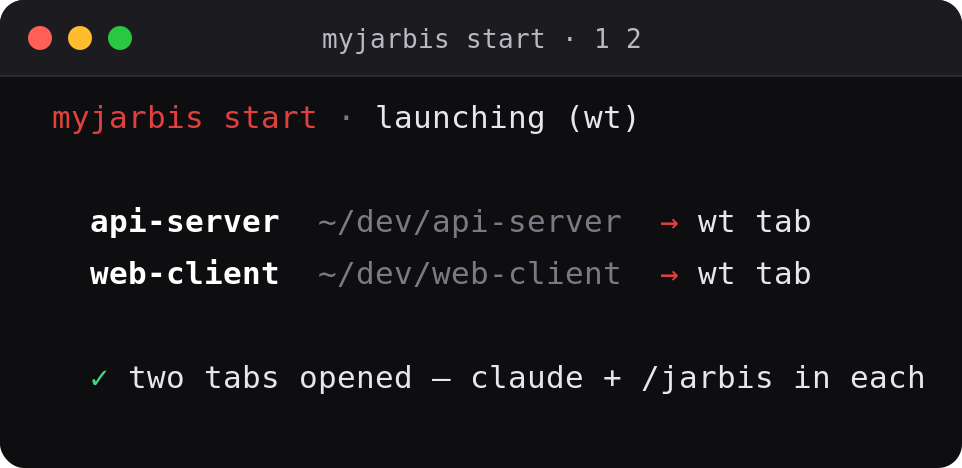
Prefer the classic way? It still works:
cd ~/projects/my-app
claude
> /jarbis
See it work
/jarbis boots a session: it loads the project, lists your modules
(verticals), and resumes exactly where you left off.
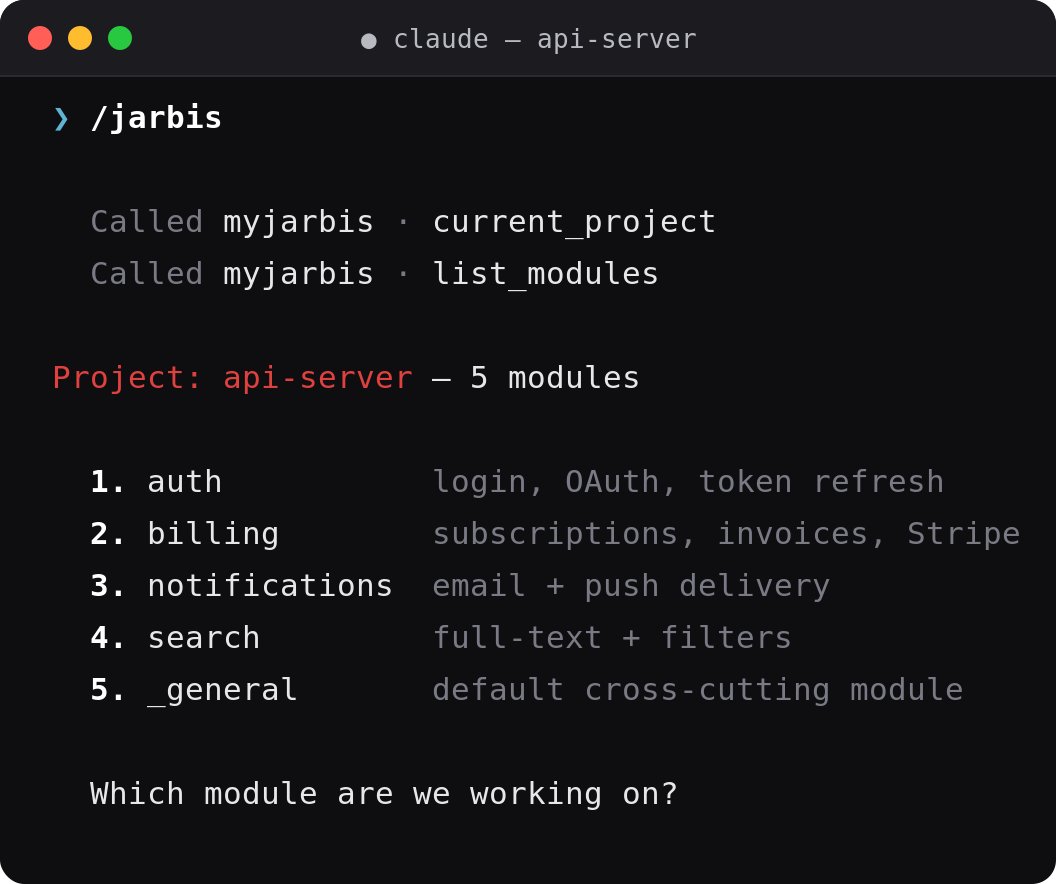
After that, everything is natural language — the agent knows which
MCP tool to call:
| You say… | Agent does |
|---|---|
| "let's work on AUTH-12" | search story + audit acceptance criteria + propose a phase |
| "I decided to use Laravel Sanctum" | save_observation(kind=decision) |
| "heads up, refresh tokens must revoke access" | save_observation(kind=gotcha) |
| "mark AUTH-12 done with commit abc" | update_progress (row-level state) |
| "commit this" | git commit with a WHY / FOR-WHAT body, no signature |
| "let's switch to frontend" | confirm + end_session + start_session(frontend) |
| "where was I?" | resume() — reads back the "Resume here" |
| "done, close it" | summary + next_session + end_session |
The next /jarbis resumes right where this one ended.
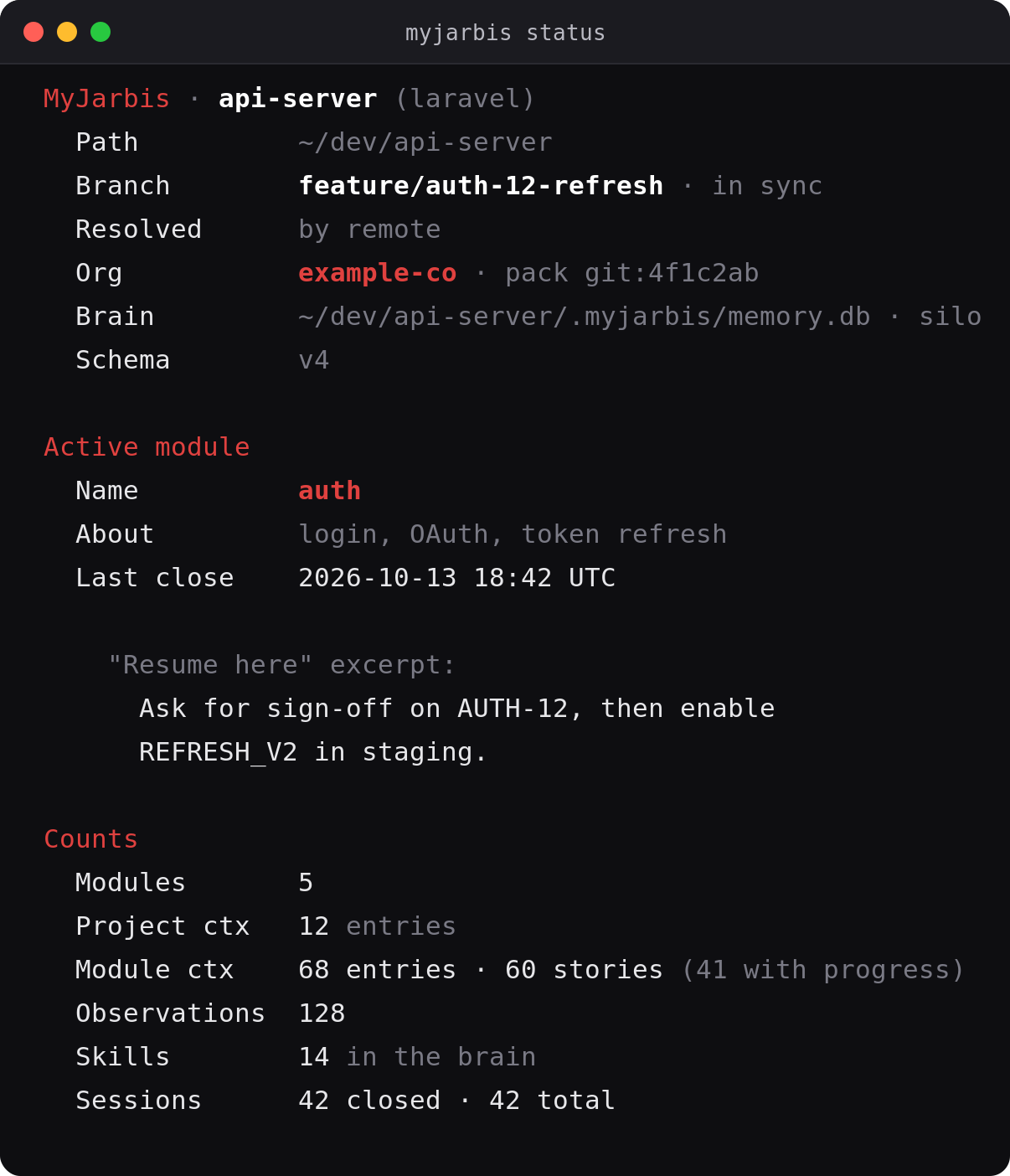
The CLI is consistent and instant (zero LLM tokens) — here's myjarbis status:
Why per-project, per-module?
In real projects, work is vertical. You don't work on "the codebase";
you work on the Media Manager, then Page Builder, then Translations. Each
vertical has its own workflow, plan, stories, and skills.
MyJarbis models that explicitly — and only loads the vertical you're in:
org (optional — owns the pack: skills, workflows, taxonomy)
 └ project
  ├── project_context (practices, deps, conventions — always loaded)
  ├── project_state   (new in v0.3 — the living "resume here", one row not N notes)
  ├── providers       (new in v0.3 — which tracker / forge / ci this project uses)
  ├── workflows       (new in v0.3 — process as rows, org to project to user)
  ├── modules (verticals — you create them)
  │     ├── module_context (workflow, plan, stories, AC)
  │     │     └── progress  (per-row state, like a "Smoke/Commit" column)
  │     ├── sessions (start → save observations → end, closed automatically)
  │     │     └── observations (decisions, gotchas, progress)
  │     │           ├── topic_key (new in v0.3 — identity; saving again updates it)
  │     │           └── refs      (new in v0.3 — links to commits / MRs / tickets)
  │     └── skills (module-level — only when this module is active)
  └── skills (project-level — always loaded: 10 baselines + any org pack)
When you open Claude, the SessionStart hook asks which vertical you want.
Only that module + the project core get loaded. The other modules stay
out of context — that's the core token-saving move.
myjarbis start — launch from anywhere
Run it from any directory. It reads your global registry, lets you
pick by number, name, or substring, and opens each chosen project ready
to work.
myjarbis start                 # interactive picker
myjarbis start api-server     # by name (or substring) — skip the picker
myjarbis start                 # then type "1 3" to launch two at once
It auto-detects how to open each project (override with a flag):
| Environment | Opens as | Force |
|---|---|---|
| WSL + Windows Terminal | a new wt.exe tab per project |
--wt |
inside a tmux session |
a new tmux window per project | --tmux |
| otherwise | replaces the current shell (one) | --here |
myjarbis start --print         # dry-run: print the resolved command(s), launch nothing
myjarbis start --no-jarbis     # open claude without firing /jarbis
myjarbis start --cmd "/resume" # custom initial prompt instead of /jarbis
myjarbis start --json          # list registered projects as JSON and exit
Projects whose path no longer exists are flagged (path missing) and
skipped. On WSL the tab is forced opaque (--opacity 100) so it doesn't
inherit a transparent profile. After you exit claude, the tab drops to a
shell in the project dir (keep-alive), so the window stays useful.
CLI workflow (git-like)
/jarbis is fastest when it doesn't have to render a menu — it just
continues with what's set. The CLI handles setup and switching, likegit checkout, all instant and token-free:
myjarbis module use backend       # set active module (like git checkout)
myjarbis module current           # print active
myjarbis module unset             # clear → next /jarbis shows the menu

myjarbis status                   # git-like overview (project, module, counts)
myjarbis config list              # language, persona, scope, nudges
myjarbis config persona mentor    # change how the agent talks back
With an active module set, opening claude auto-resumes it and prints
the curated "Resume here" — /jarbis then only acknowledges and
continues (no tool calls, no menu render).
searchis an MCP tool, not a CLI verb — the agent calls it; there
is nomyjarbis search. Usemyjarbis statusandmyjarbis timeline
from the shell.
Org packs — load how your team works, don't teach it
myjarbis init seeds ten generic skills. Everything specific to your
organization — review rules, release checklist, how tickets get closed —
used to be taught to each project by hand, which means it reliably wasn't.
An org pack is a directory you keep in your own (private) repo:
<pack>/
├── pack.yml            slug, name, compatible_with
├── skills/*.md         skills to add
├── overrides/*.md      skills that REPLACE a baseline of the same name
├── context-kinds.yml   extra taxonomy labels
├── workflows/*.yml     workflows at org scope
└── providers.yml       tracker / forge / ci templates — never credentials
myjarbis org add acme ~/work/acme-pack     # register + apply here
myjarbis init --org=acme                   # new project, pack included
myjarbis org sync acme                     # re-apply to EVERY project of the org
myjarbis org diff acme                     # what sync would change (dry run)
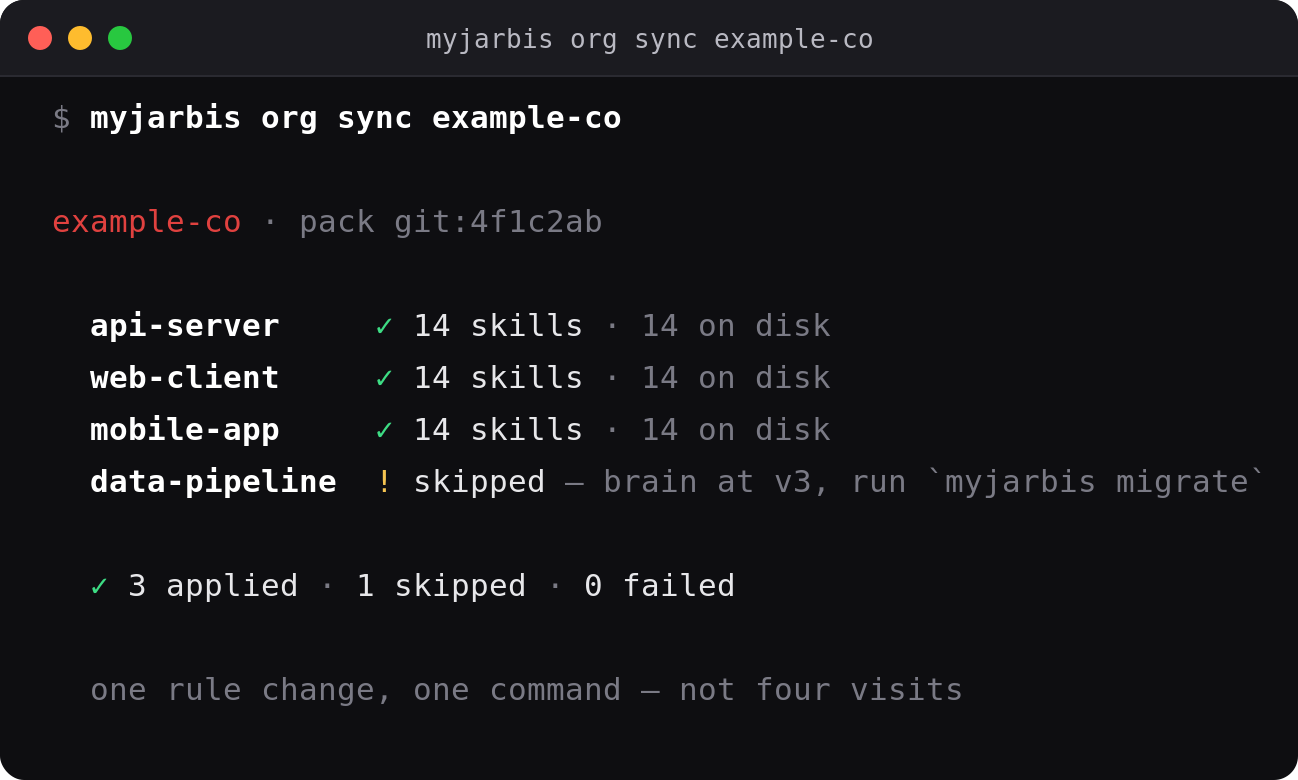
Applying is idempotent (created | updated | unchanged per item) and ends
by writing skills to .claude/skills/ — the database alone configures
nothing the agent can see. A project whose brain predates v0.3 is reported
as skipped rather than silently missed.
MyJarbis ships no pack. examples/pack/ holds a fictional one so the
contract is readable. Your rules, client names and tool wrappers stay out
of this repo.
Workflows as data, not prose
Process written as prose gets duplicated and then contradicted. Workflows
are rows, resolved org → project → user into one ordered list:
myjarbis workflow show ticket-close
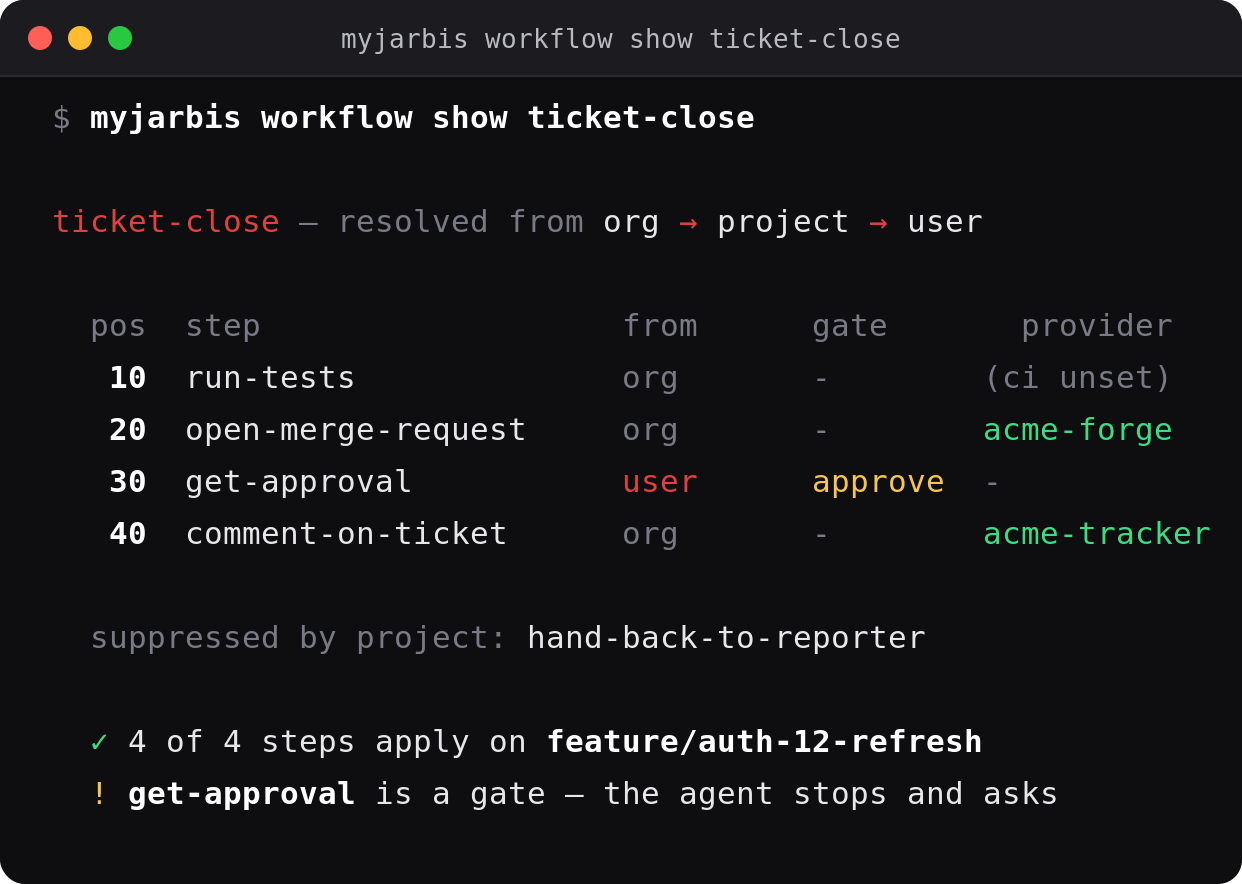
A step names an abstract capability (tracker.comment), never a
product. Which tool that means comes from the project's provider row — so
one org workflow serves a client on one tracker and a client on another,
and MyJarbis never learns a vendor's name.
gate=approve means stop and ask. Conditions are decidable
(branch ~= release/*, framework in [laravel, express]), not free text
for the agent to interpret differently each session.
myjarbis provider set tracker acme-tracker --config='{"base_url":"https://..."}'
Never put a credential in
--config. It's rejected on write and on
export, because the brain dump is meant to be committed. Store the
location instead:{"token_file": "~/.config/acme/token"}.
Notes that have identity
Three habits formed in v0.2 because nothing better existed. v0.3 gives
each one a column:
| The habit | What replaces it |
|---|---|
| A new note titled "CORRECTS note 80" | topic_key — saving again updates that note |
| "Do not repeat: comments 4-29337–41" in prose | find_by_ref — a boolean, not a paragraph |
| A new "RESUME HERE" note every session | project_state — one row, with an expiring lock |
myjarbis state get          # the living state
myjarbis kinds list         # the allowed context kinds
kind is a catalogue now, not free text — three projects once invented
three vocabularies for the same seven ideas. An unknown kind is rejected
with the nearest match; a pack can add its own.
One brain or many
Pre-v0.3 there was one memory.db per project. That still works and is
still the default (isolation = silo). v0.3 adds a shared brain at~/.myjarbis/memory.db so a cross-cutting change is one action.
The isolation that the filesystem used to provide is now enforced in code,
and it is not optional:
- scope is bound to the connection, not passed per query
- a read with no scope fails rather than returning every project
- passing another project's id is refused, not honoured
- crossing projects needs an explicit scope and a stated reason
tests/v03-isolation.sh asserts all four. Migration is opt-in and backs
up first:
myjarbis migrate --dry-run              # report, touch nothing
myjarbis migrate                        # upgrade this project's brain
myjarbis merge --from <proj>/.myjarbis/memory.db --as acme-portal
Opening a brain never migrates it — merely looking for a project would
otherwise rewrite the schema of files you never named.
Living diagrams
Documentation that draws itself while you work. Every module can get a
draw.io diagram that is a view of its memory — you never draw it by
hand. You code, you tell MyJarbis what you did (the save_observation you
already do), and the diagram redraws itself.
It reads top-to-bottom as a narrative of the work: one card per
observation — title, a kind tag, the "why", and the files it touched —
chained with arrows in the order things happened.
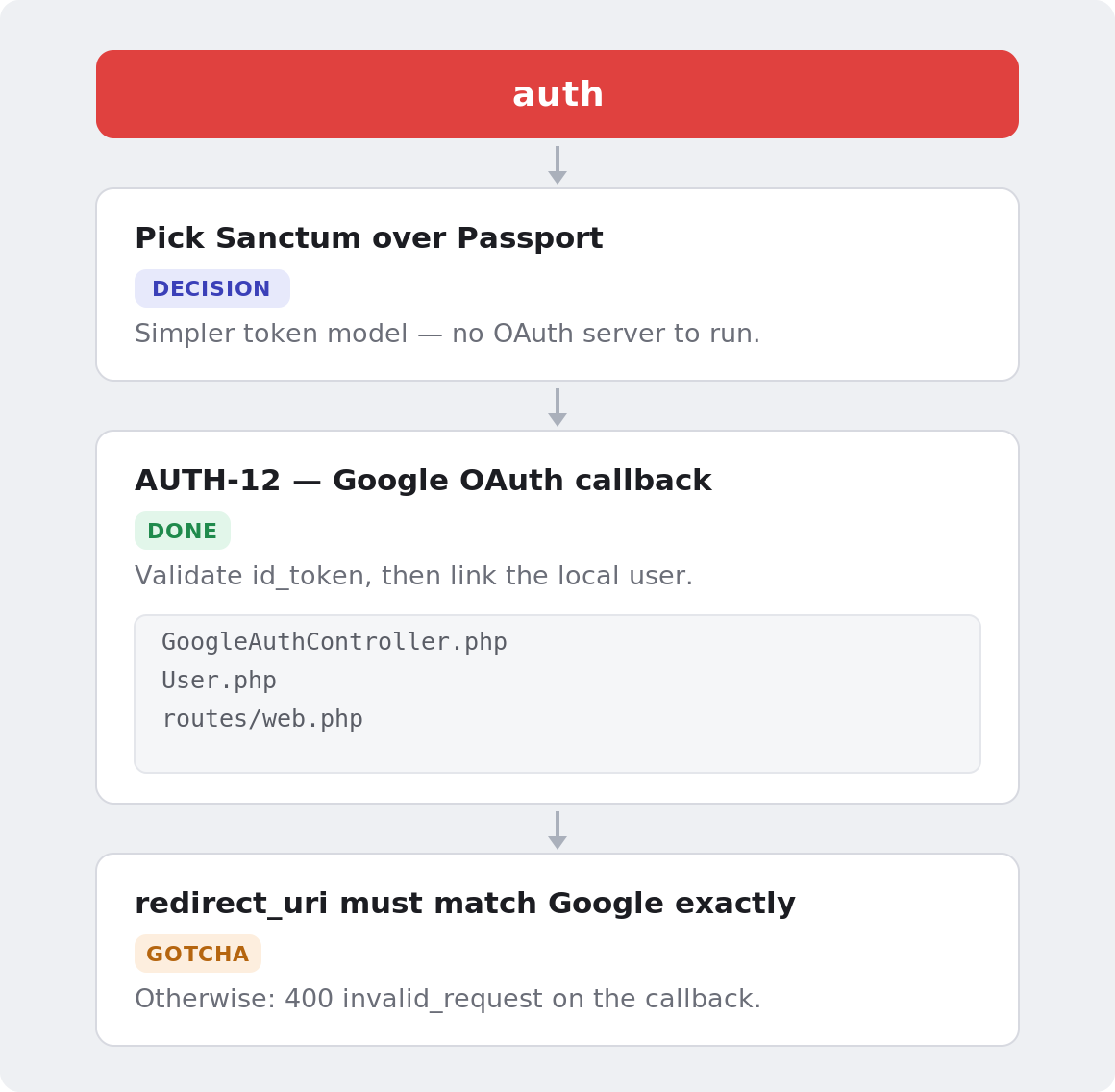
Each card is one observation — its kind becomes the tag, the title and
"why" come straight from what you saved, and the files it touched nest
inside. Cards chain with arrows in the order things happened.
myjarbis diagram                # (re)generate + open the active module's diagram
myjarbis config diagram on      # opt in to auto-generate/open (default off)
It's opt-in: by default it only runs when you ask. Turn diagram.auto
on and session hooks + save_observation + update_progress keep it live
and pop it open in VS Code (install the
Draw.io Integration
extension to render .drawio inside the editor).
Deep dive
Bootstrap a project (init, modules, importing your .md files)cd ~/projects/my-app
myjarbis init # creates memory.db + 10 baselines + plugin hooks
myjarbis init is interactive — it asks two questions to personalize
how Claude talks back:
Languages: EN (United States), ES (Argentina), PT (Brazil)
  Language [EN/es/pt]: en

Personas:
  1=Concise (token-saving) — terse, no preamble (default)
  2=Pair programmer — 1-line intent before each change
  3=Mentor — WHAT/WHY/HOW/BENEFITS
  4=Critical reviewer — challenges your assumptions first
  Persona [1/2/3/4, default 1]: 1
Skip the prompts for CI / scripts:
MYJARBIS_LANGUAGE=ES MYJARBIS_PERSONA=concise myjarbis init
Create your verticals and import the .md files you already keep on disk:
myjarbis module add backend
myjarbis module add frontend

myjarbis import agents/WORKFLOW.md         --target=project        --kind=workflow
myjarbis import agents/backend/PLAN.md     --target=module:backend --kind=plan
myjarbis import agents/backend/tickets.json --target=module:backend --kind=story --mapping='stories[]'
Re-imports are idempotent (SHA-256 on content): unchanged → no-op,
changed → in-place UPDATE.
cd ~/projects/my-app
claude
> /jarbis
The SessionStart hook fires:
═══ MyJarbis · my-app (laravel) ═══

Modules:
  • backend, last session 2026-05-04 14:30 UTC
  • frontend (paused)

Pick a module to begin (e.g., "let's work on backend").
Or create a new one: `myjarbis module add <name>`.

── Last "Retomar aquí" (backend, 2026-05-04 14:30 UTC) ──
PR #1234 merged to develop. Next: start AUTH-12 with the JWT
refresh flow. Branch: feature/auth-12-refresh-jwt.
The menu always shows — even with one module — so you can switch
verticals, create one, or change settings without leaving Claude.
Timestamps are absolute ISO (not "2h ago"), so the output is byte-stable
and Anthropic's prompt cache survives between calls.
You say "let's work on backend" → the agent callsstart_session("backend") and gets project_core + backend context + the
previous next_session. Only the 10 baselines + backend's module-level
skills are materialized to .claude/skills/. Frontend's are not on disk.
progress field
Hand-edited PROGRESS.md tables have a "Smoke" column, a "Commit" column, a
"Status" column — per-row state. MyJarbis ships the same primitive:
every module_context row (typically a story) has a free-form markdownprogress field the agent maintains:
"mark MM-S3.6 as done with commit abc1234, smoke OK"
  ↓
update_progress(
  local_id = "MM-S3.6",
  progress = "done · batch 2 (2026-05-04) · commit abc1234 · smoke OK"
)
The progress text travels with the row in start_session, search, andload_module — so the next /jarbis already sees which stories are done,
in progress, or blocked, without reading any MD.
| MD workflow | MyJarbis equivalent |
|---|---|
| Edit PROGRESS.md "Smoke" column | update_progress(local_id, "done · ...") |
| Edit CURRENT.md rolling summary | end_session(summary, next_session) |
| Edit ERRORS.md new lesson | save_observation(kind=gotcha, ...) |
| Read CURRENT.md next morning | previousSession.nextSession in start_session |
start_session does not dump the full module library. It returns:
previousSession.nextSession— the curated "Resume here" (read first)projectContext[]/moduleContext[]— index entries (title + 240-char
excerpt +progressflag)stories: { count, entries: [{localId, progress?}] }— inventory, no body
When the agent needs a full row, it follows the canonical RAG pattern:
1. search(query, scope="module")     # FTS5 snippets with row IDs
2. load_module(row_ids=[<id>])       # full body of just those rows
load_module returns excerpts by default; full=true is opt-in and
warns past 50KB — so the agent never accidentally loads 100KB+ of docs
into one call.
Materialized to .claude/skills/myjarbis-<name>/SKILL.md and loaded at
session start.
Claude Code identifies a skill by its directory name, not by the
name:in its frontmatter. So these appear asmyjarbis-<name>— the
prefix is what makes them safe to clean up without touching skills you
wrote yourself.
| Skill | What it teaches the agent |
|---|---|
module-orchestration |
How to pick/switch modules + conversational triggers |
session-protocol |
When to close a session + summary + next_session format |
observation-protocol |
When to save decision/gotcha/progress + natural triggers |
story-driven |
Pipeline detect → audit → execute → close, by phases |
bitacora-progress |
How to write a "next_session" that helps tomorrow |
framework-detect |
Auto-explore the codebase on the first session |
subagent-delegation |
When to spawn Explore/Plan/general-purpose in parallel |
compact-protocol |
Structured snapshot before native /compact |
interaction-style |
Your tone / language / depth (composed at init) |
commit-hygiene |
Commit format + git log as queryable context |
commit-hygiene — every commit follows type(scope): description
with a Por qué: / Para qué: body, no Co-Authored-By: Claude, no--no-verify, no git add -A. The git log becomes queryable memory.
interaction-style — composed from your language + 1 of 4 personas
(Concise / Pair programmer / Mentor / Critical reviewer). Re-edit anytime
with myjarbis skill edit interaction-style.
# project-level (always active here)
myjarbis skill add tracker-rules --content-from=docs/tracker-rules.md \
  --description="Issue-tracking rules for this project"

# module-level (only active when working on MM)
myjarbis skill add mm-pixel-perfect --module=MM \
  --content-from=docs/mm-pixel-perfect.md \
  --description="MM: copy HTML from design package, never reinterpret"
When you start_session(MM), MM's skills materialize to .claude/skills/.
Switch modules and they disappear; the new module's appear.
.claude-plugin/hooks/hooks.json registers 4 events:
- SessionStart (startup|clear) — if
.myjarbis/activeis set,
auto-starts that module and prints the curatednext_session(no menu).
Otherwise prints the localized module menu. Output is byte-stable. - SessionStart (compact) — restores the pre-compact snapshot.
- UserPromptSubmit — first message forces ToolSearch + detects story
localIds. Optional save reminder vianudges.save_reminder_minutes. - Stop — reminds you to close an open session.
Optional git post-commit hook (myjarbis hook install git-post-commit):
on every commit while a session is open, saves a progress observation
with the hash, message, files, and detected story id. Idempotent.
Stale-resume warning — when the "Resume here" is older than 7 days
(session.stale_after_days), the hook surfaces a warning to confirm the
context still applies before the agent proceeds.
┌─────────────────────────────────────────────────────────────────┐
│  CLAUDE CODE (harness)                                          │
│  hooks: SessionStart · UserPromptSubmit · Stop · SessionEnd     │
│  /jarbis (the only slash command)  ·  skills read from .claude/ │
└────────────────────────────────┬────────────────────────────────┘
                                 ▼
┌─────────────────────────────────────────────────────────────────┐
│  MCP SERVER (Node/TS, ~/.myjarbis-global/mcp-server/)           │
│  Always-loaded (20):                                            │
│    current_project · list_modules · start/end_session · resume  │
│    load_project_core · load_module · search                     │
│    save_observation · update_progress · suggest_topic_key       │
│    update_observation · find_by_ref · add_ref                   │
│    get/set_project_state · get_workflow · list_workflows        │
│  Deferred, loaded on demand (12):                               │
│    create_module · *_skills · import_* · set_interaction_style  │
│    set_workflow_step · list_context_kinds · list/set_provider   │
│    search_code · get_context · update_memory      (v0.1 aliases)│
└────────────────────────────────┬────────────────────────────────┘
                                 ▼
┌─────────────────────────────────────────────────────────────────┐
│  SCOPE — bound to the connection, not passed per query          │
│  {kind:'project', id} | {kind:'all', reason}                    │
│  A read with no scope FAILS. Another project's id is REFUSED.   │
└────────────────────────────────┬────────────────────────────────┘
                                 ▼
┌─────────────────────────────────────────────────────────────────┐
│  SQLite — better-sqlite3 + FTS5                   (schema v4)   │
│    <project>/.myjarbis/memory.db     isolation = silo (default) │
│    ~/.myjarbis/memory.db             isolation = shared         │
│                                                                 │
│  orgs → projects → project_context · modules · skills           │
│                  → project_state · providers · workflows        │
│  modules → module_context · sessions → observations → refs      │
│  context_kinds (the taxonomy)  ·  workflow_steps                │
└─────────────────────────────────────────────────────────────────┘
Resolution order for "which project is this?": an explicit --project,
then the normalised git remote, then the nearest enclosing registered
path — then failure. It never creates a brain; only myjarbis init does.
Each project has its own memory.db. shared: true commits it to the
repo (whole team loads the same context — init --shared=true warns that
observations may carry tokens/paths). shared: false (default) is.gitignored and personal.
myjarbis cost
Five levers keep token use low:
- Per-module loading — only the active module + project core ride the
system prompt. - Index by default —
start_session/load_modulereturn excerpts;
full bodies arrive only viaload_module(row_ids=[...])after a search. - Cache-stable hooks — byte-deterministic output so the prompt cache
survives between turns. - Deferred admin tools — 9 of 18 MCP tools load on demand
(~600–1200 tokens saved/session). - Trilingual
/jarbis— each project loads only its language variant.
myjarbis cost                  # tokens + cache hit ratio per session, USD approx
myjarbis cost --last=5 --json
Hit ratio above ~80% means the cache is working; below ~50% means
something is emitting variable content and busting it.
search is FTS5 over project_context, module_context, skills, and
observations. Scopes:
module(default) — active module + project_core. Token-saving.project— every module of this project + project_coremodule_only— only the active or named moduleobservations— only the session logskills— only skill content
With 5 modules indexed, the default module scope means the agent only
sees hits from the one you're in.
v0.1 → v0.2 (markdown → SQLite) runs automatically on first open:knowledge-base.md → observations, daily.md → workflow,project-summary.md → functional spec, 10 baselines seeded. Auto-backup
at ~/.myjarbis-global/backups/<project>/<ts>/. Legacy aliases
(search_code, get_context, update_memory) still work.
Schema versioning — MyJarbisDB.open() walks MIGRATIONS[v] from
current+1 up to SCHEMA_VERSION; each step is idempotent. v3 addedmodule_context.progress and upgrades any v2 DB in place.
myjarbis init                       # init project (interactive)
myjarbis start [name] [flags]       # global launcher (see above)
myjarbis doctor                     # health check (25+ probes)
myjarbis status [--json]            # git-like overview
myjarbis timeline <module> [--json --limit=N]
myjarbis stats                      # row counts per table
myjarbis cost [--last=N] [--json]   # token usage + cache hit ratio
myjarbis list                       # registered projects
myjarbis update                     # pull + rebuild MCP server
myjarbis hook install git-post-commit

myjarbis module list | use <n> | current | unset | add <n> [--description=...]
myjarbis config list | language <EN|ES|PT> | persona <concise|pair|mentor|reviewer>
myjarbis config diagram <on|off>

myjarbis skill add <name> --content-from=<file> [--module=...] [--description=...]
myjarbis skill list | edit | delete | enable | disable | materialize

myjarbis import <file.md>   --target=<project|module:NAME> --kind=<kind>
myjarbis import <file.json> --target=... --kind=<kind> --mapping='items[]'
.myjarbis/config/settings.json)
{
  "version": "0.2.0",
  "project": { "name": "my-app", "framework": "laravel" },
  "shared": false,
  "search_default_scope": "module",
  "story_pattern": "[A-Z]+-S?\\d+(\\.\\d+)?",
  "auto_module_select_when_single": true,
  "skills": {
    "materialize_on_session_start": true,
    "cleanup_module_skills_on_session_end": false
  },
  "nudges": { "save_reminder_minutes": null },
  "session": { "stale_after_days": 7 },
  "diagram": { "auto": false }
}
nudges.save_reminder_minutes— positive integer N reminds the agent tosave_observationafter N+ idle minutes;nullkeeps hooks cache-stable.diagram.auto— opt-in living diagram.false= onlymyjarbis diagram
generates/opens it;true= session hooks keep it live in VS Code.
tests/bootstrap-import.sh      # 12 .md + 1 JSON bulk import idempotency
tests/skills-lifecycle.sh      # baselines + module-level + cleanup on switch
tests/full-session-cycle.sh    # open → work → close → reopen → resume
tests/compact-cycle.sh         # snapshot pre/post /compact roundtrip
tests/dx-batch-1.sh            # stale-resume + timeline + post-commit auto-observation
The single slash command is /jarbis. Everything else is conversation or a quick CLI verb.
No /plan, /implement, /complete — the 10 baseline skills let the agent infer all of it.
MIT · Built by Braian Axel Troncoso 🇦🇷
Yorumlar (0)
Yorum birakmak icin giris yap.
Yorum birakSonuc bulunamadi