claude-code-brain-bootstrap
Health Uyari
- License — License: MIT
- Description — Repository has a description
- Active repo — Last push 0 days ago
- Low visibility — Only 8 GitHub stars
Code Gecti
- Code scan — Scanned 12 files during light audit, no dangerous patterns found
Permissions Gecti
- Permissions — No dangerous permissions requested
This tool is a project configuration template that installs a pre-made `.claude/` folder into your repository. It provides persistent memory, enforced guardrails, and automated workflows so your AI coding assistant remembers your project conventions across sessions without repeating mistakes.
Security Assessment
This is a Shell-based skill designed to scaffold configuration files in your local development environment. The automated code scan of 12 files found no dangerous patterns, hardcoded secrets, or requests for excessive system permissions. The project explicitly claims it performs "no third-party installs without your explicit approval." While the repository claims to generate over 200 files, the light audit did not detect malicious network requests or attempts to access sensitive data. Because it operates as a local code generator, the overall risk is Low.
Quality Assessment
The project is highly active, with its last push occurring just today. It uses the permissive MIT license and includes continuous integration (CI) pipelines. The primary concern is its extremely low community visibility. With only 8 GitHub stars, it has not been broadly vetted by the open-source community, meaning hidden bugs or unconventional behaviors might exist. However, its documentation is comprehensive, the repository is well-described, and the developer intent is clearly communicated.
Verdict
Safe to use, though you should review the generated configuration files before committing them to a production codebase.
🧠 Give your AI coding assistant the one thing it's missing: deep knowledge of your codebase.

ᗺB - Brain Bootstrap
Your AI coding assistant is brilliant.
It just forgets everything, ignores your rules, and breaks your conventions.
Brain doesn't hope the AI behaves — it makes it. Permanently.
by y-abs · no third-party installs without your explicit approval




What This Is · Guarantees · Before & After · Real Example · 5 Min Setup · Under the Hood · 200+ Files · Gets Smarter · Guardrails · Superpowers · Make It Yours · FAQ · Contribute
💡 What This Is
Brain Bootstrap is a project configuration template — a ready-made .claude/ folder you install once into your repo. It gives Claude Code persistent memory, enforced guardrails, and 31 built-in workflows so your AI assistant finally knows your project and stops repeating the same mistakes every session.
The problem it solves:
You ask Claude to add a feature. It uses npm run build — but you use yarn turbo build. It installs date-fns even though @company/utils already has formatDate(). It edits tsconfig.json to silence a type error — the file you explicitly said never to touch.
You correct it. It apologizes. Next session: same mistakes.
Claude Code is stateless by design — each session starts blank. So you end up re-explaining your stack, re-enforcing the same rules, re-correcting the same errors. Every. Single. Session. You become the AI's memory.
What Brain Bootstrap gives you instead:
- Persistent memory — conventions, architecture, past mistakes embedded once and never forgotten
- Enforced rules — bash hooks that block violations before they run, no AI judgment involved
- Ready-to-use workflows — 31 slash commands (
/plan,/review,/mrand 28 more), 18 skills, 5 specialist subagents - Self-updating knowledge — the knowledge layer grows with your codebase, session by session
Install once. Correct once. It never happens again.
🔒 Not Suggestions — Guarantees
Every other instruction system hopes the AI complies. Brain doesn't hope — it enforces.
Corrections become permanent rules. Forbidden patterns get blocked before they run — by deterministic bash scripts, not AI judgment. The knowledge base updates itself as your codebase evolves. The same mistake cannot happen twice.
You stop babysitting — the AI just knows.
✨ What Changes When You Add a Brain
Every AI coding tool reads instructions. None of them enforce those instructions on themselves. You write "never edit tsconfig.json" — it edits tsconfig.json anyway. You correct it — same mistake next session.
Instructions are text. Text is advisory. Advisory gets overridden. Brain replaces text with mechanisms — hooks that block before execution, memory that persists across sessions, knowledge that stays current:
| 🔁 Every session today | 🧠 With Brain — once, forever |
|---|---|
| You repeat your conventions every session — package manager, build commands, code style | Knows your entire toolchain from day one — conventions are documented, not repeated |
| You re-explain your architecture after every context reset | architecture.md is auto-loaded — survives compaction, restarts, everything |
| You correct a mistake, it apologizes, then does it again tomorrow | Corrections are captured in lessons.md — read at every session start, never repeated |
| The AI modifies config files to "fix" issues — linter settings, compiler configs, toolchain files | Config protection hook blocks edits to any protected file — forces fixing source code, not bypassing the toolchain |
| A command opens a pager, launches an editor, or dumps unbounded output — session hangs | Terminal safety hook intercepts dangerous patterns before they execute — pagers, vi, unbounded output, all blocked |
| Code reviews vary wildly depending on how you prompt | /review runs a consistent 10-point protocol every time — same rigor, zero prompt engineering |
| Research eats your main context window and you lose track | research subagent explores in an isolated context — your main window stays clean |
| Knowledge docs slowly rot as the code evolves | Self-maintenance rule + /maintain command detect drift and fix stale references automatically |
| You're locked into one model — switching to Haiku or a local LLM means reconfiguring everything | Agents pick the best model per task — falls back to Ollama, LM Studio, Haiku, any provider |
| You push a PR and discover too late that your change broke 14 other files | code-review-graph scores every diff 0–100 before you push — blast radius, breaking changes, risk verdict in seconds |
After a few sessions, your AI will know things about your codebase that even some team members don't.
👀 See It In Action — Real Project, Real Diff
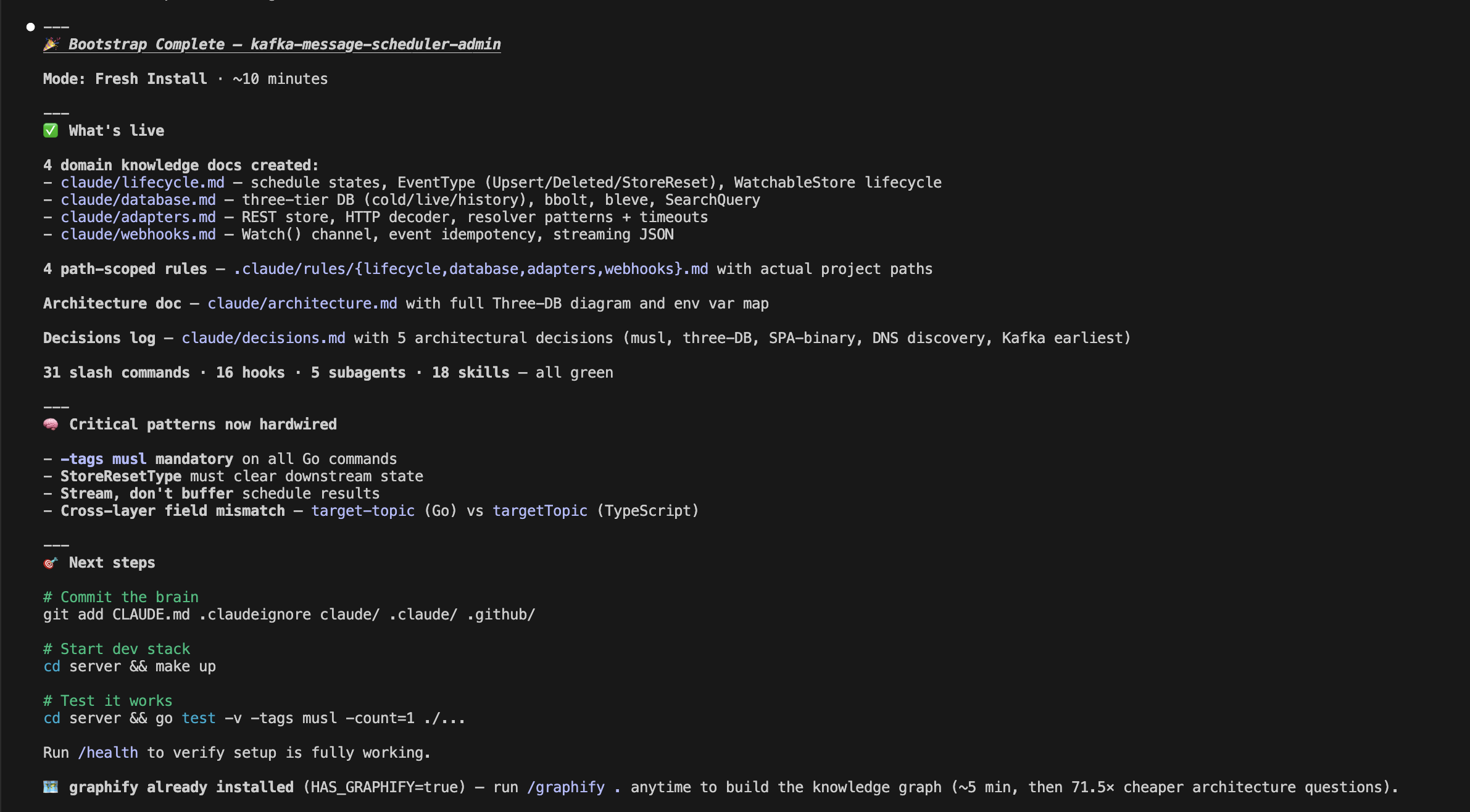
Skeptical? Here's the exact output on a TypeScript / Go / Kafka stack — every file Brain added, zero manual editing:
→ kafka-message-scheduler-admin: before vs. after Brain Bootstrap
🎯 200+ files isn't complexity. It's the minimum architecture where instructions become guarantees.
🚀 Get Started in 5 Minutes
Step 1 — Install the template
Prerequisites: git, bash ≥ 3.2, jq (install jq if missing — brew install jq / apt install jq).
git clone https://github.com/y-abs/claude-code-brain-bootstrap.git /tmp/brain
bash /tmp/brain/install.sh your-repo/
rm -rf /tmp/brain
🔍 Pre-flight check:
bash /tmp/brain/install.sh --check— verifies all prerequisites (git, bash, jq) before touching your repo. Runs in 1 second, no side effects.
The installer auto-detects fresh install vs. upgrade — it never overwrites your knowledge (CLAUDE.md, lessons, architecture docs). Existing files stay untouched; only missing pieces are added. A backup is auto-created before any upgrade. settings.json is deep-merged (your existing allowlist is preserved). Existing commands are never overwritten — Brain's versions only fill the gaps.
Step 2 — Let the AI configure itself
With Claude Code (recommended — full automation)/bootstrap
The /bootstrap command runs the discovery engine (discover.sh — pure bash, zero tokens), detects your entire stack, fills 70+ placeholders, then has the AI write architecture docs and domain knowledge specific to your codebase. Fully automated, ~5 minutes.
The claude/*.md knowledge docs are plain Markdown — any AI can read them. Run discover.sh, then tell your AI to read claude/tasks/.discovery.env and fill the {{PLACEHOLDERS}} in claude/architecture.md + claude/build.md. Or skip discovery and let the AI infer from package.json / pyproject.toml / etc. See DETAILED_GUIDE.md for the full prompt.
The discovery engine detects 25+ languages, 1,100+ frameworks, 21 package managers in ~2 seconds. Then the AI fills in what requires reasoning: architecture, domain knowledge, critical patterns.
🧠 How It Works Under the Hood
Claude Code Brain is 200+ files of structured configuration that live in your repo, version-controlled alongside your code. It's not a wrapper, not a plugin, not a SaaS product — it's a knowledge architecture that teaches your AI assistant how your project actually works.
Your repo
├── 📋 CLAUDE.md                    ← Operating protocol (auto-loaded every conversation)
├── ⚙️ .claude/
│   ├── commands/                   ← 31 slash commands (/build, /test, /review, /mr, /health...)
│   ├── hooks/                      ← 16 lifecycle hooks (safety, quality, recovery, audit)
│   ├── agents/                     ← 5 AI subagents (research, reviewer, plan-challenger...)
│   ├── skills/                     ← 18 skills (TDD, triage, root-cause, code review, semantic search...)
│   ├── rules/                      ← 13 path-scoped rules (auto-load per file type)
│   └── settings.json               ← Tool permissions, hook registration
├── 📚 claude/
│   ├── architecture.md             ← Your project's architecture (auto-imported)
│   ├── rules.md                    ← 24 golden rules (auto-imported)
│   ├── build.md                    ← Build/test/lint/serve commands for your stack
│   ├── terminal-safety.md          ← Shell anti-patterns that cause session hangs
│   ├── cve-policy.md               ← Security decision tree
│   ├── plugins.md                  ← Plugin config (claude-mem + graphify + MCP)
│   ├── scripts/                    ← 19 bootstrap & maintenance scripts
│   ├── bootstrap/                  ← 🧠 Setup scaffolding (auto-deleted after bootstrap)
│   ├── tasks/lessons.md            ← 🧠 Accumulated wisdom (persists across sessions)
│   ├── tasks/todo.md               ← 📝 Current task plan (survives session boundaries)
│   └── tasks/CLAUDE_ERRORS.md      ← 🐛 Error log (promotes to rules after 3+ recurrences)
└── 🚫 .claudeignore                ← Context exclusions (lock files, binaries, etc.)
Write your knowledge once. Every AI tool reads it. ✍️
Because it lives in your repo, it's version-controlled, PR-reviewed, and shared across your team automatically — no SaaS account, no sync, no drift.
🎯 The Three-Layer Token Strategy
The system is designed to minimize token cost while maximizing context — your AI doesn't drown in 50K tokens when you ask it to fix a typo:
| Layer | What | When loaded | Cost |
|---|---|---|---|
| 🟢 Always on | CLAUDE.md + imported rules — operating protocol, critical patterns |
Every conversation | ~3-4K tokens |
| 🟡 Auto-loaded | Path-scoped rules — short do/don't lists per domain | When editing matching files | ~200-400 each |
| 🔵 On-demand | Full domain docs — architecture, build, auth, database | When the task requires it | ~1-2K each |
| 🗺️ Graph | GRAPH_REPORT.md — architecture map, god nodes, communities |
Before file searches (via PreToolUse hook) | 71.5× fewer tokens than reading raw files |
📦 What's Inside
| Category | Count | Highlights |
|---|---|---|
| 📚 Knowledge docs | 13 | Architecture, rules, build, CVE policy, terminal safety, templates, decisions + 3 worked domain examples |
| ⚡ Slash commands | 31 | Build, test, lint, review, MR, debug, deploy, maintain, research, bootstrap — covers the full dev lifecycle |
| 🪝 Lifecycle hooks | 16 | Config protection, terminal safety, commit quality, session recovery, batch formatting, exit checklist |
| 🤖 AI subagents | 5 | Research, reviewer, plan-challenger, session-reviewer, security-auditor — each auto-selects optimal model |
| 🎓 Skills | 18 | TDD, root-cause trace, code review, triage, brainstorming, semantic search, browser automation, LSP refactoring |
| 🔧 Brain scripts | 19 | Stack discovery (3800-line detector), template population, validation, portability lint |
| 📏 Path-scoped rules | 13 | Auto-loaded per file type — terminal safety, quality gates, domain learning, agent orchestration |
| 🔌 Plugins | 10 | Architecture graph, semantic search, risk analysis, cross-session memory, browser automation, LSP refactoring |
| ✅ Validation checks | 127+ | File existence, hook executability, placeholder detection, settings consistency, cross-reference integrity |
🔀 Write Once, Read Everywhere
| Tool | What it reads | Depth |
|---|---|---|
| Claude Code | CLAUDE.md + .claude/ + claude/*.md |
🟢 Everything |
| Any AI assistant | claude/bootstrap/PROMPT.md → claude/*.md |
🔵 Bootstrap → knowledge |
Agents declare their optimal model (model: opus for review/security, session model for research). Falls back gracefully to whatever you're running — Ollama, LM Studio, Bedrock, any local endpoint.
🔄 It Gets Smarter Over Time
This isn't a static config that rots. It's a living system with six feedback loops:
- 📋 Exit checklist — captures corrections at the end of every turn, so they stick
- 🧠
lessons.md— accumulated wisdom, read at every session start — impossible to skip - 🐛 Error promotion — same mistake 3 times? Becomes a permanent rule automatically
- 🔁 Session hooks — context survives restarts, compaction, resume — nothing gets lost
- 🔍
/maintain— audits all docs for stale paths, dead references, drift - 🗺️ Auto-updating graph — knowledge graph rebuilds on every commit and branch switch
🛡️ Safety: Defense in Depth
Security isn't one mechanism — it's two layers working together:
🚫 Layer 1: Permissions — What the AI Can't Even Attempt
settings.json defines hard boundaries. The AI can never push code — it presents a summary and waits for your confirmation. Destructive commands (rm -rf /, DROP DATABASE, deployment scripts) are blocked at the permission layer. Only explicitly allowed tool patterns run; everything else requires your approval.
These aren't suggestions — they're hard permission boundaries enforced before the AI even sees the command.
🪝 Layer 2: Hooks — What Gets Intercepted at Runtime
16 lifecycle hooks add runtime guardrails — deterministic bash scripts, zero tokens, zero AI reasoning:
| Hook | What it prevents |
|---|---|
| 🔒 Config protection | Blocks editing biome.json, tsconfig.json, linter configs — forces fixing source code instead |
| 🚧 Terminal safety gate | Blocks vi/nano, pagers, docker exec -it, unbounded output — 3 profiles: minimal/standard/strict |
| 🧹 Commit quality | Catches debugger, console.log, hardcoded secrets, TODO FIXME in staged files |
Plus 13 more — session recovery, batch formatting, test reminders, identity refresh, permission audit, exit checklist. Full hook reference →
🔌 Plugin Ecosystem
Ten plugins available — pick what fits your stack. Run setup-plugins.sh and choose a strategy (recommended, full, personalize, or none):
| Tool | Axis | Requires | Impact |
|---|---|---|---|
| code-review-graph | 🔴 Change risk analysis — risk score 0–100, blast radius, breaking changes from git diffs | Python 3.10+ | Pre-PR safety gate |
| codebase-memory-mcp | 🔍 Live structural graph — call traces, blast radius, dead code, Cypher queries | curl | 120× fewer tokens vs file reads |
| graphify | 🗺️ Architecture snapshot — god nodes, community clusters, cross-module map | Python 3.10+ | 71.5× fewer tokens per query |
| cocoindex-code | 🔎 Semantic search — find code by meaning via local vector embeddings (no API key) | Python 3.11+ | Finds what grep/AST miss |
| serena | 🔧 LSP symbol refactoring — rename/move/inline across entire codebase atomically | uvx + Python 3.11+ | Low — on-demand |
| rtk | ⚡ Command efficiency — transparently rewrites bash commands for compressed output | cargo | 60-90% output token savings |
| playwright | 🌐 Browser automation — navigate, click, fill, snapshot web pages | Node.js 18+ | Replaces manual browser steps |
| caveman | 🗣️ Response compression — terse replies (65-87% savings) + input file compression | Node.js | Negative — reduces tokens |
| codeburn | 📊 Token observability — cost breakdown by task, model, USD | Node.js 18+ (CLI) | Zero (reads session files) |
| claude-mem | 🧠 Cross-session memory — captures every interaction, searchable across sessions | — | ⚠️ Disabled by default (~48% quota) |
📚 Full plugin reference: claude/plugins.md — usage examples, install commands, toggle scripts, token economics.
⚙️ Make It Yours
Extending the Brain is simple — one file, one registration:
| To add… | Create… | Registration |
|---|---|---|
| 📚 Domain knowledge | claude/<domain>.md |
Add to CLAUDE.md lookup table |
| 📏 Path-scoped rule | .claude/rules/<domain>.md |
Automatic (matched by file path) |
| ⚡ Slash command | .claude/commands/<name>.md |
Automatic (discovered by Claude Code) |
| 🪝 Lifecycle hook | .claude/hooks/<name>.sh |
Register in .claude/settings.json |
| 🤖 AI subagent | .claude/agents/<name>.md |
Automatic (discovered by Claude Code) |
| 🎓 Skill | .claude/skills/<name>.md |
Automatic (discovered by Claude Code) |
Three worked examples in claude/_examples/ — API domain, database domain, messaging domain.
📚 Full reference: claude/docs/DETAILED_GUIDE.md — complete file inventory, architecture diagrams, all 31 commands, all 16 hooks, placeholder reference, stack-specific examples, FAQ.
❓ FAQ
💻 What platforms and languages are supported?Platforms: Linux ✅, macOS ✅, Windows WSL2 ✅, Git Bash ✅, CMD/PowerShell ❌ (Claude Code requires a Unix shell).
Prerequisites: git, bash ≥ 3.2 (≥ 4 for /bootstrap), jq. Optional: Python 3.10+ for plugins like graphify.
Languages: 25+ — TypeScript, Python, Go, Rust, Java, Kotlin, Ruby, PHP, C#, C/C++, Swift, Dart, Elixir, and more. The knowledge docs are language-agnostic; stack-specific details are auto-detected by the discovery engine.
🔄 I already have a CLAUDE.md / claude/ config — will this overwrite it?💡 macOS ships Bash 3.2 —
discover.shneeds Bash 4+ (brew install bash). Runbash install.sh --checkto verify everything in 1 second.
Never. The installer detects your existing config and enters upgrade mode — it adds only what's missing and never touches your knowledge files (CLAUDE.md, lessons.md, architecture docs, settings). A full backup is auto-created before any change.
Very little. The system is designed to be cheap by default — your AI doesn't load 50K tokens when you ask it to fix a typo:
- Always on: ~3-4K tokens (operating protocol + critical rules)
- Auto-loaded: ~200-400 tokens per rule (only when editing matching files)
- On-demand: ~1-2K tokens per doc (only when the task needs it)
See the Three-Layer Token Strategy for the full breakdown.
🤖 Does it work with local LLMs / Ollama / LM Studio?Yes. Agents declare their optimal model but fall back gracefully to whatever you're running — Ollama, LM Studio, Haiku, Bedrock, any provider. The knowledge docs are plain Markdown — any model can read them. No API keys required for the core system.
⚖️ How is this different from Cursor rules / .cursorrules?Scope. Cursor rules are a flat instruction file — the AI reads it if it feels like it. Brain is a multi-layered enforcement architecture with lifecycle hooks that block before execution, subagents that run in isolated contexts, skills that activate per task, session memory that persists across restarts, and self-maintenance that keeps docs current.
It's the difference between a sticky note and an operating system.
👥 Is this just for solo developers?Works great solo, but it's designed for teams. Everything is version-controlled and shared by default (TEAM mode).
Not ready to share your Brain with the team? Switch to SOLO mode: add CLAUDE.md, claude/, .claude/ to .gitignore.
🤝 Contributing
PRs welcome! All contributions must be domain-agnostic.
👉 Full guide → CONTRIBUTING.md · 🐛 Report a bug · CI runs 5 checks on every PR.
📄 License
MIT — see LICENSE.
Yorumlar (0)
Yorum birakmak icin giris yap.
Yorum birakSonuc bulunamadi