vroid-studio-mcp
Health Uyari
- License — License: MIT
- Description — Repository has a description
- Active repo — Last push 0 days ago
- Low visibility — Only 5 GitHub stars
Code Gecti
- Code scan — Scanned 12 files during light audit, no dangerous patterns found
Permissions Gecti
- Permissions — No dangerous permissions requested
Bu listing icin henuz AI raporu yok.
MCP server for VRoid Studio. Lets AI agents create and edit characters in the editor — choose presets, tune sliders and colors, frame the camera, and save. Drives the editor's own API through a BepInEx/IL2CPP plugin: no mouse or OCR automation; works with the window minimized
vroid-studio-mcp
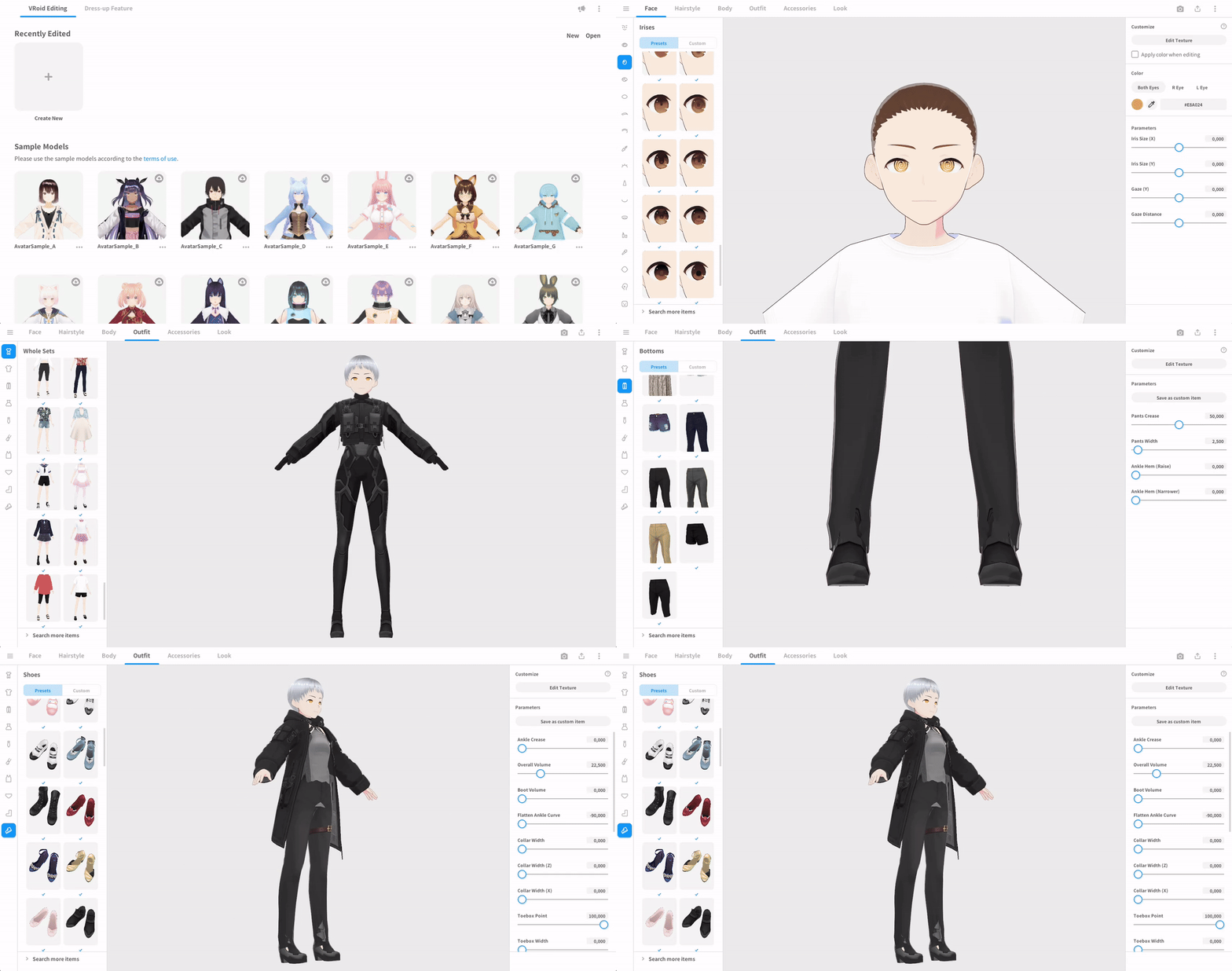
vroid-studio-mcp is an adapter between VRoid Studio 2.14.0 and AI agents. It lets an MCP client
(Claude Desktop, OpenCode, …) create and edit characters in the real editor: pick presets, move
sliders, change colors, frame the camera, inspect the result, and save — all under the agent's
control, while you keep working in VRoid Studio as usual.
Features
- Character creation and editing — create or open a character, let the agent build it, and save
it (.vroid). - Full editor control — work through the editor as a person would: sections (
Face,Hairstyle,Body,Outfit), categories, presets, and individual sliders/colors. - Live visual feedback — the agent receives rendered previews of the model and preset
thumbnails, so it decides by looking instead of guessing. - High-quality preview render — configurable MSAA and supersampling (SSAA) plus anisotropic
filtering keep the preview clean and crisp for the agent to judge. - Readable preset names — VRoid ships no human-friendly names; the plugin supplies them, so
presets are told apart by meaning rather than an internal id. - Corrected English labels — the editor's English translation gives different sliders the same
name; the plugin fixes these in the interface.
How it works
- The plugin attaches to VRoid Studio's own internal API and calls it directly. It does not
simulate the mouse or keyboard and does not read the screen, so it is precise and reliable. - Because it never touches the GUI, it keeps working while the window is in the background or
minimized — start a long edit, switch to another app, and the agent keeps going. - Wine is supported out of the box. If you run VRoid Studio through Wine on Linux, paths are
translated in both directions automatically, so agents and scripts on your computer can just use
normal Linux paths for open/save — there is nothing to configure.
Requirements
- VRoid Studio 2.14.0 (Windows, or run through Wine) — official website.
- BepInEx 6 for Unity IL2CPP — download
BepInEx-Unity.IL2CPP-win-x64-6.0.0-be.788.
BepInEx bundles everything else the plugin needs.
Installation
- Install the BepInEx build from Requirements into your VRoid Studio folder, then launch the app
once so BepInEx finishes setting itself up. - Copy the plugin file into BepInEx's plugin folder, so you end up with:
<VRoidStudio>/BepInEx/plugins/VroidStudioMcp.dll - Copy the two data folders into the VRoid Studio folder (the one containing
VRoidStudio.exe):<VRoidStudio>/i18n/ # corrected English labels <VRoidStudio>/labels/ # readable preset names - Optional: copy the included BepInEx config to keep log files off:
<VRoidStudio>/BepInEx/config/BepInEx.cfg - Start VRoid Studio. The plugin is now serving an MCP endpoint at
http://127.0.0.1:17891/mcp.
What's in the release
The archive ships only this plugin and its data — never VRoid Studio itself and never BepInEx
(both are things you install separately):
BepInEx/plugins/VroidStudioMcp.dll   the plugin
BepInEx/config/BepInEx.cfg      BepInEx config with logging turned off
i18n/                           corrected English labels
labels/                         readable preset names
README.md  README.ru.md  LICENSE
Getting started
Point your MCP client at the local endpoint. For example:
{ "mcpServers": { "vroid-studio-mcp": { "url": "http://127.0.0.1:17891/mcp", "type": "http" } } }
Then just ask the agent for what you want, for instance: "Create a female character, give her a
short bob and green eyes, then save it to my Documents." The agent inspects the current sections,
presets and parameters, applies changes, and checks the result on the rendered preview.
Configuration
Settings live in <VRoidStudio>/BepInEx/config/com.kokokoshka.vroidstudiomcp.servers.json. The defaults
are sensible; the ones you might care about:
| Setting | Default | What it does |
|---|---|---|
enabled |
true |
turn the control server on/off |
msaa_samples |
4 |
smooths the preview (applied on restart) |
render_scale |
2 |
renders the preview at higher resolution for a crisper image |
aniso_filtering |
true |
sharper textures at an angle |
If the preview feels slow, set render_scale to 1.
The address (and these toggles) can also be edited inside VRoid Studio: open Settings from the
account icon and look for the Programmatic Control (MCP) section at the top.
Documentation for developers
- docs/internal-api.md — the reverse-engineered internal API of VRoid Studio.
- docs/external-api.md — the control surface exposed to clients (MCP).
- docs/architecture.md — how the plugin is built and how to extend it.
- docs/quirks.md — engine behaviours that are easy to get wrong.
- docs/macos.md — macOS status.
- AGENTS.md — build/test workflow and conventions.
docs/artist-agent-prompt.md is an example system prompt for an agent
that acts as a character artist.
macOS
macOS is still under research and not part of this release. On Apple Silicon it is achievable
(the plugin itself is platform-independent), but it needs BepInEx/Il2CppInterop builds that are not
yet part of BepInEx upstream. See docs/macos.md.
AI disclosure
Most of the reverse engineering and the initial implementation were produced with AI coding agents:
DeepSeek V4.1 Flash running in OpenCode. Every AI-generated result was manually reviewed and
verified against the running app (deterministic in-plugin tests and runtime checks); nothing was
merged without validation.
Legal
This is an interoperability and automation project. VRoid Studio, BepInEx and other third-party
components belong to their owners and are not included. Use at your own risk.
License
MIT © Ilya Chelyadin and vroid-studio-mcp contributors.
Yorumlar (0)
Yorum birakmak icin giris yap.
Yorum birakSonuc bulunamadi