modus
Health Uyari
- License — License: Apache-2.0
- Description — Repository has a description
- Active repo — Last push 0 days ago
- Low visibility — Only 6 GitHub stars
Code Uyari
- fs module — File system access in apps/desktop/scripts/build-logo-sprite.cjs
Permissions Gecti
- Permissions — No dangerous permissions requested
Bu listing icin henuz AI raporu yok.
Open source coding agent workspace, an agent-first desktop app that runs locally. alternative to Cursor and Codex.

Modus
The open-source, local-first desktop workspace for AI coding agents.
Plan a feature, let an agent build it, watch every command and diff, browse pages, run real terminals, and keep the whole loop on your machine.





English | 简体中文
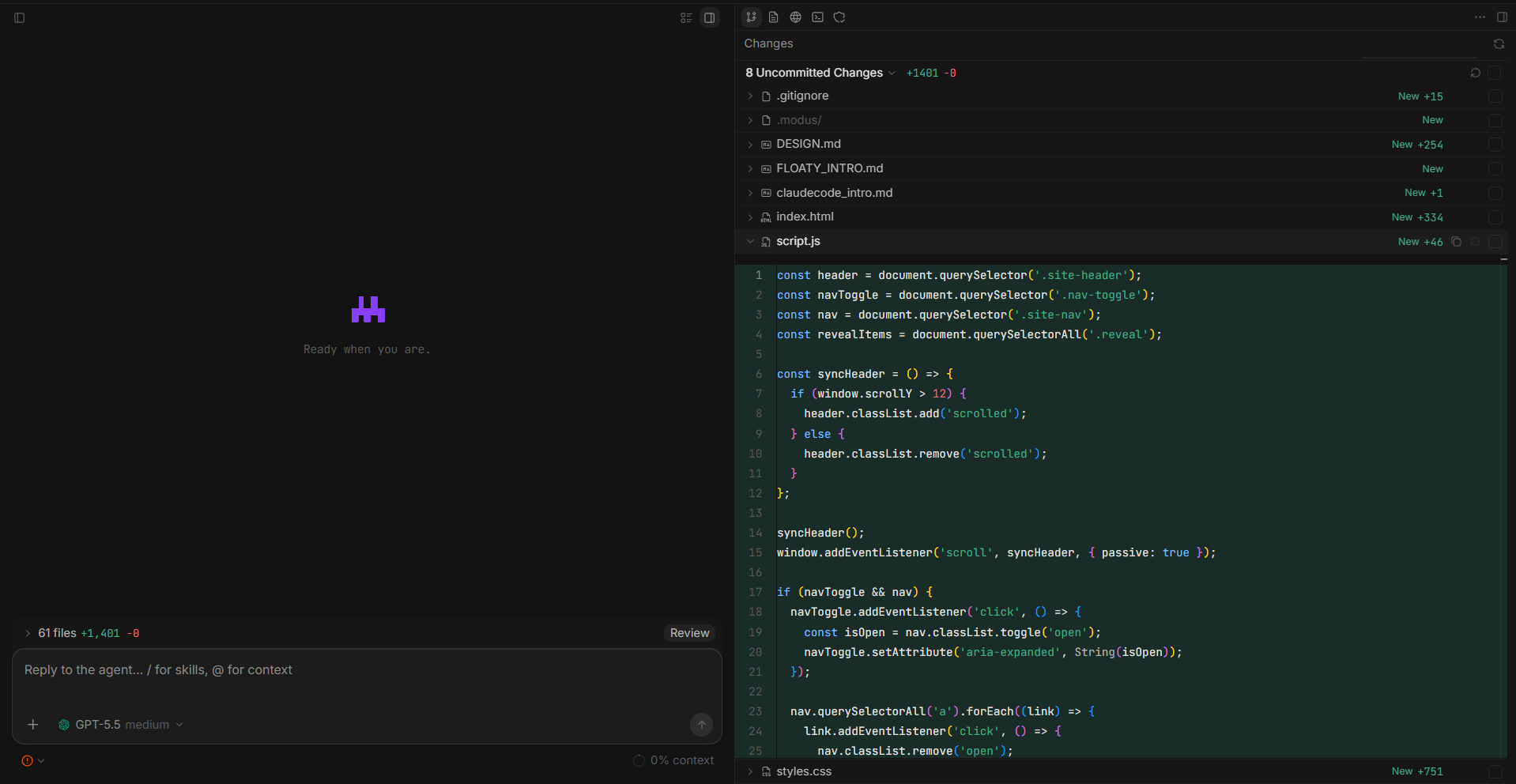
Modus is a desktop app that makes agentic coding visible and local. You open a real
project folder, plan the work, and let an agent execute against your current checkout —
while chat, tool calls, Git changes, terminals, the browser, and permissions all live in
one window. Bring your own model stack (any PI-compatible provider, plus MCP servers and
local skills). Your code and history stay on your machine.
Run from source today — packaged, signed installers for macOS / Windows / Linux are
on the roadmap. The terminal sidecar is already cross-platform (portable-pty); the
remaining work is the build/sign/release matrix.
Quick Start
# Requirements: Node >= 22.19.0, npm, Rust + Cargo, Git
git clone https://github.com/brandlll-lee/modus.git
cd modus
npm install
npm run dev
Then:
- Open a workspace folder (your real project + Git branch).
- Connect a model provider in Settings (any PI-compatible provider, or a custom one).
- Plan, then build — toggle Plan Mode to get a reviewable
plan.md, approve it, and
let the agent execute. Or just start chatting. - Inspect everything — review diffs, run terminals, open pages, and approve risky
actions, all in the right inspector.
Features
| Feature | What it does |
|---|---|
| Plan Mode | A read-only planning loop: the agent researches and asks clarifying questions, then writes a single reviewable plan.md instead of editing code. Approve it from the Review Plan card to start the build. |
| Interactive Questions | The ask_user tool lets the agent pause and ask structured questions (choice + free-text) so plans and turns stay aligned with your intent. |
| Agent Timeline | Streamed assistant output, tool cards, inline diffs, terminal actions, todos, and checkpoints — with edit-and-resend and rollback on any message. |
| Per-turn execution | Model, thinking level, and plan/build mode are bound to each turn, so switching mid-session (or rolling back) always runs with the settings you picked. |
| Source Control | Cursor-style Changes panel: scope switcher (Uncommitted / Unstaged / Staged / All commits), list ↔ tree layout, tri-state staging, per-file and whole-file diffs, commit history, and commit / push. |
| Files | An inspector file explorer with a resizable tree and smoothly collapsible folders, backed by a sandboxed read service. |
| In-app Browser | Real pages inside the inspector with tabs, navigation, DevTools, screenshots, and per-workspace storage isolation. The panel auto-opens when the agent starts browsing, and agents drive it with Cursor-compatible browser tools. |
| Terminal | Real PTY sessions through a Rust sidecar (modus-pty-host, portable-pty) rendered with xterm.js. Agents run managed, visible terminals via terminal tools. |
Context (@) |
Attach files, folders, Git diffs, terminal output, images, and indexed Markdown docs straight into the conversation. |
| Models & Providers | Configure built-in and custom PI-compatible providers, model parameters (context/output limits, temperature, reasoning), all stored locally. |
| MCP & Skills | Add MCP servers (stdio / HTTP-SSE) from a UI, enable/disable their tools, and surface local skills as slash commands. |
| Permissions | A typed preload bridge, IPC sender validation, dynamic risk classification of shell/Git/MCP actions, global approval modes, and local permission records. |
| Checkpoints | Pre-run snapshots and restore points let you roll the workspace back to any earlier message. |
What It Feels Like
- The left sidebar is your project shelf: pinned and recent projects (each with a
"..." actions menu), sessions, and live activity. - The center is the agent timeline: messages, streamed output, tool cards, diffs,
terminal actions, todos, checkpoints, and the Review Plan / Questions cards above the
composer. - The composer switches model and thinking level, sets the approval mode, toggles
Plan vs Build, and takes images,/skills, and@context. - The right inspector holds Changes, Files, Browser, Terminal, and Security, so you can
inspect diffs, pages, logs, and runtime state without leaving the conversation. - The settings window manages providers, custom models, model parameters, MCP servers,
skills, and security configuration.
Architecture
Renderer (React 19)        Sidebar · chat timeline · composer · inspector
        │                  (Changes / Files / Browser / Terminal / Security) · settings
        ▼
Preload bridge             A narrow, typed doorway: window.modus.*  (no Node in the renderer)
        │
        ▼
Electron main (Node)       Trusted services: workspace · git · browser (CDP) · terminal ·
        │                  files · docs · models · MCP · skills · permissions · agent runtime
        ├──────────────►   Rust PTY sidecar (modus-pty-host)   real terminals via portable-pty
        └──────────────►   SQLite (node:sqlite)                workspaces, sessions, events,
                                                               permissions, docs, checkpoints
Design principles: authoritative signals over heuristics, capability-driven rendering over
name-based dispatch, and a renderer that can only reach the system through validated IPC.
See desktop security notes.
Tech Stack
| Layer | Implementation |
|---|---|
| Desktop | Electron 42, electron-vite |
| UI | React 19, Base UI, Tailwind CSS v4, Motion, Tabler Icons |
| Editors | Monaco (diff + code), xterm.js (terminal) |
| Markdown | Streamdown (+ CJK, code, math, Mermaid) |
| Agent runtime | @earendil-works/pi-coding-agent (PI SDK) |
| Terminal sidecar | Rust + portable-pty (crates/pty-host) |
| Local data | node:sqlite |
| Validation / quality | Zod, Typebox · TypeScript, Biome, Vitest |
| Packaging | electron-builder |
Project Layout
modus/
├─ apps/
│  └─ desktop/            # Electron app (main · preload · renderer)
├─ crates/
│  └─ pty-host/           # Rust PTY sidecar used by the terminal
├─ docs/                  # Architecture and media
└─ packages/              # Reserved for shared packages
Development
npm run dev          # run the desktop app
npm run check        # biome + typecheck across the workspace
npm run format       # biome --write
npm run test         # vitest (unit + integration)

# desktop-only
npm --workspace @modus/desktop run typecheck
npm --workspace @modus/desktop run build      # builds the app + Rust sidecar
cargo check -p modus-pty-host
Tests use real execution (real git repos, real PTY) rather than mocks, and assert behavior
contracts instead of pinning sample data.
Roadmap
Near-term
- Cross-platform release matrix: build the Rust sidecar per target, bundle it into each
installer, and sign / notarize (macOS, Windows). - Sharper timeline rendering and stronger approval UX.
- Hunk-level staging and richer review flows.
Later
- Fusion mode: plan → isolated worktrees → parallel agents → judge → integrator.
- Rules, memories, and automations.
Contributing
There is no formal contribution guide yet. For now:
- Open an issue with a clear reproduction or proposal.
- Keep changes small, scoped, and easy to review (Conventional Commits).
- Run
npm run checkandnpm run testbefore sending a PR. - Favor systematic, root-cause solutions over patches: authoritative signals over guessing,
data/config over name-lists and magic numbers, and no dead or faked UI.
License
Licensed under the Apache License 2.0.
Yorumlar (0)
Yorum birakmak icin giris yap.
Yorum birakSonuc bulunamadi